Templates cannot bend
A template forces your message into fixed blocks. The moment your angle is unusual, you are fighting merge tags instead of saying what you mean.
AI Instructions
Write a short brief for each campaign, the way you would brief a new rep. Who it is for, what you offer, how it should sound and what it must never say. FirstSales writes every first email and follow-up with that brief.
$1 for 3 days · Cancel anytime · No contract
Plain-English fields, no prompt tricks
Audience, offer, tone and rules per campaign
Do and Don't rules on every draft
Change the brief whenever you learn something
You know your buyer, your offer and the lines that work. Most tools give you no plain way to say so, so you fix the output by hand.
A template forces your message into fixed blocks. The moment your angle is unusual, you are fighting merge tags instead of saying what you mean.
A raw chat tool turns you into a part-time prompt writer. You tune and re-run until it sounds right, then do it all again for the next list.
You tell a chat window not to mention price, and three emails later it does. A rule you have to repeat every time is not a rule.
No prompt syntax and no template to rebuild. One brief per campaign.
Guided auto-fill asks who the email is for, how it should sound, what to avoid and what to ask for.
Check the strategy, tone and Do and Don't fields it filled in, and add your own lines.
Every first email and follow-up in the campaign is written with your brief. Change it when you learn more.
The writer reads your brief literally. Here are six common instructions, how most people first write them, and a clearer version that leaves less to guess.
Vague
“Be professional.”
Clear
“Write like a peer, not a vendor. Short sentences. No exclamation marks.”
Professional means something different to everyone. Describe what it looks like on the page.
Vague
“Don't be pushy.”
Clear
“Never ask for a call in the first email. End it with one yes-or-no question.”
A rule the writer can check is a rule it can keep. Name the thing to avoid and what to do instead.
Vague
“Mention our product.”
Clear
“Describe the product in one sentence: a shared booking calendar for clinics with two or more sites.”
Give the exact line you want, so every email describes your product the same way.
Vague
“Target decision makers.”
Clear
“Write for operations leads at clinics with two or more sites. Skip hospitals.”
A clear audience and a clear exclusion change the opener, the reason and the example.
Vague
“Keep it short.”
Clear
“Keep the first email under 90 words. Follow-ups under 60.”
A number is easier to follow than an adjective. Set it once in the maximum email length.
Vague
“Don't overpromise.”
Clear
“Only promise a 20-minute walkthrough. Never quote savings or results.”
Say what you can safely promise. The bounded deliverable field exists for exactly this line.
AI Instructions is part of every campaign, on every plan.
Each field asks a plain question. Write your answer like a message to a colleague and the writer works from it.
Your clinic campaign and your agency campaign can sound nothing alike and chase different buyers at the same time.
Do and Don't lines go into every first email and follow-up the campaign writes, not only the first one.
Target audience, problems, triggers and exclusions tell the writer who it is writing for and why it matters to them.
Add sample subject lines and writing samples. The writer learns the pattern and the voice from real writing.
Turn on approval and read each draft before it goes. Approve, edit or reject, and tighten the brief as you go.
All of them live on the AI Instructions tab of the campaign builder.
Not sure where to start? Guided auto-fill asks four short questions: who the email is for, what voice it should use, what it should avoid and what the recipient should do next. Your answers fill the fields below, and you can replace them any time.
The campaign strategy fields hold the core of the brief: the target audience, the problems you solve, the triggers that make an email timely, who to exclude, the offer and the one action you want. The writer uses them to choose the opener, the reason and the ask.
Add the lines that protect your brand and your deal, one rule per line. Do: name their company, end with one question. Don't: mention price in email one, claim integrations you do not have. Every draft in the campaign is written with these rules.
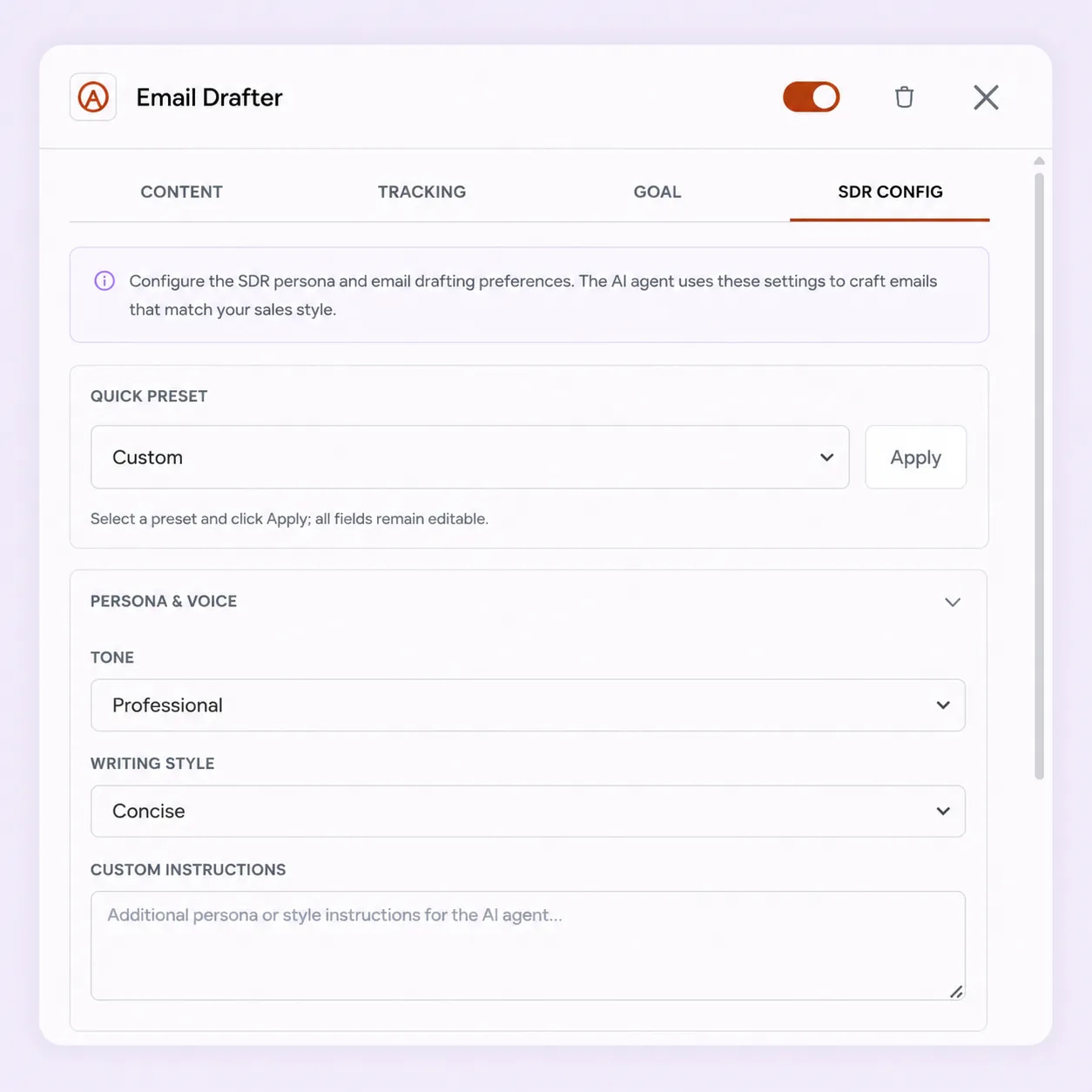
Add tone tags, sample subject lines and a maximum email length on the AI Instructions tab. In the Email Drafter, the SDR Config tab adds a quick preset, such as Consultative SDR or Friendly Networker, plus tone, writing style, follow-up strategy and CTA style. Every preset stays editable.
The AI Instructions tab groups your brief into a few short sections. You do not need to fill every field. Start with the strategy and the rules, then add the rest as you learn.
Who this campaign is for and what you want from them.
How the emails should sound.
The rules every draft is written with.
Real writing the writer can copy the pattern of.
A good brief is short, specific and honest. These are the habits that make the biggest difference, in plain words.
Imagine a smart new hire who has never seen your product. What would you tell them before their first email? Who to write to, what problem to name, what to offer, how to sound and what never to say. That is the brief. Leave out anything you would not say out loud to a person.
"Operations leads at clinics with two or more sites" is far more useful than "decision makers". A clear audience changes the opener, the reason and the example the writer picks. If one line cannot hold your audience, you probably have two campaigns, not one.
Buyers reply to emails about their problems, not about your features. Use the Problems field to list the two or three problems your offer solves, in the words a buyer would use. The writer leads with those, and the product comes after as the answer.
"Be friendly" and "keep it short" mean different things to everyone. Write what they look like: short sentences, no exclamation marks, under 90 words. A rule the writer can check is a rule it can keep, and one you can check when you read the drafts.
The quickest way to lose trust is a promise you cannot keep. Use the bounded deliverable field for the one thing you can always deliver, such as a 20-minute walkthrough. Add a Don't line for anything you must never claim, such as savings figures or results.
The desired action should be one easy step, like replying yes or no. A booking link in the first email asks for too much too soon, so save it for a follow-up to people who show interest. The CTA policy field tells the writer how to adjust the ask to the reader.
Two or three subject lines that worked for you teach more than a paragraph of description. Writing samples go further: they are analysed into a writing profile, so drafts pick up your rhythm and word choice. Use your own writing, not an example you found online, so the emails sound like you.
Turn on approval for a new campaign and read the first drafts yourself. When something is off, fix the brief, not only the draft: add a Don't line, sharpen the audience or shorten the length cap. Each fix improves every email that follows, so a few minutes here saves hours later.
Run through these once. They take a few minutes and catch most problems early.
“I've been using FirstSales.io for several months now, and I can confidently say it has revolutionized how I approach lead generation and customer acquisition.”
 Paweł StelmachSmall business owner · Trustpilot
Real words from real users. No paid reviews.
“If you are looking to fix your sales pipeline, you should definitely try [it]. My open rate has increased drastically. The UI and UX are easy to understand, even for a beginner like me.”

Pooja Dhole
@ThisIsPoojaD
“One of the biggest pains in cold email is making sure that you have your DNS setup correctly. Firstsales has created a system to make sure you have done this correctly.”
Mike O
Trustpilot review
“One of the best email outreach tools I have ever seen in my 9 years of business experience. It has solved the problem of email outreach for my cold emails.”

Santhosh K.
Founder and CEO, small business
Same goal, cold emails that sound like you and keep your rules. Two very different ways to get there.
Rigid blocks, or a chat window that forgets.
A plain brief, used on every draft.
Many tools give you one prompt box or a fixed template. FirstSales gives every campaign a structured brief in plain English.
| What you get | Typical tool | FirstSales |
|---|---|---|
| How you steer the writer | Varies | Plain-English fields |
| Prompt writing needed | Varies | No |
| Audience and exclusions | Varies | Fields of their own |
| Do and Don't rules | Varies | Used on every draft |
| Brief per campaign | Varies | Yes |
| Guided start | Varies | Four auto-fill questions |
| Learn from your writing | Varies | Writing samples and subject lines |
| Review before sending | Varies | Approve, edit or reject |
| Price | Varies | $29/mo, included |
| Start your $1 trial | ||
Can’t find yours? Write to us.
AI Instructions is the plain-English brief you write for each campaign, on its own tab in the campaign builder. It covers who the campaign is for, what you offer, how the emails should sound and the rules they must keep. The writer uses it for every first email and follow-up.
No. Each field asks a plain question, and guided auto-fill can fill the brief from four short answers. Write the way you would message a colleague.
The target audience, problems, triggers, exclusions, offer and desired action; the writing style, tone tags, languages and maximum email length; Do and Don't rules; the CTA policy and what you can safely promise; and sample subject lines and writing samples.
Yes. Each campaign has its own brief, so two campaigns can target different buyers and sound completely different at the same time.
Yes. Edit the brief and save it. Drafts written after that use the new version, with no campaign to rebuild.
Turn on approval and every draft waits for you to approve, edit or reject it. If a draft misses a rule, make the rule more specific in the brief.
A template fixes the words. AI Instructions describes what you want, and the writer writes a new email for each contact with it. If you want your exact words, Manual mode with Email Templates is still there.
No. AI Instructions is part of every campaign on every plan, from $29/mo with unlimited mailboxes. Try it for $1 for 3 days. No contract: cancel any time from your dashboard.
Connect unlimited mailboxes and let AI agents find leads, write each email and follow up. Or send your own templates in manual mode. From $29/mo.
$1 for 3 days · Cancel anytime · No contract