#Email blacklist removal: the complete 2026 playbook
Copy page
TL;DR: A blacklisting is not a life sentence. Most first-time Spamhaus listings clear in 24 to 48 hours once you fix the root cause and file a clean removal request, while repeat offenses can take one to two weeks. The real work is diagnosing why you landed on the list, since delisting without fixing the cause just gets you relisted within days.
#What you will learn
- What an email blacklist actually checks
- The five ways senders end up blocklisted
- Signs you are blocked before you see a bounce
- Step by step removal for the major blocklists
- Blacklist comparison table
- The delisting workflow, visualized
- Preventing a repeat listing
- When to abandon the domain instead
- FAQs
Cold email senders lose entire weeks chasing a single blocked domain, and most of that time is wasted on the wrong list.
Spamhaus, Barracuda, and SORBS operate independently, each with different triggers, different review processes, and different consequences for getting it wrong twice.
Get the sequence backwards, filing a delisting request before you fix the underlying spam trap hit or the broken SPF record, and you burn your one clean shot with that blocklist's abuse team.
A single day of blocked sending on a primary domain can cost a mid-size outbound team several hundred meetings-worth of pipeline touches, since every queued sequence either bounces or sits stuck until the block clears.
That cost compounds. Teams that skip the root-cause step and just resubmit removal forms tend to see the same domain relisted within two to three weeks, according to patterns deliverability vendors report across repeat-offender accounts.
#What an email blacklist actually checks
A blacklist, more accurately called a DNSBL (DNS-based blocklist), is a database that maps IP addresses or domains to a reputation score.
Receiving mail servers query these lists in real time, before your message even reaches the inbox provider's own spam filter.
Spamhaus alone processes queries from roughly two-thirds of the world's mail servers, according to its own network data, which makes it the single most consequential list to stay off.
There is no single global blacklist that every inbox provider checks the same way. Gmail, for instance, does not rely on any single public DNSBL at all; it builds its own reputation model from sender history, engagement, and authentication signals, and treats third-party blocklist data as one input among many rather than an automatic block trigger.
Barracuda's Reputation Block List and SORBS work the same way but pull from different signal sources: spam trap hits, complaint feedback loops, and open relay scans.
Getting listed on any one of them does not guarantee a bounce everywhere. It does guarantee that a meaningful share of your inbox placement rate disappears overnight.
The mechanism matters because it changes your fix. A Spamhaus SBL listing means a spam trap caught a live message from your IP. A Barracuda listing usually means a spike in complaint rate crossed their internal threshold.
#What a blacklisting actually costs
A blocklist entry rarely blocks 100% of your mail. It usually degrades placement, pushing a rising share of messages to spam or the receiving server's silent drop queue instead of a hard bounce you can see.
That makes it worse in practice, not better. You keep sending, the email deliverability numbers look merely bad instead of broken, and the team burns another week of list data against a domain that is quietly losing trust with every send.
Run the math before you decide how urgent this is. If a rep sends 150 emails a day at a normal 2% reply rate, a week of degraded placement at half that rate is roughly 10 to 15 lost replies, which at typical B2B conversion rates is real pipeline.
#The five ways senders end up blocklisted
Almost every listing traces back to one of five causes, and knowing which one hit you determines the fix.
Spam trap hits. A pristine or recycled trap address absorbed a message from your list. This usually means your list hygiene failed, not that your copy was spammy.
Complaint rate spikes. Recipients hit "report spam" faster than your engagement earns trust. Google and Yahoo now enforce a hard 0.3% complaint ceiling for bulk senders, and crossing it repeatedly gets you flagged well before a formal blacklist listing shows up.
Volume spikes without warmup. A cold IP or domain suddenly sending thousands of messages a day looks identical to a compromised account. Email warm-up statistics consistently show that ramping too fast is the single most common self-inflicted cause of a first listing.
Open relay or compromised infrastructure. Rare for SaaS senders, common for anyone running their own SMTP server without proper authentication.
Shared IP contamination. If you send through a shared pool and another tenant on that pool gets caught, you inherit their reputation hit. This is the argument for dedicated sending infrastructure once volume justifies it.
Purchased or scraped list data. Lists bought from a data broker or scraped from an old event sign-up sheet almost always contain seeded trap addresses. Sellers rarely disclose this, and the sender absorbs the entire reputation cost.
A team that imports 5,000 purchased contacts and sends without verification is, statistically, sending to at least a handful of traps buried in that file. One trap hit is enough to trigger an SBL listing on a cold domain with no sending history to offset it.
Each cause needs a different fix before you touch a delisting form. Filing a removal request without addressing the trap hit, the complaint spike, or the ramp speed just resets the clock on your next listing.
#Signs you are blocked before you see a bounce
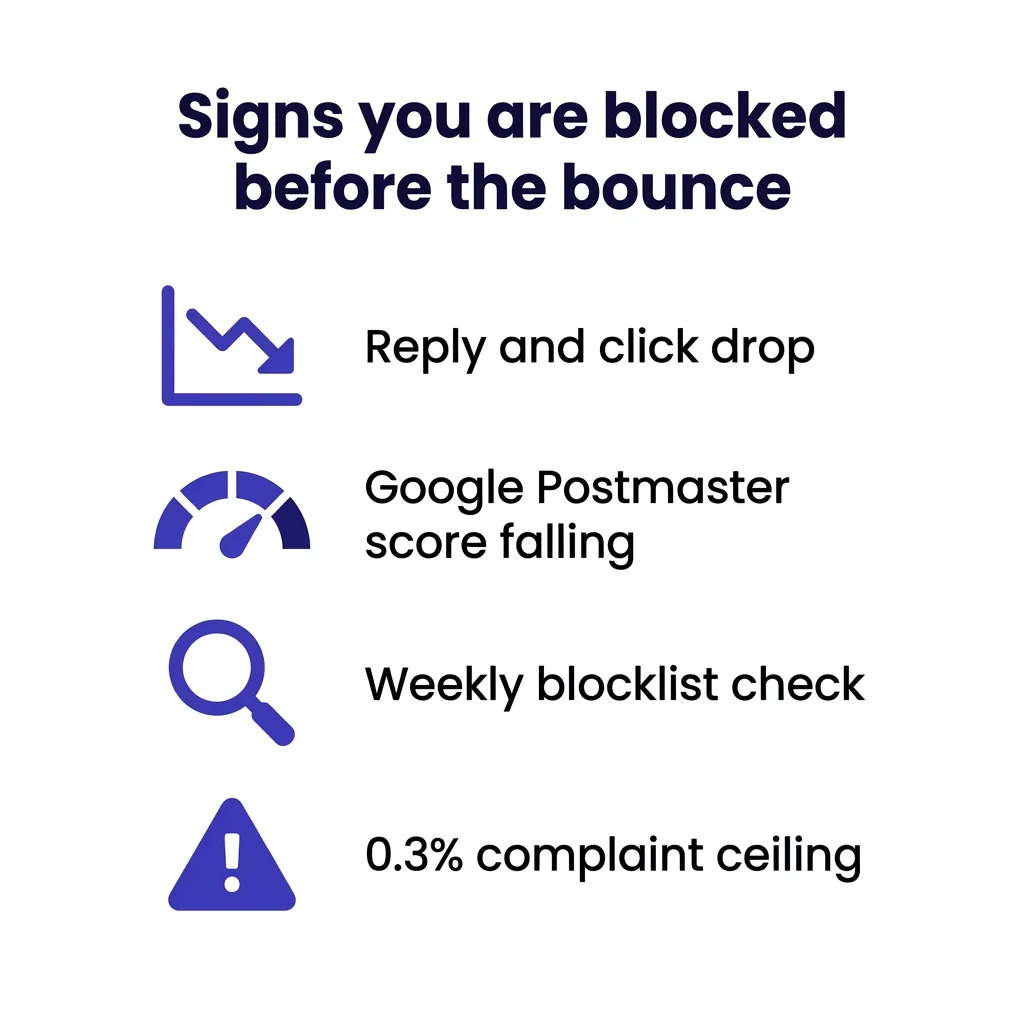 Signs you are blocked before you see a bounce
Bounce messages are the last, loudest signal. By the time you see a 5.7.1 rejection referencing Spamhaus, you have likely been listed for hours or days.
Watch for quieter signals first. A sudden drop in open-adjacent engagement (clicks, replies, even unsubscribes) across multiple campaigns at once, not just one sequence.
Check Google Postmaster Tools weekly, not monthly. Domain and IP reputation there moves before most third-party blocklists catch up.
Run your sending IP and domain through Spamhaus, Barracuda, SORBS, and MXToolbox at least once a week if you send any meaningful cold email volume. A five-minute check beats a three-day outage.
#Reading the bounce message correctly
Not every bounce is a blacklist. The SMTP response code and text tell you which problem you actually have.
A 5.7.1 code referencing Spamhaus, Barracuda, or a named reputation service confirms a blocklist hit. Copy the exact reference URL in the bounce text; both Spamhaus and Barracuda include a direct link to the specific listing in their rejection message.
A 5.1.1 code usually means an invalid or nonexistent address, unrelated to reputation. A 4.7.0 or 4.2.1 (soft, temporary failure) often means rate limiting rather than an outright block, which Gmail sending limit and Outlook 5000 sender rules enforce separately from any third-party blocklist.
Mixing these up wastes time. Filing a Spamhaus delisting request for what is actually a rate-limit issue accomplishes nothing, since Spamhaus never listed you in the first place.
#Step by step removal for the major blocklists
#Spamhaus SBL and CSS
Spamhaus runs the Spamhaus Block List (SBL) for IPs and the Domain Block List for domains, plus the newer CSS (Combined Spam Sources) list for behavioral triggers.
- Look up your IP or domain at check.spamhaus.org to confirm the listing and read the specific reason code.
- Fix the underlying cause first. Spamhaus explicitly states it will not delist an IP where the problem is still active.
- Submit the removal request through the official Spamhaus portal only. Never pay a third party claiming to expedite delisting; Spamhaus removal is always free.
- Wait. First-time SBL listings for legitimate senders typically clear in 24 to 48 hours once the request is submitted correctly, according to Spamhaus's own delisting guidance and third-party deliverability trackers. Repeat offenses can take one to two weeks and may require a written explanation of remediation steps.
#Barracuda Reputation Block List
Barracuda's process runs through its own self-service portal.
- Check status at barracudacentral.org.
- Submit removal directly on the site. No account or payment required.
- Barracuda typically processes legitimate requests within 24 to 48 hours, but repeated listings from the same IP trigger longer manual review.
#SORBS
SORBS is slower and less automated than the other two.
- Search the listing at sorbs.net.
- Follow the removal link specific to the listing category (dynamic IP, spam source, open relay).
- Expect longer turnaround, often several days, since SORBS relies more heavily on manual review than Spamhaus or Barracuda.
#Microsoft and Outlook block
Microsoft does not run a traditional public blocklist you delist from. Instead, sustained bounces from Outlook and Hotmail addresses usually mean you have tripped their internal filtering under the Outlook 5000 sender rules or the broader Microsoft cold email rules.
Fix comes through the Smart Network Data Services (SNDS) portal and the Junk Email Reporting Program, not a delisting form.
#Google block
Google similarly avoids a public delisting queue. A block usually surfaces as Gmail permanent rejection errors tied to the Google bulk sender rules.
Recovery means fixing authentication, cutting volume, and rebuilding sender history. There is no form to file; reputation rebuilds on its own timeline, typically two to four weeks of clean sending.
#Blacklist comparison table
| Blocklist | Auto-delist available | Typical wait (first offense) | Free to remove | Manual review required |
|---|---|---|---|---|
| Spamhaus SBL | ✓ | 24 to 48 hours | ✓ | Only for repeat listings |
| Barracuda RBL | ✓ | 24 to 48 hours | ✓ | Rare |
| SORBS | ✗ | Several days | ✓ | Usually |
| Microsoft (SNDS-based) | ✗ | 2 to 4 weeks | ✓ | Always |
| Google (reputation-based) | ✗ | 2 to 4 weeks | ✓ | Always |
#The delisting workflow, visualized
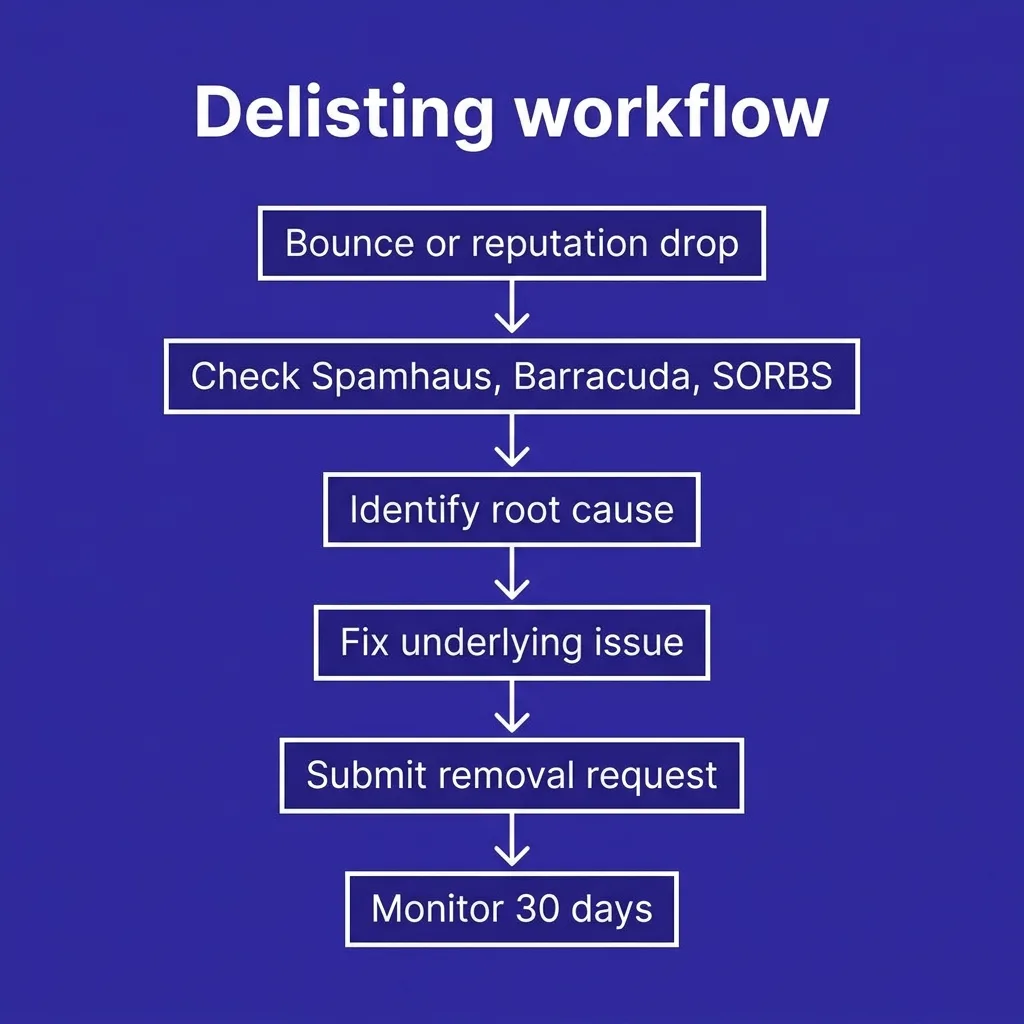 The delisting workflow, visualized
The 30-day monitoring window matters as much as the delisting itself. Inbox providers rebuild trust gradually after a listing clears, and a second bounce spike inside that window reads as a pattern, not an accident.
Most teams stop checking the moment the blocklist lookup shows clean, then get surprised by a soft placement problem two weeks later that traces back to the same root cause resurfacing at scale.
#Registering for feedback loops before you need them
A feedback loop (FBL) forwards spam complaints from the inbox provider back to you directly, before they accumulate into a formal blocklist trigger.
Yahoo, AOL, and several regional providers offer FBL registration for free. Microsoft folds this into its Junk Email Reporting Program through SNDS.
Set these up during initial domain setup, not after your first listing. A sender who can see complaint spikes in near real time can pause a bad sequence hours before it crosses a threshold that gets the domain listed.
#A short recovery walkthrough
Here is a hypothetical scenario that mirrors what most teams experience: imagine a five-person SDR team importing a 3,000-contact list scraped from an old conference attendee sheet, then sending 400 emails a day from a domain warmed for only five days.
By day three, bounce rate on that domain crosses 4%, well past the 2% ceiling. By day four, Spamhaus SBL lists the sending IP after catching a trap hit in the scraped data.
The fix in this scenario: stop sending immediately, run the remaining list through verification, cut daily volume to 50 for the next two weeks, and file the Spamhaus removal request only after the trap-hit source (the scraped list) is fully removed from the sending queue. Delisting clears in about 36 hours. The lesson is not the timeline, it is that the trap hit and the volume spike happened together, and skipping either fix would have caused a relisting within days.
#Preventing a repeat listing
Getting delisted once and doing nothing else guarantees a second listing.
Start with list hygiene. Every campaign should run through email verification before sending, not after a bounce spike already hit your reputation.
Watch your cold email bounce rate against the 2% ceiling that Google and Yahoo now enforce for bulk senders, and treat 1% as your internal alarm, not the actual limit.
Keep authentication current. A broken or expired SPF, DKIM, and DMARC setup is one of the fastest routes back onto a blocklist, since receiving servers treat unauthenticated bulk mail as inherently suspicious.
Ramp new sending infrastructure the way how to warm up an email describes: days, not hours, and volume increases of roughly 20% per day rather than jumping straight to full send volume.
Consider subdomain versus separate domain isolation so a single bad list or a single compromised sequence cannot take down your primary sending domain.
#Compliance overlap you cannot ignore
Complaint rate and legal compliance are linked more tightly than most senders realize.
A campaign that violates cold email compliance rules, missing a working unsubscribe link or misrepresenting the sender, generates far more spam complaints than a compliant one. Higher complaints mean faster blocklist listings.
Review is cold email legal requirements for your target regions before scaling volume, and implement one-click unsubscribe properly, since Google and Yahoo now require it structurally, not just as a footer link, for any sender above their bulk threshold.
#Monitoring tools worth setting up
Free tools cover most of what a cold email team needs. MXToolbox checks dozens of blocklists in one query and can be scheduled to alert on changes.
Google Postmaster Tools and Microsoft SNDS are free and directly reflect how the two largest inbox providers actually see your domain, which matters more day to day than any single third-party blocklist.
Paid deliverability monitoring platforms add automated alerting and historical trend graphs, worth the cost once you manage more than two or three sending domains at once, since manual weekly checks do not scale past that.
This is where most teams underinvest. FirstSales handles warmup pacing, bounce monitoring, and domain health checks automatically inside its sending layer, so a spike in bounces triggers a pause before it becomes a blacklist entry instead of after.
#When to abandon the domain instead of fighting the blacklist
Sometimes the math says walk away.
If a domain has been listed on Spamhaus SBL three or more times in six months, Spamhaus's own repeat-offender policy makes future delisting progressively harder and slower.
Calculate the cold email domain burn rate against the cost of a new domain, DNS setup, and a proper 4 to 6 week warmup cycle. A fresh domain, warmed correctly, often costs less in time than a third delisting fight on a domain that inbox providers already distrust.
Rotating in a new domain also protects your primary company domain from reputation damage, which matters more than any single campaign.
#Common mistakes that extend a listing
Three mistakes show up repeatedly across teams recovering from a blacklisting, and each one adds days to the timeline.
Resubmitting the same removal request multiple times without changing anything looks, to an abuse desk, like the sender does not understand why they were listed. Wait for a response before resubmitting.
Continuing to send from the flagged IP while the request is pending resets the review clock in most cases, since the abuse team is checking for continued bad behavior, not just historical behavior.
Paying a third-party "guaranteed delisting" service is the third mistake. These services submit the same free form you could submit yourself, and a handful have been flagged by Spamhaus directly for making false guarantees about turnaround time.
#Industry and regional blocklists worth knowing
Beyond the big three, a handful of narrower lists matter depending on your target market.
UCEPROTECT is aggressive and controversial, sometimes listing entire IP ranges rather than individual senders, which some receiving servers ignore for exactly that reason.
Regional lists like the ones maintained by specific ISPs in Germany or Japan rarely show up in general-purpose checkers, so if a specific market's reply rates drop sharply while everything else looks clean, check for a region-specific listing before assuming a copy or targeting problem.
#IP listings versus domain listings
Most blocklists can list either an IP address or a domain, and the two behave differently once you try to recover.
An IP listing is usually faster to clear because IPs are fungible. If delisting drags on past a week with no resolution in sight, moving to a fresh IP on the same domain sometimes restores delivery faster than continuing to fight the original listing.
A domain listing is harder to escape this way, since the domain itself carries the history regardless of which IP sends from it. This is the scenario where the subdomain isolation strategy pays off: a domain-level listing on a dedicated outbound subdomain does not touch your root domain's reputation or your transactional mail.
Know which type you are dealing with before choosing a recovery path. Check the exact listing type on the blocklist's own lookup page; Spamhaus, for example, clearly labels whether the entry is IP-based (SBL, XBL) or domain-based (DBL).
#Frequently asked questions
#How long does Spamhaus delisting take?
First-time SBL listings for a resolved issue typically clear in 24 to 48 hours after a correctly filed request. Repeat listings can take one to two weeks and require documented remediation.
#Is email blacklist removal free?
Yes, on every legitimate blocklist including Spamhaus, Barracuda, and SORBS. Any service charging a fee to expedite delisting is not affiliated with the actual blocklist operator.
#Can I check if I am blacklisted without a paid tool?
Yes. MXToolbox, check.spamhaus.org, and barracudacentral.org all offer free lookups against the major lists in seconds.
#What is the difference between Spamhaus SBL and CSS?
The SBL lists IPs and domains tied to confirmed spam sources, often from trap hits. CSS (Combined Spam Sources) lists behavioral patterns, like sudden volume spikes, that resemble spam even without a confirmed trap hit.
#Does one blacklist listing affect deliverability everywhere?
No. Each mail provider weighs blocklists differently. Being on SORBS has minimal impact on Gmail delivery, while a Spamhaus listing affects a much larger share of receiving servers globally, since Spamhaus data feeds into filtering decisions at a large portion of corporate and consumer mail gateways worldwide.
#Why did I get relisted right after delisting?
Because the underlying cause was not fixed before the removal request. A cleared listing with no change to sending behavior almost always returns within days.
#Can a shared IP get me blacklisted for someone else's mistake?
Yes. If you send through a shared IP pool and another sender on that pool triggers spam traps or complaint spikes, the reputation hit applies to the whole pool, not just the offending sender.
#How do spam traps actually work?
A spam trap is an email address with no real owner, seeded into old data or abandoned domains specifically to catch senders using unverified or purchased lists. Any message sent to one confirms poor list hygiene to the blocklist operator.
#Should I stop sending entirely while delisting?
Yes, from the flagged IP or domain. Continuing to send while listed extends the review and can push a first-time offense into repeat-offender territory.
#What triggers a Barracuda listing specifically?
Barracuda weighs complaint rate and spam trap hits heavily, along with volume anomalies. It tends to list faster than Spamhaus but also clears faster for first-time, low-severity issues.
#Does DMARC affect blacklist risk?
Indirectly. A domain without DMARC, or one stuck in monitor mode instead of quarantine or reject, makes it easier for spoofed mail to damage the domain's reputation, which raises blacklist risk over time.
#Can my whole company domain get blacklisted from one bad sequence?
Yes, if you send cold outreach from the same domain used for transactional or marketing mail. This is why isolating cold outbound onto a subdomain matters.
#How often should I monitor blacklist status?
Weekly at minimum for active cold email senders. Daily during any period of volume increase, new domain warmup, or after a list import.
#Do free delisting tools actually work?
The free official portals (Spamhaus, Barracuda, SORBS) work reliably. Third-party "delisting services" charging fees typically just submit the same free form on your behalf, sometimes incorrectly.
#What happens if Spamhaus rejects my removal request?
They will state the reason, usually that the underlying issue is still detectable. Fix that specific issue and resubmit rather than repeatedly filing identical requests.
#Can catch-all domains cause blacklisting faster?
Sending to catch-all addresses without additional verification raises soft-bounce and spam trap risk, since catch-all domains sometimes mask dead or trap addresses behind an accept-all configuration.
#How do I know if a bounce is blocklist-related or something else?
Check the bounce message text. A 5.7.1 or explicit reference to Spamhaus, Barracuda, or a specific reputation score points to a blocklist. Generic 5.1.1 errors usually mean an invalid address instead.
#Does warming up a new domain prevent all blacklisting?
It removes the single biggest cause (volume spikes on cold infrastructure) but does not protect against spam trap hits from bad list data, so pair warmup with verification.
#Who actually decides blocklist policy?
Each list is run independently: Spamhaus by the Spamhaus Project, Barracuda by Barracuda Networks, SORBS by its own volunteer-run team. None of them coordinate policy with each other or with inbox providers directly, though inbox providers do consume their data as one signal among many alongside their own internal reputation models.
#Can a good sending history protect me from a single mistake?
Partly. A domain with months of clean, engaged sending history tends to recover faster from an isolated incident than a brand-new domain with no track record, because inbox providers weigh historical trust alongside the current signal.
That protection has limits. Even an established domain will get listed if a spam trap hit is confirmed, since Spamhaus and Barracuda both react to the specific signal, not the sender's overall reputation.
Blacklist removal is mechanical once you know which list flagged you and why. The harder discipline is treating it as a symptom, not the disease: fix the list hygiene, the ramp speed, or the authentication gap that caused it, or expect to be back here within a month.
Teams running outbound at scale rarely have the bandwidth to check four separate blocklist dashboards every week on top of everything else on the calendar. That is exactly the gap platforms like FirstSales close, folding bounce monitoring, warmup pacing, and domain health checks into the same system that sends the campaigns, so the first sign of trouble triggers a pause instead of a week-long fire drill.
Get the fundamentals right once (clean data, gradual ramp, current authentication) and blacklists become a rare event instead of a recurring line item on your deliverability budget.
Save the delisting portal links from this guide somewhere your team can find them at 6am on a Monday, because that is usually when the first bounce report shows up.