
TL;DR: A catch-all domain accepts mail for any address, which means standard verification tools mark every guess as valid even when the specific mailbox does not exist. Hunter's testing found catch-all addresses bounce roughly 27 times more often than verified ones, and they typically make up 15-30% of a B2B prospect list. This piece gives you a risk framework for when to send, when to skip, and how to test safely.
#What a catch-all domain actually does
A catch-all, sometimes called an accept-all domain, is configured to accept incoming mail for any address at that domain, whether or not a real mailbox exists behind it.
Small businesses and older corporate domains set this up deliberately, often years ago, so no legitimate email ever bounces due to a typo in the recipient's address.
The setup is convenient for the domain owner and a serious problem for anyone verifying a prospect list against it.
Standard email verification works by pinging the receiving mail server and checking whether it accepts or rejects a given address, a method called SMTP verification.
Against a catch-all server, every ping gets accepted, since the server is configured to say yes to everything regardless of whether a real mailbox exists.
The verifier has no way to distinguish a real mailbox from a guessed one, so it marks the address "valid" with the same confidence it would give a normal, non-catch-all address.
#The bounce risk is not small
Hunter's own testing data found that catch-all addresses bounce roughly 27 times more often than addresses verified against a standard, non-catch-all mail server (email verification before sending).
That number matters because bounce rate is one of the few metrics mailbox providers actively use to score sender reputation, and it is measured server-side, immune to the tracking pixel problems that plague open and click data (cold email bounce rate).
A typical B2B prospecting list contains 15-30% catch-all addresses, according to industry verification data, which means ignoring this category entirely is not a small edge case decision, it is a decision that touches a meaningful share of most lists (Bulk Email Checker verification guide).
graph TD
    A[Prospect list, 1000 contacts] --> B{Verify each address}
    B -->|Standard domain, verified| C[700-850 contacts: safe to send]
    B -->|Catch-all domain, unverifiable| D[150-300 contacts: risk tier]
    D --> E{Choose a strategy}
    E -->|Skip entirely| F[Zero catch-all bounce risk]
    E -->|Send with monitoring| G[Track bounce rate per segment]
    G --> H{Segment bounce rate over 3%}
    H -->|Yes| I[Suppress catch-all segment]
    H -->|No| J[Continue sending cautiously]
#Why skipping catch-all addresses is the conservative default
The math is simple once you compare the downside to the upside.
A catch-all address that turns out to be real adds one more prospect to your outreach.
A catch-all address that turns out to be dead adds a hard bounce, and hard bounces compound: enough of them push your domain's bounce rate over the 2% threshold that mailbox providers treat as a deliverability red flag (cold email deliverability checklist).
Cross a bounce rate threshold and your entire sending domain's reputation degrades, which affects every email you send from it, not just the ones that bounced.
That asymmetry, small upside per address against a domain-wide downside, is why most deliverability specialists recommend skipping catch-all addresses on cold campaigns by default rather than treating them the same as verified contacts.
Losing 15-30% of a list's reach feels expensive in the moment, but it is cheaper than losing sending capacity on your whole domain for weeks while you repair reputation.
#When sending to catch-all addresses makes sense anyway
Skipping is the safe default, not a universal rule, and there are real situations where sending to catch-all addresses is worth the risk.
#Small, high-value target lists
If your total addressable market for a campaign is only 200-300 accounts, losing 15-30% of them to a blanket skip rule removes real revenue opportunity from an already narrow pool.
For small, high-value lists, a more targeted approach, like verifying the specific person's LinkedIn presence or finding an alternate verified contact at the same company, often beats a blanket skip.
#Domains where catch-all is common by design
Some industries, particularly smaller agencies, local service businesses, and older nonprofits, run catch-all configurations at much higher rates than the general B2B average.
If your ICP concentrates in one of those segments, skipping catch-all addresses could remove a majority of your addressable market rather than a minority, which changes the cost-benefit math significantly (cold outreach for local businesses).
#When you can isolate and monitor the segment
Sending to catch-all addresses becomes much safer when you route them through a separate sending domain or a dedicated inbox pool, so a bad bounce rate on that segment does not touch your main sending reputation.
This isolation lets you test the segment's real bounce rate against your 2-3% safety threshold without risking the domains carrying your verified, high-confidence sends.
#A practical decision framework
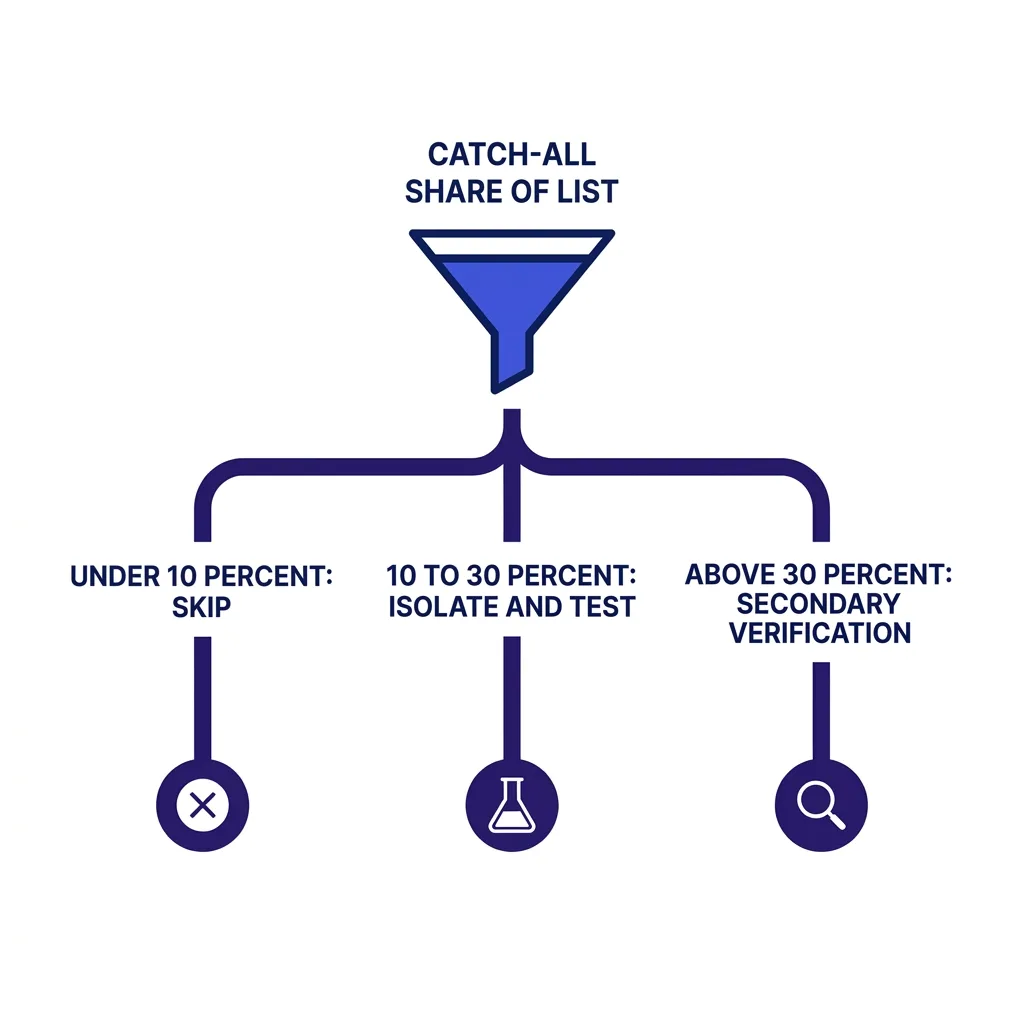 A practical decision framework
Start every list with standard SMTP verification and split contacts into three buckets: verified, invalid, and catch-all-unverifiable.
Drop invalid addresses immediately, since there is no scenario where sending to a confirmed-dead address makes sense.
For the catch-all bucket, apply this decision tree before deciding to send.
First, check what share of your total list the catch-all bucket represents.
Under 10%, skip them without much analysis, since the lost reach is small and not worth the added risk.
Between 10% and 30%, which is the typical range for B2B lists, isolate the catch-all segment onto a separate sending domain and test it in a small batch before scaling.
Above 30%, which usually signals a niche or SMB-heavy target market, invest in secondary verification methods, like pattern-matching against known company email formats or cross-referencing LinkedIn, before deciding whether to send at all.
Track bounce rate for the catch-all segment specifically, separate from your overall campaign bounce rate, and suppress the segment the moment it crosses 3% (spam complaint rate threshold).
#Secondary verification methods that reduce catch-all risk
SMTP verification cannot resolve catch-all uncertainty on its own, but a few supplementary techniques improve your confidence meaningfully.
#Pattern confidence scoring
If you already have several confirmed email addresses at a company, like firstname.lastname@company.com, you can score a guessed address's confidence based on how closely it matches the known pattern.
A guess that fits the company's established naming convention carries meaningfully lower bounce risk than a guess against an unknown pattern, even on a catch-all domain.
#Cross-referencing with enrichment data
Waterfall enrichment tools that pull from multiple data sources sometimes carry independent confirmation of an email address's validity, gathered from sources outside a single SMTP ping (waterfall enrichment for B2B data).
Cross-referencing a catch-all guess against a second independent source raises confidence even when neither source alone would clear a strict verification bar.
#Testing with a low-risk first touch
Some teams send a single, low-stakes first-touch email to unverified catch-all contacts, then use the response, or lack of a bounce, to build a verified sub-list for the rest of the sequence.
This approach works best when the first touch is short and generic enough that a bounce costs little, and the domain sending it is isolated from your main reputation pool.
#What happens if you ignore catch-all risk entirely
Sending a full, unfiltered list, including every catch-all guess, to your primary sending domain is the highest-risk path available, and it shows up in the data quickly.
A 20% catch-all share with a 27x bounce multiplier against a normal 1-2% baseline bounce rate can push your effective bounce rate well past the 2% threshold that triggers deliverability throttling.
Once a domain crosses that line, mailbox providers start routing a growing share of all your mail, including the mail to your verified, high-confidence contacts, into spam or junk folders.
Recovering from that state takes weeks of clean sending and, in serious cases, a full domain replacement, both of which cost far more in lost pipeline than the catch-all segment was ever worth (email blacklist removal).
#Comparing your options for catch-all handling
| Approach | Bounce risk | Reach lost | Best for |
|---|---|---|---|
| Skip all catch-all | ✓ Lowest | ✗ 15-30% of list | Large, replaceable lists |
| Send unfiltered to main domain | ✗ Highest | ✓ None | Never recommended |
| Isolate on secondary domain | ✓ Contained | ✓ None | Testing new segments |
| Pattern-match before sending | ✓ Reduced | ✓ Minimal | Lists with known naming conventions |
| Cross-reference with enrichment | ✓ Reduced | ✓ Minimal | Higher-budget campaigns |
| Low-risk first-touch test | ✓ Contained | ✓ Minimal | Small, high-value target lists |
#How FirstSales handles the catch-all decision
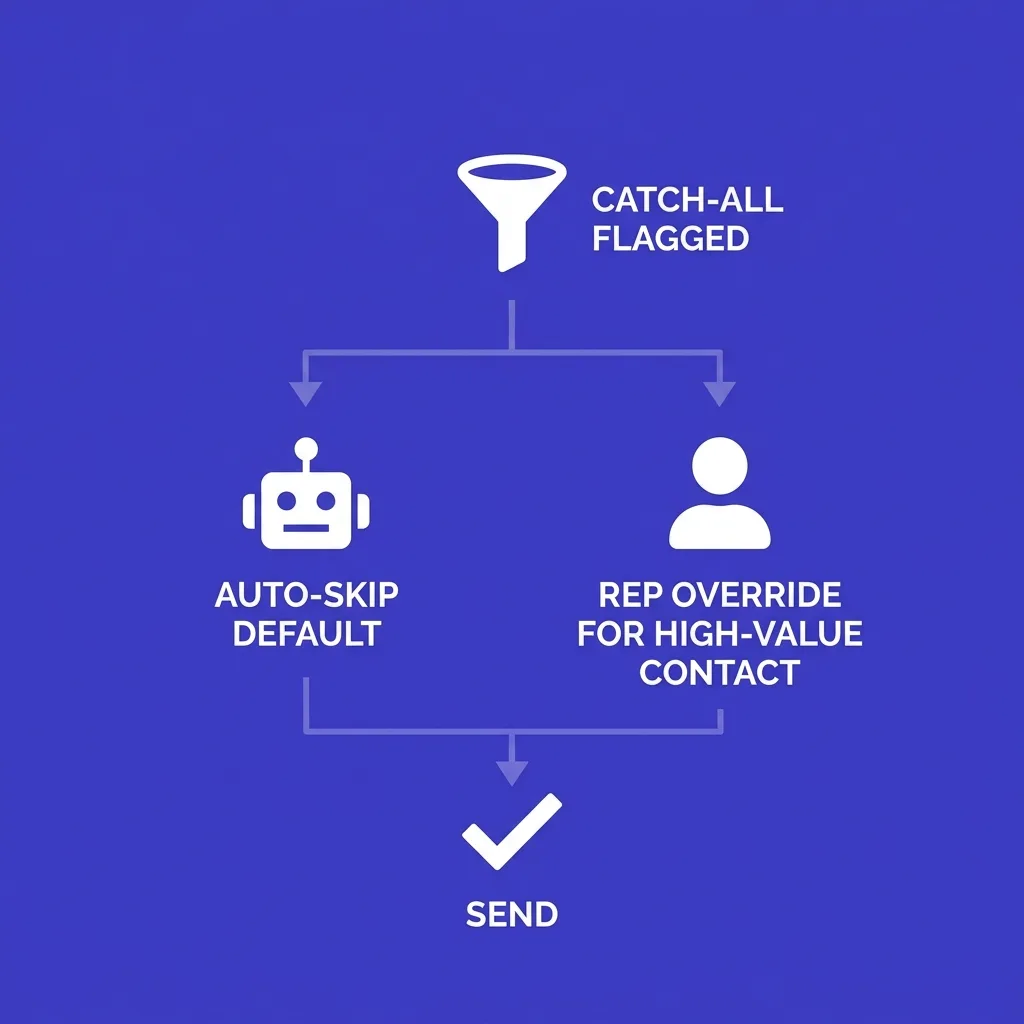 How FirstSales handles the catch-all decision
FirstSales applies standard verification to every list before a campaign launches and flags catch-all addresses as a distinct risk tier rather than lumping them in with verified contacts.
For most campaigns, the platform defaults to skipping the catch-all tier, matching the conservative recommendation in this article, while giving teams the option to isolate and test that tier on a separate sending path when the target market justifies the extra reach.
That default exists because the deliverability cost of guessing wrong on a catch-all address compounds across the whole domain, not just the single send, and protecting domain reputation protects every future campaign that domain will ever carry.
Human reviewers in the FirstSales approval flow also see the catch-all flag directly on each draft before it sends, so a rep can make a judgment call on a specific high-value contact instead of relying purely on an automated skip rule.
That combination, an automated conservative default plus a human override for cases that clearly warrant the extra risk, tends to outperform either a pure blanket-skip policy or a pure send-everything policy on total qualified pipeline per domain.
#Why catch-all configuration exists in the first place
Catch-all setups are usually not a deliberate marketing choice, they are an IT default that nobody ever turned off.
A domain administrator setting up mail years ago sometimes enables catch-all specifically so a customer email with a typo, like "info@" instead of "sales@", still reaches someone instead of bouncing back with a confusing error.
That original intent, forgiving typos on inbound customer mail, has nothing to do with cold outbound, but it creates exactly the ambiguity that makes verification unreliable for anyone sending to that domain.
Larger, more security-conscious IT departments tend to disable catch-all specifically because it also creates a spam and phishing risk on the inbound side, which is part of why catch-all rates skew higher at smaller, less resourced organizations.
Understanding this history matters because it explains why catch-all rate is not random noise, it correlates with company size, IT maturity, and industry in predictable ways you can factor into your list-building strategy.
#Building catch-all awareness into your list-sourcing process
The cheapest fix for catch-all risk happens before verification ever runs, at the point where you choose your data source.
Some B2B data providers score domains for catch-all status as part of their base enrichment, letting you filter or deprioritize catch-all-heavy domains before they ever enter your sending pipeline.
Waterfall enrichment providers that chain multiple data sources together often catch a higher share of real, individually confirmed addresses on domains that would otherwise verify as ambiguous catch-all guesses (waterfall enrichment for B2B data).
Building this filter into your sourcing step, rather than discovering the catch-all problem only after a campaign already bounced, saves the reputation cost entirely instead of managing it after the fact.
Review your list source's catch-all rate quarterly, since providers vary meaningfully in how well they source individually confirmed addresses versus falling back on pattern guesses when a company profile lacks a specific contact.
Two data providers pulling from the same underlying company database can still return meaningfully different catch-all rates on the same target list, since verification methodology and how aggressively a provider guesses versus confirms individual mailboxes differ by vendor.
Ask any new data provider directly what share of their B2B contact records are individually confirmed versus pattern-guessed, since that single number predicts your downstream catch-all exposure better than almost any other spec on their sales page.
#A worked example: 5,000-contact campaign with mixed catch-all exposure
Picture a 5,000-contact list built for a mid-market SaaS campaign, where verification returns 3,750 confirmed addresses and 1,250 catch-all-flagged addresses, a 25% catch-all share consistent with typical B2B data.
Sending to all 5,000 unfiltered, assuming a 1.5% baseline bounce rate on verified contacts and a 27x multiplier on catch-all guesses, could produce a blended bounce rate well above the 2% safety ceiling once the math is worked through.
Skipping the 1,250 catch-all contacts entirely drops the list to 3,750 high-confidence sends with an expected bounce rate near the 1.5% baseline, protecting the sending domain at the cost of 25% less reach.
A middle path, isolating the 1,250 catch-all contacts onto a secondary domain and testing a batch of 200 first, lets the team measure the real bounce rate on that specific segment before deciding whether the remaining 1,050 are worth the risk.
If the test batch comes back under 3%, scaling the remaining catch-all segment on the isolated domain adds meaningful reach without touching the reputation of the primary domain carrying the 3,750 confirmed sends.
If the test batch comes back well above 3%, the team has lost 200 sends on a secondary, low-value domain instead of degrading the reputation of the domain carrying the bulk of the campaign's real pipeline.
This worked example is why isolation, not blanket sending or blanket skipping, is often the highest-reach, lowest-risk path once a team has the infrastructure to support a secondary sending domain.
The extra domain and small inbox pool needed to run this isolation strategy cost a fraction of what a single blacklist recovery event costs, which makes the setup worth it for any team running catch-all tests regularly rather than as a one-off experiment.
#How this interacts with authentication and bulk sender rules
Bounce rate does not sit in isolation, it feeds directly into the compliance thresholds Google, Yahoo, and Microsoft now enforce for bulk senders.
Those providers require SPF, DKIM, and DMARC authentication for anyone sending more than 5,000 emails a day, and they pair that requirement with reputation scoring that weighs bounce and complaint rates heavily (google bulk sender rules).
Compliant senders with clean authentication and low bounce rates average roughly 89% inbox placement, while non-compliant senders, or senders with elevated bounce rates from unfiltered catch-all sending, see 22-34% of mail routed to spam or rejected outright (PowerDMARC bulk sender guide).
This means a catch-all bounce problem is not just a reputation issue in the abstract, it is a direct input into whether a mailbox provider treats your entire domain as compliant or not under rules that are actively enforced in 2026.
A domain with strong SPF, DKIM, and DMARC setup but a high bounce rate from unfiltered catch-all sending can still get throttled, since authentication proves you are who you say you are, it does not excuse a bad sending pattern once you are confirmed (spf dkim dmarc setup).
Treat catch-all filtering as part of your authentication compliance strategy, not a separate deliverability nicety, since both feed the same reputation score that determines whether your mail reaches the inbox at all.
Microsoft's own bulk sender requirements, phased in through May 2025, apply the same logic through Outlook and Microsoft 365, which means a catch-all-driven bounce spike can cost you placement across both major inbox ecosystems at once, not just Google (outlook 5000 sender rules).
#Frequently asked questions
#What is a catch-all email address?
A catch-all address is one that a domain's mail server accepts regardless of whether the specific mailbox actually exists, because the domain is configured to accept all incoming mail.
This means standard verification tools cannot distinguish a real mailbox from a guessed one on that domain.
#How common are catch-all domains in B2B prospecting?
Catch-all addresses typically make up 15-30% of a standard B2B prospect list, according to verification industry data.
The share varies significantly by industry, with smaller companies and older domains showing higher catch-all rates than large enterprises.
#Why do standard verification tools fail on catch-all domains?
Standard SMTP verification pings the mail server and checks whether it accepts a given address.
A catch-all server accepts every address it is asked about, so the verifier cannot tell a real mailbox from a fabricated guess.
#How much more likely are catch-all addresses to bounce?
Hunter's testing found catch-all addresses bounce roughly 27 times more often than addresses verified against a non-catch-all server.
That multiplier is large enough that even a modest catch-all share in a list can meaningfully raise your overall bounce rate.
Run the math on your own list before assuming the industry average applies, since the exact multiplier shifts with your specific data source and target industry.
#Should I always skip catch-all addresses?
Skipping is the conservative default and the right choice for most large, replaceable B2B lists.
It is not a universal rule, since small, high-value target lists or ICPs concentrated in catch-all-heavy industries can justify a more careful, targeted approach instead.
#What bounce rate threshold puts my domain at risk?
Most deliverability guidance treats 2% as the safety ceiling, with anything above 3% considered a serious risk to sender reputation (cold email bounce rate).
Google and Yahoo's bulk sender rules also tie compliance thresholds to complaint and bounce behavior, so crossing this line can trigger throttling beyond just reputation damage.
#Can I isolate catch-all sends to protect my main domain?
Yes, routing catch-all contacts through a separate sending domain or dedicated inbox pool contains the bounce risk to that isolated infrastructure.
This lets you test a catch-all segment's real bounce rate without risking the reputation of the domains carrying your verified sends.
#What is pattern confidence scoring?
Pattern confidence scoring compares a guessed email address against known, confirmed addresses at the same company to see if it matches the established naming convention.
A guess that fits an established pattern, like firstname.lastname@company.com, carries lower bounce risk than a guess with no supporting pattern evidence.
#Does waterfall enrichment help with catch-all uncertainty?
It can, since waterfall enrichment pulls from multiple independent data sources, some of which may carry confirmation of an address's validity beyond a single SMTP check (waterfall enrichment for B2B data).
Cross-referencing a catch-all guess against a second source raises confidence even when no single source clears a strict verification bar alone.
#What industries have the highest rates of catch-all domains?
Smaller agencies, local service businesses, and older nonprofits tend to run catch-all configurations at higher rates than large enterprise domains.
If your ideal customer profile concentrates in one of these segments, a blanket skip rule could remove a majority of your addressable market.
#How do I test a catch-all segment safely?
Isolate the segment onto a separate sending domain, send a small batch first, and monitor the segment's bounce rate independently from your main campaign metrics.
Suppress the entire segment immediately if its bounce rate crosses 3%, since that signals your guesses are missing more often than they are landing.
#What happens if my domain's bounce rate gets too high?
Mailbox providers start routing a growing share of your mail into spam or junk folders, which affects delivery to your verified contacts too, not just the catch-all guesses that bounced.
Recovery can take weeks of clean sending, and severe cases sometimes require replacing the domain entirely.
#Is a low-risk first-touch email a good strategy for catch-all contacts?
It can work well for small, high-value lists, since a short, low-stakes first message limits the cost of a wrong guess while a lack of bounce helps confirm the address for future sends.
Run this approach from an isolated domain so a batch of wrong guesses does not touch your main sending reputation.
#Do catch-all addresses affect spam complaint rates too?
Not directly, since spam complaints come from real recipients who receive and flag a message, while catch-all risk is primarily a bounce problem from addresses that do not exist.
The two metrics are related in that both feed into the same overall sender reputation score that mailbox providers track.
#How does FirstSales handle catch-all addresses by default?
FirstSales verifies every list before a campaign launches and flags catch-all addresses as a separate risk tier, defaulting to skip them for most campaigns.
Teams can choose to isolate and test the catch-all tier on a separate sending path when their specific target market justifies the added reach.
#Can I use LinkedIn to verify a catch-all contact instead of email verification?
Yes, confirming that a specific person holds the role and is active at the company on LinkedIn adds independent confidence that a guessed email address is more likely to be real.
This does not eliminate bounce risk entirely, but it narrows the guesswork considerably compared to sending on pattern alone.
#Should catch-all handling change based on list size?
Yes, smaller lists where every contact matters justify more manual verification effort per address, while large lists benefit more from a blanket skip rule that trades some reach for speed and safety.
The 10% and 30% thresholds in this article's decision framework are a practical starting point for making that call.
#Does skipping catch-all addresses hurt my total pipeline?
It reduces total addressable reach by 15-30% in a typical list, but it protects the deliverability of the 70-85% of contacts you can verify with confidence.
Most teams find that protecting deliverability on the majority produces more total pipeline than risking the whole domain to reach the unverifiable minority.
#What's the fastest way to check if a domain is catch-all?
Most verification tools flag catch-all status directly in their report, since they test the domain's behavior against a deliberately fake address alongside your real guesses.
If a domain accepts a randomly generated, almost certainly nonexistent address, it is catch-all, and every other address on that domain should be treated as unverified rather than confirmed valid.
#Why do smaller companies have higher catch-all rates than large enterprises?
Catch-all configuration is often an old IT default meant to forgive typos on inbound customer email, and smaller companies with less IT oversight are more likely to leave that default enabled indefinitely.
Larger, more security-conscious organizations tend to disable catch-all deliberately, since it also creates an inbound spam and phishing risk they would rather avoid.
Factor this into your targeting strategy: if your ideal customer profile skews toward small or mid-market companies, plan for a higher catch-all share from the start rather than treating it as a surprise mid-campaign.
Catch-all addresses are not automatically bad contacts, they are unverifiable ones, and that distinction should drive a deliberate decision rather than a default assumption either way.
Skip them on large lists where the lost reach is cheap, isolate and test them on smaller, high-value lists where every contact counts, and never send them unfiltered through the domain carrying your verified pipeline.
Build the catch-all check into your list-sourcing process, not just your pre-send checklist, and the decision gets easier every campaign after the first one.
Most teams that adopt this framework stop treating catch-all handling as a one-time cleanup task and start treating it as a permanent part of how every new list gets processed before a single email goes out.
That permanent habit, checked once per list rather than debated once per campaign, is what separates programs with stable domain reputation from programs that rebuild a burned domain every few months.