#Google Bulk Sender Rules 2026: The 0.10% Spam Cap
Copy page
**TL;DR: If you send 5,000 or more emails per day to Gmail addresses, Google classifies you as a bulk sender permanently. You must keep your spam complaint rate below 0.10% at all times - with a practical working buffer of under 0.08%. Cross 0.30% and Gmail starts blocking you.
SPF, DKIM, and DMARC are not optional. One-click unsubscribe is mandatory for commercial mail. None of this is new policy - Google has been enforcing harder since November 2025, and the tolerance for partial compliance has disappeared.**
#Table of Contents
- What Counts as a Bulk Sender in 2026
- The Three-Zone Spam Rate Framework
- SPF, DKIM, and DMARC: What Google Actually Requires
- One-Click Unsubscribe: The RFC 8058 Mandate
- What Happens When You Violate the Rules
- Cold Senders vs. Bulk Senders: Where the Lines Blur
- How to Stay Under 0.08% in Practice
- Reading Google Postmaster Tools for Cold Email
- The Threshold Reference Table
- How These Rules Interact with Microsoft's Requirements
- FAQs
- Conclusion
#What Counts as a Bulk Sender in 2026
Google defines a bulk sender as anyone who sends 5,000 or more messages to Gmail addresses within a 24-hour period. That threshold is cumulative across all of your sending domains and subdomains - it is not per inbox, per campaign, or per tool. Once you cross 5,000 in a single day, Google tags your domain as a bulk sender indefinitely.
There is no de-classification.
This catches a lot of cold emailers off guard. You might send 200 emails per inbox across 30 inboxes, tell yourself each individual inbox is well under the limit, and still end up flagged because Google looks at the aggregate volume tied to your infrastructure - the sending IPs, the reply-to domains, the DKIM signing domains.
The classification also carries forward. If you hit 5,000 on a single day during a campaign launch and then go quiet for three months, Google still holds your domain to bulk sender standards when you come back. The rulebook does not reset between campaigns.
For cold email specifically, this means any serious outreach operation - more than a handful of inboxes running simultaneously - is operating under bulk sender rules whether the operator knows it or not. The requirements are not voluntary guidelines you graduate into when volume picks up. They are the floor from the moment your cumulative sends hit that threshold.
The good news is that complying with bulk sender rules does not hurt deliverability for legitimate outreach. The requirements mostly ask you to do things that correlate with better performance anyway: cleaner authentication, smaller engaged lists, easy opt-outs. The teams that resent these requirements are usually the ones relying on list blast volume rather than message quality.
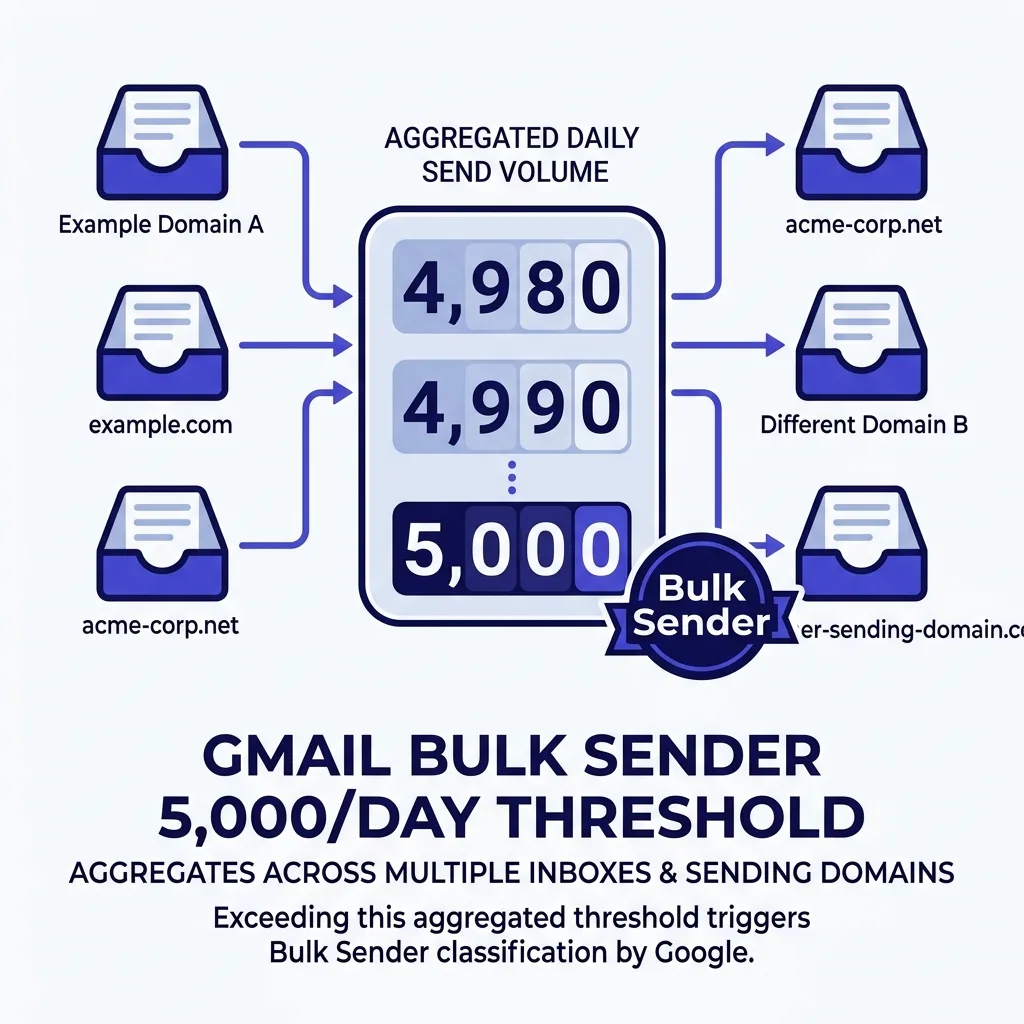 Diagram showing Gmail bulk sender classification: how the 5,000/day threshold applies across multiple inboxes and domains
#The Three-Zone Spam Rate Framework
Google Postmaster Tools displays your spam complaint rate as a percentage of delivered messages that recipients mark as spam. In 2025 Google added explicit threshold lines to the dashboard - a visual green/yellow/red indicator that makes the zones clear at a glance.
The framework has three distinct zones:
Green zone (under 0.10%): Your domain is operating within policy. Google will not take any automated action against your sending based on spam rate alone. Inbox placement can still vary for other reasons - content quality, engagement signals, IP reputation - but complaint rate is not your problem.
Yellow zone (0.10% to 0.30%): You are above the recommended threshold. Gmail's automated systems start applying extra scrutiny to your mail. Some messages may route to spam tabs.
You will see this reflected in your Postmaster reputation scores before you see it in bounce rates, which means you need to be watching the dashboard, not just your delivery reports.
Red zone (above 0.30%): This is Google's hard enforcement line. At 0.30% sustained, Gmail begins active blocking - temporary deferrals, 421 errors, and in extended cases permanent reputation damage to the sending domain. Recovery from this zone requires dropping volume, cleaning your list aggressively, and waiting out the reputation decay cycle.
Some domains never fully recover.
The practical buffer that deliverability professionals recommend is 0.08% or below. That gives you a 20% cushion inside the green zone before you hit the 0.10% threshold. For cold email, where a single poorly targeted batch can spike complaints sharply, that cushion matters.
One thing the percentage hides: the absolute number of complaints that move the rate depends on your volume. If you send 1,000 emails per day, one spam report is 0.10%. If you send 10,000 per day, you can absorb ten spam reports before crossing the same threshold.
This is why scaling volume and tightening targeting have to happen together - bigger lists make the percentage more stable, but only if the targeting quality keeps complaints proportionally low.
#SPF, DKIM, and DMARC: What Google Actually Requires
Google's authentication requirements for bulk senders have three distinct components. All three are required. Partial compliance is not sufficient, and Google's enforcement since November 2025 has confirmed that "almost compliant" infrastructure gets treated the same as non-compliant infrastructure.
SPF (Sender Policy Framework) tells receiving mail servers which IP addresses are authorized to send mail from your domain. Your DNS record lists the approved sending sources. Gmail checks incoming mail against this record.
If the sending IP is not on the list, the message fails SPF authentication. Setting up SPF is a single DNS TXT record - the complexity is in keeping it current as you add or change sending tools, since each ESP or sending service needs to be listed.
DKIM (DomainKeys Identified Mail) adds a cryptographic signature to outgoing messages. The signature is tied to a private key on the sending side; the corresponding public key sits in a DNS TXT record on your domain. Gmail uses the public key to verify that the message body and headers were not altered in transit, and that the signature was placed by someone who controls your domain.
Google is specific that bulk senders need DKIM - having SPF and DMARC without DKIM is not acceptable. The DKIM key should be 2048-bit minimum.
DMARC (Domain-based Message Authentication, Reporting and Conformance) ties SPF and DKIM together and tells receiving servers what to do with mail that fails both checks. Your DMARC record must specify a policy of at least p=none to qualify, though p=quarantine or p=reject are stronger. Critically, DMARC alignment requires that the RFC5322 From domain - the address your recipients actually see in their email client - matches the domain used for DKIM signing or SPF.
Misalignment between display domain and signing domain is a common mistake that causes authentication failures even when all three protocols are technically deployed.
For cold email senders using separate sending domains, each sending domain needs its own complete authentication stack. A DKIM record for your main company domain does nothing for a sending domain like mail.yourbrand-outreach.com. This is not optional bookkeeping - it is the infrastructure work that separates stable sending from eventual domain burn.
If you need a step-by-step setup walkthrough, the SPF, DKIM, and DMARC setup guide for 2026 covers the DNS record syntax for each protocol and the common configuration mistakes that cause alignment failures.
#One-Click Unsubscribe: The RFC 8058 Mandate
Google's one-click unsubscribe requirement applies to all bulk senders who send commercial or promotional messages. Cold email is commercial mail. The requirement is not optional based on how you label your outreach internally.
RFC 8058 defines the technical standard. In practice, it requires two specific email headers on every message you send: List-Unsubscribe and List-Unsubscribe-Post. The List-Unsubscribe header contains the unsubscribe URL.
The List-Unsubscribe-Post header specifies the action - List-Unsubscribe=One-Click - that tells Gmail this endpoint supports single-request unsubscription without requiring the recipient to visit a landing page or confirm their choice.
When these headers are present, Gmail surfaces an "Unsubscribe" link in the email client directly next to the sender name. When a recipient clicks it, Gmail sends an HTTP POST request to your endpoint. Your system processes it.
The recipient is removed. No redirect, no confirmation form, no second click. The whole interaction happens inside Gmail's interface.
The business case for this is straightforward: a recipient who can unsubscribe easily is much less likely to hit the "Report Spam" button. One-click unsubscribe reduces spam complaints because it gives dissatisfied recipients a low-friction alternative to marking your domain as a threat. Teams that resist implementing it because they worry about unsubscribe rates are misunderstanding the trade-off.
An unsubscribe is a recoverable outcome. A spam complaint damages domain reputation in ways that affect every future email to every Gmail address.
For teams using cold email platforms, check whether your sending tool adds these headers automatically. Many reputable platforms do. If you are using custom SMTP or direct API sends, you need to add the headers in code.
The POST endpoint needs to be live, reachable over HTTPS, and capable of processing the unsubscribe action without authentication barriers.
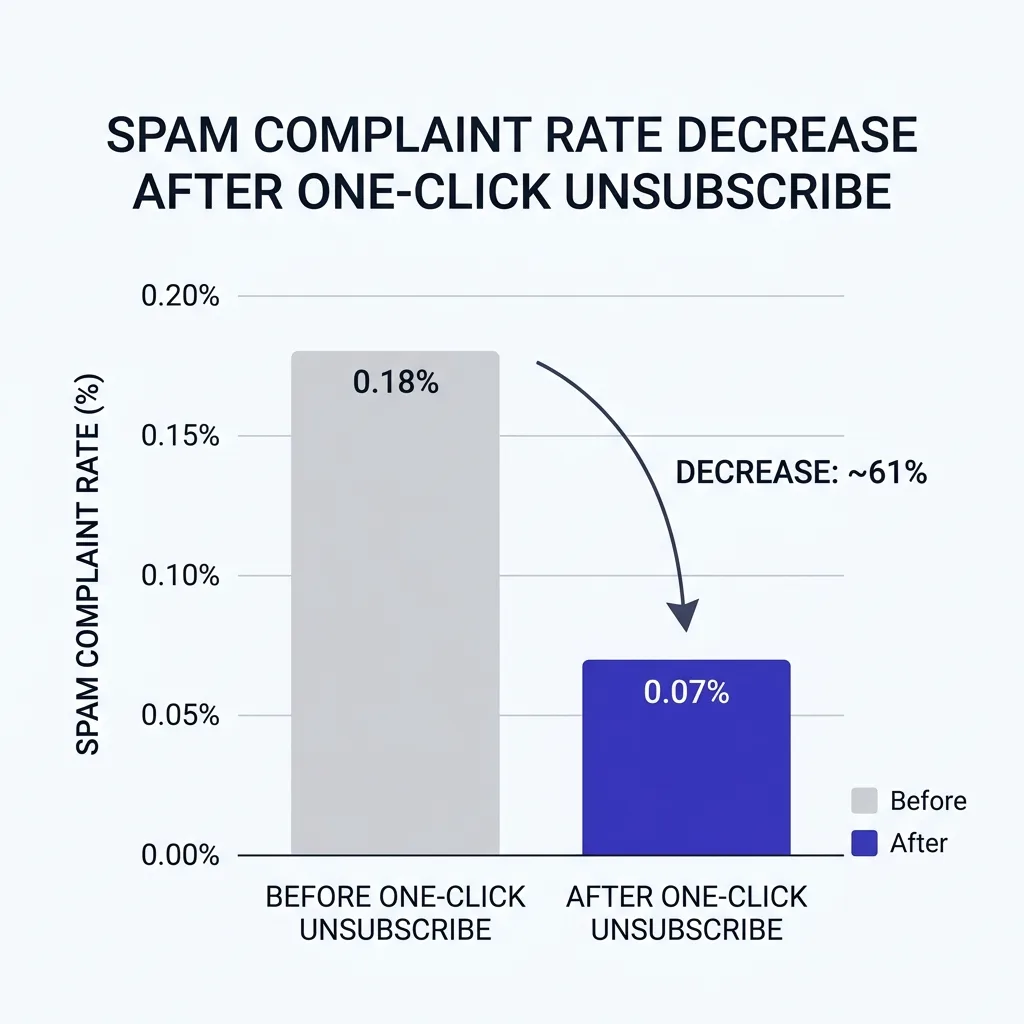 Chart showing spam complaint rate reduction after implementing one-click unsubscribe across cold email campaigns, with before/after comparison in deep indigo and white
#What Happens When You Violate the Rules
Google's enforcement follows a graduated pattern, but the escalation is faster than most senders expect. Understanding the sequence matters because the remediation window at each stage shrinks dramatically as you move up the severity ladder.
Stage 1 - Reputation degradation: Your domain reputation score in Postmaster Tools drops from "High" toward "Medium" or "Low." Messages still deliver, but inbox placement rates fall. More of your mail routes to the Promotions or Spam tabs.
Reply rates drop, which looks like a targeting problem but is actually a deliverability problem. Many teams diagnose this as poor copy and iterate on messaging when the real issue is reputation.
Stage 2 - Throttling and deferral: Gmail's servers begin issuing 421 temporary deferral errors. Your sending tool retries and some messages eventually deliver, but with significant delays. At high volumes, the retry queue can back up enough that your sending schedule falls apart entirely.
This stage is recoverable if you stop volume increases, clean your list, and wait for complaint rates to drop.
Stage 3 - Soft rejection: Some messages receive 550 "message rejected" responses permanently rather than temporarily. These are true delivery failures. The domain is now flagged as a source of spam-adjacent mail and automatic recovery is not guaranteed.
Stage 4 - Hard block: At sustained 0.30% complaint rates, Gmail can block a domain entirely. Future mail from that domain goes to spam or is rejected outright, regardless of authentication status. Recovery at this point typically requires abandoning the domain and starting over with a new sending domain that has been properly warmed and aged.
The hard block is not a theoretical outcome. Teams running high-volume, low-quality outreach hit it regularly. The ones caught off guard are usually those who were not monitoring Postmaster Tools and only noticed the problem when reply rates dropped to zero.
One important nuance: Gmail's spam rate calculation is based on the rate seen by Google's systems across your sending infrastructure, not the number of complaints you receive inside your own sending tool. If you are using an ESP that aggregates multiple senders, your reputation is partially tied to the behavior of other senders on shared IPs. This is one of the strongest arguments for dedicated sending infrastructure for cold email at any serious scale.
#Cold Senders vs. Bulk Senders: Where the Lines Blur
The 5,000-per-day threshold creates a real operational question: is your outbound operation technically cold email or bulk mail? The distinction matters because the answer changes your compliance obligations and your tactical approach to sending.
Traditional bulk email is permission-based. A newsletter audience opted in. Marketing sequences go to customers who provided their email address willingly.
Spam complaints in this context represent a breakdown in list hygiene or content relevance, but the underlying consent model is fundamentally different from cold outreach.
Cold email is non-permission outreach. Recipients did not ask to hear from you. This makes the spam complaint risk structurally higher per email sent.
A cold recipient who finds your message irrelevant has no psychological reason to click "Unsubscribe" - they did not subscribe. They are more likely to hit "Report Spam" as a way of saying "I did not ask for this."
This structural difference means cold email teams need to operate at complaint rates well below even the 0.10% threshold. The 0.08% buffer is a starting point, not a ceiling. Teams doing high-quality signal-based outreach - personalizing by funding round, hiring signal, or job change - typically see complaint rates below 0.03% because the relevance is obvious to the recipient.
Teams doing list-blast outreach to broad ICPs regularly see complaint rates above 0.15%, which puts them in the yellow zone with no margin for error.
The blur between cold and bulk also shows up in infrastructure choices. If you send 500 cold emails per inbox across 12 inboxes, you are sending 6,000 emails total - bulk territory by Google's definition. You need full authentication on every sending domain, one-click unsubscribe on every message, and active spam rate monitoring in Postmaster Tools.
For more on the specific deliverability traps that catch AI-driven outbound systems, see why AI SDRs get blocked - the root cause is almost always a combination of complaint rate drift and authentication gaps that no one was watching.
#How to Stay Under 0.08% in Practice
Staying under 0.08% is an operational discipline, not a one-time setup. It requires consistent decisions across list quality, message relevance, volume pacing, and monitoring. Here is what that looks like concretely.
Verify email addresses before sending. Sending to invalid or abandoned addresses does not directly cause spam complaints, but it degrades your sender reputation in ways that interact with complaint rate enforcement. Use an email verification service before loading any list into your sequence tool. Remove addresses that are catch-all, role-based (info@, support@), or have not been verified as active.
The email verification before sending process should be a required step in your campaign setup checklist, not an optional enhancement.
Target narrowly and signal-specifically. The single best predictor of spam complaint rate is message relevance. A cold email that lands in the inbox of someone who recently hired a VP of Sales and references that specific signal will almost never generate a spam report - the message feels intentional and relevant. A cold email sent to a scraped list of CFO email addresses with a generic pitch will generate complaints because most recipients will not see themselves in the message.
Narrower targeting means fewer total sends and fewer total complaints.
Pace your volume. Sending your entire weekly volume in two hours concentrates complaint exposure in a short window. Gmail's systems notice sudden spikes. Spreading volume across the day and week produces a more consistent complaint rate signal and gives your list engagement signals time to develop.
Most cold email tools support time-zone-based sending schedules - use them.
Include easy opt-out language in every message. Beyond the technical RFC 8058 headers, the body text of every cold email should contain a clear, simple opt-out mechanism. "Reply with 'remove' to opt out" or "Let me know if you'd prefer not to hear from me" reduces spam button clicks because it gives recipients a human alternative. Some recipients will use the spam button anyway, but offering an in-message opt-out path reliably reduces complaint rates by 20-40% compared to messages that include no opt-out language at all.
Monitor Postmaster Tools weekly. This is the most commonly skipped step. Google Postmaster Tools shows your domain reputation, spam rate trend, and authentication status updated daily. A complaint rate spike that you catch on day two is a recoverable problem.
A complaint rate spike you discover three weeks later - when you notice reply rates have cratered - may already be in the enforcement zone. Set a weekly calendar reminder. Check the dashboard.
React early.
Segment and suppress aggressively. If a contact has not replied to any of your sequences across multiple campaigns, they are a low-engagement prospect with above-average complaint potential. Remove them. If a contact is in a company vertical that has generated complaint patterns in the past, suppress that segment.
Segmentation for complaint risk is as important as segmentation for ICP fit.
#Reading Google Postmaster Tools for Cold Email
Google Postmaster Tools is a free dashboard that gives senders visibility into how Gmail is treating their mail. Every cold email team sending to Gmail addresses at any meaningful volume should have it set up. Without it, you are flying blind on the metrics that determine whether your campaigns survive.
Setting up Postmaster Tools requires verifying domain ownership through a DNS TXT record - the same process as Google Search Console. Once verified, the dashboard populates with data from your recent sending. If your daily volume is below a certain threshold, some metrics will show as "not enough data" rather than actual numbers, which is one of the arguments for consolidating sends from fewer sending domains rather than fragmenting across dozens.
The key metrics to watch for cold email:
Domain Reputation is a four-level indicator: High, Medium, Low, or Bad. You want High consistently. A drop from High to Medium is an early warning that your complaint rate or engagement signals are trending in the wrong direction.
A drop to Low means Gmail is already routing more of your mail to spam.
Spam Rate is the percentage metric discussed throughout this article. Postmaster shows you a 30-day chart. Look for the trend direction, not just the current reading.
A complaint rate that has been flat at 0.07% for 30 days is fine. A rate that has moved from 0.03% to 0.07% over the last two weeks is a signal that something changed in your targeting or list quality.
Authentication shows whether SPF, DKIM, and DMARC are passing for your sent mail. Any failures here mean some of your messages are reaching Gmail without authentication - these messages face much higher rejection probability regardless of complaint rate. Authentication failures are usually infrastructure misconfigurations, not recipient behavior, so they are fully within your control to fix.
Delivery Errors tracks temporary and permanent rejection rates. A sudden spike in 421 errors (temporary deferral) often precedes a complaint rate spike by a few days - it can be Gmail pre-emptively throttling based on real-time reputation signals before the complaint rate fully reflects the problem.
For a deeper walkthrough of reading these metrics in the context of an active cold email program, see Google Postmaster Tools for cold email - it covers how to set up domain filtering, interpret the reputation bands, and triage a sudden reputation drop.
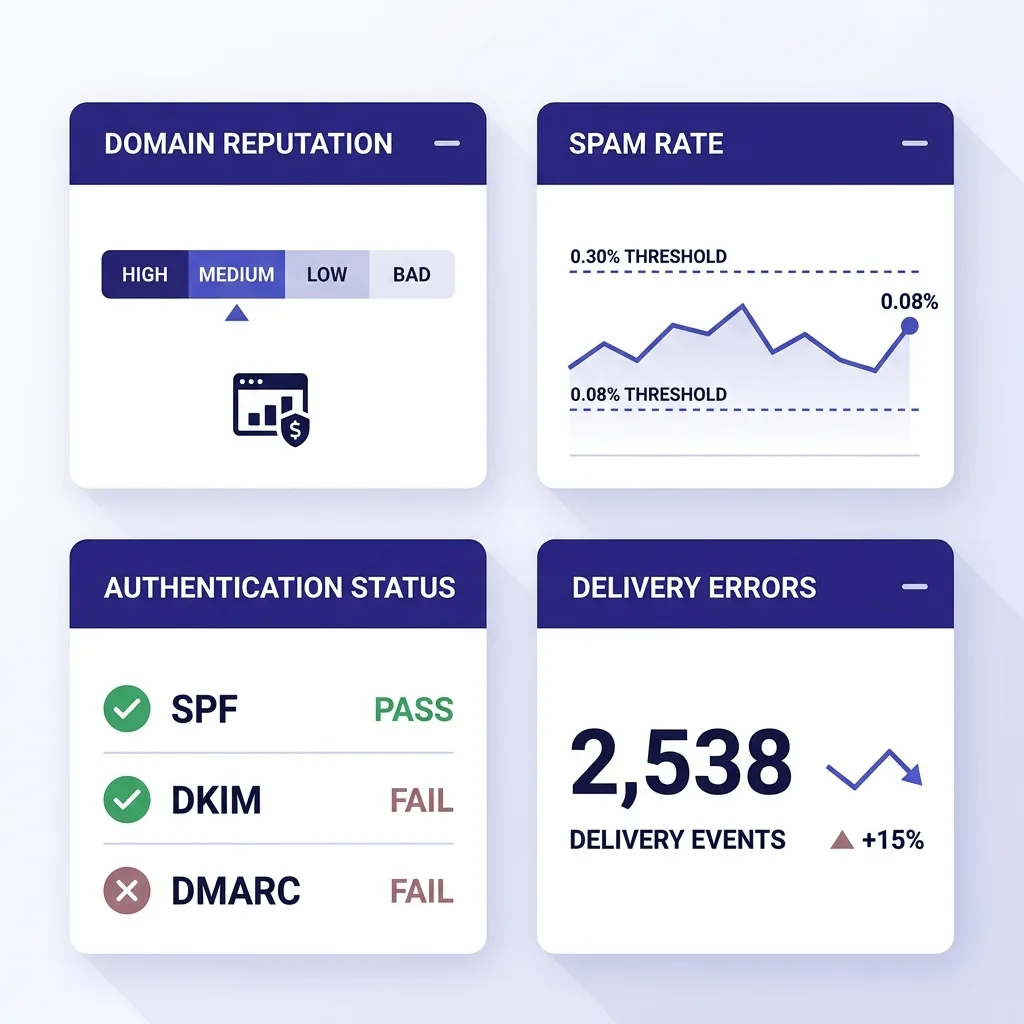 Infographic of Google Postmaster Tools dashboard layout showing Domain Reputation, Spam Rate, Authentication, and Delivery Errors panels with annotations in deep indigo on white background
#The Threshold Reference Table
The following table summarizes the key thresholds and requirements under Google's bulk sender rules in 2026, alongside the corresponding practical guidance for cold email teams.
| Metric | Google Threshold | Cold Email Target | Consequence of Exceeding |
|---|---|---|---|
| Spam complaint rate - recommended cap | 0.10% | Under 0.08% | Inbox placement degradation, spam tab routing |
| Spam complaint rate - hard enforcement | 0.30% | Never approach | Active blocking, temporary/permanent rejection |
| Practical buffer zone | 0.10% - 0.30% | Treat as red zone | Reputation scoring drops, throttling begins |
| Safe operating target | Under 0.10% | Under 0.08% | No automated action on rate alone |
| Authentication - SPF | Required (all senders) | Required | Higher spam filter scores, failed alignment |
| Authentication - DKIM | Required (bulk senders) | Required, 2048-bit | Authentication failure, higher rejection rate |
| Authentication - DMARC | Required, minimum p=none | Recommend p=quarantine | Messages may fail alignment checks |
| One-click unsubscribe | Required (bulk + commercial) | Required on every message | Policy violation, complaint rate increases |
| Bulk sender threshold | 5,000 emails/day to Gmail | Know your daily total | Bulk rules apply permanently once crossed |
| Domain warmup for new domains | Required ramp-up period | 30-60 days minimum | High rejection rate on new IP/domain pairs |
The table above covers spam complaint rate thresholds in a consistent framework - use it as a quick reference when setting campaign limits or reviewing sending infrastructure with your team.
#How These Rules Interact with Microsoft's Requirements
Google is not alone in tightening enforcement. Microsoft has its own set of sender requirements for Outlook and Microsoft 365 addresses, and the overlap in audience means most cold email campaigns hit both Gmail and Outlook inboxes simultaneously. Running a campaign that is Google-compliant but Microsoft-non-compliant produces deliverability gaps that can be mistaken for targeting problems.
The core authentication requirements - SPF, DKIM, DMARC - are shared. Both platforms want to see proper authentication, and proper setup for one typically satisfies the other. The divergence shows up in volume thresholds, complaint tolerance, and the weight given to domain age.
Microsoft places more emphasis on domain age and warmup history than Google does. A freshly registered sending domain with perfect authentication will still hit Outlook's junk folder at higher rates than a domain that has been active for 6 to 12 months with consistent low-complaint history. This makes domain management a longer-horizon concern - you cannot spin up a new sending domain the week before a campaign and expect it to perform.
Microsoft's complaint rate tolerance also differs in how it is measured and enforced. While Google's 0.30% hard threshold is publicly documented, Microsoft's enforcement is less publicly specified but observed to be tighter at the per-inbox level for new senders. The practical guidance is the same: target under 0.08% and treat any rate above 0.10% as requiring immediate action.
For a complete breakdown of Microsoft's specific requirements and how they differ from Google's rules, see Microsoft cold email rules 2026.
One strategic implication: if your ICP skews heavily toward enterprise buyers at large companies, your list will contain more Microsoft 365 addresses than Gmail addresses. The reverse is true for SMB and startup buyers. Knowing your recipient mix by email provider helps you understand which set of rules carries more operational weight for any given campaign.
If you are evaluating infrastructure decisions around which email ecosystem to prioritize, the Google Workspace vs Microsoft 365 cold email comparison covers sender reputation differences, authentication defaults, and the inbox placement patterns each platform rewards.
For teams who have already run into deliverability problems on Gmail specifically - permanent rejection, blacklisting, or reputation band drops - the Gmail permanent rejection guide for 2026 covers the remediation path, including what timeline to expect for reputation recovery and whether domain replacement is necessary.
Proper email authentication setup is the foundation for both platforms. Without it, every other deliverability optimization - list quality, targeting, copy - is built on an unstable base.
#FAQs
#Does the 5,000-per-day threshold apply per domain or per sender?
The threshold applies to the total volume sent to Gmail addresses across your sending infrastructure. Google looks at the aggregate from all sending domains, IP addresses, and DKIM signing domains associated with your operation. Splitting volume across multiple domains does not prevent bulk sender classification if the combined total exceeds 5,000.
Once any domain in your infrastructure has collectively sent 5,000 messages in a single day, that domain is permanently classified as a bulk sender.
#Can I send cold email without one-click unsubscribe if I am not a "bulk" sender?
Technically, one-click unsubscribe is only mandated for bulk senders under Google's published guidelines. However, this is the wrong question to optimize for. Cold email without an easy opt-out mechanism has structurally higher spam complaint rates because recipients who do not want your mail have no alternative to the spam button.
Including one-click unsubscribe - and in-message opt-out language - reduces complaint rates regardless of whether you are technically required to include it. The mandate is a floor, not a ceiling.
#What DMARC policy does Google require for bulk senders?
Google requires a published DMARC record with a minimum policy of p=none. This means the record must exist, but it does not require Google to take any action on failing mail - it just reports. However, p=none provides no protection against domain spoofing and does not strengthen your authentication posture.
Most deliverability professionals recommend moving to p=quarantine as soon as you have confirmed DMARC alignment is working correctly, which typically requires monitoring the aggregate reports for two to four weeks.
#How quickly do spam complaint rate violations get enforced?
Enforcement is not instantaneous. Google's systems evaluate complaint rates over a rolling period, and a single bad day does not immediately trigger hard blocking. However, the system responds faster than most senders expect - a spike above 0.30% that lasts three to five days is enough to produce throttling and temporary rejections.
The reputation recovery timeline after a spike is measured in weeks, not hours, which means early detection via Postmaster Tools monitoring is critical to preventing small problems from becoming large ones.
#Does Google count spam reports from within Gmail as the only metric?
Google Postmaster Tools spam rate data is based on messages that Gmail users mark as spam within the Gmail interface. It does not include recipients who use third-party email clients to access Gmail accounts, nor does it reflect feedback loop data from other providers. This means your actual spam complaint incidence is likely higher than the Postmaster Tools rate - some portion of complaints from non-Gmail interfaces are not captured in the metric.
Treat the Postmaster rate as a floor, not a ceiling, for your true complaint incidence.
#Can I use a subdomain for cold email sending instead of creating a separate domain?
Yes, and this is a common infrastructure pattern. Using mail.yourdomain.com or outreach.yourdomain.com as your sending domain creates some separation between your cold email reputation and your main domain's reputation. However, DMARC policy inheritance means that a strict DMARC policy on your root domain can affect subdomain mail depending on how your record is configured.
The full trade-offs between subdomain and separate domain sending are covered in subdomain vs separate domain for cold email.
#Conclusion
Google's bulk sender rules in 2026 are not new policy - they are existing requirements being enforced with less patience for partial compliance and more automated consequence for violations. The 0.10% spam complaint cap, the SPF plus DKIM plus DMARC authentication stack, and the one-click unsubscribe mandate are the three pillars. The practical target for cold email is under 0.08% complaint rate, proper authentication on every sending domain, and an opt-out mechanism on every message.
What has changed is not the rules but the tolerance. Gmail's enforcement since late 2025 means that teams who were getting away with incomplete authentication or complaint rates in the 0.12% to 0.20% range are now seeing that reflected in inbox placement, throttling, and in some cases hard blocks. The teams that adapted early are delivering reliably.
The ones still running cold email like it is 2022 are burning domains and wondering why their reply rates collapsed.
The google bulk sender rules are also a filter that separates sustainable cold email from spray-and-pray blasting. You cannot stay under 0.08% complaint rate by sending irrelevant mail at scale. You can do it by targeting carefully, personalizing with real signals, and treating every send as a conversation request rather than a broadcast.
That is not just deliverability discipline - it is what separates the outreach that generates pipeline from the outreach that generates spam folder entries.
If you want to run a campaign that stays under the thresholds, lands in the primary inbox, and generates real replies, start your first campaign this week for $1 at https://app.firstsales.io - FirstSales handles authentication setup, complaint rate monitoring, and signal-based personalization so your outreach reaches inboxes, not spam folders.