Results sit in a report
Opens and replies land on a dashboard. Turning that into a better next email is left to you, and most weeks there is no time.
AI Learning
FirstSales learns what you like before a campaign sends, then learns from what happens after. Opens, replies, meetings, unsubscribes and bounces all feed back into the next draft, and the Learning page shows you exactly what it has learned.
$1 for 3 days · Cancel anytime · No contract
Teach your taste in about 60 seconds
Learns from replies and meetings, not guesses
Measured against a control arm
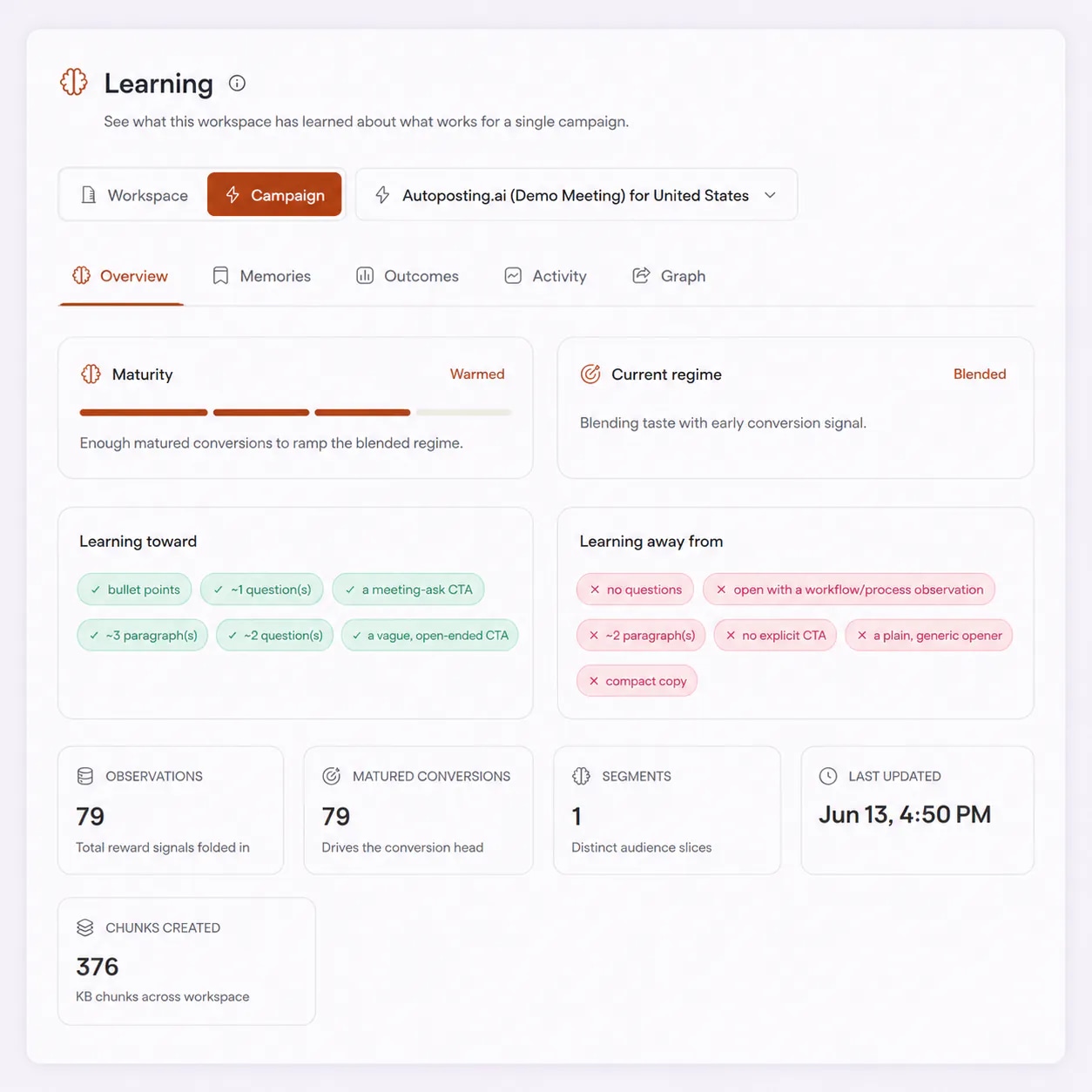
See what it learned, in plain words
A campaign is rarely right on day one. The hard part was never sending. It is noticing what works, and having the next email act on it.
Opens and replies land on a dashboard. Turning that into a better next email is left to you, and most weeks there is no time.
Testing one subject line against another takes weeks of sends, and you learn one thing at a time. By then the list has moved on.
Many AI writers start from zero on every draft. They do not know which emails you liked, which ones got replies or which ones got people to unsubscribe.
No test to design and no model to tune. Learning runs under every AI Autopilot campaign.
Swipe through practice emails. Heart the ones you would send and pass on the rest. It is optional and never blocks launch.
Every open, click, reply, meeting, unsubscribe and bounce is recorded and tied back to the email that earned it.
What it learns is applied to every new draft, and the Learning page shows you what is working and what needs attention.
Nothing here is guessed from other companies' data. The learning comes from your own taste, your own results and your own decisions in the app.
Before a campaign sends, you can swipe through practice emails written for it. Every heart and every pass tells the writer what you would put your name to.
Once emails go out, every recorded result is tied back to the email that earned it. Good signals pull the writer one way. Bad signals push it the other.
When Chat proposes an action, you approve or reject it. When it answers, you can rate the reply. Each verdict becomes a memory Chat uses next time.
AI Learning is part of every AI Autopilot campaign, on every plan.
Ten hearts on practice emails are enough for a campaign to write in your taste. You can refine it any time by swiping a few more.
Qualified positive replies and meetings pull drafts one way. Unsubscribes and bounces push them the other way.
Outcome rates compare emails written with what it learned against a baseline control arm, so you can see real lift.
The Memories tab lists the preferences it has formed about templates, tone and structure, written so you can read them.
See what one campaign has learned, what the whole workspace has learned, or what Chat has learned from your verdicts.
Turn on Auto mode and FirstSales runs the learning loop itself: it seeds your taste, applies it and sharpens for conversions as it gathers data.
Taste seeding and Auto mode live in your campaign. Everything it has learned lives on the Learning page.
FirstSales writes practice emails for your campaign and shows them one at a time. Heart the ones you would send and pass on the rest. Ten hearts and the campaign writes in your taste. If none of them feel right, edit your instructions or try more samples. It is optional and never blocks launching your campaign.
Auto mode sits in your campaign settings. When it is on, FirstSales keeps seeding your taste, applies what it has learned to every draft it writes, and turns on Premium re-rank once the model has matured. Premium re-rank drafts several candidates and picks the one most likely to convert. You can see what Auto mode is doing at any moment.
A learning system should prove it is helping. The Outcomes tab compares emails assigned to treatment, written with what it learned, against a baseline holdout control arm. Rates are shown per signal: open, click, qualified positive reply and meeting or goal, plus unsubscribe, bounce and out of office. The Activity tab lists every recorded result, newest first.
Chat proposes actions, such as adding leads to a campaign, and you approve or reject each one. You can also rate its replies. Every verdict becomes a memory that Chat uses in future conversations, and you can read those memories in the Chat scope of the Learning page.
A new campaign has no results yet, so it leans on what you liked. As real outcomes mature, they carry more of the weight. The Overview tab shows where each campaign stands.
01
Before there is enough signal, drafts follow your AI Instructions and the practice emails you hearted. Nothing is guessed from a handful of sends.
02
Once enough conversions have matured, the writer blends your taste with early conversion signal. The Overview tab shows this as the current regime.
03
With more matured outcomes, real results carry more of the weight. Your rules still hold: AI Instructions and Do and Don't lines never switch off.
The bars are a drawing of the idea, not a measurement. The Learning page shows each campaign's real maturity and current regime.
The engine does the heavy lifting, but a few habits help it learn the right lessons faster. Here they are, in plain English.
A brand new campaign has no results to learn from, so the writer leans on what you tell it. Swiping practice emails takes about a minute and gives it ten clear examples of what you would send. It is optional, but it is the quickest way to make the very first emails sound like you.
Learning sharpens a good brief. It does not replace one. Fill in your AI Instructions with the audience, the offer and the rules first. Learning then works inside those rules: it changes how emails are written, never what you told it never to say.
A pass is just as useful as a heart. It tells the writer what you would not send. If a whole round feels wrong, pick "None of these felt right" and adjust your instructions, rather than hearting the least bad option.
Replies and meetings take days to arrive, so one week of sends is not the full story. The engine waits for outcomes to mature before it leans on them. Early on, the Overview tab will show a campaign still relying mostly on taste, and that is by design.
Always read lift against the control arm on the Outcomes tab, not against last month. Lists, seasons and offers change, and only a control sent at the same time tells you whether the learning itself is helping.
The Memories tab and the learning toward and away from lists show, in plain words, what the writer has picked up. If something looks wrong, such as a habit you do not want, fix it in your AI Instructions with a clear Don't line.
Unsubscribes and bounces count against an email, not just for it. If they rise, check your list and your sending health first. A cleaner list gives the learning cleaner signal, and the next emails improve faster.
When you are happy with the drafts, switch on Auto mode in campaign settings. It keeps seeding, applies what it has learned to every draft and enables Premium re-rank when the model is ready. You can still read every draft first if approval is on.
Run through these once. They keep the signal clean and the lessons right.
“User Interface, Ease of Use, Able to hit the inbox in the first attempt.”
 Sadashiv B.Founder, small business · G2
Real words from real users. No paid reviews.
“One of the biggest pains in cold email is making sure that you have your DNS setup correctly. Firstsales has created a system to make sure you have done this correctly.”
Mike O
Trustpilot review
“I've been using FirstSales.io for several months now, and I can confidently say it has revolutionized how I approach lead generation and customer acquisition.”

Paweł Stelmach
Small business owner
“I have always struggled in cold outreach. However, Firstsales has provided an excellent tool for cold outreach.”

Kaushal S.
Founder, small business
Same goal, emails that get better over time. One way leaves it all to you. The other learns as it sends.
Reports, hunches and slow tests.
Taste first, then real results.
Many tools leave optimisation to manual tests. FirstSales learns from your taste and your results, and shows you what it learned.
| What you get | Typical tool | FirstSales |
|---|---|---|
| Learns your taste before sending | Varies | Practice emails, heart or pass |
| Learns from outcomes | Varies | Replies, meetings, unsubscribes, bounces |
| Measured against a control | Varies | Baseline control arm |
| See what it learned | Varies | Memories, patterns and graph |
| Scopes | Varies | Campaign, workspace and Chat |
| Hands-off option | Varies | Auto mode |
| Picks the best of several drafts | Varies | Premium re-rank, once mature |
| Your rules still apply | Varies | AI Instructions always hold |
| Price | Varies | $29/mo, included |
| Start your $1 trial | ||
Can’t find yours? Write to us.
AI Learning is the part of FirstSales that makes each campaign better over time. It learns your taste from practice emails before you send, then learns from real outcomes after, and applies both to every new draft. The Learning page shows what it has learned.
Your hearts and passes on practice emails, and the outcomes of real sends: opens, clicks, qualified positive replies, meetings or goals, unsubscribes, bounces and out-of-office replies. In Chat, it also learns from the actions you approve or reject and the replies you rate.
No. Taste seeding is optional and never blocks launching your campaign. Ten hearts are enough for the campaign to write in your taste, and you can swipe a few more any time to refine it.
The Outcomes tab compares emails written with what it learned against a baseline control arm, signal by signal. That shows real lift, not a before-and-after guess.
No. Learning works inside your AI Instructions. Your audience, offer and Do and Don't lines still apply to every draft. If you see a habit you do not want, add a Don't line and it is used from the next draft on.
AI Autopilot campaigns. Template campaigns keep the copy you wrote, so there is nothing for the writer to change there.
A switch in campaign settings that lets FirstSales run the learning loop itself. It keeps seeding your taste, applies learned preferences to every draft and turns on Premium re-rank once the model has matured.
No. AI Learning is part of every AI Autopilot campaign on every plan, from $29/mo with unlimited mailboxes. Try it for $1 for 3 days. No contract: cancel any time from your dashboard.
Connect unlimited mailboxes and let AI agents find leads, write each email and follow up. Or send your own templates in manual mode. From $29/mo.
$1 for 3 days · Cancel anytime · No contract