Follow-ups slip
A busy week is all it takes. The second email never goes out, the third is forgotten, and warm prospects go cold because nobody wrote back to them on time.
Email sequences
Lay out your first email, follow-ups and waits on a visual canvas. FirstSales writes each step for each contact, sends on your schedule and cancels the rest of the sequence when a contact replies or opts out.
$1 for 3 days · Cancel anytime · No contract
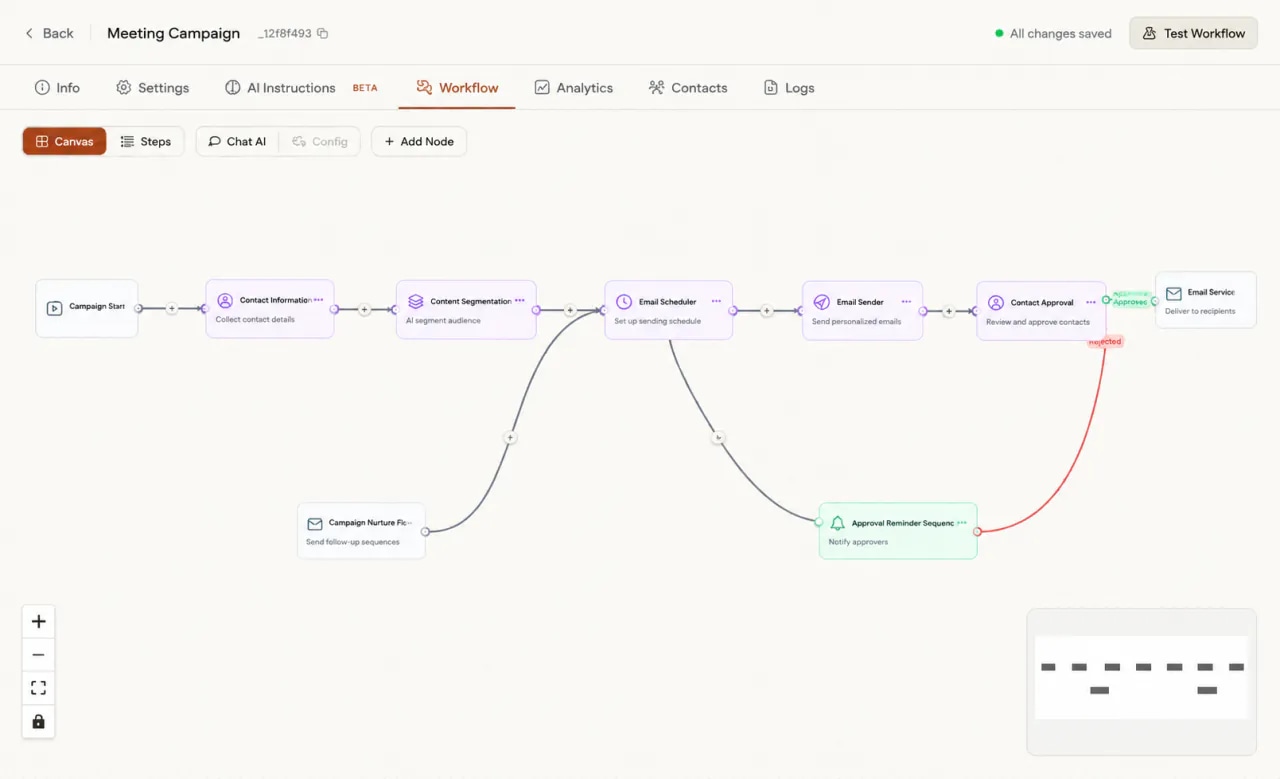
A visual canvas, or a simple list of steps
Every step written for each contact
Follow-ups that take a new angle
Stops on reply or opt-out
Most cold email replies do not come from the first email. They come later, if anyone remembers to send the next one.
A busy week is all it takes. The second email never goes out, the third is forgotten, and warm prospects go cold because nobody wrote back to them on time.
“Just bumping this up” gives nobody a reason to reply. Writing a fresh angle for every contact, on every step, by hand, is more work than anyone has time for.
A spreadsheet of reminders does not know who replied this morning. Someone says yes, then gets another follow-up anyway, and the deal starts on the wrong foot.
No flowchart to draw by hand, no copy to write from scratch, no reminders to keep.
Open the Workflow tab and place email, wait and condition blocks on the canvas. Prefer a list? Switch to Steps view.
The Email Drafter writes every email for every contact from your knowledge base, your offering and the goal of the campaign.
FirstSales sends each step on schedule from your mailboxes and cancels the rest the moment a contact replies or opts out.
A sequence is a first email, a few follow-ups and the waits between them. Here is a simple one, step by step, the way it runs for each contact.
This is an example. You choose how many emails to send and how long to wait between them, with Wait / Delay nodes on the canvas.
Email 1
One reason to talk and one easy question. The AI writes it for each contact from your knowledge base and offering, or you write it yourself in Manual mode.
Wait / Delay
The sequence pauses for the wait you set. Nothing goes out to this contact until it ends.
Follow-up 1
It points back to the first email in one line, then gives a fresh reason to reply. No “just bumping this up”.
Wait / Delay
Spacing follow-ups out keeps the sequence feeling like a person, not a reminder app.
Follow-up 2
With rotating value on, each follow-up leads with a different benefit, so people who skipped one angle may answer another.
Wait / Delay
Most contacts are still in progress at this point. Pending sends on the Analytics tab shows what is still to come.
Last follow-up
A short check-in that makes it easy to say yes, no or not now. Then the sequence ends for this contact.
At any step
The moment a contact replies or opts out, their remaining emails are cancelled. Nobody gets chased after they answer.
Sequences are part of every campaign, on every plan.
The canvas shows every step and every branch of a campaign on one screen. Zoom, pan and move blocks until the flow reads the way you think about it.
In AI mode the Email Drafter writes each email for each contact, using your knowledge base and offering. No mail-merge blanks, no copy-pasted follow-ups.
Pick the New angle approach, rotate the value you lead with on each follow-up and refer back to the last email, so every step earns its place.
A reply or an opt-out stops the sequence for that contact. The conversation moves to your inbox, where you or Autopilot take it from there.
Put a Content Approval block in the flow and drafts wait for you to approve, edit or reject them. Or let them go out on their own.
Choose Email Template in the campaign builder for Manual mode. You write the sequence, FirstSales sends it, and replies still stop it.
All of them live inside the campaign, a click apart.
Click Add Node and pick a block: agents that find, sort, research and write; actions like Wait / Delay; conditions like If / Else; and system blocks like Email Sender. Click to place it in the middle, or drag it onto the canvas.
Open the Email Drafter block to set what it writes from. Turn on AI mode, connect the knowledge base for context and brand voice, and add an offering for product or service details.
Set a writing style, add your own rules in plain words, and choose how follow-ups behave: a new angle each time, a different value each time, and a line that refers back to the last email.
Open a thread and each email shows its trail: drafted, approved, then sent or scheduled with a date and time. Edit it before it goes. The side panel shows the contact, the campaign goal and engagement so far.
Open Add Node, then click a block to place it in the middle or drag it where you want it. These are the groups and blocks in the panel today.
Blocks that do work for you: find people, sort them, research them, write to them and decide when.
Blocks that shape timing and learn from your edits.
Blocks that split the path, so different contacts take different routes.
Blocks that send the email and connect the campaign to the outside.
A good sequence is mostly restraint: short emails, real reasons to reply and enough space between them. Here is how to set one up, in plain words.
The first email has one job: start a conversation. Say who you are in a line, give one reason this matters to them, and ask one easy question. Save the details for later steps. A long first email reads like a brochure, and brochures do not get replies.
A follow-up that only says “checking in” adds nothing. Each step should bring something new: a different benefit, a short example, a question from another angle. In FirstSales, turn on the New angle approach and rotate value, and the writer does this for each contact.
People are busy, not ignoring you. Put a Wait / Delay block between every email so each one arrives after the last has had time to land. Close spacing feels pushy. Wide spacing lets people forget. Start in the middle, then use your numbers to adjust.
A sequence that never ends turns into spam. Three or four emails in total is enough for most cold outreach. End with a short, polite close that makes it easy to say no. Some of the best replies come from that last email.
The fastest way to ruin a warm reply is to send another follow-up after it. FirstSales cancels the remaining emails the moment a contact replies or opts out, so the next thing they get is a real answer from you.
Instead of writing every email yourself, tell the writer what to always and never do: never mention price in email one, always name their company, never claim tools you do not support. Custom instructions keep every step on brand without a template.
For a new sequence, put a Content Approval block in the flow and read the first batch of drafts. Approve, edit or reject them. When they read the way you want, let more of them go out on their own.
Run through this once before real contacts go into the flow. It takes a few minutes.
“I have always struggled in cold outreach. However, Firstsales has provided an excellent tool for cold outreach.”
 Kaushal S.Founder, small business · G2
Real words from real users. No paid reviews.
“If you are looking to fix your sales pipeline, you should definitely try [it]. My open rate has increased drastically. The UI and UX are easy to understand, even for a beginner like me.”

Pooja Dhole
@ThisIsPoojaD
“One of the biggest pains in cold email is making sure that you have your DNS setup correctly. Firstsales has created a system to make sure you have done this correctly.”
Mike O
Trustpilot review
“I've been using FirstSales.io for several months now, and I can confidently say it has revolutionized how I approach lead generation and customer acquisition.”

Paweł Stelmach
Small business owner
What changes when the sequence runs itself and stops on reply.
Reminders, copy-paste and memory.
One sequence per campaign, on a canvas.
Many tools send a list of emails. FirstSales writes each one, branches the flow and stops on reply.
| What you get | Typical tool | FirstSales |
|---|---|---|
| Build the flow | Varies | Visual canvas or a list of steps |
| Who writes each email | Varies | AI, per contact, or you in Manual mode |
| Follow-up approach | Varies | New angle, rotating value, refers to last email |
| Branches | Varies | If / Else, Approval Switch, Quality Filter |
| Stop on reply or opt-out | Varies | Always |
| Approval before sending | Varies | Content Approval block, or send on its own |
| Warm-up | Varies | 21 days, included |
| Mailboxes | Varies | Unlimited on every plan |
| Price | Varies | $29/mo, sequences included |
| Start your $1 trial | ||
Can’t find yours? Write to us.
A first email plus the follow-ups and waits that come after it, run for each contact in a campaign. You build it on the Workflow tab, as a canvas of blocks or as a list of steps, and FirstSales sends each step from your mailboxes.
Yes. When a contact replies or opts out, the rest of their emails are cancelled. The reply lands in your inbox, where you or Autopilot answer it.
No. In AI mode, the Email Drafter writes each email for each contact from your knowledge base, offering and campaign goal. If you would rather write it yourself, pick Email Template in the campaign builder for Manual mode.
Put a Wait / Delay block between emails on the canvas. The sequence pauses for that contact until the wait ends, then sends the next step.
Yes. Add a Content Approval block and drafts wait for you to approve, edit or reject them. Every email shows whether it was drafted, approved, then sent or scheduled.
Yes. Condition blocks split the flow: If / Else branches on one condition, Approval Switch routes on several, and Quality Filter lets only the leads that meet your bar move on.
No. Sequences are part of every campaign on every plan, from $29/mo, with unlimited mailboxes and a 21-day warm-up. Try it for $1 for 3 days. No contract: cancel any time from your dashboard.
If you want to send the same email to a huge list as fast as possible, we are not your fit. FirstSales is for founders, sales teams and agencies who want fewer, better emails that start real conversations.
Connect unlimited mailboxes and let AI agents find leads, write each email and follow up. Or send your own templates in manual mode. From $29/mo.
$1 for 3 days · Cancel anytime · No contract