Right title, wrong moment
A list built from job titles and company size is full of people who fit and do not care today. You write to all of them and hear back from few.
Signals
Pick the topics, people and companies to watch. Signals finds who comments on or likes those posts, scores each person with a short reason and shows their comment in their own words. You start with the best, while the conversation is still fresh.
$1 for 3 days · Cancel anytime · No contract
Watch keywords, people or companies
Every lead scored, with a short reason
Their comment, in their own words
Never more than the daily credit budget you set
Most lead lists tell you who fits on paper. They cannot tell you who is thinking about your problem this week. That gap is where good outreach goes cold.
A list built from job titles and company size is full of people who fit and do not care today. You write to all of them and hear back from few.
When someone comments on a post about the problem you solve, they are telling you what is on their mind. Most of that is never seen by the people who could help.
Scrolling feeds, opening posts, reading every comment and copying names into a sheet takes hours, and you still miss most of it.
You choose what to watch and how much to spend. Signals does the watching.
Open the campaign builder and pick Signals, next to AI Autopilot and Email Template. Add the keywords, people or companies to watch. One signal can watch several.
Each scan uses credits. You set the most a signal may spend in a day, and it never goes over that number.
The people who commented on or liked those posts land on your Signals page, each with a score and a short reason. Start with the best and work down.
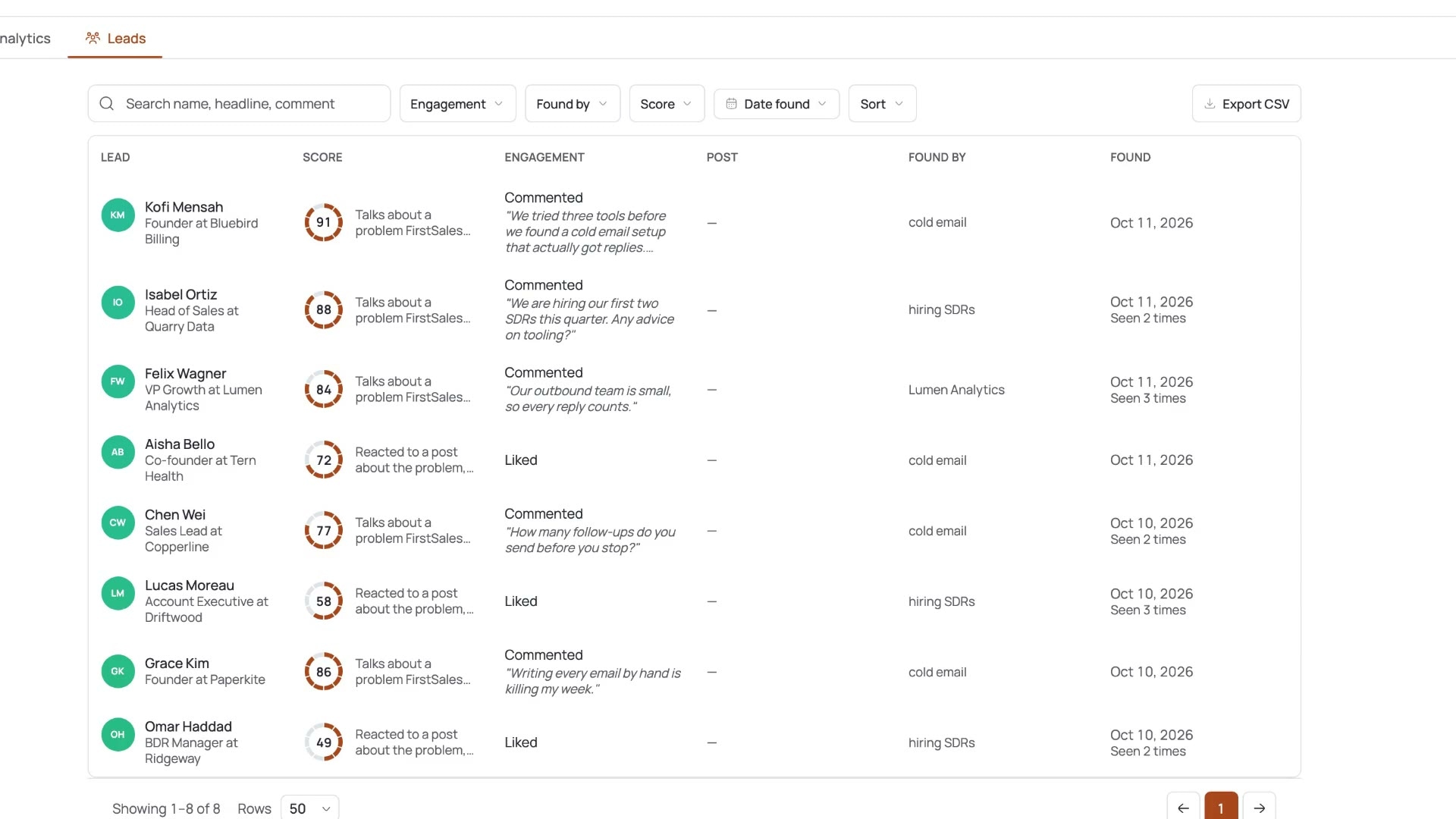
Every lead on your Signals page answers the same three questions before you read a profile: who is this, what did they do, and why should I start with them?
01Lead
Name, role and company, so you can tell at a glance if this person fits who you sell to.
02Score
Every person gets a score, so the best fits rise to the top and you do not read the list in random order.
03Reason
A short reason sits next to every score. You can agree, disagree and move on in seconds.
04Engagement
A like, or a comment shown in their own words. A comment tells you what is on their mind today.
05Post
The post they reacted to, so you know the topic and the conversation they joined.
06Found by
If you run more than one signal, you see which one brought each person in, and when.
Signals turns public conversations into a short, ranked list of people worth your time.
Everyone on the list just reacted to a post about your topic. That is a better first line than any job title.
Scores put the best fits at the top. You spend your first hour on your best leads, not on the alphabet.
You see their comment in their own words. Your first message can answer it, instead of guessing what they care about.
A short reason sits next to each score. If you disagree, skip the person. Nothing is hidden behind a number.
Scans use credits, and each signal stays inside the daily credit budget you set. No surprise bills from a busy topic.
Signals lives inside FirstSales, next to your campaigns, contacts and inbox. No extra tool, no extra login.
What you set up, what Signals finds, how it ranks people and what it costs.
A signal is a list of things to follow on LinkedIn. Pick keywords for the topics your buyers post about, people whose posts they read, or companies they follow.
Signals looks at posts that match what you watch and finds the people who reacted to them. A like is a light signal. A comment is a strong one, and you see it word for word.
A list of hundreds of names is only useful in the right order. Signals gives each person a score and a short reason, so you start with the best and can check the logic.
Each scan uses credits from your plan. You set a daily credit budget for each signal, and scans stop at that line. A busy topic cannot run away with your month.
A signal is a short list of things to watch on LinkedIn. Mix them. The examples below are ideas to copy, not presets.
Watch posts about the problem you solve, the job your buyer does or the words they use when it hurts.
Good for
Example: cold email deliverability · outbound for founders · sales hiring
Watch the posts of people your buyers listen to: well-known operators, writers, hosts and peers in your space.
Good for
Example: A founder who writes about outbound · a podcast host in your niche
Watch posts from companies your buyers care about, including your own company page.
Good for
Example: Your company page · a tool your buyers already use
This is the real FirstSales app in the sample workspace. Open Signals, go to the Leads tab and you see each person with their score, the reason, how they engaged and the post they reacted to.
“If you are looking to fix your sales pipeline, you should definitely try [it]. My open rate has increased drastically. The UI and UX are easy to understand, even for a beginner like me.”
 Pooja Dhole@ThisIsPoojaD · X
What changes when the watching runs on its own.
Scrolling LinkedIn and copying names.
A scored list, inside the app.
A static list tells you who fits. Signals tells you who just showed interest.
| What you get | Typical lead list | FirstSales Signals |
|---|---|---|
| Based on | Job title and company filters | Recent LinkedIn engagement |
| What you watch | Not applicable | Keywords, people or companies |
| Why each person is there | Matched a filter | A score and a short reason |
| Their own words | Not shown | Comments shown in full |
| Ranking | Varies | Scored, best fits first |
| Spend control | Varies | Daily credit budget per signal |
| Where it lives | A separate tool or file | Inside FirstSales, next to campaigns |
| Export | Varies | CSV from the Leads tab |
| Start your $1 trial | ||
Signals finds the people. What you do next decides whether they write back. Here is what works, in plain words.
A job title tells you someone could buy. A comment tells you they are thinking about the problem now. Timing is the hardest part of cold outreach, and a recent reaction to a post about your topic is one of the few public clues you get. It does not mean they want to buy. It means they will recognise the subject when you write.
People rarely post the name of a product category. They post about the pain: a hiring problem, a missed target, a tool that let them down. Watch the words your buyer uses when the problem hurts. If you are unsure, read ten posts in your market and note the phrases that keep coming back. Those make good keywords.
In many markets a handful of voices lead the conversation. Their posts gather comments from exactly the people you want to reach. Adding those people to a signal finds an audience that already chose to engage with your topic, without you having to guess the keywords.
A score is a shortcut, not a verdict. The short reason beside it tells you why Signals ranked a person high or low. Read a few at the top and the bottom of the list. If the logic matches how you think about your buyer, trust the order. If not, adjust what you watch.
Nobody likes to feel watched. Do not open with “I saw you liked a post”. Open with the topic: their point of view, a question about it or something useful you know. If they left a comment, answer the thought, not the fact that they posted it. Keep it short and about them.
A conversation is freshest in the days after the post. Work the top of your list soon after people are found. Speed matters less than relevance, though: one thoughtful note to the right person beats twenty fast ones to everyone who liked a post.
A broad keyword on a busy topic can find a lot of people. That is useful, but only if you have time to work the list. Start with a small daily credit budget and a narrow signal. Raise it once you see the quality of the people it finds and how many you can really follow up.
Five minutes here saves a week of reading the wrong list.
Real words from real users. No paid reviews.
“I've been using FirstSales.io for several months now, and I can confidently say it has revolutionized how I approach lead generation and customer acquisition.”

Paweł Stelmach
Small business owner
“I have always struggled in cold outreach. However, Firstsales has provided an excellent tool for cold outreach.”

Kaushal S.
Founder, small business
“His honest and insightful feedback helped us transform @synchrowork when we started on LTD to what we are building now.”

Sushant Kumar
@sushantkr49
Can’t find yours? Write to us.
Signals watches LinkedIn posts about the topics, people and companies you pick. It finds the people who comment on or like them, and scores each one with a short reason so you start with the best.
Keywords, people or companies. One signal can watch several of them at once, so you can group related topics instead of making many signals.
Start it from the campaign builder, next to AI Autopilot and Email Template. The people it finds appear on your Signals page, in the Leads tab.
Every person gets a score and a short reason in plain words. Sort by score to start with the best fits, and read the reason to check the logic.
Each scan uses credits from your plan. You set a daily credit budget for each signal, and it never spends more than that in a day.
Signals is on paid plans only. Plans start at $29/mo, and you can try FirstSales for $1 for 3 days. See the pricing page for what each plan includes.
Yes. The Leads tab has an Export CSV button, so you can download the people Signals found.
If your buyers never post or comment on LinkedIn, Signals will find few people. It works best in markets where buyers talk about their work in public.
Connect unlimited mailboxes and let AI agents find leads, write each email and follow up. Or send your own templates in manual mode. From $29/mo.
$1 for 3 days · Cancel anytime · No contract