Prospecting eats the day
Finding the right people, checking their email addresses and building a list takes hours before a single email goes out.
AI SDR
FirstSales does the repeat work of a sales development rep: it finds people who fit, writes each one a personal email, follows up until they reply and offers your booking times. You approve what goes out and take the calls.
$1 for 3 days · Cancel anytime · No contract
Finds leads that fit your ideal customer
Writes each email from company and role
Follows up until a reply, then stops
You approve before anything sends
Somebody has to find the leads, write the emails and chase the replies every single day. When that somebody is you, outbound is the first thing to slip. When it is a new hire, you wait months for them to ramp, and the work still stops when they are out.
Finding the right people, checking their email addresses and building a list takes hours before a single email goes out.
A template blasted to a list sounds like a template. Writing a real note to each person takes time nobody has.
Most replies come after a follow-up. When follow-ups depend on someone remembering, they stop the first busy week.
Set the AI SDR up once. After that, the work runs every day and you step in only where a person helps.
Describe your ideal customer and your offer. Add your knowledge base so it knows your product, your proof and the questions buyers ask.
Read what it wrote. Edit the tone or reject a draft. It learns your writing from emails you really sent.
Replies land in one inbox and booked meetings land on your calendar. You show up, listen and sell. The AI SDR keeps the next list moving.
An SDR's job is mostly the same small tasks, again and again. Here is how a normal day splits once FirstSales takes the repeat work and you keep the calls only a person should make.
Morning
You:Open the approval queue with your coffee. Approve, edit or reject the drafts waiting for you.
Your AI SDR:Sends the approved emails from your warmed-up mailboxes, spread across them with sending rotation.
Late morning
You:Take the calls already on your calendar. No prospecting before them.
Your AI SDR:Looks for new leads that match your ideal customer, with AI search and Google Maps.
Afternoon
You:Read the replies that need a person: a real objection, a pricing question, a referral.
Your AI SDR:Checks every new contact before it sends and leaves out the ones that would bounce.
Evening
You:Log off. Nothing waits on you to keep the pipeline moving.
Your AI SDR:Writes tomorrow's first emails and follow-ups, each one from the contact's company and role.
Overnight
You:Sleep.
Your AI SDR:Watches the health of every inbox each hour and keeps new mailboxes in their warm-up plan.
Next morning
You:New drafts and new replies are waiting in one place.
Your AI SDR:Stops the sequence for anyone who replied or opted out, so nobody gets a follow-up by mistake.
A good SDR is steady more than clever. FirstSales is steady by design: it does not get tired, skip follow-ups or forget a lead.
AI search and Google Maps find people who match your ideal customer, not a bought list of strangers.
Each email is written for one person, from their company and role. No mail merge with a first name.
It follows up until the person replies and stops the moment they reply or opt out.
Drafts wait in Needs approval until you approve, edit or reject them. Turn on AI Autopilot when you trust it.
Every mailbox warms up for 21 days, every contact is checked before it sends and each inbox gets a health grade.
Meeting campaigns offer your booking times, so an interested reply can turn into a call on your calendar.
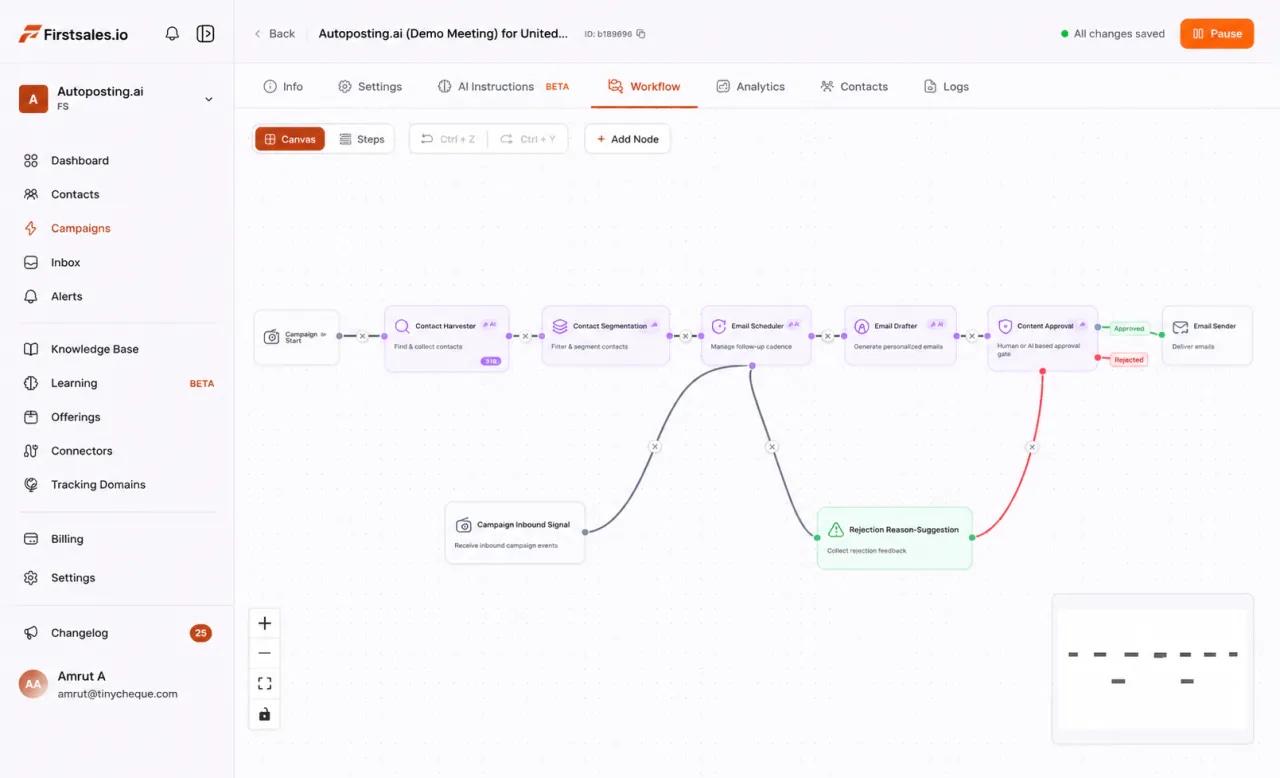
Each job is a step in one campaign workflow: Contact Harvester, Segmentation, Email Scheduler, Email Drafter, Content Approval and Email Sender. You can see every step, change it and check what it did.
Tell FirstSales who you sell to. AI agents look for matching people with AI search and Google Maps, then check every address before it is used. Contacts that would bounce are left out.
The Email Drafter writes each first email from the contact's company and role. Your knowledge base, offerings and writing profile tell it what you sell and how you sound.
New drafts wait in Needs approval. Read each one, then approve, edit or reject it. When you trust what it writes, turn on AI Autopilot and let approved campaigns run on their own.
Each follow-up is written for the same person, not copied from the first email. The sequence stops on a reply or an opt-out, so nobody gets chased after they answer.
Connect Google Calendar or Outlook Calendar. In a meeting campaign, FirstSales offers your booking times, and with AI Autopilot on it answers interested replies for you.
Every lead moves through the same six stages. The tag on each stage shows who owns it. You can move the line: turn on AI Autopilot to hand more over, or keep every email in the approval queue.
Builds a list of people who fit your ideal customer and checks each address.
Drafts a first email for each person from their company and role, in your tone.
You read the drafts in Needs approval. Approve, edit or reject each one.
Sends from your mailboxes and follows up until the person replies.
Replies land in Unibox. You answer the ones that need a person.
In a meeting campaign, offers your booking times so the meeting lands on your calendar.
Prefer to write every email yourself? Template mode sends your own words with no AI writing at all. You still get lead finding, contact checks, warm-up, follow-ups that stop on a reply and one inbox for every answer.
This is the real FirstSales app with sample data. Open a campaign and you see each lead, each draft, each send and each reply. No black box.
A short, honest guide for founders and sales leads deciding whether to hand outbound to software.
A sales development rep finds leads, writes first emails, follows up and books meetings. An AI SDR does those same steps with software. It does not replace the person who closes the deal.
The AI writes from what you tell it. A clear ideal customer, a clear problem and a clear offer give it something true to say. A vague offer gives you vague emails.
Read the first drafts before they send. Fix the tone, add proof to your knowledge base and reject anything off. Turn on AI Autopilot once the drafts read like you, not before.
Start with one clear group of people: one industry, one role, one problem. A narrow list makes it easy to see what works, fix what doesn't and then widen the search with AI search or Google Maps.
Opens are a weak signal. Count replies from the right people and meetings booked. FirstSales shows sends, replies, bounces and meetings per campaign, so you can see which offer and which list earn real conversations.
A great email in spam does nothing. FirstSales warms up every mailbox for 21 days, checks each contact before it sends and grades each inbox, so the emails have a fair chance to be seen.
Hard objections, pricing talks and the call itself belong to you. The AI SDR clears the path so you spend your time there.
A short setup that makes every email better. Do it once, before the first campaign, and update it as you learn what your buyers answer.
“I have always struggled in cold outreach. However, Firstsales has provided an excellent tool for cold outreach.”
 Kaushal S.Founder, small business · G2
Real words from real users. No paid reviews.
“If you are looking to fix your sales pipeline, you should definitely try [it]. My open rate has increased drastically. The UI and UX are easy to understand, even for a beginner like me.”

Pooja Dhole
@ThisIsPoojaD
“One of the best email outreach tools I have ever seen in my 9 years of business experience. It has solved the problem of email outreach for my cold emails.”

Santhosh K.
Founder and CEO, small business
“User Interface, Ease of Use, Able to hit the inbox in the first attempt.”

Sadashiv B.
Founder, small business
What your week looks like when the repeat work runs on its own.
Outbound fits around everything else, until it doesn't.
The work runs every day. You step in where it counts.
Not a replacement for good salespeople. A way to keep outbound running without waiting to hire, train and manage someone for it.
| What you get | New SDR hire | FirstSales AI SDR |
|---|---|---|
| Time to first email | After hiring and training | After a short setup |
| Lead research | By hand | AI search and Google Maps |
| Personal first emails | As many as time allows | One per person, every day |
| Follow-ups | When remembered | Until a reply, every time |
| Contact checks | Varies | Before every send |
| Mailbox warm-up | Separate tool | 21 days, built in |
| Approval before sending | Manager review | Built in |
| Price | A full salary | From $29/mo |
| Start your $1 trial | ||
Can’t find yours? Write to us.
An AI SDR is software that does the repeat work of a sales development rep: finding leads, writing first emails, following up and booking meetings. FirstSales does these steps for you while you approve what goes out and take the calls.
Each email is written for one person from their company and role, using your knowledge base and offerings. The writing profile learns your tone from emails you really sent. You read and approve the drafts before they go out.
Yes. New drafts wait in Needs approval, where you approve, edit or reject each one. Turn on AI Autopilot only when you are happy with what it writes.
AI agents look for people who match your ideal customer with AI search and Google Maps. You can also import your own contacts. Every contact is checked before it sends, and Dirty contacts are skipped.
Yes. Connect Google Calendar or Outlook Calendar and run a meeting campaign. FirstSales offers your booking times in the email, and with AI Autopilot on it answers interested replies.
No. It does the repeat work so your people spend time on real conversations. Objections, pricing and the call itself stay with a person.
FirstSales protects the mailboxes it sends from. Each new mailbox warms up for 21 days in three phases, every contact is checked before it sends, SPF, DKIM and DMARC are checked when you connect, and each inbox gets a health grade watched every hour.
Plans start at $29/mo with unlimited mailboxes, warm-up and team members. You can try it for $1 for 3 days and cancel anytime from your dashboard.
Connect unlimited mailboxes and let AI agents find leads, write each email and follow up. Or send your own templates in manual mode. From $29/mo.
$1 for 3 days · Cancel anytime · No contract