One piece, sold as the whole
A tool that only writes emails still leaves you to find leads, check them, send them and handle replies somewhere else.
AI SDR software
Many tools do one part of outbound: a lead list here, a sender there. FirstSales is one AI SDR that finds leads, writes each email, follows up, books meetings and protects your inboxes. Here is how to compare it with anything else you are looking at.
$1 for 3 days · Cancel anytime · No contract
Leads, writing, sending and replies in one app
Approval queue before anything sends
Warm-up and health grade on every inbox
Unlimited mailboxes and team members
AI SDR software is new, and the label covers very different products. Some write emails but don't find leads. Some send but don't protect your domain. Some charge for every mailbox you add. A short demo rarely shows which is which.
A tool that only writes emails still leaves you to find leads, check them, send them and handle replies somewhere else.
Some tools send in your name with no review step. One bad email to the wrong list can cost you a domain and a reputation.
Per-mailbox or per-seat pricing punishes you for spreading your sending safely or adding a teammate.
A short, practical way to test AI SDR software with your own offer and your own buyers.
Take the eight questions below into every demo. Cross off any tool that can't answer them plainly, or that needs three other tools to cover the job.
Connect a mailbox, describe your ideal customer and read the first drafts. Judge the writing with your own eyes, and check how the tool treats contacts it can't verify.
Count replies from the right people and meetings booked, not opens. Keep the tool that starts real conversations without putting your domain at risk.
Take this list into every demo and trial. The left column is the question. The right column is how FirstSales answers it, so you have something to hold other tools against. A vague answer to any of these is an answer too.
Where do the leads come from, and are they checked before you send?
AI search and Google Maps, or your own import. Every contact is checked before it sends and Dirty contacts are skipped.
Is each email written for one person, or is it a template with a name swapped in?
Each email is written from the contact's company and role, using your knowledge base, offerings and writing profile.
Can I read and approve emails before they send?
Yes. Drafts wait in Needs approval. Turn on AI Autopilot only when you trust it.
Does it stop the moment someone replies or opts out?
Yes. A reply or an opt-out ends the sequence for that person.
Can it move an interested reply to a booked call?
Meeting campaigns offer your booking times from Google Calendar or Outlook Calendar.
Is warm-up included, and how do I see the health of each inbox?
21-day warm-up in three phases, a health grade per inbox and monitoring every hour, on every plan.
What does it cost to add mailboxes or teammates?
Nothing extra. Unlimited mailboxes, warm-up and team members on every plan.
Can I try it with real work before I commit?
$1 for 3 days, then from $29/mo. No contract, cancel anytime from your dashboard.
FirstSales puts the full outbound job in one app, so nothing falls into the gap between tools.
AI search and Google Maps find people who fit your ideal customer. No separate lead database to buy.
Each email comes from the contact's company and role, your knowledge base and your writing profile.
Needs approval holds every draft until you approve, edit or reject it. AI Autopilot is there when you want it.
21-day warm-up, contact checks before every send, SPF, DKIM and DMARC checks and a health grade per inbox.
Unibox puts every reply in one list, and the built-in CRM keeps contacts, companies and deals next to them.
Unlimited mailboxes, warm-up and team members on every plan, from $29/mo.
Here is each one, what good looks like, and how it works in FirstSales. Use the same lens on every tool on your list, and write down the answers so you can compare them later.
Good AI SDR software works with your real mailboxes, not a shared pool. In FirstSales you connect Google, Microsoft or any SMTP/IMAP mailbox, as many as you need.
Ask to see the steps behind an email. In FirstSales a campaign is a workflow you can open: Contact Harvester, Segmentation, Email Scheduler, Email Drafter, Content Approval and Email Sender.
Replies are the point of outbound. FirstSales brings every reply from every mailbox into Unibox, and stops the sequence for anyone who answered or opted out.
An AI SDR should move people to a call. Connect Google Calendar or Outlook Calendar and run a meeting campaign: FirstSales offers your booking times, and with AI Autopilot on it answers interested replies.
Sending more email from a cold domain is risky. FirstSales warms up every mailbox for 21 days, checks every contact before it sends and grades each inbox from its bounce rate and warm-up score.
There are three common paths. Each can work for the right team. Here is what each one asks of you in time, money and attention, so you choose with open eyes instead of finding out after the first quarter.
Path 1
A person who prospects, writes and follows up full time.
Good for
Watch out for
Path 2
A lead database, a sender, a warm-up tool, a verifier and a CRM, each paid for and set up on its own.
Good for
Watch out for
Path 3
One app that finds leads, writes, sends, follows up, books and keeps your inboxes healthy.
Good for
Watch out for
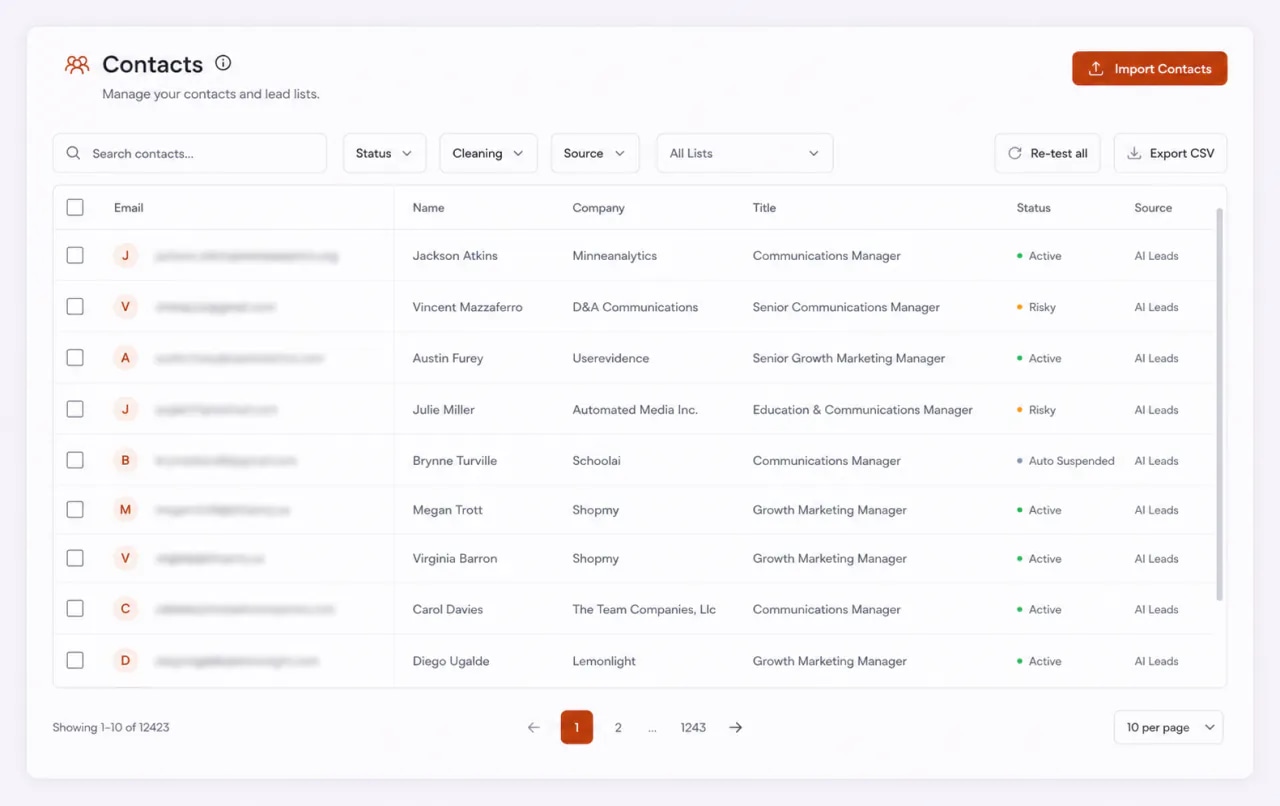
This is the real FirstSales app with sample data. The dashboard shows campaigns, drafts waiting for approval, sends and replies in one view. Ask every vendor to show you the same screen with real numbers, not a mockup.
Plain advice for founders, sales leads and agencies comparing tools.
Write down the steps you need done: find leads, check them, write, send, follow up, handle replies, book meetings. Then check which steps each tool really does and which it leaves to you.
Software that writes in your name should let you read its work first. Look for a review queue where you can approve, edit or reject, and a clear switch for when you hand over more.
Demos use the vendor's best example. In a trial, give the tool your own offer and your own ideal customer, then read ten drafts. If you wouldn't send them, neither should the software.
Check the price of one more mailbox, one more teammate and one more client. Safe sending means spreading volume across mailboxes, so per-mailbox pricing adds up fast.
Ask whether warm-up is included, whether contacts are checked before each send and how you see the health of each inbox. An AI SDR that lands in spam books nothing.
Leads, emails, replies and deals spread across tools are hard to act on. A built-in CRM and one inbox for replies save the copying and the gaps.
Software breaks in small ways: a mailbox disconnects, a record won't verify, a draft reads wrong. Before you buy, find out whether real people answer support and how fast. FirstSales has real support, and most questions get an answer the same day.
Run these checks in any trial before you decide. They take one sitting, and they tell you more than any sales call.
“One of the best email outreach tools I have ever seen in my 9 years of business experience. It has solved the problem of email outreach for my cold emails.”
 Santhosh K.Founder and CEO, small business · G2
Real words from real users. No paid reviews.
“I have always struggled in cold outreach. However, Firstsales has provided an excellent tool for cold outreach.”

Kaushal S.
Founder, small business
“User Interface, Ease of Use, Able to hit the inbox in the first attempt.”

Sadashiv B.
Founder, small business
“One of the biggest pains in cold email is making sure that you have your DNS setup correctly. Firstsales has created a system to make sure you have done this correctly.”
Mike O
Trustpilot review
What changes when the whole job runs in one app.
Each piece works. The gaps between them don't.
One app, one login, one place to look.
What to check on every tool. Where we don't know what another tool does, we say it varies.
| What you get | Typical AI SDR tool | FirstSales |
|---|---|---|
| Lead finding | Varies | AI search and Google Maps |
| Contact checks | Varies | Before every send |
| Personal emails | Varies | From company and role |
| Approval before sending | Varies | Needs approval queue |
| Meeting booking | Varies | Google or Outlook Calendar |
| Warm-up | Varies | 21 days, included |
| Mailboxes | Varies | Unlimited on every plan |
| Team members | Varies | Unlimited on every plan |
| Built-in CRM | Varies | Contacts, companies and deals |
| Price | Varies | From $29/mo |
| Start your $1 trial | ||
Can’t find yours? Write to us.
AI SDR software does the repeat work of a sales development rep with AI: finding leads, writing first emails, following up and booking meetings. Tools differ a lot in which of these steps they really cover.
List the steps you need done, then ask each vendor the same questions about leads, writing, approval, follow-ups, meetings, deliverability and price. Run a trial with your own offer and read the drafts yourself.
Both. FirstSales is an AI SDR that finds leads, writes and follows up, and it is also a full cold email platform with warm-up, contact checks, Unibox and a built-in CRM. If you prefer to write your own emails, Template mode sends them with no AI writing.
No. Drafts wait in Needs approval until you approve, edit or reject them. AI Autopilot is a choice you make per campaign when you trust the writing.
No. Every plan includes unlimited mailboxes, warm-up and team members. Plans start at $29/mo. See the pricing page for each plan's credits.
Yes. Give each client its own workspace, and give each teammate access to all workspaces or only the ones they work on. Billing stays with one organization.
Start a trial for $1 for 3 days. Connect a mailbox, build a first list and read the drafts. There is no contract and you can cancel anytime from your dashboard.
Yes. FirstSales has an API with an OpenAPI 3.1 spec, a CLI and an MCP server, so you can start campaigns, add contacts and read results from your own scripts or AI tools.
Connect unlimited mailboxes and let AI agents find leads, write each email and follow up. Or send your own templates in manual mode. From $29/mo.
$1 for 3 days · Cancel anytime · No contract