Client work gets mixed up
When every client shares one account, a contact list gets reused in the wrong campaign, or a follow-up goes out from the wrong mailbox. Tags and folders look like separation until the day they are not.
Team workspaces
Give each client, brand or team its own workspace with its own campaigns, contacts, mailboxes and knowledge base. Invite people with the right role, choose which workspaces they can open, and pay once for the whole organization. Workspaces and team members are unlimited on every plan.
$1 for 3 days · Cancel anytime · No contract
Unlimited workspaces and team members on every plan
Campaigns, contacts and mailboxes stay in their workspace
Five roles, plus access to all or specific workspaces
One organization, one bill, from $29/mo
Agencies and teams that run outreach for more than one client or brand tend to hit the same three problems. None of them shows up on day one. All of them show up by the third client.
When every client shares one account, a contact list gets reused in the wrong campaign, or a follow-up goes out from the wrong mailbox. Tags and folders look like separation until the day they are not.
A freelancer brought in for one client can open every other client's contacts and replies. Without roles and per-client access, the only safe choice is to share less and do more yourself.
Tools priced per seat or per account turn each new client into a new subscription and another login. The work grows, and so does a pile of invoices that nobody wants to reconcile.
The organization is the account you sign in to and the account you pay for. Workspaces sit inside it, one for each client, brand or team. Everything you run for a client lives in its workspace and stays there.
Organization
Workspaces
Dental clinics
Inside each workspace
B2B software
Inside each workspace
New business
Inside each workspace
Add as many workspaces as you need. The number of workspaces never changes your plan price.
You do not need a new account per client. You need a workspace per client and the right people in each one.
Create a workspace for a client, a brand or an internal team. Connect its mailboxes and add its knowledge base and Offerings inside it.
Give each person a role and choose whether they can open all workspaces or only specific ones. Use groups when a role is not quite right.
Switch between workspaces from one sign-in. Billing and credits stay on the organization, so a new client never means a new plan.
Five steps from one account to a workspace for each client, with the right people in each.
Start with a workspace for each client, brand or team you run outreach for. Each one has its own campaigns, contacts and lists, connected mailboxes, knowledge base and Offerings, so the copy, the facts and the senders for one client never end up in another client's campaign. Switch between workspaces from the same sign-in.
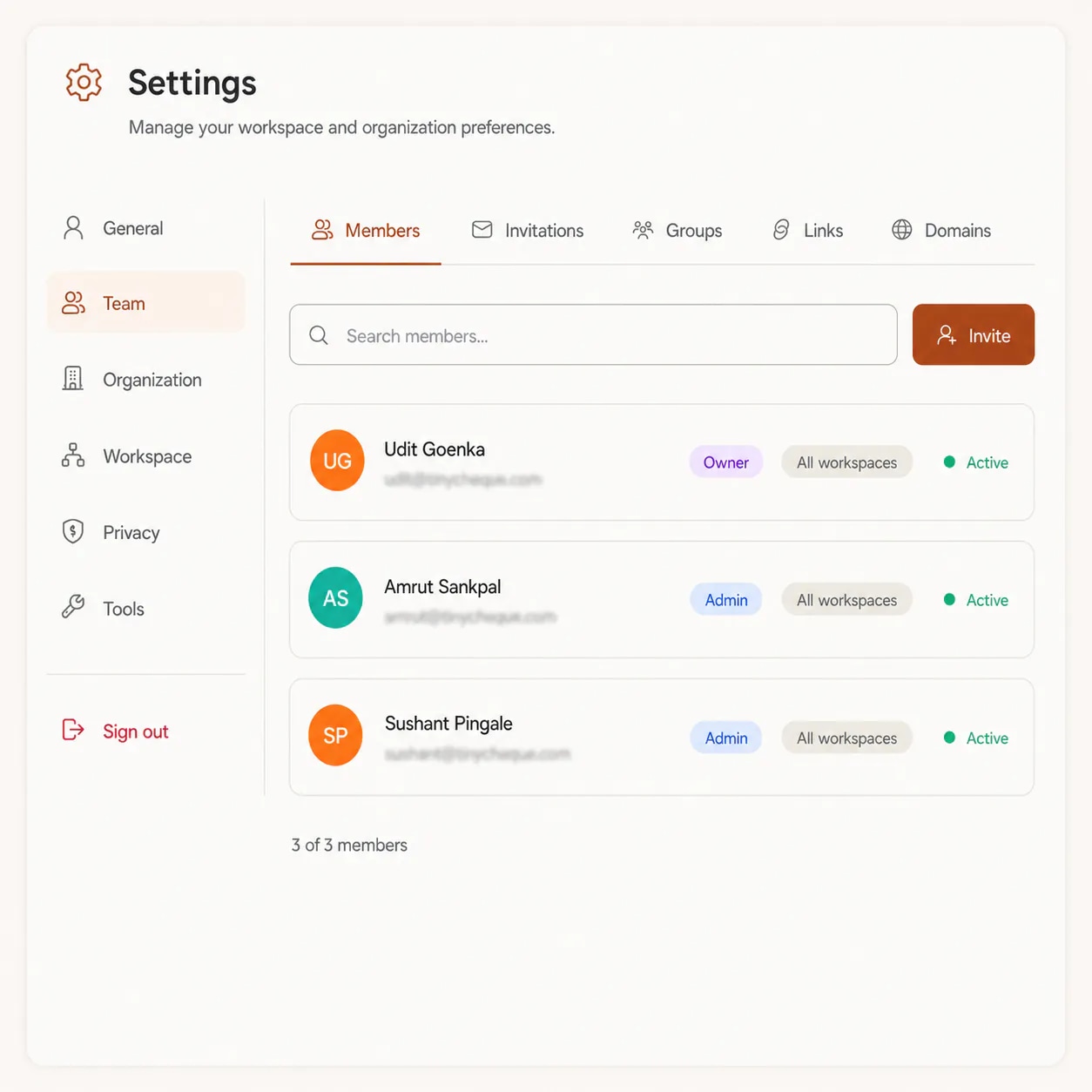
Invite teammates by email, several at once. Pick a role for each person: Admin, Manager, Member or Viewer. Then choose their workspace access: all workspaces, current and future, or only the specific workspaces you tick. Only owners and admins can give access to all workspaces, so a manager can never open the whole agency by accident.
Roles cover most people. For the rest, create a group and tick exactly the permissions it needs, across campaigns, contacts, lists, mailboxes, Unibox, knowledge base, Offerings and more. For example, a reviewer group can approve and reject drafts in Unibox without being able to launch or delete a campaign. You can only grant permissions you have yourself.
For larger teams, create an invite link tied to a group, with a limit on how many people can use it and the number of days before it expires. Revoke it whenever you like. Or add an allowed email domain: people who sign up with an email from that domain join your organization automatically, up to the role you set.
Billing and credits sit on the organization, not on each workspace. One plan covers every workspace you add and every person you invite, and every workspace draws on the same pool of credits. When someone leaves, suspend them to remove their access straight away without touching the work they did.
Each person gets a role, which decides what they can do, and an access setting, which decides which workspaces they can do it in. Put the two together and a junior on one client sees that client and nothing else.
| Role | What they can do |
|---|---|
| Owner | Full access to everything, including billing and transferring the organization. |
| Admin | Manages members, settings and all workspace content. |
| Manager | Manages campaigns, contacts and workspace content. |
| Member | Standard access to campaigns and contacts. |
| Viewer | Read-only access to workspace content. |
All workspacesCurrent & future
Every workspace you have now and every one you add later. Only owners and admins can give this access.
Specific workspacesPick a subset
Only the workspaces you tick. New workspaces stay hidden from this person until you add them.
Need something in between? Make a group with exactly the permissions you want, such as approving drafts without launching campaigns.
Workspaces work the same way for every kind of team. What changes is where you draw the lines. These are sample setups to start from, not rules.
The agency runs cold email for several clients. Each client gets a workspace with its own domain, mailboxes and knowledge base, so one client's facts never slip into another client's emails.
One company sells under more than one brand. Each brand has its own voice, Offerings and sending domain, but the same finance team pays for everything.
A sales team covers more than one market, with different lists and different times to send. Splitting by region keeps each team's contacts and replies in one place.
What changes when each client gets a workspace under one organization.
Add a workspace for every client, brand or team. The count never changes your plan price.
Campaigns, contacts, lists, mailboxes, knowledge base and Offerings each belong to one workspace.
Invite the whole team and your freelancers. There is no per-seat price.
Owner, Admin, Manager, Member and Viewer, each with a clear set of things they can do.
Open all workspaces to a few people and only specific ones to everyone else.
One plan and one pool of credits covers every workspace in the organization.
Habits that keep a multi-client setup tidy as it grows from three clients to thirty.
A workspace is the line that keeps one client's contacts, mailboxes and copy away from another's. If two clients share a workspace, that line is gone.
Use the client's name, not an internal code. When someone switches workspaces in a hurry, the name should be impossible to confuse.
Keep access to all workspaces for the few people who truly run the whole account. Everyone else gets specific workspaces.
Invite new people as Member or Viewer and raise the role once they need more. Taking access away later is harder than adding it.
Name groups after what people do, such as Draft reviewers or List builders, and give each group only the permissions that job needs.
An invite link without a limit is an open door. Set a use limit and a few days to expire, and revoke it once the team has joined.
Send each client's campaigns from that client's domain, connected inside its workspace. Replies then land in the right place.
When a freelancer finishes or a teammate moves on, suspend them straight away. Their access ends and their work stays where it was.
Run through this list each time you bring on a new client.
“I've been using FirstSales.io for several months now, and I can confidently say it has revolutionized how I approach lead generation and customer acquisition.”
 Paweł StelmachSmall business owner · Trustpilot
The same agency, set up two ways.
A login and a bill for each client.
One organization, a workspace per client.
What running several clients looks like each way.
| What you get | Separate accounts | FirstSales |
|---|---|---|
| Clients | One account each | Unlimited workspaces |
| Sign-in | One per account | One for everything |
| Team | Often per seat | Unlimited members |
| Roles | Varies by tool | Owner, Admin, Manager, Member, Viewer |
| Access | Whole account | All or specific workspaces |
| Custom permissions | Rarely | Groups |
| Joining | Invites only | Invites, links, allowed domains |
| Billing | A bill per account | One organization |
| Price | Grows with clients | From $29/mo |
| Start your $1 trial | ||
Real words from real users. No paid reviews.
“User Interface, Ease of Use, Able to hit the inbox in the first attempt.”

Sadashiv B.
Founder, small business
“One of the best email outreach tools I have ever seen in my 9 years of business experience. It has solved the problem of email outreach for my cold emails.”

Santhosh K.
Founder and CEO, small business
“I have always struggled in cold outreach. However, Firstsales has provided an excellent tool for cold outreach.”

Kaushal S.
Founder, small business
Can’t find yours? Write to us.
A workspace is a separate space inside your organization for one client, brand or team. It holds that client's campaigns, contacts and lists, connected mailboxes, knowledge base and Offerings.
The organization is the account you sign in to and pay for. It holds your members, groups, roles and billing. Workspaces sit inside the organization, one for each client or brand.
As many as you need. Workspaces and team members are unlimited on every plan, and adding one does not change your price.
Owner, Admin, Manager, Member and Viewer. The owner has full access, including billing. Admins manage members and settings. Managers run campaigns and contacts. Members have standard access. Viewers have read-only access.
Yes. Give them access to specific workspaces and tick only that client's workspace. They will not see any other workspace, including ones you add later.
Yes. Create a group and tick the exact permissions it needs, such as approving drafts without launching campaigns. You can only grant permissions you hold yourself.
Billing and credits sit on the organization. One plan covers every workspace and member. Plans start at $29/mo, you can try FirstSales for $1 for 3 days, and there is no contract.
Suspend them from the Members list. Their access ends straight away, and the campaigns and contacts they worked on stay in their workspaces.
Connect unlimited mailboxes and let AI agents find leads, write each email and follow up. Or send your own templates in manual mode. From $29/mo.
$1 for 3 days · Cancel anytime · No contract