Sent from a cold domain
A brand-new mailbox that suddenly sends hundreds of emails looks like spam to mail providers. Without a warm-up, your best email lands in a folder nobody opens.
Cold email outreach
Good cold email outreach is a short list of steps done well: a healthy domain, a clean list, a short email about the reader and polite follow-ups. This page walks through each one, and shows how FirstSales does the heavy lifting so you can focus on the replies.
$1 for 3 days · Cancel anytime · No contract
SPF, DKIM and DMARC checked when you connect
21-day warm-up before you send at volume
Every contact checked before each send
Follow-ups that stop when someone replies
When cold email gets no replies, the email is often not the problem. The message never reached the inbox, it went to the wrong people, or it was one try and done. Each of these has a fix, and none of them needs a bigger list.
A brand-new mailbox that suddenly sends hundreds of emails looks like spam to mail providers. Without a warm-up, your best email lands in a folder nobody opens.
Old, made-up and role addresses bounce. Every bounce hurts your sender reputation, so the next emails, even to good contacts, are less likely to arrive.
People miss emails. Without a few polite follow-ups you lose most of the replies you could have had, and you never learn what would have worked.
Cold email outreach works when you do three things in order. Skip one and the others work much less well.
Set up your domain records, warm up each mailbox and send only to checked contacts. This is the part people skip, and the part that matters most.
Write to one person at a time about their company and role, with one easy question. Short beats clever.
Follow up a few times, stop the moment they reply, and answer quickly. Turn interested replies into meetings while the interest is warm.
Each step on this page is something FirstSales does or checks for you, so good outreach is the default instead of extra work.
SPF, DKIM and DMARC are checked when you connect a mailbox, with the exact record to add if one is missing.
Every mailbox warms up over 21 days in three phases, on every plan, before you send at full volume.
Format, mail server, mailbox and disposable or role addresses are checked before each send. Dirty contacts are skipped.
Each email is written from the contact's company and role, or sent from your own template if you prefer.
FirstSales follows up until someone replies, and stops on a reply or an opt-out.
Unibox brings every reply from every mailbox into one list, next to the built-in CRM.
Do them in this order. Each step makes the next one work better, and the first two decide whether anyone sees your email at all.
Mail providers check three records to decide whether an email really comes from you: SPF, DKIM and DMARC. Many teams send from a separate domain so their main one stays safe. When you connect a mailbox, FirstSales checks all three and shows the exact record to add for any that is missing.
A new mailbox needs to build trust before it sends at volume. FirstSales warms up each mailbox in three phases over 21 days: days 1–7, 8–14 and 15–21. Watch each mailbox's warm-up score, and start real sends once it is ready.
Pick people who could buy, not everyone you can find. Find leads with AI search and Google Maps or import your own. Before each send, FirstSales checks every address for format, mail server, mailbox and disposable or role addresses, and skips the Dirty ones so they never hurt your reputation.
Use the five-part shape above: subject, opener, reason, ask, sign-off. FirstSales writes each email from the contact's company and role, using your knowledge base and writing profile, and you approve drafts before they send. Run A/B tests to learn which subject or angle gets more replies.
Send a few polite follow-ups, then stop. FirstSales stops a person's sequence the moment they reply or opt out, and brings every reply into Unibox. With a meeting campaign, it offers your booking times from Google Calendar or Outlook Calendar so interested people can pick a slot.
A good cold email is short and about the reader. Here is one example, split into its parts, with why each part is there. The example is made up for a sample company. Swap in your own buyer and offer.
1Quick question on hiring at Northwind
2Saw Northwind just opened two SDR roles.
3Most teams tell us ramping new reps is the slow part.
4Is that true for you too?
5Sam, Acme
Plain and specific. It reads like a note from a person, not a newsletter.
One true detail about their company shows you looked, and earns the next line.
Name a problem people in their role often have. Keep it to one sentence.
One easy question. A yes or no is simpler to send than a calendar slot.
Your name and company. No long signature, no images, no tracking-heavy links.
People are busy, and a first email is easy to miss. A short, polite track gives them a few chances to answer. Here is an example track you can start from. Change the days to suit your buyers.
Day 1First email
Short, personal, about them. One easy question at the end.
Day 4Follow-up
A new angle or a short example. Not "just bumping this".
Day 9Follow-up
Offer a two-line answer by email instead of a call.
Day 16Last note
Say you won't write again and leave the door open.
In FirstSales the track runs on its own and stops for a person the moment they reply or opt out.
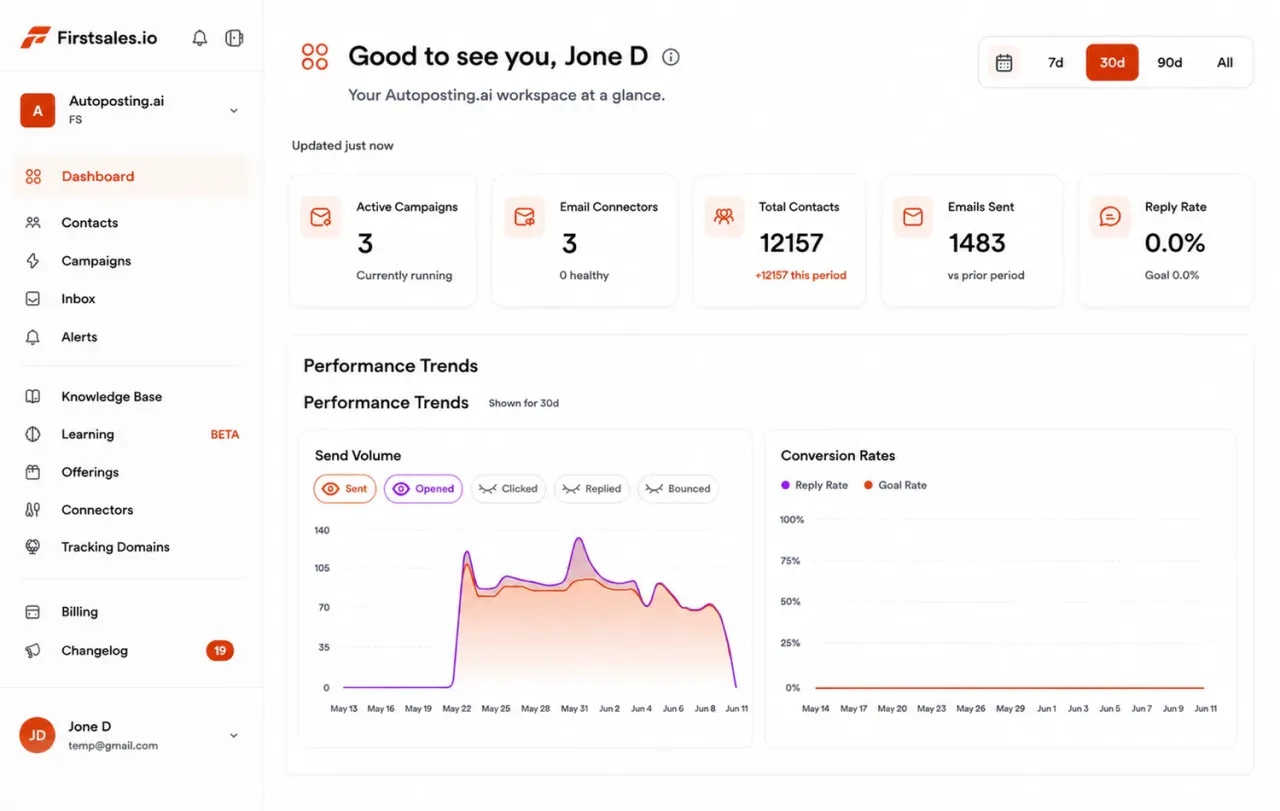
Once outreach is running, a few numbers tell you what to fix. This is a sample campaign in FirstSales: sends per day, bounces, replies and meetings, side by side. If bounces climb, check the list. If replies are low, change the email.
Plain advice that holds for any tool and any market.
Write down the role, company type and problem you solve in one sentence. A smaller list of the right people beats a big list of anyone, and it keeps bounces and spam complaints low.
Many teams send cold email from a second domain that looks like their main one. If something goes wrong, the domain you use for customers and invoices is not touched.
Start slow and grow over a few weeks. Sending a lot from a new mailbox on day one is one of the quickest ways to end up in spam.
A few mailboxes each sending a modest amount look more natural than one mailbox sending a lot. FirstSales includes unlimited mailboxes and rotates sends across them.
Most good cold emails fit on a phone screen without scrolling. Cut the company history and the feature list. Keep one detail about them, one reason and one question.
A first email that asks a simple question is easier to answer than one that asks for 30 minutes. Once they reply, offering times is natural.
A few follow-ups, each with something new, are polite. Many more are not. Always honour an opt-out straight away.
Open tracking is unreliable, and opens do not pay the bills. Watch bounces to check your list and replies to check your email.
Run through this before each new campaign. It takes a few minutes and saves weeks of silence.
“I have always struggled in cold outreach. However, Firstsales has provided an excellent tool for cold outreach.”
 Kaushal S.Founder, small business · G2
Real words from real users. No paid reviews.
“One of the best email outreach tools I have ever seen in my 9 years of business experience. It has solved the problem of email outreach for my cold emails.”

Santhosh K.
Founder and CEO, small business
“One of the biggest pains in cold email is making sure that you have your DNS setup correctly. Firstsales has created a system to make sure you have done this correctly.”
Mike O
Trustpilot review
“If you are looking to fix your sales pipeline, you should definitely try [it]. My open rate has increased drastically. The UI and UX are easy to understand, even for a beginner like me.”

Pooja Dhole
@ThisIsPoojaD
The same playbook, with the slow parts done for you.
Every step is a task on your list.
Every step is checked or done for you.
What each step of the playbook takes when you do it yourself, and when FirstSales does it.
| What you get | By hand | FirstSales |
|---|---|---|
| Domain records | Look up and test yourself | Checked on connect |
| Warm-up | Separate tool or skipped | 21 days, included |
| Finding leads | Manual research | AI search and Google Maps |
| Contact checks | Spreadsheet or none | Before every send |
| Writing | One template for all | Per person, from company and role |
| Approval | Your own review | Needs approval queue |
| Follow-ups | Reminders and memory | Automatic, stop on reply |
| Replies | Each inbox on its own | Unibox, all mailboxes |
| Booking | Back-and-forth emails | Times offered in the email |
| Cost | Your hours | From $29/mo |
| Start your $1 trial | ||
Can’t find yours? Write to us.
Cold email outreach is writing to people who don't know you yet, usually to start a sales conversation. Done well, it is a short, personal email to the right person, followed by a few polite follow-ups.
In many countries it is allowed for business contacts, within rules. The rules differ by country, so check the ones that apply to you. Always say who you are, write to people your offer is relevant to, and honour opt-outs straight away.
A few, spread over two or three weeks, each adding something new, is a common starting point. Stop as soon as someone replies or opts out. FirstSales does that stop for you.
Short enough to read on a phone without scrolling. One detail about them, one reason you're writing and one easy question is usually enough.
Mail providers are wary of new mailboxes that suddenly send a lot. Warming up builds trust slowly. FirstSales warms up every mailbox over 21 days in three phases, on every plan.
Set up SPF, DKIM and DMARC, warm up each mailbox, send only to checked contacts, keep volume modest per mailbox and write plain, personal emails. FirstSales checks or does each of these for you.
Yes. Template mode sends your own words with no AI writing. You still get warm-up, contact checks, follow-ups that stop on a reply and Unibox.
Start a $1 trial for 3 days. Connect a mailbox, let FirstSales check your domain records, build a first list and read the drafts. Plans start at $29/mo, with no contract.
Connect unlimited mailboxes and let AI agents find leads, write each email and follow up. Or send your own templates in manual mode. From $29/mo.
$1 for 3 days · Cancel anytime · No contract