#Cold subscriber list reactivation: the safe 2026 playbook
Copy page
TL;DR: Reactivating a dormant but opted-in subscriber list is not the same task as cold outreach, and treating it that way is the fastest way to tank sender reputation. Segment by true inactivity window first, run a small controlled re-engagement test before touching the full list, and be ready to suppress or delete anyone who does not respond. Done correctly, reactivation recovers real revenue. Done carelessly, it burns a domain.
Every list has a graveyard.
Subscribers who opted in two years ago, opened a few emails, then went silent. Nobody deleted them, because deleting subscribers feels like admitting failure.
That graveyard is now a deliverability liability. Google, Yahoo, and Microsoft weight recent engagement heavily when deciding whether your mail lands in the inbox or the spam folder, and a list padded with dead addresses drags the average down for everyone.
This guide covers how to reactivate the addresses worth saving, suppress the ones that are not, and avoid the legal and technical mistakes that turn a reactivation campaign into a deliverability disaster.
#What you will learn
- Reactivation vs cold email: why the distinction matters
- Step 1: define what "cold" actually means for your list
- Step 2: segment before you send anything
- Step 3: run a controlled test batch
- Step 4: the reactivation sequence structure
- Legal considerations: CAN-SPAM, CASL, GDPR
- Technical deliverability checks before reactivation
- When to suppress or delete instead of reactivating
- What to do with subscribers who still do not respond
- Measuring a reactivation campaign correctly
#Reactivation vs cold email: why the distinction matters {#reactivation-vs-cold}
A reactivation email goes to someone who opted in at some point, gave you consent, and has a documented relationship with your brand, even if that relationship has gone quiet.
A cold email goes to someone who never gave consent and has no prior relationship with you at all.
These are legally and technically different activities, and confusing them creates real risk. Under CAN-SPAM, CASL, and GDPR, an opted-in but dormant subscriber generally remains a legitimate recipient, provided your unsubscribe mechanism still works and you honor it. A stranger who never opted in is a different category entirely, governed by separate rules depending on jurisdiction.
Technically, the two also carry different deliverability risk profiles. A dormant list still has domain-level sending history tied to it: past opens, past clicks, past complaints. Cold prospecting to net-new addresses has none of that history, which is why cold email requires its own warmup and deliverability process entirely separate from list reactivation.
#Step 1: define what "cold" actually means for your list {#define-cold}
"Cold" is not a fixed number. It depends on your sending cadence and industry.
A rough framework:
- Weekly senders: no opens or clicks in 90 days is a strong cold signal
- Monthly senders: no opens or clicks in 180 days
- Quarterly or seasonal senders: no opens or clicks in 12 months
Pull your list and bucket every subscriber by last engagement date, not by signup date. A subscriber who joined 3 years ago but opened last week is not cold. A subscriber who joined last month and has never opened a single email might already be cold, and deserves separate handling.
Signup date tells you how long someone has been on the list. It tells you nothing about whether they still want to be there. Two subscribers who joined the same day can have completely different engagement histories a year later, one opening every send and one having gone silent after the welcome email. Bucketing purely by signup date treats both the same, which wastes reactivation budget on people who never needed it and delays action on people who genuinely went cold months ago.
Definition block: Sunset window is the length of time a subscriber can go without engaging before a sender moves them out of the regular send list and into a reactivation or suppression track. Most email platforms let you automate this window, and building one prevents cold subscribers from silently accumulating. See email sunset policies for how to set one up.
#Step 2: segment before you send anything {#segment}
Do not run a single reactivation blast to the whole cold segment. Segment first.
| Segment | Definition | Reactivation approach |
|---|---|---|
| Recently cold | Engaged 3-6 months ago, then stopped | Standard reactivation sequence |
| Long cold | No engagement in 12+ months | Smaller test batch, lower expectations |
| Never engaged | Opted in but never opened a single email | High risk, consider suppressing without attempting reactivation |
| Hard bounced historically | Bounced at least once in the past | Remove before any reactivation attempt, do not include |
| Complained historically | Marked spam at least once | Never re-add to any active send, permanent suppression |
The "never engaged" segment deserves special scrutiny. An address that has never opened, clicked, or interacted since the day it signed up is a strong candidate for a spam trap or an abandoned mailbox, both of which will hurt deliverability the moment you send to them again.
Pull this segment out and treat it as its own category, separate from everyone else who at least engaged once and then stopped. The two groups look similar on a raw signup report, but they carry very different risk profiles, and lumping them into one reactivation batch means the riskiest addresses ride along with the safest ones straight into your sending infrastructure.
#Step 3: run a controlled test batch {#test-batch}
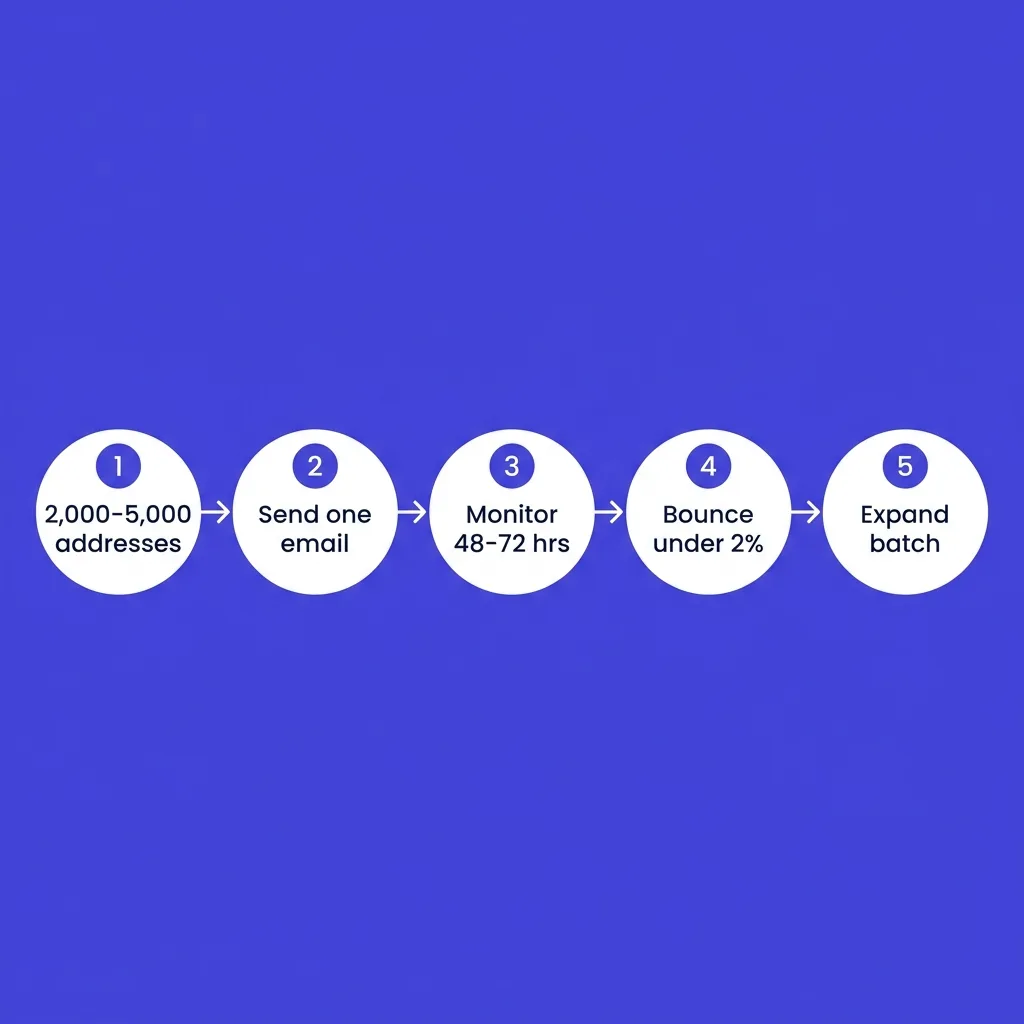 Step 3: run a controlled test batch {#test-batch}
Never reactivate a full cold segment in one send. Test on a small, representative sample first, then expand only if the results are healthy.
A safe test structure:
- Pull 2,000 to 5,000 addresses from your "recently cold" segment (the lowest-risk bucket)
- Send a single, low-pressure reactivation email
- Monitor bounce rate, complaint rate, and open rate for 48 to 72 hours before sending to anyone else
- If bounce stays under 2% and complaints stay under 0.3%, expand to the next batch
- If either threshold breaks, stop, investigate, and clean the list further before continuing
This staged approach protects your whole domain. A bad reactivation blast to 50,000 dormant addresses at once can spike your spam complaint rate high enough to affect deliverability for every other campaign you run afterward, including transactional mail.
#Step 4: the reactivation sequence structure {#sequence-structure}
A reactivation sequence is short: 2 to 3 emails, spaced further apart than a normal campaign.
Email 1: the honest check-in. Acknowledge the gap directly. "We noticed it's been a while" reads more honest than pretending nothing happened. Ask one clear question: do you still want to hear from us?
Email 2 (if no response, 5-7 days later): the value reminder. Show what they have missed, concretely. A specific feature launch, a specific piece of content, a specific offer. Vague "look what's new!" messaging underperforms specifics.
Email 3 (if still no response, 5-7 days later): the last call. Be direct that this is the final email before removal from the list. Give one clear action: click to stay, or do nothing and be removed automatically.
A last-call framing that explicitly threatens removal outperforms a vague final reminder, because it gives the reader a real reason to act now rather than defer indefinitely.
#Legal considerations: CAN-SPAM, CASL, GDPR {#legal}
This section is general practice guidance, not legal advice. Consult counsel for your specific jurisdiction and list history.
CAN-SPAM (United States): Generally permits reactivation emails to previously opted-in subscribers, provided the sender includes a working unsubscribe mechanism, honors opt-outs within 10 business days, and does not use deceptive subject lines or headers.
CASL (Canada): Requires either express or implied consent. Implied consent from a prior business relationship generally expires 2 years after the relationship ends, which matters directly for reactivation timing: a subscriber whose implied consent window has lapsed may require fresh express consent before you can legally re-contact them.
GDPR and PECR (EU/UK): Consent under GDPR must be specific, informed, and freely given, and it does not automatically expire on a fixed timer the way CASL's implied consent does. However, many data protection authorities treat a long period of total non-engagement as a signal that consent may no longer reflect current intent, which is part of why a reactivation email that explicitly re-confirms interest is good practice, not just good deliverability hygiene.
The practical takeaway across all three frameworks: an honest, clearly-labeled reactivation email that makes opting out trivially easy sits on solid ground almost everywhere. The risk grows when senders disguise reactivation as something else, bury the unsubscribe link, or keep emailing people who already opted out.
One frequently missed detail: honoring an opt-out means removing the address from every list it appears on, not just the campaign that triggered the complaint. A subscriber who unsubscribes from a newsletter but keeps receiving product announcement emails from the same brand will reasonably assume the opt-out was ignored, and may escalate to a spam complaint or a regulatory report instead of a second unsubscribe attempt.
Keep a documented consent record for every subscriber where possible: the date they opted in, the source (a form, an event, a purchase), and the date of their last engagement. This record is what protects a sender if a regulator or an email provider ever asks for proof of legitimate permission behind a reactivation campaign.
#Technical deliverability checks before reactivation {#technical-checks}
Before sending a single reactivation email, run these checks.
Verify the sending domain's SPF, DKIM, and DMARC are all correctly configured and passing. Bulk sender requirements from Google, Yahoo, and Microsoft treat these as a floor, not a bonus, and a misconfigured record can tank an otherwise well-targeted reactivation campaign.
Run the list through an email verification tool to catch hard bounces, syntax errors, and known spam traps before sending, not after. See catch-all email addresses for how to handle accept-all domains, which are common in old, dormant lists.
Check for any known blacklist listings on your sending domain or IP before starting reactivation, since a reactivation campaign layered on top of an existing reputation problem compounds the damage. See blacklist removal if you find an active listing.
Consider sending reactivation from a separate subdomain, isolated from your primary transactional and marketing streams. If the reactivation campaign underperforms, the damage stays contained rather than bleeding into your core sending reputation. See separating transactional, marketing, and outbound streams for the setup.
#When to suppress or delete instead of reactivating {#suppress-or-delete}
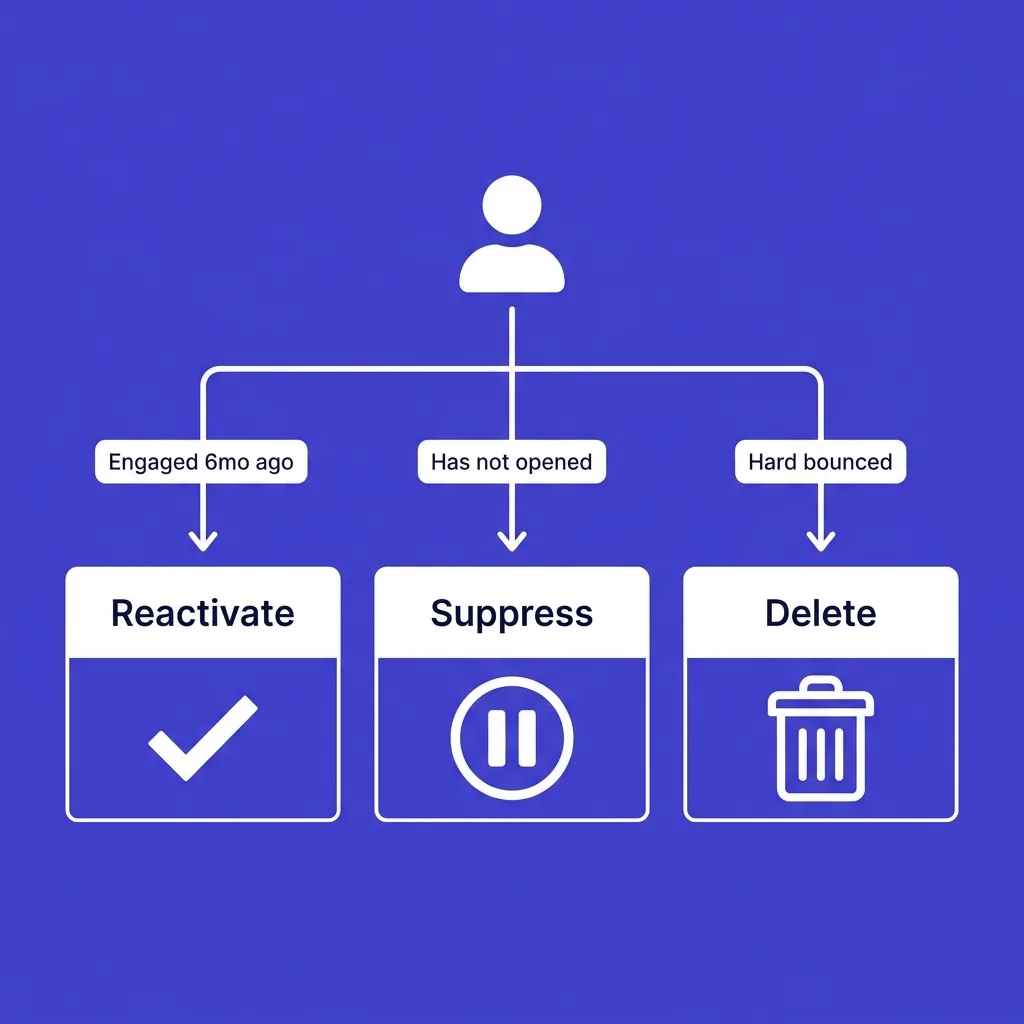 When to suppress or delete instead of reactivating {#suppress-or-delete}
Not every cold address is worth reactivating. Some should go straight to suppression or deletion.
| Signal | Reactivate | Suppress | Delete |
|---|---|---|---|
| Engaged within 6 months, then stopped | ✓ | ✗ | ✗ |
| Never engaged since signup, over 12 months old | ✗ | ✓ | ✓ (consider) |
| Hard bounced previously | ✗ | ✗ | ✓ |
| Complained previously | ✗ | ✓ (permanent) | ✗ |
| Role-based address (info@, sales@) with no engagement | ✗ | ✗ | ✓ |
| Implied consent expired under applicable law | ✗ | ✓ | ✗ |
Deletion is not failure. A smaller, engaged list consistently outperforms a larger, cold one on every deliverability metric that matters. Removing dead weight is what protects your ability to reach the subscribers who actually want to hear from you.
Marketing teams sometimes resist deletion because list size feels like a proxy for reach or company value. It is not. A list of 200,000 addresses with a 12% open rate performs worse, and carries more deliverability risk, than a list of 40,000 addresses with a 45% open rate. Inbox providers do not score you on list size. They score you on how the people on that list actually behave when your mail arrives.
#What to do with subscribers who still do not respond {#no-response}
After a 3-email reactivation sequence, anyone who has not engaged should move to one of two places: permanent suppression or deletion.
Suppression keeps the record for compliance and history purposes but stops all future sends. This is the safer default for most lists, since it preserves an audit trail.
Deletion removes the record entirely. This is worth doing periodically (annually, for example) to reduce database size and eliminate any residual risk from stale personal data, which also supports GDPR's data minimization principle.
Whichever path you choose, document the decision and the date. If a regulator or a subscriber ever asks why they stopped receiving mail, you want a clear, timestamped answer.
Build this into your platform's workflow rather than tracking it in a separate spreadsheet. Most modern email platforms support custom fields or tags for exactly this purpose, a suppression date field and a reason code, which keeps the record attached to the subscriber automatically instead of relying on a document that can get lost or fall out of date. A tagged record also survives platform migrations far better than a spreadsheet that someone forgets to export.
#Measuring a reactivation campaign correctly {#measurement}
Do not judge a reactivation campaign by raw open rate alone. Apple Mail Privacy Protection and other prefetching mechanisms inflate opens across the board, making the number less reliable than it used to be. See why email metrics moved past open rates for the fuller picture.
Better signals for a reactivation campaign specifically:
- Click-through rate on the "still want to hear from us" link, which requires deliberate action
- Reply rate, if your reactivation email invites a direct reply
- Unsubscribe rate (a healthy sign here, since it means genuinely uninterested people are self-selecting out)
- Post-reactivation engagement over the following 90 days, to confirm the win was not a one-time blip
A reactivation campaign that recovers 8% of a cold segment into genuinely engaged subscribers, while cleanly suppressing the other 92%, is a strong result. Chasing a higher recovery number by ignoring bounce and complaint signals is how reactivation campaigns turn into deliverability incidents.
Set the recovery expectation before you launch, not after. A team expecting a 40% win-back rate will read an 8% result as a failure and either abandon the process or push harder on the same cold segment, both of which cause more harm than good. A team that knows single-digit recovery is normal for genuinely dormant lists treats that same 8% as the win it actually is, banks the suppression cleanup as a second, equally valuable outcome, and moves on to the next quarter's sunset cycle.
If your team also runs prospecting outreach to net-new contacts, keep that motion entirely separate from list reactivation. A platform like FirstSales is built for cold, signal-based prospecting with its own warmup and deliverability monitoring, which is a fundamentally different job than reactivating an existing opted-in list.
#Reactivation email copy that works {#copy-examples}
Copy for reactivation emails follows a different logic than regular marketing copy, because the primary goal is a yes-or-no signal, not a sale.
Subject lines that perform:
- "Still want to hear from us?"
- "Quick question before we go quiet"
- "Is this still the right inbox for you?"
- "We noticed it's been a while"
Avoid subject lines that pretend nothing happened. A cold subscriber who gets a normal promotional subject line, with no acknowledgment of the gap, has no reason to open it over the dozens of other emails competing for attention that day.
Body copy structure that works for email 1:
State the gap honestly in one line.
Ask one direct question: do they still want these emails?
Give one clear action (a single button or link), and mention what happens if they take no action.
A short, honest reactivation email consistently outperforms a longer one packed with offers. The reader already checked out once. A wall of text and three competing calls to action gives them more reasons to ignore the email a second time, not fewer.
For the final "last call" email, be direct about the consequence. "This is the last email you'll get from us unless you click below" sets a clear stake and gives the reader an actual reason to act now instead of putting it off again.
#Common reactivation mistakes {#mistakes}
Sending the full cold segment in one blast. This is the single most common and most damaging mistake. It skips the test-batch step entirely and exposes the whole domain to risk at once.
Using the same list hygiene standards as an active list. A dormant list accumulates more invalid, abandoned, and role-based addresses over time than an actively-maintained one. Skipping a fresh verification pass before reactivation, because "we verified it two years ago," is asking for a bounce spike.
Pretending the gap did not happen. Reactivation copy that reads like a normal campaign, with no acknowledgment that the subscriber has been silent, feels tone-deaf and undercuts the honesty that makes reactivation work.
No clear removal consequence. A reactivation sequence that never actually threatens removal trains subscribers that ignoring your emails has no consequence, which defeats the purpose of running the campaign at all.
Reactivating instead of asking why they went cold in the first place. If a large share of a list went cold around the same time, that is a signal worth investigating before you spend budget trying to win them back. A content shift, a pricing change, or a deliverability problem in the past might be the real root cause, and reactivation alone will not fix a repeat of that cause going forward.
Ignoring segment-specific legal requirements. A single global reactivation email sent to a list spanning the US, Canada, and the EU without accounting for CASL's implied consent window or GDPR's stricter consent standards creates unnecessary compliance risk. Segment by region where your list size and geography justify it.
#Frequently asked questions
#What counts as a "cold" subscriber?
It depends on your sending frequency. Weekly senders should treat 90 days of no engagement as cold. Monthly senders can extend that to 180 days. There is no single universal number.
#Is reactivating a cold list legal?
Generally yes, if the subscriber previously opted in and your unsubscribe mechanism works correctly. Rules vary by jurisdiction (CAN-SPAM, CASL, GDPR), and consent can lapse over time under some frameworks, particularly CASL's implied consent window.
#How is list reactivation different from cold email?
Reactivation targets people who already opted in and have a documented relationship with your brand. Cold email targets people who never gave consent. They carry different legal footing and different deliverability risk.
#Should I send a reactivation campaign to my entire cold segment at once?
No. Start with a small test batch (2,000 to 5,000 addresses) from your lowest-risk segment, monitor bounce and complaint rates for 48 to 72 hours, then expand only if the results stay healthy.
#What bounce rate should stop a reactivation campaign?
If bounce rate exceeds 2% during a test batch, stop and clean the list further before sending to more addresses. That threshold aligns with current bulk sender requirements from Google and Yahoo.
#How many emails should a reactivation sequence include?
Two to three emails, spaced 5 to 7 days apart: an honest check-in, a value reminder, and a final last-call email that clearly states removal is coming.
#What happens to subscribers who do not respond to reactivation?
Move them to permanent suppression or delete their record entirely. Continuing to send to a non-responsive segment after a reactivation attempt only increases deliverability risk with no upside.
#Can I use the same domain for reactivation and regular marketing sends?
You can, but isolating reactivation on a separate subdomain limits the blast radius if the campaign underperforms, protecting your core sending reputation.
#Does CASL require fresh consent for old subscribers?
Implied consent under CASL generally expires 2 years after the last business interaction. A subscriber past that window may need express re-consent before further contact.
#What is a spam trap and why does it matter for reactivation?
A spam trap is an email address, often an old abandoned one, used by ISPs and anti-spam organizations to catch senders with poor list hygiene. Old dormant lists are more likely to contain them, so verification before reactivation matters.
#Should I include a discount or incentive in a reactivation email?
It can help, but lead with an honest check-in first. An incentive-only approach without acknowledging the gap can feel transactional and undercut trust.
#How do I know if my list needs a reactivation campaign?
If a meaningful share of your list has not engaged in 6 or more months, and you have never run a systematic sunset or reactivation process, it is overdue.
#What is the difference between suppression and deletion?
Suppression keeps the record but blocks all future sends, useful for compliance history. Deletion removes the record entirely, which supports data minimization requirements under GDPR.
#Can reactivation campaigns hurt my sender reputation?
Yes, if done carelessly. Sending to a large, unverified cold segment all at once can spike bounce and complaint rates enough to affect deliverability across your entire domain.
#How often should I run a reactivation campaign?
Most lists benefit from a reactivation pass once or twice a year, paired with an ongoing sunset policy that catches subscribers before they go fully cold.
#Do reactivation emails need special subject lines?
Yes. Avoid generic "we miss you" language that reads as automated. An honest, specific subject line ("Still want emails from us?") performs better and sets accurate expectations.
#Is it worth reactivating addresses that never opened a single email?
Usually not. A subscriber who has never engaged since signup is a higher-risk profile, potentially an abandoned mailbox or spam trap, and is often better suppressed without attempting contact.
#How does list reactivation affect BIMI or verified sender status?
A healthy engagement rate supports the reputation signals that BIMI and other trust indicators depend on. A reactivation campaign that damages engagement metrics can undercut those signals. See BIMI for cold email senders for the underlying mechanics.
#What tools help verify a list before reactivation?
Dedicated email verification services catch hard bounces, invalid syntax, and known spam traps before you send. Running this check is worth the cost relative to the deliverability damage a bad batch send can cause.
#Should reactivation emails come from a real person or a brand name?
A named sender ("Sarah from [Brand]") often outperforms a generic brand-only sender name for reactivation specifically, since the honest, human framing matches the message content.
#Key takeaways
- List reactivation targets opted-in but dormant subscribers, a legally and technically different activity from cold outbound.
- Segment by real engagement history before sending anything, and test on a small batch first.
- A 2 to 3 email reactivation sequence, spaced 5 to 7 days apart, is enough: check-in, reminder, last call.
- Anyone who does not respond should move to suppression or deletion, not stay on the active list indefinitely.
- Keep reactivation and cold prospecting infrastructure separate to protect deliverability on both.
Run the test batch first, watch the numbers, and let the data decide how far to expand.