**TL;DR: Microsoft rolled out mandatory SPF, DKIM, and DMARC requirements for bulk senders in 2025 and tightened enforcement throughout 2026. New M365 domains need at least 14 days of age before you can send anything, and a 30-day ramp period before hitting 200 emails per day per inbox. Spam complaint rates above 0.10% trigger junk routing; above 0.30% risks outright blocking.
Basic Authentication for SMTP was retired on March 1, 2026, which breaks most legacy automation tools. SNDS - Microsoft's sender reputation portal - was also overhauled in June 2026. If you send cold email to Outlook.com, Hotmail, or Live.com addresses, this article covers every rule that now applies to you.**
#Why Microsoft's 2026 Rules Matter for Cold Email
Most cold email conversations in 2026 still revolve around Google. The spam rate caps, the bulk sender program, the Postmaster Tools dashboard - Google gets the coverage. But depending on your target market, anywhere from 35% to 55% of your prospect inboxes are running on Outlook or Microsoft 365.
Ignore Microsoft's rules and you are quietly burning more than half your list.
Microsoft's deliverability requirements went through a significant update cycle that started in early 2025 and continued hardening through mid-2026. The changes touch authentication, sending volume, tooling, and the infrastructure you use to connect your email automation. Some of the changes are similar to what Google announced for Gmail.
Others are distinctly Microsoft - stricter in some ways, more opaque in others.
The bottom line for cold email senders: Microsoft is no longer a softer target than Gmail. Both platforms now require full authentication, enforce complaint rate thresholds, and use engagement signals to route your messages. The playbook that worked in 2023 - buy a domain, create an inbox, connect to an automation tool, and start sending 500 emails per day - does not work anymore on either platform.
This article covers the specific rules Microsoft has put in place for 2026, where they differ from Google's approach, and what you need to do to stay compliant and keep landing in the primary inbox.
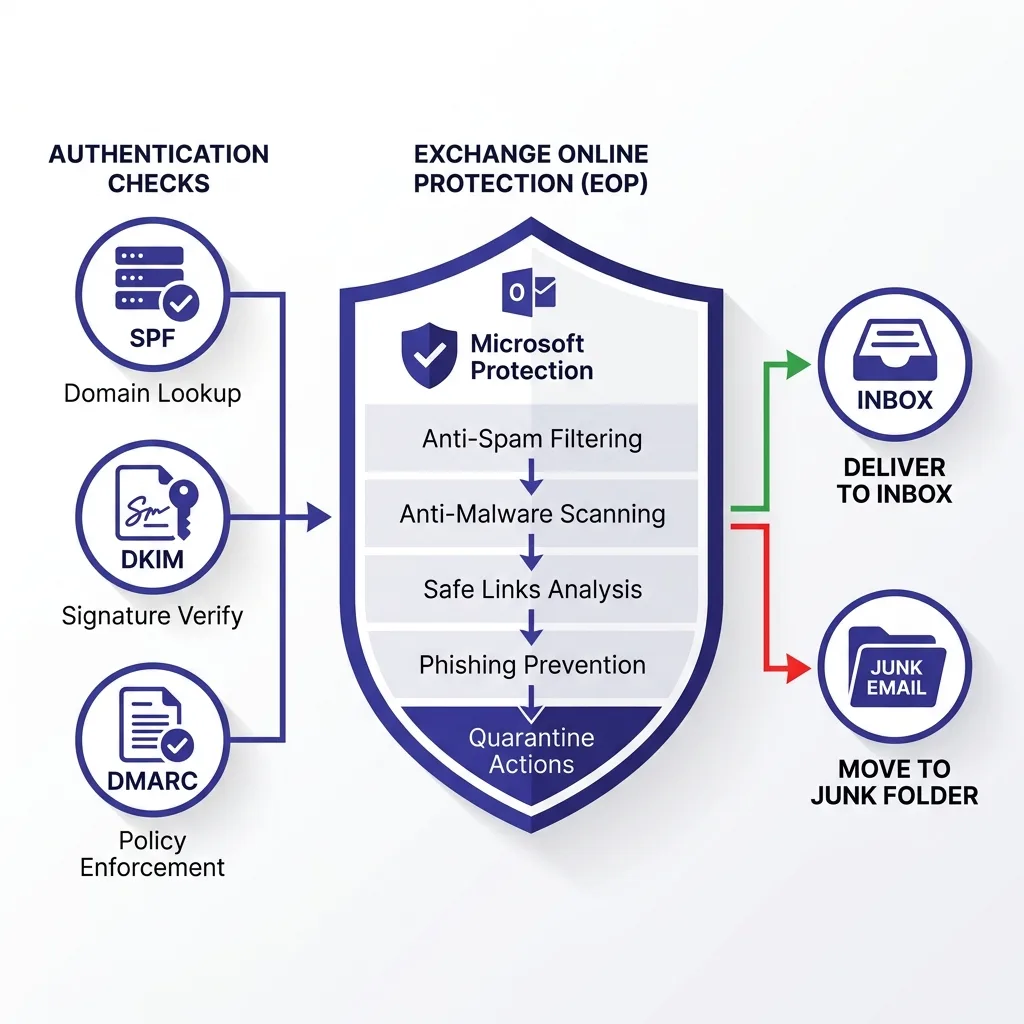 Diagram showing Microsoft's layered email filtering process from sender authentication through Exchange Online Protection to inbox routing
#Who These Rules Apply To
Microsoft draws a clear line at 5,000 emails per day to Microsoft consumer addresses. If you send more than that volume daily to Outlook.com, Hotmail.com, or Live.com addresses, you are classified as a bulk sender and the full set of 2026 requirements applies automatically.
For cold email teams sending to business addresses on Microsoft 365 - like firstname@company.com where the company runs M365 - the filtering rules apply through Exchange Online Protection (EOP), Microsoft's server-side spam filtering layer. EOP is the gatekeeper for every business inbox on Microsoft 365. The authentication and reputation rules still apply, but the complaint rate reporting works differently because business inboxes do not funnel complaints through the same feedback loop as consumer Outlook.com accounts.
The practical breakdown:
- Outlook.com / Hotmail.com / Live.com / MSN addresses: Direct Microsoft consumer accounts. The 5,000/day bulk sender threshold applies. Spam complaint data flows through Microsoft's JMRP (Junk Mail Reporting Program) and SNDS.
- Business M365 addresses: Filtered by EOP on behalf of the receiving company. Authentication requirements still apply, and EOP's sender reputation scoring affects delivery regardless of volume.
For most B2B cold email teams, your prospect list is dominated by M365 business addresses rather than consumer Outlook.com accounts. That means EOP is your primary concern, not the consumer bulk sender threshold. But the authentication requirements are identical, so the compliance setup is the same either way.
#The Authentication Trifecta: SPF, DKIM, and DMARC
Microsoft made SPF, DKIM, and DMARC mandatory starting May 5, 2025, and continued enforcement through 2026 with less tolerance for partial compliance. Missing any one of these three protocols is grounds for automatic junk routing across all Microsoft mail properties.
Here is what each record does and what Microsoft specifically requires:
SPF (Sender Policy Framework)
Your SPF record tells Microsoft which IP addresses and mail servers are authorized to send email on behalf of your domain. Microsoft checks this on every inbound message. If your sending tool's IP is not listed in your SPF record, Microsoft's filters treat that as a red flag - even if DKIM passes.
The key pitfall with SPF and cold email infrastructure is including too many third-party services. SPF has a hard limit of 10 DNS lookups. Most senders who chain multiple tools together (email warmup service + cold email platform + transactional email provider) blow past this limit without realizing it, which causes SPF to fail intermittently.
Run dig TXT yourdomain.com and count your lookups before assuming your SPF is clean.
DKIM (DomainKeys Identified Mail)
DKIM attaches a cryptographic signature to each outgoing message that Microsoft can verify against a public key in your DNS. It proves the message was not tampered with in transit and confirms it originated from a server authorized by your domain.
Microsoft requires a minimum DKIM key length of 1024 bits, but 2048-bit keys are strongly recommended for 2026 and beyond. Some older cold email platforms still generate 1024-bit keys by default. Check yours.
If your cold email tool lets you configure DKIM through a custom domain, use it - sending through a shared subdomain (like mail.sendgrid.net) without domain alignment will hurt your authentication score in Microsoft's systems.
DMARC (Domain-based Message Authentication, Reporting, and Conformance)
DMARC tells Microsoft what to do when a message fails SPF or DKIM alignment checks. For cold email senders, a DMARC policy of p=none satisfies Microsoft's minimum requirement, but it gives you nothing in terms of protection. A p=quarantine policy is where most mature cold email programs land by 2026 - it keeps impersonation attempts from reaching your prospects while still allowing legitimate sending to flow through.
DMARC also sends you aggregate reports (RUA tags) showing where email claiming to come from your domain is originating. If you are not reading those reports, you are flying blind on whether your authentication is actually working.
For a full walkthrough of how to set up all three records for cold email domains, see our SPF, DKIM, and DMARC setup guide for 2026.
#Domain Age and the Ramp-Up Period
This is where Microsoft's rules differ most noticeably from Google's bulk sender framework. Microsoft enforces a minimum domain age and a structured ramp-up period that Google does not make as explicit.
The 14-day minimum age rule
New Microsoft 365 domains require a minimum of 14 days before they can send cold email without hitting immediate reputation throttles. During this window, Microsoft's systems are collecting signals about the domain - whether it has DNS records set up correctly, whether it starts receiving inbound traffic, whether warmup activity looks organic. Domains that bypass this window by jumping straight into cold email volume consistently land in junk.
In practice, this means when you register a new sending domain, you should configure authentication records on day one and start warmup traffic by day three or four - but you should not run any cold email campaigns until the domain is at least two weeks old.
The 30-day ramp to 200 emails per day
Even after the 14-day minimum, Microsoft expects a gradual ramp over 30 days before you reach 200 emails per day per inbox. The recommended starting point is 20 to 30 sends per day in week one, scaling up slowly with each passing week. Trying to compress this timeline by jumping from 30 to 150 sends in a single week will trigger EOP's volume-based filters.
This 200 emails per day ceiling matters more than it sounds. Many cold email playbooks from 2023 and 2024 assumed 50 to 100 sends per inbox per day was the safe zone. On Microsoft-hosted inboxes in 2026, the ceiling after a full ramp is closer to 150 to 200 per day, and that is only for inboxes with strong engagement signals.
For a brand new inbox on a 60-day-old domain, the practical safe ceiling is 30 to 50 per day. This is consistent with what the broader deliverability community has confirmed: the 5,000-per-inbox-per-day era is over, and most experts now put safe B2B cold volume at 10 to 50 per inbox per day depending on domain age and warmup history.
Engagement signals feed back into the ramp
Microsoft's ML-based engagement monitoring will throttle accounts showing open rates below 8% sustained over a rolling window. This is a relatively new signal in 2026. It means that if your cold email list quality is poor - high percentage of dead addresses, people who never open anything - Microsoft will interpret that as bulk spam behavior and compress your sending ceiling even if you are technically within volume limits.
This is why email verification before sending matters specifically for Outlook deliverability. Sending to unverified lists creates hard bounces and low engagement patterns that compound into reputation damage on Microsoft's systems.
#Complaint Rate Thresholds: Microsoft vs Google
Both Microsoft and Google now enforce spam complaint rate thresholds, but they work differently. Understanding the distinction helps you set the right monitoring approach.
| Metric | Google Gmail | Microsoft Outlook |
|---|---|---|
| Safe complaint rate | Below 0.08% (recommended buffer) | Below 0.10% |
| Warning threshold | 0.08% - 0.10% | 0.10% - 0.20% |
| Junk routing trigger | 0.10% | 0.10% - 0.20% |
| Hard block risk | 0.30% | 0.30% |
| Complaint visibility | Google Postmaster Tools (near real-time) | SNDS / JMRP (with lag) |
| Complaint data source | FBL + Postmaster reporting | JMRP + SNDS (being migrated 2026) |
| Bulk sender threshold | 5,000 emails/day to Gmail | 5,000 emails/day to Outlook.com |
| One-click unsubscribe required | Yes (bulk senders) | Not formally mandated, but expected |
| Authentication minimum | SPF + DKIM + DMARC mandatory | SPF + DKIM + DMARC mandatory |
The surface-level thresholds look similar between Google and Microsoft, but the enforcement mechanisms are different. Google gives you near real-time visibility through Postmaster Tools - you can see complaint rates shift within 24 hours and adjust. Microsoft's SNDS and JMRP data has historically had more lag, which means you can be accumulating complaints for several days before the data surfaces in your monitoring dashboard.
The 2026 SNDS overhaul (covered below) attempts to address some of this but has also introduced new complexity.
The practical implication: when sending to mixed lists that include both Gmail and Outlook addresses, calibrate your thresholds to Google's stricter standard (target below 0.08% complaint rate). That keeps you safe on both platforms simultaneously. If you are only sending to M365 business addresses, the consumer complaint rate data through SNDS does not apply anyway - you are operating under EOP's enterprise reputation scoring instead.
For context on how Google's rules compare in detail, see our breakdown of Google bulk sender rules and the 0.10% spam cap.
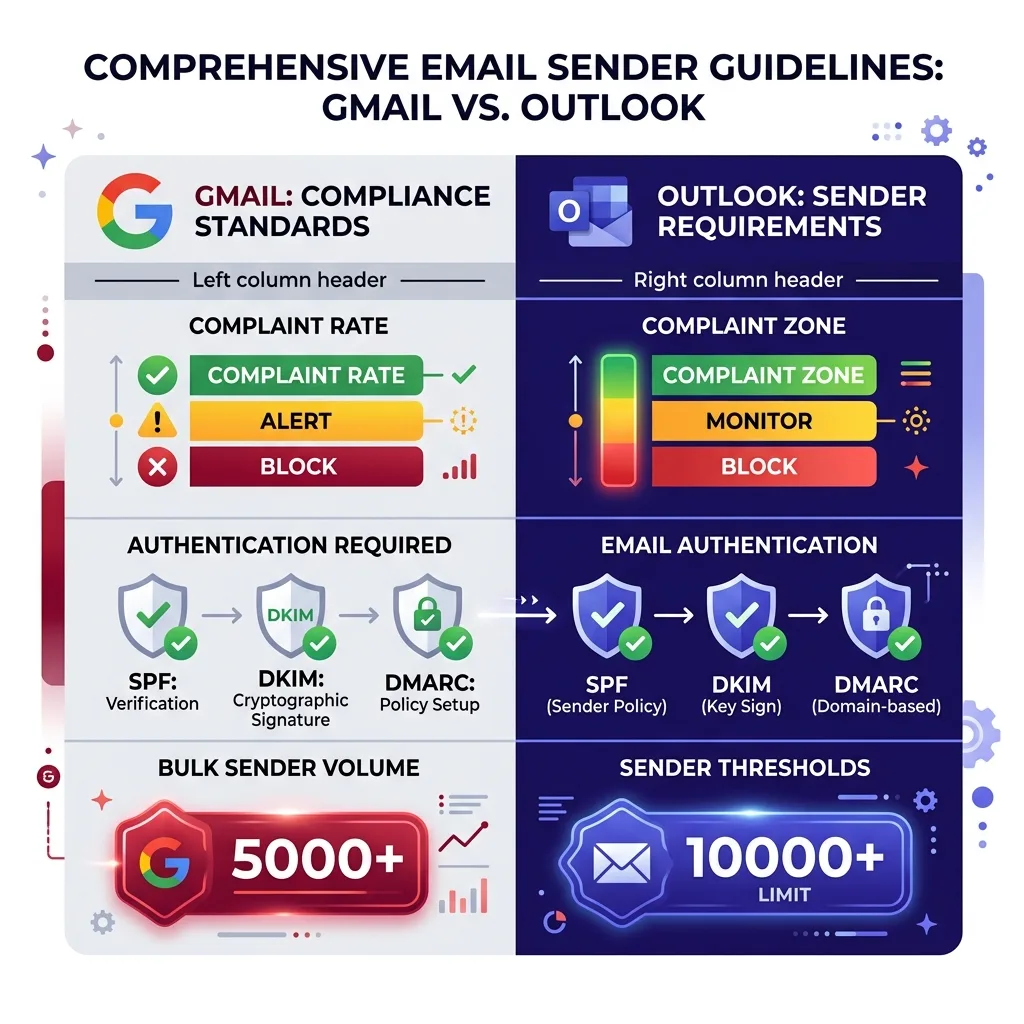 Chart comparing Gmail vs Outlook complaint rate thresholds, enforcement timelines, and authentication requirements side by side in a clean infographic format
#Basic Authentication Retirement and What Replaces It
This is the change that broke the most cold email setups in early 2026, and it is still catching teams off guard.
What happened on March 1, 2026
Microsoft permanently retired Basic Authentication for SMTP AUTH on March 1, 2026. Basic Authentication is the simple username/password method that most sales automation tools have historically used to connect to Microsoft 365 inboxes. When you configured your cold email tool with an Outlook email address and password, it was using Basic Auth to connect and send.
As of March 1, that connection method no longer works. Microsoft now requires OAuth 2.0 for all SMTP AUTH connections. If your cold email platform has not updated its Microsoft integration to use OAuth 2.0, you cannot connect your M365 inbox to it at all.
What this means in practice
Most of the major cold email platforms had OAuth 2.0 support for Microsoft connections before the March 2026 deadline, but not all of them. Smaller or older tools, custom-built outreach automation, and anything connecting through generic SMTP settings with a username/password combination is now broken for M365.
If your Microsoft 365 inboxes are not sending through your cold email tool right now, Basic Auth retirement is the most likely cause. The fix is to reconnect using your tool's Microsoft OAuth integration (usually a button that says "Connect with Microsoft" and opens a browser-based authorization flow) rather than entering credentials manually.
Dedicated SMTP as an alternative
Teams that cannot or do not want to use OAuth 2.0 - for example, teams running custom automation scripts - have moved to dedicated SMTP services that accept standard credential authentication and then handle the relay to Microsoft's infrastructure. This adds a layer but keeps legacy tooling functional.
For teams evaluating whether to stay on M365 or move to Google Workspace for cold email, the authentication change is worth factoring in. See our comparison of Google Workspace vs Microsoft 365 for cold email for a full breakdown of the trade-offs.
#SNDS: Microsoft's Reputation Portal (Now Overhauled)
Microsoft Smart Network Data Services (SNDS) is the equivalent of Google Postmaster Tools for Microsoft-hosted consumer inboxes. It gives senders visibility into their IP reputation, complaint rates, and spam trap hits for mail delivered to Outlook.com, Hotmail, Live.com, and MSN addresses.
What SNDS is and is not
SNDS is useful if you are sending directly from your own mail server with a static IP address. It reports data at the IP level, not the domain level. For cold email teams using a SaaS cold email platform, the IP your mail is sent from belongs to the platform's infrastructure, not to you - which means you likely cannot register that IP in SNDS and get complaint data back.
This is a key difference from Google Postmaster Tools, which reports at the domain level and is useful regardless of whether you are sending from your own server or through a third-party platform.
For cold email specifically, SNDS has limited direct utility unless you run your own mail server. Its primary value for SaaS-based cold email teams is monitoring whether your sending platform's shared IPs are healthy and not on Microsoft's blocked or heavily filtered IP ranges.
The June 2026 SNDS overhaul
Microsoft retired the original SNDS portal on June 8, 2026. The changes affect several things:
- All JMRP (Junk Mail Reporting Program) complaint feeds now must be linked to an SNDS account. Unlinked feeds were removed when the old portal shut down.
- The sender address in complaint reports is now redacted. The original message body is completely removed from complaint notifications. This breaks complaint attribution workflows that used to parse body content to identify which campaign triggered a complaint.
- Authentication workflows for accessing SNDS data have changed. Teams that had automated reporting pipelines pulling SNDS data via the old API need to update their integrations.
The practical impact on cold email teams is mainly for the minority running their own mail servers and using JMRP for complaint monitoring. If you were using automated complaint feed parsing to suppress addresses, you need to update that workflow to work with the new redacted format.
For most SaaS cold email platforms, the SNDS overhaul is something your vendor needs to handle on the backend. If your platform was surfacing Microsoft complaint data, check whether that data has continued flowing since June 8, 2026.
#How Outlook Filtering Differs From Gmail
Both platforms filter aggressively in 2026, but the mechanisms differ enough that a strategy tuned for Gmail can still underperform on Outlook.
IP reputation vs domain reputation
Google's filtering is heavily domain-reputation-based. Your sending domain builds a reputation over time that travels with you regardless of what IP you send from. Microsoft's filtering through EOP weights IP reputation more heavily alongside domain signals.
This is why shared IP infrastructure matters more on Microsoft than on Google. A cold email platform with poor IP hygiene - because other customers on the same shared IP are abusing it - will hurt your Outlook deliverability even if your domain is perfectly clean.
The solution is to use cold email platforms that offer dedicated IP options for M365 sending, or platforms that actively manage IP rotation and reputation on shared infrastructure.
Engagement signals and the 8% open rate floor
Microsoft's ML-based engagement monitoring in 2026 uses open rates as a signal in a way that Google's systems handle differently. Microsoft has been reported to throttle or filter more aggressively on accounts showing sustained open rates below 8%. Google's Postmaster Tools tracks spam rate rather than open rate as its primary public metric.
For cold email senders, this means list hygiene is not just about avoiding bounces - it is about targeting people who are actually likely to open. Spray-and-pray sending to massive unqualified lists will tank your open rate and trigger Outlook's engagement filters even if your spam complaint rate looks acceptable.
The role of the Bulk Complaint Level (BCL)
Microsoft 365's EOP assigns every inbound message a Bulk Complaint Level (BCL) score from 0 to 9. A BCL of 0 means the message is unlikely to be bulk email. A BCL of 9 means it almost certainly is.
Company IT administrators can configure their M365 tenants to route messages above a certain BCL threshold to junk. The default threshold in many M365 configurations is 6 or lower.
This means even if your message passes SPF/DKIM/DMARC, EOP might still route it to junk because your sending patterns look bulk-like. Factors that increase BCL include: high volume from a single sending IP, lack of personalization (identical messages to many recipients), low engagement history from that IP/domain combination, and content patterns common to mass marketing.
This is why sending frequency and per-inbox volume limits matter - the principles apply across both Gmail and Outlook even though the specific rules differ.
Content filtering differences
Microsoft's content filters are more sensitive to certain trigger patterns than Gmail's, particularly around link structures. Messages with multiple redirect URLs, link shorteners, or tracking pixels from unfamiliar domains score higher on EOP's bulk/spam indicators. Cold email tools that load messages with several tracked links perform noticeably worse in Outlook inboxes than in Gmail inboxes for this reason.
A practical workaround is to limit tracked links to one per cold email when targeting Outlook-heavy contact lists, or to use tracking domains that are closely aligned with your sending domain.
#The Microsoft Cold Email Compliance Checklist
Here is the complete setup and operational checklist for sending cold email that lands in Outlook and Microsoft 365 inboxes in 2026.
Domain and DNS setup
- Register sending domain at least 14 days before first campaign
- Publish a valid SPF record with all authorized sending IPs (stay under 10 DNS lookup limit)
- Enable DKIM with a 2048-bit key length minimum
- Publish a DMARC record (minimum
p=none;p=quarantinerecommended) - Verify all three records pass validation before starting warmup
- Use a dedicated sending domain separate from your primary business domain (to protect root domain reputation)
Warmup and volume
- Start warmup at 20 to 30 emails per day per inbox
- Ramp gradually over 30 days toward 150 to 200 per day maximum
- Do not run cold campaigns until domain is at least 14 days old
- Keep per-inbox cold email volume at 30 to 50 per day during first 60 days
- Monitor open rates - if they drop below 8% sustained, reduce volume
Authentication and tooling
- Confirm your cold email platform supports OAuth 2.0 for Microsoft 365 connections (required since March 1, 2026 - Basic Auth is dead)
- If using custom SMTP, switch to OAuth 2.0 or route through a dedicated SMTP relay
- Verify your platform's sending IPs are not on Microsoft's blocked IP lists before starting
List quality
- Verify email addresses before adding to any sequence targeting Outlook or M365 domains
- Remove addresses that hard bounce immediately
- Monitor complaint rate across all sending activity - keep below 0.10% as working ceiling
- Suppress unsubscribes immediately even though Microsoft does not yet formally mandate one-click unsubscribe for business email
Monitoring
- Register with SNDS if you run your own mail server (note: portal overhauled June 2026, update authentication workflows)
- Check Microsoft's sender support portal for any IP blocks before launching new campaigns
- Use your cold email platform's deliverability monitoring to track Outlook-specific inbox placement rates
- Review DMARC aggregate reports weekly to catch authentication failures early
Our email authentication setup guide covers the technical DNS configuration in detail if you need step-by-step instructions.
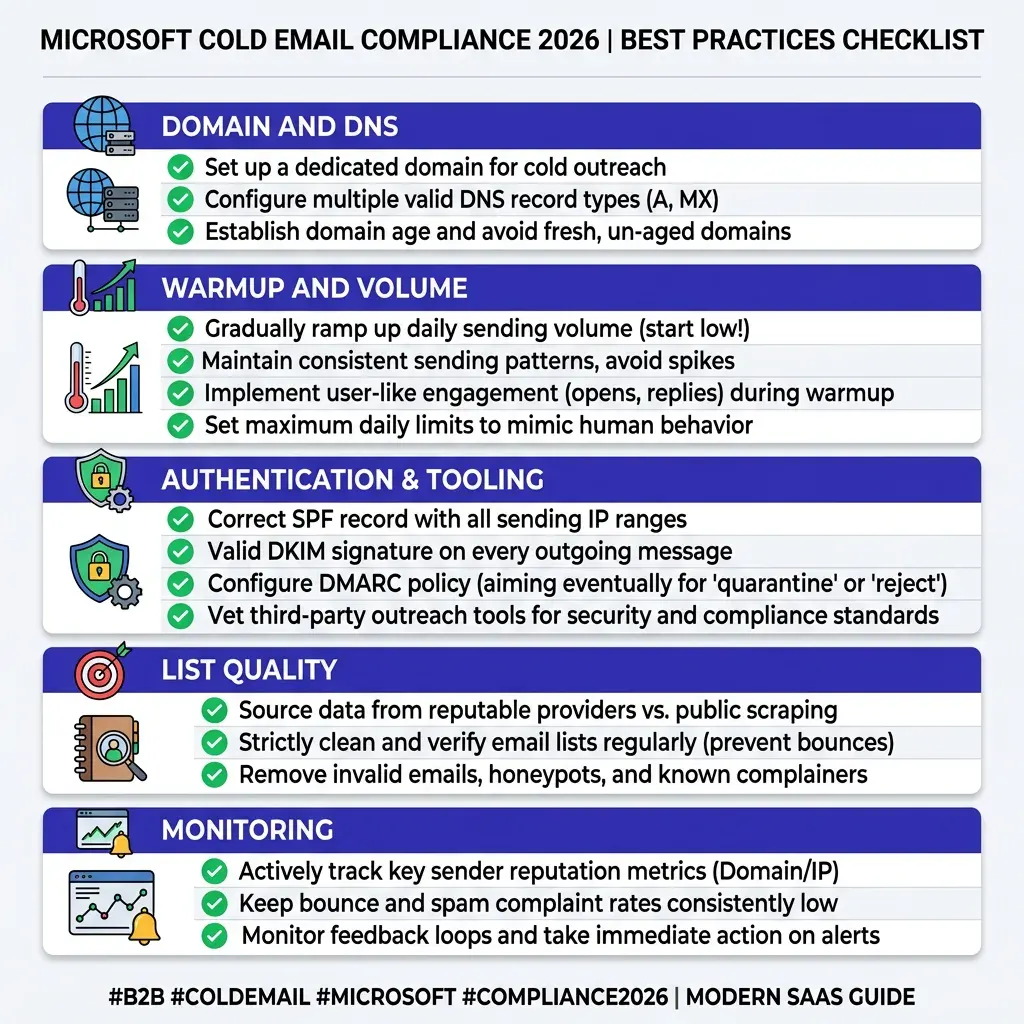 Infographic checklist of Microsoft Outlook cold email compliance requirements for 2026 - authentication, domain ramp, complaint thresholds, and tooling in a clean vertical flow layout with deep indigo and white color scheme
#Common Mistakes That Send You to Junk
Even technically compliant senders end up in Outlook junk folders. These are the patterns that surface repeatedly.
Connecting with Basic Auth after March 2026
If your Microsoft inbox suddenly stopped sending through your cold email tool in Q1 2026, Basic Auth retirement is almost certainly why. Re-connecting via OAuth 2.0 is the fix. This is not a deliverability issue per se - it prevents sending entirely rather than routing to junk - but it catches teams by surprise.
Sharing an IP with bad actors
On shared cold email infrastructure, your deliverability is partly a function of what other senders on the same IP are doing. A platform with poor customer vetting or no sending policies will have IP reputation problems that bleed into your campaigns. Check whether your platform offers IP isolation for Microsoft sending, or evaluate platforms based on their IP management practices.
SPF lookup limit overflow
Including too many include: statements in your SPF record causes SPF to fail for messages from any IP beyond the 10-lookup limit. This is an extremely common silent failure. Use an SPF record flattening tool to verify your lookup count.
A failing SPF record means EOP treats your messages as unauthenticated, which dramatically increases junk routing probability.
Sending to cold lists without warmup
Taking a fresh domain and sending 100 cold emails on day one is the fastest route to a junk sender reputation on Microsoft's systems. The 14-day minimum age and 30-day ramp exist for a reason. Skipping warmup can result in reputation damage that takes months to recover from, even if you stop sending and restart correctly.
High volume, low personalization
EOP's BCL scoring picks up on identical or near-identical message content sent to large recipient lists. Pure template blasting - same subject line, same body, same call to action to every recipient - reads as bulk spam regardless of whether your complaint rate is low. Even minimal personalization (first name in subject, company name in body) reduces BCL scores.
Ignoring bounce feedback
Microsoft's systems penalize senders who continue sending to addresses that hard bounced. Continuing to retry bounced addresses looks like a hallmark of spam operations. Remove hard bounces from your lists immediately.
DMARC misalignment
Having SPF and DKIM records is not enough if they do not align with the From: domain in your messages. DMARC alignment requires that the domain in your SPF mailfrom or your DKIM d= tag matches the domain in the visible From: header. Tools that send on behalf of your domain using their own infrastructure can create misalignment without you realizing it.
Check alignment explicitly using a DMARC testing tool.
For a deeper look at how Microsoft's filtering compares when choosing between M365 and Google Workspace as your sending infrastructure, see our guide on Google Workspace vs Microsoft 365 for cold email.
#FAQs
#Does Microsoft require one-click unsubscribe like Google does for bulk senders?
Microsoft has not formally mandated one-click List-Unsubscribe headers for business email senders in the same explicit way Google has for Gmail. However, Microsoft's filtering systems do consider engagement signals - including spam complaints - as proxies for unwanted email. In practice, including a plain-text unsubscribe option in your cold emails reduces complaint rates, which protects your Microsoft sender reputation.
Treat it as a best practice even if it is not yet a formal requirement. This may change: Microsoft typically follows Google's policy direction within 12 to 24 months.
#How does SNDS work and do I need it for cold email?
SNDS (Smart Network Data Services) is Microsoft's free sender reputation monitoring tool. It reports complaint rates and spam trap hit data at the IP address level for mail delivered to Outlook.com and Hotmail.com consumer accounts. If you send cold email through a SaaS platform rather than your own mail server, you likely cannot register the sending IPs in SNDS because they belong to your platform.
In that case, SNDS is not directly accessible to you - your platform's deliverability team should be monitoring those IPs. SNDS is most useful for teams running their own outbound mail servers. Note: the portal was overhauled in June 2026, so if you had an existing SNDS setup, verify your access and JMRP feed linking are still intact.
#What is the Bulk Complaint Level (BCL) and how do I lower it?
BCL is a score from 0 to 9 that Microsoft's Exchange Online Protection assigns to every inbound email. Higher scores indicate more spam-like bulk behavior. Many M365 tenant admins configure their junk mail settings to filter messages above BCL 6.
To lower your BCL score: send from well-warmed IPs and domains with strong authentication, personalize messages rather than blasting identical content, maintain clean lists with high engagement, limit the number of tracked links per message, and use tracking domains that are related to your sending domain. You cannot check your own BCL score directly - it is calculated at the receiver's end - but improving these factors consistently reduces it.
#My cold emails land in Gmail inbox but go to Outlook junk. Why?
The most common cause is IP reputation. Google's filtering is more domain-centric, while Microsoft's EOP weights IP reputation heavily alongside domain signals. Your cold email platform's shared IPs may have strong reputation with Google but weaker standing with Microsoft.
Other causes include: SPF/DKIM configuration issues specific to how your tool connects to Microsoft (especially if OAuth 2.0 migration was incomplete), message content that scores high on EOP's bulk detection (high tracked link count, templated content), or domain age and ramp issues if you launched campaigns too quickly. Start by checking authentication alignment for your Microsoft sending specifically - it is often different from your Gmail configuration if you are using different sending infrastructure for each.
#Do Microsoft's rules apply when sending to Microsoft 365 business accounts?
Yes, but through a different mechanism. The 5,000-per-day bulk sender threshold and the SNDS/JMRP complaint reporting specifically cover Outlook.com, Hotmail.com, and Live.com consumer accounts. Business Microsoft 365 accounts are filtered by Exchange Online Protection on the receiving company's tenant.
EOP applies its own reputation scoring, and the authentication requirements (SPF, DKIM, DMARC) apply equally. The main difference is that you do not get complaint data from EOP-filtered business addresses the same way you do through SNDS for consumer addresses. Your signal for deliverability to M365 business inboxes is inbox placement rate monitoring through your sending platform.
#How many cold emails per day can I safely send from a Microsoft 365 inbox?
After a proper 30-day ramp on a domain that is at least 14 days old, the safe ceiling for cold email volume from a single Microsoft 365 inbox is 150 to 200 emails per day. During the first 30 days, keep volume at 20 to 50 per day and increase gradually. These limits assume strong authentication, high list quality, and engagement rates above 8%.
If your engagement is lower or your domain is newer, stay toward the lower end. For comparison, the per-inbox safe volume question for Gmail follows similar principles - both platforms have moved well away from the high-volume-per-inbox approach that worked before 2024.
#Conclusion
Microsoft's 2026 sender rules close the gap that used to make Outlook a softer target than Gmail. SPF, DKIM, and DMARC are non-negotiable. Domain age and ramp periods are enforced.
Spam complaint rates above 0.10% trigger junk routing. Basic Authentication is gone. SNDS is being overhauled.
And EOP's engagement monitoring means list quality directly affects whether your messages reach the inbox.
The cold email senders who are doing fine in 2026 are the ones who approached Microsoft the same way they approached Gmail - with clean infrastructure, gradual ramps, verified lists, and monitored complaint rates. The ones struggling are still running 2022-era playbooks on 2026-era filters.
Microsoft accounts for a large chunk of your prospect list. Getting the infrastructure right is not optional - it is the foundation that every other part of your cold email strategy sits on.
If you want to run compliant, high-deliverability cold email campaigns without building and managing this infrastructure yourself, start your first campaign for $1 at FirstSales - built for teams who want results without burning their domains.