#Gmail Sending Limits 2026: What's Safe for Cold Email
Copy page
**TL;DR: Google Workspace accounts can officially send up to 2,000 emails per day. For cold email, the real safe number is 20-50 per inbox per day on a warmed, aged account - and closer to 10-20 during your first 30 days. The 5,000-per-inbox era died with the 2024 bulk sender mandate.
This guide gives you the tier-by-tier limits, the warmup ramp, and the math on how to scale without burning domains.**
#Table of Contents
- Why the Official Limit Is Not the Safe Limit
- Gmail Sending Limits by Account Tier (2026 Numbers)
- The Spam Complaint Rate That Actually Controls Your Fate
- What Killed the High-Volume Era
- The Warmup Ramp: Week-by-Week Schedule
- How to Scale Volume Without Burning Inboxes
- Gmail vs Google Workspace: What Changes at the Inbox Level
- The Technical Throttles Most Senders Miss
- Domain Age, Reputation, and the Hidden Multipliers
- Monitoring: How to Know Before Gmail Tells You
- Building a Safe Multi-Inbox Infrastructure
- FAQs
- Conclusion
#Why the Official Limit Is Not the Safe Limit
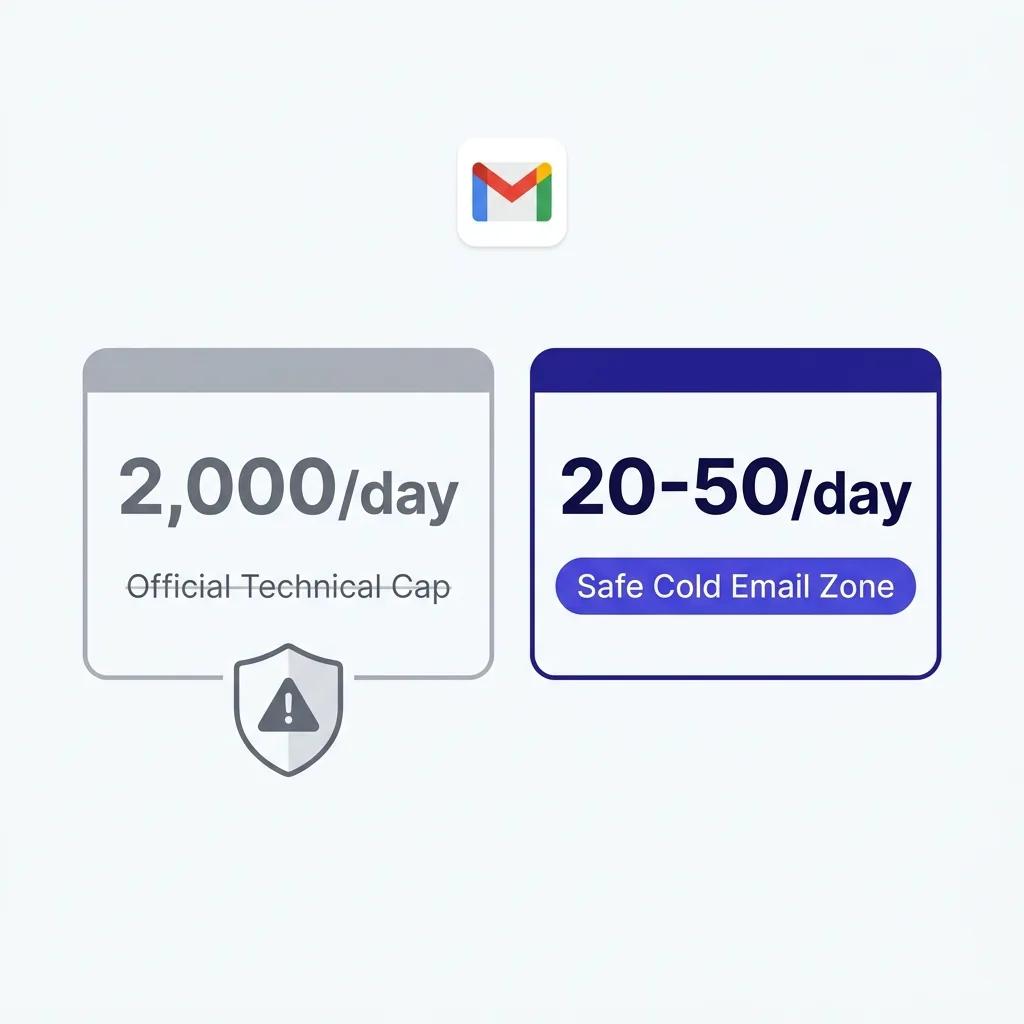
Google publishes a straightforward number: 2,000 emails per day for Google Workspace accounts. That number is real. It is also almost completely irrelevant to anyone running a cold email program in 2026.
Here is the disconnect. The 2,000-per-day cap is an absolute technical ceiling, the point at which Gmail's infrastructure physically stops accepting sends. It was designed with transactional emails, newsletters to opted-in lists, and internal corporate communications in mind.
It was never calibrated for cold outreach to people who have never heard of you and did not ask to hear from you.
Cold email is a fundamentally different category of sending. Your recipients have no prior relationship with your domain. They did not subscribe.
A meaningful percentage of them will hit the spam button the moment your subject line fails them. Even a 0.5% spam complaint rate - which would be excellent performance for many cold campaigns - puts you well above the 0.10% threshold Google now treats as its hard enforcement line for general email sending limits.
The result: you can technically send 2,000 emails in a day. Do it consistently with a fresh domain and a list of cold prospects, and you will see your domain blacklisted within two to four weeks. Sometimes faster.
The practical safe ceiling for cold email in 2026 sits at 20-50 emails per inbox per day for properly warmed accounts, and 10-20 per day during the first month. That is not a timid guideline from overcautious bloggers. It is the observed deliverability reality from agencies running hundreds of sending domains at volume.
 Gmail sending limit tiers diagram showing official cap vs safe cold email zone
#Gmail Sending Limits by Account Tier (2026 Numbers)
Before getting into what is safe, it helps to understand what the actual limits are across the different account types. Gmail serves several different user categories and the caps vary significantly.
| Account Type | Official Daily Limit | External Recipient Cap | Cold Email Safe Zone |
|---|---|---|---|
| Free Gmail (@gmail.com) | 500 emails/day | 500 unique external | 10-20/day (not recommended for cold) |
| Google Workspace Basic | 2,000 emails/day | 2,000 unique external | 20-30/day (warmed, aged) |
| Google Workspace Business | 2,000 emails/day | 2,000 unique external | 30-50/day (warmed, 60+ days old) |
| Google Workspace Enterprise | 2,000 emails/day | 2,000 unique external | 30-50/day (warmed, established domain) |
| Gmail SMTP API (App Passwords) | 2,000 emails/day | Same as tier | 20-30/day |
| New domain (0-30 days old) | 2,000 (technical) | 2,000 (technical) | 5-10/day maximum |
A few important mechanics to understand:
Rolling 24-hour window, not midnight reset. Google counts sends on a rolling 24-hour basis. If you send 400 emails at 11pm, those 400 still count the following day until 11pm. This catches a lot of senders who think they reset at midnight.
Recipients, not messages. The limit counts individual recipient addresses, not outgoing messages. One email to 50 people counts as 50 sends against your quota.
The 20 emails per hour soft throttle. Separate from the daily cap, Gmail applies a soft throttle at roughly 20 outbound messages per hour. Exceeding this consistently - even within your daily budget - can trigger a temporary 1-24 hour suspension of sending. Most cold email tools spread sends across the day specifically to avoid hitting this soft ceiling.
Bounces count. Rejected emails still count toward your quota. High bounce rates compound the damage because they consume your daily budget while also signaling poor list hygiene to Google's filters.
The practical takeaway from this table: even if you have a Business Workspace account with a technical ceiling of 2,000 per day, the safe operating range for cold outbound is a fraction of that number. The emails per inbox per day ceiling that protects your deliverability is determined by your reputation score, not your account type.
#The Spam Complaint Rate That Actually Controls Your Fate
Gmail's bulk sender guidelines - now fully enforced as of 2025 and carrying over into 2026 - introduced a spam complaint rate framework that is more consequential than any daily sending cap.
The headline numbers:
- 0.10% - Google's recommended maximum complaint rate for sustained inbox placement
- 0.30% - Hard enforcement threshold where Gmail begins rejecting your messages outright (error 550)
- 0.08% - The practical operational target that experienced cold email infrastructure teams aim for, equivalent to fewer than 1 complaint per 1,250 emails sent
These thresholds apply specifically to senders pushing 5,000+ emails to Gmail addresses per day - the technical definition of a "bulk sender" under Google's guidelines. But the behavioral signals that generate spam complaints affect everyone, regardless of volume.
The math reveals why the official 2,000-per-day limit is a trap for cold emailers. If you send 2,000 cold emails per day and even 6 people hit the spam button, you are at 0.30% - the hard enforcement line. With a well-targeted, personalized campaign, you might expect 0.5-2% of cold email recipients to mark as spam over time.
The only way to stay below 0.10% at volume is to have an extremely clean list, high relevance, and an audience that already knows your brand name.
None of those conditions describe typical cold outreach.
This is precisely why the Google bulk sender rules 2026 framework pushed the entire cold email industry toward lower-volume, higher-precision sending. You are not fighting the sending cap. You are fighting the complaint rate math.
Beyond the spam rate threshold, the 2026 bulk sender rules require:
- SPF authentication configured on your sending domain
- DKIM signing with a 1024-bit key minimum (2048-bit preferred)
- DMARC policy published at your domain (quarantine or reject recommended)
- One-click unsubscribe link in every commercial email
- Valid "List-Unsubscribe" header in the message
Missing any of these causes delivery failures independent of your volume or complaint rate. The authentication requirements are now table stakes, not differentiators.
#What Killed the High-Volume Era
Two years ago, a well-funded outbound team could run 500-1,000 emails per inbox per day across a roster of aged domains. That era is functionally over. Understanding what changed explains why the current limits are where they are.
The February 2024 mandate. Google announced in late 2023 and enforced starting February 2024 that all senders of 5,000+ daily emails to Gmail addresses must comply with the full authentication and complaint rate framework. This was not a recommendation. Senders who missed the deadline saw immediate delivery failures.
The permanent rejection escalation. Starting November 2025, Gmail began issuing 550-5.7.1 permanent rejections for senders outside compliance, rather than the softer temporary deferrals it had used previously. A temporary deferral means retry later and eventually deliver. A permanent 550 rejection means your email is gone.
This shift dramatically raised the stakes for non-compliance.
Postmaster Tools visibility. Google's Postmaster Tools now surface domain reputation scores in real time. ISPs, enterprise mail filters, and third-party blocklist operators all feed off the same underlying signals Google uses to classify senders. A single burned sending domain can shadow-damage the reputation of related domains if they share IP infrastructure.
AI-driven classification. Google has significantly upgraded its language-model-based spam classification. It can now identify templated cold email patterns - even well-personalized ones - at a signal level that was not possible three years ago. Volume and cadence patterns that were invisible to earlier filters now register as likely-spam signals before a single complaint is filed.
The Gmail permanent rejection 2026 landscape reflects all of this: non-compliant senders face hard bounces at the inbox level, not just junk folder placement. Getting yourself out of a permanent rejection requires submitting a sender review form and demonstrating sustained compliance over multiple weeks. There is no quick fix.
The consequence for cold email practitioners is that the economics of volume have inverted. Sending 10,000 emails across 5 inboxes was once cheaper per meeting than sending 1,000 across the same inboxes with better targeting. In 2026, that calculation flips: high volume burns domains faster than the meeting pipeline justifies, and the per-domain cost of replacement and warmup makes precision targeting the economically superior strategy.
#The Warmup Ramp: Week-by-Week Schedule
A new inbox has zero sending reputation. Google has no signal about whether this domain sends legitimate, wanted email. Until you build that signal through a structured warmup, you should not be sending cold outreach at all.
The warmup process works by establishing a positive behavioral history with Gmail: emails that get opened, replied to, and not marked as spam. Most senders use a warmup tool (Mailreach, Lemwarm, Instantly's warmup network, or similar) that automates this through networks of real inboxes exchanging positive-signal emails.
Here is a realistic week-by-week ramp for a new Google Workspace inbox:
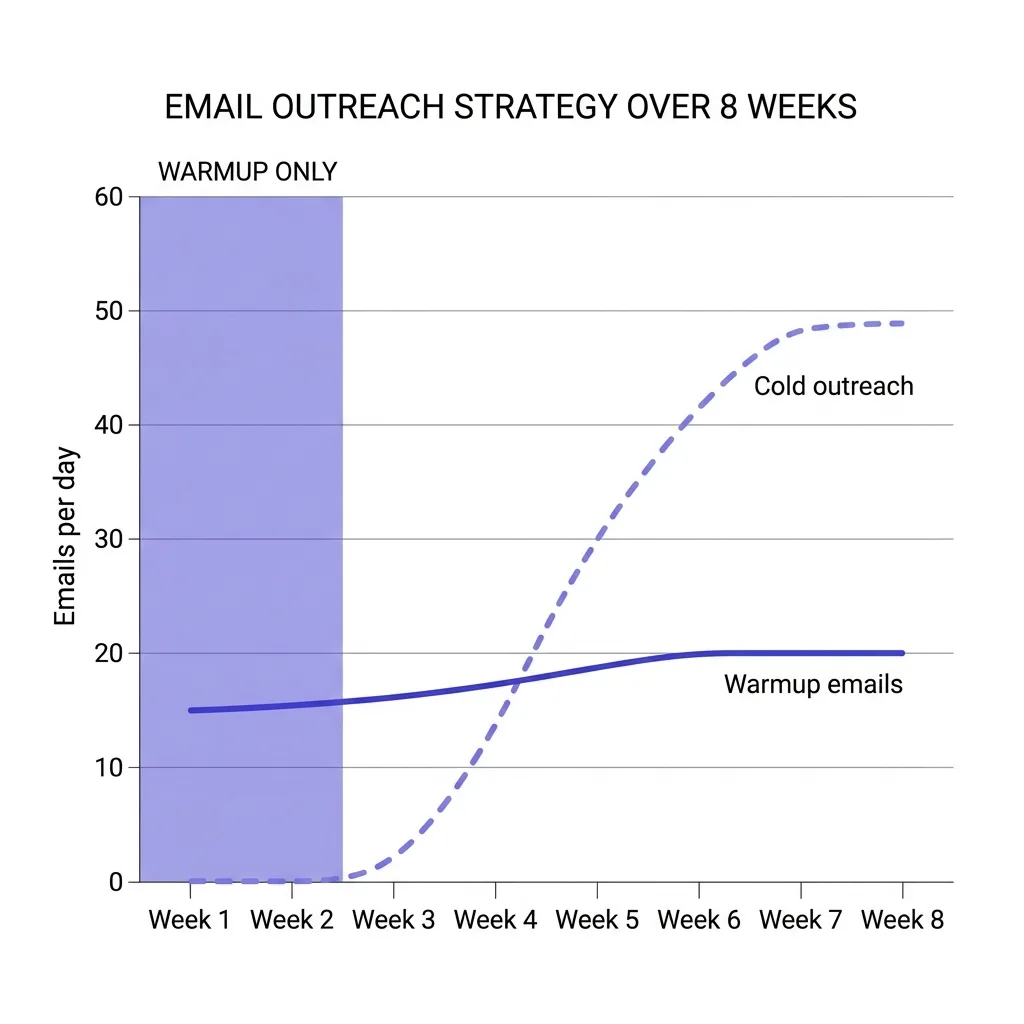
Weeks 1-2 (Days 1-14): Warmup only, 10-20 emails per day Send nothing but warmup emails during this period. The warmup tool handles all volume. No cold outreach.
Your domain needs to establish that it sends mail that people open and engage with.
Weeks 3-4 (Days 15-28): Warmup + light cold sends, up to 30 emails per day total
Begin mixing in a small number of cold sends - 5-10 per day maximum - alongside continued warmup. Total daily volume across warmup and cold should not exceed 30. Monitor open rates and bounce rates closely during this phase.
Weeks 5-8 (Days 29-56): Ramp to 40-50 per day
By week 5 on a domain with clean sending history and authentication fully configured, you can increase cold outreach to 20-30 emails per day while keeping warmup running at 20 per day alongside it. Do not spike volume suddenly. Increase by 5-10 per day, not by doubling.
Week 9 and beyond: Steady state at 50 per day maximum
Most cold email practitioners settle at 30-50 cold sends per day per inbox as the sustainable ceiling. Some sources report pushing to 80-100 on accounts that are 6+ months old with strong domain reputation, but this is the high end and requires a clean list and ongoing monitoring.
Warmup does not stop when you launch campaigns. Best practice in 2026 is to keep warmup tools running permanently at 20-30 emails per day even after your inbox is fully ramped. This maintains the positive-signal base that cold outreach alone cannot sustain, because cold outreach generates complaint and ignore signals that warmup emails counterbalance.
 Email warmup ramp chart showing week-by-week volume increase from 10 emails per day to 50 over 8 weeks
#How to Scale Volume Without Burning Inboxes
If the safe limit per inbox is 30-50 per day, how do you run a meaningful outbound program? The answer is infrastructure math, not limit-breaking.
The standard approach in 2026 for any serious cold email operation:
Multiple inboxes across multiple domains. Rather than pushing one inbox to its limit, you operate a fleet. Three inboxes sending 40 emails each delivers 120 cold outreach emails per day with minimal risk to any single account. Spread across different sending domains - not just different users on the same domain - so that a domain-level reputation hit does not take down your entire operation.
The domain-to-inbox ratio. Most practitioners run 2-3 inboxes per sending domain. This balances setup cost against risk. If a domain gets flagged, you lose 2-3 inboxes, not 10.
A 10-person outbound team running 3 inboxes per domain across 10 domains can deliver 900+ cold emails per day while staying within safe per-inbox limits.
Sending domain variety. Your primary domain (companyname.com) should never be used for cold email at volume. Cold outreach belongs on variant domains: getcompanyname.com, companyname.io, trycompanyname.com. If a variant domain burns, your primary domain's deliverability is unaffected.
Time distribution. Cold email tools worth using distribute sends across the business day with randomized intervals between messages. Sending 40 emails in 10 minutes looks like automation. Sending 40 emails spread across 8 hours with 5-15 minute gaps between each looks like a human.
Gmail's behavioral filters notice the difference.
The sending infrastructure question is as much about how you send as about how much you send. Tools that batch-blast versus tools that drip-send produce dramatically different deliverability outcomes at the same nominal volume.
#Gmail vs Google Workspace: What Changes at the Inbox Level
Free Gmail accounts (@gmail.com) are categorically unsuitable for cold email programs. The daily limit is 500 versus 2,000, the IP pools Gmail uses for @gmail.com sends carry lower trust scores with most corporate spam filters, and the accounts are trivially associated with consumer spam rather than business communication.
For outbound programs, you want Google Workspace accounts on custom domains. Here is what changes:
Deliverability infrastructure. Google Workspace accounts route through Google's business email infrastructure, which carries higher baseline trust with receiving mail servers than consumer Gmail. A @yourcompany.com address sending from Google Workspace's servers arrives with different reputation signals than @gmail.com.
Authentication control. With Google Workspace on a custom domain, you control your SPF, DKIM, and DMARC records. You cannot configure these on @gmail.com. This matters because the 2026 bulk sender rules require all three for compliant sending.
Postmaster Tools access. Google Postmaster Tools tracks reputation at the domain level, and you can only monitor your own sending domain. With @gmail.com, you have no visibility into your reputation score. With a custom Workspace domain, you can track domain reputation, IP reputation, spam rate, and delivery error rate in near real time.
The 500-per-day misunderstanding. You may encounter references to a 500-per-day limit for Google Workspace accounts used in cold email. This is not an official Google policy. It is a practitioner guideline that some high-volume agencies apply as an internal safe threshold.
Google's official Workspace limit is 2,000. The 500 figure reflects a conservative interpretation of when behavioral signals start accumulating negative weight, not a technical cap.
For context on how Google Workspace cold email compares to Microsoft's infrastructure, see Google Workspace vs Microsoft 365 for cold email.
#The Technical Throttles Most Senders Miss
Beyond the daily sending cap and the spam complaint rate, Gmail applies several technical throttles that cold email programs regularly run into without realizing it.
The per-hour soft cap. Sending more than roughly 20 emails per hour on a Workspace account triggers Gmail's rate-limiting response. This does not always manifest as a hard error - sometimes emails queue and deliver slowly, sometimes the account gets a temporary 1-24 hour suspension. Cold email tools worth using send at a rate of 1-2 emails per minute, which stays comfortably below this threshold.
SMTP connection limits. Gmail limits the number of concurrent SMTP connections. If you are connecting to Gmail's SMTP servers programmatically (rather than through the API), excessive concurrent connections trigger throttling. The standard recommendation is one connection per sending session with appropriate delays.
The alias counting rule. Emails sent from aliases within your Google Workspace account count against the same quota as your primary address. If you have [email protected] with aliases [email protected] and [email protected], all three share a single 2,000-per-day budget. Many senders discover this the hard way when adding aliases to increase apparent volume.
Auto-responder and bounce loops. Out-of-office replies sent to your cold emails count against your incoming limit and can trigger classification signals. More problematically, if your sends generate bounces above roughly 2-3%, Gmail treats this as a list hygiene signal. The email verification before sending step is not optional - it is a prerequisite for protecting your sender reputation.
API vs SMTP differences. Using Gmail's API (via OAuth) versus SMTP (via App Password or direct) has different throttling behavior. The API enforces quota in units (each message send call = 1 quota unit), while SMTP throttling is more behavioral. The Gmail API is generally the more predictable and stable path for programmatic sending.
#Domain Age, Reputation, and the Hidden Multipliers
Two domains with identical authentication, identical warmup periods, and identical sending volume can get radically different deliverability outcomes. The difference comes down to several factors that operate beneath the surface of any explicit limit.
Domain age. Google's trust models weight domain age heavily. A domain registered last week sending 40 cold emails per day looks different from a domain registered three years ago sending the same 40 per day. This is why acquiring aged domains (domains registered 1-2+ years ago that are currently unused) has become a common cold email infrastructure strategy.
Aged domains start with more trust, require shorter warmup periods, and tolerate slightly higher volumes before triggering behavioral filters.
TLD selection. .com domains carry higher baseline trust than many alternatives. .io has normalized for tech companies. Domains on less common TLDs (.club, .online, .xyz) carry lower baseline trust with spam filters. When building your sending infrastructure, .com and .io are the safest choices.
The TLD matters more now than it did three years ago.
Prior sending history. If your domain has a history of sending legitimate email before you start cold outreach - product updates to customers, invoices, support replies - that history provides positive reputation context. Domains used exclusively for cold email from day one start with less credit.
IP neighborhood. Email sent through Google Workspace routes through Google's shared IP pools for business senders. Your reputation is partially a function of who else shares your IP range and how they behave. Google's infrastructure is designed to isolate reputation at the domain level, but IP-level signals still influence how receiving servers classify your mail.
The email domain rotation discipline - rotating your cold sends across multiple domains rather than concentrating them on one - exists specifically to manage this reputation math. No single domain should carry your entire sending program.
#Monitoring: How to Know Before Gmail Tells You
Gmail rarely sends explicit warnings before taking action against a sending domain. The practical early warning system is monitoring your own data continuously.
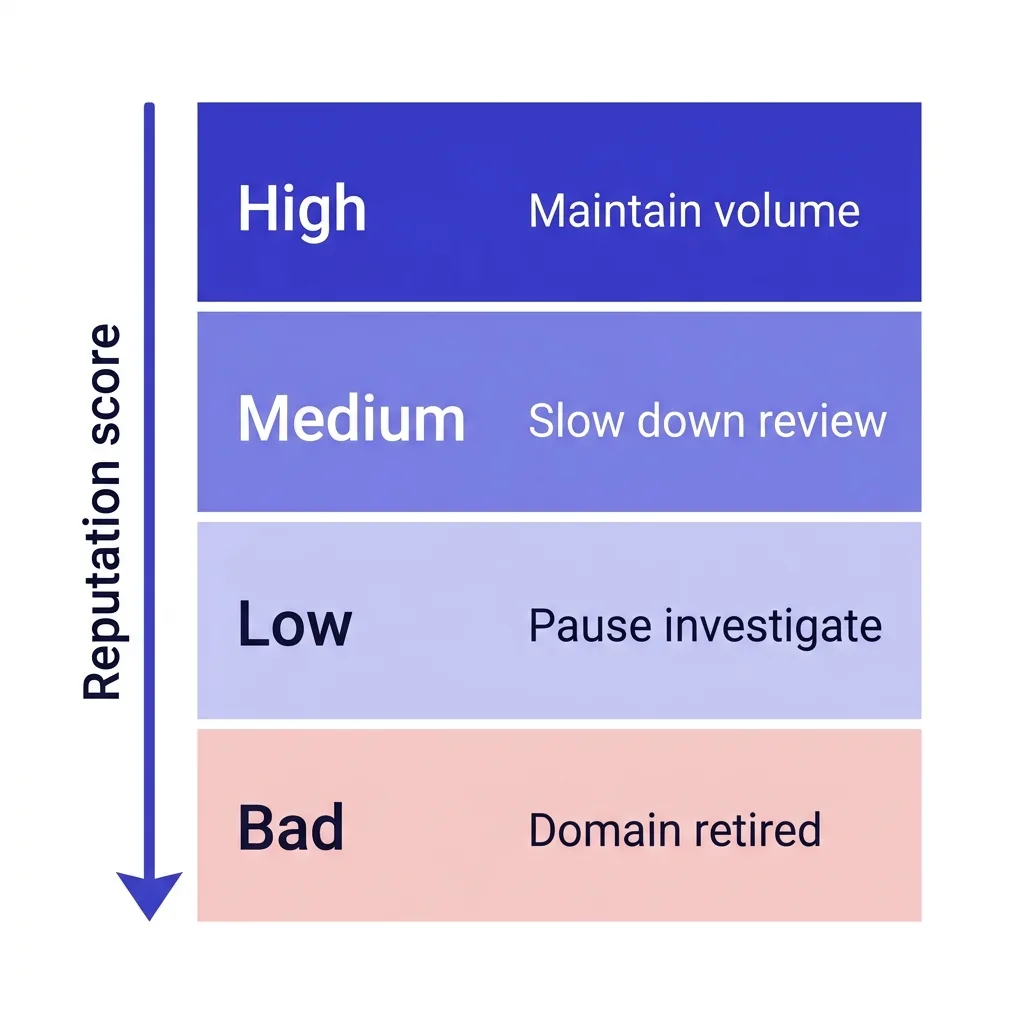
Google Postmaster Tools is the single most important monitoring tool for Gmail senders. It surfaces:
- Domain reputation score (Bad, Low, Medium, High)
- IP reputation score
- Spam rate (the percentage of your emails Gmail users mark as spam)
- Authentication pass rate (SPF, DKIM, DMARC alignment)
- Delivery error rate and error type breakdown
- Encryption rate
The spam rate shown in Postmaster Tools is not the raw number of spam clicks. Google applies sampling and normalization, so the displayed rate is Google's assessment of your complaint behavior relative to your sending volume. Watch for any upward trend in spam rate even if you remain technically below 0.10%.
A trend matters as much as the absolute number.
What to watch week over week:
- Spam rate trending above 0.05% - investigate immediately
- Domain reputation dropping from High to Medium - slow down volume and review list quality
- Authentication pass rate below 100% - something is misconfigured
- Spike in delivery errors - check bounce rate and investigate specific error codes
Reply rate as a proxy signal. If your reply rate drops suddenly on campaigns that were previously performing consistently, this is often the first visible symptom of inbox placement problems before your deliverability monitoring shows hard data. Emails landing in spam do not generate replies.
Email deliverability monitoring tools - Glockapps, Mailtrap, MailReach's monitoring features - run periodic inbox placement tests by seeding your campaigns to test addresses across different email providers. This gives you visibility into whether your emails are landing in the primary inbox, promotions tab, or spam folder at major providers.
The general rule: if you are sending cold email at any meaningful volume, you should be checking Postmaster Tools weekly at minimum. A reputation problem caught at Low is recoverable. A reputation that has sat at Bad for three weeks means your domain is effectively burned.
 Infographic showing Google Postmaster Tools dashboard with domain reputation tiers - High, Medium, Low, Bad - with color-coded thresholds and action steps for each tier
#Building a Safe Multi-Inbox Infrastructure
Pulling this all together into a practical infrastructure model for 2026:
The per-team-member calculation. For each outbound role running active campaigns, you need 3-5 sending inboxes across 2-3 domains, all properly warmed and running parallel warmup alongside live sends. At 30-50 cold emails per inbox per day, 5 inboxes delivers 150-250 cold touches per day per sender - a realistic daily output for a focused cold email program.
Domain acquisition cadence. Given that domains face ongoing reputation decay from cold email volume, the standard operating procedure for volume programs is to retire domains after 6-12 months and replace them with fresh or aged domains that have been warming in the background. Running 20-30% of your infrastructure as "warming in reserve" at all times ensures you can swap without downtime.
Sending tool selection. Not all sending tools handle the technical mechanics of how many cold emails per day correctly. The tools that survive 2026 deliverability conditions are the ones that enforce per-inbox daily limits, spread sends throughout business hours, randomize inter-send intervals, maintain warmup alongside live campaigns, and provide inbox placement monitoring. Tools that simply batch-send to the daily limit on a schedule are a liability.
List hygiene as infrastructure. Clean lists are not a nice-to-have - they are a structural component of staying within safe sending limits. A 5% bounce rate on a 500-email-per-day program wastes 25 sends against your daily budget and triggers bounce signals. Email verification before campaign launch is standard operating procedure for any program that takes email sending limits seriously.
The cost model. At roughly $10-20 per inbox per month for Google Workspace seats, plus $5-10 per domain per year, plus warmup tool costs, the infrastructure to run 150-200 clean cold email sends per day costs approximately $50-100 per month per outbound sender. That is not a large number relative to the pipeline a well-run cold email program generates - but it is a real cost that scales with team size.
For programs that need to scale beyond what a self-managed inbox fleet can deliver, FirstSales' sending infrastructure handles the domain management, warmup, and rotation mechanics automatically, so outbound teams can focus on messaging and targeting rather than inbox management.
#FAQs
#How many cold emails can I send from Gmail per day in 2026?
Google Workspace accounts have an official ceiling of 2,000 emails per day, but the safe volume for cold email is 20-50 per inbox per day on fully warmed accounts. Free Gmail accounts cap at 500 per day and are not suitable for cold outreach at any volume.
#What happens if I exceed Gmail's sending limit?
Exceeding the hard daily limit results in a temporary send suspension - typically until the rolling 24-hour window resets. Exceeding safe behavioral limits (high complaint rates, bounce rates, or spam signals) can result in domain-level reputation drops, delivery deferrals, or permanent 550 rejections for non-compliant bulk senders.
#Does warming up a Gmail inbox actually change the safe sending ceiling?
Yes, significantly. A fresh Workspace inbox that has never sent email has effectively zero safe sending capacity for cold outreach. After 4-8 weeks of structured warmup establishing positive engagement history, the same inbox can safely send 30-50 cold emails per day.
Warmup builds the reputation signal that earns you higher volume tolerance.
#What is the spam complaint rate limit for Gmail in 2026?
Google's enforcement threshold is 0.30% - emails get permanently rejected above this level. The recommended safe ceiling is 0.10%. Experienced cold email operators target 0.08% or below.
At 50 emails per day, you can absorb roughly 1 spam click every 1,250 sends before hitting the 0.08% threshold.
#Can I use my main company domain for cold email outreach?
You should not. Your primary domain's reputation affects your transactional emails, support emails, and all customer communication. Cold email activity degrades domain reputation over time through complaint signals and bounce accumulation.
Use variant sending domains - getcompanyname.com, trycompanyname.com - and protect your primary domain for trusted communication only.
#How many sending inboxes do I need to send 200 cold emails per day?
At a safe ceiling of 40 emails per inbox per day, you need 5 warmed inboxes to send 200 cold emails per day. Spread across 2-3 domains (2 inboxes per domain) so that a domain-level incident does not take down your entire sending capacity. Budget 4-8 weeks of warmup before any inbox enters live campaign rotation.
#Conclusion
The gmail sending limit 2026 reality is this: Google publishes a 2,000-per-day technical ceiling that has almost nothing to do with what cold email practitioners can safely use. The real constraints are behavioral - spam complaint rates below 0.10%, bounce rates below 2-3%, proper authentication, and the accumulated reputation of your sending domain.
Safe cold email in 2026 means 20-50 emails per inbox per day, a 4-8 week warmup before sending anything, multiple inboxes spread across multiple variant domains, and ongoing monitoring through Google Postmaster Tools. The senders who understand this math protect their deliverability and keep generating pipeline. The senders who chase the 2,000-per-day ceiling discover that domain burn is expensive and recoverable reputation damage takes weeks to fix.
If you want to run this infrastructure without managing inbox fleets, domain rotation, and warmup scheduling manually, FirstSales handles all of it - sending infrastructure, warmup, domain management, and campaign sequencing in one place. Start your first campaign this week for $1 and see what a properly-configured cold email program actually delivers.