
**TL;DR: The safe number of emails per inbox per day for cold outreach in 2026 is 10-20 for new inboxes, and 30-50 for inboxes that have been properly warmed and aged for at least 6-8 weeks. Anything above 50 per inbox per day is where inbox placement starts to collapse - not gradually, but sharply. The answer to sending more total volume is never "push each inbox harder."
It is always "add more inboxes." This article walks through the math, the ramp schedule, and the multi-inbox architecture that keeps domains alive.**
#Why the Old "200 Per Day" Rule Is Dead
Three years ago, a reasonable cold email playbook might tell you to send 100-200 emails per day from a single inbox. Some teams pushed even harder. The logic was simple: Gmail allows up to 2,000 sends per day on Google Workspace accounts, so anywhere below that technical ceiling felt safe.
That logic no longer works. The technical sending limit and the deliverability safe limit are now completely different numbers, and confusing them is the single most common reason cold email campaigns die.
Google, Microsoft, and the major anti-spam networks have all tightened their filtering models significantly. Google's bulk sender rules, which became mandatory in early 2024, introduced hard requirements around SPF, DKIM, DMARC authentication, and one-click unsubscribe. More importantly, they introduced complaint rate thresholds - stay under 0.10% spam complaints, or face delivery degradation.
Cross 0.30% and you are in hard-fail territory. You can read more about those thresholds in our guide to email sending limits.
But complaint rate is only one signal. Volume pattern is another. When an inbox that normally sends 5-10 messages per day suddenly starts pushing 150, that anomaly is visible to spam classifiers.
It looks like a compromised account. It looks like a blast campaign. Neither is welcome.
The result is that the per-inbox safe number has dropped dramatically from what it was in 2021 or 2022. The teams who have not updated their mental model are the ones burning through domains at an unsustainable rate. According to data published from large cold email sending studies in 2025-2026, teams sending above 150 emails per mailbox per day see spam rates that are 43% higher than teams that stay under 50.
The cold email volume trap is real: more sends from one inbox does not mean more replies. It usually means fewer, because the emails land in spam.
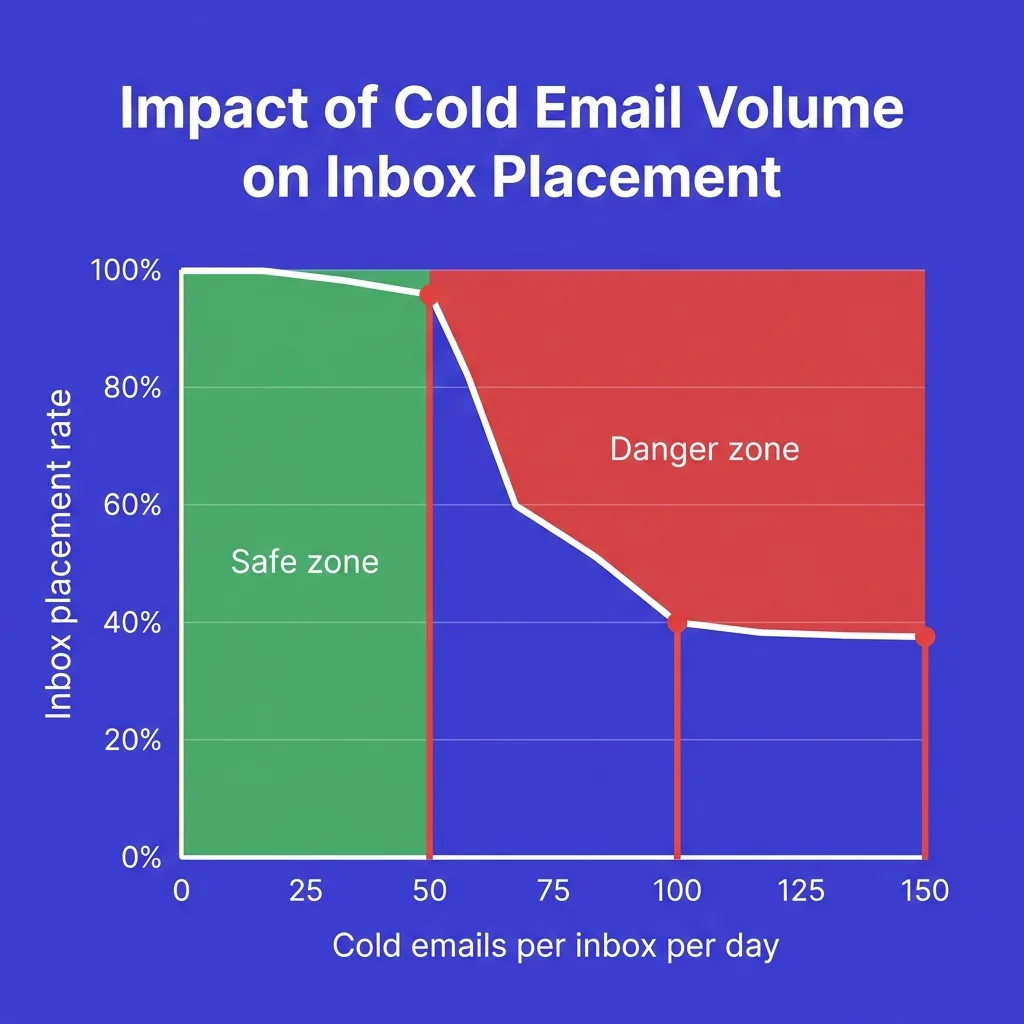 Inbox placement rate vs daily send volume per inbox showing sharp drop above 50 emails per day
#The Actual Safe Numbers in 2026
Here is what the data and practitioner consensus shows for 2026. These are not theoretical maximums - they are the numbers where inbox placement stays high and sender reputation stays intact.
New inbox (0-4 weeks old, still warming): 5-20 emails per day total, including warmup traffic. Do not run cold campaigns on a new inbox at all during weeks 1-3. The inbox needs to build a sending history first.
Established inbox (4-8 weeks, warmup complete): 20-30 cold emails per day is the conservative range. This is where most cautious senders operate and where inbox placement is most predictable.
Aged inbox (8+ weeks, clean reputation, good engagement history): 30-50 cold emails per day is the practical ceiling. Some practitioners push to 50-60 on inboxes with strong historical engagement, but this is where risk starts to climb.
Above 50 per inbox per day: This is where you are gambling. Some aged inboxes on well-maintained domains handle it. Many do not.
The downside - a burned domain or a flagged account - costs you weeks of rebuild time.
The consensus among practitioners running high-volume outbound at scale is to use 30-50 as the operational ceiling, then add more inboxes for higher total volume. The formula is simple: divide your daily send target by 50 to get the number of inboxes you need, then divide by 2 to get the minimum number of domains required.
#What Happens Above 50 Emails Per Inbox Per Day
The failure mode above 50 emails per inbox is not a gradual decline. It tends to be a cliff. Inbox placement - the percentage of your emails that reach the primary inbox rather than spam or promotions - can drop from 85-90% to below 40% within days of crossing the threshold on an inbox that is not ready for it.
Here is what actually happens in sequence:
The ESP (Google Workspace or Microsoft 365) detects an unusual volume spike. Their filtering systems flag the sending pattern. Emails start routing to spam folders at the recipient end.
Recipients who do find your email in spam are more likely to mark it as spam than to open it. That complaint signal feeds back into your sender reputation. Reputation degrades.
Future emails from that inbox - and potentially that domain - are pre-flagged.
The recovery process is slow. A domain with damaged reputation can take 4-8 weeks to recover even with no further sending. Some never fully recover.
This is why the cold email domain burn rate problem is so acute at scale: teams that try to maximize per-inbox volume end up cycling through new domains at 10-20% attrition per month.
The data point from large-scale sending studies is clear: the 30-50 range per inbox per day produces the highest reply rates (around 5.7% average for well-targeted lists) while keeping sender reputation intact. Above 60 per inbox, reply rates start falling even when the emails are technically delivered, because engagement-based filtering is moving more of them to promotions or spam.
There is also a compounding dynamic that makes per-inbox overload particularly dangerous for teams running multiple campaigns simultaneously. When one inbox on a domain takes a reputation hit, other inboxes on that domain do not stay neutral - they inherit partial damage. So a team that is pushing all five inboxes on a domain to 100 sends per day does not have five isolated experiments.
They have one shared reputation pool that is being drawn down from five directions at once. This is how a single aggressive campaign week can destroy months of warmup work across an entire domain cluster.
The campaign-level perspective matters too. Even if your inbox can technically handle 80 sends per day without triggering ESP-level flags, the list quality question becomes critical at that volume. Sending 80 emails per day to a tight, verified list of 25-30 fresh contacts per inbox means you are cycling through those contacts very quickly.
The alternative - sending to a larger, lower-quality list to keep the inbox busy - creates its own deliverability problems through higher bounce rates and lower engagement. Neither path is better than simply adding more inboxes and keeping each one at a sustainable 30-50 ceiling.
#The Warmup Ramp Schedule You Should Follow
Warmup is not optional. Skipping it compresses the timeline to domain death from months to weeks. Inboxes that complete a proper warmup achieve around 88% inbox placement in their first month of cold outreach.
Inboxes that skip warmup land at around 54%.
Here is a practical 8-week ramp schedule that balances speed with safety:
| Week | Warmup Sends/Day | Cold Sends/Day | Total/Day | Notes |
|---|---|---|---|---|
| 1 | 5-10 | 0 | 5-10 | Warmup only, no cold sends at all |
| 2 | 10-20 | 0 | 10-20 | Continue warmup, check for flags |
| 3 | 20-30 | 0-5 | 20-35 | Introduce up to 5 cold sends if warmup is clean |
| 4 | 25-35 | 5-10 | 30-45 | Ramp cold sends slowly |
| 5 | 20-30 | 10-20 | 30-50 | Reduce warmup slightly as cold increases |
| 6 | 15-25 | 20-30 | 35-55 | Inbox should be stable at this range |
| 7 | 10-20 | 30-40 | 40-60 | Approaching operational ceiling |
| 8+ | 10-20 (maintenance) | 30-50 | 40-70 | Warmup runs permanently in maintenance mode |
A few important points about this schedule:
Never increase total daily volume by more than 20% from one week to the next. Even if engagement looks great, sudden jumps look anomalous to filtering systems.
Keep warmup running permanently in maintenance mode after the initial ramp. Warmup is not a one-time activity - it is ongoing inbox health maintenance. The warmup traffic provides positive engagement signals (opens, replies) that offset the neutral or negative signals from cold outreach.
If you see spam placement climb above 5-8% at any point during the ramp, pull back to the prior week's volume for at least 5 days before trying to push forward again.
For a deeper dive into the warmup process specifically, see the guide to pre-warmed inboxes.
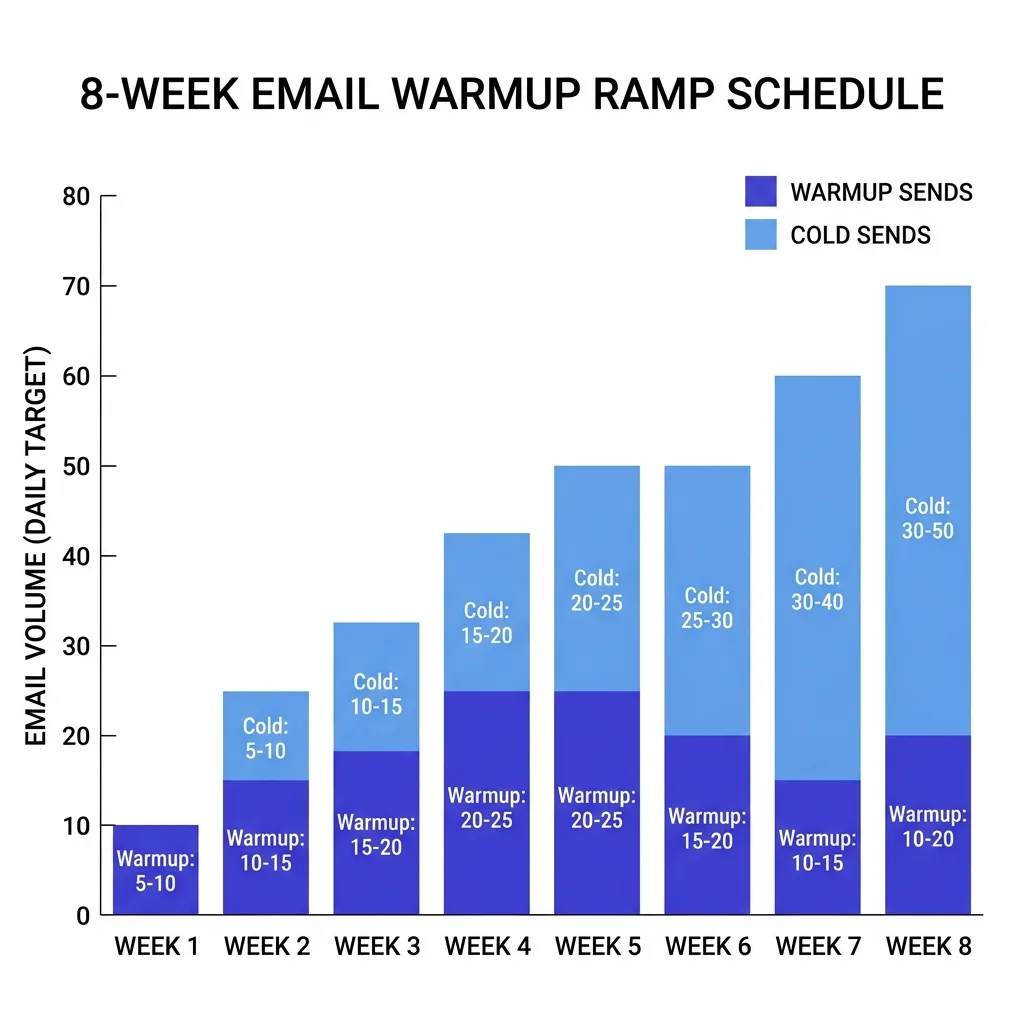 8-week inbox warmup ramp schedule chart showing gradual volume increase from 5 to 50 emails per day
#How to Scale Volume Without Killing Inboxes
This is the central strategic insight that separates teams who scale cold email successfully from teams who burn through infrastructure constantly: the answer to "I need to send more emails" is never "send more from each inbox." It is always "add more inboxes."
The math is simple. Say you need to send 500 cold emails per day. At a per-inbox ceiling of 50, you need 10 inboxes minimum.
At a more conservative per-inbox limit of 30, you need 17 inboxes. That sounds like a lot, but modern cold email tooling makes managing 20-30 inboxes routine.
Here is how to structure the scaling:
Per campaign: Assign 2-3 inboxes per active campaign. Do not run one campaign from 15 inboxes - it makes troubleshooting harder and concentrates risk if a campaign generates complaints.
Per domain: Use 2-3 inboxes per domain maximum. Some practitioners go up to 3-4 on mature domains, but 2-3 is the safer baseline. You want inbox diversity across domains, not concentration within a single domain.
Domain count: For every 100 cold emails per day you want to send, plan for at least 1 dedicated sending domain. For 500 emails per day, that means at least 5 sending domains.
Domain age requirement: Domains need to be at least 14-30 days old before you begin warmup. Sending from a brand-new domain is near-guaranteed spam placement.
Inbox rotation: Use weighted random rotation rather than strict round-robin. Round-robin creates predictable mechanical patterns that spam filters can detect. Weight the rotation slightly toward your best-performing inboxes while keeping all active inboxes warm.
Our warmup infrastructure tooling handles all of this automatically - inbox rotation, warmup scheduling, and deliverability monitoring across your full sending pool.
One thing teams often underestimate when they first start scaling is the lead time required. You cannot decide on a Monday that you want to send 1,000 emails per day by Friday. Getting to that volume safely takes 6-8 weeks of warmup per inbox, plus the time to source and configure domains.
The teams who scale smoothly start building their next round of sending infrastructure 6-8 weeks before they actually need the capacity.
A practical pipeline for steady scaling looks like this: every two weeks, register 2-3 new sending domains. Configure DNS (SPF, DKIM, DMARC) on day one. Start warmup on day 14 when the domain clears its initial aging window.
Begin cold sends on week 5-6. By the time that batch of inboxes is fully operational, you are already two weeks into warming the next batch. With this rolling pipeline, you can grow total daily send capacity by 100-150 emails per month without ever disrupting the domains that are already performing well.
The key mental shift is treating sending infrastructure like a manufacturing line rather than a one-time setup. There is always a batch aging, always a batch warming, always a batch in active use. When an active domain degrades, it rolls off and gets replaced by the next warmed batch.
The program never stops because one domain burned.
#Domain Reputation Is Not Inbox-Specific
This is one of the most misunderstood points in cold email infrastructure: when you damage one inbox on a domain, you damage every inbox on that domain.
Domain reputation is domain-wide. If you have three inboxes on yoursendingdomain.com - say first@, second@, and third@ - and first@ starts generating complaints because you pushed it to 150 emails per day, all three inboxes suffer the reputation hit. Emails from second@ and third@ will see inbox placement fall even if those addresses were sending conservatively.
The practical implication is that per-inbox volume discipline protects not just that inbox but every inbox on the same domain. Overloading one inbox to try to squeeze more sends out of a domain is a false economy - you are risking the entire domain's sending capacity.
This is also why domain rotation is a core part of any high-volume cold email strategy, not an optional add-on. When you spread your sending across multiple domains, a single bad sending day on one domain does not collapse your entire program. You contain the damage.
For a detailed breakdown of how domain rotation works in practice, see the guide to how many cold emails per day and how to structure domains around that volume.
#Google vs Microsoft: Do the Limits Differ?
The short answer is: practically speaking, no - the effective per-inbox safe limits are roughly the same for Google Workspace and Microsoft 365 cold sending. Both platforms have tightened their filtering significantly, and both use reputation signals that are sensitive to the same volume patterns.
The technical limits differ. Google Workspace allows up to 2,000 sends per day per account. Microsoft 365 has varying limits depending on plan tier but generally allows 10,000 per day on business plans.
Neither of these technical limits is relevant to cold email. You would hit spam-based delivery failure orders of magnitude before reaching the technical cap.
What does differ is the complaint handling and the enforcement speed:
Google reacts faster to complaint spikes. If a campaign generates elevated spam complaints against a Google Workspace inbox, delivery degradation can appear within 24-48 hours.
Microsoft's filtering has historically been slightly more lenient on complaint rate, but the 2025-2026 updates to Microsoft's sender requirements (following the Google February 2024 mandate) have tightened this significantly. Microsoft now expects authentication, low complaint rates, and domain history in ways that closely mirror Google's requirements.
For the purposes of setting per-inbox daily limits, treat both platforms identically: 30-50 per inbox per day for warmed, aged inboxes. More detail on Gmail-specific limits is in our Gmail sending limit 2026 guide.
#The Inbox-to-Domain Ratio That Protects You
Getting the inbox-to-domain ratio right is as important as getting per-inbox volume right. Here is the framework that high-volume teams use in 2026:
2-3 inboxes per sending domain - This is the standard configuration. It gives you some volume per domain while keeping the risk contained. If one inbox on a domain has a bad run, the domain damage is manageable.
1 inbox per domain for maximum safety - Some teams building long-term brand assets use dedicated domains for outreach with a single inbox each. Higher infrastructure cost, maximum deliverability protection.
4+ inboxes per domain - This is where risk increases substantially. The cumulative reputation signals from four or more inboxes all land on the same domain. One bad campaign can take down the whole domain.
For agencies or teams running outreach for multiple clients, keep each client on a separate domain cluster. Never mix client sending on shared domains.
At 20 or more active sending domains, plan to warm 2-4 new domains every month to replace any that degrade or to add capacity for volume growth. Domain attrition at scale is real - even conservative senders see some domain degradation over time.
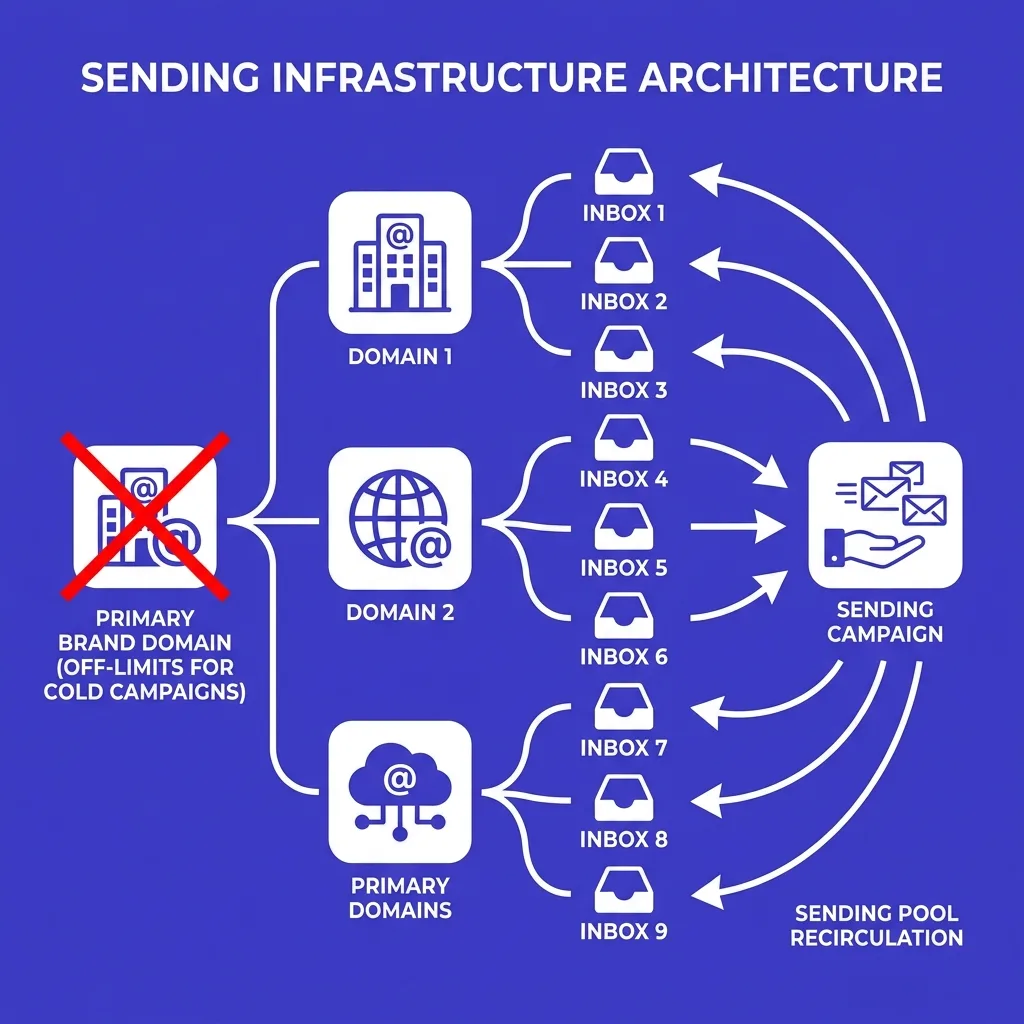 Infographic showing inbox-to-domain ratio diagram with 2-3 inboxes per domain, domain clusters, and rotation arrows, deep indigo and white flat design
#Signs Your Per-Inbox Volume Is Already Too High
If you are reading this because something already feels off with your cold email performance, here are the specific signals that point to per-inbox volume as the cause:
Open rates dropping without any content change. If your emails used to open at 40-50% and have drifted below 25-30% without you changing the subject line or targeting, delivery placement is degrading. Emails landing in spam cannot be opened.
Reply rates collapsing even on previously successful campaigns. Some of this is list fatigue, but if it happens suddenly and across multiple campaigns simultaneously, the inbox is the more likely cause.
Google Postmaster Tools showing domain reputation moving from High to Medium or Low. This is the clearest data signal available. Domain reputation in Postmaster Tools is a direct read on how Google's systems view your sending domain. A drop from High to Medium can precede significant inbox placement problems by 1-2 weeks.
Bounce rates suddenly increasing. Some bounces are just bad list hygiene. But if a campaign on a previously clean list is generating more than 2-3% hard bounces, the domain may be on blocklists.
Warmup tool showing declining engagement scores. If your warmup network is flagging that warmup emails are landing in spam at higher rates, that is an early warning before campaign delivery is affected.
Any of these signals should prompt you to cut per-inbox volume by 30-40% immediately, increase warmup sends relative to cold sends, and monitor for improvement over 5-7 days before pushing volume back up.
#Building a Sustainable Sending Infrastructure
Sustainable cold email infrastructure in 2026 looks different from what was common two or three years ago. The "one domain, one inbox, blast volume" model is gone. The architecture that works now is more like a portfolio of sending assets, each managed conservatively.
Here is what that infrastructure looks like in practice:
Primary brand domain: Never use this for cold outreach. This is your website domain, your support domain, your transactional email sender. Cold email reputation risk should never touch your primary domain.
Dedicated sending domains: Variations on your brand name (yourcompany-outreach.com, tryyourcompany.com, yourcompanyio.com). Register 3-5 of these before you start scaling. Set up SPF, DKIM, and DMARC on every single one before any email leaves them.
2-3 inboxes per sending domain: Using real names (firstname.lastname@) rather than generic roles (hello@, info@) performs better in both deliverability and response rates because it reads as human.
Inbox rotation software: Manual inbox management does not scale past 5-6 inboxes. At 10+ inboxes, you need tooling that handles rotation, scheduling, and monitoring automatically.
Continuous warmup: Every inbox runs warmup permanently. Not just during setup. The maintenance warmup volume (10-20 sends per day via the warmup network) keeps positive engagement signals flowing to the inbox and offsets the neutral or negative signals from cold outreach.
Monthly review cycle: At the end of each month, check Postmaster Tools for all sending domains, review per-inbox performance, retire any domains or inboxes that have dropped below acceptable placement rates, and onboard new warmed domains to replace capacity.
This infrastructure model supports sustainable volume growth. Instead of pushing individual inboxes harder and burning them faster, you grow the infrastructure footprint and keep each component operating within safe parameters. The email sending limits guide covers the full authentication and infrastructure setup in detail.
A point worth making about the economics: building this infrastructure correctly is cheaper than burning it down and rebuilding. A single sending domain costs $10-15 per year. Setting up 5-10 sending domains at the start of a serious outreach program is a $50-150 one-time cost.
Compare that to the cost of rebuilding after a domain burn - new domains, new warmup cycles, 6-8 weeks of reduced or zero outreach capacity, and the pipeline damage from missed follow-ups during the recovery period.
The infrastructure investment is trivially small relative to the risk it prevents.
The other economic argument is about reply quality, not just reply quantity. Teams that stay under 50 per inbox per day and invest in proper targeting and personalization consistently outperform teams that blast at 150+ per inbox. A well-targeted campaign at 30 sends per inbox per day hitting a 15-20% reply rate generates more conversations than a blasted campaign at 100 sends per inbox per day hitting a 1-2% reply rate - and costs far less in domain attrition.
That math holds up all the way from single-person outbound programs to full agency-scale operations. The how many cold emails per day guide goes deeper into this comparison with concrete campaign data.
#FAQs
#How many cold emails per inbox per day is safe for a brand new domain?
Zero during the first two weeks. A brand new domain has no sending history, no reputation, and no engagement signals. Any cold email sent from it goes to spam with high probability.
Spend weeks 1-2 on warmup-only traffic (5-20 sends per day via a warmup network), then introduce cold sends slowly starting in week 3 at no more than 5-10 per day. By week 6-8, a properly warmed inbox on a 30-day-old domain can handle 20-30 cold sends per day safely.
#Can I send 100 cold emails per day from one inbox if it is well warmed?
Technically possible on an aged inbox with a strong reputation history. Practically inadvisable. Data from large sending studies shows inbox placement rates start dropping meaningfully above 60 per inbox per day, and the risk-adjusted return is worse than splitting that volume across two inboxes at 50 each.
The effort to manage 100 sends per inbox versus 50 per inbox on two inboxes is marginal; the deliverability protection from two inboxes is substantial.
#Does it matter if I send all my daily emails at once versus spreading them throughout the day?
Yes, significantly. Sending 40 emails in a 10-minute burst looks automated and unnatural to spam filters. Spreading 40 sends over a 6-8 hour window with some randomization in the timing looks much closer to a human sending pattern.
Most modern cold email tools handle this automatically with send-time randomization. If yours does not, that is a gap worth fixing.
#What is the minimum number of inboxes I need to send 500 cold emails per day?
Using the 30-50 per inbox ceiling, you need a minimum of 10 inboxes (500 / 50 = 10) to hit 500 per day. Distribute those across at least 4-5 sending domains to protect against domain-level reputation events. A more conservative setup would be 17 inboxes at 30 each across 6-8 domains - more infrastructure cost, but much lower risk of a single campaign or domain failure collapsing your total volume.
#Should warmup sends count toward my daily cold send limit?
Yes. Your inbox does not distinguish between warmup sends and cold sends when it comes to total daily volume. If your inbox is handling 30 warmup sends per day via your warmup tool, that leaves 20-30 slots for cold sends (to stay under the 50 per inbox ceiling).
Factor warmup traffic into your total daily send budget per inbox.
#How long does it take for a burned inbox or domain to recover?
A mildly degraded inbox can recover in 2-4 weeks if you stop cold sending, maintain warmup-only traffic, and let engagement signals rebuild. A severely burned domain - one that is on blocklists or has generated sustained complaint spikes - can take 6-12 weeks to recover partial function, and some never recover to their prior performance level. This is why prevention (staying under 50 per inbox per day) is dramatically cheaper than recovery.
#Conclusion
The number that matters for cold email in 2026 is not your daily total volume. It is your per-inbox daily volume. Keep that number at 10-20 for new inboxes still in warmup, 30-50 for inboxes that have completed the warmup ramp and built a clean reputation, and never push past 50 unless you have strong engagement history and accept the elevated risk.
Scaling cold email volume means scaling inbox count, not per-inbox pressure. The math is simple: your daily target divided by 50 equals the minimum inboxes you need. Build the infrastructure to match that ratio, keep warmup running permanently, and monitor domain reputation monthly.
The teams hitting consistent inbox placement above 85% in 2026 are not the ones with the best copy or the most sophisticated targeting alone. They are the ones who treated their sending infrastructure as a long-term asset worth protecting - which starts with respecting the per-inbox limit every single day.
If you want the infrastructure to support this without managing it yourself, start your FirstSales account for $1 and run your first properly-structured campaign this week. Inbox rotation, warmup, and per-inbox limits are all handled automatically so your deliverability stays intact as you scale.