#How Many Cold Emails Per Day Without Burning Domains
Copy page
**TL;DR: Safe cold email volume in 2026 is 30-50 emails per inbox per day on warmed, aged accounts. To send 1,000 emails daily you need roughly 25-30 inboxes spread across 8-10 domains. Pushing beyond those thresholds without adding infrastructure is how teams burn their primary domain and lose weeks of sending capacity.
Scale by adding inboxes and domains - not by increasing per-inbox pressure.**
#Table of Contents
- Why the Old Advice Is Getting Teams Burned
- The Fundamental Math: Inboxes Times Daily Cap
- Per-Inbox Limits in 2026: What the Data Actually Shows
- Domain Pool Architecture: How Many Domains You Need
- The Burn Rate Reality: 10-20% of Domains Die Monthly
- Volume Tiers: A Worked Example From 100 to 5,000 Emails Per Day
- Google and Microsoft Rules That Cap Your Ceiling in 2026
- The Ramp Schedule: Why You Cannot Sprint to Full Volume
- What Breaks First When You Overshoot the Limits
- Protecting Your Primary Domain While Running Volume
- Signals That Tell You to Slow Down Before Damage Hits
- FAQs
- Conclusion
#Why the Old Advice Is Getting Teams Burned
Not long ago, you would read articles telling you to "send up to 500 emails per day per inbox" or to "max out Gmail's 2,000-per-day limit for full sending power." Those articles were wrong then and actively dangerous now.
In 2026, Google defines a bulk sender as anyone sending 5,000 or more messages per day to Gmail addresses. That definition triggers mandatory SPF, DKIM, and DMARC authentication, one-click unsubscribe requirements, and a hard spam complaint ceiling of 0.10% - with enforcement action starting at 0.30%. Microsoft's rules for Outlook and M365 are directionally similar, with additional scrutiny on domain age and ramp history.
The platforms have gotten smarter. They track behavioral signals - not just authentication headers - and they weight per-inbox sending patterns as a spam indicator. Sending 500 cold emails from one inbox in a single day is a pattern that looks nothing like a legitimate human sender, and the filters know it.
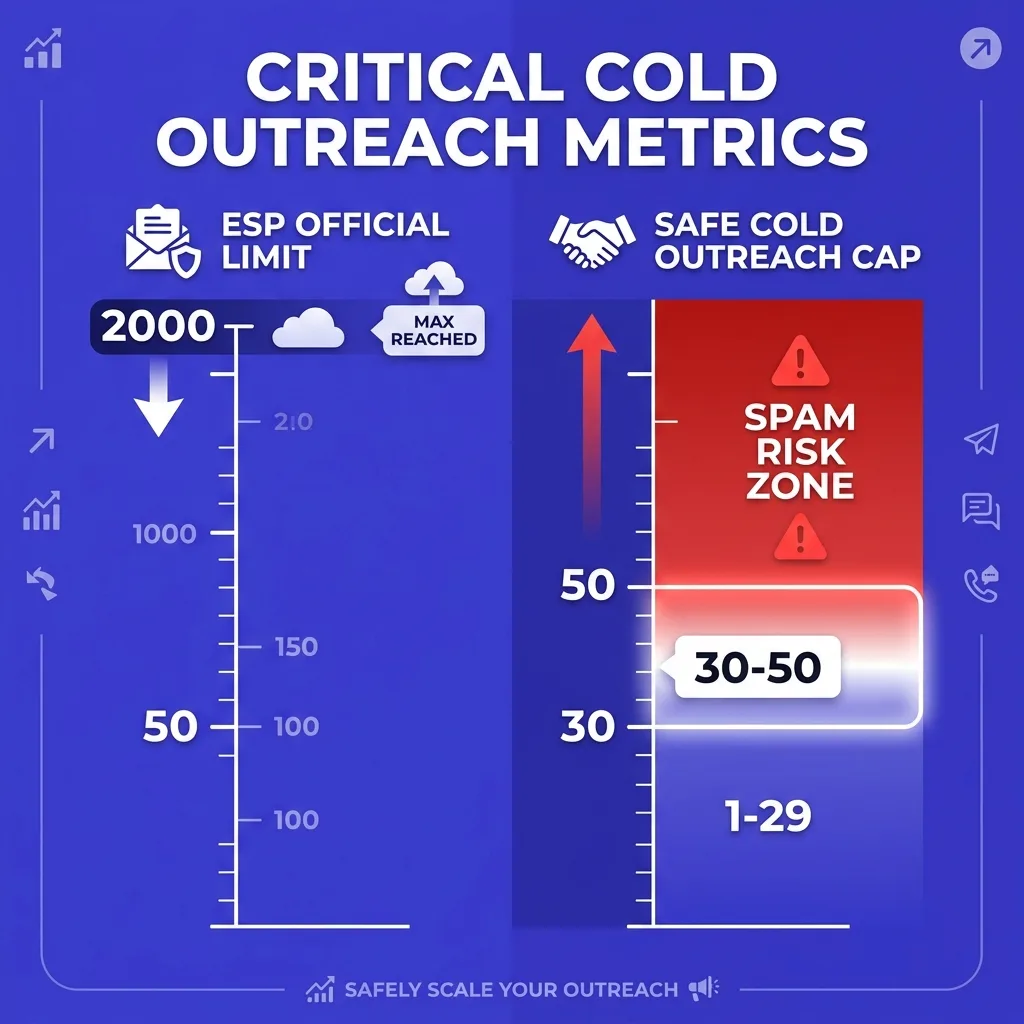
So the question "how many cold emails per day" has two valid answers: the number you can physically send before an error code appears (high) and the number you can sustainably send without inbox placement collapsing over time (much lower). This article is about the second number - and about the infrastructure math that lets you scale that second number safely into the thousands.
 alt: Diagram showing the gap between ESP daily limits and safe cold email sending thresholds, with spam risk zones highlighted in red and safe zone in indigo
#The Fundamental Math: Inboxes Times Daily Cap
Every volume calculation in cold email starts with the same formula:
Total daily emails = Number of active inboxes x Safe per-inbox daily cap
That is it. There is no shortcut. You cannot compress the equation by pushing one inbox to 300 sends while three others sit idle.
You cannot route extra volume through one high-reputation domain and expect it to carry the load indefinitely.
The "safe per-inbox daily cap" is not a fixed number - it is a range that shifts based on inbox age, warmup history, domain reputation, and list quality. But the range is narrower than most people expect, and it sits far below the official ESP sending limits.
Understanding this math up front matters because it determines your infrastructure budget before you ever send a single email. If you need 1,000 cold outreach emails per day and your safe cap is 30 per inbox, you need at minimum 34 inboxes. If you want those inboxes distributed across domains (which you do, for isolation), you are looking at roughly 8-10 domains with 3-4 inboxes each.
Get the math wrong and you spend budget on list building, copywriting, and personalization - only to see your deliverability collapse in week three because every inbox is overloaded.
#Per-Inbox Limits in 2026: What the Data Actually Shows
The consensus across deliverability practitioners in 2026 lands in a specific band. For properly warmed inboxes on Google Workspace or Microsoft 365 accounts with at least 4-6 weeks of warmup history and clean domain reputation, the safe cold outreach volume is 30-50 emails per inbox per day.
That ceiling is lower for newer accounts. For an inbox that just completed its initial warmup ramp, 20-30 per day is a more defensible target in the first month of active sending. For an account under 30 days old, you should be closer to 15-20 per day even if warmup tools show strong scores.
The ceiling is also compressed by warmup tool activity. If your warmup tool is generating 20 automated warmup sends per day through that inbox, your actual available cold outreach capacity shrinks accordingly. Total daily activity - warmup plus outreach - is what the receiving mail servers observe.
Treating those two buckets as independent is a common mistake.
There is a meaningful difference between the conservative target and the aggressive ceiling:
- Conservative (lowest risk): 20-30 cold emails per inbox per day
- Standard (good hygiene): 30-40 cold emails per inbox per day
- Aggressive (requires clean domain, strong warmup, verified list): 40-50 cold emails per inbox per day
Most teams that describe themselves as "doing everything right" but still experiencing deliverability problems are running at the aggressive end with domains or lists that do not support that volume. The safe answer for a new program is to start at the conservative end and move up only after monitoring inbox placement rates for two to three weeks.
What the data does not support is the 100-200-per-inbox numbers that circulated in earlier years. Inbox providers adjusted their filtering to catch that pattern. Running 150 cold emails per inbox per day in 2026 is almost certain to damage deliverability within a few weeks, regardless of authentication setup.
Understanding the email sending limits that each platform enforces at the account level helps you understand where the hard ceilings sit - even if your practical working ceiling should be well below them.
#Domain Pool Architecture: How Many Domains You Need
Once you know your per-inbox cap, the domain question becomes arithmetic.
The standard infrastructure recommendation for 2026 is 3-4 inboxes per sending domain. You could run more inboxes per domain, but spreading risk across a larger domain pool means any single domain problem - reputation hit, blacklist incident, or burn - affects a smaller percentage of your total daily volume.
This is not just theoretical risk management. At scale, domain incidents happen. The question is whether one incident takes out 5% of your volume or 40% of your volume.
The formula for domain count:
Domains needed = Total target daily volume / (Inboxes per domain x Per-inbox cap)
Working through a few scenarios:
- 100 emails/day: 2-3 inboxes on 1 domain (small program, low risk)
- 500 emails/day: 10-15 inboxes across 4-5 domains
- 1,000 emails/day: 25-30 inboxes across 8-10 domains
- 2,500 emails/day: 60-75 inboxes across 18-25 domains
- 5,000 emails/day: 120-150 inboxes across 35-50 domains
These numbers assume a working per-inbox cap of 35-40 emails per day, which is the reasonable midpoint for well-maintained infrastructure. If you operate more conservatively at 25/day, adjust the numerator accordingly.
The domain naming strategy matters as much as the count. Sending domains should look like legitimate business variants of your primary domain - not throwaway lookalikes. Variations like get[yourcompany].com, try[yourcompany].com, [yourcompany]hq.com, or [yourcompany]mail.com read as plausible business entities.
Random strings and obvious burner names increase filter scrutiny before you send a single message.
Each domain needs full authentication: SPF record that includes your sending provider, DKIM signatures on every outgoing message, and a DMARC policy (at minimum p=none to start, moving to p=quarantine as you gain confidence in your setup). Missing any of these disqualifies you from Google's bulk sender requirements if you cross the 5,000-per-day threshold to Gmail addresses.
Proper email domain rotation across your pool smooths the load and prevents any single domain from accumulating an oversized share of your total complaint volume.
#The Burn Rate Reality: 10-20% of Domains Die Monthly
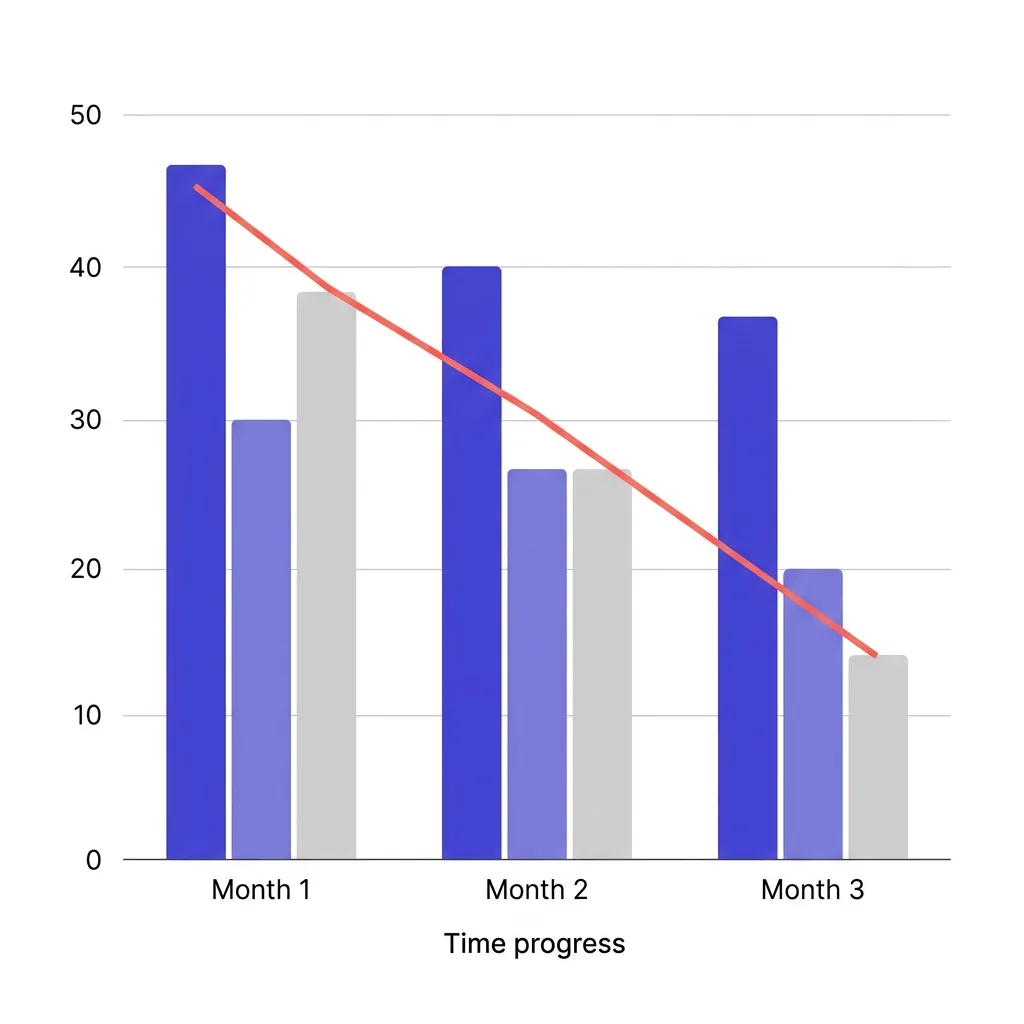
Here is the number that most volume-focused guides do not want to discuss: at meaningful sending scale, you will lose domains. Industry data from Q1 2026 puts the domain degradation and death rate at 10-20% per month for teams running sustained cold outreach volume.
That is not a worst-case estimate. It is what happens when you send enough volume across enough domains over enough time. Some domains develop reputation problems from complaint accumulation.
Some get listed on blocklists after a bad batch of emails hits invalid addresses. Some age into problems as the sending patterns become well-known to filtering systems. Some encounter infrastructure issues that accelerate reputation loss.
Planning for 10-20% monthly burn means building domain replacement into your operating model - not treating it as a fire drill when it happens.
A practical approach: for every 10 domains in your active pool, maintain 2-3 domains in warmup at all times. Those warming domains are your bench. When an active domain degrades, you rotate a warmed domain into the active pool and start warming a replacement.
The cycle is continuous.
The cold email domain burn rate article goes deep on the mechanics of why domains degrade and what the early warning signals look like. The short version: bounce rate above 2% sustained for more than a week, spam complaint rate trending toward 0.08%, and Google Postmaster Tools showing reputation moving from "high" to "medium" are all early signals that a domain needs to be pulled back and rested before it burns completely.
The economics of domain replacement are not trivial but they are manageable. A fresh domain plus Google Workspace or Microsoft 365 setup costs roughly $15-40 per domain per month in infrastructure. For a program running 50 domains, that is $750-2,000 monthly in sending infrastructure - before list, warmup tools, and platform costs.
Building in a 15% monthly replacement budget means allocating for 7-8 new domain setups per month.
Teams that do not budget for this find themselves scrambling when domains burn, rushing new domains without proper warmup, and compounding the deliverability problem they were trying to escape.
 alt: Bar chart showing domain health over 90 days with burn curve, replacement cycle, and active vs warming vs retired domain count over time, deep indigo and white color scheme
#Volume Tiers: A Worked Example From 100 to 5,000 Emails Per Day
The table below shows the infrastructure requirements for common daily volume targets. It assumes 35 cold emails per inbox per day (a reasonable working ceiling for maintained accounts), 3 inboxes per domain, and a 15% monthly domain replacement budget.
| Daily Target | Inboxes Needed | Domains Needed | Monthly Domain Replacement | Infrastructure Complexity |
|---|---|---|---|---|
| 100 emails/day | 3 inboxes | 1 domain | 0-1/month | Low - manageable solo |
| 250 emails/day | 8 inboxes | 3 domains | 1/month | Low-medium |
| 500 emails/day | 15 inboxes | 5 domains | 1/month | Medium |
| 1,000 emails/day | 29 inboxes | 10 domains | 2/month | Medium-high |
| 2,500 emails/day | 72 inboxes | 24 domains | 4/month | High - needs ops |
| 5,000 emails/day | 143 inboxes | 48 domains | 7-8/month | Very high - dedicated infra |
A few things stand out in this table. First, the jump from 500 to 1,000 emails per day roughly doubles everything - inboxes, domains, and operational overhead. That doubling continues up the scale, which is why many teams plateau at 500-1,000 per day.
The infrastructure required to push beyond that threshold demands dedicated attention that a small sales team cannot spare.
Second, 5,000 emails per day is where Google's bulk sender rules kick in and every compliance requirement becomes mandatory. Teams approaching that number while running without DMARC alignment or one-click unsubscribe are one bad week from a permanent rejection notice.
Third, the "infrastructure complexity" column matters as much as the numbers. Running 48 domains with 143 inboxes is a full operational function, not a side task. Domain monitoring, warmup management, rotation schedules, reputation tracking, and bounce handling at that scale require either dedicated tooling or a dedicated person (or both).
For most B2B outbound programs, the 500-1,000 emails per day range is the practical ceiling where good sending hygiene, manageable domain count, and reasonable operational overhead align. Scaling beyond that without solving the operational model first is how teams end up burning their entire infrastructure in a quarter.
The what breaks first when scaling cold email volume article walks through the cascade of failures that typically happens when teams push volume faster than their infrastructure supports.
#Google and Microsoft Rules That Cap Your Ceiling in 2026
Two platform changes in 2024-2025 created a new compliance floor that cold email teams cannot ignore in 2026.
Google's bulk sender requirements apply to any account sending 5,000 or more messages per day to Gmail addresses. Requirements include:
- SPF and DKIM authentication on every outbound message
- DMARC policy on your sending domain (minimum
p=none) - One-click unsubscribe header on commercial and promotional messages
- Spam complaint rate must stay below 0.10% (with 0.08% as the practical buffer)
- Spam complaint rate must never reach 0.30% - at that threshold, Gmail starts rejecting messages from your domain
The 0.10% threshold sounds lenient until you do the math. Sending 1,000 emails per day means one complaint per day keeps you at exactly the limit. Two complaints per day on 1,000 sends puts you at 0.20% - in the warning zone.
At 5,000 sends per day you have a window of five complaints before you hit the threshold. That is why list quality and personalization are not just reply-rate optimizations in 2026 - they are deliverability requirements.
Microsoft's rules for Outlook and Exchange Online focus heavily on domain age and sending ramp history. New domains sending at high volume immediately raise flags. Microsoft also tracks complaint rates across their network and will throttle or block senders who accumulate complaints above their internal thresholds (which are less publicly documented than Google's but operationally similar).
The practical implication: you cannot bypass the math by pushing all your volume to one well-authenticated domain. Authentication is the price of admission, not a performance enhancer. Volume still needs to be distributed across an appropriately sized infrastructure.
The cold email volume trap is exactly this - teams that meet the authentication requirements and then assume they can push as much volume as the API will accept, without accounting for the behavioral signals that get flagged independent of authentication status.
#The Ramp Schedule: Why You Cannot Sprint to Full Volume
New domains and new inboxes cannot operate at full capacity from day one. The mail server ecosystem - primarily Google and Microsoft - uses sending pattern history to calibrate trust. A domain that jumps from zero to 500 emails per day in week one looks suspicious regardless of authentication setup.
The standard warmup ramp for a new inbox in 2026:
- Week 1-2: 5-15 emails per day (primarily warmup tool activity)
- Week 3-4: 15-25 emails per day (warmup plus early cold outreach)
- Week 5-6: 25-35 emails per day (transitioning to full outreach)
- Week 7+: 35-50 emails per day (full capacity for maintained accounts)
That 6-7 week ramp before an inbox reaches full productive capacity is the primary reason you need a bench of warming domains at all times. If you start a program with five domains and immediately need to replace one, you cannot pull a replacement domain off the shelf and run it at full capacity - you need a domain that has already completed the warmup cycle.
The 30% rule is widely cited across deliverability practitioners: never increase daily send volume by more than 30% in a single week. That applies to individual inboxes and to your total program volume. A sudden spike in outgoing volume is one of the clearest spam-pattern signals that mail servers look for.
Sending at consistent volume on consistent days also matters. Sending nothing Monday and Tuesday then running 500 emails Wednesday through Friday creates a pattern that looks like batch-and-blast behavior - which is exactly what bulk spam operations do. Spreading sends across every business day, with modest daily variation, builds a pattern that looks like an active human sender.
Understanding how emails per inbox per day interact with warmup schedules, domain age, and reputation scores gives you the full picture of why ramps take as long as they do.
#What Breaks First When You Overshoot the Limits
When a team pushes volume beyond what their infrastructure supports, the failure is rarely sudden and obvious. It is a slow degradation that looks like a copywriting problem or a list quality problem before the root cause becomes clear.
Here is the typical sequence:
Week 1-2 of overshoot: Reply rates drop. Open rates may stay nominally stable. The team tries different subject lines and angles, assuming the copy needs work.
Week 3-4: More emails start landing in spam. Google Postmaster Tools (if the team is monitoring) shows domain reputation slipping from "high" to "medium." Bounce rates tick up slightly as some addresses become unreachable through reputation filtering.
Week 5-6: Open rates collapse. A significant portion of messages are going to spam folders and are never seen. Complaint rate spikes because the people who do see the messages are now more likely to flag them as spam (spam folder appearance primes recipients to hit the button).
Week 7+: Domain reputation hits "low" or "bad" in Google Postmaster Tools. Inbox placement on that domain drops to near-zero for Gmail addresses. The domain is functionally burned.
Recovery from a fully burned domain takes 2-3 months if the team stops sending from it immediately. Many teams do not stop - they keep pushing volume from the damaged domain because they do not have replacement infrastructure ready, which extends the damage and may make recovery impossible.
The trap is that the sequence above looks like copy or list problems in the early stages. Teams chase those solutions - hiring copywriters, buying new lists, testing more angles - without ever fixing the underlying volume-to-infrastructure mismatch. By the time the deliverability collapse is obvious, months of sending history have been wasted and multiple domains are compromised.
#Protecting Your Primary Domain While Running Volume
Your primary business domain - the one on your company website, your marketing emails, and your leadership team's addresses - should never be used for cold outreach at volume.
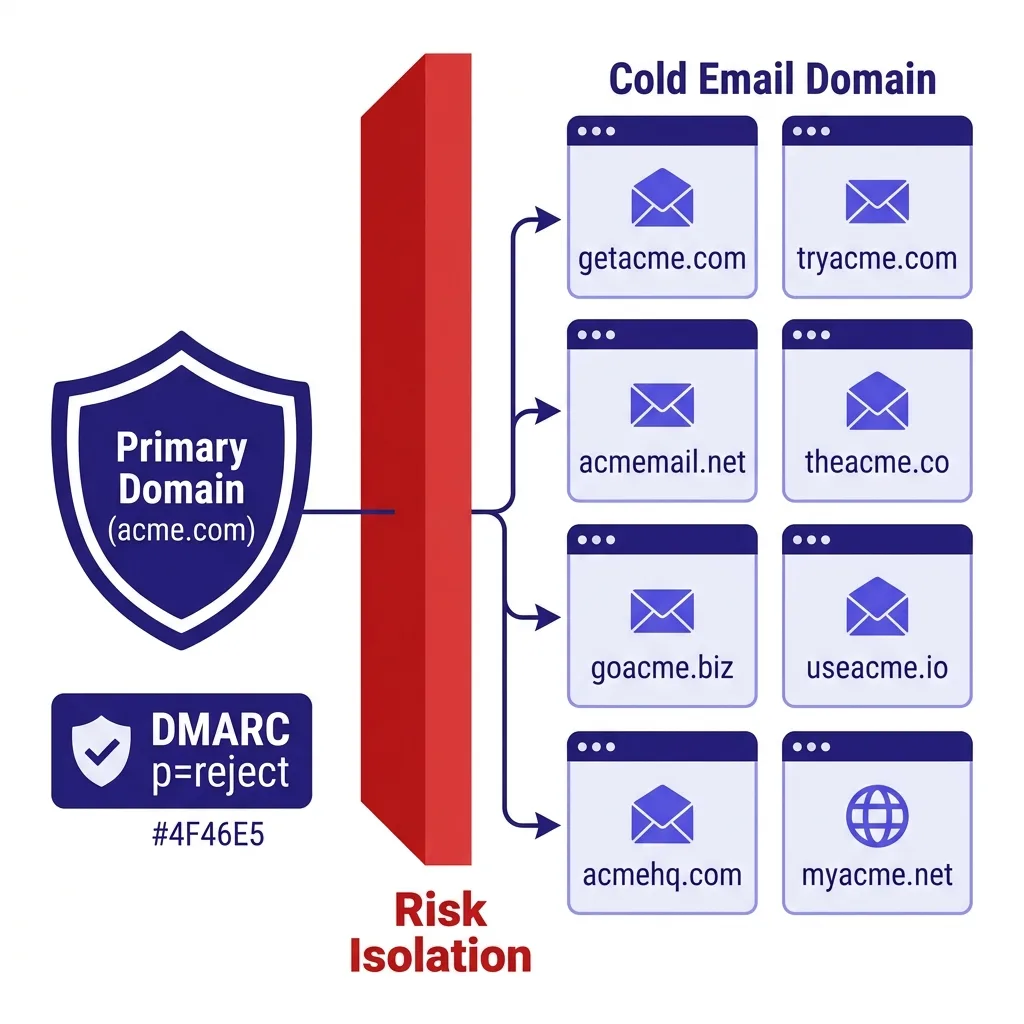
This point is non-negotiable and deserves clear emphasis. If your company is acme.com, your cold outreach should run from getacme.com, tryacme.com, or similar sending domains. The acme.com domain should be reserved for operational email only and protected by a strict DMARC policy (p=reject) that prevents any spoofing.
Why does this matter so much? Because domain reputation is not fully isolated between different uses of the same domain. A cold outreach program running from acme.com that accumulates spam complaints will damage the domain reputation that also affects your marketing emails, your customer success team's outreach, and your transactional email delivery.
The cost of burning your primary domain extends well beyond lost outreach capacity. Customer emails get flagged. Marketing campaigns land in spam.
Transactional messages like password resets and invoices see reduced delivery rates. Rebuilding primary domain reputation after it has been damaged is a multi-month process with real business consequences.
Running cold outreach through your sending infrastructure on properly isolated sending domains protects the primary domain from any spillover, no matter what happens with the outbound program.
The technical setup for protection: DMARC p=reject on your primary domain. SPF that explicitly does not authorize your cold email sending provider on the primary domain. DKIM signing only from your transactional and marketing email services.
These controls ensure that even if someone were to attempt sending from your primary domain using your cold email infrastructure, it would be rejected.
 alt: Infographic showing the separation between primary company domain (protected, p=reject DMARC) and cold email sending domain pool, with arrows showing traffic flow and risk isolation, clean flat design in deep indigo #4F46E5 and white
#Signals That Tell You to Slow Down Before Damage Hits
The goal is to catch problems before a domain burns, not after. These are the metrics to monitor and the thresholds that should trigger a pause or a volume reduction.
Bounce rate: Keep it below 2%. A sustained bounce rate above 2% for five or more days is an early signal of list quality problems that will compound into deliverability issues. If a single send batch produces a bounce rate above 4-5%, pull back immediately and run verification on the remaining list.
Spam complaint rate in Google Postmaster Tools: Your target is below 0.08% to maintain the buffer below Google's 0.10% threshold. If the 7-day rolling average crosses 0.08%, reduce volume from that domain immediately. If it approaches 0.10%, pause outbound from that domain and investigate.
Domain reputation in Google Postmaster Tools: "High" is the target. "Medium" is a warning - reduce volume and improve list quality. "Low" means stop sending from that domain immediately.
"Bad" means the domain is functionally burned.
Open rate decline: If your open rate on a specific domain drops by more than 20-25% week over week without a corresponding change in subject lines or audience, that domain is likely experiencing inbox placement problems. Confirm with a seed list test.
Reply rate by domain: If one domain in your pool is producing dramatically lower reply rates than your others, it may have an inbox placement problem that your monitoring has not yet caught. Run a manual check on inbox placement for that domain.
The email sending limits you need to watch are not just the official platform limits - they are these behavioral thresholds that operate well below the hard ceilings and tell you when your program is drifting toward territory that will produce infrastructure damage.
Consistent monitoring across these signals is the operational practice that separates teams that scale sustainably from teams that rebuild their infrastructure every quarter.
#FAQs
#How many cold emails per day is safe for a new domain?
For a brand-new domain in its first month of warmup, limit outreach to 10-20 emails per day. The warmup tool should handle the bulk of activity in weeks one and two. From week three onward you can start mixing in real cold outreach at the low end of that range, increasing gradually over the following 4-6 weeks toward the 30-50 range.
#Can I send more cold emails per day if I use Gmail versus Google Workspace?
Personal Gmail accounts are not suitable for cold outreach at any meaningful volume. Gmail's personal terms of service prohibit commercial bulk sending, and the sending limits (500/day) are set well above what is deliverable before spam filters catch the pattern. Google Workspace accounts are the correct tool for cold outreach, with the 30-50/day per inbox cap applying to these accounts.
#What happens if I send too many cold emails and burn a domain?
Domain recovery after a reputation hit takes 2-4 weeks if you stop sending immediately and the damage is moderate. Full burns - where Google Postmaster Tools shows "bad" domain reputation - can take 2-3 months to recover, if they recover at all. During that window, inbox placement for Gmail addresses from that domain is near zero.
The practical answer is to retire the domain, let it rest for 60-90 days with no outbound activity, and start warming a replacement domain immediately.
#Do follow-up emails count toward my daily cold email limit?
Yes. Every message sent from an inbox counts toward its daily activity total - initial outreach, follow-ups, warmup emails from your warmup tool, and any other messages from that account. If your inbox sends 20 warmup emails and 15 follow-ups, you have only 10-15 slots remaining for new outreach before hitting a conservative daily cap.
Plan your sequences with this in mind or expand your inbox pool to accommodate follow-up volume.
#How do I scale to 5,000 cold emails per day without destroying deliverability?
You need approximately 120-150 inboxes across 40-50 domains, all properly warmed and maintained. At that volume, Google's bulk sender requirements are mandatory - SPF, DKIM, DMARC, one-click unsubscribe, and spam rate below 0.10% are all enforced. The operational overhead at that scale requires dedicated infrastructure management.
Most teams find that 1,000-2,500 emails per day is the practical ceiling where quality and volume stay in balance without requiring a dedicated deliverability operations function.
#Should I use subdomains or separate domains for cold email?
Separate domains are strongly preferred for cold outreach. Subdomains share reputation signals with the root domain, which means a deliverability problem on mail.acme.com can affect acme.com. A separate domain like getacme.com keeps the risk fully isolated.
The cost difference is minimal (an additional domain registration) and the risk isolation is significant. Some providers treat subdomain reputation as partially separate, but the general practitioner consensus is to use separate domains for volume cold outreach.
#Conclusion
How many cold emails per day you can send without burning domains comes down to a single discipline: keeping per-inbox volume at 30-50 emails per day on properly warmed, maintained accounts, and scaling total volume by expanding your infrastructure rather than pushing individual inboxes harder.
The math is not complicated. For 1,000 daily emails you need roughly 25-30 inboxes across 8-10 domains. For 5,000 you need 10 times the infrastructure.
Building that infrastructure correctly - with proper warmup ramps, full authentication, domain isolation from your primary business domain, and 15-20% monthly replacement capacity - is what separates teams that run stable outbound programs for years from teams that rebuild their sending infrastructure every quarter.
The 10-20% monthly domain burn rate is real. Budget for it. Monitor your Google Postmaster Tools metrics weekly.
Keep a bench of warming domains equal to 15-20% of your active pool. And never push per-inbox volume beyond 50/day, regardless of how clean your list is or how strong your warmup scores look.
If you want to skip the infrastructure build and run your first outbound campaign this week, FirstSales handles the domain pool, warmup cycles, rotation logic, and deliverability monitoring automatically - start for $1 at app.firstsales.io and send your first sequence today.