**TL;DR: Cold email sending frequency works on two distinct layers. The first is per-domain daily pacing - how many emails leave each inbox each day, ideally 30-50 for a warmed domain. The second is per-prospect follow-up spacing - how long you wait between touches to the same person, ideally 3-5 days with widening gaps.
Getting both right simultaneously is the difference between a healthy domain that sends for years and a burned domain you replace every 30 days. This article gives you the exact numbers, the logic behind each threshold, and a ready-to-copy cadence table.**
#Why Frequency Has Two Completely Different Meanings
When most people ask about cold email sending frequency, they are actually asking two separate questions at once. They want to know how many emails they can send per day without hurting their domain, and they want to know how often they should follow up with a prospect before moving on. These are related problems but they operate on completely different timescales and affect completely different signals.
The first question is about infrastructure. Your inbox has a throughput ceiling, your domain has a reputation score, and Google or Microsoft is watching the sending pattern every single day. Exceed the ceiling or create an erratic pattern, and your inbox placement degrades.
Degrade enough, and you start landing in spam. Keep landing in spam, and your domain gets flagged. Once flagged, the reputation damage compounds and sometimes becomes permanent.
The second question is about prospect psychology. A follow-up sent too soon after the first email feels pushy and reads as desperation. A follow-up sent too late loses the thread entirely.
There is a narrow window where a follow-up lands at just the right moment - when the prospect has had enough time to process the first email but has not fully moved on.
Most outbound teams confuse the two, optimize for one while neglecting the other, or use gut feel instead of data for both. This article separates them cleanly, gives you the specific numbers that hold up in 2026, and shows you how to build a cadence that protects your reputation while capturing every reply that is available to you.
Understanding cold email sending frequency is foundational before you look at anything else. It sits upstream of personalization, subject lines, and copy. You can write the best email in the world but if your domain is burning or your follow-up timing is off, the reply rate will never reflect the quality of the writing.
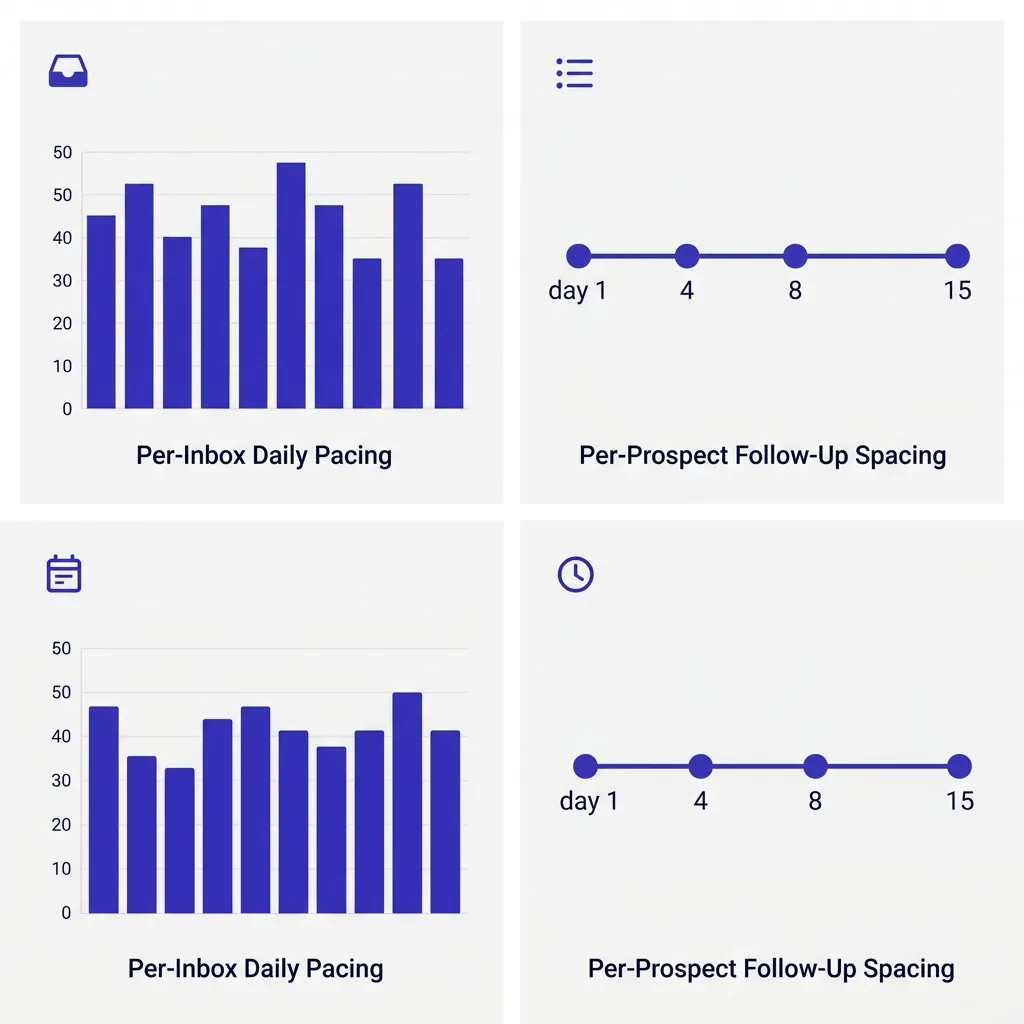 Diagram showing the two distinct frequency layers - per-domain daily volume and per-prospect follow-up timeline
#Layer One - Per-Domain Daily Pacing
The question of how many cold emails you can safely send per inbox per day has a clear answer in 2026, though it varies based on domain age and warmup status.
For a fully warmed domain on Google Workspace or Microsoft 365 that is at least 90 days old and has been through a proper warmup period, 30 to 50 cold emails per inbox per day is the practical safe ceiling for most senders. Some operators push to 100 per day on aged domains with strong historical reputation, but the deliverability curve starts bending the wrong way above 50, meaning you send more but fewer of those emails actually land in the inbox. The effective volume - emails that reach the primary inbox and get seen - often peaks somewhere in the 30 to 50 range and then plateaus or drops even as raw send volume climbs.
New domains present a completely different situation. A domain registered last week should start at 5 to 10 emails per inbox per day and hold there for the first two weeks of warmup. Rushing past this threshold is one of the most common ways teams burn fresh infrastructure before a campaign even gets started.
This connects directly to the data on how many emails per inbox per day is safe. The concept is simple: email providers look for patterns that resemble legitimate senders. A legitimate sender does not fire up a new domain on Monday and immediately blast 500 emails.
They build from low volume, earn reputation through engagement, and gradually increase. Mimicking that pattern is not optional - it is the only way to earn the inbox placement rates that make cold email viable.
The practical implication is that per-inbox volume is a ceiling you earn, not a limit you start with. How quickly you get there depends on how consistently you warm, whether you maintain warmup in parallel with campaigns (which you should, see ongoing email warmup for the mechanics), and whether your list quality keeps bounce rates low enough to avoid triggering complaint thresholds.
Looking at the email sending limits that Google Workspace and Microsoft 365 impose, there is an important distinction between technical limits and practical limits. The technical limit on a Google Workspace account is much higher than 50 emails per day - Google allows up to 2,000 per day for standard accounts. But the practical limit for cold email - the volume above which your domain reputation starts degrading - is far lower.
The two numbers are not the same, and using the technical limit as a guide for cold email is a guaranteed path to domain damage.
#The Ramp Schedule Most Teams Skip
A ramp schedule is the plan for gradually increasing sending volume on a new inbox over the first four to six weeks. Skipping it is the single most common deliverability mistake in cold email, and the teams that get burned most often are those that buy ten new domains, skip warmup, and then wonder why their open rates collapsed after two weeks.
Here is a realistic ramp schedule for a new Google Workspace or Microsoft 365 inbox:
- Week 1: 5 to 10 cold emails per day, in addition to active warmup tool sends
- Week 2: 10 to 20 cold emails per day
- Week 3: 20 to 30 cold emails per day
- Week 4: 30 to 40 cold emails per day
- Week 5 onward: 40 to 50 cold emails per day, with warmup still running in the background
The warmup tool running in the background throughout the campaign is critical. Many teams stop warmup once they start sending, which is a mistake. Warmup creates positive engagement signals - emails being opened, replied to, and moved out of spam - that counteract the negative signals generated by cold outreach that gets ignored or reported.
Think of it as a credit system: warmup deposits positive reputation credits while cold sends spend them. You need the credits to keep flowing in.
One subtlety that matters here: the ramp schedule is per-inbox, not per-domain. If your domain has three inboxes and each one follows this ramp, your total domain volume in week one might be 15 to 30 emails across the domain. By week five, you are at 120 to 150 domain-wide per day.
This aggregate view matters because domain reputation is a shared pool across all inboxes attached to that domain.
#Burst Sending Versus Even Pacing - What the Data Shows
Even pacing is not just a best practice - it is a strong deliverability signal that email providers actively read. The pattern of when you send, not just how many you send, communicates whether you look like a human sender or an automated blast operation.
Erratic volume is one of the clearest spam signals in 2026. Sending 500 emails on Monday, nothing from Tuesday through Thursday, and then 1,000 emails on Friday is not just risky - it is exactly the pattern that spam filters are tuned to catch. Email providers build models of what a typical sender looks like.
A typical legitimate sender has relatively stable daily volume with natural variation. A bot or compromised account tends to produce dramatic spikes.
The specific sending interval also matters. Emails sent in randomized intervals of 3 to 8 minutes between each send perform better than batch sends that fire at the top of the hour or at regular machine-generated intervals. Tools that send at exactly 60-second intervals or always at :00 of each hour look automated.
Tools that send with human-like randomness look legitimate.
For practical purposes, this means you want your sending tool configured to:
- Respect a daily volume cap that stays consistent from day to day
- Send within business hours of the recipient's timezone where possible
- Use randomized intervals between sends rather than mechanical schedules
- Spread sends across the full business day rather than front-loading them
The consistency requirement also means that taking a week off from sending and then resuming at full volume is a deliverability risk. If you must pause campaigns, try to maintain at least minimal warmup activity on the inbox so the sending pattern does not look like it went dead and then suddenly reactivated.
#Layer Two - Per-Prospect Follow-Up Spacing
Once you have per-domain daily pacing locked in, the second frequency layer is about how long you wait between touches to the same person. This is the dimension that most directly affects reply rates, and the data here is more nuanced than most guides suggest.
The headline finding from multiple studies of cold email sequences in 2025 and 2026 is that the first email captures approximately 58% of all replies in a sequence. The remaining 42% come from follow-ups. This single data point has a significant implication: the follow-up sequence is not optional if you want to capture the full reply potential of your outreach.
But you also cannot follow up in a way that triggers spam reports or poisons your own deliverability.
The sweet spot for the first follow-up is three to four days after the initial email. This gap gives the prospect enough time to have seen the first email without completely forgetting it. It also avoids the perception of harassment that same-day or next-day follow-ups produce.
Prospects who receive a follow-up the day after the original email often report it as spam, which is exactly the signal you do not want generating on your domain.
For the second follow-up, the spacing should widen. Three to four days after the first follow-up, so roughly seven to eight days from the original send, works well as a default. By this point you are still within the window where the prospect connects the dots between touchpoints, but you have shown enough restraint to not feel aggressive.
The third follow-up should be further still - typically another seven days out, landing around day 14 to 15 from the initial send. At this distance, the email reads more like a fresh outreach than a nagging reminder. Some practitioners recommend changing the subject line at this stage to create a clean thread rather than continuing the same reply chain.
This connects to the full follow-up email strategy question, including what to write in each touchpoint to add genuine value rather than just checking in.
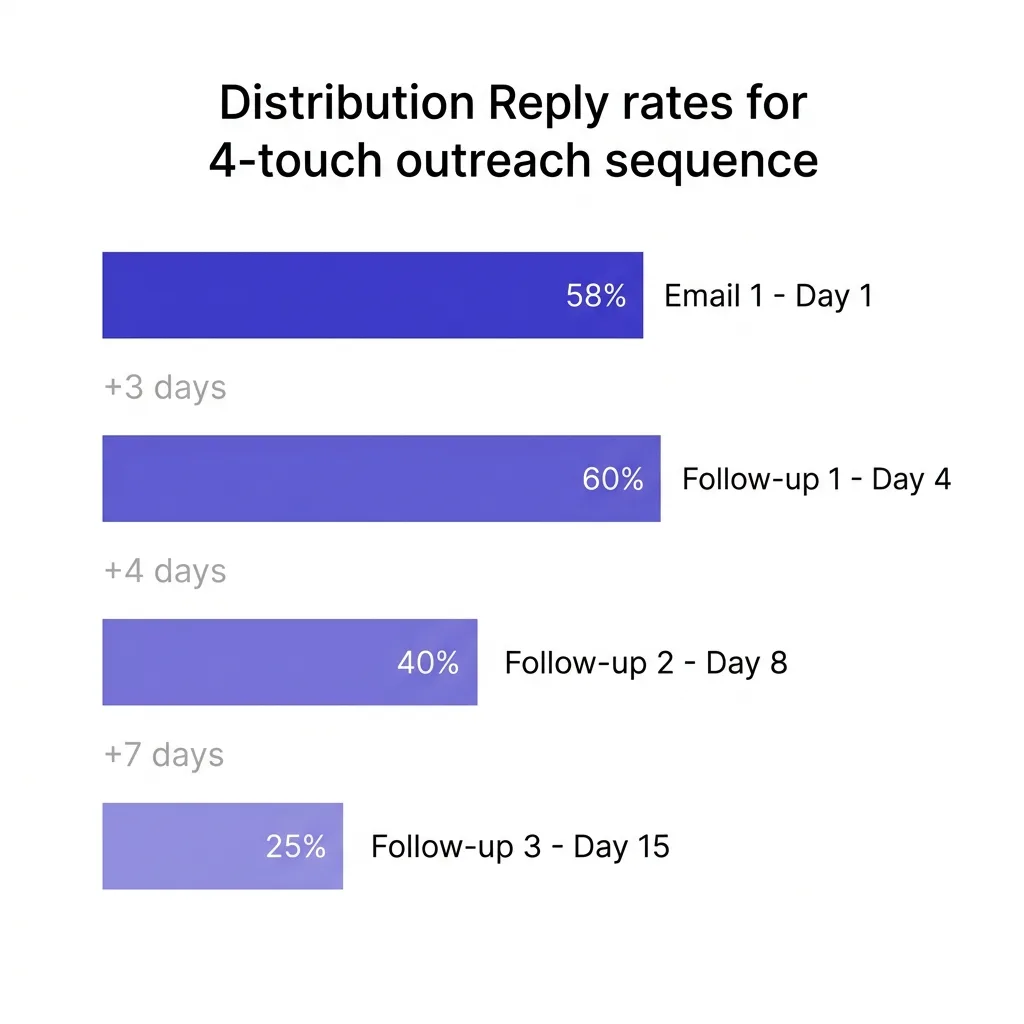 Chart showing reply rate distribution across a 4-touch cold email sequence with 3-5 day gaps between each touchpoint
#How Many Follow-Ups Actually Move the Needle
The relationship between number of follow-ups and reply rate is not linear, and understanding the curve helps you calibrate your sequence length.
Research across large cold email datasets consistently shows a few things. One follow-up on top of the initial email increases reply rates by roughly 49% compared to sending the initial email alone. A second follow-up on top of that can add another 3 to 4 percentage points of response rate.
Beyond the third follow-up, diminishing returns set in sharply, and - critically - spam complaint risk increases. One analysis of 16.5 million cold emails found that spam complaint risk more than triples by the fourth follow-up compared to the initial send.
Given these numbers, the practical optimal sequence length for most cold email campaigns is four to five total touches - an initial email plus three to four follow-ups. Under four touches and you leave roughly 42% of available replies on the table. Over five or six touches and the marginal reply gain stops justifying the spam risk increase.
This is not a universal rule - some industries and buyer personas respond to longer sequences, and signal-triggered sequences often produce different dynamics than static list outreach. But as a default architecture, four to five touches is where the math points.
The distribution of replies also matters for sequencing logic. If 58% of replies come from the first email, 20% or so from follow-up one, and the remainder spread across subsequent touches, then the follow-up emails need to add genuine new content rather than rehash the same pitch. A follow-up that just says "following up on my previous email" generates fewer replies than one that introduces a new angle, references a relevant case study, or connects to something the prospect published or their company announced.
#Sample Cadence Table - The Structure That Works
The following table shows a concrete four-touch cadence built around the frequency principles discussed above, with example content angles for each step:
| Touch | Day | Delay From Previous | Content Angle | Subject Approach |
|---|---|---|---|---|
| Initial email | Day 1 | - | Core value prop + specific reason for reaching out | Direct, relevant to prospect's role |
| Follow-up 1 | Day 4 | +3 days | New angle - address a specific pain point | Brief, reference first email naturally |
| Follow-up 2 | Day 8 | +4 days | Social proof - customer outcome relevant to their industry | Curiosity-led, not "following up" |
| Follow-up 3 | Day 15 | +7 days | Break-up or direct ask - easy yes/no | Blunt, respectful of their time |
| (Optional) Follow-up 4 | Day 22 | +7 days | Signal-triggered only - company news or job change | Fresh subject line, clean thread |
The widening gap pattern - 3 days, then 4, then 7 - reflects how prospect memory and attention work in practice. The first follow-up catches people who meant to reply but got busy. The second follow-up reaches people who need a second exposure before they engage.
The third follow-up is a final threshold test. By day 15, anyone who is going to reply from this sequence has a strong reason to do so, and the email reads like a standalone rather than nagging.
The optional fourth follow-up is only worth sending if you have a signal to reference - a funding announcement, a job change, a new product launch, or any piece of news that makes your outreach freshly relevant. Without a signal, the fourth follow-up in a static sequence typically generates minimal additional lift and meaningful spam risk.
Note that this cadence operates within the per-domain pacing limits from Layer One. On a given day, your sequence engine is only adding these follow-ups to the pool of emails going out from each inbox, and the total volume from all active sequences running through that inbox should stay within your per-inbox daily ceiling. If you have 200 prospects in various stages of this sequence, the sending tool needs to be managing the aggregate across all of them - not sending all day-4 follow-ups on the same day if doing so would spike the volume.
You can design your full email sequences to enforce both layers simultaneously at /email-sequences/.
#Sending Windows - Day, Hour, and Interval
Within the two frequency layers, there is a third dimension worth calibrating: when during the day and week you send. This affects inbox placement indirectly because high engagement rates (opens and replies) send positive reputation signals, and engagement varies by send time.
The data for 2026 consistently points to Tuesday, Wednesday, and Thursday as the highest-performing days for cold email. Monday tends to have cluttered inboxes - people are catching up from the weekend - and Friday sees lower engagement as people mentally check out before the weekend. This means if you are running a five-day-per-week campaign, you get the same volume distributed across a narrower high-value window.
For time of day, the 8 to 10 AM window in the recipient's timezone performs well for most B2B audiences. The email arrives before the workday chaos fully sets in, sits near the top of the inbox, and gets seen during the first email check of the day. For senior executives and C-suite recipients, some practitioners have found that evening sends - 9 to 11 PM - outperform morning sends, because executives often manage their own email outside business hours away from meetings and gatekeepers.
Test both windows against your specific audience rather than assuming the morning window applies universally.
The interval between individual sends within a campaign session matters too. Natural human-like randomization - 3 to 8 minutes between each email going out - outperforms mechanical batch sends. This does not mean each email gets delayed by 8 minutes across a huge volume; the randomization just ensures the send pattern does not look like a bot firing at exactly 60-second intervals.
The best time to send email article goes deeper on the timing optimization question, including industry-specific data that can meaningfully shift what works for your audience.
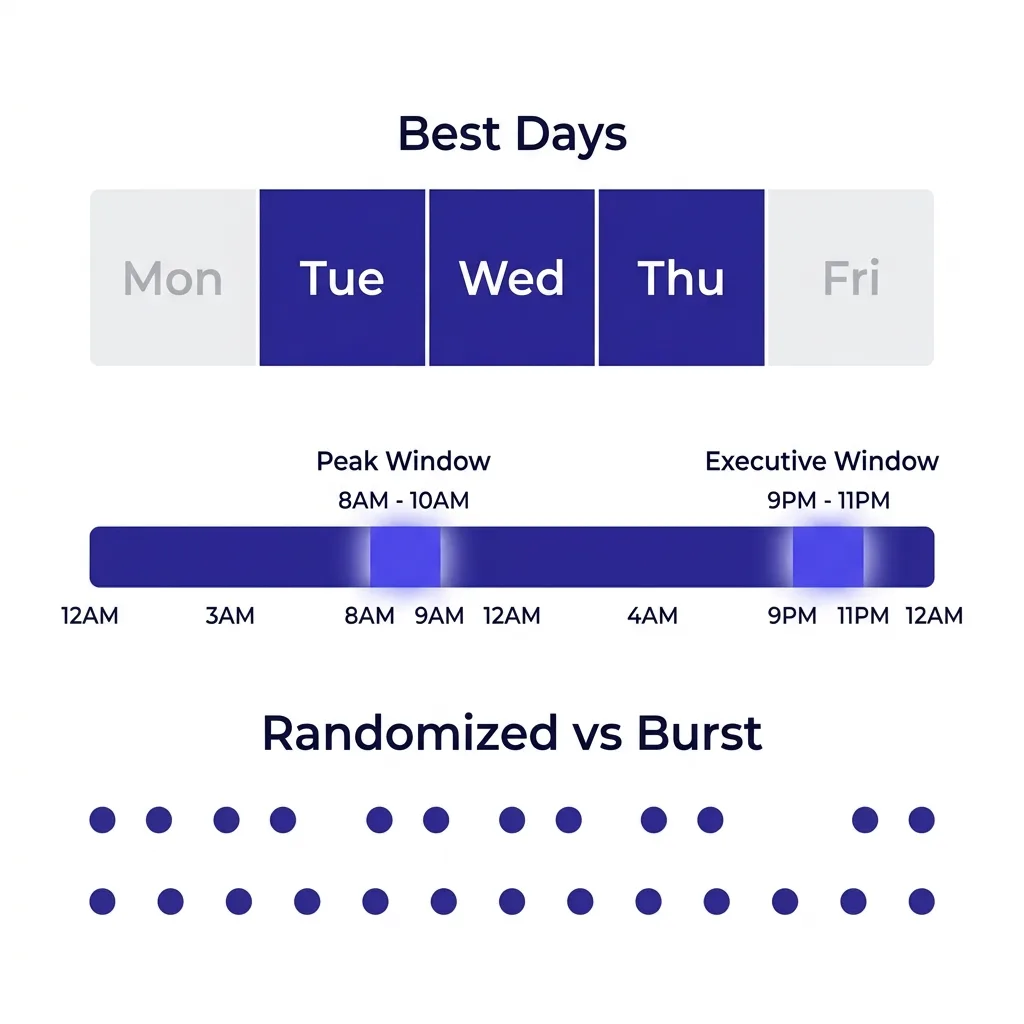 Infographic showing ideal sending windows by day and hour, plus interval randomization pattern for cold email
#Scaling Volume Without Burning Domains
Once you understand both frequency layers and the sending window dynamics, the question of how to scale total outbound volume becomes straightforward. You do not scale by pushing more emails through each inbox. You scale by adding more inboxes.
This is the infrastructure answer to the frequency problem. If your per-inbox ceiling is 40 to 50 emails per day and you need to send 1,000 emails per day, you need 20 to 25 active inboxes. If those inboxes are distributed across multiple sending domains - which they should be - you are also distributing the domain reputation risk.
A single negative signal on one domain does not collapse your entire sending operation.
The math on domain distribution works like this: most practitioners use two to three inboxes per sending domain. At 40 to 50 emails per inbox per day and two inboxes per domain, each domain is doing 80 to 100 sends per day. At that volume, a spam complaint spike on one domain affects a small fraction of your total sends.
If that domain starts showing deliverability degradation, you can pause it while the rest of your infrastructure continues running.
This connects to the broader cold email domain infrastructure question, which the email sending limits guide covers in terms of how to structure your domain portfolio.
The warmup picture also scales with inbox count. Every new inbox needs its own ramp schedule. Adding 10 new inboxes to scale volume does not mean those inboxes are ready to send at full volume on day one.
A well-run operation has inboxes at various stages of the ramp, with new infrastructure being brought online continuously so there is always warmed capacity ready to replace any degraded domains.
Ongoing email warmup should run on every active inbox throughout the life of the campaign, not just during the initial ramp period. The positive engagement signals from warmup networks counteract the neutral or negative signals from cold outreach and help maintain the reputation credits that keep your emails landing in primary inboxes.
#How Google and Microsoft Interpret Frequency Signals
Understanding what Google and Microsoft actually look at when evaluating a sender helps demystify why the frequency thresholds exist where they do.
Google's bulk sender guidelines, updated and strictly enforced through 2025 and into 2026, require senders to keep spam complaint rates below 0.10%, with a hard failure threshold at 0.30%. In practice, most experienced cold email operators aim to stay below 0.08% as a safety buffer. At the daily send volumes we have been discussing - 30 to 50 emails per inbox - even a few spam complaints in a day can push your rate over 0.10% if your total volume is low.
This is one reason why volume and list quality are inseparable: a low-quality list generates more spam complaints, and at any given volume level, more complaints means a higher complaint rate.
SPF, DKIM, and DMARC authentication is mandatory for bulk senders under Google's current rules. This is not optional infrastructure. Sending without proper authentication not only fails deliverability on authenticated domains but also triggers immediate reputation penalties.
If you have not audited your authentication setup recently, the email sending limits article covers the authentication requirements in full.
Microsoft's approach for Outlook and M365 domains is directionally similar though different in some specifics. Microsoft places significant weight on domain age - newer domains face much stricter scrutiny regardless of volume - and has a lower tolerance for complaint spikes on domains that have not built reputation history over time. The Microsoft environment tends to be somewhat less permissive than Google Workspace for cold email at scale, which is why many teams route higher-volume sends through Google Workspace inboxes while using Microsoft 365 accounts for more targeted, lower-volume sequences.
What both providers have in common is that they are fundamentally looking for consistency and legitimacy. A domain that sends at steady volume, generates engagement, maintains low complaint rates, and has been operating for months or years looks legitimate. A domain that appeared last month, sends erratically, and generates complaint rates above 0.10% does not, regardless of what the email itself says.
The frequency disciplines described in this article - per-inbox pacing, ramp schedules, even sending intervals, and spaced follow-ups - are all in service of looking consistent and legitimate to the infrastructure that makes the final inbox-or-spam decision.
#FAQs
#How many cold emails per day can I send from one inbox without hurting deliverability?
For a fully warmed inbox on a domain at least 90 days old, 30 to 50 cold emails per day is the practical safe ceiling in 2026. Some teams push to 100 on well-aged, high-reputation domains, but deliverability effectiveness often peaks around 50 and can degrade above that even if the inbox technically allows more. New domains and new inboxes should start at 5 to 10 per day and ramp over four to six weeks.
The number you can send safely is earned through consistent warmup and clean list quality, not granted by default.
#How long should I wait between cold email follow-ups?
The first follow-up should go out three to four days after the initial email. The second follow-up should be four to five days after that, landing around day eight. The third follow-up should be another seven days out, around day 15.
The pattern should widen over time - earlier gaps are shorter, later gaps are longer. This mirrors how legitimate correspondence works and avoids the perception of harassment that same-day or next-day follow-ups create.
#How many follow-up emails should I send in a cold email sequence?
Three to four follow-ups on top of the initial email is the sweet spot for most B2B cold email campaigns in 2026. Research across 16.5 million cold emails shows that one follow-up can increase overall reply rates by around 49%, but spam complaint risk triples by the fourth follow-up. The first email captures roughly 58% of replies in a sequence, and the follow-ups capture the remaining 42%.
Under three follow-ups leaves replies on the table; over five follow-ups usually generates more spam risk than incremental reply gain.
#Does sending at consistent daily volume actually matter for deliverability?
Yes, significantly. Email providers build models of what typical legitimate senders look like and flag patterns that deviate. Sending 500 emails on Monday, nothing for three days, then 1,000 on Friday is a pattern that correlates with spam operations and automated blast campaigns.
Consistent daily volume - even if that means intentionally capping sends to stay steady - signals legitimate sender behavior. The interval between individual sends also matters: randomized 3 to 8 minute gaps between emails perform better than mechanical batch sends at fixed intervals.
#Should I keep running warmup while I am actively sending cold email campaigns?
Yes, always. Warmup should run continuously throughout the life of any active sending inbox, not just during the initial ramp period. Warmup activity creates positive engagement signals - opens, replies, emails moved from spam to inbox - that counteract the neutral or negative signals generated by cold outreach that gets ignored.
Think of warmup as a continuous deposit into your reputation credit account. The moment you stop warmup and keep sending cold email, you are spending credits without replenishing them, which leads to gradual deliverability erosion.
#What is the difference between per-domain daily volume and per-prospect follow-up frequency?
These operate on completely different dimensions. Per-domain daily volume is an infrastructure question about how many total emails leave each inbox each day, which affects domain reputation and inbox placement for everyone on your list. Per-prospect follow-up frequency is a sequencing question about how long you wait between contacts to the same individual, which affects whether that person perceives your outreach as helpful or harassing.
You need to get both right simultaneously.
Perfect follow-up timing does nothing if your domain is burned from volume spikes. Perfect per-inbox pacing does nothing if your follow-up intervals are so aggressive they generate spam complaints.
#Conclusion
Cold email sending frequency is a two-layer discipline, and most teams only manage one layer at a time. The teams that protect their domains over years rather than months understand that per-inbox daily pacing and per-prospect follow-up spacing are both non-negotiable, that burst sending is as dangerous as excessive volume, and that the cadence architecture needs to be built into the system rather than improvised campaign by campaign.
The numbers in 2026 are clear: 30 to 50 cold emails per inbox per day for warmed domains, a four to six week ramp for new inboxes, follow-ups starting three to four days after the initial send and widening to seven-day gaps by the third touch, and a total sequence length of four to five touchpoints. Operate within those parameters and you protect the infrastructure that makes outbound viable at scale.
If you want to run sequences that enforce both frequency layers automatically - capping per-inbox daily volume, spacing follow-ups correctly, and keeping your domain reputation data visible - start your first campaign with FirstSales for $1 at https://app.firstsales.io and see what a cadence built around deliverability protection actually looks like in practice.