
#Pre-Warmed Inboxes: Shortcut or Trap in 2026?
Copy page
**TL;DR - Pre-warmed inboxes give you a head start, not a free pass. Inbox placement on day one can be 86% versus 52% for a cold inbox, and the time savings are real. But the reputation you buy is borrowed: it belongs to a warmup pool pattern that Google and Outlook have already catalogued, it doesn't scale past 30-50 emails per day without immediate risk, and a volume spike can drop your domain to spam placement in under 48 hours.
For short campaigns and agency scale-ups, they make sense. For any long-term outbound motion, self-warming on aged domains is still the more durable bet.**
#Table of Contents
- What a Pre-Warmed Inbox Actually Is
- The Promise: Why Cold Emailers Buy Pre-Warmed Inboxes
- How Providers Build Pre-Warmed Inboxes
- The Trap: Six Ways Pre-Warmed Inboxes Backfire
- What Google and Outlook Actually See
- Pre-Warmed vs Self-Warmed: A Direct Comparison
- Volume Ceilings That Matter
- When Pre-Warmed Inboxes Are the Right Call
- How to Vet a Pre-Warmed Inbox Provider
- Building Your Infrastructure the Right Way
- The Decision Table
- FAQs
- Conclusion
#What a Pre-Warmed Inbox Actually Is
A pre-warmed inbox is an email account - typically on Google Workspace or Microsoft 365 - that a third-party provider has been running through a simulated sending history before handing it to you. The idea is simple: instead of starting your outbound campaign with a brand-new inbox that has zero sending history, you buy one that looks like it has been active for weeks or months.
That history usually consists of automated sending patterns, inbox-to-inbox exchanges within a warmup pool, and occasionally some light engagement signals like opens and replies between pool members. When you receive the inbox, the provider tells you the domain is aged, the sending score is healthy, and you can start cold outreach immediately or within a day or two.
It sounds like an attractive shortcut. The reality is more nuanced.
The key distinction that most buyers miss is that a pre-warmed inbox has a sending history - but it doesn't have your sending history. The reputation attached to that inbox was generated by automated processes on a shared network, not by legitimate business email you sent. That distinction matters more in 2026 than it did two years ago, because both Google and Microsoft have gotten significantly better at identifying warmup pool patterns and discounting the signals they generate.
Understanding how to warm up an email the right way gives you a baseline for evaluating what pre-warmed providers are actually delivering versus what genuine warmup looks like.
#The Promise: Why Cold Emailers Buy Pre-Warmed Inboxes
The appeal is real and the numbers cited by providers are not entirely fabricated. Side-by-side tests comparing pre-warmed inboxes to cold inboxes on the same list show meaningful differences in early inbox placement:
- Pre-warmed inboxes: 86% inbox placement on day one
- Standard fresh inboxes: 52% inbox placement on day one
That 34-percentage-point gap represents real lost opportunities. If you are running a time-sensitive campaign - a product launch, an event, a limited outreach window - waiting four weeks to self-warm an inbox can genuinely cost pipeline.
The time argument is also legitimate. A proper self-warmup on a new domain takes two to four weeks when done manually, or two to three weeks with a warmup tool running background activity. Providers claim pre-warmed inboxes are ready in 24 to 72 hours.
For agencies managing 20 client campaigns simultaneously, that time compression matters.
There is also a cost-of-delay argument worth taking seriously. During a 21 to 42-day manual warmup, your inbox sits mostly idle. The opportunity cost of those 3,000 to 6,000 unsent emails is arguably more expensive than 12 months of pre-warmed inbox fees.
That math is real - it just depends heavily on what you are actually sending and to whom.
The email warm up statistics page documents the expected warmup curves for self-warmed inboxes, which gives you concrete numbers to weigh against provider claims.
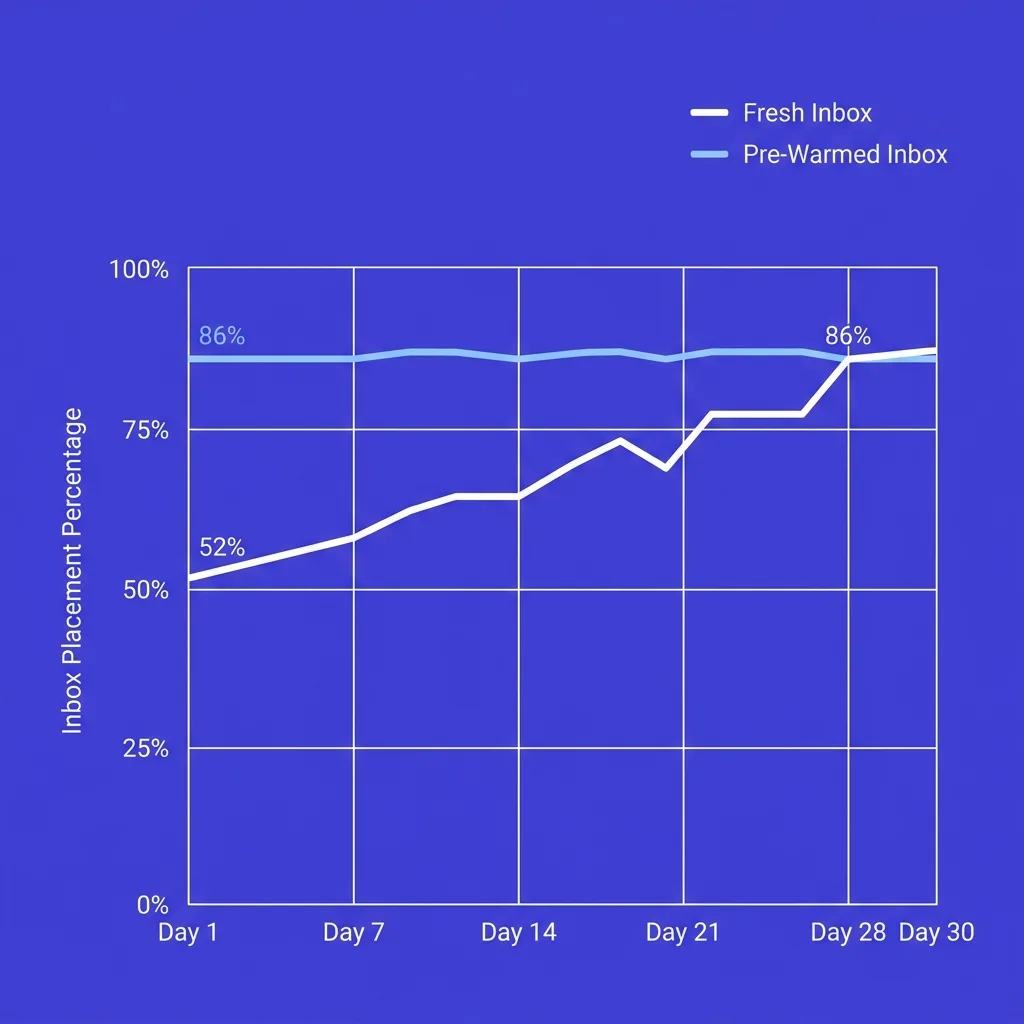 Inbox placement rates: pre-warmed vs fresh inboxes over the first 30 days of sending
#How Providers Build Pre-Warmed Inboxes
To evaluate a pre-warmed inbox intelligently, you need to understand what actually happens during the warmup process on the provider's end. There are two main approaches, and they are not equivalent.
Warmup pool networks. The most common method. The provider maintains a network of inboxes that email each other on rotating schedules. Your inbox receives emails from other pool members, opens them, replies to some, and sends its own.
After several weeks of this activity, the sending score looks healthy. The problem is that Google and Microsoft have identified the behavioral fingerprints of most warmup pools - predictable send times, identical reply cadences, narrow sender diversity, and IP clusters that belong to known warmup networks. As of 2026, the engagement signals from warmup pool activity carry significantly less weight than they did in 2022.
SMTP-only warmup. Some providers run warmup sequences over SMTP only. This is almost entirely useless. Gmail and Outlook make reputation decisions based on engagement signals they observe at the inbox level - opens, replies, spam complaints.
SMTP traffic is invisible to those signals. An inbox that was "warmed" exclusively via SMTP has approximately no reputation advantage over a fresh inbox. It just has a history the provider can show you in a dashboard.
Real-engagement-adjacent warmup. The best providers try to mix pool activity with some genuine engagement signals - interactions with real Gmail or Outlook accounts, not just other pool members. This is harder to scale and more expensive, which is why most providers don't do it properly. A reply from a real @gmail.com user carries more reputation weight than ten automated opens from a warmup pool account.
The gap between these two signals has grown wider in 2026 as provider algorithms have matured.
What you should ask any pre-warmed inbox provider: what percentage of warmup activity involved real human accounts outside the pool? If they can't answer that clearly, assume the answer is zero.
#The Trap: Six Ways Pre-Warmed Inboxes Backfire
#1. You're Renting Trust You Don't Own
When a provider controls the inbox - the account credentials, the Google Workspace license, the domain registration - you are a tenant, not an owner. If the provider raises prices, shuts down, or gets their sending infrastructure flagged, your access disappears along with the reputation they built. This is not a theoretical risk.
Multiple pre-warmed inbox providers have shut down abruptly since 2023, leaving clients scrambling for replacements mid-campaign.
Even with providers who hand over full account control, the underlying domain may have been provisioned on shared IP ranges or registered with patterns that invite scrutiny.
#2. The Volume Ceiling Is Lower Than Advertised
Most pre-warmed inbox providers advertise that you can "send immediately" or "start outreach on day one." What they omit is the volume constraint. An inbox with four to eight weeks of warmup history typically maxes out at 30 to 50 cold emails per day before inbox placement starts degrading.
Some practitioners who work with verified, engaged lists stay at 20 to 30. Push past the ceiling on a dirty or unverified list and domain reputation can collapse inside 48 hours.
This matters because most people who buy pre-warmed inboxes are trying to move fast. Moving fast means sending volume. And high volume on a newly received inbox - even a "pre-warmed" one - triggers the same flags as volume on any other new account.
The ongoing email warmup guide covers why maintenance warmup matters after you begin sending, which is directly relevant here: a pre-warmed inbox still needs ongoing warmup activity to sustain its baseline reputation.
#3. The Domain Quality Is Often Separate from Inbox Quality
Inbox-level warmup and domain-level reputation are not the same thing. A provider might deliver you an inbox with 12 weeks of warmup history sitting on a domain registered two months ago with a $1 registrar that has been used by dozens of other senders on the same provider's network. Domain age, registrar reputation, and domain-level sending history all factor into how Google and Outlook evaluate your mail.
An inbox that looks warm at the account level can still land in spam because the domain underneath it is weak.
Good providers configure SPF, DKIM, and DMARC correctly and use aged domains. Budget providers often skip this or use domains with murky histories. A Mailpool analysis of over one million cold emails found that missing DNS authentication alone can drop deliverability by up to 30%.
Pre-warmed or not, that hit applies.
Connecting this to cold email domain burn rate is important: if you push an under-qualified pre-warmed inbox too hard, you are accelerating the burn rate of whatever domain it sits on.
#4. Shared Infrastructure Means Shared Risk
Many pre-warmed inbox providers run multiple clients on shared IP ranges. If another client on the same infrastructure sends spam, hits complaint thresholds, or triggers a Google or Microsoft bulk sender policy violation, your inboxes can be collateral damage. You had no control over their behavior and you get penalized anyway.
The email domain rotation strategy exists partly to manage this kind of risk - spreading sends across multiple domains so one burned domain doesn't kill the whole operation. Pre-warmed inboxes on shared infrastructure make that strategy harder to execute cleanly.
#5. Volume Consistency Matters as Much as Volume Ceiling
Google and Microsoft do not just look at how many emails you send per day - they look at sending consistency. An inbox that warmed up sending five to fifteen emails per day, then suddenly sends 40 on the day you take ownership, has a behavioral anomaly that filtering algorithms flag. Volume consistency matters as much as the absolute ceiling.
Going from 10 emails per day to 80 overnight is a red flag even on a properly pre-warmed inbox. The right approach is to ramp up gradually from whatever level the warmup ended at, adding no more than 20% volume per day.
#6. Warmup Pool Signals Are Increasingly Discounted
Google weights engagement from real Gmail accounts more heavily than engagement from warmup networks. Microsoft has implemented similar pattern recognition. By 2026, the major warmup pool networks are largely identified by both providers - the IP ranges, the behavioral patterns, the timing signatures.
The reputation signals those pools generate are not worthless, but they are meaningfully discounted compared to what genuine human engagement with your emails would produce.
The practical implication: a pre-warmed inbox has a real but thinner foundation than it appears in the provider's deliverability dashboard.
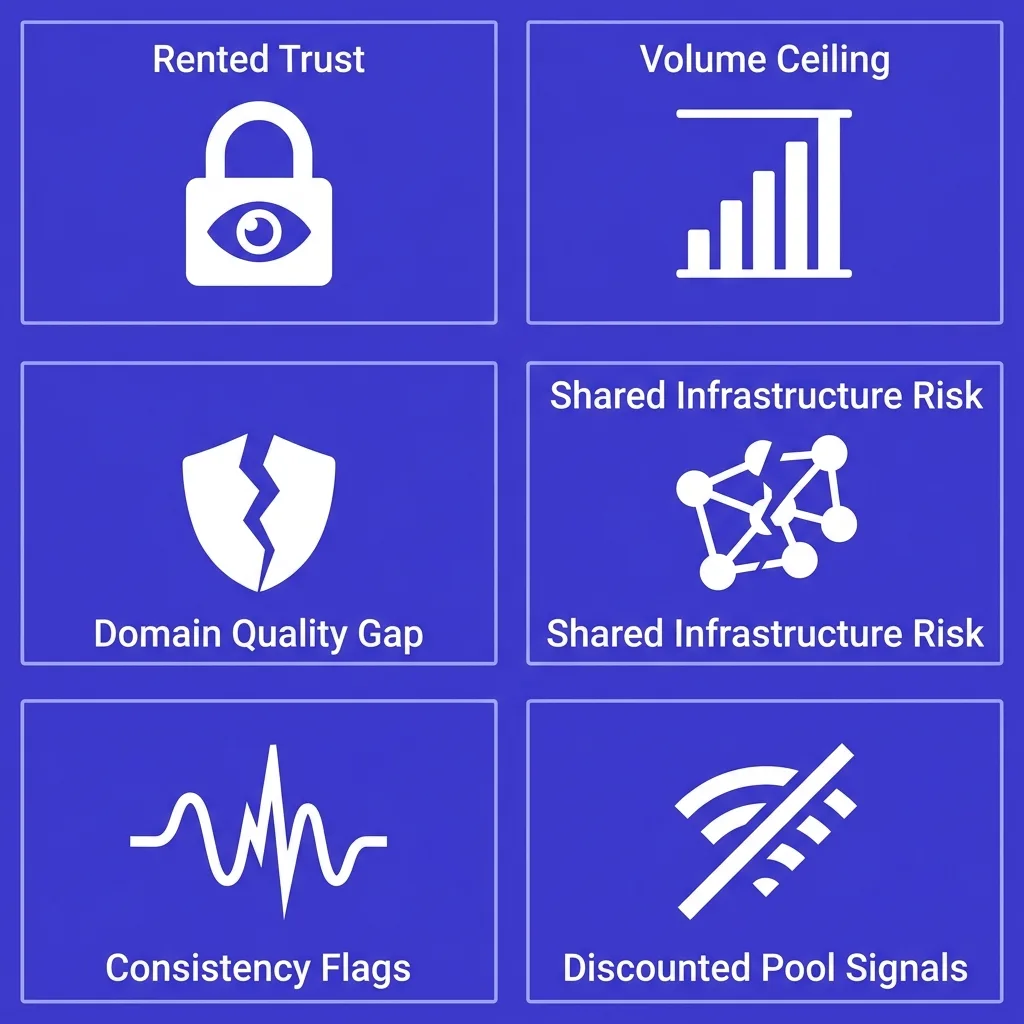 Six failure modes of pre-warmed inboxes: rented trust, volume ceilings, domain quality gaps, shared infrastructure risk, consistency flags, discounted pool signals
#What Google and Outlook Actually See
Both Google and Microsoft have published enough of their sender evaluation criteria to understand what signals matter. What they look at is not "was this inbox warmed?" - it is a composite of signals that inform a probability score for whether a given email is legitimate communication or bulk unsolicited mail.
The factors that actually move that score include:
- Sender authentication. SPF, DKIM, and DMARC are baseline requirements for both providers as of 2024 to 2025 updates. Missing or misconfigured authentication degrades deliverability regardless of warmup status.
- Spam complaint rate. Google's published threshold is 0.10% - above that, deliverability starts degrading. At 0.30%, you face hard consequences. Aiming for under 0.08% is the practical buffer most experienced senders use. Microsoft is similarly strict.
- Sending consistency. Sudden volume spikes trigger filters immediately, even from inboxes with sending history. The 20% daily volume increase limit applies here.
- List quality. Hitting invalid addresses, spam traps, or sending to lists with low engagement signals will degrade domain reputation fast regardless of how well the inbox was pre-warmed.
- Engagement signals. Replies, forwards, and manual inbox placement (moving from spam to inbox) are the highest-value signals. Automated warmup pool opens carry less weight. Genuine replies from real recipients carry the most weight.
What Google and Outlook do not see - and therefore cannot factor - is what the provider's dashboard shows you about warmup history. The warmup score in your provider's interface is based on the provider's metrics, not on Google's or Microsoft's actual sender scoring. These are different things.
#Pre-Warmed vs Self-Warmed: A Direct Comparison
| Factor | Pre-Warmed Inbox | Self-Warmed Inbox |
|---|---|---|
| Time to first send | 24-72 hours | 2-4 weeks |
| Day-1 inbox placement | ~86% (best providers) | ~52% |
| Volume ceiling at start | 30-50/day max | 15-30/day at week 4 |
| Reputation ownership | Borrowed from provider | Yours, built incrementally |
| Domain quality control | Provider-dependent | Full control |
| Ongoing maintenance needed | Yes - ongoing warmup still required | Yes - same requirement |
| Cost structure | Higher upfront, ongoing fees | Lower upfront, time cost |
| Risk if provider shuts down | Lose asset | No dependency |
| Scalability for long campaigns | Moderate (ceiling limits volume) | Higher (reputation compounds) |
| Google/Outlook signal weight | Discounted (pool patterns) | Higher (genuine signals) |
| Best for | Short campaigns, agency scale | Long-term outbound programs |
| Compliance-sensitive use cases | Risky (unclear ownership) | Clean audit trail |
The table shows a pattern: pre-warmed inboxes win on speed, lose on durability. For outbound programs measured in weeks, that tradeoff can be reasonable. For programs measured in months, the compounding value of genuine self-built reputation usually outweighs the time saved.
#Volume Ceilings That Matter
One of the most common mistakes buyers make is treating the pre-warmed inbox as fully deployable from day one. Here are the actual safe sending volumes by warmup duration:
| Warmup History | Safe Daily Cold Email Volume | Risk Zone | Danger Zone |
|---|---|---|---|
| 2-3 weeks (entry) | 15-25/day | 26-40/day | 41+/day |
| 4-6 weeks (standard) | 25-35/day | 36-55/day | 56+/day |
| 8-12 weeks (aged) | 35-50/day | 51-80/day | 81+/day |
| Self-warmed, 30+ days | 20-40/day | 41-60/day | 61+/day |
| Self-warmed, 60+ days | 30-50/day | 51-70/day | 71+/day |
These numbers assume a clean, verified list. If you are sending to unverified data, apply a 30% haircut across the board. Hitting even one spam trap on a fresh inbox - pre-warmed or not - can set domain reputation back significantly.
The relationship between these limits and inbox count is why experienced outbound teams structure their infrastructure around many inboxes sending conservatively, rather than few inboxes sending at volume. For an operation sending 500 cold emails per day, you need 15 to 25 inboxes running at safe volume - not 2 inboxes pushing hard.
#When Pre-Warmed Inboxes Are the Right Call
Despite the caveats, there are genuine use cases where pre-warmed inboxes make operational sense.
Agency scale-up under time pressure. If you run a cold email agency and a new client wants a campaign live within a week, building a fresh infrastructure from scratch is not viable. Pre-warmed inboxes let you get a campaign running at modest volume while you simultaneously build out a longer-term self-warmed infrastructure for that client.
Backup inbox capacity. When a domain gets flagged or an inbox starts showing deliverability degradation, you need replacement capacity fast. Pre-warmed inboxes can fill that gap while you investigate and repair the primary infrastructure. This connects directly to having a cold email domain burn rate strategy - knowing roughly when domains will degrade lets you pre-provision backup capacity.
Short-duration, high-value campaigns. A product launch, a conference follow-up, a seasonal push with a hard end date. If the campaign runs for three to four weeks and you need decent inbox placement on day one, the time-to-value math can favor pre-warmed inboxes.
Testing new ICP segments. Before investing weeks in building out a full self-warmed infrastructure for a new segment, you can run a limited test with pre-warmed inboxes to validate response rates and message-market fit. If the segment works, build the real infrastructure. If it doesn't, you haven't sunk four weeks into warmup for a segment that won't convert.
What is not a good use case: your primary sending infrastructure for a sustained outbound program. The volume ceilings are too low, the ownership risks are too real, and the reputation does not compound the way self-built reputation does.
#How to Vet a Pre-Warmed Inbox Provider
If you decide pre-warmed inboxes make sense for your situation, the quality gap between providers is enormous. Here is what to check before you hand over money.
Domain age and provenance. Ask for the registration date of the domain the inbox sits on. Under 90 days is a yellow flag. Under 60 days on an inbox the provider claims is "fully warmed" is a red flag.
Also ask whether the domain was previously used by other senders.
Dedicated vs shared IPs. Shared IP ranges mean shared risk. Dedicated IPs cost more but isolate your reputation from other clients on the provider's network. For any campaign where deliverability matters, dedicated IPs are worth the premium.
Authentication configuration. Request proof that SPF, DKIM, and DMARC are correctly configured. A legitimate provider can show you this in 60 seconds. If they hedge or offer to "set it up after delivery," walk away.
Warmup pool composition. Ask what percentage of warmup activity involved accounts outside the provider's own network - real human accounts, not pool members. Budget for evasion on this question; most providers won't give you a clean answer. But asking forces them to either disclose or equivocate, which tells you something.
Account control and ownership. Confirm you receive full credentials, that the Google Workspace or Microsoft 365 account is registered to your domain or a domain you control, and that you can change passwords and access settings independently of the provider.
Inbox placement test data. Ask for independent inbox placement test results from a tool like GlockApps, Mailreach, or similar - not the provider's internal dashboard. Day-one and week-two placement rates on a representative list should be verifiable externally.
Week-one open rates on a clean list. If pre-warmed Microsoft 365 inboxes deliver 12% to 18% open rates in week one on a verified B2B list, they probably were not genuinely pre-warmed. Genuine warmup should sustain above 25% on a clean list early on.
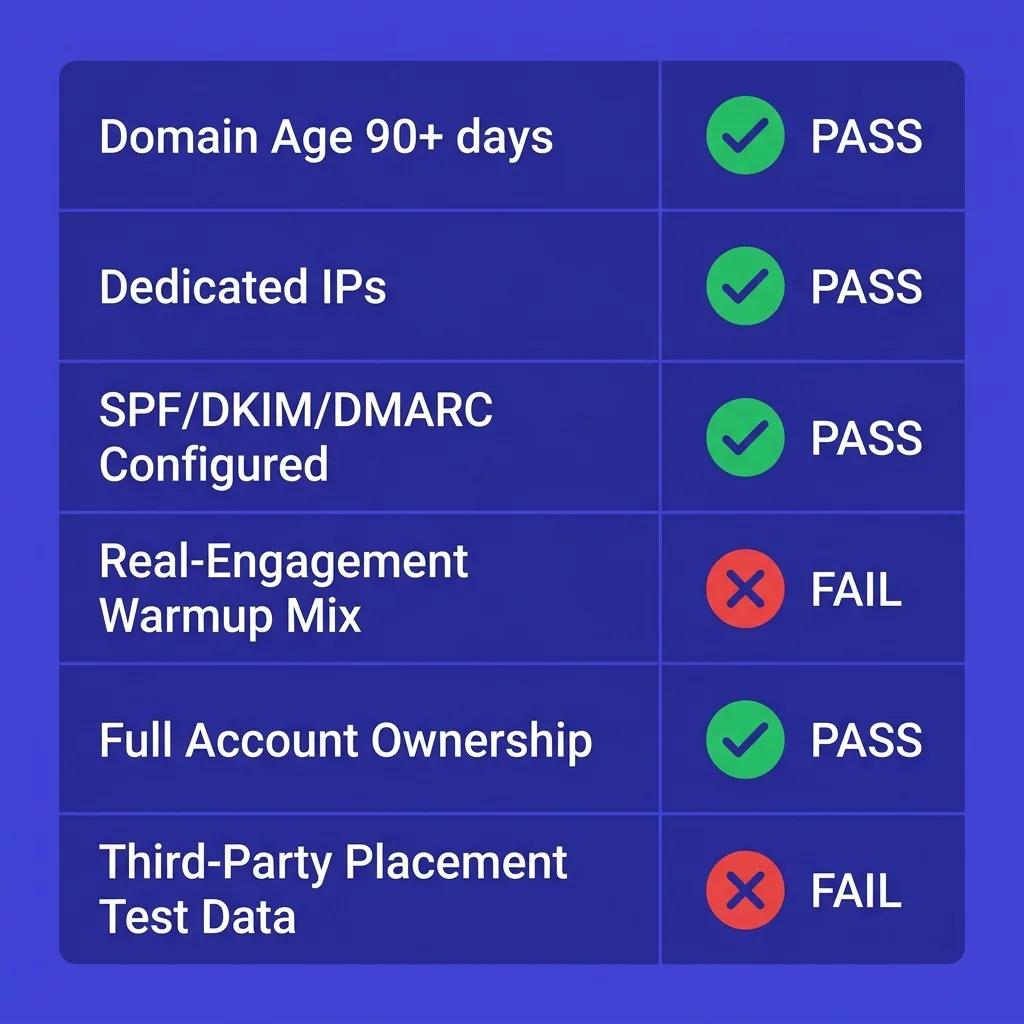 Due diligence checklist for evaluating pre-warmed inbox providers - six categories with green/red status indicators
#Building Your Infrastructure the Right Way
Whether you start with pre-warmed inboxes or self-warm from scratch, the infrastructure principles that sustain deliverability over time are the same. Understanding these also helps you evaluate whether a pre-warmed inbox is a genuine shortcut or a deferred liability.
Domain separation from your primary brand domain. Never send cold outreach from your main company domain. Use separate sending domains that mirror your brand but are not the same address. If a sending domain gets flagged, your primary domain stays clean.
See email domain rotation for how to manage a multi-domain setup.
Authentication before anything else. SPF, DKIM, and DMARC are not optional. They are table stakes. A missing or broken DMARC record alone can cost 30% of inbox placement.
Set these up on day one, before any warmup or sending starts, and verify them with an external tool.
Gradual, consistent volume ramp. Whether you start from zero or from a pre-warmed baseline, volume should increase at no more than 20% per day. Consistency matters as much as the ceiling. An inbox that sends 15 emails on Monday and 60 on Tuesday is producing a behavioral anomaly that filters notice.
List verification before sending. Invalid addresses, role accounts, and spam traps are inbox placement killers. Verify every list before sending. This is especially critical with pre-warmed inboxes where the margin for error is smaller because the reputation foundation is thinner.
Ongoing warmup maintenance. Pre-warmed or self-warmed, every sending inbox benefits from continued warmup activity running in the background. Stopping warmup when you start sending is like removing a scaffold before the building is stable. The ongoing email warmup practice keeps your baseline reputation from eroding as cold sending volume increases.
Monitor your metrics actively. Domain reputation score, spam complaint rate, inbox placement rate, and bounce rate are the four numbers to watch weekly. Google Postmaster Tools gives you free access to domain reputation data for Google Workspace accounts. Microsoft has equivalent tools in the SNDS and JMRP programs.
If domain reputation starts slipping, dial back volume immediately - waiting for complaint rates to spike is too late.
The warmup tools and sending platforms that integrate warmup monitoring with campaign sending make this easier. FirstSales's warmup infrastructure is built to handle this automatically, keeping warmup activity calibrated to your actual sending volume so you don't have to manage it manually.
#The Decision Table
Use this to decide whether pre-warmed inboxes belong in your infrastructure:
| Scenario | Recommended Approach | Reason |
|---|---|---|
| New outbound program, no time pressure | Self-warm from scratch | Builds durable, owned reputation |
| Agency, new client campaign in under 7 days | Pre-warmed inboxes + parallel self-warm | Speed now, durability later |
| Short campaign (under 4 weeks) | Pre-warmed inboxes acceptable | Duration fits the reputation window |
| Sustained program (3+ months) | Self-warm only | Pre-warmed ceiling too low to scale |
| Backup/replacement capacity urgently needed | Pre-warmed inboxes | Fast provisioning is the use case |
| Compliance-sensitive industry (finance, health) | Self-warm, full ownership | Audit trail and control requirements |
| Testing new ICP before building infrastructure | Pre-warmed inboxes for test | Limits sunk cost if segment fails |
| High-volume sending (100+ emails/day per inbox) | Neither - reduce per-inbox volume | Infrastructure problem, not warmup problem |
| Budget constrained, time rich | Self-warm | Lower cost, higher long-term ROI |
| Budget flexible, time constrained | Pre-warmed from vetted provider | Worth the premium if provider quality is verified |
#FAQs
#How long does a pre-warmed inbox reputation actually last?
The warmup-generated reputation does not expire on a fixed timeline - it degrades based on how you use the inbox. If you stay within recommended volume limits (30 to 50 emails per day for a fully warmed inbox), send to verified lists, maintain authentication, and keep spam complaint rates under 0.08%, the reputation can sustain indefinitely. Pushing past volume ceilings or hitting complaint spikes can collapse domain reputation in under 48 hours regardless of prior warmup history.
The reputation is a buffer, not a permanent asset.
#Can Google or Outlook tell that an inbox was warmed by a third-party pool?
Yes, with high probability. Both providers have catalogued the behavioral fingerprints of major warmup pool networks - the IP ranges, timing patterns, reply cadences, and sender diversity profiles that warmup pools produce. They discount engagement signals from these patterns rather than counting them the same as genuine human engagement.
This does not mean pre-warmed inboxes are useless, but it does mean their effective reputation is thinner than the provider's dashboard suggests.
#What volume should I start at when I receive a pre-warmed inbox?
Start at the volume the warmup ended at, not at the maximum advertised ceiling. Ask the provider what daily volume the inbox was at during the final week of warmup and begin there. If the warmup ended at 20 emails per day, start there and increase by no more than 20% per day as you observe inbox placement metrics.
Going straight to the ceiling because the inbox is "ready" is how reputation collapses happen.
#Is a pre-warmed inbox on Microsoft 365 different from one on Google Workspace?
The underlying warmup mechanics are similar, but the provider evaluation criteria differ. Microsoft has historically been more lenient with new sender ramp-up but has tightened requirements significantly since 2024. Google has slightly more transparent published criteria (the 0.10% spam complaint threshold, one-click unsubscribe, mandatory authentication).
A pre-warmed inbox on either platform benefits from the same quality criteria: dedicated IPs, proper authentication, aged domain, and real-engagement-adjacent warmup activity.
#Do I still need ongoing warmup if my inbox came pre-warmed?
Yes. Ongoing warmup activity maintains the baseline reputation your sending activity builds on. Once you start sending cold email volume, that volume generates complaint signals, bounces, and engagement patterns that can pull your reputation in either direction.
Running ongoing warmup in parallel keeps positive engagement signals flowing alongside your cold outreach. The ongoing email warmup practice is not a startup phase - it is maintenance.
#What is the biggest mistake buyers make with pre-warmed inboxes?
Treating "pre-warmed" as synonymous with "ready for full-scale sending." The warmup generates a starting baseline, not a high-volume sending license. The most common failure pattern is a team receives pre-warmed inboxes on a Monday, sends 80 to 100 emails per inbox by Wednesday because "they're supposed to be ready," hits complaint spikes from a dirty list, and watches the domain reputation drop to spam placement within 72 hours.
The inbox was pre-warmed; the list was not clean and the volume was not calibrated. Both matter.
#Conclusion
Pre-warmed inboxes are a legitimate tool when used correctly and provisioned from a quality provider. They solve a real problem - the time cost of building inbox reputation from zero - and the day-one deliverability advantage is genuine. An 86% inbox placement rate versus 52% is a meaningful difference when a campaign has a hard deadline.
But the shortcut has real limits that most people discover after the damage is done. The reputation is borrowed, not owned. The volume ceilings are lower than advertised.
Google and Outlook have catalogued warmup pool patterns and discount their signals. The domain quality underneath the inbox matters as much as the inbox-level warmup. And a single volume mistake or list quality problem can collapse months of built reputation in 48 hours.
The right mental model is this: a pre-warmed inbox gives you a running start on a track that still has the same obstacles. You still need clean lists, proper authentication, calibrated volume, ongoing warmup maintenance, and consistent sending behavior. The warmup history moves your starting line forward by a few weeks - it does not change the rules of the race.
For teams building sustained outbound programs, self-warming on aged, properly configured domains is still the more durable foundation. For agencies, short campaigns, and backup capacity, pre-warmed inboxes earn their place in the toolkit.
If you want infrastructure that handles the warmup, authentication, volume calibration, and ongoing maintenance automatically - so you can focus on writing emails that actually get replies - start your first campaign on FirstSales for $1 at https://app.firstsales.io and see how deliverability-first sending works in practice.