#LinkedIn connection request limits in 2026 (every cap)
Copy page
TL;DR: Most LinkedIn accounts can send about 100 connection requests per week in 2026, with a rolling seven-day reset. Premium and Sales Navigator accounts with strong trust signals can reach 150 to 200. There is a hard ceiling of 1,500 pending invitations, withdrawing them does not restore your quota, and the fastest way to get restricted is not volume.
It is robotic timing, a low acceptance rate, and automation that LinkedIn fingerprints. Treat these caps the way you treat email sending limits: as guardrails that protect your account, not obstacles to beat.
#Table of contents
- Why LinkedIn limits work like email deliverability rules
- The 2026 LinkedIn connection request limit
- Full limits table: free vs Premium vs Sales Navigator
- The pending invitation ceiling and withdrawal rules
- InMail credits and Sales Navigator messaging caps
- What actually triggers warnings, restrictions, and bans
- The safe ramp for new vs aged accounts
- Why automation tools get accounts flagged
- How acceptance rate and SSI change your real limit
- Pairing LinkedIn with email so volume is not the bottleneck
- FAQs
- Conclusion
#Why LinkedIn limits work like email deliverability rules
Cold email has hard rules now. Google and Microsoft require SPF, DKIM, and DMARC, they punish spam complaint rates above 0.10%, and they degrade domains that send too much too fast. Most senders learned to respect those guardrails because ignoring them kills the channel.
LinkedIn runs the same playbook. It just hides the rulebook.
Where email gives you a spam folder and a bounce code, LinkedIn gives you a quiet warning, then a feature lock, then in the worst case a permanent ban with no appeal. The limits are not published in one tidy document. They shift with your account age, your acceptance rate, and how human your activity looks.
That ambiguity is the point. LinkedIn wants outreach to feel like a person reaching out, not a script firing on a timer.
So the smart way to read this guide is to treat every number as a deliverability budget. You have a weekly invite allowance the way you have a daily email volume. You have a pending-invite backlog the way you have a domain reputation.
And you have behavioral signals that decide whether the platform trusts you, the same way inbox providers decide whether your mail lands. If you already run email outreach, the email sending limits that keep you out of spam map almost one to one onto what follows.
The teams that win on LinkedIn in 2026 are not the ones who found a clever bypass. They are the ones who stay well under the caps, keep their acceptance rate high, and never give the algorithm a reason to look twice.
#The 2026 LinkedIn connection request limit
Here is the number you came for. As of 2026, most LinkedIn accounts can send around 100 connection requests per week. That figure is widely cited across outreach platforms including LinkedHelper, Taplio, and Wandify, and it has held roughly steady since LinkedIn tightened invite limits in 2021.
The weekly cap is not a calendar week. It is a rolling seven-day window. If you send your first invite on a Wednesday at 2:00 PM, your allowance resets the following Wednesday at 2:00 PM, not on Monday.
Send your full batch in one burst and you are locked out for nearly seven full days.
A few details matter more than the headline number.
The 100-per-week figure is a soft ceiling, not a guarantee. Brand-new accounts get a stricter informal cap, often 50 to 80 invites per week, until they build trust. Flagged or low-acceptance accounts can drop to 20 to 30 per week.
On the other end, aged Premium and Sales Navigator accounts with a strong Social Selling Index and an acceptance rate above 40% can reach 150 to 200 per week.
There is also a daily shape to respect. Even if your weekly budget is 100, dumping all of them on one day reads as automation. Community testing puts the safe daily range around 20 to 25 invites for free and Premium accounts, and 25 to 30 for Sales Navigator, spread across the day rather than fired in a tight window.
When you hit the wall, LinkedIn shows a plain message: "You've reached the weekly invitation limit." That notice is the polite version. Push past it repeatedly with workarounds and the platform escalates from a soft cap to a real restriction.
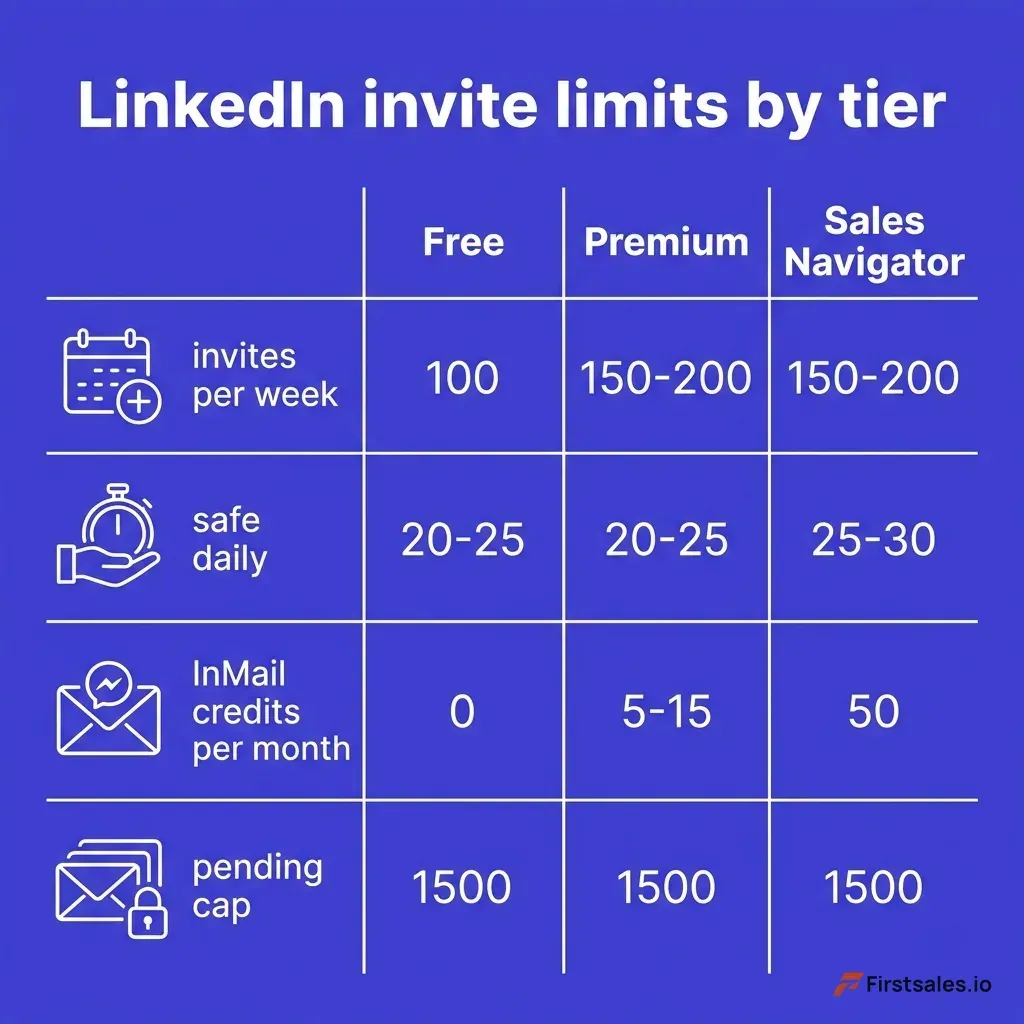 Diagram showing the LinkedIn weekly invitation limit as a rolling seven-day window, with a gauge at 100 invites for standard accounts, 150 to 200 for high-trust Premium and Sales Navigator accounts, and 20 to 30 for flagged accounts
#Full limits table: free vs Premium vs Sales Navigator
The single weekly invite number hides a stack of other caps that shape what your account can actually do. Here is the full picture across the three tiers most sales and recruiting teams use. These are 2026 commonly-cited ranges from outreach platforms and LinkedIn Help, not guarantees, and your real numbers move with account trust.
| Limit | Free (Basic) | Premium (Career / Business) | Sales Navigator |
|---|---|---|---|
| Connection requests per week | ~100 (soft) | ~100-200 with trust | ~100-200 with trust |
| Safe daily invites | 20-25 | 20-25 | 25-30 |
| New-account weekly cap (under 30 days) | 50-80 | 50-80 | 50-80 |
| Pending invitation ceiling | 1,500 | 1,500 | 1,500 |
| InMail credits per month | 0 | 5-15 | 50 |
| Max InMail credit accrual | 0 | varies by plan | 150 |
| Open Profile InMails (free) | ✓ | ✓ | ✓ |
| Recommended new messages per week | ~100 | ~150 | ~250+ |
| Search results visible per query | 1,000 | 1,000+ | 2,500 |
| Monthly commercial search use limit | ✗ (capped) | ✗ (raised) | ✓ (unlocked) |
| 1st-degree connection cap | 30,000 | 30,000 | 30,000 |
A few rows deserve a callout because people misread them constantly.
The InMail row is where Sales Navigator earns its price. Free accounts get zero InMail credits and can only message people they are connected to, plus anyone with an Open Profile. Premium plans include a small monthly allotment.
Sales Navigator Core, Advanced, and Advanced Plus all include 50 InMail credits per month.
The search row is the quiet killer for free accounts. LinkedIn caps free search at 1,000 visible results per query and enforces a monthly commercial use limit that throttles you once the platform decides you are searching like a recruiter. Sales Navigator removes that throttle and shows up to 2,500 results.
If your outreach depends on building large targeted lists, the free tier runs out of runway fast.
The 30,000 cap on first-degree connections is real but most people never reach it. Once you do, you cannot accept new connections until you remove some.
#The pending invitation ceiling and withdrawal rules
Your weekly invite cap is not the only ceiling. There is a second one that catches scaled outreach off guard: the 1,500 pending invitation limit.
Every connection request you send that has not yet been accepted or ignored sits in a pending pile. LinkedIn lets that pile grow to about 1,500. Hit the ceiling and you cannot send new invites at all, even if your weekly allowance has reset, until you clear some of the backlog.
Most practitioners do not wait for 1,500. They keep the pending pile under 500 to 700 and withdraw older requests on a schedule. A bloated backlog of unaccepted invites is itself a trust signal.
It tells LinkedIn your targeting is loose and people are not interested in connecting with you, which is exactly the pattern the platform associates with spam.
Now the part that trips everyone up. Withdrawing pending invites does not give your weekly quota back. If you sent 100 invites this week and withdraw 40 of them, you do not get 40 fresh sends.
The withdrawal helps your backlog and your account hygiene. It does not reset your sending budget.
There is a cooldown attached too. After you withdraw an invitation, you cannot send a new invite to that same person for about three weeks. So withdrawing to re-target someone quickly does not work.
Plan withdrawals as cleanup, not as a way to recycle contacts.
The healthy rhythm looks like this: send your weekly batch, let invites breathe for two to three weeks, withdraw the ones still pending after that window, and keep your total backlog comfortably under 700. That single habit does more for long-term account safety than any clever sending trick.
#InMail credits and Sales Navigator messaging caps
Connection requests are one lane. Direct messaging is another, and it has its own meters.
InMail is LinkedIn's paid way to message someone you are not connected to. Sales Navigator gives you 50 InMail credits per month across all three editions. Those credits accumulate up to a maximum of 150 if you do not use them, so an unused month rolls forward but you cannot stockpile forever.
There is a refund mechanic worth understanding because it stretches your real allowance. LinkedIn returns an InMail credit whenever the recipient responds within 90 days, and a response counts whether they pick "Interested," "Maybe later," or "Not interested." So a message that lands well effectively costs you nothing.
A message that gets ignored costs a full credit. That refund rule quietly rewards better-written, better-targeted InMails, because higher response rates mean you burn fewer credits.
Open Profiles are the free loophole that is actually allowed. Premium members can flip on Open Profile, and anyone, including free accounts, can message them at no credit cost and without a connection request. Open InMails do not touch your credit balance or your invite quota.
They are a legitimate channel, just a limited one, since not everyone has Open Profile enabled.
For everyday messaging to people you are already connected to, there is no hard published daily limit, but the practical guidance is steady: keep new outreach to roughly 100 messages per week on free accounts, 150 on paid, and up to 250 per day on Sales Navigator for warmed accounts. Recruiter tiers go far higher, into the hundreds per day, because the platform expects that volume from a paid hiring seat.
The honest read on InMail: it is expensive per message and easy to waste. A connection request plus a thoughtful note after they accept usually beats a cold InMail on both cost and reply rate. Save InMail for high-value targets where waiting on a connection accept is not worth it.
The tradeoff between the two channels is the whole subject of LinkedIn DMs vs cold email, and the short version is that neither scales the way email does.
#What actually triggers warnings, restrictions, and bans
Here is the thing most "limits" guides get wrong. They obsess over the numbers and skip the part that actually gets accounts killed. LinkedIn does not ban you for hitting 101 invites.
It bans you for looking like a robot.
No single action causes a ban. It is an accumulation of signals, and LinkedIn runs several detection layers at once. Behavioral pattern analysis, velocity monitoring, browser fingerprinting, IP and geographic anomaly checks, and message similarity scoring all feed the same trust score.
The most telling trigger is timing. LinkedIn's systems look for what engineers call heartbeats. If your activity is perfectly linear, say exactly one action every 45 seconds, no human does that.
Real people pause, get distracted, check a notification, send three invites in a minute and then nothing for an hour. Mechanical regularity is a louder signal than raw volume.
Velocity inside a tight window is another. Visiting 50 profiles in five minutes is trivial for a bot and physically impossible for a person. Cramming all your daily actions into one 20-minute block reads the same way, even if the daily total is modest.
The restrictions escalate in tiers. A Tier 1 restriction temporarily disables a feature for anywhere from 1 to 24 hours, often a soft "you're doing that too fast" pause. A Tier 2 restriction locks the account for 3 to 14 days and frequently demands ID verification before you get back in.
Ignore those and the next stop is a permanent ban, which on LinkedIn is genuinely hard to reverse.
LinkedIn also benchmarks invites against your network size. A rough guideline that circulates among practitioners is to keep daily invitations under about 3% of your total connections. An account with 300 connections firing 80 invites a day looks nothing like an account with 8,000 connections doing the same.
Context shapes the threshold.
The takeaway is simple. Stay under the published caps, randomize your timing, spread activity across the day, and never let your sessions look mechanical. The accounts that get flagged are almost never the ones sending a few too many invites.
They are the ones whose pattern screams script.
#The safe ramp for new vs aged accounts
A brand-new LinkedIn account is not a warmed one, and treating it like a seasoned account is how people get locked out in week one. The same warmup logic you apply to a fresh sending domain applies here.
LinkedIn watches new accounts harder. Until you establish trust signals, a completed profile, consistent login times, a healthy accepted-to-sent ratio, and no flags, your real cap sits well below the headline 100 per week. New accounts under 30 days old often run into an informal ceiling of 50 to 80 invites per week.
A ramp that holds up looks like this:
- Week 1: Complete your profile fully first. Photo, headline, about section, experience. Then send 10 to 20 invites per day, heavily personalized, to people likely to accept.
- Week 2: Increase to 20 to 30 per day if your acceptance rate is holding above 30%. Keep engaging with content so your activity looks like a real user, not a sending machine.
- Week 3: Move toward 30 to 40 per day. Start using search and messaging more, still spread across natural hours.
- Week 4 and beyond: Approach the full 80-per-day theoretical ceiling only if your acceptance rate is strong and you have seen zero warnings. Most safe operators settle around 15 to 25 high-quality invites a day and never chase the maximum.
Aged accounts get more rope, but the rope is conditional. A two-year-old account with 5,000 connections and a 45% acceptance rate can sustain 150 to 200 invites a week. The same account, if it suddenly triples its daily volume overnight, gets throttled anyway.
LinkedIn reads sudden behavior changes as suspicious regardless of account age. Ramp changes gradually even on a mature account.
One rule covers both cases: increases should be slow and your acceptance rate should stay healthy. The moment acceptance drops, your sending is the problem, not the limit.
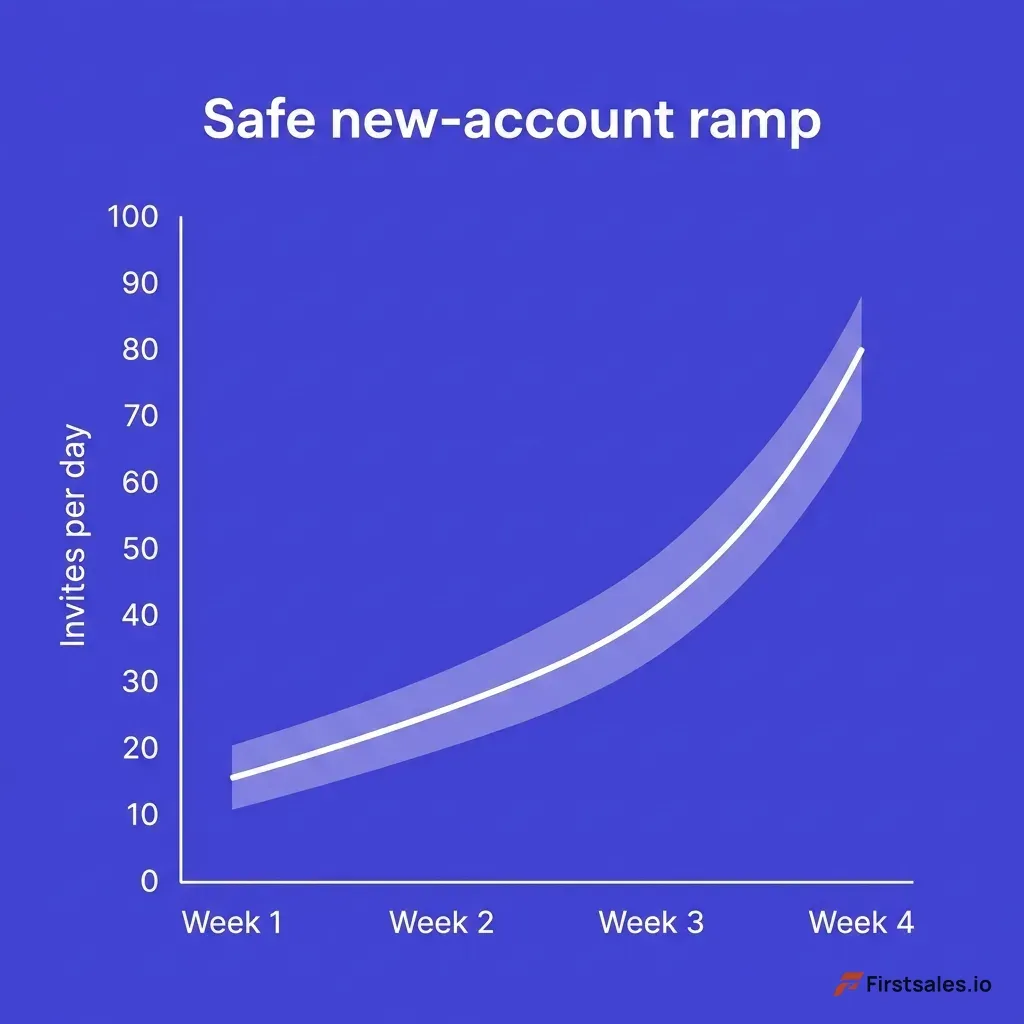 Chart showing a safe LinkedIn invitation ramp curve over account age, starting at 10 to 20 invites per day in week one and rising gradually to around 80 per day by week four, with a shaded safe zone well below the maximum
#Why automation tools get accounts flagged
LinkedIn's user agreement prohibits using third-party automation tools and scrapers. That clause has sat in the terms for years. What changed in 2026 is enforcement.
In March 2026, LinkedIn took action against the automation provider HeyReach at the company level. The trigger was not individual users blowing past invite limits. It was the tool's cloud-proxy architecture, which LinkedIn's detection systems classify as policy-violating infrastructure no matter how careful any single user is with their daily caps.
Accounts connected to that infrastructure got swept up regardless of their personal sending behavior.
That is the lesson worth sitting with. Many tool users assume that staying under the limits keeps them safe. The HeyReach action showed that the platform also fingerprints the infrastructure itself.
If thousands of accounts route through the same cloud IPs, run the same browser fingerprint, and fire the same API calls, LinkedIn can identify and ban the whole cluster at once.
This is why automation gets accounts flagged even when the numbers look conservative:
- Cloud-based tools route many accounts through shared server IPs that do not match where the user actually logs in, an instant geographic anomaly.
- Browser fingerprinting catches headless or virtualized sessions that lack the messy signatures of a real browser on a real machine.
- Message similarity detection flags accounts blasting near-identical templates, since real conversations vary.
- API pattern monitoring spots tools hitting LinkedIn's internal endpoints in ways the official app never would.
- Heartbeat timing exposes scripts whose actions are too evenly spaced to be human.
Browser-based tools that run locally inside your own session, mimic human delays, and use your real IP carry lower risk than cloud tools, but lower is not zero. Every automation layer is a bet against a detection system that keeps getting better. When the bet loses, you do not lose a campaign.
You lose the account and the network you spent years building.
The defensible position is to keep LinkedIn outreach mostly manual and well under the caps, and to put your scale somewhere the rules actually permit it. That somewhere is email.
#How acceptance rate and SSI change your real limit
Two accounts can both be a year old and both send 80 invites a week, and one gets throttled while the other does not. The difference is usually acceptance rate.
Your acceptance rate is the share of sent invites that people accept. In 2026 the healthy benchmark sits around 30 to 45%. Cross 40% and LinkedIn reads your outreach as wanted, and your effective ceiling rises.
Fall to 10 to 20% and the platform interprets that as spam-like targeting and tightens your limits aggressively, sometimes down to a trickle. The metric does double duty: it tells you whether your targeting and messaging are good, and it tells LinkedIn whether to trust you.
This is the one dial you actually control. You cannot directly raise the cap. You can raise your acceptance rate, and the cap follows.
The way to do that is unglamorous. Send to people who have a real reason to accept, a shared group, a recent post you engaged with, a clear professional overlap. Personalize the note.
Stop inviting cold lists of people who have never heard of you.
Your Social Selling Index is the other dial. SSI is LinkedIn's own 0 to 100 score across four parts: building your professional brand, finding the right people, engaging with insights, and building relationships. Accounts above 65 tend to enjoy higher trust and more sending headroom.
SSI is not a hard gate on invite limits, but it correlates with the overall trust signals, account age, acceptance ratio, session behavior, and IP consistency, that decide your real allowance.
Both metrics reward the same behavior: act like a real professional building a real network. The platform's limits loosen for accounts that look human and tighten for accounts that look like sending machines. That is the entire game.
#Pairing LinkedIn with email so volume is not the bottleneck
Add up everything above and one fact stands out. LinkedIn is a high-trust, low-volume channel. About 100 quality invites a week is the responsible ceiling, and chasing more is how accounts die.
That is not a flaw. It is what makes a LinkedIn connection valuable. But it means LinkedIn alone cannot carry a pipeline that needs to reach hundreds of accounts a month.
This is where the two channels divide cleanly. LinkedIn is where a relationship gets human and personal. Email is where outreach scales.
A warmed email domain can responsibly send far more touches per week than LinkedIn permits in invites, with deliverability rules you can actually engineer around rather than guess at. The math behind that ceiling is worth knowing in detail, and how many cold emails you can send per day lays out the safe numbers the same way this guide lays out LinkedIn's.
The strongest 2026 outbound motion runs both together. Use LinkedIn for the accounts where a personal connection moves the deal, the senior buyer, the warm referral, the prospect already engaging with your content. Use email for breadth, for the signal-based accounts where a sharp, relevant message can land at volume without burning a scarce LinkedIn invite.
The full sequencing playbook lives in email and LinkedIn multichannel outreach, and if you are still deciding where to put your first hour of the day, cold calling vs cold email covers the third lane.
FirstSales is built for the scalable half of that motion. It runs signal-based prospecting, drafts personalized cold email with human review baked into the workflow, and protects your sending domains so volume does not cost you deliverability. The result is a system where LinkedIn stays small, personal, and safe, while email does the heavy lifting your invite cap was never meant to.
You can start your first campaign for $1 at app.firstsales.io and let email carry the volume LinkedIn cannot.
The point is not to pick a channel. It is to stop asking LinkedIn to do a job its limits were specifically designed to prevent.
#FAQs
#What is the LinkedIn connection request limit in 2026?
Most accounts can send about 100 connection requests per week in 2026, on a rolling seven-day reset rather than a calendar week. Premium and Sales Navigator accounts with strong trust signals and an acceptance rate above 40% can reach 150 to 200 per week. New accounts under 30 days old often face a stricter informal cap of 50 to 80 per week until they build trust.
#How many connection requests can I send per day safely?
The safe daily range is roughly 20 to 25 invites for free and Premium accounts, and 25 to 30 for Sales Navigator, spread across the day. Even though your weekly budget might be 100, sending them all in one burst looks like automation and can trigger a restriction. Spacing matters more than the raw daily total.
#What is the LinkedIn pending invitation limit?
LinkedIn caps pending, unaccepted invitations at about 1,500. Once you hit that ceiling you cannot send new invites until you withdraw some of the backlog, even if your weekly allowance has reset. Most safe operators keep their pending pile under 500 to 700 to protect account trust.
#Does withdrawing invitations restore my weekly sending quota?
No. Withdrawing pending invitations does not give back any of your weekly sending budget. It only helps reduce your backlog and keep your account hygiene healthy.
After you withdraw an invite, you also cannot re-send to that same person for about three weeks.
#How many InMail credits do you get with Sales Navigator?
Sales Navigator Core, Advanced, and Advanced Plus each include 50 InMail credits per month. Unused credits accumulate up to a maximum of 150. You get a credit back whenever the recipient responds within 90 days, whether they reply interested, maybe later, or not interested.
#Can I message people on LinkedIn without using InMail credits?
Yes, in two ways. You can message anyone you are already connected to for free, and you can send free Open InMails to any Premium member who has Open Profile enabled. Open InMails do not count against your credit balance or your connection request quota.
#What actually gets a LinkedIn account banned?
Bans come from an accumulation of signals, not one action. The biggest triggers are robotic timing, such as one action every 45 seconds, high velocity in a tight window, a low acceptance rate, shared cloud IPs, and detectable automation infrastructure. Staying under the caps while keeping your activity human and varied is what keeps an account safe.
#Why do automation tools get LinkedIn accounts flagged?
LinkedIn's terms prohibit third-party automation, and the platform fingerprints both behavior and infrastructure. In March 2026 LinkedIn banned the cloud tool HeyReach at the company level because of its cloud-proxy architecture, sweeping up users who stayed within daily limits. Shared IPs, browser fingerprints, message similarity, and mechanical timing all expose automated accounts.
#How do I warm up a new LinkedIn account?
Complete your profile fully, then ramp gradually over three to four weeks. Start at 10 to 20 personalized invites per day in week one, increase by about 10 per day each week if your acceptance rate stays above 30%, and approach higher volumes only after a month of clean activity. Most safe operators settle around 15 to 25 quality invites a day.
#How does acceptance rate affect my connection limit?
Acceptance rate is the share of sent invites that people accept, and the 2026 healthy benchmark is 30 to 45%. Above 40%, LinkedIn trusts your outreach and your effective ceiling rises. Below 10 to 20%, the platform reads it as spam and tightens your limits, so improving targeting and personalization is the most reliable way to send more.
#Is LinkedIn or cold email better for high-volume outreach?
Email is better for volume. LinkedIn is a high-trust, low-volume channel capped near 100 invites a week, while a warmed email domain can responsibly send far more touches with deliverability rules you can engineer around. The strongest approach uses LinkedIn for personal, high-value connections and email for scaled, signal-based outreach.
#What is a good LinkedIn SSI score for outreach?
A Social Selling Index above 65 generally signals high trust and tends to come with more sending headroom. SSI is not a hard gate on invite limits, but it correlates with the overall trust signals LinkedIn uses to set your real allowance, including account age, acceptance rate, and session consistency. Building your brand and engaging genuinely raises it over time.
#Conclusion
LinkedIn's limits are not arbitrary friction. They are the platform protecting what makes a connection worth having. About 100 invites a week, a 1,500 pending ceiling, 50 InMail credits a month, and a detection system that punishes robotic behavior all point the same direction: act like a real professional, not a sending machine.
The accounts that thrive in 2026 share a few habits:
- They stay well under the published caps and never chase the maximum.
- They keep acceptance rate above 40% by targeting people who actually want to connect.
- They withdraw stale pending invites to keep the backlog under 700.
- They randomize timing and spread activity across natural hours.
- They keep automation off the account, because the infrastructure itself gets fingerprinted.
And they make peace with the one fact this guide keeps circling back to. LinkedIn was never built to carry outbound volume. Its limits exist specifically to stop that.
So the volume goes where the rules allow it, into email, where deliverability is something you can engineer rather than guess at.
If your pipeline needs more reach than 100 invites a week can deliver, stop trying to bend LinkedIn's caps and let email do the scaling. FirstSales runs signal-based prospecting, AI-drafted email with human review, and domain protection built in, so your LinkedIn stays personal and safe while email carries the load. Start your first campaign for $1 at app.firstsales.io.
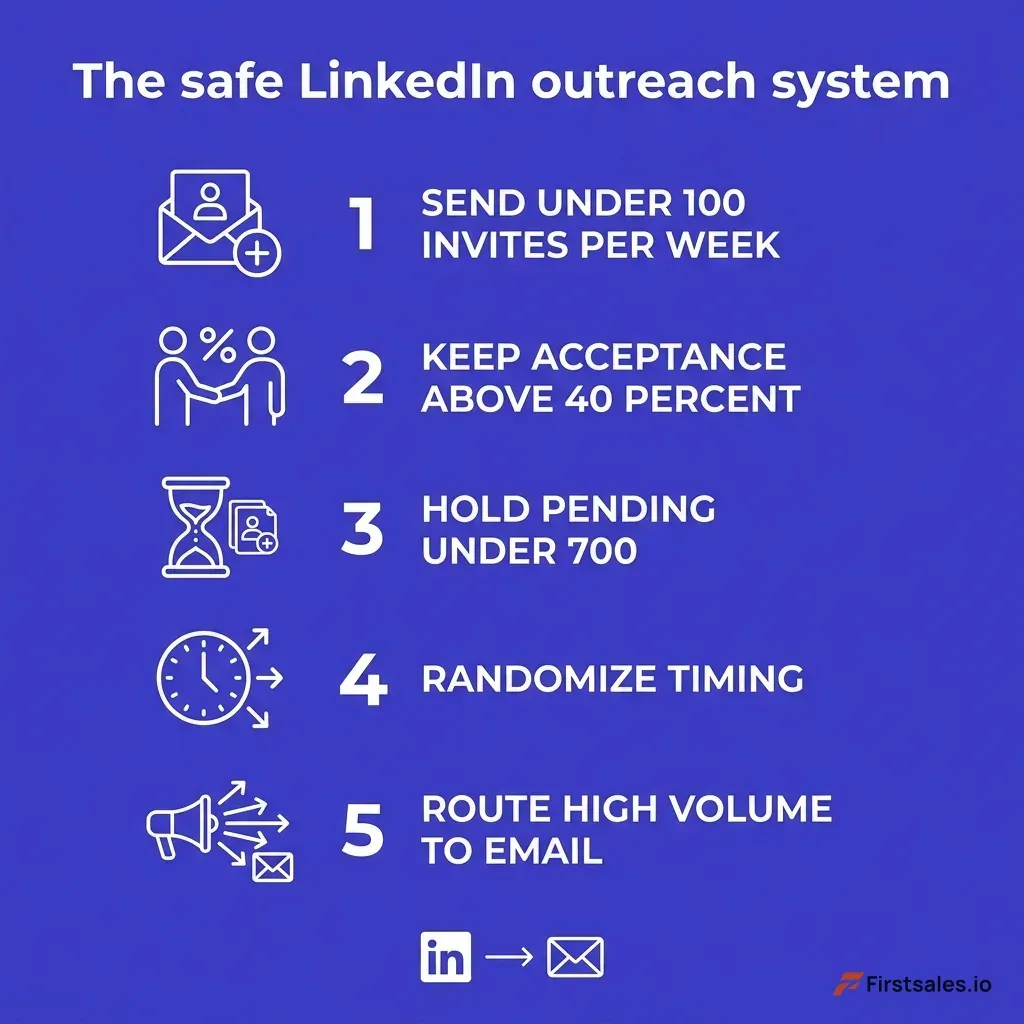 Infographic summarizing the safe LinkedIn outreach system: send under 100 invites per week, keep acceptance above 40 percent, hold pending under 700, randomize timing, and route high volume to email, with deep indigo and white flat design