#Email accessibility as a deliverability trust signal in 2026
Copy page
TL;DR: 99.88% of HTML emails fail basic accessibility checks, according to the Email Markup Consortium's 2026 report covering over 376,000 messages. Inbox providers now weigh structural and rendering quality as part of pre-open scoring, which means accessibility gaps are no longer just a compliance risk. They are a deliverability problem hiding inside your template.
#What you will learn
- Why accessibility now touches deliverability
- The 2026 accessibility failure data
- The five fixes that matter most
- Accessibility versus deliverability checklist
- How pre-open scoring works
- Testing your templates properly
- Regulatory pressure adding urgency
- FAQs
Cold email teams spend months tuning subject lines and send times while shipping a template that a screen reader cannot parse.
That used to be purely a compliance and inclusion problem. It is now also a rendering and engagement problem that inbox providers can measure before a human ever opens the message.
Most teams treat accessibility as a nice-to-have that gets cut whenever a deadline tightens. That trade-off made more sense when accessibility and deliverability were unrelated line items competing for the same sprint.
They are not unrelated anymore, and the data supporting that shift is now large enough (over 376,000 emails analyzed in a single year) to stop treating this as a theoretical concern.
#Why accessibility now touches deliverability
Inbox providers stopped relying on opens as a trust signal years ago, since pixel-based open tracking became unreliable after Apple Mail Privacy Protection and widespread image-blocking.
What replaced it, partly, is structural and rendering quality: does the HTML parse cleanly, does the semantic markup make sense, does the message render consistently across clients and assistive technology.
A message with broken markup, missing alt text, and no semantic structure looks, structurally, a lot like a message thrown together by a low-effort mass sender. That resemblance matters, because why cold emails land in spam increasingly comes down to signals like this rather than any single keyword or link.
#The pre-open scoring shift in context
Metrics that used to define email performance, opens chief among them, stopped being reliable years ago. Email metrics after open rates died covers why Apple Mail Privacy Protection broke open tracking specifically.
The replacement metrics inbox providers actually optimize around (spam complaints, deletes without reading, time spent, click quality) all correlate with how well a message renders and how coherent its structure is.
A template that a screen reader announces as a wall of unlabeled images and nested tables produces exactly the kind of confused, low-quality engagement signal that trains a filter toward distrust, regardless of whether the recipient uses assistive technology at all.
#The 2026 accessibility failure data
The Email Markup Consortium tested 376,348 HTML emails sent between May 2025 and May 2026 and found that all but eight contained serious or critical accessibility issues, a 99.88% failure rate.
That number is barely different from 2025's 99.89% failure rate, which means the industry is not meaningfully improving despite years of awareness campaigns.
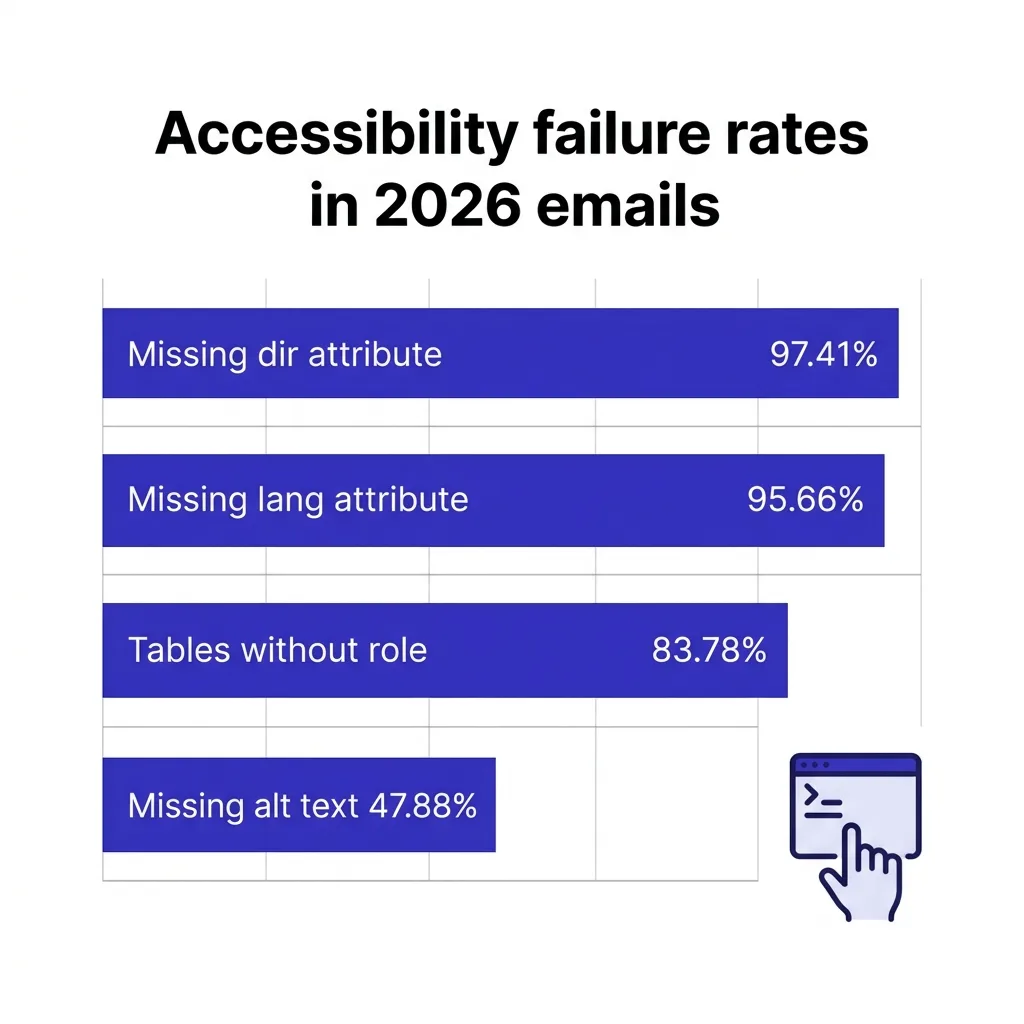
Missing alt text on images shows up in 47.88% of emails and is classified as a critical failure, since screen reader users get no information at all about what the image conveys.
Missing dir attributes on the email body occur in 97.41% of messages, missing body-level lang attributes in 95.66%, and layout tables without role="presentation" or role="none" in 83.78%, according to the same report.
More broadly, about 55.5% of website images across the web lack alt text, so email is not uniquely bad. It is just as bad as everything else, which is exactly the problem when inbox providers are looking for signals that separate careful senders from careless ones.
There is one bright spot in the data. The report notes consistent, incremental improvement in basic tag-level compliance (dir, lang, alt, role) as modern email frameworks adopt an accessibility-by-default approach, which suggests the fix is increasingly a tooling choice, not a manual effort problem.
Cold email specifically skews toward better baseline accessibility than heavily designed marketing HTML, mostly by accident. A sparse, mostly-text sequence with one logo and a signature has far fewer places for accessibility failures to hide than a six-image newsletter template, which is a small silver lining worth preserving rather than undoing with a heavier redesign.
#The five fixes that matter most
 The five fixes that matter most
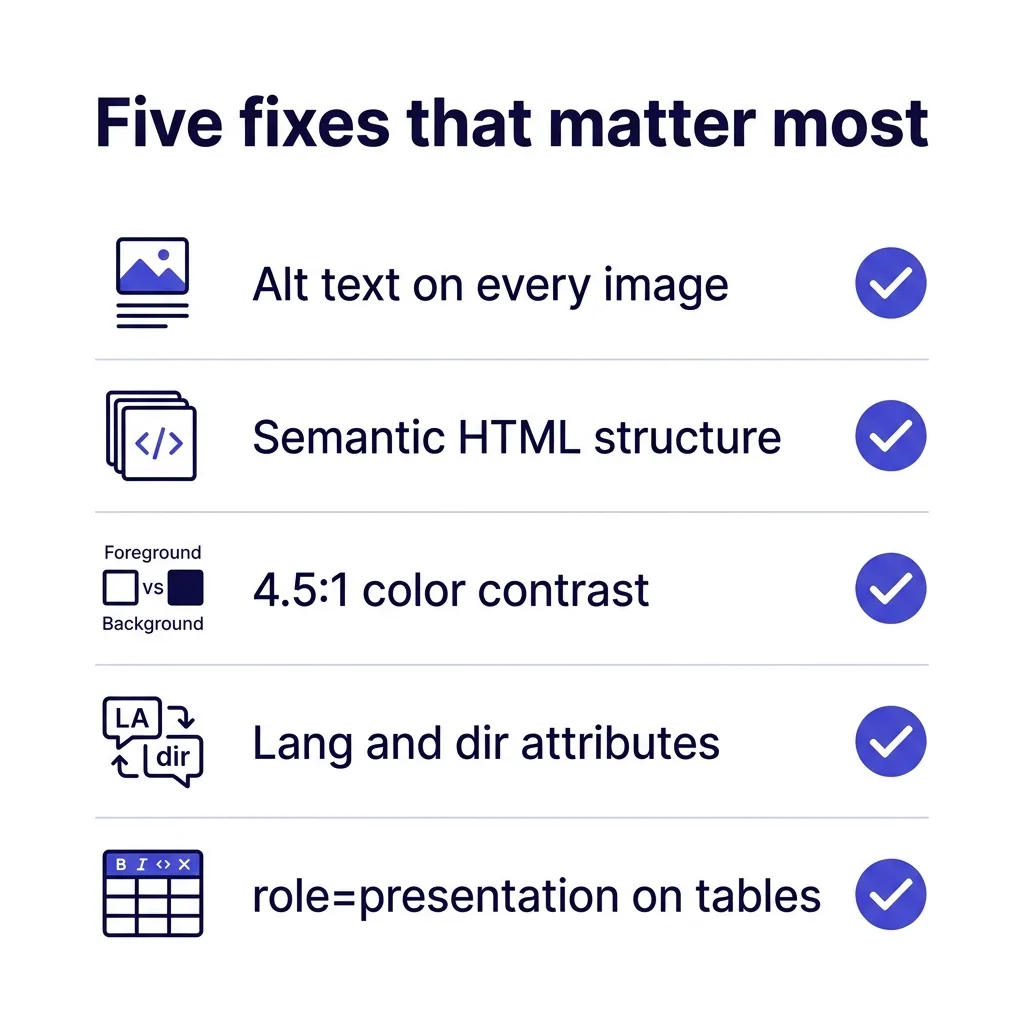
You do not need a full accessibility audit to close most of the gap. Five fixes cover the overwhelming majority of what the Email Markup Consortium data flags as critical.
Alt text on every image. Every meaningful image needs descriptive alt text; purely decorative images need an empty alt="" so screen readers skip them cleanly instead of announcing a filename.
Semantic HTML structure. Use real heading tags and structured markup instead of styled <div> soup, since assistive technology and, increasingly, filtering systems both parse structure to understand what a message actually contains.
Sufficient color contrast. WCAG AA requires a 4.5:1 contrast ratio for normal text, which most branded email templates fail the moment a light gray sits on a white background for "subtle" secondary text.
Language and direction attributes. A lang="en" attribute on the body and correct dir handling for right-to-left content take one line of template code and fix two of the report's most common failures.
Table roles for layout tables. If you still use table-based layout (many email clients still require it for consistent rendering), mark layout tables with role="presentation" so screen readers do not announce them as data tables.
None of these five fixes require a redesign. They are template-level edits a developer or a technically comfortable marketer can implement in an afternoon across every active sequence.
The return on that afternoon compounds every time the template sends, since a fix applied once at the template level protects every message generated from it going forward, unlike copy-level fixes that need repeating per campaign.
#Common accessibility mistakes specific to cold email
Cold email templates fail differently than marketing newsletters, since they optimize for a different constraint: looking like a real, individually written message rather than a designed campaign.
The most common mistake is embedding the entire message as an image to preserve exact font rendering, which is a marketing-email habit that is catastrophic for cold outreach. It fails screen readers completely, triggers image-heavy spam signals, and looks nothing like a message a real person actually typed.
The second is signature images: a company logo, a headshot, or a styled signature block rendered as one flattened image with no alt text. Screen reader users get nothing, and the image itself adds no information a plain-text signature could not convey more reliably.
The third is tracking pixels and hidden elements that get announced awkwardly by assistive technology as blank, unlabeled content, breaking the reading flow of an otherwise clean message.
A fourth, less obvious mistake: reply-to addresses and call-to-action buttons styled as images with no text alternative. A recipient using a screen reader hears nothing actionable, and a filter parsing the message sees an image-heavy send with no discernible call to action in the actual text content, which is its own quiet reputation cost.
#Accessibility and AI-drafted email
AI drafting tools generate the text content of a message, not the underlying HTML structure, so accessibility remains a template-level responsibility regardless of how the copy was written.
The risk shows up when personalization logic dynamically swaps images, buttons, or content blocks per recipient without alt text and semantic rules built into the generation logic itself, since a template that is accessible in its default state can become inaccessible the moment dynamic content overrides it.
Any team using cold email personalization at scale should audit the template logic itself, not just a handful of rendered sample emails, since edge cases in dynamic content are exactly where accessibility gaps hide.
#Accessibility versus deliverability checklist
| Practice | Helps accessibility | Helps deliverability signal | Effort |
|---|---|---|---|
| Descriptive alt text on all images | ✓ | ✓ | Low |
| Semantic heading structure | ✓ | ✓ | Low |
| 4.5:1 minimum color contrast | ✓ | ✗ direct, ✓ indirect via engagement | Medium |
| lang and dir attributes | ✓ | ✓ | Low |
| role="presentation" on layout tables | ✓ | ✓ | Low |
| Plain-text fallback included | ✓ | ✓ | Low |
| Real links with descriptive anchor text | ✓ | ✓ | Low |
#How pre-open scoring works
Inbox providers evaluate a message before the recipient ever sees it, weighing sender authentication, historical engagement, and increasingly, content and rendering quality.
Mobile rendering adds another layer to this. Over half of B2B email opens now happen on a mobile device, where a template that barely passes accessibility checks on desktop often breaks further: text scales unpredictably, tap targets shrink below usable size, and images that had marginal alt text on desktop sometimes get stripped from mobile rendering entirely depending on the client.
None of the major providers publish an exact accessibility scoring formula. What is documented, through Google's bulk sender guidance and general filtering research, is that rendering problems and structural anomalies correlate with lower engagement, and lower engagement is a direct, well-documented deliverability signal.
The causal chain runs like this: broken markup degrades rendering, degraded rendering lowers engagement (fewer clicks, more deletes without reading), and lower engagement trains the filter to trust the sender less over time.
Accessibility fixes do not bypass this chain directly. They remove one of the root causes of the rendering failures that start it, which is why treating alt text and semantic structure as a deliverability lever, not just a compliance checkbox, is the accurate framing.
Accessibility sits alongside other pre-open trust signals rather than replacing them. Email preheader optimization and BIMI verified branding both influence the same pre-open trust judgment a recipient and a filter both make, and a sender getting all three right sends a more consistent signal than one getting any single element right in isolation.
#Testing your templates properly
 Testing your templates properly
Automated checkers catch most structural issues quickly. Free tools can flag missing alt text, missing lang attributes, and contrast failures in seconds, and several major email service providers now build basic accessibility checks directly into their editors.
Automated tools cannot catch everything. Reading order, whether the content makes sense when a screen reader announces it top to bottom regardless of visual layout, needs an actual screen reader test, not just a linter.
Framework choice matters more than most teams realize here. Templating frameworks like MJML and Foundation for Emails generate semantic, accessible markup by default, which is exactly the trend the Email Markup Consortium report credits for the industry's small year-over-year improvement in basic attribute compliance.
Hand-coded templates, or templates exported from older drag-and-drop builders that predate accessibility-by-default norms, are where the failure rate concentrates. If your current template was built more than two years ago, treat a framework migration as a deliverability project, not just a design refresh.
Run at least one real screen reader pass (VoiceOver on Mac, NVDA on Windows, both free) on any template sent to more than a few hundred recipients. Fifteen minutes catches problems automated tools miss entirely, like a call-to-action button that announces only as "click here" with no context about what it does.
Test dark mode rendering alongside accessibility, since the two problems often compound: a background image with white text that relies on a colored background disappearing under dark mode email rendering hurts both sighted users in dark mode and screen reader users who never saw the visual layer in the first place.
#Client-by-client testing realities
Gmail, Outlook, Apple Mail, and Yahoo Mail each render HTML email differently enough that a template passing one client's test can still fail another's, independent of accessibility specifically.
Outlook's desktop client still uses a Word-based rendering engine for HTML email, which strips or mishandles several modern CSS properties that Gmail and Apple Mail render correctly, so a contrast fix that works everywhere else can still fail silently in Outlook desktop.
Budget for testing across at least these four clients before scaling any redesigned template past a small pilot list, since the cost of finding a rendering failure after 10,000 sends is far higher than finding it in a 20-account test batch.
Keep a small, permanent seed list of test accounts across these clients so every template change gets the same four-way check before it goes live, rather than re-assembling test accounts from scratch each time a template ships.
#Regulatory pressure adding urgency
The European Accessibility Act became enforceable on 28 June 2025, requiring businesses serving EU consumers to meet accessibility standards across digital channels, email included.
That is a real compliance deadline with real penalties for companies selling into the EU, not just a best practice.
There is also a market argument independent of compliance risk. People with disabilities represent 28.7% of adults in the United States and control more than a trillion dollars in annual disposable income, according to accessibility market research cited in the 2026 Email Markup Consortium report.
A B2B sender targeting procurement, IT, or operations roles is statistically certain to be emailing some recipients who use assistive technology daily, whether or not that shows up anywhere in a CRM field.
#How this fits with existing compliance obligations
Accessibility sits alongside, not instead of, the compliance work most cold email teams already track for cold email compliance penalties and whether cold email is legal in their target regions.
CAN-SPAM, GDPR, and CASL all focus on consent, identification, and opt-out mechanics. None of them mandate WCAG-level accessibility directly, which is precisely why so many senders have never connected the two areas of compliance risk.
The European Accessibility Act changes that connection for any sender with EU consumers in their pipeline, and other jurisdictions have historically followed EU digital accessibility precedent within a few years, which makes early compliance cheaper than retrofitting under a future deadline.
#A short walkthrough
Here is a hypothetical scenario that mirrors what several teams have found when they finally audited their templates: imagine a marketing team using an image-heavy HTML template for a mid-funnel nurture sequence, built two years earlier by a designer who has since left the company.
An audit finds zero alt text on any of the six images, no lang attribute, and a signature block rendered entirely as a flattened image with the sender's name unreadable to any screen reader.
Fixing all four issues take a developer about two hours. Over the following quarter, the sequence's click-to-open rate improves modestly, and more notably, spam complaint rate drops, since messages that render cleanly and clearly across every client and access method generate fewer confused or frustrated recipients hitting report spam by default.
The lesson in this scenario is not a guaranteed metric lift, it is that the fix cost was trivial relative to how long the broken template had been running unnoticed.
#Monitoring accessibility alongside deliverability
Treat accessibility checks as part of your regular deliverability review, not a separate one-time project.
Pair template audits with your existing cold email deliverability checklist review cadence, and track engagement trends through email deliverability monitoring and Google Postmaster Tools the same week you update or launch a new template.
If inbox placement rate drops after a template redesign, check accessibility and rendering fundamentals before assuming the copy or subject line caused it. A visually appealing redesign that breaks alt text or introduces new layout tables without proper roles can quietly undo unrelated deliverability work.
#Where accessibility fits in a broader deliverability program
Accessibility is one input among several, not a silver bullet that fixes deliverability on its own.
Pair it with the fundamentals: current SPF, DKIM, and DMARC setup, a clean cold email bounce rate, and complaint rate under the 0.3% threshold Google and Yahoo enforce for bulk senders.
Consider plain text versus HTML for your specific sequences too, since a well-written plain-text email sidesteps most rendering and accessibility problems entirely by design, at the cost of visual branding.
FirstSales templates default to clean, semantic markup and plain-text-first sending for cold sequences specifically because that combination avoids the rendering failures the 2026 accessibility data shows are still nearly universal across the industry.
#Training the team that writes the templates
Most accessibility failures are not caused by one careless developer, they come from a template process where nobody owns the check.
A copywriter drafts the email, a designer adds the header image, and a sender schedules the send, and none of those three roles is explicitly responsible for alt text or heading structure.
Naming one person, even informally, as the accessibility reviewer for new templates closes that gap without adding a full approval layer.
A five-minute checklist works better than a lengthy policy document, since reviewers actually run through five items but skip a two-page guide.
Include the basics: every image has descriptive alt text, links use meaningful anchor text instead of "click here," heading levels are used in order rather than skipped, and the template renders correctly with images turned off.
New hires writing their first templates benefit from seeing one broken example and one fixed example side by side, since the contrast makes the fix obvious in a way a written rule does not.
Revisiting this checklist whenever a new sending tool or template builder gets adopted keeps the habit current instead of tied to a tool that gets replaced within a year.
#Frequently asked questions
#Does email accessibility directly affect deliverability?
Not as a documented, direct ranking factor from any provider. It affects deliverability indirectly, through the engagement and rendering-quality signals that broken markup damages.
#What is the biggest accessibility failure in cold email specifically?
Missing alt text, present in 47.88% of tested emails according to the 2026 Email Markup Consortium report, and classified as a critical failure since it leaves screen reader users with no information about the image at all. Signature images and logo blocks are the most common offenders, since they get built once and reused across hundreds of campaigns without anyone revisiting the markup.
#Do I need a full WCAG audit for every campaign?
No. The five fixes covered in this guide (alt text, semantic structure, contrast, lang and dir attributes, table roles) address the overwhelming majority of common failures without a formal audit process.
#Does plain text avoid accessibility problems entirely?
Mostly, yes. Plain text has no images to caption, no color contrast to manage, and renders identically across assistive technology, which is one reason plain text often performs as well as or better than HTML for cold outreach.
#What contrast ratio do I actually need?
WCAG AA requires 4.5:1 for normal body text and 3:1 for large text (18pt or 14pt bold and larger). Most email tools include a contrast checker directly in the color picker now.
#Are automated accessibility checkers enough?
They catch most structural issues but miss reading-order and context problems. Pair automated checks with at least one manual screen reader pass on high-volume templates.
#Does dark mode rendering count as an accessibility issue?
It overlaps significantly. Text that disappears against a background in dark mode affects sighted users with visual sensitivity and screen reader users relying on properly announced content structure alike.
#Is the European Accessibility Act relevant if I only sell in the US?
Only if you have EU customers or prospects. If any part of your total addressable market includes EU consumers, the June 2025 enforcement date applies to your email communications with them.
#Does accessibility matter more for B2C or B2B email?
Both, though the failure rate data shows no meaningful difference by sector. B2B senders often assume their audience skews toward less need for accessibility, which is not supported by disability prevalence data across any demographic or industry.
#What is the fastest single fix to make right now?
Add alt text to every image in your active templates. It takes minutes, fixes the single most common critical failure, and requires no design or development resources beyond a template edit.
#Do screen readers actually get used to read cold sales emails?
Yes. Assistive technology usage is not correlated with job function or seniority, and B2B buyer personas including IT, operations, and executive roles all include screen reader users at rates consistent with general population disability statistics.
#Does role="presentation" on tables actually change anything visually?
No. It only changes how assistive technology announces the table, telling a screen reader to skip announcing it as a data table with rows and columns since it exists purely for layout.
#Can accessibility fixes hurt my email's visual design?
Rarely, when done correctly. Alt text, contrast, and semantic structure are invisible to sighted users viewing a properly designed template; the two goals conflict only when a design was already relying on very low contrast as an aesthetic choice.
#How do I test lang and dir attributes?
Check the raw HTML source of a sent test email for <body lang="en"> or similar at the top level. Most email builders let you inspect or export the raw HTML before sending.
#Does accessibility affect spam folder placement directly?
Not as a named, direct trigger in any published filtering documentation. It affects the engagement signals that do influence spam folder placement, through better rendering and clearer content for all recipients, assistive-technology users included.
#Should cold email templates be simpler than marketing newsletter templates?
Generally yes, and simplicity helps accessibility too. Fewer nested layout tables, fewer background images carrying meaning, and more real text content reduce both rendering risk and accessibility failures simultaneously.
#Do email service providers check accessibility automatically before sending?
Some now include basic checks (missing alt text, low contrast) directly in their editors, but coverage varies widely by platform and none catch everything a manual review would.
#Is there a certification for accessible email?
Not an industry-standard one equivalent to WCAG certification for websites. The Email Markup Consortium's annual report functions as the closest thing to an industry benchmark, tracking failure rates across a large sample each year.
#Does personalization at scale make accessibility harder to maintain?
It can, if personalization logic dynamically inserts images or content blocks without corresponding alt text or structure rules built into the template logic, so accessibility checks should run on the template level, not just the final rendered output.
#What happens if I ignore accessibility entirely?
Nothing catastrophic in the short term for most senders, but the compounding risk is real: EU compliance exposure if you have EU recipients, a widening engagement gap as filters increasingly weight rendering quality, and a growing body of legal precedent for digital accessibility claims that has already reached retail and SaaS companies.
The risk compounds quietly rather than announcing itself. Deliverability does not collapse overnight from accessibility gaps alone, it erodes gradually alongside every other quality signal a sender ignores, until the cumulative effect shows up as a placement problem with no single obvious cause.
Fixing it later costs more than fixing it now. Retrofitting accessibility into an established template library means auditing every send in rotation, whereas building it into the template from the start costs almost nothing beyond the initial setup time.
Fixing alt text and semantic structure will not, by itself, rescue a domain with authentication or list-hygiene problems. It removes one more variable working against you in a filtering environment that increasingly rewards senders who get the fundamentals right across the board, not just the ones marketers usually optimize.
Pull up your current active templates today and check three things: alt text on every image, a lang attribute on the body, and contrast on any secondary text.
Fifteen minutes of checking against a 99.88% industry failure rate is a good bet on where the next deliverability gain is actually hiding.