
TL;DR: A working cold email stack costs far more than one sending tool subscription once you add domains, inboxes, warmup, verification, and enrichment. A solo sender at 150 emails a day typically pays $60-$110 a month across five separate tools, while a 500-email-a-day team lands closer to $270-$400. This piece breaks down every line item and compares that DIY stack against an all-in-one platform.
#Why the sticker price is never the real price
A cold email sending platform advertises a monthly price, and that number is almost never what a working setup actually costs.
The platform fee covers sequencing, tracking, and reporting.
It does not cover the domains you need to protect your primary domain's reputation, the inboxes those domains route mail through, the warmup service that ages those inboxes, or the verification tool that checks your list before you send a single message.
Add those five categories together and the real monthly bill is often 2-4x the number on the pricing page.
Cold email infrastructure in 2026 runs $0.40-$4.50 per inbox per month depending on provider and scale, which sounds cheap until you multiply it across the 10-30 inboxes a serious sending program needs (Maildeck infrastructure pricing).
#The five line items in every real stack
#Sending domains
You never send cold email from your company's primary domain, since a single deliverability mistake there can knock your website's email off the internet along with your outbound.
Sending domains sit on cousin domains instead, a practice that protects your brand domain's reputation while giving you room to rotate inventory (subdomain vs separate domain).
Domain registration runs $1 for a .xyz to about $10 for a .com as a one-time annual cost, so this line item is the cheapest part of the stack by far.
Most programs run 2-5 sending domains for every 10 daily target inboxes, since spreading inboxes across domains limits the blast radius of any single domain's reputation problem.
#Inboxes
Each sending domain needs mailboxes to send through, and each mailbox has a real per-seat cost from Google Workspace or Microsoft 365, plus whatever markup a pre-warmed inbox provider adds on top.
Pre-warmed Google Workspace and Microsoft 365 inboxes start around $4.99 per inbox with DNS already configured, dedicated IPs, and admin access included (Maildeck cheap inbox pricing).
A team running 500 emails a day at 30-40 sends per inbox per day needs roughly 12-15 active inboxes, which puts this line item at $60-$75 a month before any other tool is added.
#Warmup
A brand-new inbox cannot send cold email at volume on day one without triggering spam filters, since mailbox providers score new sending patterns as suspicious by default.
Warmup services send and receive simulated conversations between a pool of mailboxes to build sending reputation gradually over 2-4 weeks before a real campaign starts (how to warm up an email).
Standalone warmup tools run $10-15 per mailbox per month, though many sequencing platforms now bundle warmup into the base subscription at no extra charge, and some dedicated add-ons run as low as $0.60 per inbox (EmailToolTester Apple MPP context).
Warmup does not stop once a campaign launches either, since ongoing warmup in the background keeps reputation stable through sending pauses, volume changes, and provider algorithm updates (ongoing email warmup).
#Verification
Sending to a dead or invalid address costs you more than the wasted message, since every bounce chips away at the sending reputation of the mailbox and domain behind it.
Verification tools ping the receiving mail server before you send to confirm the address exists, typically priced per 1,000 verified contacts at $2-$10 depending on the provider and accuracy tier.
This step is not optional above a small list size: teams skipping verification consistently see bounce rates creep above the 2% safety threshold within a few campaigns (email verification before sending).
Catch-all domains complicate this math further, since a domain configured to accept mail for any address at all reports every verification check as valid even when the specific mailbox does not exist (catch-all email addresses).
#The sending and sequencing platform
This is the tool most people think of when they hear "cold email cost," and it is genuinely the smallest line item in a real stack once you account for everything else.
Entry-level sending platforms start around $37-$49 a month, with mid-tier plans adding features like A/B testing, custom tracking domains, and advanced reporting for $90-$100 a month (Hunter cold email software roundup).
graph TD
    A[Total cold email stack cost] --> B[Domains: ~$1-10 per domain, yearly]
    A --> C[Inboxes: ~$5-8 per inbox, monthly]
    A --> D[Warmup: $0-15 per inbox, monthly]
    A --> E[Verification: $2-10 per 1,000 contacts]
    A --> F[Sending platform: $37-100+ monthly]
    B --> G[Solo sender, 150/day: $62-111 total]
    C --> G
    D --> G
    E --> G
    F --> G
    B --> H[Team, 500/day: $268-400+ total]
    C --> H
    D --> H
    E --> H
    F --> H
#Two real budgets, worked out in full
#Solo founder at 150 emails a day
A solo sender needs 3-4 active inboxes across 2 sending domains to hit 150 sends a day comfortably under provider limits.
Domains cost about $10-20 one time, amortized to roughly $1-2 a month.
Inboxes run $20-32 a month at $5-8 per seat.
Warmup, if not bundled, adds $10-15 per active inbox, or closer to $0 if the sequencing tool includes it.
Verification for a modest list runs $10-20 a month at typical volumes.
The sequencing platform itself lands around $37-49 a month at entry tier.
Total: roughly $62-111 a month, matching field data from recent cost breakdowns for small cold email operations (Litemail startup cold email guide).
#B2B SaaS team at 500 emails a day
A team pushing 500 sends a day across a full SDR motion typically runs 12-15 inboxes across 4-6 domains.
Domains amortize to about $3-5 a month across the fleet.
Inboxes run $75-110 a month.
Warmup, if standalone, adds another $50-100 a month across the fleet, though many teams at this scale negotiate bundled warmup into a mid-tier sequencing plan instead.
Verification for a larger, faster-refreshing list runs $30-60 a month.
The sequencing platform sits at the mid-tier, $90-100 a month for the features a team this size actually needs, like shared inboxes and team reporting.
Total: roughly $268-400 a month, consistent with reported figures for mid-sized cold email programs (coldBirds infrastructure pricing).
#Where the hidden costs live
#Time, not just money
Running five separate tools means five separate dashboards, five separate support queues, and five separate places a misconfiguration can break deliverability.
A DNS record set correctly in your domain registrar but not propagated to your warmup tool causes silent failures that take hours to diagnose across a fragmented stack.
That diagnostic time has a real cost even when no line item shows it, and it scales with the number of tools in the chain.
#Domain burn and replacement
Domains do not last forever in a cold outbound program, since aggressive sending eventually degrades reputation even with best practices in place.
Domain burn rate varies by sending discipline, but most programs plan for periodic domain replacement as a standing cost, not a one-time setup expense (cold email domain burn rate).
Budget for replacing 10-20% of your sending domains annually, which adds a small but real recurring line to the true stack cost beyond the initial purchase.
#Data and enrichment
None of the five core categories above include the cost of the contact data itself, which is often the largest line item in the entire outbound budget once you add firmographic and intent data on top of basic contact info.
Waterfall enrichment, which chains multiple data providers to maximize match rate, typically costs more per contact than a single-source list but delivers meaningfully higher accuracy (waterfall enrichment for B2B data).
#Comparing DIY stack vs an all-in-one platform
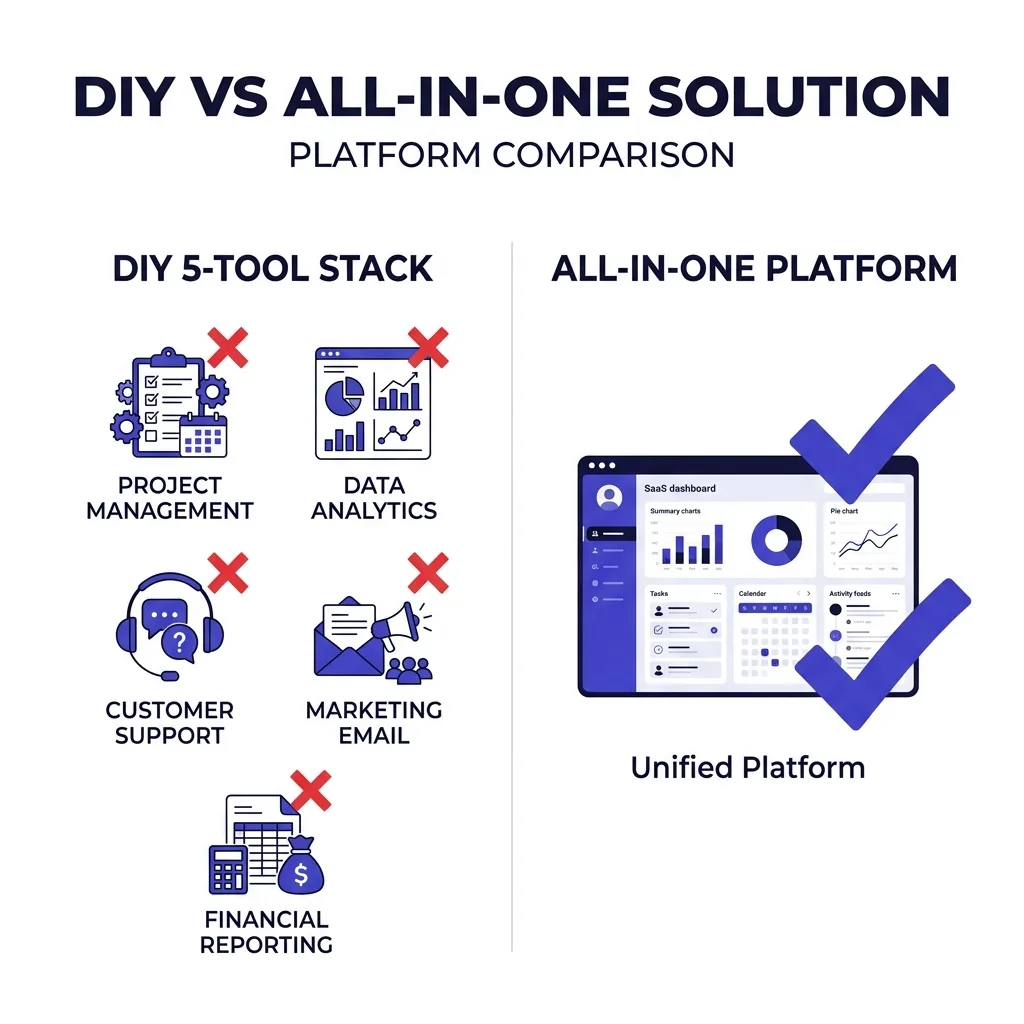 Comparing DIY stack vs an all-in-one platform
| Category | DIY 5-tool stack | All-in-one platform |
|---|---|---|
| Setup time | ✗ Days across separate onboarding flows | ✓ Hours, single onboarding |
| Domain and DNS management | ✗ Manual, split across registrar and warmup tool | ✓ Handled in one dashboard |
| Warmup included | ✗ Often a separate paid add-on | ✓ Usually bundled |
| Verification included | ✗ Separate subscription | ✓ Often included or discounted |
| Reporting across tools | ✗ Requires manual reconciliation | ✓ Unified reporting |
| Total monthly cost at scale | ✓ Can be cheaper at very high volume | ✗ Sometimes a premium for convenience |
| Support surface | ✗ Five vendors to troubleshoot with | ✓ One support relationship |
| AI drafting and human review | ✗ Bolt-on integrations, inconsistent | ✓ Built in, like FirstSales |
#When DIY actually wins
A DIY stack makes sense past a certain volume threshold, since per-unit costs on inboxes and verification drop meaningfully at scale in ways a bundled platform's pricing tiers do not always pass through.
Teams running 2,000+ emails a day with a dedicated deliverability specialist on staff often save money piecing together specialized best-in-category tools for each function.
Below that volume, the time cost of managing five vendors usually outweighs the marginal savings, especially for a solo founder or a small team without a dedicated ops person watching DNS records and bounce rates daily.
FirstSales bundles sending, warmup, and AI-assisted drafting with human approval into one platform specifically because most teams below the 2,000-email-a-day threshold lose more in fragmented management time than they save piecing together point tools.
#A simple framework for choosing your stack
Start by counting your realistic daily send volume for the next 6 months, not your aspirational number, since infrastructure sized for a volume you never reach is wasted spend.
Under 200 emails a day, an all-in-one platform almost always wins on total cost of ownership once you account for setup time and support overhead.
Between 200 and 1,000 emails a day, run the math on both paths using your actual quoted prices, since this is the range where the answer genuinely depends on your specific vendor choices.
Above 1,000 emails a day with dedicated deliverability staff, a specialized DIY stack starts to pay for itself through per-unit savings at scale.
Whatever you choose, budget for domain replacement and enrichment separately from the core five-tool stack, since both are recurring costs that most first-time budgets miss entirely.
#What changes the math most: volume, not headcount
Two teams with the same headcount can have wildly different stack costs depending on their target send volume, which is why benchmarking against "cost per rep" misses the real driver.
A single founder pushing 500 emails a day pays roughly the same infrastructure bill as a five-person SDR team pushing the same volume, since inboxes, domains, and warmup scale with send count, not with how many humans are writing the copy.
This means the cost planning question is never "how many people are on outbound," it is "how many emails do we need to send weekly to hit pipeline targets," and the stack should be sized to that number first.
Teams that size infrastructure to headcount instead of volume routinely end up either underprovisioned, hitting daily sending caps and bottlenecking pipeline, or overprovisioned, paying for idle inboxes that never see enough volume to justify their warmup cost.
Model your target weekly reply and meeting volume backward into required send volume, then size domains and inboxes to that number with roughly 20-30% headroom for testing and list churn.
#The compounding cost of getting deliverability wrong
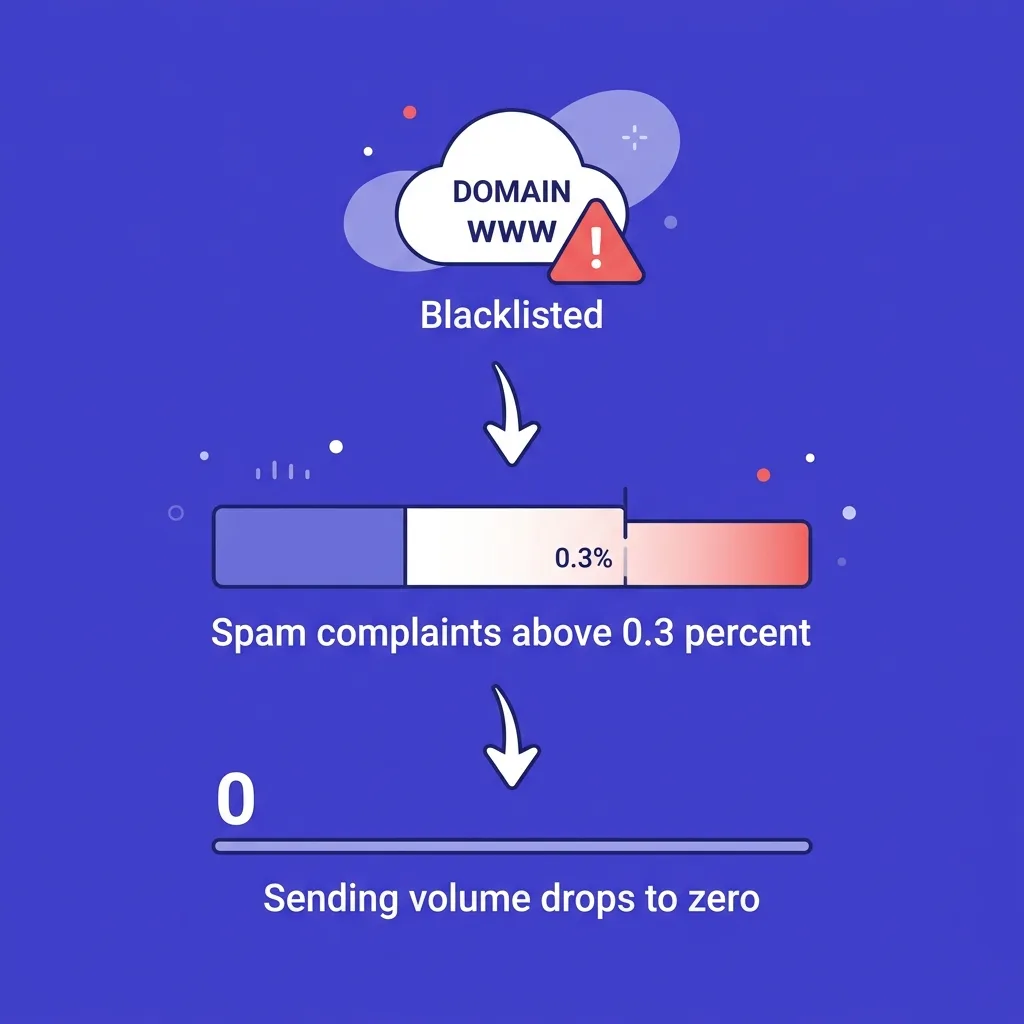 The compounding cost of getting deliverability wrong
Every line item in this article assumes a functioning setup, but a poorly configured stack does not just cost more, it costs more in ways that compound.
A domain that gets blacklisted mid-campaign does not just stop sending, it drags down the reputation of every inbox routed through it, and often the reputation of the IP range those inboxes share with other domains in the same provider account.
Recovering a blacklisted domain, when recovery is even possible, means delisting requests, a multi-week reputation rebuild, and lost pipeline during the outage, costs that dwarf the few dollars a month a cheaper verification tool might have saved (email blacklist removal).
Spam complaint rates above the 0.3% threshold Google and Yahoo enforce trigger throttling that can take weeks to reverse, during which sending volume effectively drops to zero regardless of how much infrastructure you are paying for (spam complaint rate threshold).
This is the real argument for spending slightly more on warmup and verification upfront: the downside risk of skipping them is not a marginal cost, it is a program-halting one that erases weeks of pipeline in a single bad send.
Budget the extra $10-20 a month per inbox for proper warmup as insurance against a failure mode that costs far more than the premium.
#Building a one-page budget before you buy anything
Before signing up for a single tool, write down your target weekly send volume, your acceptable bounce rate ceiling, and your total monthly budget on one page.
List each of the five cost categories against that page with a low and high estimate pulled from current market pricing, not from a single vendor's marketing site.
Add a line for domain replacement at 10-20% of your domain fleet annually, and a line for data or enrichment costs separate from the infrastructure five.
Compare the resulting total against at least one all-in-one platform quote before committing to a DIY build, since the convenience premium is easier to justify or reject once you see both numbers side by side.
Revisit the page after your first full month of real sending data, since actual bounce rates, inbox counts needed, and warmup duration almost always differ from the initial estimate.
This one-page exercise takes under an hour and prevents the most common budgeting mistake in cold email: discovering the real cost only after the first invoice cycle, when switching tools mid-warmup means starting reputation building over from scratch.
#What a first-month invoice actually looks like
Most teams underestimate month one specifically, because warmup and domain setup both front-load cost before any campaign has sent a single prospecting email.
Domains need 2-4 weeks of warmup before they can safely carry cold volume, which means you are paying for inboxes and warmup for a month before revenue-generating sends even begin.
Budget for this ramp explicitly: a solo founder's "$62-111 a month" steady-state number often looks more like $90-150 in month one once domain setup and full warmup cycles are included.
Teams that skip this planning step sometimes panic at the first invoice and either abandon the buildout early, wasting the warmup investment already made, or rush sending before warmup completes, which risks the exact deliverability failure the warmup was meant to prevent.
Plan for a 4-6 week ramp period as a fixed cost of entry, not a surprise, and the steady-state numbers in this article become the real baseline from month two onward.
#How pricing tends to shift over the first year
Inbox and domain costs are not static once a program is running, since providers adjust pricing tiers and volume discounts kick in as your fleet grows past certain thresholds.
Most pre-warmed inbox providers offer meaningful per-seat discounts once a buyer crosses 20-30 active inboxes, which can shave 15-25% off the inbox line item for a scaling team.
Warmup costs tend to move the opposite direction for programs that keep growing domain count, since more domains sending to each other inside the same warmup pool can actually improve warmup speed and lower per-inbox warmup cost over time.
Verification costs scale roughly linearly with contact volume, so this line item rarely sees the same discount curve as inboxes and domains, and teams should expect it to grow proportionally with list size rather than flattening out.
Sending platform costs are the most negotiable of the five categories, since most vendors offer custom pricing above their published tiers for teams running serious volume, and it is worth asking directly rather than accepting the sticker price once you cross a few thousand emails a day.
Track your true cost per sent email monthly, not just your total bill, since that per-unit number reveals whether your stack is actually getting more efficient as it scales or just getting bigger.
#Frequently asked questions
#What is the average total cost of a cold email stack?
A solo sender at 150 emails a day typically spends $62-111 a month across domains, inboxes, warmup, verification, and a sending platform.
A team at 500 emails a day typically spends $268-400 a month across the same five categories.
#Is the sending platform subscription the biggest cost?
No, for most setups the sending platform is actually the smallest line item once domains, inboxes, warmup, and verification are added together.
Inboxes and verification usually account for the largest share of total monthly spend at scale.
#How much do sending domains cost?
Domains run $1 for a budget TLD like .xyz to about $10 for a .com, as a one-time annual purchase per domain.
Most programs run 2-6 sending domains depending on total inbox count and volume.
#Why can't I just send cold email from my company's main domain?
Sending cold outbound from your primary domain risks the reputation of the domain your website, support email, and internal communication depend on.
A single deliverability mistake on a shared domain can push your transactional and internal email into spam alongside your cold outreach.
#How much does inbox warmup cost?
Standalone warmup tools run $10-15 per mailbox per month, though some add-ons cost as little as $0.60 per inbox.
Many sequencing platforms now bundle warmup into the base subscription, which removes this as a separate line item entirely.
#Do I need email verification if my list is small?
Verification matters at any list size, since even a small list with a high bounce rate can trigger provider-level sending restrictions.
The cost is low enough, typically $2-10 per 1,000 contacts, that skipping it to save money rarely makes sense.
Lists that refresh often, such as ongoing intent-based prospecting feeds, need repeat verification passes rather than a single one-time check, which adds a small recurring cost most first budgets forget to plan for.
#What is a catch-all domain and why does it affect cost?
A catch-all domain accepts mail for any address, which means standard verification tools report every address on that domain as valid even when the specific mailbox does not exist.
This inflates your effective bounce rate and adds hidden cost through reputation damage that a verification report alone will not show you (catch-all email addresses).
#How many inboxes does a 500-email-a-day program need?
Roughly 12-15 active inboxes, assuming 30-40 sends per inbox per day to stay under provider sending limits and protect deliverability.
Spreading those inboxes across 4-6 domains further limits the risk of any single domain's reputation damaging the whole program.
#Does an all-in-one platform always cost more than a DIY stack?
Not always, but it usually costs less below roughly 1,000 emails a day once setup time and vendor management overhead are included in the comparison.
Above that volume, with dedicated deliverability staff, a specialized DIY stack can save money through better per-unit pricing.
#What percentage of sending domains need to be replaced each year?
Most programs budget for replacing 10-20% of sending domains annually as reputation naturally degrades with aggressive cold outbound use.
This is a recurring cost that a lot of first-time budgets leave out entirely.
#Is contact data and enrichment part of the "stack cost" or separate?
It is a separate but real cost that sits outside the five core infrastructure categories, often the largest single line item in a full outbound budget.
Waterfall enrichment, which combines multiple data sources for higher match rates, typically costs more per contact than a single-source list (waterfall enrichment for B2B data).
#What's the cheapest way to get started with cold email?
A solo founder starting from zero can get a working setup online for roughly $60-70 a month using a budget domain, a pre-warmed inbox provider, a bundled sequencing platform, and light verification.
Scaling past that budget setup usually happens naturally as reply volume creates enough pipeline to justify a bigger inbox fleet.
#How does inbox pricing change at higher volumes?
Per-inbox pricing tends to drop as you buy in bulk from pre-warmed inbox providers, with per-seat costs falling from around $8 down toward $4-5 at larger fleet sizes.
This is part of why very high-volume senders can sometimes beat all-in-one platform pricing on a pure cost-per-inbox basis.
#Should I budget for tool sprawl as a hidden cost?
Yes, every additional tool in the stack adds onboarding time, a support relationship, and a place where a misconfiguration can silently break deliverability.
That time cost rarely shows up on an invoice, but it is real and it grows with every tool added to the chain.
#How often should I re-evaluate my stack cost?
Quarterly is reasonable for most teams, since inbox pricing, warmup bundling, and platform tiers shift often enough that a stack built a year ago may no longer be the cheapest path to the same volume.
Re-evaluate immediately after any major change in send volume, since the cost curve is not linear across the small, mid, and high-volume tiers.
#What sending volume triggers stricter authentication requirements?
Google and Yahoo require SPF, DKIM, and DMARC authentication for any sender pushing more than 5,000 emails a day to their users, enforced since February 2024 for Google and Yahoo, and May 2025 for Microsoft (Google bulk sender rules).
Non-compliant senders above that threshold face 22-34% of their mail routed to spam or rejected outright, compared to roughly 89% inbox placement for compliant senders (PowerDMARC bulk sender guide).
#Can I reduce cost by using free email providers instead of Google Workspace or Microsoft 365?
Some teams experiment with Zoho, Fastmail, or private SMTP servers to cut per-inbox cost, though deliverability outcomes vary and require more manual configuration (inbox providers beyond Google and Microsoft).
The savings are real but come with a steeper setup curve and, in some cases, lower baseline trust from receiving mail servers.
#How does domain rotation affect my monthly cost?
Domain rotation, cycling sending volume across a larger pool of domains, adds a modest upfront cost in extra domain purchases but reduces the risk of any single domain burning out and needing full replacement (email domain rotation).
Most teams find the extra $10-30 a month in domain cost cheaper than the deliverability disruption of losing a primary sending domain mid-campaign.
#What is the biggest cost mistake new cold email senders make?
Underinvesting in verification and warmup while overspending on the sending platform's top tier, when the platform tier rarely drives outcomes as much as list quality and inbox reputation do.
A cheap platform plan paired with solid verification and warmup consistently outperforms an expensive platform plan paired with a dirty list and cold inboxes.
#Does FirstSales include warmup and verification in its base price?
FirstSales bundles AI-assisted drafting, human approval, sending, and warmup together specifically to avoid the fragmented five-tool stack this article breaks down.
Teams evaluating any all-in-one platform should confirm exactly which of the five cost categories are included before comparing the sticker price against a DIY build.
The number on a sending platform's pricing page is a fraction of what a working cold email program actually costs.
Map out all five categories before you commit to either a DIY stack or an all-in-one platform, and compare the real monthly total, not just the subscription fee.
The teams that budget accurately from day one spend less over a year than the teams that discover each hidden line item one invoice at a time.