
TL;DR: Most cold email failures trace back to plumbing, not copy. Run this audit across DNS records, mailbox fleet health, warmup state, and monitoring before you touch a single subject line, and score each section against the pass thresholds below.
#Why the audit comes before the copy
Teams write copy first because copy feels like the controllable part.
DNS records feel like someone else's job, mailbox warmup feels slow and boring, and monitoring feels like something you set up "later."
That order is backwards.
A perfectly written email sent from a domain with a broken DMARC record, out of a mailbox that never warmed up, on a sending pattern that trips Gmail's bulk sender rules, will land in spam regardless of the words inside it.
You cannot copy your way out of a plumbing problem.
This audit treats infrastructure as a gate, not a nice-to-have.
Every section below has a pass threshold.
If a section fails, fix it before you send anything new from that domain.
#Section 1: DNS and authentication
This is where most audits should start, and where most teams do the least.
#SPF
Your SPF record must list every service that sends mail on your domain's behalf, and it must resolve within 10 DNS lookups.
Go over 10 lookups and mail servers treat the record as a permanent SPF failure, which is worse than having no SPF record at all.
Check with a DNS lookup tool and count the includes.
Nested includes from nested add-ons are the usual culprit.
#DKIM
Every sending domain needs its own DKIM key, and every sending platform you use needs its own selector.
A shared DKIM key across five sending tools is a fragile setup: rotate or revoke on one tool and mail from the others can start failing signature checks.
Rotate keys on a schedule, not only after an incident.
#DMARC
DMARC alignment is the piece teams skip because it is the scariest to get wrong.
Start at p=none with reporting turned on, read the aggregate reports for two to three weeks, then move to p=quarantine once SPF and DKIM both align cleanly.
Google and Yahoo's bulk sender rules, in force since February 2024 and tightened further into 2026, require DMARC at minimum p=none for any sender pushing more than 5,000 messages a day to their users.
Below that volume it is not legally required by their policy, but it is required by reality: unauthenticated mail gets filtered on reputation signals anyway.
For the full setup sequence, see SPF, DKIM, and DMARC setup for 2026.
#Reverse DNS and BIMI
Reverse DNS (PTR records) should resolve back to a hostname that matches your sending domain or a clearly related one.
A mismatched or missing PTR record is a small signal on its own, but it stacks with everything else mailbox providers weigh.
BIMI is optional, but it is a trust signal in inboxes that render it, and it requires DMARC enforcement first.
BIMI is worth adding once your authentication is already solid, purely for the visual trust boost in supporting inboxes.
#Section 1 pass threshold
| Check | Pass threshold |
|---|---|
| SPF lookup count | 10 or fewer, no permerror |
| DKIM | Unique key per domain, rotated in the last 6 months |
| DMARC policy | At least p=none with active reporting, p=quarantine target within 90 days |
| PTR record | Resolves to a hostname matching the sending domain |
| Shared DKIM across tools | Not present |
#Section 2: mailbox fleet health
A domain is not a sending unit.
A mailbox is.
#Provider mix
One provider fleets fail together.
If every mailbox sits on Google Workspace and Google throttles or blocks your sending IP range, your entire outbound stops, not just part of it.
Split the fleet across at least two providers, typically Google Workspace and Microsoft 365, and add a private SMTP relay once volume justifies the operational overhead.
We go deeper on the split ratios in mailbox provider diversification.
#Mailboxes per domain
The old advice of "3 mailboxes per domain" is a starting point, not a law.
The real constraint is volume per mailbox, not mailbox count.
A mailbox sending 30-40 emails a day with a healthy warmup history can carry more load than five mailboxes each sending 10 without any history.
See how many sending domains you need for the volume math.
#Aliasing and subdomain structure
Cold sending domains should sit on subdomains separate from your primary corporate domain, so a reputation hit on the sending subdomain never touches your main domain's ability to send invoices, receipts, or internal mail.
outreach.yourcompany.com protects yourcompany.com.
Make that call before you buy your first sending domain, not after.
#Section 2 pass threshold
| Check | Pass threshold |
|---|---|
| Provider diversity | At least 2 mailbox providers in the fleet |
| Domain isolation | Sending subdomain separate from primary corporate domain |
| Mailboxes with zero warmup history sending live | 0 |
| Single point of failure (one provider, one domain) | Not present |
#Section 3: warmup state
Warmup is the section teams most often fake.
They spin up a mailbox, run an automated warmup tool for five days, and call it ready.
#Warmup duration
A new domain needs 2-4 weeks of graduated sending before it touches real cold volume, and a new mailbox on an established domain still needs 1-2 weeks minimum.
Warmup volume should ramp gradually: something like 10-15 emails a day in week one, doubling every few days toward target volume by week three or four, never jumping straight to full send volume.
The data on warmup effectiveness is mixed enough that it is worth reading the actual numbers rather than trusting a vendor's claim; see email warm-up statistics for what the studies actually found.
#Engagement quality during warmup
Automated warmup networks that only open and never reply produce a shallow signal.
Real engagement, replies, moving mail out of spam, marking as important, is a stronger signal to mailbox providers than opens alone, particularly since Apple Mail Privacy Protection has made open tracking close to meaningless as a metric on its own.
#Ongoing warmup, not just onboarding warmup
Warmup is not a one-time gate you clear and forget.
Mailboxes that go quiet for a week, then resume high-volume sending, look exactly like a compromised account to a spam filter.
Keep a small trickle of warmup-style sending running continuously, even on mailboxes actively sending campaigns, especially around planned pauses like holidays.
Set that trickle up once and leave it running rather than treating warmup as a one-time gate.
#Section 3 pass threshold
| Check | Pass threshold |
|---|---|
| New domain warmup period | 2-4 weeks minimum before cold volume |
| New mailbox warmup period | 1-2 weeks minimum |
| Warmup includes real replies, not just opens | Yes |
| Continuous background warmup on active mailboxes | Running |
| Sending resumed at full volume after a gap of 5+ days | Not present |
#Section 4: sending patterns
Even a fully authenticated, fully warmed fleet gets flagged if the sending pattern looks like a bot.
#Volume ceilings by provider
Gmail enforces a 2,000 recipient per day cap for standard accounts and stricter bulk sender rules above 5,000 messages a day in aggregate to Gmail addresses, with a spam complaint rate ceiling of 0.1% and a bounce rate ceiling near 2% before enforcement kicks in.
See Gmail sending limit for 2026 for the exact current numbers, since providers adjust these periodically.
Outlook and Microsoft 365 apply their own throttles, and Microsoft's 5,000 sender rule set tightened further through 2025 into 2026.
Confirm the current thresholds before you plan volume against a Microsoft-heavy prospect list, since providers adjust these periodically.
#Sending time and rhythm variance
A mailbox that sends exactly 40 emails every day at exactly 9:00am, every day, with zero variance, reads as automated even before content is scanned.
Randomize send windows within a business-hours range and vary daily volume by 10-20% rather than holding a flat number.
#Bounce and complaint rates as gating metrics, not just tracking metrics
Bounce rate above 2% and spam complaint rate above 0.1% are not just numbers to watch on a dashboard.
They are thresholds that trigger automatic reputation penalties at Google and Microsoft, and they compound: a domain that crosses the line once recovers slower the second time.
Read cold email bounce rate for the verification workflow that keeps this number down before a send, not after.
#Section 4 pass threshold
| Check | Pass threshold |
|---|---|
| Daily volume per mailbox | Within provider ceiling for warmup stage |
| Bounce rate | Under 2%, verified pre-send |
| Spam complaint rate | Under 0.1% |
| Send time variance | Randomized, not fixed |
| Flat, identical daily volume across weeks | Not present |
#Section 5: monitoring coverage
You cannot audit what you are not watching.
#Postmaster and reputation tools
Google Postmaster Tools gives you a domain and IP reputation signal directly from Google, spam rate feedback, and delivery error breakdowns for any domain sending meaningful volume to Gmail addresses.
If it is not connected for every sending domain, this section fails outright.
See Google Postmaster Tools for cold email for the setup and what the reputation categories actually mean.
#Inbox placement testing
Postmaster tools tell you about reputation.
They do not tell you where mail actually lands: primary inbox, promotions tab, spam folder.
A seed list, a small panel of test accounts across Gmail, Outlook, and other providers that you send to and check manually or through a tool, closes that gap.
A handful of test accounts across the major providers, checked weekly, is enough to close that gap.
#Alerting, not just dashboards
A dashboard nobody checks is not monitoring.
Set alert thresholds on bounce rate, spam complaint rate, and sudden reputation score drops, and route them somewhere a human actually sees within hours, not at the next weekly review.
If placement collapses, you want a runbook ready, not a scramble; see deliverability incident response for the triage order.
#Section 5 pass threshold
| Check | Pass threshold |
|---|---|
| Postmaster tools connected | Every sending domain |
| Seed list or placement testing | Active, checked weekly minimum |
| Automated alerting on bounce or complaint spikes | Configured |
| Written incident response plan | Exists |
| Monitoring limited to open rate tracking | Not sufficient on its own |
graph TD
    A[Start audit] --> B[Section 1: DNS and authentication]
    B --> C[Section 2: mailbox fleet health]
    C --> D[Section 3: warmup state]
    D --> E[Section 4: sending patterns]
    E --> F[Section 5: monitoring coverage]
    F --> G{All 5 sections pass?}
    G -->|Yes| H[Clear to scale volume]
    G -->|No| I[Fix failing section first]
    I --> B
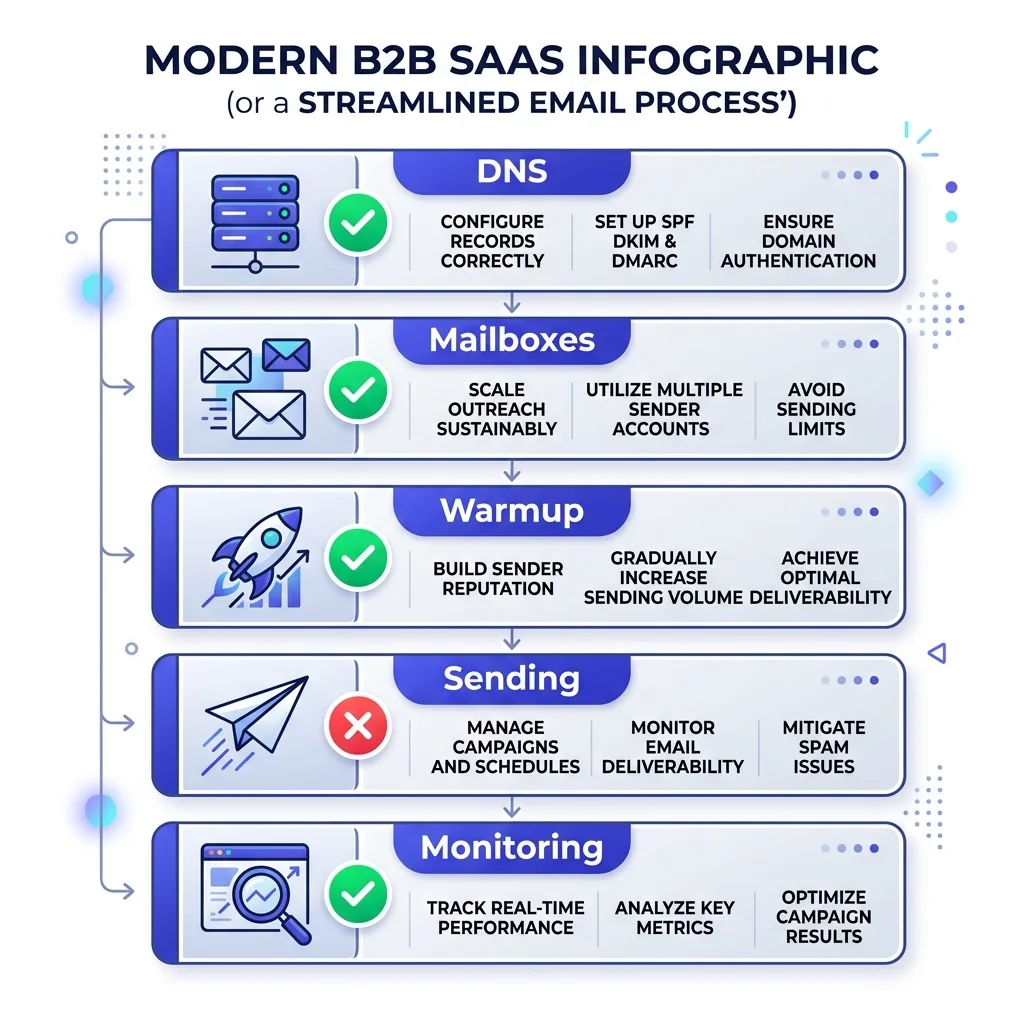 Cold email infrastructure audit checklist showing five gated sections
#The scoring model
Score each of the five sections as pass or fail against the thresholds above, not on a sliding scale.
A section with four green checks and one red one is still a fail.
The reason is simple: infrastructure problems are binary at the point they trigger a filter.
A DMARC record either aligns or it does not.
A bounce rate is either under 2% or it is not.
Partial credit does not protect you from Gmail's bulk sender rules.
Overall audit result:
- 5 of 5 pass: clear to scale sending volume on that domain.
- 3-4 of 5 pass: hold volume flat, fix the failing sections within two weeks, re-audit.
- 0-2 of 5 pass: stop sending from that domain entirely until the fix is verified, not just applied.
Run this audit before you launch on a new domain, again after any volume increase, and again immediately after any unexplained drop in reply rate.
Most teams only run it after the drop, when the fix takes weeks instead of days.
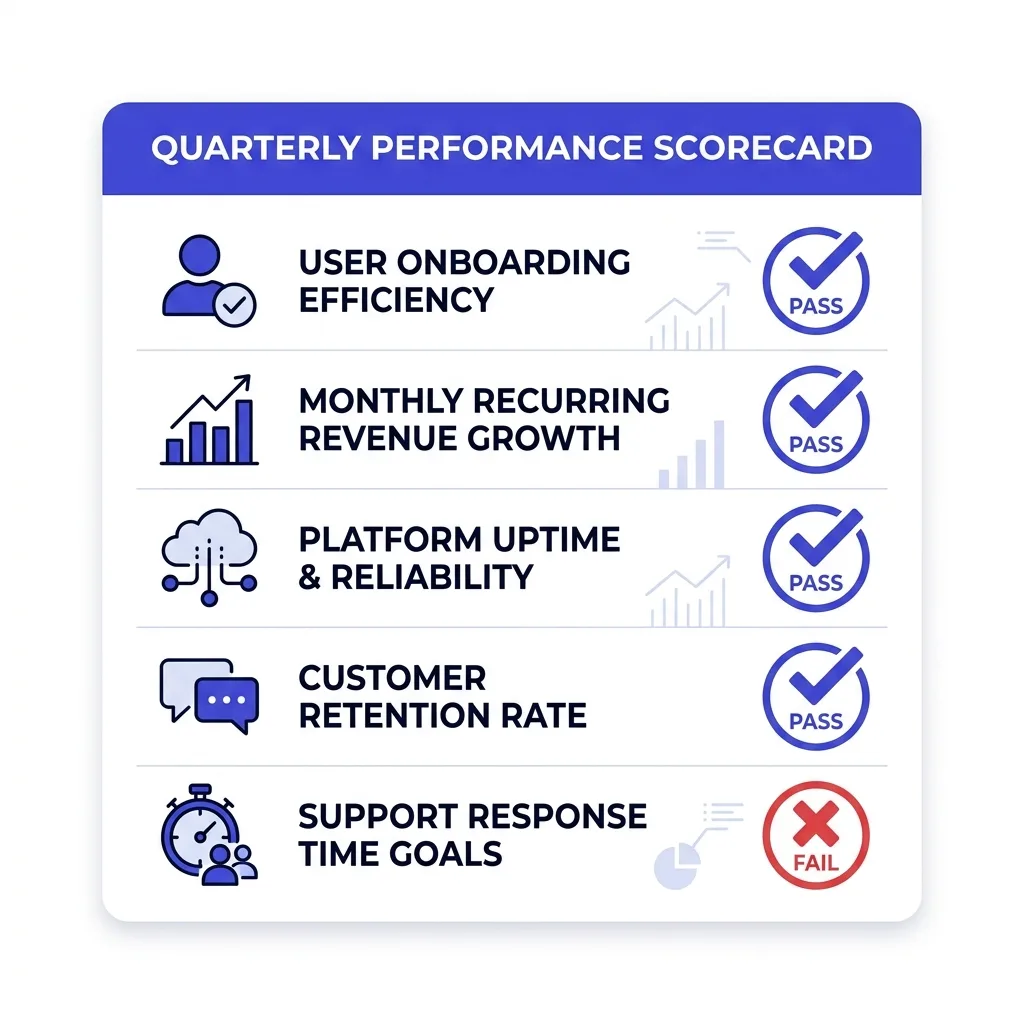 Scoring model showing pass and fail thresholds across five audit sections
#Where FirstSales fits
Most of this audit is invisible until something breaks.
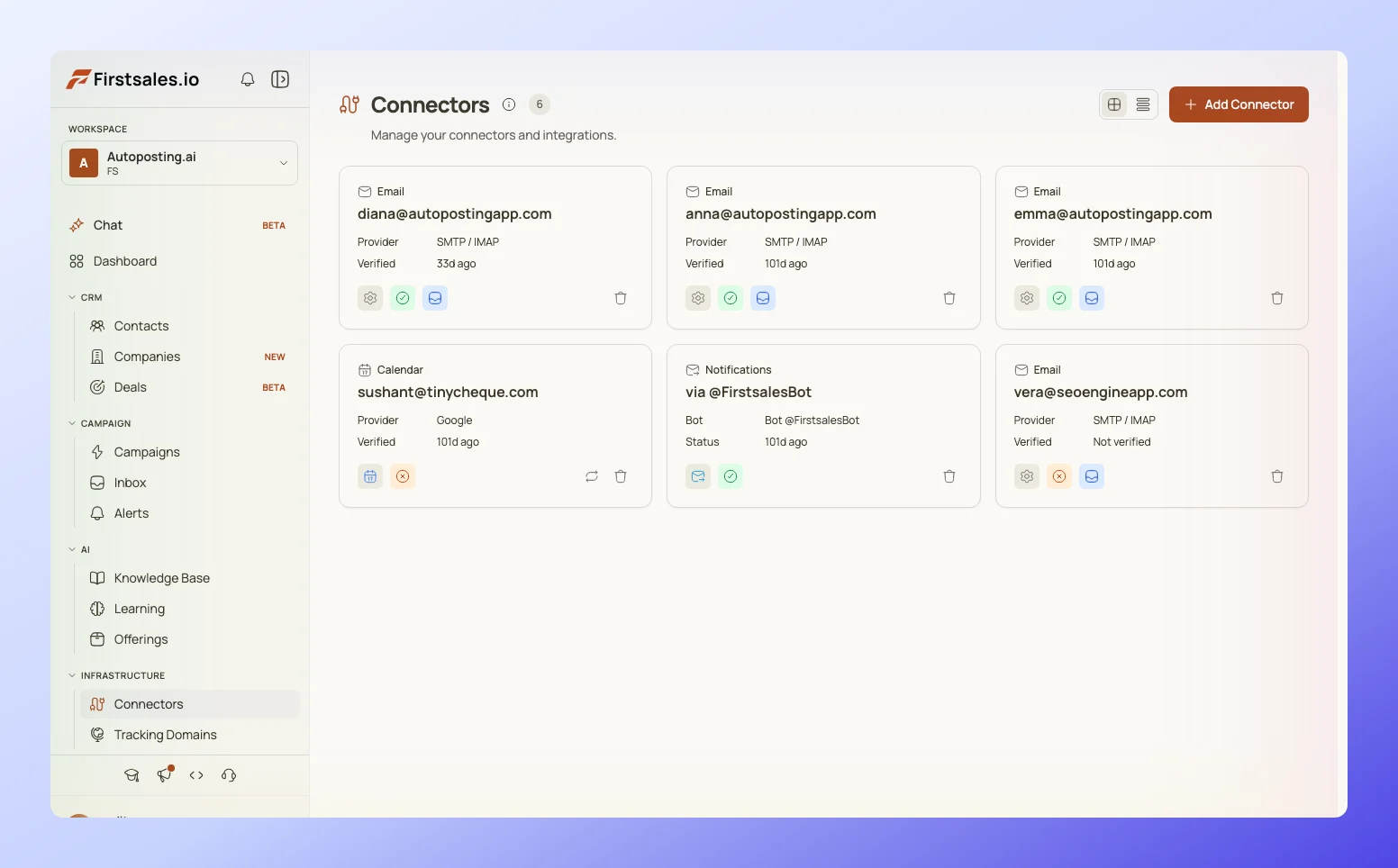 FirstSales deliverability monitor showing bounce rate, spam complaints, and warmup status per mailbox
FirstSales runs deliverability monitoring in the background across every connected mailbox, tracking bounce rate, spam complaint signals, and warmup status against the same thresholds in this checklist, so a failing section surfaces as an alert instead of a mystery drop in replies three weeks later.
That does not replace doing the DNS work yourself.
It means you find out on day two that a section failed, not on day twenty when the domain is already burned.
#What is overrated in deliverability advice
A few things get repeated constantly that deserve pushback.
"Just buy more domains." More domains without warmup discipline is more surface area to burn, not more capacity. A well-run 3-domain fleet outsends a poorly warmed 10-domain fleet.
Open rate as a health signal. Apple Mail Privacy Protection pre-fetches images on a huge share of iOS mail, inflating opens across the board. Treat open rate as noise, not signal, and watch reply rate and bounce rate instead.
Warmup tools as a substitute for real replies. A warmup network that only opens and archives is a weak signal compared to actual back-and-forth conversation, and mailbox providers appear to weigh the two differently.
Dedicated IPs for small senders. Below meaningful volume, a dedicated IP is a reputation liability with no reputation history to draw on. Most teams sending under a few thousand emails a day are better off on a well-managed shared IP. That only flips once sustained volume is high enough to build a dedicated IP's own reputation history.
#FAQ
#How often should I run a cold email infrastructure audit?
Run it before launching any new sending domain, after any meaningful volume increase, and immediately after any unexplained drop in reply rate or placement.
Beyond that, a quarterly pass on active domains catches DKIM keys that expired or DMARC policies that drifted without anyone noticing.
#What is the single most common infrastructure failure?
Missing or misconfigured DMARC alignment, usually because SPF or DKIM technically pass but do not align with the visible "From" domain, which DMARC requires on top of the individual checks passing.
#Can I skip DMARC if I send under 5,000 emails a day?
Google's bulk sender enforcement technically applies above that threshold, but unauthenticated mail below it still gets filtered on reputation and pattern signals.
Set up DMARC regardless of volume; it costs nothing to configure and protects the domain from spoofing either way.
#How long does full domain warmup actually take?
Plan for 2-4 weeks for a brand-new domain before it touches real cold sending volume, with mailbox-level warmup continuing in the background even after that.
Rushing this window is the single fastest way to burn a domain inside its first month.
#Do I need a dedicated IP address?
Most senders under high daily volume are better off on a well-managed shared IP with a strong shared reputation, since a dedicated IP has no reputation history and inherits none from other senders.
Dedicated IPs start making sense at higher sustained volume where you can maintain consistent sending patterns to build that history yourself.
#What is a safe bounce rate ceiling?
Keep bounce rate under 2%, and treat anything approaching that number as a signal to pause and re-verify your list, not push through it.
Google's bulk sender rules use roughly this threshold as an enforcement trigger.
#What is a safe spam complaint rate?
Under 0.1% is the ceiling used in Google's bulk sender rules, and crossing it repeatedly triggers automatic reputation penalties that are slow to reverse.
#How many mailboxes do I need per domain?
There is no fixed number that works for every case; the real constraint is total safe volume per domain given each mailbox's individual warmup state and sending history.
Start with 2-3 mailboxes per domain and scale mailbox count with verified sending capacity, not on a fixed formula.
#Should all my mailboxes be on the same email provider?
No. A single-provider fleet fails together if that provider throttles or flags your sending pattern.
Split across at least two providers, typically Google Workspace and Microsoft 365, plus a private SMTP option once volume justifies it.
#What does Google Postmaster Tools actually show me?
Domain and IP reputation category, spam rate as reported by Gmail users, authentication success rates, and delivery error breakdowns, all specific to mail you send to Gmail addresses.
It will not show placement in non-Gmail inboxes, which is why a separate seed list matters.
#Is open rate still useful for judging campaign health?
Not on its own. Apple Mail Privacy Protection inflates opens across a large share of iOS traffic by pre-fetching images regardless of whether a human opened the email.
Watch reply rate and bounce rate as the primary health signals instead.
#How do I know if a domain is unrecoverable versus just needs time?
A domain stuck in spam despite clean authentication, low bounce rate, and weeks of reduced volume is a signal the reputation damage may outlast a simple pause.
At that point the repair-versus-replace math usually favors retiring the domain rather than fighting its reputation for another month.
#What is the fastest way to detect a deliverability problem early?
Automated alerting on bounce rate and spam complaint rate spikes, tied to a monitoring tool checking Postmaster data, catches most problems within a day instead of a week.
Reply rate drops are a lagging indicator; bounce and complaint spikes are the leading one.
#Does subdomain structure actually matter for reputation?
Yes. A separate sending subdomain isolates reputation damage from your primary domain, so a bad sending pattern on the outreach subdomain does not put your invoicing or internal email at risk.
#How many DNS lookups can my SPF record safely use?
Ten is the hard limit before mail servers treat the record as a permanent failure.
Count every include, including nested includes from third-party tools, and consolidate where you can.
#What is BIMI and do I need it?
BIMI displays your verified brand logo next to your email in supporting inboxes, and it requires DMARC enforcement (p=quarantine or p=reject) as a prerequisite.
It is a trust signal, not a deliverability requirement, and worth adding once your authentication is already solid.
#Can AI-assisted sending make infrastructure problems worse?
Yes, if the automation increases sending volume or velocity faster than the underlying mailbox fleet has warmed up for.
Infrastructure limits do not care whether a human or a model generated the email; the mailbox and domain still need the same warmup and volume discipline either way.
#What is a realistic reply rate to expect once infrastructure passes the audit?
Systematised campaigns with clean infrastructure commonly land in the 10-18% range, and signal-based sends can reach similarly high numbers, against a platform-wide average closer to 3.43% in 2026.
Passing this audit does not guarantee that range, but failing it makes reaching it unlikely regardless of copy quality.
#How do I audit a domain I inherited from someone else?
Run every section of this checklist as if the domain were brand new, since you cannot verify the sending history or warmup discipline of a prior owner.
Check Postmaster Tools reputation first; if it already shows a poor or bad category, treat the domain as needing repair before any new sending.
#Is a written incident response plan really necessary before something breaks?
Yes. Deciding triage order, kill switches, and who gets notified during an active reputation collapse takes far longer than writing the plan in advance, and every hour of delay during an incident costs more sending capacity.
#Conclusion
Copy gets the attention because copy is what people read.
Infrastructure gets ignored because it is invisible until it fails, and by the time it fails, the fix is measured in weeks, not hours.
Run the five sections in this audit against their pass thresholds before you launch anything new, and re-run them the moment a metric moves in the wrong direction.
The teams still getting double-digit reply rates in 2026 are not writing dramatically better emails than everyone else.
They are running mail through infrastructure that passes this audit, consistently, before the words ever matter.