
TL;DR: When placement collapses, the fix is not "send less and hope." Pause sending within the hour, isolate the domain or IP causing the drop, run the DNS and content checks in a fixed order, and only resume once inbox placement on seed accounts is confirmed clean for 48 hours. Most teams lose two extra weeks of pipeline because they skip the pause step and keep sending while diagnosing.
#What a deliverability incident actually looks like
It rarely announces itself.
Open rates were never reliable to begin with, since Apple Mail Privacy Protection inflates them for a meaningful share of your list.
The real signal shows up in reply rate first.
A campaign that was pulling 6-8% replies drops to 1-2% over three or four sending days, with no change to targeting or copy.
Bounce rate is the second signal, and it moves faster than most teams expect.
Google's bulk sender rules cap spam complaints at 0.1% and require bounce rates to stay under 2%.
Cross either line and Gmail starts routing your mail to spam quietly, before you see a hard bounce spike in your sending tool.
Google Postmaster Tools is the third signal, and it is the one most teams check last instead of first.
Domain reputation moves from "high" to "medium" or "low" days before your own metrics show the damage clearly.
If you are not checking Postmaster Tools weekly as a baseline, you are diagnosing an incident that started before you noticed it.
#The first hour: stop the bleeding
The instinct in a crisis is to fix the problem before pausing.
That instinct is wrong here, and it is the single biggest reason recovery takes weeks instead of days.
Every email sent while the underlying cause is still active adds another data point telling Gmail, Outlook, or your seed panel that this sender is a problem.
Pause the affected sending domain or IP first.
Not the whole campaign platform, not every domain in your fleet, just the specific sender showing the drop.
If you run a diversified mailbox fleet across Google, Microsoft, and private SMTP, this is where it pays off: a Google-side reputation hit does not force you to pause every domain.
Next, freeze new list uploads to that sender for the duration of the incident.
A fresh batch of unverified contacts is the most common accelerant for a bounce-rate spike, and adding one mid-incident makes the eventual root cause harder to isolate.
Log the exact moment you noticed the drop, the campaign IDs involved, and the sending volume for the prior 72 hours.
You will need this timeline for the root cause investigation, and reconstructing it from memory two days later is unreliable.
| First-hour instinct | ✓ Right move | ✗ Wrong move |
|---|---|---|
| Sending during diagnosis | Pause the affected sender immediately | Keep sending "just to see" if it gets worse |
| List uploads | Freeze new uploads to that sender | Add a fresh batch to test a theory |
| Scope of the pause | Narrowest sender showing the drop | Every domain in the fleet, by default |
| Notifying leadership | Short message within two hours | Wait until the root cause is confirmed |
| Root cause search | Fixed triage sequence, one step at a time | Random changes across DNS, content, and lists at once |
#Triage order: check these in sequence
Random troubleshooting wastes the most valuable resource in an incident: time before reputation decays further.
Run these checks in order, not in parallel, because each one rules out a category of cause before you move to the next.
#1. DNS authentication
Confirm SPF, DKIM, and DMARC are still passing and aligned.
A surprising number of incidents trace back to a DNS record that changed for an unrelated reason: a hosting migration, an expired CNAME, or a shared IP provider rotating infrastructure.
Check alignment specifically, not just presence.
SPF, DKIM, and DMARC can all technically pass while the domains do not align, which still triggers spam filtering under DMARC quarantine or reject policies.
#2. Blocklist status
Query your sending IP and domain against the major DNSBLs: Spamhaus, Barracuda, SpamCop.
Delisting timelines vary by provider. Spamhaus typically processes removal requests within 24 to 48 hours once the underlying issue is resolved, and Barracuda often responds within 12 to 24 hours for a first-time listing.
Neither will delist you while the cause is still active, which is another reason the pause in step one has to happen before you file a removal request.
Check both the sending domain and the sending IP separately.
A shared IP can be listed because of another sender's behavior entirely, and a domain-only check will miss it.
If you are on a shared IP and this is the second or third time another tenant has tanked your reputation, that is a strong argument for moving to a dedicated IP once your volume justifies it.
#3. Recent sending pattern
Pull your last 14 days of volume, and look for any spike above your normal daily ceiling.
A sudden jump from 200 to 800 sends a day on a domain that has not warmed up to that volume reads as a strong spam signal to mailbox providers, independent of content.
#4. Content and link changes
Compare the subject lines and body copy from the affected campaign against your last known-good send.
New tracking domains, shortened links, or an attachment added mid-campaign are common triggers that a copy review alone will miss, since the sentence-level content did not change.
#5. List quality
Check bounce and complaint rates specifically on the newest segment added to the campaign.
If the incident started after a new list import, run that segment through an email verification pass before it touches the domain again.
graph TD
    A[Placement drop detected] --> B[Pause affected domain/IP]
    B --> C[Freeze new list uploads]
    C --> D[Check DNS authentication]
    D --> E{Passing and aligned?}
    E -->|No| F[Fix DNS, wait for propagation]
    E -->|Yes| G[Check blocklist status]
    G --> H{Listed?}
    H -->|Yes| I[File delisting request]
    H -->|No| J[Check sending pattern and content]
    J --> K[Check list quality on newest segment]
    K --> L[Run seed list test]
    L --> M{Clean for 48 hours?}
    M -->|No| L
    M -->|Yes| N[Resume at reduced volume]
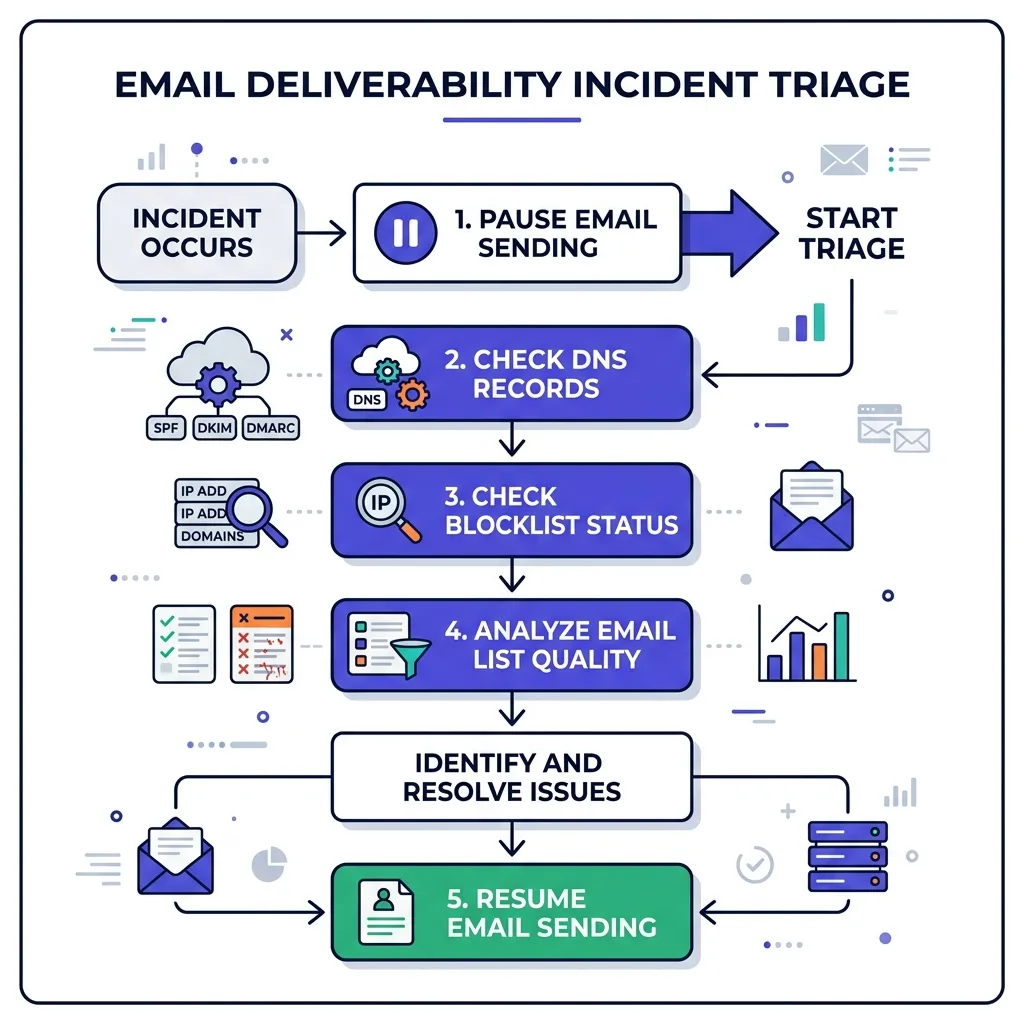 Triage flow for a deliverability incident from detection to resume
#Kill switches and what they actually do
Not every incident needs the same level of response, and treating a minor dip like a full domain burn wastes goodwill you will need later.
| Kill switch | What it stops | When to use it |
|---|---|---|
| Pause one campaign | Sends from a single sequence | Localized content or list issue |
| Pause one domain | All sends from that domain | Domain-level reputation drop, DNS issue |
| Pause one mailbox provider's slice | Sends to Gmail or Outlook recipients specifically | Provider-specific filtering, other providers unaffected |
| Full account freeze | Every domain in the fleet | Shared infrastructure compromise, IP-level blocklisting |
| Retire the domain | Permanent stop, no resume | Confirmed blocklist plus repeated failed delisting attempts |
Most incidents resolve at the campaign or domain level.
A full account freeze is rare, and reaching for it by default trains your team to treat every dip as a five-alarm fire, which burns trust with sales leadership the next time you need to actually pause everything.
#The comms plan nobody writes down
Deliverability incidents fail twice: once technically, and once organizationally, when sales leadership finds out pipeline dropped before anyone told them why.
Write the notification template before the incident, not during it.
It should say what happened, what is paused, the expected timeline, and who owns the fix.
Send it to sales leadership within two hours of confirming the incident, even if the root cause is not yet known.
"We found a problem and paused sending, update in 24 hours" is a better message than silence followed by a confused question about why the pipeline dashboard went flat.
A working template looks like this: what happened (in one sentence, no jargon), what is paused right now, the next check-in time, and one name to contact with questions.
Keep it to four lines.
A long technical explanation in the first message reads as defensive, and sales leadership does not need the DNS record details until the postmortem.
Assign one owner for the incident, not a committee.
Deliverability fixes move fast when one person has the authority to pause sending, approve DNS changes, and greenlight the resume.
They stall when three people are all waiting for someone else to make the call.
#Who actually needs to be involved
Three people cover almost every incident: the domain or infrastructure owner, someone with sales leadership visibility, and whoever built the list or campaign involved.
Larger teams add a fourth: a compliance contact, if the incident touches a regulated segment or a jurisdiction with strict consent rules.
Do not pull in the whole revenue team.
A wide distribution list creates pressure to "just resume already," and that pressure is exactly what causes teams to skip the 48-hour clean seed list confirmation and relapse a week later.
#Recovery timeline by severity
| Severity | Typical cause | Recovery time | Resume condition |
|---|---|---|---|
| Minor dip | Single bad segment, one campaign | 2-4 days | Bounce rate back under 2% |
| Moderate drop | DNS misconfiguration, volume spike | 1-2 weeks | Clean seed list results for 48 hours |
| Blocklist event | Confirmed Spamhaus or Barracuda listing | 2-4 weeks | Delisting confirmed plus clean sending history |
| Full domain reputation collapse | Sustained spam complaints above 0.1% | 4-8 weeks, sometimes longer | Postmaster Tools shows "medium" or better sustained |
These ranges assume the root cause was actually fixed, not just waited out.
Teams that resume sending because "it has been a week" without confirming the cause tend to relapse within days, which resets the recovery clock and adds a second incident on top of the first.
Use a seed list across Gmail, Outlook, and Yahoo accounts to confirm placement before resuming, rather than trusting your own inbox check, which does not reflect how a stranger's spam filter treats your mail.
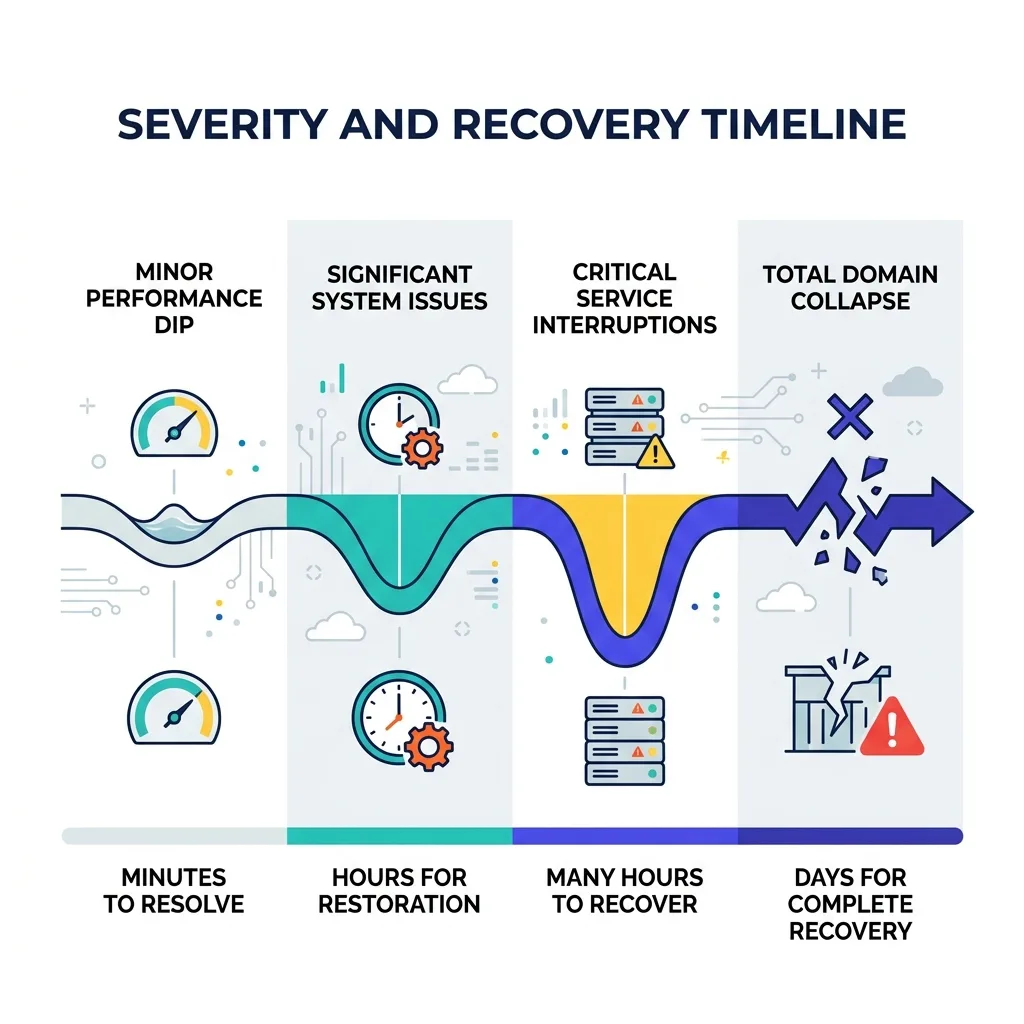 Recovery timeline stages from minor dip to full domain collapse
#When to retire instead of repair
Not every incident is worth fixing.
If the domain has been through this cycle twice already, or if a full domain reputation recovery effort is projected to take longer than simply provisioning a new domain and re-warming it, retire it.
The math is straightforward: a fresh domain warms up in roughly 2-4 weeks of disciplined ramping.
A severely burned domain can take 4-8 weeks to recover, with no guarantee the recovery holds once you push volume back up.
See when to retire a burned domain for the specific signals that say repair is not worth the time.
#Building the runbook before you need it
Every point above assumes you have a runbook ready when the incident starts, which is exactly the assumption that fails at 90% of teams.
Write the document now, while you are calm, not during the incident, while you are guessing.
It should list: who has authority to pause sending, where the DNS records live and who has access, the seed list accounts and how to check them, the DNSBL lookup tools, and the sales leadership contact for the comms template.
Run a cold email infrastructure audit quarterly so the baseline in your runbook stays accurate instead of describing a setup that changed six months ago.
FirstSales customers get deliverability monitoring built into the sending layer, so a reputation dip on Google Postmaster Tools or a bounce-rate spike surfaces as an alert instead of a surprise three days later when reply rates have already cratered.
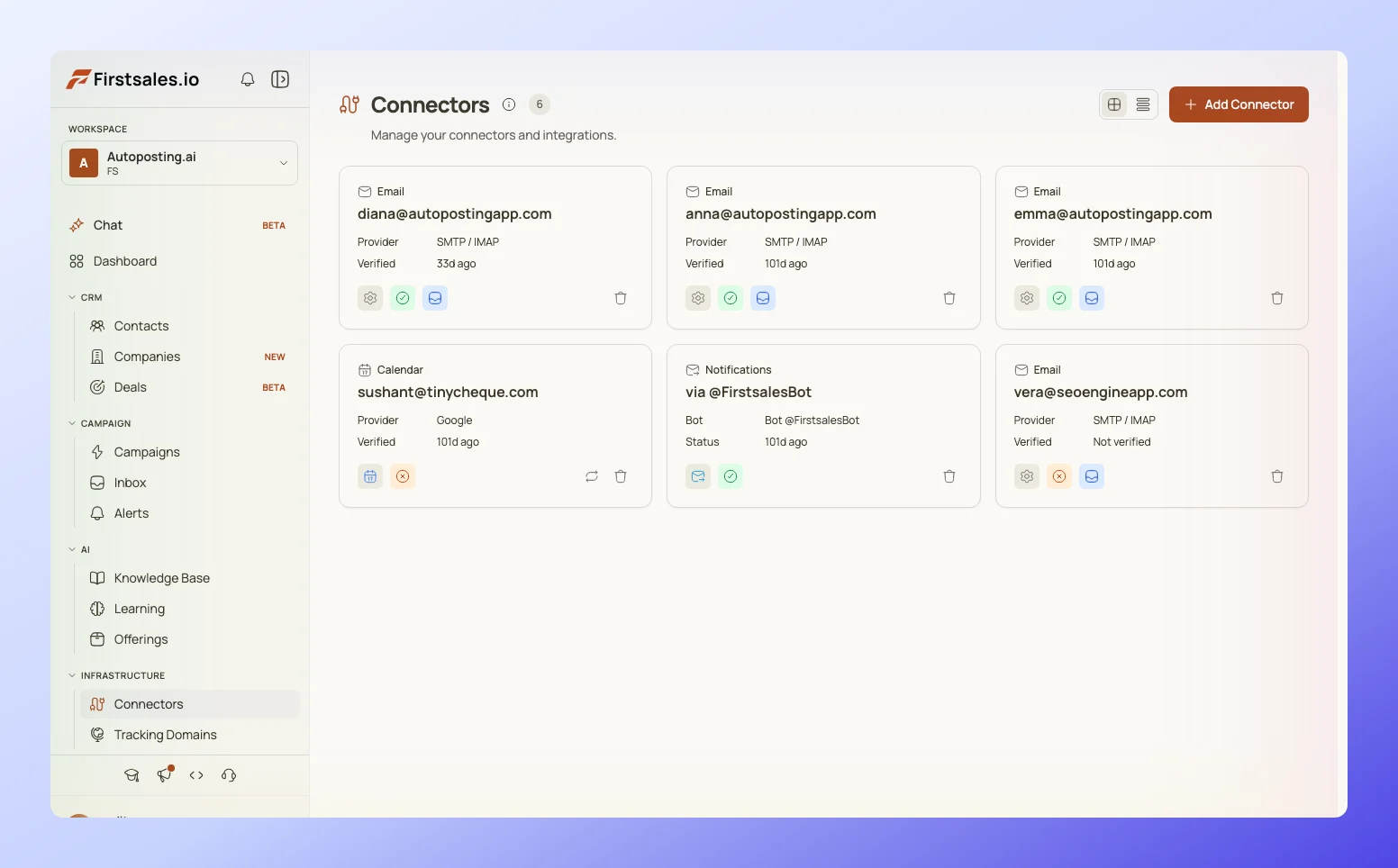 FirstSales deliverability monitor showing domain health and alerts
That earlier warning does not replace the runbook. It just gives the runbook more lead time to work with.
#What is overrated in incident response
Real-time dashboards get treated as the whole solution, and they are not.
A dashboard tells you something changed. It does not tell you why, and teams that stare at graphs instead of running the triage sequence above waste the exact hours that matter most.
"Slow down sending" as a blanket fix is also overrated.
Reducing volume without fixing the actual cause, a DNS misalignment, a bad list segment, a blocklist entry, just delays the same failure at a lower rate.
It feels like progress because the bounce rate improves slightly, but the underlying problem is still there when volume comes back up.
The most overrated fix of all is switching to a new domain the moment something looks off.
Cold email domain burn rate becomes a real cost problem when teams treat every dip as a burn event instead of running a five-minute triage first.
Most drops are a DNS issue or a bad list segment, both fixable in place within days, not a reason to abandon a domain that took a month to warm up.
#FAQ
#How fast should we pause sending after noticing a deliverability drop?
Within the hour. Every send during an active incident adds another negative data point to the sender's reputation, which extends the eventual recovery timeline.
#What is the first thing to check in a deliverability incident?
DNS authentication: SPF, DKIM, and DMARC alignment. It is the most common single cause and the fastest to rule in or out.
#How long does Spamhaus delisting take?
Typically 24 to 48 hours once the underlying spam-triggering issue is confirmed resolved. Spamhaus will not delist while the cause is still active.
#How long does Barracuda delisting take?
Often 12 to 24 hours for a first-time listing, though repeated listings can take longer and require stronger proof the issue is fixed.
#Should we pause one campaign or the whole account?
Pause at the narrowest level that stops the specific problem. A full account freeze should be reserved for shared-infrastructure incidents or confirmed IP-level blocklisting.
#Do we need to tell sales leadership immediately?
Yes, within two hours, even before you know the root cause. A short "found a problem, sending is paused, update in 24 hours" message prevents a worse conversation later.
#How do we know when it is safe to resume sending?
Confirm clean inbox placement on a seed list across Gmail, Outlook, and Yahoo for 48 consecutive hours before resuming, not just an improved metric in your own sending tool.
#What causes most deliverability incidents?
DNS misconfiguration, a sudden sending volume spike, a bad list segment with high bounce rates, or a shared IP getting flagged for another sender's behavior.
#Does a single bounce spike mean we are blocklisted?
Not necessarily. Check your bounce rate against the 2% threshold first, then check the actual DNSBLs. Many bounce spikes never trigger a blocklist entry.
#Can open rate tell us anything useful during an incident?
Very little. Apple Mail Privacy Protection makes open rate an unreliable metric on its own, so lean on reply rate, bounce rate, and Postmaster Tools reputation instead.
#Should we assign one person to own the incident or a team?
One person. A single owner with authority to pause sending and approve fixes moves faster than a group waiting on consensus.
#What is the role of Google Postmaster Tools in incident response?
It shows domain and IP reputation directly from Google's side, often before your own campaign metrics reflect the damage. Check it weekly as a baseline, not only during incidents.
#How much does a deliverability incident typically cost in lost pipeline?
It depends on sending volume and deal size, but a two-week recovery on a domain that normally drives meetings daily represents a real, calculable pipeline gap. Track it so the next incident gets faster executive attention.
#Is it ever right to keep sending while diagnosing?
No, not from the affected sender. Keep sending from unaffected domains if you run a diversified fleet, but the specific sender showing the drop should stop immediately.
#What is a seed list and why does it matter here?
A set of test inboxes across major providers that you send to specifically to check where your mail actually lands, inbox or spam. It is the only reliable way to confirm placement before resuming full volume.
#Should we notify our email service provider during an incident?
If the issue involves shared IP infrastructure or a platform-level block, yes. If it is domain-specific and DNS is confirmed correct, the provider usually cannot do more than you can from the DNS side.
#How often should we run the DNS and blocklist checks even without an incident?
Weekly, as part of routine monitoring. Catching a DNS drift or an early blocklist listing before it tanks reply rates is far cheaper than recovering from a full incident.
#What is the difference between a moderate drop and a full domain collapse?
A moderate drop usually traces to one identifiable cause and resolves in one to two weeks. A full collapse involves sustained spam complaints above the 0.1% threshold and can take four to eight weeks or longer to recover, if it recovers at all.
#Can AI-generated email content trigger deliverability incidents?
Content alone rarely triggers a filter unless it includes spam-trigger patterns or the sending pattern around it looks automated. Volume and list quality matter more than whether a human or an AI drafted the copy, provided a human reviewed it before send.
#Do smaller companies need a formal incident response plan?
Yes. A one-page runbook with pause authority, DNS access, and a seed list check takes an hour to write and saves days of confused troubleshooting during an actual incident.
#What should go in the post-incident review?
The timeline from first signal to resolution, the confirmed root cause, what the runbook missed, and one specific change to the monitoring setup so the same cause gets caught earlier next time.
#Conclusion
The plan above works because it removes decisions from the moment they are hardest to make well.
Pause first, run the triage sequence in order, use the narrowest kill switch that solves the problem, and tell sales leadership before they have to ask.
Write the runbook now, while nothing is on fire, and confirm placement on a real seed list before declaring the incident over.
Most of the damage in a deliverability incident comes from the hours spent guessing before the pause, not from the underlying technical cause itself.