
#Inbox providers beyond Google and Microsoft for cold email
Copy page
TL;DR: Google Workspace and Microsoft 365 dominate cold email infrastructure because their sending reputation is trusted by default, but they are not the only viable option. Zoho, Fastmail, and private SMTP servers can work for specific use cases, with real tradeoffs in trust, setup complexity, and how receiving mail servers score them. This piece breaks down when each alternative makes sense and when it is a trap.
#Why Google and Microsoft became the default
Google Workspace and Microsoft 365 inboxes carry an inherent trust advantage that has nothing to do with your own sending behavior.
Receiving mail servers, including Gmail and Outlook themselves, have decades of data on both providers' infrastructure and apply a baseline trust score to mail originating from their IP ranges that a brand-new, unknown SMTP server simply does not get.
That baseline trust means a fresh Google Workspace inbox, properly warmed up, reaches inbox placement faster and more reliably than a fresh inbox on almost any alternative provider.
This is why the overwhelming majority of cold email infrastructure in 2026 still runs on one of these two ecosystems, and why any alternative provider needs a specific, deliberate reason to justify the switch (google workspace vs microsoft 365 for cold email).
#The real reasons teams look beyond Google and Microsoft
#Cost at scale
Google Workspace and Microsoft 365 seats carry a per-user licensing cost that adds up quickly across a large inbox fleet, since neither provider prices specifically for the high-volume, low-per-seat-usage pattern cold email requires.
Alternative providers built specifically for cold outbound infrastructure sometimes undercut standard Workspace and 365 pricing meaningfully at scale, which matters once a program is running 20-30+ inboxes.
#Sending limit ceilings
Gmail enforces a daily sending limit for Workspace accounts, and Microsoft applies its own bulk sender thresholds through Outlook, both of which cap how aggressively you can scale a single inbox before hitting a hard wall (gmail sending limit 2026).
Teams pushing very high volume sometimes look to alternative providers specifically to diversify sending capacity across ecosystems rather than concentrating all risk and all rate limits inside one provider's infrastructure.
#Diversification against platform-level policy risk
Relying entirely on Google or Microsoft infrastructure means a single policy change from either company can disrupt your entire sending capacity overnight, since both companies have tightened bulk sender requirements meaningfully in recent years (microsoft cold email rules 2026).
Running a portion of your inbox fleet on a genuinely separate infrastructure provider reduces that single-point-of-failure risk, even if the alternative provider's baseline trust is lower.
#Zoho: the budget alternative
Zoho Mail is the most commonly cited Google and Microsoft alternative for cold email, largely because it offers a genuinely lower per-seat price and a mail infrastructure built with business email, not just consumer inboxes, in mind.
Zoho's sending reputation is real but noticeably thinner than Google's or Microsoft's, since fewer receiving mail servers have decades of behavioral data on Zoho's IP ranges compared to the two dominant providers.
In practice, this means Zoho inboxes often need a longer, more careful warmup period to reach the same inbox placement rate a Google Workspace inbox achieves faster (how to warm up an email).
Zoho works best as a secondary provider in a mixed fleet, where a portion of sending volume runs through Zoho to diversify risk and cost, while the core, highest-priority campaigns still run through Google or Microsoft infrastructure.
Teams running Zoho at scale report needing tighter list hygiene and lower daily send caps per inbox than they would run on Google Workspace, since Zoho's smaller reputation buffer means mistakes show up in deliverability faster.
#Fastmail: privacy-forward, narrower use case
Fastmail markets itself on privacy and independence from the major advertising-driven providers, which appeals to certain brands whose positioning benefits from not routing mail through Google or Microsoft infrastructure.
Its deliverability track record for transactional and personal mail is solid, but it was not built with high-volume cold outbound as a primary use case, and its terms of service reflect that in ways worth reading carefully before committing a large sending fleet.
Fastmail tends to work best for small-scale, highly targeted outbound, think founder-led sales at low volume, rather than a 20-inbox SDR fleet pushing thousands of emails daily.
The tradeoff is straightforward: you get a provider whose brand alignment might matter to a privacy-conscious audience, in exchange for a smaller-scale, more hands-on approach to volume and warmup than Google or Microsoft infrastructure requires.
#Private SMTP: full control, full responsibility
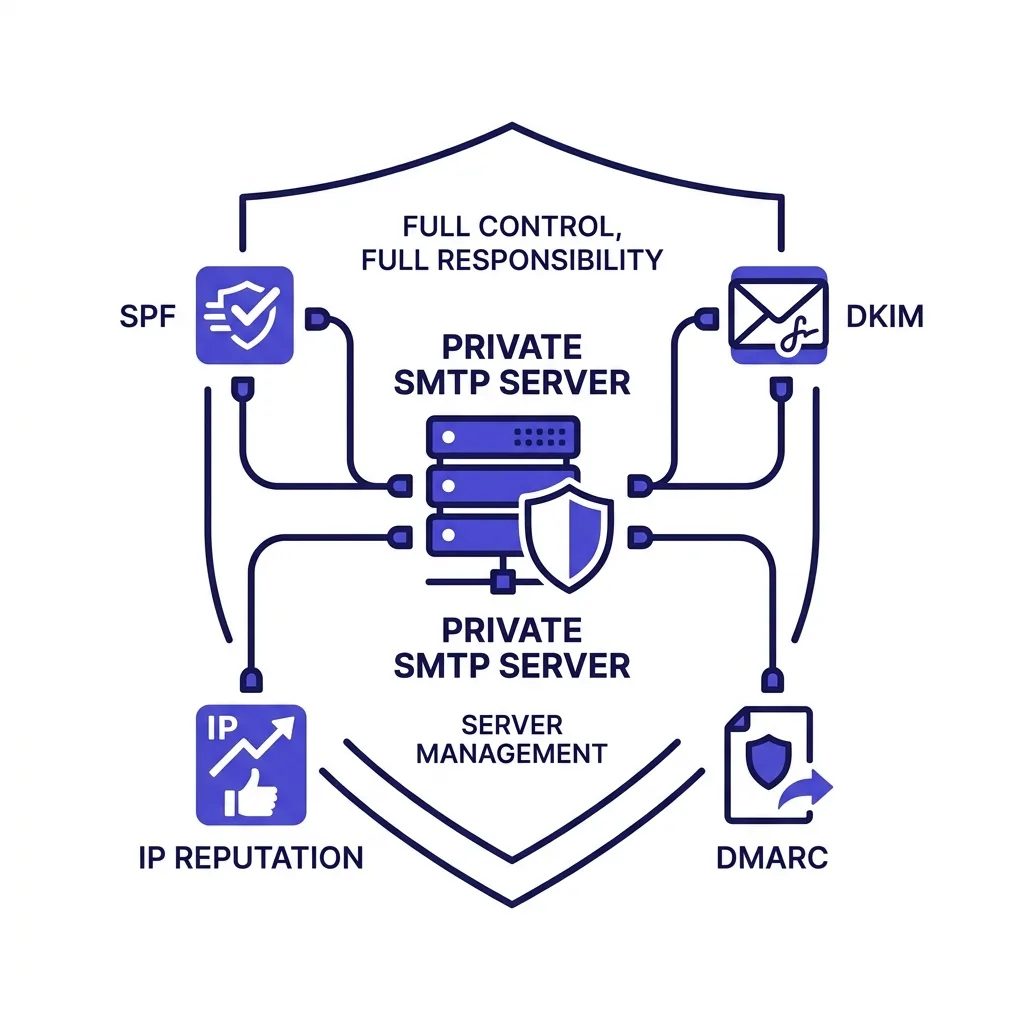 Private SMTP: full control, full responsibility
Running your own SMTP server, or contracting a dedicated IP through a specialized sending infrastructure provider, gives you full control over sending reputation, IP allocation, and technical configuration that shared-tenant providers like Google Workspace do not expose.
This path suits teams with genuine technical capacity, since a private SMTP setup requires managing SPF, DKIM, and DMARC configuration manually, monitoring IP reputation continuously, and handling delisting requests yourself if a dedicated IP ever lands on a blacklist (spf dkim dmarc setup).
The upside is real: a well-managed private SMTP setup at high volume can outperform shared-tenant providers on cost per email and gives you complete visibility into exactly what is affecting your reputation, rather than inheriting whatever reputation state a shared provider's IP pool carries.
The downside is equally real: a poorly managed private SMTP setup has no safety net, since there is no Google or Microsoft reputation system quietly absorbing minor mistakes the way a shared, high-trust provider's infrastructure does.
Most teams that succeed with private SMTP either have a dedicated deliverability specialist on staff or work with a specialized outbound infrastructure vendor that handles the IP and reputation management on their behalf.
#The trust gap, quantified
Compliant senders running proper authentication average roughly 89% inbox placement in 2026, while non-compliant senders see 22-34% of mail routed to spam or rejected outright, a 3x to 7x penalty (PowerDMARC bulk sender guide).
That authentication-driven gap applies regardless of provider, but the starting point differs meaningfully: a Google Workspace inbox with correct SPF, DKIM, and DMARC starts from a higher trust baseline than a brand-new private SMTP IP with the exact same authentication configuration, since receiving servers weigh sending history and IP reputation on top of pure authentication compliance.
This is the core tradeoff every alternative provider decision comes down to: authentication compliance is table stakes everywhere, but the starting trust baseline and the speed of building reputation from there vary significantly by provider.
#Comparing the providers side by side
| Provider | Deliverability baseline | Setup complexity | Cost at scale | Best use case |
|---|---|---|---|---|
| Google Workspace | ✓ Highest, fastest ramp | ✓ Low, well documented | ✗ Higher per-seat at scale | Core sending, most teams |
| Microsoft 365 | ✓ High, fast ramp | ✓ Low | ✗ Higher per-seat at scale | Core sending, Outlook-heavy targets |
| Zoho Mail | ✗ Moderate, slower ramp | ✓ Low to moderate | ✓ Lower per-seat cost | Secondary volume, cost diversification |
| Fastmail | ✗ Unproven at cold volume | ✓ Moderate | ✓ Competitive at low volume | Small-scale, privacy-forward brands |
| Private SMTP | ✗ Starts at zero, builds slowly | ✗ High, needs expertise | ✓ Lowest per-email at high volume | High-volume teams with deliverability staff |
#A practical decision framework
Start with Google Workspace or Microsoft 365 as your core infrastructure unless you have a specific, documented reason not to, since the trust baseline advantage is large enough to outweigh the cost premium for most teams under a few thousand emails a day.
Add a secondary provider like Zoho once your fleet grows large enough that per-seat cost savings become meaningful, and treat that secondary provider's volume as supplementary, not primary, until you have real bounce and placement data proving it performs well for your specific sending pattern.
Consider private SMTP only once you have dedicated deliverability expertise on staff or a vendor relationship that provides it, since the downside of a poorly managed private setup is severe enough that the cost savings rarely justify the risk without that expertise in place.
Whatever mix you choose, never concentrate all sending on a single alternative provider without first validating bounce rate and placement on a small test batch, since alternative providers' reputation systems behave differently enough from Google and Microsoft that assumptions built on Workspace experience do not transfer cleanly.
#How multi-provider fleets actually get built in practice
Teams that successfully diversify beyond Google and Microsoft rarely do it all at once, they add one alternative provider at a time and validate it before adding another.
A common pattern: run 70-80% of sending volume through Google Workspace and Microsoft 365 combined, and route the remaining 20-30% through Zoho or a similar alternative, adjusting the split as real bounce and placement data comes in.
This split limits the damage from any single provider's reputation problem while still capturing meaningful cost savings on the diversified portion of the fleet.
Domain rotation compounds this strategy well, since spreading sending volume across multiple domains and multiple providers simultaneously reduces the blast radius of any single failure point to a small fraction of total sending capacity (email domain rotation).
FirstSales supports mixed-provider inbox connections specifically because most serious cold email programs eventually want this kind of diversification, and building it into the platform from the start avoids the manual reconciliation headache of managing multiple providers' reporting separately.
#What changes if you're targeting a specific inbox ecosystem
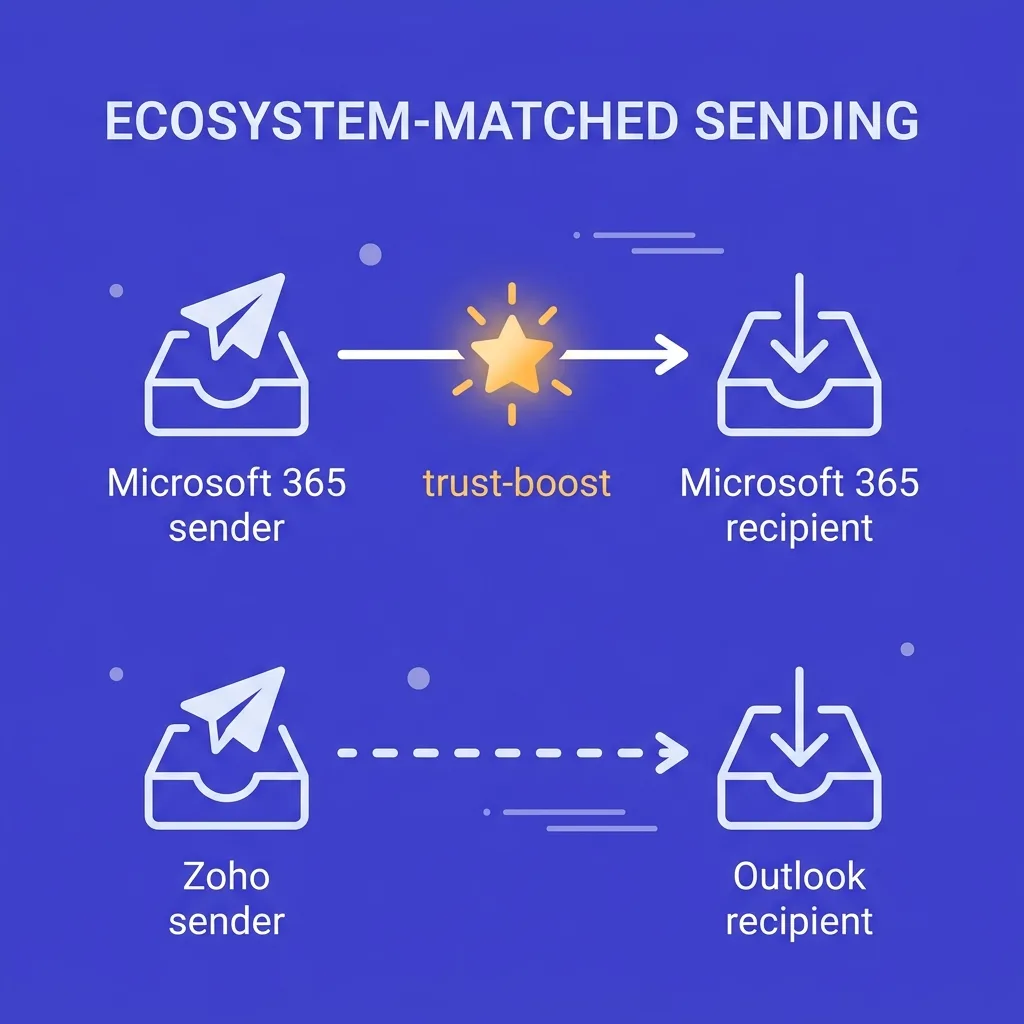 What changes if you're targeting a specific inbox ecosystem
If your ideal customer profile skews heavily toward one inbox ecosystem, say a target market that runs almost entirely on Microsoft 365 internally, your own sending infrastructure choice matters less than making sure your authentication and content pass that specific ecosystem's filters cleanly.
Outlook's filtering behavior differs from Gmail's in specific, documented ways, and testing your content and sending pattern against the ecosystem your prospects actually use beats optimizing for a generic, provider-agnostic best practice (microsoft cold email rules 2026).
This is a separate axis from the sending provider decision covered in this article, but the two interact: a Microsoft 365 sending inbox targeting Microsoft 365 recipients sometimes benefits from same-ecosystem trust signals that a cross-ecosystem send, like Zoho sending to Outlook, does not carry.
Test both dimensions, your sending provider and your target ecosystem, independently before assuming a deliverability problem traces back to just one of them.
#What the receiving side actually sees
Every inbox provider decision ultimately gets judged by receiving mail servers, not by the sending provider's own marketing claims.
Gmail's spam filtering weighs sender IP reputation, domain age, authentication compliance, and engagement history together, and it does not treat a well-configured Zoho or private SMTP sender meaningfully worse than Google Workspace once all four factors are equally strong.
The catch is that reaching "equally strong" on IP reputation and domain age takes real time on an alternative provider, since you are building history from zero instead of inheriting a provider-wide baseline.
Google Postmaster Tools gives you visibility into exactly how Gmail scores your sending domain, regardless of which provider you send through, which makes it one of the few tools that works identically across your whole mixed-provider fleet (google postmaster tools for cold email).
Check Postmaster data segmented by sending domain and provider, since a blended view can hide a specific alternative provider dragging down your average while your Google Workspace inboxes perform fine.
#Regulatory and compliance considerations across providers
Authentication and deliverability are not the only factors that shift by provider, since data residency, privacy law, and platform terms of service vary meaningfully too.
Fastmail's positioning around user privacy sometimes comes with terms of service that are stricter about bulk or automated sending than Google Workspace's, which is worth reading closely before building a large campaign on top of it.
Private SMTP setups put the compliance burden entirely on you, including staying current with evolving requirements like one-click unsubscribe support, which Google and Yahoo now require for all bulk senders regardless of provider (one-click unsubscribe cold email).
A managed provider like Google Workspace or Microsoft 365 handles some of this compliance surface at the infrastructure level, while a private SMTP operator needs to implement and maintain it manually.
Factor this compliance overhead into your cost comparison between providers, since the cheaper sticker price on an alternative provider sometimes hides real engineering time spent maintaining compliance features a managed provider includes by default.
#How provider choice interacts with domain strategy
Provider and domain are two separate decisions that get made together in practice, since every inbox lives on a domain and every domain routes through a provider.
Running multiple domains across a single provider diversifies domain-level risk but leaves you fully exposed if that one provider has a policy or infrastructure problem.
Running multiple providers across a single domain does the opposite, protecting against a provider-level issue while leaving the domain itself as a single point of failure.
The strongest setups diversify on both axes at once: several domains, spread across two or more providers, so that neither a domain-specific reputation problem nor a provider-wide policy change can take down the whole sending program at once.
This full diversification adds real management overhead, which is exactly why unified reporting across providers matters so much once a fleet grows past a handful of inboxes, since manually reconciling bounce and placement data across five or six separate dashboards becomes its own operational burden.
Most teams build toward full diversification gradually, starting with a single provider and a couple of domains, then adding providers and domains as volume and risk tolerance both grow.
#Signals that it's time to add a second provider
A few concrete signals suggest a program has outgrown a single-provider setup and is ready to diversify.
Consistently hitting Gmail's daily sending caps across most of your Workspace inboxes is one clear signal, since it means growth is now bottlenecked by provider-level limits rather than list size or copy quality.
A per-seat cost that has grown large enough to show up as a meaningful line item in your monthly infrastructure budget is another, especially once your fleet crosses 20-30 active inboxes.
A single deliverability scare, like a policy change or temporary throttling event on your primary provider, is often the trigger that finally pushes teams to build the diversification they had been putting off.
Treat any of these three signals as a prompt to start a small, deliberate test on a second provider, not as a reason to migrate your entire fleet overnight.
None of these signals mean the current provider failed, they mean the program has grown past what a single provider can efficiently support alone.
Read them as growth signals worth planning for, not emergencies, and the transition to a diversified fleet stays deliberate instead of reactive.
#Frequently asked questions
#Is Google Workspace still the best option for cold email in 2026?
For most teams, yes, since its trust baseline and fast warmup ramp outweigh the higher per-seat cost, especially for programs under a few thousand emails a day.
Larger, more cost-sensitive programs often keep Google Workspace as the core while adding a cheaper alternative provider for supplementary volume.
#Why does Zoho need a longer warmup period than Google Workspace?
Fewer receiving mail servers have deep historical data on Zoho's sending IP ranges compared to Google's, so Zoho inboxes start from a thinner trust baseline.
A longer, more gradual warmup helps build that reputation before pushing full cold outbound volume through a Zoho inbox.
#Can Fastmail handle high-volume cold email sending?
It can technically send high volume, but its infrastructure and terms of service were not built with cold outbound as the primary use case in mind.
It tends to work better for small-scale, highly targeted outreach than for a large SDR fleet running thousands of daily sends.
#What does running a private SMTP server actually require?
You need to configure and monitor SPF, DKIM, and DMARC yourself, manage IP reputation continuously, and handle blacklist delisting requests without the safety net a shared-tenant provider offers.
Most teams that succeed with this approach have dedicated deliverability expertise on staff or a specialized vendor managing it for them.
#Is it cheaper to run cold email through alternative providers?
Often yes at scale, since alternative providers can undercut Google Workspace and Microsoft 365 per-seat pricing meaningfully once a fleet grows into the dozens of inboxes.
The savings need to be weighed against the slower warmup ramp and thinner trust baseline most alternatives carry.
#Should I diversify across multiple inbox providers?
Diversification reduces single-point-of-failure risk from any one provider's policy change or reputation event, which is valuable for larger, more mature sending programs.
Most teams that diversify successfully keep 70-80% of volume on Google and Microsoft combined while testing the remainder on an alternative provider.
#Does using an alternative provider affect authentication requirements?
No, SPF, DKIM, and DMARC requirements from Google, Yahoo, and Microsoft's bulk sender rules apply regardless of which provider you send through (spf dkim dmarc setup).
Authentication compliance is table stakes on every provider, though the starting trust baseline on top of that compliance still varies by provider.
#What is the biggest risk of switching to a private SMTP setup too early?
A poorly managed private SMTP setup has no reputation safety net, so mistakes that a shared-tenant provider's baseline trust would absorb instead show up directly as deliverability failures.
This risk is highest for teams without dedicated deliverability expertise attempting to manage a private setup on their own.
#How do I test whether an alternative provider works for my sending pattern?
Route a small test batch, isolated on its own domain, through the alternative provider and track bounce rate and inbox placement independently from your main campaign metrics.
Scale gradually only after that test batch confirms performance close to what you see on your primary provider.
#Does target ecosystem matter as much as sending provider?
Yes, and it is a separate consideration: if your prospects mostly use Microsoft 365 or Gmail internally, testing your content and sending pattern against that specific ecosystem's filtering behavior matters independently of which provider you send from.
Both dimensions interact, so isolate which one is causing a deliverability issue before changing either.
#What sending limits does Gmail enforce on Workspace accounts?
Gmail enforces daily sending caps on Workspace accounts that scale with account age and reputation, capping how aggressively a single inbox can push volume before hitting a hard limit (gmail sending limit 2026).
Teams pushing very high total volume often need more inboxes rather than pushing any single inbox past its safe daily ceiling.
#Are Microsoft's bulk sender rules the same as Google's?
The core requirements, SPF, DKIM, and DMARC authentication, are similar in spirit, but Microsoft's enforcement timeline and specific thresholds differ from Google's (microsoft cold email rules 2026).
Microsoft's requirements phased in through May 2025, roughly a year after Google and Yahoo's February 2024 enforcement date.
#Can I mix Google Workspace and private SMTP in the same campaign?
Yes, and many mature sending programs do exactly this, routing different inboxes within the same overall campaign through different providers to spread risk.
Track bounce and placement per provider separately even within a single campaign, since blended reporting can hide a problem developing on one provider while the other performs well.
#Does domain age matter more than provider choice?
Both matter, but they are independent factors: a well-aged domain on a weaker provider can outperform a brand-new domain on Google Workspace, and vice versa.
Domain reputation and provider reputation both feed into the receiving server's overall trust decision, so neither factor alone tells the full story.
#What happens if my alternative provider gets blacklisted?
Recovery depends heavily on the provider's own reputation management resources, since a shared-tenant provider with strong abuse monitoring can often resolve a blacklist event faster than an individual private SMTP operator managing delisting alone (email blacklist removal).
This is part of why private SMTP requires more dedicated expertise: you are your own abuse and reputation management team when something goes wrong.
#Is it worth using an alternative provider just to save money on a small fleet?
Usually not, since the cost savings on a small fleet of under 10 inboxes rarely offset the slower warmup ramp and added setup complexity of learning a new provider's quirks.
Cost savings from alternative providers become meaningful mainly at larger scale, where per-seat differences multiply across dozens of inboxes.
#How does FirstSales handle multi-provider inbox connections?
FirstSales connects inboxes across Google Workspace, Microsoft 365, and other providers into one unified sending and reporting layer, so teams diversifying their fleet do not have to manually reconcile bounce and placement data across separate dashboards.
This matters most for teams past the point of running a single-provider setup, where the reporting overhead of managing multiple tools separately starts to outweigh the benefit of diversification itself.
A unified view also makes it far easier to spot the early signs of a specific provider degrading before it turns into a full deliverability incident across that segment of the fleet.
#Should new cold email programs start with an alternative provider?
No, new programs should start with Google Workspace or Microsoft 365 to benefit from the fastest, most reliable warmup ramp while the rest of the sending program, copy, targeting, and sequencing, is still being validated.
Introduce alternative providers later, once the core program is proven and scale or cost pressures create a real reason to diversify.
Trying to validate copy, targeting, and a new provider all at once makes it far harder to isolate which variable is actually causing a deliverability or reply-rate problem.
#What's the single biggest mistake teams make when trying alternative providers?
Switching a large share of sending volume to an unproven alternative provider all at once, without a small test batch first, which risks a deliverability failure across a meaningful chunk of the program before any real data confirms the provider works for that specific sending pattern.
Test small, validate with real bounce and placement numbers, and scale only after the data supports it.
#Does one-click unsubscribe compliance work differently across providers?
The requirement itself, a functioning one-click unsubscribe header for bulk mail, is the same regardless of provider, since Google and Yahoo enforce it at the receiving side (one-click unsubscribe cold email).
Managed providers and most sequencing platforms implement this automatically, while a private SMTP setup requires you to build and maintain the header support yourself.
Google Workspace and Microsoft 365 earn their default status honestly, through years of accumulated trust that alternative providers cannot replicate overnight.
Use alternatives deliberately, for cost diversification at scale or specific technical control, and always validate with a small test batch before trusting an alternative provider with meaningful sending volume.
Build toward a diversified, multi-provider fleet gradually as your program's volume and risk tolerance grow, rather than treating provider choice as a single, permanent decision made on day one.