Skip to content
NewSee how

How Credits, Plans & Billing Work in FirstSales

Understand credit costs per action, the four plans, buying top-ups via Dodo, reading usage history, and why there's no surprise auto-recharge.

  1. How credits work

    FirstSales runs on credits. Every billable action spends a set amount, so you pay for what you use. Typical rates:

    • Manual email (1 credit
    • AI-drafted email) 2 (Standard) or 8 (Premium)
    • Signature polish (1
    • Find a lead) 15 · Deep enrich (35
    • Maps scraper) 5 per place, 5 per email found
    • Research (30 (Standard) / 60 (Premium)
    • Contact cleaning) 0.2 per contact

    Your plan grants a monthly credit allotment; top-ups add more on demand.

  2. Find billing

    Open Billing. It's four tabs: Overview (balance and plan at a glance), Usage (consumption history), Payments (top-ups and receipts), and Plan (subscription tiers). Credits and dates in the history are shown in UTC and are net of refunds.
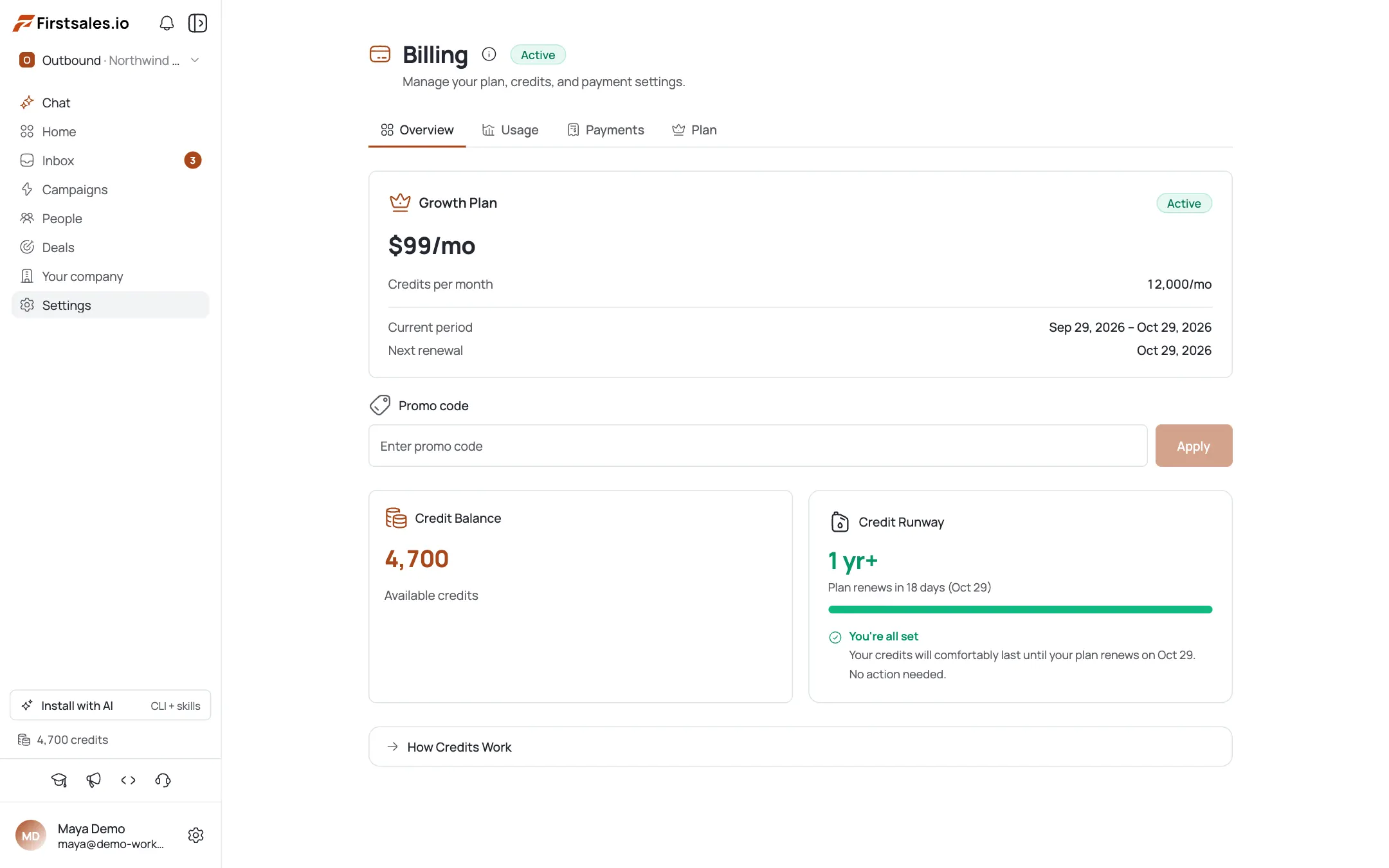
    Find billing
  3. Pick a plan

    On the Plan tab, choose a subscription. Each tier grants a monthly (or annual) credit allotment:

    • Starter ($29/mo ($276/yr), 4k/48k credits
    • Growth) $79/mo ($756/yr), 12k/144k credits
    • Pro ($149/mo ($1,428/yr), 30k/360k credits
    • Business) $499/mo ($4,788/yr), 175k/2.1M credits

    Annual billing saves ~20%. Pick the tier whose monthly credits match your real sending volume.
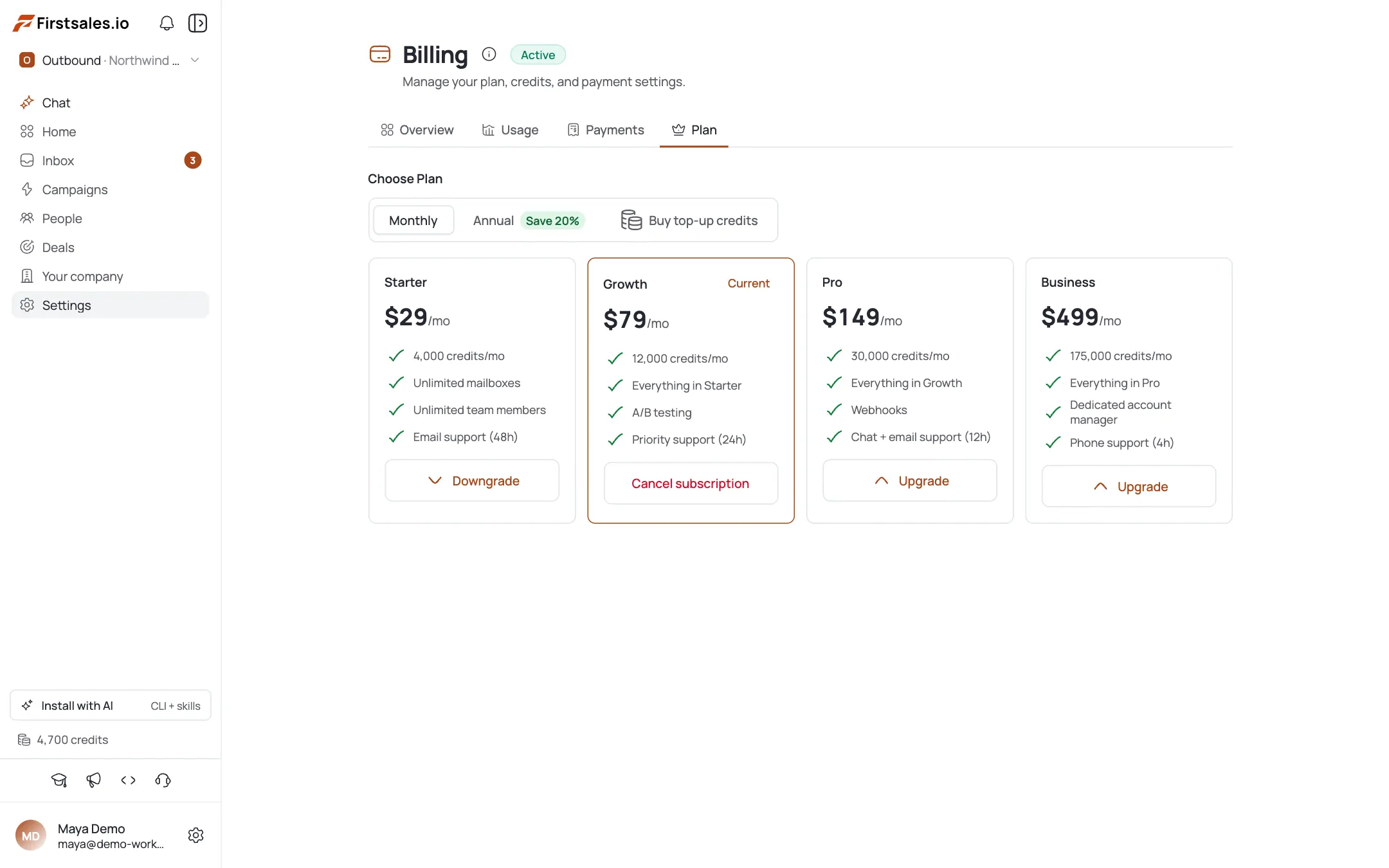
    Pick a plan
  4. Top up credits

    Need more mid-cycle? On Payments, buy a top-up via Dodo at $1 = 100 credits. Quick amounts are $50 / $100 / $250 / $500, with a $50 minimum and $10,000 maximum per purchase. Top-up credits stack on top of your plan allotment.

  5. Read your usage history

    The Usage tab itemizes each charge: the action, the credits spent, and the timestamp (UTC). Refunds appear as their own line items (e.g. "Contact Cleaning Refund", "Admin Refund"), and the running balance is already net of them, so what you see is what you actually paid.

  6. Know what auto-renews (and what doesn't)

    There is no auto-recharge: credits never top up automatically when you run low, so you're never surprised by a charge. The only automatic renewal is your annual plan, which you can toggle. Watch your balance on the Overview tab and top up deliberately before a big send.

Pro tips

  • Size the plan to your monthly volume

    Estimate credits/month from your send mix (AI drafts at 2–8, cleaning at 0.2/contact, enrichment at 15–35) and pick the tier that covers it. Annual saves ~20% if the volume is steady.

  • No auto-recharge: watch the balance

    Credits don't refill themselves mid-cycle. Before a large campaign or enrichment run, check Overview and top up so a send doesn't stall on an empty balance.

  • AI Premium costs 4× AI Standard

    Standard drafts are 2 credits, Premium 8. Reserve Premium for high-value prospects; use Standard for volume to stretch your allotment.

  • History is net of refunds and in UTC

    If the numbers look off versus your local clock, remember timestamps are UTC and the balance already subtracts refunds: the line items show the gross action and its refund separately.

Frequently asked questions

What does each action cost in credits?

Roughly: manual email 1, AI draft 2 (Standard) / 8 (Premium), signature polish 1, find-lead 15, deep enrich 35, Maps scraper 5/place and 5/email, research 30/60, contact cleaning 0.2/contact.

What plans are available?

Starter ($29/mo, 4k cr), Growth ($79/mo, 12k), Pro ($149/mo, 30k), and Business ($499/mo, 175k). Annual billing grants ~12× the monthly credits and saves about 20%.

How do I buy more credits?

On the Payments tab, top up via Dodo at $1 = 100 credits (quick amounts $50/$100/$250/$500, min $50, max $10,000). Top-ups stack on your plan allotment.

Does FirstSales auto-recharge my credits?

No. There's no auto-recharge: you top up manually. The only automatic renewal is the annual plan subscription, which is a toggle.

Why are my usage timestamps off?

Consumption history is shown in UTC, not your local time, and the balance is net of refunds. Refunds show as separate line items.

Where do I see my remaining balance?

On the Billing Overview tab, which shows your current credit balance and active plan at a glance.

Billing & Credits

Outreach that keeps going after you log off.Leads, emails, follow-ups and replies, handled.

Connect unlimited mailboxes and let AI agents find leads, write each email and follow up. Or send your own templates in manual mode. From $29/mo.

$1 for 3 days · Cancel anytime · No contract

Install with AI

Your coding agent sets up the FirstSales CLI and skills for you.

Prompt for Claude Code

I'm setting up FirstSales (https://firstsales.io), an AI outbound sales platform: campaigns, contacts, a reply inbox, deliverability and lead signals. Help me get my workspace sending real, good emails end to end, from Claude Code.

Read these first so you know how FirstSales works:
- Developer docs and API: https://developer.firstsales.io
- CLI: https://www.npmjs.com/package/@firstsales.io/cli
- Skills for coding agents: https://github.com/firstsalesio/firstsales-skills (read README.md and GUIDE.md)

Setup
1. Install the CLI: npm install -g @firstsales.io/cli
2. Install the FirstSales skills:
   claude plugin marketplace add firstsalesio/firstsales-skills
   claude plugin install firstsales@firstsales
3. Ask me if I already have a FirstSales account. If not, send me to https://app.firstsales.io to sign up.
4. Ask me to create an API key under Settings → API → API Keys, with only the scopes we need.
   Never ask me to paste the key into this chat. Tell me to run this in my own terminal, so the key stays hidden:
   read -rs FS_KEY && firstsales auth login --api-key "$FS_KEY"; unset FS_KEY
5. Run `firstsales whoami` and tell me which workspace and organisation we are connected to.

Then ask me about my business: what I sell, who I sell to (roles, company size, countries), my best customers, and what I use today for outbound (tools, lists, mailboxes). Walk me through:
1. Teaching FirstSales my business: website, offer, proof points and case studies in the knowledge base, so the AI writes like someone who knows the product.
2. Connecting my sending mailboxes and checking my sending domain: SPF, DKIM, DMARC and warm-up. If anything is unhealthy, tell me the exact DNS record to add.
3. Bringing in contacts: import my CSV or CRM export into a clean list, remove duplicates and bad emails, and block domains I must never email (customers, competitors, my own).
4. Building my first campaign: the right list, senders, steps and timing. Write the sequence with me, show me the drafts, and do not launch until I say yes.
5. Setting up Signals if it fits: find people engaging with LinkedIn posts about topics my buyers care about, and turn them into leads.
6. Inviting my team and giving each person the right access.

Once campaigns run, show me how to work the reply inbox from here: which replies need an answer, draft responses in my voice, and move good conversations into deals. If I use Cal.com, connect it so follow-ups can offer my booking link (not the first email).

Throughout, as you learn about my business, proactively suggest and help create:
- Reply templates for the questions and objections my prospects are likely to raise, based on my product, site and codebase if you can see them.
- Campaign ideas and segments worth testing, with the reason for each.

Safety rules:
- Show every change as a dry run (--dry-run) first and wait for my yes. Never send emails, launch campaigns or delete anything without my yes.
- Tell me before anything that spends credits, and how many.

Be opinionated. If the docs give a sensible default, just use it. Don't make me choose between five options.