Skip to content
NewSee how

Industries · Real estate

Real estate cold email software that reaches owners, tenants and buyers when they are ready to move.

FirstSales finds companies and property owners that fit your market, spots a real change like a hiring wave, a new site or a lease coming up, and writes each decision maker a short email about it. It follows up until they reply and stops the moment they do.

$1 for 3 days · Cancel anytime · No contract
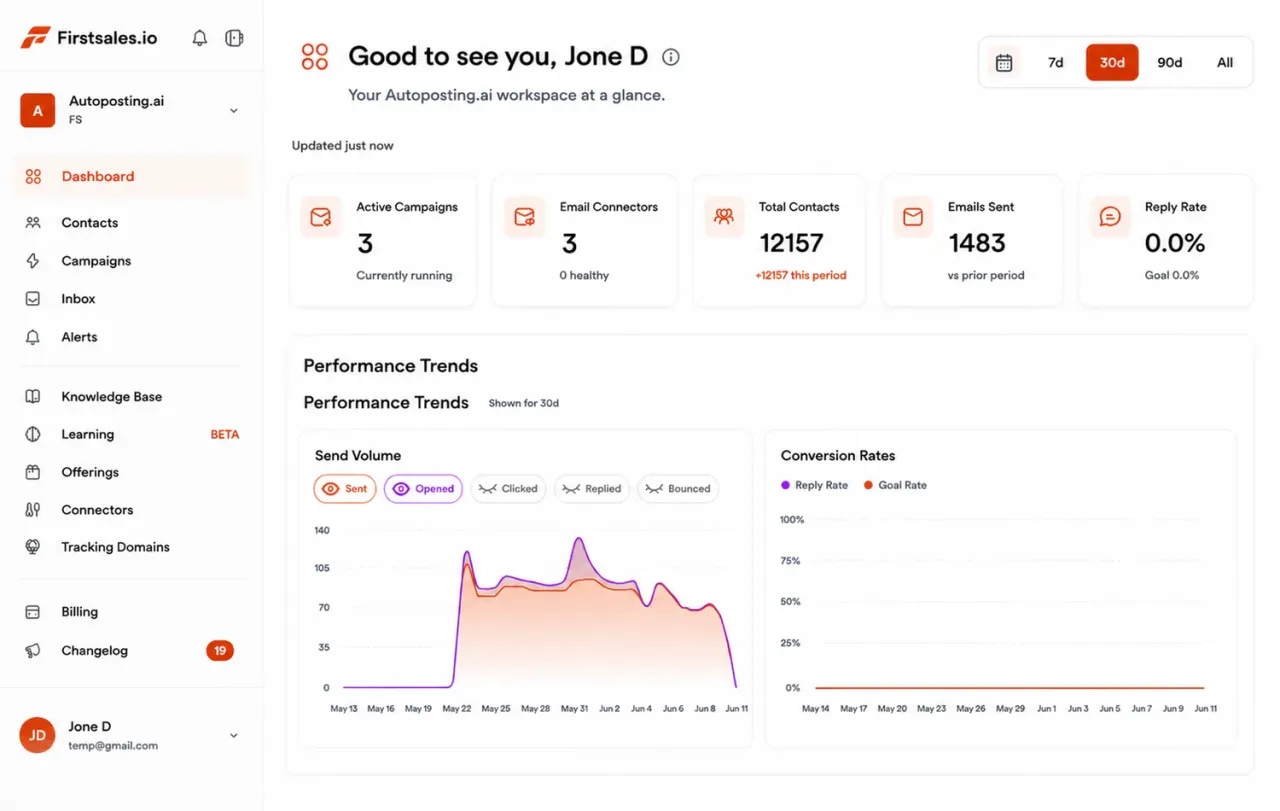
FirstSales dashboard for a real estate firm: active campaigns, connected mailboxes, contacts, emails sent and a sending volume chart
  • 01

    Written only from the listings, markets and services you add to the knowledge base

  • 02

    Separate campaigns for owners and for tenants or buyers

  • 03

    Unlimited mailboxes, with 21 days of warm-up

  • 04

    Start for $1 for 3 days, then from $29/mo

The problem

Most real estate firms chase the same few deals, and hear about them last.

By the time a company is touring spaces, it already has a broker. The firms that win reach the business before the search starts, and keep in touch until the timing is right.

You hear about deals too late

A company that is already touring has made most of its choices. Being first matters more than being loud.

Listing blasts get ignored

A brochure of spaces sent to everyone says nothing about what one business needs. It reads like spam, and it lands like spam.

Timing is long and uneven

A lease can be a year or more away. Without patient follow-up, the contact you made today is gone when they are ready.

How it works

From your listings and markets to a booked tour, in three steps.

Set it up once, review as much as you like, and FirstSales researches, writes and follows up.

  1. 01

    Connect a separate domain

    Add mailboxes on a cold email domain, not your main firm domain. SPF, DKIM and DMARC are checked, and warm-up starts.

  2. 02

    Teach it your market

    Add your listings, markets, services and past deals. Describe the owners or businesses you serve, and FirstSales builds the list.

  3. 03

    Send, follow up and book

    Each email names a real change. Follow-ups stop on a reply, and interested prospects get your meeting link to book a call or a tour.

Two sides of every deal

Real estate firms win business on both sides, and each side needs its own message.

An owner wants a reliable tenant or buyer. A tenant or buyer wants the right space at a fair price. FirstSales runs each side as its own campaign, with its own list, offer and voice.

Owners and landlords

Outreach that wins listings, management contracts and owner relationships.

  • Write to property owners and asset managers
  • Your leasing, sales or management services in the knowledge base
  • Lead with their building, their market or a vacancy
  • Offer a short market view, not a hard pitch

Tenants and buyers

Outreach that brings businesses to the spaces you represent.

  • Write to companies that are growing, moving or opening sites
  • Your current listings and markets in the knowledge base
  • Lead with their hiring, expansion or lease timing
  • Offer a shortlist or a tour, not a brochure
What you get

Outreach that sounds like a broker who knows the market and the company.

Everything a real estate firm needs for steady outreach, in every plan.

  • Only your listings and markets

    The AI writes only from your knowledge base, so it never offers a space you do not have.

  • A real reason to write

    Every email opens with a real change, like hiring, a new site, a funding round or a lease date.

  • Both sides of the deal

    Run owner outreach and tenant or buyer outreach as separate campaigns, with separate lists and offers.

  • Clean lists

    Every contact is checked before each send, and Dirty contacts are left out to protect your domain.

  • Patient follow-ups

    Follow-ups spaced over weeks, stopped the moment someone replies or opts out.

  • A workspace per market or team

    Run each city, office or team in its own workspace. Unlimited workspaces and team members.

Reasons to write

Businesses think about space when something changes, so write when it does.

A cold email about property lands when it names a real change. These are the moments that put space on a company's agenda, with a sample first line for each.

  • Hiring past their current space

    A wave of new roles often means the office will be full soon.

    Sample first line

    Saw you have twelve open roles on the careers page. Is the current office keeping up?

  • A new site or market

    A company opening in a new city or district needs space there first.

    Sample first line

    Saw you are opening in the harbor district this year. Have you found a location yet?

  • A lease coming up for renewal

    Renewal time is when tenants compare options and owners need a plan.

    Sample first line

    Leases from your building's last renovation are coming up. Are you planning to renew or look around?

  • A funding round or growth news

    New funding often comes with plans for a bigger or better office.

    Sample first line

    Congrats on the new round. Is a move part of the plan for the next year?

  • A vacancy or a building for sale

    An empty unit or a sale listing tells you an owner may want help.

    Sample first line

    Noticed the ground floor unit on Elm has been listed for a while. Want a second view on the asking rent?

  • Hybrid work or a smaller team

    Some teams need less space, or a different kind of space.

    Sample first line

    Saw your team moved to a hybrid schedule. Is the current floor plan still the right size?

Set up real estate outreachthat reaches buyers before the search starts.

Four parts of the app do the work a research assistant and a busy broker would do by hand.

  1. Connect

    Send from a separate, trusted domain

    Add Gmail, Outlook or SMTP mailboxes on a cold email domain. Mailboxes are unlimited, so spread volume across as many as you need with sending rotation.

    • SPF, DKIM and DMARC checks. Per domain, with the exact fix if a record is missing.
    • 21-day warm-up. Three phases before full volume.
    • Health grade. Each mailbox gets a grade and hourly inbox monitoring.
  2. Teach

    Teach it the spaces and services you offer

    Add your listings, markets, leasing or management services and past deals. The AI writes only from what you add, so every detail matches what you can offer.

    • Knowledge base. Listings, markets and services in one place.
    • Offerings. Owner and tenant offers, each with its own buyer and message.
    • Lead list from a description. Every contact checked before each send.
  3. Write

    Emails that name a real change

    Each email starts with something true about the company or the property, like hiring, a new site or a vacancy, and asks one plain question. No blasts, no hype.

    • Writing profile. Keeps your tone clear, local and professional.
    • Approval queue. Approve, edit or reject drafts before they send.
    • A/B tests. Test two openings and keep the one prospects reply to.
  4. Reply

    Turn replies into tours and calls

    Replies land in Unibox. Interested prospects get your meeting link, and the sequence stops on any reply or opt-out.

    • Unibox. Every reply from every mailbox in one inbox.
    • Stop on reply or opt-out. No follow-up after a no.
    • Meeting link. Interested replies get your booking link.
Plain guide

How to do cold email for real estate.

What works when you write to owners, tenants and buyers who are busy running their business.

  1. 01

    Pick one side per campaign

    An email to a landlord and an email to a growing tenant are different emails. Keep each campaign to one side and one kind of contact.

  2. 02

    Lead with their change, not your listings

    Hiring, a new site or a lease date is a real reason to talk. A list of available spaces is not.

  3. 03

    Offer two or three spaces, not twenty

    A short list chosen for them shows you listened. A full brochure shows you did not.

  4. 04

    Play the long game

    Space decisions can take months. Space your follow-ups out and offer to check back closer to their lease date.

  5. 05

    Keep every detail current

    Update the knowledge base when a space leases or a price changes, so no email offers something that is gone.

  6. 06

    Write to businesses, not homeowners

    Cold email fits commercial property, owners and investors best. Check the stricter rules before you write to private homeowners.

“One of the best email outreach tools I have ever seen in my 9 years of business experience. It has solved the problem of email outreach for my cold emails.”
Santhosh K.Founder and CEO, small business · G2
Who you write to

Commercial space decisions run through a few people, and each one cares about something different.

Whether you represent owners, tenants or buyers, the decision rarely sits with one person. These are the people, what they care about and the angle that gets a reply.

  • 01

    Founder or CEO

    What they care about
    Space that supports growth without locking the company in.
    The angle that gets a reply
    Name their growth step and ask how space fits the next year.
  • 02

    Operations or facilities lead

    What they care about
    A move or fit-out that does not disrupt the business.
    The angle that gets a reply
    Talk about timing, layout and what a smooth move looks like.
  • 03

    CFO or finance lead

    What they care about
    Clear costs, fair terms and no surprises in the lease.
    The angle that gets a reply
    Offer a plain view of total cost and the terms worth checking.
  • 04

    HR or people lead

    What they care about
    A workplace that helps them hire and keep people.
    The angle that gets a reply
    Mention commute, amenities and space for the team they are building.
  • 05

    Property owner or landlord

    What they care about
    Reliable tenants, low vacancy and a well-run building.
    The angle that gets a reply
    Name their building or vacancy and offer a short market view.
  • 06

    Asset or portfolio manager

    What they care about
    Steady income and good decisions across many properties.
    The angle that gets a reply
    Lead with one property in their portfolio and one clear idea for it.
Before and after

Real estate outreach, before and after FirstSales

What changes when each email reads like a note from someone who knows the market.

The usual way

Blasts and cold calls.

  • Listing blastsThe same brochure to everyone.
  • Hearing about deals lateAnother broker got there first.
  • One email, then silenceThe contact is gone when they are ready.
  • Owners and tenants mixedNothing feels written for either side.
  • Bought lists uncheckedBounces hurt the domain.
  • Replies scatteredInterested prospects wait.
With FirstSales

Timely, local outreach.

  • A real change at the companyA reason to reply.
  • Reaching them firstBefore the search starts.
  • Patient follow-upsStopped on any reply or opt-out.
  • One side per campaignEach email fits the reader.
  • Contacts checked firstDirty contacts out before each send.
  • UniboxEvery reply in one inbox.
Real objections

What prospects say to a real estate cold email and what to say back.

Most businesses are not looking for space the day your email lands. These are the objections you will hear most, with a calm reply for each.

  • “We are not looking right now.”

    Ask when their lease ends and offer to check back closer to that date.

  • “We already work with a broker.”

    Respect it. Offer a second view on one space or one market they may not cover.

  • “We are happy where we are.”

    Agree, and offer a short note on what similar spaces rent for, so they know their position at renewal.

  • “Just send me your listings.”

    Send two or three that fit what you know about them, with one line on why each one fits.

  • “How did you get my email?”

    Say plainly you found their company through public sources, and offer to remove them.

  • “The market is too uncertain to move.”

    Agree that timing matters, and offer a plain view of options, including staying and renegotiating.

Before you send

real estate outreach checklist

Run through this before each new campaign. FirstSales handles most of it for you.

  • A cold email domain that is not your main firm domain
  • SPF, DKIM and DMARC set on every sending domain
  • Warm-up running for 21 days
  • License number or firm name added where your rules require it
  • Only current listings and accurate terms in the knowledge base
  • No promised prices, rents or returns in the writing profile
  • Every contact checked and Dirty contacts left out
  • One side and one market per campaign
  • Drafts reviewed in the approval queue
  • Your meeting link ready for interested replies
Care by default

Real estate has its own rules for outreach, so keep every email accurate and fair.

Brokers and agents are licensed, and advertising rules differ by country, state and region. These general truths keep your outreach accurate and easy to defend.

  • Show your license where requiredSome places ask brokers to include a license number or firm name in their ads and emails. Add it to your writing profile if it applies.
  • Keep listings accurateDescribe size, price and terms only as they are. Keep the knowledge base current so an old listing is not offered as available.
  • Never promise returns or pricesDo not promise a sale price, a rent or a return on an investment. Share facts and options, not forecasts you cannot stand behind.
  • Treat everyone fairlyFair housing and anti-discrimination rules apply to how you describe and offer property. Keep wording neutral and about the space.
  • Write to businesses about businessCold email works best for commercial property, owners and investors. Rules for writing to private homeowners can be stricter, so check them first.
  • Make opting out easyGive a simple way to opt out in every campaign. FirstSales stops follow-ups when someone replies or opts out.

This is general information, not legal advice. FirstSales gives you the tools to send with care; you choose who to contact and you are responsible for following the licensing, advertising and privacy rules that apply to you and your contacts.

Why firms switch

Real estate outreach: FirstSales vs a typical tool

Many tools send one template to a list. FirstSales writes each email from your listings and a real change at the company.

Outreach features for real estate firms in FirstSales and a typical cold email tool
What you getTypical toolFirstSales
Emails written only from your listings and marketsVariesAI writes only from your knowledge base
Opens with a real change at the companyVariesBuilt in
Separate owner and tenant campaignsVariesUnlimited workspaces
SPF, DKIM and DMARC checksVariesBuilt in, per domain
MailboxesVariesUnlimited on every plan
21-day warm-upVariesBuilt in
Contact checks before each sendVariesOn every send, no add-on
Starting priceVaries$29/mo
Start your $1 trial

Questions,answered plainly.

Can’t find yours? Write to us.

01Does cold email work for real estate?

Yes, for commercial property, owners and investors, when each email names a real change like hiring, a new site or a lease date. FirstSales writes from your listings and markets and never offers a space you did not add.

02Can I email homeowners?

Rules for writing to private people are often stricter than for businesses, and they differ by country and state. Check what applies before you send. This is not legal advice.

03Who should a real estate firm email?

Usually founders, operations leads and CFOs at growing businesses, or property owners and asset managers. Each role gets its own angle, and each side of the deal gets its own campaign.

04Can I run owner and tenant outreach separately?

Yes. Give each side, market or team its own workspace with its own knowledge base, mailboxes and campaigns. Workspaces and team members are unlimited.

05Will it offer spaces I no longer have?

No, as long as the knowledge base is current. The AI writes only from what you add, so update it when a space leases or a price changes.

06How do we protect our main domain?

Send from a separate cold email domain. FirstSales checks SPF, DKIM and DMARC, warms each mailbox up for 21 days in three phases, and gives it a health grade with hourly inbox monitoring.

07How do I try it?

Start for $1 for 3 days. Connect a mailbox, add your listings and markets, and read the first drafts in manual mode. No contract: cancel anytime from your dashboard.

Outreach that keeps going after you log off.Leads, emails, follow-ups and replies, handled.

Connect unlimited mailboxes and let AI agents find leads, write each email and follow up. Or send your own templates in manual mode. From $29/mo.

$1 for 3 days · Cancel anytime · No contract

Install with AI

Your coding agent sets up the FirstSales CLI and skills for you.

Prompt for Claude Code

I'm setting up FirstSales (https://firstsales.io), an AI outbound sales platform: campaigns, contacts, a reply inbox, deliverability and lead signals. Help me get my workspace sending real, good emails end to end, from Claude Code.

Read these first so you know how FirstSales works:
- Developer docs and API: https://developer.firstsales.io
- CLI: https://www.npmjs.com/package/@firstsales.io/cli
- Skills for coding agents: https://github.com/firstsalesio/firstsales-skills (read README.md and GUIDE.md)

Setup
1. Install the CLI: npm install -g @firstsales.io/cli
2. Install the FirstSales skills:
   claude plugin marketplace add firstsalesio/firstsales-skills
   claude plugin install firstsales@firstsales
3. Ask me if I already have a FirstSales account. If not, send me to https://app.firstsales.io to sign up.
4. Ask me to create an API key under Settings → API → API Keys, with only the scopes we need.
   Never ask me to paste the key into this chat. Tell me to run this in my own terminal, so the key stays hidden:
   read -rs FS_KEY && firstsales auth login --api-key "$FS_KEY"; unset FS_KEY
5. Run `firstsales whoami` and tell me which workspace and organisation we are connected to.

Then ask me about my business: what I sell, who I sell to (roles, company size, countries), my best customers, and what I use today for outbound (tools, lists, mailboxes). Walk me through:
1. Teaching FirstSales my business: website, offer, proof points and case studies in the knowledge base, so the AI writes like someone who knows the product.
2. Connecting my sending mailboxes and checking my sending domain: SPF, DKIM, DMARC and warm-up. If anything is unhealthy, tell me the exact DNS record to add.
3. Bringing in contacts: import my CSV or CRM export into a clean list, remove duplicates and bad emails, and block domains I must never email (customers, competitors, my own).
4. Building my first campaign: the right list, senders, steps and timing. Write the sequence with me, show me the drafts, and do not launch until I say yes.
5. Setting up Signals if it fits: find people engaging with LinkedIn posts about topics my buyers care about, and turn them into leads.
6. Inviting my team and giving each person the right access.

Once campaigns run, show me how to work the reply inbox from here: which replies need an answer, draft responses in my voice, and move good conversations into deals. If I use Cal.com, connect it so follow-ups can offer my booking link (not the first email).

Throughout, as you learn about my business, proactively suggest and help create:
- Reply templates for the questions and objections my prospects are likely to raise, based on my product, site and codebase if you can see them.
- Campaign ideas and segments worth testing, with the reason for each.

Safety rules:
- Show every change as a dry run (--dry-run) first and wait for my yes. Never send emails, launch campaigns or delete anything without my yes.
- Tell me before anything that spends credits, and how many.

Be opinionated. If the docs give a sensible default, just use it. Don't make me choose between five options.