Lists go stale on their own
People change jobs, companies change domains and inboxes get shut down. A list that was good last quarter is quietly full of addresses that no longer exist.
Email verification
One dead address costs you a bounce. A list full of them costs you the domain. FirstSales checks each contact as it comes in, flags the risky ones, suspends the bad ones and keeps them out of every campaign, so your mailboxes only email people who can receive it.
$1 for 3 days · Cancel anytime · No contract
Five checks on every new contact
Bad addresses skipped on every send
Credits back when an address cannot be verified
Included in every plan, from $29/mo
A bounced email feels like nothing. One fewer prospect. But mailbox providers count every one, and enough of them turns a healthy sender into a filtered one.
People change jobs, companies change domains and inboxes get shut down. A list that was good last quarter is quietly full of addresses that no longer exist.
Providers do not judge one email. They judge the sender. A run of bounces drags down every mailbox on that domain, including the ones sending to good addresses.
Nobody has time to look up mail servers or spot typos in thousands of rows. So the list goes out as it is, and the bounce report arrives after the damage is done.
Contact cleaning is a single setting. After that, it runs on every list you bring in, before any campaign can touch it.
Go to Settings, then Tools, and switch on Contact cleaning. Workspace owners and admins can change it. Do it before your first import.
Upload a CSV, add contacts by hand or let FirstSales find leads for you. Each new contact runs through five checks as it lands.
Clean contacts go into your campaigns. Dirty ones are suspended and skipped. Risky ones wait for you to decide.
Most bad addresses look fine at a glance. Each check reads a different part of the address, and together they catch the ones that would bounce or hurt you.
info@gmial.com
Suggested fix: gmail.com
Address formatWhole address
Is it written like a real email address?
Missing @, stray spaces, broken characters and other syntax errors.
Mail serverDomain
Can this domain receive email at all?
Domains with no mail server (no MX record) and mailboxes that cannot be reached.
Disposable addressDomain
Is this a throwaway inbox?
Temporary inboxes that expire shortly after someone creates them.
Typo correctionDomain
Is the domain a common misspelling?
Slips like gmial.com or outloook.com, with the likely fix.
Role addressName part
Is this a shared inbox, not a person?
Addresses like info@, support@ or noreply@ that no single person reads.
Re-testing a list adds a sixth flag: catch-all domains, which accept any address and so can never be fully confirmed.
Every part of list hygiene a careful sender would do by hand, done for every contact.
With cleaning on, contacts are verified when they are imported, so a bad address is caught before a campaign can ever reach it.
Format, mail server, disposable inboxes, typos and role addresses. Each one looks at a different reason an email would fail.
Dirty contacts are auto-suspended and skipped on every send. No suppression list to build, export or keep up to date.
Catch-all domains and shared inboxes are marked Risky, not thrown away, so you can decide who is worth the send.
Credits come back for any address that cannot be verified, and recently cleaned contacts are skipped on a re-test.
Fewer bounces keep the health grade on each mailbox steady, which protects the warm-up you spent 21 days building.
Four parts of contact cleaning, and where each one shows up in the app.
Pick a contact list, drop in a CSV and import. With cleaning on, each new contact is verified automatically, and duplicates inside your workspace are removed so nobody gets the same email twice.
Each check looks at a different weak spot. Together they catch the addresses that would bounce, expire or land in an inbox no one reads.
Valid syntax, with no broken characters.
The domain has DNS and mail exchange records.
Throwaway inboxes that expire soon after creation.
Common misspellings like gmial.com caught and fixed.
Shared inboxes like info@ marked for review.
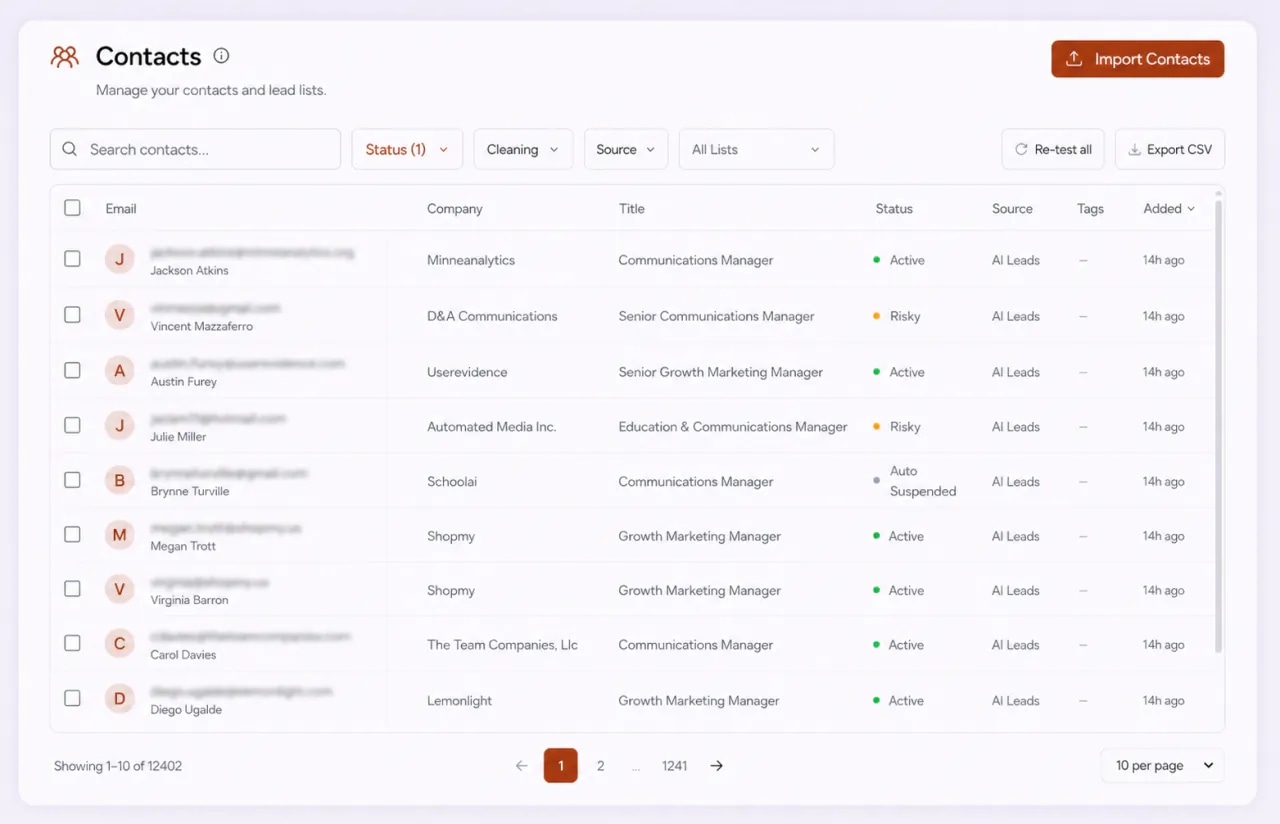
Every contact shows its result in the Contacts table. Filter by status or cleaning to see what needs a look, and let your campaigns handle the rest.
Imported before cleaning was on, or working from an older list? Select contacts, or use Re-test all on a filtered view. The drawer lists every check and shows the exact cost before you confirm.
You never build a suppression list by hand. Each result already tells your campaigns what to do with that contact.
Clean
The address passed the checks and looks safe to email.
Risky
Deliverable but low confidence, often a catch-all domain or a role address.
Dirty
Bad syntax, no mail server, a disposable inbox, a likely typo or a mailbox that does not exist.
Unknown
The check could not reach a definite answer for this address.
What verification does, what it cannot do and how to use it well. General truths, no magic numbers.
Email verification checks whether an address can receive email before you send to it. It looks at how the address is written, whether its domain has a mail server, whether the inbox is a throwaway and whether it belongs to a person or a shared team inbox. The point is simple: find the addresses that would bounce or waste a send, and leave them out.
Mailbox providers watch how often your email bounces. A sender who keeps emailing addresses that do not exist looks careless at best and like a spammer at worst. A rising bounce rate is one of the clearest signals that pushes a sender toward the spam folder, and it hurts every mailbox on the same domain.
Email addresses do not last forever. People leave jobs, companies rebrand and move domains, and old inboxes get closed. That means even a list you built carefully gets worse every month you leave it alone. Any list that is more than a little old, exported from somewhere else or bought should be cleaned again before a campaign touches it.
Some domains are set up to accept email for any address, real or not. Verification cannot tell whether a specific person exists there, because the server says yes to everything. That is why FirstSales flags catch-all domains as Risky rather than Clean. They may be fine. Treat them as lower confidence, and send to them only when the person is worth it.
Addresses like info@, support@ and sales@ go to a shared inbox, not one person. A cold email there is easy to ignore, easy to mark as spam and rarely reaches the person you wanted. They are not always wrong to email, which is why they are marked Risky. But a named person is almost always the better choice.
A bounce report tells you which addresses were bad after your reputation has already paid for them. Verifying on import turns that around: the bad address is caught before any campaign can send to it. This is why the best time to turn on contact cleaning is before your first import, not after your first bad week.
Verification tells you an address can receive email. It cannot tell you the person wants to hear from you. A clean list of the wrong people still gets ignored or reported. Use cleaning together with a clear idea of who you want to reach, short personal emails and a warmed-up mailbox. That combination is what keeps a sender healthy.
Contact cleaning uses credits. Before any re-test starts, a drawer shows the exact cost, your balance and your balance after. These are the rules behind that number.
Contact cleaning, the house rules
New contacts only
Automatic cleaning checks contacts as they are imported. Contacts you already had are not charged again.
No answer, no charge
If an address cannot be verified, the credits come back. You pay only for checks that reach a result.
No double charge
Contacts cleaned in the last 24 hours are skipped on a re-test, so running it twice in a row costs nothing extra.
No duplicate sends
Bulk import removes duplicate emails inside your workspace and keeps the first one, so nobody is emailed twice from one list.
You have the last word
Sure a flagged contact is real? Mark it valid and it goes back into your sends.
Cleaning costs show in your billing history as Contact Cleaning, with refunds listed on their own.
Run through it before a new list goes into a campaign, and again before you reuse an old one.
“I've been using FirstSales.io for several months now, and I can confidently say it has revolutionized how I approach lead generation and customer acquisition.”
 Paweł StelmachSmall business owner · Trustpilot
The same list, a very different week.
Straight from the spreadsheet.
Checked as it was imported.
Many teams clean lists in one tool, export, then upload to another. FirstSales checks contacts where they already live.
| What you get | Typical tool | FirstSales |
|---|---|---|
| Checks on import | Varies | Automatic, one setting |
| Checks per address | Varies | Five, plus catch-all on re-test |
| Bad contacts on send | Varies | Auto-suspended and skipped |
| Unverifiable addresses | Varies | Credits returned |
| Re-test twice in a day | Varies | Recent results skipped, no charge |
| Duplicates on import | Varies | Removed, first one kept |
| Override a result | Varies | Mark valid, any time |
| Price | Varies | From $29/mo, cleaning built in |
| Start your $1 trial | ||
Real words from real users. No paid reviews.
“User Interface, Ease of Use, Able to hit the inbox in the first attempt.”

Sadashiv B.
Founder, small business
“I have always struggled in cold outreach. However, Firstsales has provided an excellent tool for cold outreach.”

Kaushal S.
Founder, small business
“If you are looking to fix your sales pipeline, you should definitely try [it]. My open rate has increased drastically. The UI and UX are easy to understand, even for a beginner like me.”

Pooja Dhole
@ThisIsPoojaD
Can’t find yours? Write to us.
It checks whether an address can receive email before you send to it. FirstSales runs five checks on each new contact: address format, mail server, disposable inboxes, typos and role addresses. Bad addresses are kept out of your campaigns.
Go to Settings, then Tools, and switch on Contact cleaning. Workspace owners and admins can change it. Once it is on, every contact you import is checked automatically.
Clean is safe to send. Risky can receive email but is low confidence, usually a catch-all domain or a role address. Dirty is auto-suspended and skipped on sends. Unknown means the check could not reach an answer, and the credits come back.
Contact cleaning is part of every plan, from $29/mo, and uses a small number of credits per new contact. Credits are returned for any address that cannot be verified. A re-test shows the exact cost before you confirm.
Yes. Select them in the Contacts table, or use Re-test all on a filtered view. The drawer shows the checks and the exact credit cost before anything runs.
No. Contacts cleaned in the last 24 hours are skipped on a re-test, and you only pay for checks that reach a result.
Common reasons are a domain with no mail server, a disposable inbox, a likely typo or a mailbox that does not exist. If you know the address is real, mark it valid and it goes back into your sends.
No, and nobody can honestly promise that. Verification keeps bounces down. Warm-up, working SPF, DKIM and DMARC and short, personal emails do the rest. FirstSales handles each of them and shows you the numbers.
Connect unlimited mailboxes and let AI agents find leads, write each email and follow up. Or send your own templates in manual mode. From $29/mo.
$1 for 3 days · Cancel anytime · No contract