Active does not mean sending
A campaign can read Active for days while nothing goes out, because a mailbox disconnected, credits ran out or drafts are waiting for approval. The status alone will not tell you.
Campaign monitoring
A live campaign makes hundreds of small decisions a day. FirstSales lets you see all of them: analytics for every campaign, a per-contact journey, a log of every step, an Alert Center that points you straight to the fix, and Telegram pings when something needs you. You stop guessing why a campaign went quiet.
$1 for 3 days · Cancel anytime · No contract
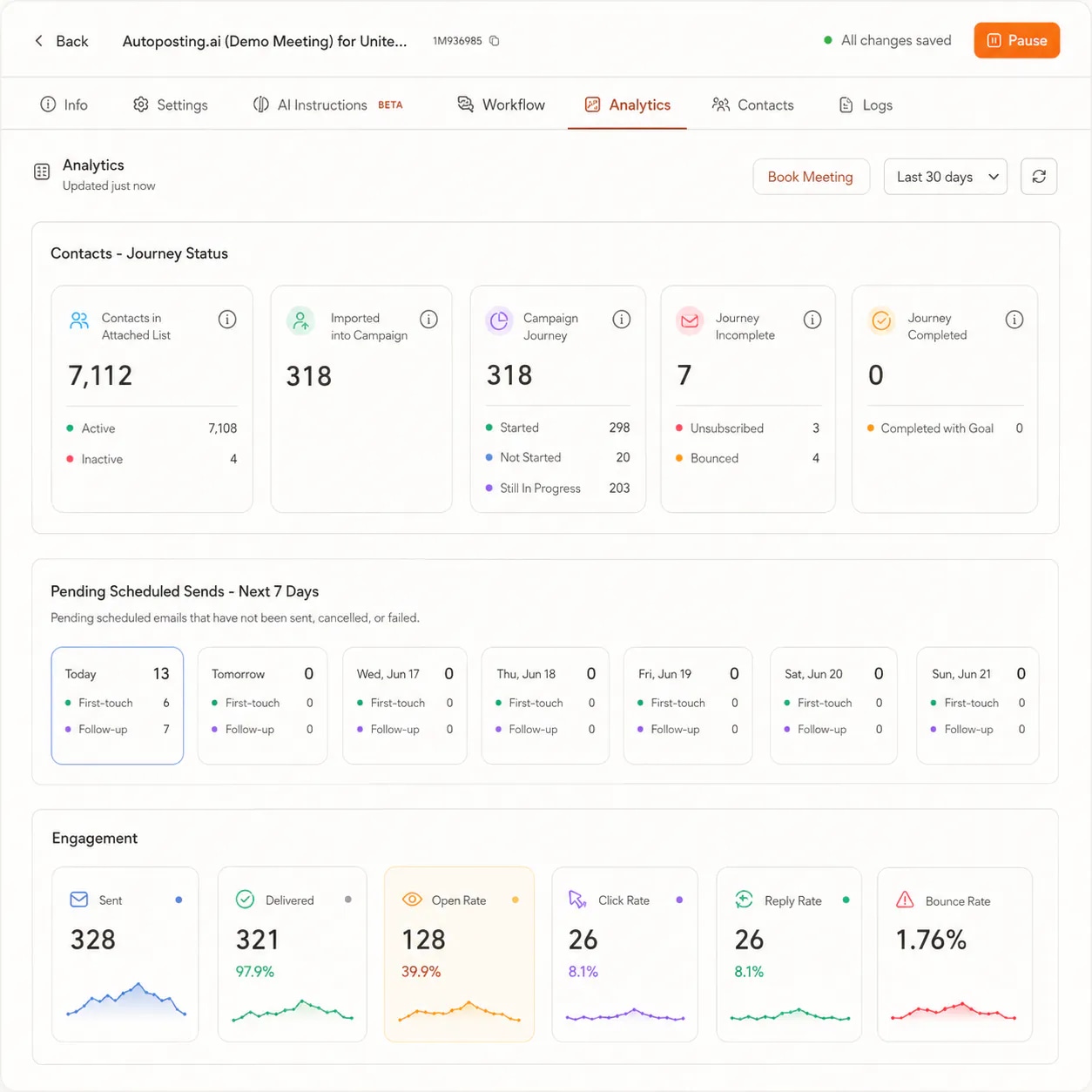
Sent, delivered, open, click, reply and bounce rates per campaign
A Logs tab that records every step, with level and category filters
An Alert Center with a one-click fix for each problem
Telegram pings for drafts to review and account alerts
Cold email fails quietly. Nothing crashes and nothing turns red on its own. The replies just stop, and you are left guessing whether it was the list, the mailbox, the copy or a setting.
A campaign can read Active for days while nothing goes out, because a mailbox disconnected, credits ran out or drafts are waiting for approval. The status alone will not tell you.
Open rates are inflated by privacy features that open emails automatically. A campaign can show strong opens and still earn no replies, and it is easy to call that a win.
When something goes wrong, most tools give you a total and a shrug. Without a record of each step, you change three things at once and never learn which one mattered.
Campaign monitoring in FirstSales follows the order you think in. First the numbers, then the story behind them, then the fix.
Open a campaign's Analytics tab. The Engagement strip, the funnel and Sender Health tell you whether the campaign is healthy and where people drop off.
Open the Logs tab to see every step the campaign took, newest first. Filter by level and category, or open a contact's journey to see what happened to one person.
The Alert Center lists every open problem with a button that takes you to the fix. Connect Telegram and the alerts that need you reach your phone.
The Engagement strip shows six numbers. Some tell you the truth about a campaign, and some only hint at it. Here is how much weight each one can carry, and what it really tells you.
High opens with flat replies is a message problem, not a success. Poor delivery is a list or deliverability problem. The funnel below the strip shows you which one you have.
No exports to a spreadsheet and no separate dashboard. The view of each campaign lives where the campaign does.
Sent and Delivered as counts, plus Open, Click, Reply and Bounce Rate, over the date range you pick, with a funnel that shows where people fall off.
Click any contact to see a timeline of every step sent, every open and reply, and the reason for any bounce or skip.
The Logs tab records what the campaign did and why, with Total, Errors and Warnings counters, a date range, search, and level and category filters.
One page for workspace health, grouped into Mailboxes, AI, Campaigns, Billing and Connectors, with a fix button on every alert.
Connect Telegram with a QR code, no bot token needed. Drafts waiting for review and account alerts reach your phone.
Pause stops sending at once with no checks. Resume re-checks launch readiness and billing first, so a campaign never restarts broken.
Four parts of campaign monitoring you will use every week, and what each one shows you.
Open the Alert Center from the alert bell. A health badge at the top reads healthy, warning or critical, with counts for critical, warning and info alerts. Alerts are grouped by Mailboxes, AI, Campaigns, Billing and Connectors, and cover real conditions such as a disconnected mailbox, stalled drafting, a campaign that has sent zero emails, low AI credits or missing email authentication.
Each campaign has a Logs tab. A counter row shows Total, Errors and Warnings, and the list below runs newest first with a relative time on every entry. Expand a row to see its category and a one-line detail. Critical entries carry the reason inline and say when work will not be retried, so you know waiting will not fix it.
The funnel shows where the whole list drops off. The journey shows one contact. Click a contact in the campaign's analytics to open a timeline of every step sent, each open and reply, and the reason behind any bounce or skip. It is the fastest way to answer a question like why one prospect never got the follow-up.
Go to Connectors, filter by Notifications and click Connect Telegram. Scan the QR code and tap START, or use the link on the same device. FirstSales uses a shared bot, so there is no bot token or chat ID to paste. Click Send test message to confirm it works, then add Telegram as a notification channel in a campaign's Content Approval step.
A campaign that reads Active is running, but that does not mean mail is going out. Sending waits on four gates. When the sent count sits at zero, one of them is closed, and it is almost always only one.
Sender
Check
Email Scheduler, then Senders. At least one verified, connected mailbox must be selected.
Fix
Reconnect the mailbox from its connector page, or add a verified one, then select it again.
Schedule window
Check
Email Scheduler, then Schedule. Today must be a Sending Day (Monday to Friday by default) in the Campaign Timezone.
Fix
Nothing, if today is outside the window. Sending waits for the next one. Otherwise correct the days or timezone.
Credits
Check
Your billing balance. Drafts are written with AI credits, so at zero nothing new is drafted.
Fix
Top up from billing, or follow the credits alert in the Alert Center. Sending picks up again.
Approval queue
Check
The Content Approval step. If every draft needs your approval, drafts wait until you act.
Fix
Approve the waiting drafts, or switch to a mode that releases drafts on its own.
There is no force-send button. Open the gate that is closed and the next scheduled window sends on its own.
What to watch on a live cold email campaign, how often, and how to work from a symptom to its cause without changing everything at once.
Campaign monitoring is the habit of checking a live campaign's numbers and behaviour so you catch problems while they are small. It covers three questions. Is the campaign sending? Is the mail landing and getting replies? And if not, which part broke? A good monitoring setup answers all three from the same place, without exports or a second tool.
For cold outreach, the reply rate, and positive replies above all, is the real signal. Opens only tell you that a subject line got seen, and even that is shaky, because privacy features in some mail apps open emails automatically. If you are at zero replies after a few hundred sends, the problem is usually the targeting or the offer, not the volume. Sending more will not fix it.
The bounce rate protects your sending reputation. Keep it under 5%, and ideally under 2%. Past 5% the app flags a high bounce rate and the Sender Health card for that mailbox turns red. Treat that as a stop sign: pause, clean the list or rest the mailbox, then resume. Sending through it pulls every future email toward spam.
Below the Engagement strip, the funnel shows how many people move from delivered to opened to replied. It tells you where to look. Good delivery with poor replies is a message problem, so work on the copy or the offer. Poor delivery is a list or deliverability problem, so work on cleaning, warm-up and authentication. Knowing which one you have saves you from fixing the wrong thing.
The Logs tab lists entries newest first, so scrolling down walks you back through the campaign's day. Most entries are routine, like the hourly check for new contacts to work. Do not read every row. Scan for change instead: a new kind of entry, a familiar one that stopped, or a run of the same check finding nothing. The time where the pattern changes is usually where the answer is.
When a step has A/B variants, analytics breaks the results out per variant, so you can compare reply rates. A handful of replies is not a verdict. Let each variant collect enough sends before you call it. Picking the winner is up to you: review the numbers, then edit or delete the variant that lost.
When a campaign underperforms, the temptation is to change the list, the copy and the schedule together. Then you never learn what worked. Change one thing, watch it for a few days, and check the log and the analytics again. Pause is always safe if you need to stop while you think, because it runs no checks, and Resume makes sure the campaign is ready before it restarts.
The Logs tab has two rows of filter chips: level (how bad) and category (which part of the system). Combine them and a long log turns into a short answer. These are the combinations that do most of the work.
| Filter | Answers the question |
|---|---|
| critical | What stopped for good? Start here when a campaign is not sending. |
| lifecycle | Did someone pause, resume or change the campaign's state, and when? |
| errorintegration | Is a mailbox or an outside service failing, rather than my campaign setup? |
| ai | What was drafted, for whom, and under which step? |
| user-action | Did a person change this, or did the system do it on its own? |
| infoexecution | Is the campaign finding contacts to work each hour, or coming up empty? |
Filters combine rather than replace each other. Clear them between questions, because a leftover filter is the most common reason a log looks empty when it is not.
Five minutes per campaign. Run it weekly, and every day for the first week of a new campaign.
“I have always struggled in cold outreach. However, Firstsales has provided an excellent tool for cold outreach.”
 Kaushal S.Founder, small business · G2
The same goal, knowing a campaign is healthy, handled two very different ways.
Totals, guesses and a lot of waiting.
Numbers, a trail and a fix button.
Most tools show you totals. FirstSales shows you the totals, the trail behind them and the way to the fix, inside the same campaign.
| What you get | Typical tool | FirstSales |
|---|---|---|
| Engagement metrics | Varies | Sent, delivered, open, click, reply, bounce |
| Per-contact history | Varies | Journey timeline with bounce and skip reasons |
| Step-by-step log | Varies | Logs tab with level and category filters |
| Workspace alerts | Varies | Alert Center with one-click fixes |
| Phone notifications | Varies | Telegram, connected with a QR code |
| A/B results | Varies | Per-variant reply rates |
| Resume safety | Varies | Readiness and billing checked on Resume |
| Price | Varies | From $29/mo, monitoring included |
| Start your $1 trial | ||
Real words from real users. No paid reviews.
“If you are looking to fix your sales pipeline, you should definitely try [it]. My open rate has increased drastically. The UI and UX are easy to understand, even for a beginner like me.”

Pooja Dhole
@ThisIsPoojaD
“One of the best email outreach tools I have ever seen in my 9 years of business experience. It has solved the problem of email outreach for my cold emails.”

Santhosh K.
Founder and CEO, small business
“I've been using FirstSales.io for several months now, and I can confidently say it has revolutionized how I approach lead generation and customer acquisition.”

Paweł Stelmach
Small business owner
Can’t find yours? Write to us.
It is checking a live campaign's numbers and behaviour so you catch problems early. In FirstSales that means the Analytics tab, the Logs tab, the Alert Center and Telegram alerts, all tied to the campaign.
Positive reply rate and meetings booked. Open rate is inflated by privacy features that open emails automatically, so it does not prove a person read the email. Replies do.
Active only means the workflow is running. Sending waits on four gates: a connected sender, an open schedule window, available credits and drafts that are not held for approval. Check them in that order. One of them is closed.
No. There is no force-send. Fix the gate that is blocking it and the next scheduled window sends on its own.
It quiets the alert for 24 hours. If the problem is still there after that, the alert comes back. Use Resolve once you have fixed it, and the alert moves to the Resolved tab.
No. FirstSales uses a shared bot. You connect by scanning a QR code or opening a link and tapping START. There is no bot token or chat ID to paste.
No. Logs are per campaign, so a problem that touches several campaigns has to be checked in each one. The Alert Center is the workspace-wide view.
No. Pause stops sending at once, so it is always a safe emergency stop. Resume re-checks launch readiness and billing before the campaign starts again.
Connect unlimited mailboxes and let AI agents find leads, write each email and follow up. Or send your own templates in manual mode. From $29/mo.
$1 for 3 days · Cancel anytime · No contract