Skip to content
NewSee how

Industries · Financial services

Cold email for financial services firms: reach owners and finance leads with careful emails your compliance team can review.

FirstSales finds the businesses that fit your services, writes each owner or finance lead a clear email from your own approved wording, and follows up until they reply. Drafts can wait in an approval queue, so nothing sends before it is checked.

$1 for 3 days · Cancel anytime · No contract
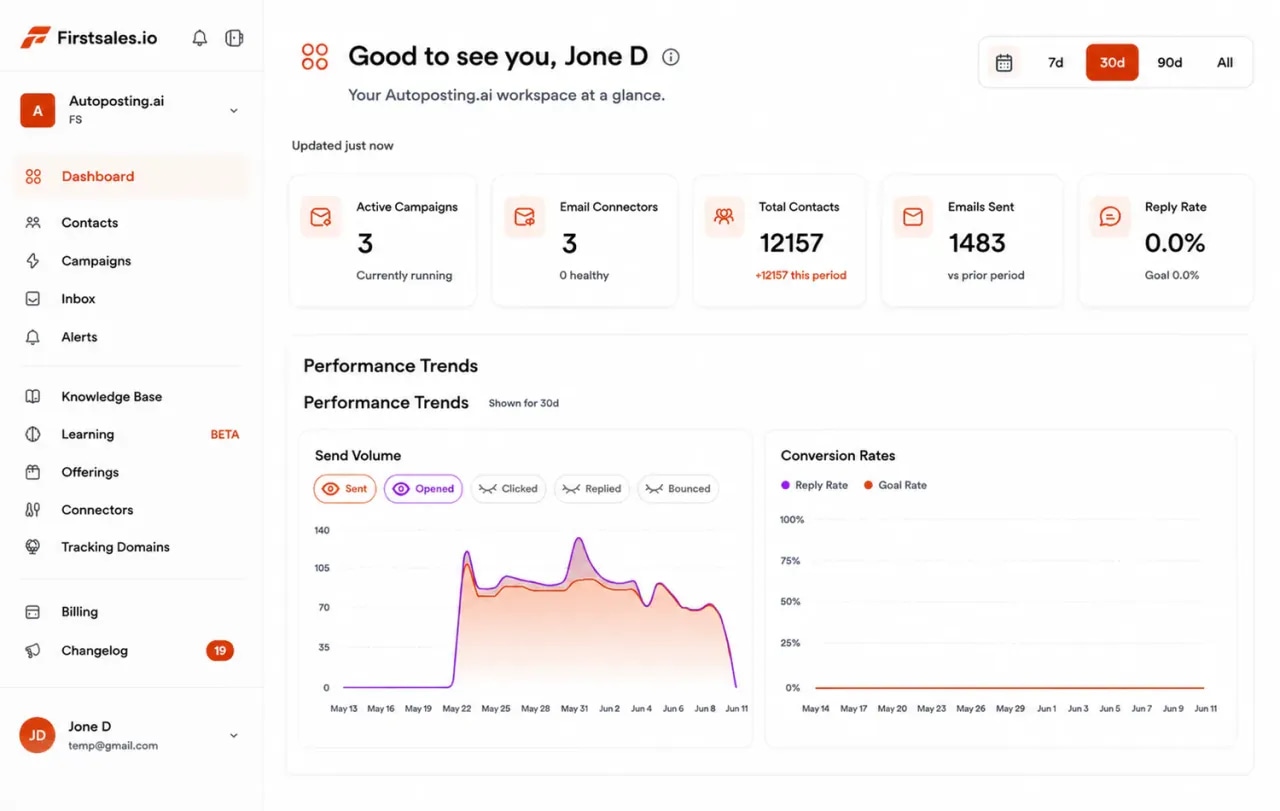
FirstSales dashboard for a financial services firm showing active campaigns, connected mailboxes, contacts, emails sent and a chart of sending volume
  • 01

    Written only from the wording you add to the knowledge base

  • 02

    Approval queue and manual mode for review before sending

  • 03

    Unlimited mailboxes, with a 21-day warm-up

  • 04

    Start for $1 for 3 days, then from $29/mo

The problem

Finance buyers trust slowly, and most cold emails give them a reason not to.

Owners and finance leads get pitches for loans, software and advice every week. To earn a reply, your email has to be clear, accurate and plainly from a real firm.

Big promises read as risk

Emails that promise savings or returns look like spam to a careful reader, and they can create problems with your own rules.

Review slows everything down

When every email needs a compliance check, outreach stalls. Teams send nothing, or send without review and hope.

Long cycles, lost follow-ups

A finance decision can wait for year-end or a board meeting. Busy advisors forget to follow up and good leads go cold.

How it works

From your approved wording to a first meeting, in three steps.

Set it up once, review as much as you need, and let FirstSales do the research, writing and follow-up.

  1. 01

    Connect a separate domain

    Add mailboxes on a cold email domain, not your main one. SPF, DKIM and DMARC are checked and warm-up starts.

  2. 02

    Teach it your services

    Add your services, fee basis and approved wording. Describe the businesses you serve and FirstSales builds and checks the list.

  3. 03

    Review, send and follow up

    Drafts wait in the approval queue if you want. Follow-ups stop on a reply, and interested prospects get your meeting link.

Careful by default

Financial outreach is held to a higher standard, so build the care in from the first email.

Firms in finance often answer to a regulator, a compliance team or both. These general principles help keep your outreach accurate and easy to defend.

  • Get your wording reviewed firstAdd only wording your compliance team has approved to the knowledge base. Use the approval queue or manual mode so drafts can be checked before they send.
  • Never promise returns or outcomesDo not promise gains, savings or results you cannot stand behind. Describe what you do and who you help, in plain words.
  • Never ask for sensitive details by emailA cold email should never ask for account numbers, balances or personal financial data. Save that for a proper process once someone is a client.
  • Say clearly who you areName your firm and your role in every email. Readers in finance check who is writing before they reply.
  • Make opting out easyGive a simple way to opt out in every campaign. FirstSales stops follow-ups when someone replies or opts out.
  • Know the rules that apply to youRules for financial marketing and business email differ by country, regulator and firm type. Check which ones cover you, including any record-keeping you must do.

This is general information, not legal or compliance advice. FirstSales gives you tools to send with care; you decide who to contact and are responsible for meeting the rules that apply to your firm and to the people you contact.

What you get

Outreach that is careful without being slow.

Everything a financial firm needs for reviewed, steady outreach, on every plan.

  • Only your wording

    The AI writes only from your knowledge base, so it says what you have approved and nothing more.

  • Review built in

    Approve, edit or reject drafts in the approval queue, or use manual mode so every email is checked.

  • A credible sender

    SPF, DKIM and DMARC checks on every domain, plus a health grade and hourly inbox monitoring.

  • Clean lists

    Each contact is checked before every send, and Dirty contacts are left out to protect your domain.

  • Follow-ups that wait well

    Spaced follow-ups for long decisions, stopped on any reply or opt-out.

  • A workspace per service line

    Run tax, advisory or lending in separate workspaces. Unlimited workspaces and team members.

Set up outreach for a financial firmwith review at every step.

Four parts of the app do the work your team would do by hand, with checks where you need them.

  1. Connect

    Send from a separate, trusted domain

    Add Gmail, Outlook or SMTP mailboxes on a cold email domain. Mailboxes are unlimited, so spread volume across as many as you need with sending rotation.

    • SPF, DKIM and DMARC checks. Per domain, with the exact fix when a record is missing.
    • 21-day warm-up. Three phases before full volume.
    • Health grade. Every mailbox gets a grade and hourly inbox monitoring.
  2. Teach

    Teach it your services and approved wording

    Add your services, fee basis, client outcomes you may share and the wording your compliance team has approved. The AI writes only from what you add.

    • Knowledge base. Services, fees and approved wording in one place.
    • Offerings. Each service line with its own buyer and message.
    • Lead list from a description. Every contact checked before each send.
  3. Write

    Clear emails, reviewed before they send

    Each email names a real change in the prospect's business and asks one question. Drafts can wait in the approval queue until someone signs off.

    • Writing profile. Keeps your tone measured and your words plain.
    • Approval queue. Approve, edit or reject drafts before they send.
    • Manual mode. Nothing sends until a person approves it.
  4. Reply

    Turn replies into first meetings

    Replies land in Unibox. Interested prospects get your meeting link, and the sequence stops on any reply or opt-out.

    • Unibox. Every reply from every mailbox in one inbox.
    • Stop on reply or opt-out. No follow-up after someone says no.
    • Meeting link. Interested replies get your booking link.
A careful rollout

From setup to first meetings: a rollout your compliance team can follow.

Regulated firms do better with a slow, visible start. This is a plain path that leaves room for review at each step, with FirstSales doing the heavy work in the background.

  1. Days 1-3

    Connect a mailbox and add approved wording

    Add a Gmail, Outlook or SMTP mailbox on a separate domain. SPF, DKIM and DMARC are checked and warm-up starts. Add your services and approved wording to the knowledge base.

  2. Days 4-10

    Share first drafts for review

    Turn on manual mode and let FirstSales write drafts for a small test list. Your compliance lead reads them in the approval queue and you tune the writing profile.

  3. Days 11-21

    Build and check the full list

    Describe the businesses you serve. FirstSales builds the list, checks each contact and leaves Dirty contacts out, while warm-up finishes its three phases.

  4. Day 22 on

    Send, follow up and book meetings

    Campaigns go out at a steady pace with sending rotation across mailboxes. Replies land in Unibox, interested prospects get your meeting link, and review stays on as long as you need it.

Who you are writing to

The person who signs is not always the person who feels the pain, so write to each one differently.

Financial services are often bought by an owner or a finance lead, with others weighing in. These are the people, what they care about and the angle that gets a reply.

  • 01

    Business owner or founder

    What they care about
    Knowing where the money is and not losing evenings to paperwork.
    The angle that gets a reply
    Name a real change in their business, like growth or a new site, and ask one plain question about it.
  • 02

    CFO or finance director

    What they care about
    Accurate numbers on time and a team that is not stretched thin.
    The angle that gets a reply
    Talk about the work: month-end close, reporting or cash planning. Offer a short look at how you help.
  • 03

    Controller or finance manager

    What they care about
    Clean books, fewer manual steps and a calm audit season.
    The angle that gets a reply
    Be specific about the process you take off their plate and how handover works.
  • 04

    HR or benefits lead

    What they care about
    Benefits and plans staff understand, with less admin for HR.
    The angle that gets a reply
    Keep it about employees and admin time. Never promise returns or results.
  • 05

    COO or operations lead

    What they care about
    Payments, payroll and vendors that run without surprises.
    The angle that gets a reply
    Describe the day-to-day work you handle and how you fit with their current tools.
  • 06

    Partner or principal at a firm

    What they care about
    Trusted partners they can refer clients to without risk to their name.
    The angle that gets a reply
    Suggest a simple referral fit, and explain who you serve and who you do not.
Plain guide

How to cold email as a financial services firm.

What works when you sell financial services to people who are careful with money.

  1. 01

    Lead with their business, not your product

    Growth, a new site, a new owner or a busy season are good reasons to write. They show you looked, and they keep the email about the reader.

  2. 02

    Describe, do not promise

    Say what you do and who you help. Leave out promised savings, returns or results. Plain description is safer and reads as more credible.

  3. 03

    Write from approved wording

    Put the descriptions your compliance team has approved into the knowledge base. The AI writes from them, so drafts start close to approved.

  4. 04

    Review first, then loosen

    Start in manual mode while you learn what the AI writes. Once drafts are reliably right, move to the approval queue for spot checks.

  5. 05

    Plan for slow decisions

    Finance decisions wait for year-end, audits or board meetings. Space follow-ups out, make each one useful and accept a not-now gracefully.

  6. 06

    Ask for a small next step

    A short call to see if there is a fit is easier to say yes to than a full proposal. Never ask for financial details in a cold email.

Real objections

What finance buyers say to a cold email and what to reply.

People who look after money are careful by nature. These are the doubts you will hear most, with a calm reply to each.

  • “We already have an accountant (or advisor).”

    Respect that. Ask whether there is one area they would like more help with, and offer to fit alongside, not replace.

  • “Is this a pitch for a product?”

    Say plainly what you offer and how you are paid. Clear terms build more trust than a soft sell.

  • “We do not share financial details with people we do not know.”

    Agree. Say you would never ask for that by email, and offer a short call to see if there is a fit first.

  • “Our bank already handles that.”

    Ask what still lands on their desk each month. Explain the gap you fill, in one or two lines.

  • “What does it cost?”

    Give a simple range or your fee basis. Hiding the price makes a finance buyer more wary, not less.

  • “Not now. Ask me after year-end.”

    Thank them and ask for a good month to come back. FirstSales stops the sequence on their reply, so set a reminder.

Before you send

Financial services outreach checklist

Run through it before each new campaign. FirstSales handles most of it for you.

  • A cold email domain that is not your main domain
  • SPF, DKIM and DMARC set up on each sending domain
  • Warm-up running for 21 days
  • Only approved wording in the knowledge base
  • No promised savings, returns or results in the writing profile
  • Your firm name and role in every email
  • Every contact checked and Dirty contacts left out
  • No request for financial details in any step
  • Manual mode or the approval queue on for the first campaign
  • Your meeting link ready for interested replies
Before and after

Financial services outreach, before and after FirstSales

What changes when outreach is reviewed, accurate and steady.

The usual way

Send and hope.

  • Promises in every emailCareful readers delete them.
  • Review done by handOutreach stalls for weeks.
  • Templates with no contextNothing worth replying to.
  • Forgotten follow-upsSlow decisions go cold.
  • Bought lists uncheckedBounces hurt the domain.
  • Replies across many mailboxesInterested prospects wait.
With FirstSales

Careful outreach, every day.

  • Plain descriptionNo promises you cannot keep.
  • Approval queueReview before anything sends.
  • Written from your wordingStarts close to approved.
  • Spaced follow-upsStopped on any reply or opt-out.
  • Contacts checked firstDirty contacts out before each send.
  • UniboxEvery reply in one inbox.
“If you are looking to fix your sales pipeline, you should definitely try [it]. My open rate has increased drastically. The UI and UX are easy to understand, even for a beginner like me.”
Pooja Dhole@ThisIsPoojaD · X
Why financial firms switch

Financial services outreach: FirstSales vs a typical tool

Many tools are built to send more. FirstSales is built to send carefully, with review where you need it.

Outreach features for financial services firms in FirstSales and a typical cold email tool
What you getTypical toolFirstSales
Emails written only from your wordingVariesAI writes only from your knowledge base
Approval queueVariesIncluded
Manual modeVariesIncluded
SPF, DKIM and DMARC checksVariesIncluded, per domain
MailboxesVariesUnlimited on every plan
21-day warm-upVariesIncluded
Contact checks before each sendVariesOn every send, no add-on
Starting priceVaries$29/mo
Start your $1 trial

Questions,answered plainly.

Can’t find yours? Write to us.

01Does cold email work for financial services firms?

Yes, when emails are clear, accurate and from a real firm. FirstSales writes each email from your own approved wording and a real change in the prospect's business, and never adds promises you did not write.

02Can our compliance team review emails before they send?

Yes. Use the approval queue to approve, edit or reject drafts, or manual mode so nothing sends until a person approves it.

03Will the AI make claims we have not approved?

The AI writes only from what you put in the knowledge base. Add approved wording only, keep the writing profile free of promises, and review drafts before they send.

04Who should we write to?

Usually the owner, CFO or finance director, plus the controller, operations lead or HR lead, depending on your service. Each role gets its own angle.

05How do we protect our main domain?

Send from a separate cold email domain. FirstSales checks SPF, DKIM and DMARC, warms each mailbox for 21 days in three phases and gives it a health grade with hourly monitoring.

06Is FirstSales a compliance tool?

No. It gives you tools to send with care, like review and opt-out handling. You are responsible for the rules that apply to your firm, and should check them with your compliance or legal team.

07How do I try it?

Start for $1 for 3 days. Connect a mailbox, add your services and approved wording, and read the first drafts in manual mode. No contract: cancel any time in your dashboard.

Outreach that keeps going after you log off.Leads, emails, follow-ups and replies, handled.

Connect unlimited mailboxes and let AI agents find leads, write each email and follow up. Or send your own templates in manual mode. From $29/mo.

$1 for 3 days · Cancel anytime · No contract

Install with AI

Your coding agent sets up the FirstSales CLI and skills for you.

Prompt for Claude Code

I'm setting up FirstSales (https://firstsales.io), an AI outbound sales platform: campaigns, contacts, a reply inbox, deliverability and lead signals. Help me get my workspace sending real, good emails end to end, from Claude Code.

Read these first so you know how FirstSales works:
- Developer docs and API: https://developer.firstsales.io
- CLI: https://www.npmjs.com/package/@firstsales.io/cli
- Skills for coding agents: https://github.com/firstsalesio/firstsales-skills (read README.md and GUIDE.md)

Setup
1. Install the CLI: npm install -g @firstsales.io/cli
2. Install the FirstSales skills:
   claude plugin marketplace add firstsalesio/firstsales-skills
   claude plugin install firstsales@firstsales
3. Ask me if I already have a FirstSales account. If not, send me to https://app.firstsales.io to sign up.
4. Ask me to create an API key under Settings → API → API Keys, with only the scopes we need.
   Never ask me to paste the key into this chat. Tell me to run this in my own terminal, so the key stays hidden:
   read -rs FS_KEY && firstsales auth login --api-key "$FS_KEY"; unset FS_KEY
5. Run `firstsales whoami` and tell me which workspace and organisation we are connected to.

Then ask me about my business: what I sell, who I sell to (roles, company size, countries), my best customers, and what I use today for outbound (tools, lists, mailboxes). Walk me through:
1. Teaching FirstSales my business: website, offer, proof points and case studies in the knowledge base, so the AI writes like someone who knows the product.
2. Connecting my sending mailboxes and checking my sending domain: SPF, DKIM, DMARC and warm-up. If anything is unhealthy, tell me the exact DNS record to add.
3. Bringing in contacts: import my CSV or CRM export into a clean list, remove duplicates and bad emails, and block domains I must never email (customers, competitors, my own).
4. Building my first campaign: the right list, senders, steps and timing. Write the sequence with me, show me the drafts, and do not launch until I say yes.
5. Setting up Signals if it fits: find people engaging with LinkedIn posts about topics my buyers care about, and turn them into leads.
6. Inviting my team and giving each person the right access.

Once campaigns run, show me how to work the reply inbox from here: which replies need an answer, draft responses in my voice, and move good conversations into deals. If I use Cal.com, connect it so follow-ups can offer my booking link (not the first email).

Throughout, as you learn about my business, proactively suggest and help create:
- Reply templates for the questions and objections my prospects are likely to raise, based on my product, site and codebase if you can see them.
- Campaign ideas and segments worth testing, with the reason for each.

Safety rules:
- Show every change as a dry run (--dry-run) first and wait for my yes. Never send emails, launch campaigns or delete anything without my yes.
- Tell me before anything that spends credits, and how many.

Be opinionated. If the docs give a sensible default, just use it. Don't make me choose between five options.