Skip to content
NewSee how

Industries · Consulting

Cold email for consulting firms: start conversations with the buyers who need your expertise.

FirstSales finds the right people, writes each one a personal email and follows up until they reply. Every email leads with an idea about their business, written from your firm's own knowledge, so outreach feels like advice, not a pitch.

$1 for 3 days · Cancel anytime · No contract
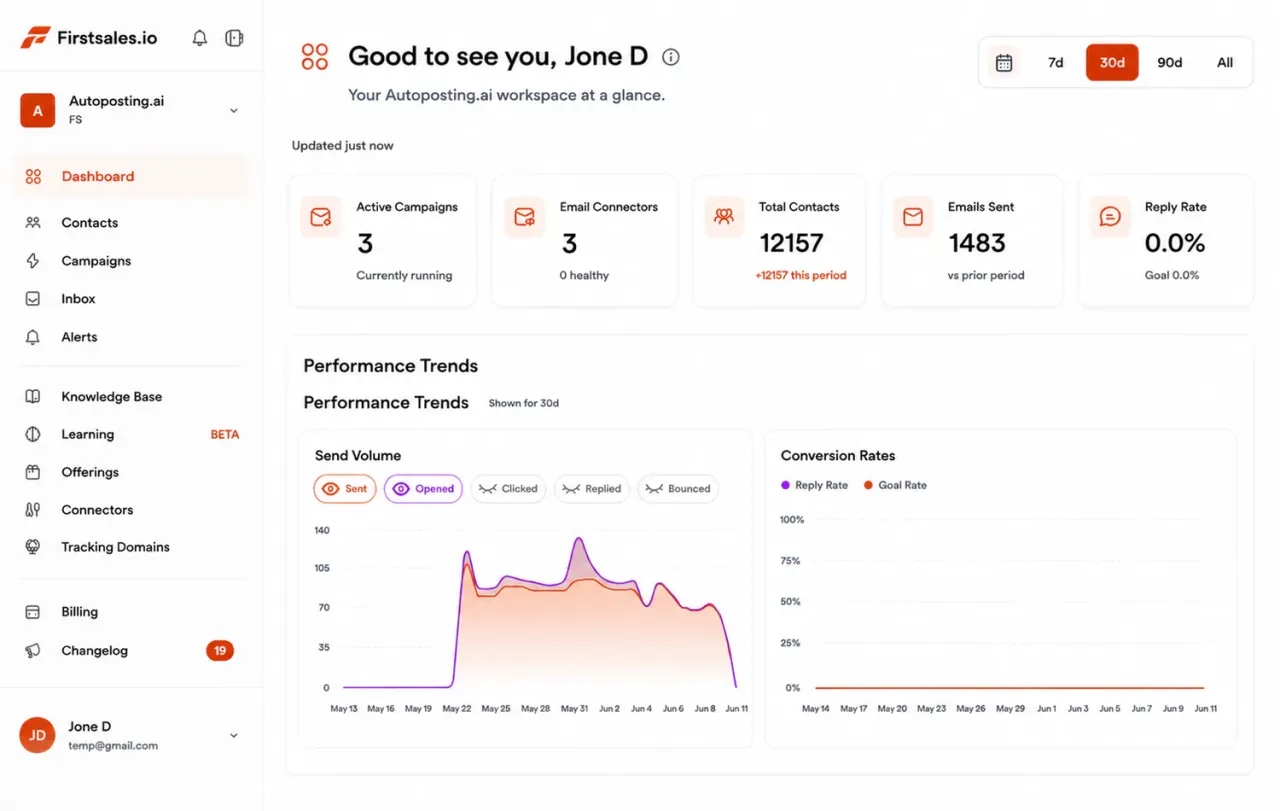
FirstSales dashboard for a consulting firm: active campaigns, connected mailboxes, contacts, emails sent and a sending volume chart
  • 01

    Emails that lead with an insight about their business

  • 02

    Written from your services, results and point of view

  • 03

    Unlimited mailboxes, warmed up for 21 days

  • 04

    Start for $1 for 3 days, then from $29/mo

The problem

Referrals are great, until they slow down.

Most consulting firms grow on referrals and networks. When those go quiet, there is no steady way to start new conversations.

Pipeline rises and falls with projects

Partners sell when they have time. During a big project, new business stops, and the next quarter starts empty.

Generic outreach hurts your name

A firm that sells judgment cannot send mass templates. Buyers judge your thinking by your first email.

Good emails take hours to write

A thoughtful email needs research on the company and the person. Doing that by hand limits you to a few a week.

How it works

From your expertise to a first meeting, in three steps.

Set up once, then let FirstSales do the research, writing and follow-up every day.

  1. 01

    Connect your mailboxes

    Add mailboxes on a cold-email domain. SPF, DKIM and DMARC are checked and warm-up starts.

  2. 02

    Teach it your firm

    Add your services, results and point of view to the knowledge base. Describe the buyers you want and FirstSales builds and checks the list.

  3. 03

    Let it write, send and follow up

    Each buyer gets a personal email that leads with an idea about their business. Follow-ups stop on a reply, and interested buyers get your meeting link.

A sequence that earns trust

Consulting is bought on trust, so each email should give before it asks.

A good consulting sequence leads with an idea, then proof, then something useful, and closes politely. FirstSales writes each step for each contact and stops the moment they reply.

  1. Email 1 · Day 1

    Show you understand their situation. One observation and one question.

    Saw you are opening a second plant. Are you planning how to staff both lines?

  2. Email 2 · Day 4

    Add proof. A short, real result from similar work, with no client name unless you have permission.

    We helped a producer of a similar size plan a second site. The hard part was shift planning.

  3. Email 3 · Day 9

    Give something useful with no strings: a checklist, a framework or a short note.

    Here is the five-question checklist we use before a site opens. Free to use.

  4. Email 4 · Day 16

    Close the loop politely. Make it easy to say not now.

    I will stop here. If planning the new plant becomes a priority, I am happy to help.

What you get

Steady new conversations without partners writing every email.

Everything a consulting firm needs for thoughtful outreach, on every plan.

  • Insight-led emails

    Each email starts from the buyer's company and role and offers one relevant idea from your knowledge base.

  • Your firm's voice

    A writing profile keeps tone, style and rules consistent, so every email sounds like a senior person wrote it.

  • Follow-ups that add value

    Each follow-up brings something new, like proof or a useful resource, and stops on any reply or opt-out.

  • Healthy mailboxes

    21-day warm-up, hourly inbox monitoring and a health grade for every mailbox.

  • A workspace per practice

    Run each service line or market in its own workspace. Workspaces and team members are unlimited.

  • Approve before it sends

    Read drafts in the approval queue, or switch to manual mode and send your own words.

Set up your firm's outreachin one afternoon.

Four parts of the app do the work partners and associates would do by hand.

  1. Connect

    Connect a sending domain for outreach

    Add Gmail, Outlook or SMTP mailboxes on a cold-email domain. Mailboxes are unlimited, so give each partner their own.

    • SPF, DKIM and DMARC checks. Per domain, with the exact fix if a record is missing.
    • Warm-up per mailbox. 21 days in three phases before full volume.
    • Sending rotation. Volume spread across your mailboxes.
  2. Teach

    Teach it your services and point of view

    Add your website, service lines, approved results and articles. Describe the buyers you want. The AI writes from these facts only.

    • Knowledge base. Your services, results and ideas in one place.
    • Offerings. Each service line with its own buyer and message.
    • Lead list from a description. Every contact checked before each send.
  3. Write

    Emails that lead with an idea

    Each email opens with an observation about the buyer's business and one question. Follow-ups add proof and a useful resource, never pressure.

    • Approval queue. Approve, edit or reject drafts before they send.
    • Manual mode. Send your own words when you prefer.
    • A/B tests. Test two subject lines and keep the winner.
  4. Reply

    Turn replies into first meetings

    Replies land in Unibox. Interested buyers get your meeting link, and the sequence stops on any reply or opt-out.

    • Unibox. Every reply from every mailbox in one place.
    • Stops on reply or opt-out. No awkward follow-up after a no.
    • Meeting link. Interested replies get your booking link.
Who you write to

The people who hire consultants each need a different reason to reply.

These are the buyers who bring in outside help, what they care about and the angle that starts a conversation.

  • 01

    CEO or managing director

    What they care about
    Growth, risk and decisions they cannot afford to get wrong.
    The angle that gets a reply
    Name a strategic change they are making and ask one sharp question about it.
  • 02

    COO or head of operations

    What they care about
    Running more with the same team, without things breaking.
    The angle that gets a reply
    Point to an operational change, like a new site or system, and offer a practical idea.
  • 03

    CFO or finance lead

    What they care about
    Cost, cash and a clear return on any outside spend.
    The angle that gets a reply
    Talk about the cost of the problem, not the cost of your work. Offer a short scoping call.
  • 04

    Head of HR or people

    What they care about
    Change that people accept, and teams that keep working through it.
    The angle that gets a reply
    Lead with the people side of a change they are making. Share a short lesson from similar work.
  • 05

    Business unit leader

    What they care about
    Hitting their numbers with a clear plan they can defend.
    The angle that gets a reply
    Offer a fast outside view on one problem in their unit, with a clear end date.
  • 06

    Owner of a private company

    What they care about
    Advice they can trust, from people who understand a business like theirs.
    The angle that gets a reply
    Keep it plain. One problem you solve for businesses like theirs and one simple next step.
Plain-English guide

How to run cold email for a consulting firm.

What works when you sell expertise, in plain words.

  1. 01

    Lead with their problem, not your firm

    Buyers do not reply to a list of services. They reply to an email that shows you understand a change they are going through. Start with one observation and one question about it.

  2. 02

    Pick a narrow market for each campaign

    Write to one type of buyer in one kind of company at a time, like COOs at food producers. The tighter the fit, the more specific and useful each email can be.

  3. 03

    Give before you ask

    Share something useful in the sequence, like a checklist or a short note. It shows how you think and gives the buyer a reason to remember you, even if the timing is wrong.

  4. 04

    Use real proof, carefully

    Mention results from similar work, in general terms unless a client agreed to be named. Put only approved facts in the knowledge base, so the AI never overstates your work.

  5. 05

    Send from each partner's own mailbox

    Buyers want to talk to the person who will do the work. Give each partner a mailbox on your cold-email domain. Mailboxes are unlimited, and each is warmed up for 21 days.

  6. 06

    Keep it running during big projects

    The biggest risk is an empty pipeline when a project ends. Let FirstSales keep outreach going every day, and review drafts in the approval queue when you have a minute.

Real pushback

What buyers tell consultants and what to say back.

Consulting buyers are careful with outside help. These are the doubts that come up most and a calm answer for each.

  • “We already work with a big firm.”

    Good. Ask which problem is too small or too specific for them. Offer focused help on that one.

  • “Consultants tell us what we already know.”

    Agree it happens. Offer a short scoping call where you share one idea they can use either way.

  • “We do not have budget for this.”

    Ask what the problem costs them today. Offer a small first phase with a clear end date and price.

  • “Send me your credentials.”

    Send one relevant example with real results only, and ask one question about their situation.

  • “We can do this ourselves.”

    Probably true. Ask what it would take their team away from. Offer to support them, not replace them.

  • “Not a priority this year.”

    Thank them and ask if you can share a short note later in the year. Your follow-ups stop on their reply.

Before you send

A consulting outreach checklist

Run through it before each new campaign. FirstSales does most of it for you.

  • A cold-email domain that is not your main domain
  • SPF, DKIM and DMARC set up on that domain
  • Warm-up running for 21 days
  • Services, approved results and articles in the knowledge base
  • One narrow buyer type for this campaign
  • A writing profile that sounds like your firm
  • Every contact checked and Dirty contacts left out
  • A useful resource ready for the sequence
  • Your meeting link ready for interested replies
  • First drafts read and approved in the approval queue
“User Interface, Ease of Use, Able to hit the inbox in the first attempt.”
Sadashiv B.Founder, small business · G2
Before and after

Consulting outreach, before and after FirstSales

What changes when thoughtful outreach runs every day, not only between projects.

By hand

Partners writing when they find time.

  • New business stops during projectsThe next quarter starts empty.
  • A few emails a weekResearch by hand limits volume.
  • Templates that sound genericBuyers judge your thinking by them.
  • Follow-ups forgottenGood conversations never start.
  • Main domain at riskNo warm-up or health checks.
  • Replies across partners' inboxesInterested buyers wait.
With FirstSales

Insight-led outreach, every day.

  • Outreach every dayPipeline keeps building during projects.
  • Research done for each buyerWritten from their company and role.
  • Your firm's voiceKnowledge base and writing profile.
  • Follow-ups that add valueStopped on any reply or opt-out.
  • Warm-up and monitoring21 days, then hourly checks per mailbox.
  • UniboxEvery reply in one place.
Why firms switch

Consulting outreach: FirstSales vs a typical tool

Many tools are built to send more. FirstSales is built to send better emails to the right buyers.

Consulting outreach features in FirstSales and in a typical cold email tool
What you getTypical toolFirstSales
Email written for each buyerVariesWritten by AI from your knowledge base
Writing profile for your firm's voiceVariesIncluded
MailboxesVariesUnlimited on every plan
Team membersVariesUnlimited on every plan
21-day warm-upVariesIncluded
Contact checks before each sendVariesEvery send, no add-on
Approval queue and manual modeVariesIncluded
Entry priceVaries$29/mo
Start your $1 trial
Good practice

Your reputation is your product, so send with care.

A consulting firm sells judgment. These general truths keep your outreach in line with that.

  • Never share client details without permissionDescribe results in general terms unless a client has agreed to be named. Put only approved facts in the knowledge base.
  • Claim only what you can proveWrite about real work and real results. The AI writes from your knowledge base, not from guesses.
  • Send from a separate domainUse a cold-email domain, not your main one, so proposals and client emails from your main domain stay clean.
  • Keep the volume low and the fit highWrite to fewer, better-matched people. A short list of the right buyers is worth more than a long list.
  • Make opting out easyGive a simple way to opt out in every campaign. FirstSales stops follow-ups when someone replies or opts out.
  • Know the rules where your buyers areRules on business email differ by country. Check the ones that apply to you and the people you contact.

This is general information, not legal advice. FirstSales gives you tools to send with care; you decide who to contact and are responsible for following the rules where you and your contacts are.

Questions,answered plainly.

Can’t find yours? Write to us.

01Is cold email right for a consulting firm?

Yes, when each email is thoughtful and well targeted. FirstSales writes every email from your knowledge base and the buyer's company and role, so it reads like advice, not a mass template.

02Will the emails sound like our firm?

Yes. Your writing profile sets tone, style and rules, and the knowledge base holds your services, results and point of view. You can approve every draft before it sends.

03Can each partner send from their own mailbox?

Yes. Mailboxes are unlimited on every plan. Add one for each partner on your cold-email domain, and each is warmed up for 21 days.

04How do you keep client details private?

The AI writes only from what you put in the knowledge base. Add approved facts and general results, and leave out anything a client has not agreed to share.

05How many follow-ups should a consulting sequence have?

Three or four emails over about two weeks works well: an idea, proof, something useful and a polite close. FirstSales stops the sequence on any reply or opt-out.

06Can we run different service lines separately?

Yes. Give each service line or market its own workspace, or its own offering with its own buyer and message. Workspaces and team members are unlimited.

07How do I try it?

Start for $1 for 3 days. Connect a mailbox, add your services and read the first drafts. No contract: cancel any time from your dashboard.

Outreach that keeps going after you log off.Leads, emails, follow-ups and replies, handled.

Connect unlimited mailboxes and let AI agents find leads, write each email and follow up. Or send your own templates in manual mode. From $29/mo.

$1 for 3 days · Cancel anytime · No contract

Install with AI

Your coding agent sets up the FirstSales CLI and skills for you.

Prompt for Claude Code

I'm setting up FirstSales (https://firstsales.io), an AI outbound sales platform: campaigns, contacts, a reply inbox, deliverability and lead signals. Help me get my workspace sending real, good emails end to end, from Claude Code.

Read these first so you know how FirstSales works:
- Developer docs and API: https://developer.firstsales.io
- CLI: https://www.npmjs.com/package/@firstsales.io/cli
- Skills for coding agents: https://github.com/firstsalesio/firstsales-skills (read README.md and GUIDE.md)

Setup
1. Install the CLI: npm install -g @firstsales.io/cli
2. Install the FirstSales skills:
   claude plugin marketplace add firstsalesio/firstsales-skills
   claude plugin install firstsales@firstsales
3. Ask me if I already have a FirstSales account. If not, send me to https://app.firstsales.io to sign up.
4. Ask me to create an API key under Settings → API → API Keys, with only the scopes we need.
   Never ask me to paste the key into this chat. Tell me to run this in my own terminal, so the key stays hidden:
   read -rs FS_KEY && firstsales auth login --api-key "$FS_KEY"; unset FS_KEY
5. Run `firstsales whoami` and tell me which workspace and organisation we are connected to.

Then ask me about my business: what I sell, who I sell to (roles, company size, countries), my best customers, and what I use today for outbound (tools, lists, mailboxes). Walk me through:
1. Teaching FirstSales my business: website, offer, proof points and case studies in the knowledge base, so the AI writes like someone who knows the product.
2. Connecting my sending mailboxes and checking my sending domain: SPF, DKIM, DMARC and warm-up. If anything is unhealthy, tell me the exact DNS record to add.
3. Bringing in contacts: import my CSV or CRM export into a clean list, remove duplicates and bad emails, and block domains I must never email (customers, competitors, my own).
4. Building my first campaign: the right list, senders, steps and timing. Write the sequence with me, show me the drafts, and do not launch until I say yes.
5. Setting up Signals if it fits: find people engaging with LinkedIn posts about topics my buyers care about, and turn them into leads.
6. Inviting my team and giving each person the right access.

Once campaigns run, show me how to work the reply inbox from here: which replies need an answer, draft responses in my voice, and move good conversations into deals. If I use Cal.com, connect it so follow-ups can offer my booking link (not the first email).

Throughout, as you learn about my business, proactively suggest and help create:
- Reply templates for the questions and objections my prospects are likely to raise, based on my product, site and codebase if you can see them.
- Campaign ideas and segments worth testing, with the reason for each.

Safety rules:
- Show every change as a dry run (--dry-run) first and wait for my yes. Never send emails, launch campaigns or delete anything without my yes.
- Tell me before anything that spends credits, and how many.

Be opinionated. If the docs give a sensible default, just use it. Don't make me choose between five options.