Skip to content
NewSee how

Industries · Marketing agencies

Cold email for marketing agencies: win clients and run their outbound from one account.

FirstSales finds the right people, writes each one a personal email and follows up until they reply. Use it to fill your own pipeline, and give every client a separate workspace with their own voice, domains and inbox.

$1 for 3 days · Cancel anytime · No contract
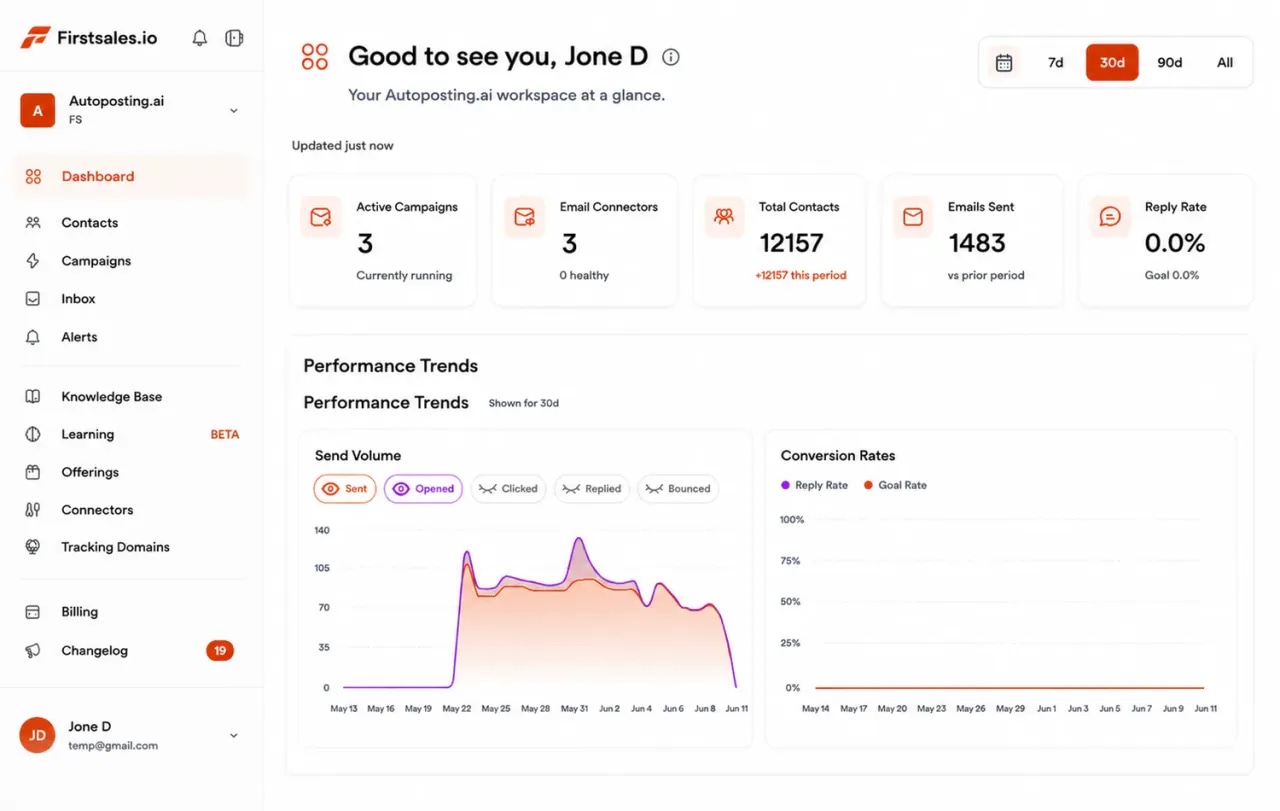
FirstSales dashboard for an agency's outbound: active campaigns, connected mailboxes, contacts, emails sent and a send-volume chart
  • 01

    Unlimited workspaces: one for you, one per client

  • 02

    Each client's emails written in that client's voice

  • 03

    Mailboxes on every client domain, warmed up for 21 days

  • 04

    Start for $1 for 3 days, then from $29/mo

The problem

Outbound for ten clients does not fit in one spreadsheet.

Agencies sell outbound, or want to. Running it by hand for many brands at once breaks fast.

Every client sounds the same

One team writing for many brands drifts into a house voice. Prospects can tell, and clients notice.

One mistake reaches the wrong list

Mixed contacts and shared mailboxes mean a single slip can email one client's prospects about another.

Your own pipeline comes last

Client work always wins the day. The agency's own outbound stops, and new business dries up.

Two jobs, one account

Agencies run cold email twice: to win clients, and to deliver for them.

Your own pipeline and your clients' campaigns need different lists, voices and domains. FirstSales keeps them apart with a workspace for each, under one login.

Your agency's pipeline

Outbound that brings in new retainers. Your voice, your case studies, your offer.

  • A workspace for the agency itself
  • Your services and results in the knowledge base
  • Write to founders and marketing leads in your niche
  • Replies go to your new-business team

Client campaigns

Outbound you run as a service. Each client sounds like the client, not like your agency.

  • One workspace per client, nothing shared by mistake
  • Each client's offer, buyer and voice kept separate
  • Mailboxes on each client's own sending domain
  • Replies and results you can show the client
How it works

From a new client to booked meetings, in three steps.

Set up a workspace, teach it the client and let FirstSales do the daily work.

  1. 01

    Open a workspace for the client

    Add the client's sending domains and mailboxes. SPF, DKIM and DMARC are checked and warm-up starts.

  2. 02

    Teach it the client

    Add the client's website, offer and voice to the knowledge base. Describe the buyer, and FirstSales builds and checks the list.

  3. 03

    Let it write, send and follow up

    Each prospect gets a personal email in the client's voice. Follow-ups stop on a reply, and interested people get a meeting link.

What you get

Run outbound for many brands without hiring for each one.

Everything an agency needs to run cold email as a service, on every plan.

  • A workspace per client

    Contacts, mailboxes, campaigns and replies stay inside each client's workspace. Workspaces are unlimited.

  • Each client in their own voice

    A knowledge base and writing profile per client, so a dental group and a software firm never sound alike.

  • Domains that stay healthy

    21-day warm-up, hourly inbox monitoring and a health grade for every mailbox on every client domain.

  • Your whole team, no seat fees

    Team members are unlimited. Add strategists, writers and account managers without paying per person.

  • Approve before it sends

    Read drafts in the approval queue, or switch a campaign to manual mode and send the client's own templates.

  • Results you can show

    Opens, replies, meetings and bounces per campaign, and A/B tests on subject lines, ready for your client report.

Set up a new clientin an afternoon.

Four parts of the app do the work your team would otherwise repeat for every client.

  1. Connect

    Connect the client's sending domains

    Add Gmail, Outlook or SMTP mailboxes on each client's cold-email domain. Mailboxes are unlimited, so you can add as many as the client's volume needs.

    • SPF, DKIM and DMARC checked. Per domain, with the exact fix if a record is missing.
    • Warm-up per mailbox. 21 days in three phases before full volume.
    • Sending rotation. Volume shared across the client's mailboxes.
  2. Teach

    Give each client a knowledge base

    Add the client's website, offer, proof points and tone. Describe their ideal buyer. The AI writes from those facts for that client only.

    • Per-client knowledge base. Offers and facts never mix between clients.
    • Writing profile. Tone, style and rules for each brand.
    • Lead list from a description. Every contact checked before any send.
  3. Write

    Personal emails in the client's voice

    Each email starts from the prospect's company and role and speaks for the client. Follow-ups build on the last email with a new angle.

    • Approval queue. Approve, edit or reject drafts before they send.
    • Manual mode. Send the client's own templates when they ask.
    • A/B tests. Try two subject lines and keep the better one.
  4. Reply

    Replies sorted per client

    Replies land in each workspace's inbox. Interested prospects are offered the client's meeting link, and the sequence stops on any reply or opt-out.

    • One inbox per workspace. No mixing one client's replies with another's.
    • Stops on reply or opt-out. No awkward follow-up after a no.
    • Meetings offered. Interested replies get the client's booking link.
Who you are writing to

The people who hire agencies each want a different kind of proof.

When you prospect for your own agency, these are the people who say yes to a retainer and what each one listens for.

  • 01

    Founder of a small company

    What they care about
    Growth they can see, without managing another vendor closely.
    The angle that gets a reply
    One clear outcome you deliver, one line on how, and an offer to share a plan for their company.
  • 02

    Head of marketing

    What they care about
    Hitting targets with a small team, and an agency that does not need hand-holding.
    The angle that gets a reply
    Name a channel or task their team cannot get to. Offer to take that one thing off their plate.
  • 03

    Head of sales

    What they care about
    More qualified meetings on the calendar, not more reports.
    The angle that gets a reply
    Talk about meetings and pipeline, not impressions. Ask how they source meetings today.
  • 04

    Marketing manager

    What they care about
    Getting campaigns live on time and looking good to their boss.
    The angle that gets a reply
    Offer to handle the busy work and give them results they can report up.
  • 05

    Owner of a local business

    What they care about
    Customers through the door and a clear monthly cost.
    The angle that gets a reply
    Plain words, a local example and one simple next step. Skip the agency jargon.
  • 06

    Partner at another agency

    What they care about
    Extra capacity or a skill they do not have in-house.
    The angle that gets a reply
    Offer a white-label or overflow partnership. Name the work you take on and how you report it.
Plain guide

How to run cold email as an agency service.

What works when you send on behalf of many brands, in plain words.

  1. 01

    Start every client with a short brief

    Before anything sends, agree on the buyer, the offer, the proof the client can stand behind and who signs the email. Put it in the client's knowledge base. A clear brief is what keeps the AI on message and keeps the client happy.

  2. 02

    Give every client their own domain and workspace

    Never send for two clients from one domain or one workspace. A separate cold-email domain per client protects their main domain, and a separate workspace keeps lists and replies apart. FirstSales gives you unlimited workspaces and mailboxes.

  3. 03

    Warm up before you promise volume

    New domains need time. Plan the first three weeks for warm-up, and tell the client up front. FirstSales runs a 21-day warm-up in three phases on every mailbox.

  4. 04

    Write for the client's buyer, not your portfolio

    Each email should read as if the client wrote it to one person. Set the tone and rules per client, and read the first drafts in the approval queue before you scale up.

  5. 05

    Report on meetings, not opens

    Clients pay for conversations. Report replies and meetings first, then what you changed and why. Use A/B tests on subject lines to show steady learning.

  6. 06

    Keep your own pipeline running

    Give your agency its own workspace and campaign. Write to founders and marketing leads in your niche with one clear result you deliver. Let it run while client work fills your day.

Real objections

What prospects tell agencies, and what to write back.

Agency buyers have been pitched many times. These are the doubts that come up most and a calm reply for each.

  • “We already have an agency.”

    Good. Ask what they wish that agency did more of. Offer to help with one gap, not to replace them.

  • “We tried an agency and it didn't work.”

    Ask what went wrong. Explain how you would report progress so they can judge early, not after six months.

  • “It's too expensive right now.”

    Offer a smaller first project with a clear end date. A short test is easier to approve than a long retainer.

  • “We do marketing in-house.”

    Ask what their team does not have time for. Many in-house teams want help with one channel, not everything.

  • “Send me some case studies.”

    Send one that matches their industry and size, with real results only, and ask one question about their goals.

  • “How do I know cold email won't hurt our brand?”

    Explain that you send from separate domains, check every contact and stop on any reply or opt-out.

Before a client goes live

An agency onboarding checklist

Run through it for every new client. FirstSales handles most of it for you.

  • A separate workspace for the client
  • A cold-email domain that is not the client's main one
  • SPF, DKIM and DMARC set on that domain
  • Warm-up running for 21 days
  • Client website, offer and proof in the knowledge base
  • Tone and rules set for the client's voice
  • Every contact checked and Dirty contacts left out
  • Sender name and reply address agreed with the client
  • The client's meeting link ready for interested replies
  • First drafts read and approved in the approval queue
“I've been using FirstSales.io for several months now, and I can confidently say it has revolutionized how I approach lead generation and customer acquisition.”
Paweł StelmachSmall business owner · Trustpilot
Before and after

Agency outbound, before and after FirstSales

What changes when each client runs in its own space, with its own voice.

By hand

Spreadsheets and shared mailboxes.

  • One voice for every brandTemplates reused across clients.
  • Shared lists and mailboxesOne slip reaches the wrong prospects.
  • Seat fees per teammateAdding a writer means a bigger bill.
  • Domains at riskNo warm-up plan and no health check.
  • Manual follow-upsInterested replies go cold.
  • Reports built by handHours each month per client.
With FirstSales

A workspace per client, one login.

  • Each client in their own voiceA knowledge base and profile per client.
  • Workspaces kept apartUnlimited, one per client.
  • Unlimited team membersNo per-seat cost.
  • Warm-up and monitoring21 days, then hourly checks per mailbox.
  • Follow-ups on timeStopped on any reply or opt-out.
  • Results per campaignReplies, meetings and A/B tests in one view.
Why agencies switch

Agency outbound: FirstSales vs a typical tool

Many tools are built for one sender. FirstSales is built to run many brands side by side.

Agency outbound features in FirstSales and in a typical cold email tool
What you getTypical toolFirstSales
Separate workspaces per clientVariesUnlimited on every plan
Knowledge base per clientVariesIncluded
MailboxesVariesUnlimited on every plan
Team membersVariesUnlimited on every plan
21-day warm-upVariesIncluded
Contact checks before each sendVariesEvery send, no add-on
Approval queue and manual modeVariesIncluded
Entry priceVaries$29/mo
Start your $1 trial
Good practice

Sending for clients means protecting their name too.

An agency carries its clients' reputation in every email. These general truths keep both brands safe.

  • Keep each client separateSeparate workspaces keep one client's contacts, mailboxes and replies away from another. Nothing gets sent to the wrong list.
  • Use the client's own sending domainA separate domain per client, never the client's main one, so their invoices and support emails stay clean.
  • Agree who the sender isDecide with the client whose name signs the email and where replies go. Be honest about who is writing.
  • Only claim what the client can provePut real facts in each client's knowledge base. The AI writes from those facts, not from guesses.
  • Honour opt-outs for every clientOffer a simple way to opt out in every campaign. FirstSales stops follow-ups when someone replies or opts out.
  • Agree on lists and volumeWrite down where contacts come from and how much each mailbox sends. Clear rules prevent awkward client calls later.

This is general information, not legal advice. FirstSales gives you the tools to send with care; you and your clients decide who to contact and are responsible for following the rules where you and your prospects are.

Questions,answered plainly.

Can’t find yours? Write to us.

01Can I run cold email for several clients from one account?

Yes. Give each client its own workspace. Contacts, mailboxes, campaigns and replies stay inside it, and workspaces are unlimited on every plan.

02Will each client's emails sound different?

Yes. Each client has its own knowledge base and writing profile, so the AI writes from that client's facts, in that client's tone.

03Which domain should I send from for a client?

A separate cold-email domain for each client, not their main one. Connect its mailboxes, and FirstSales checks SPF, DKIM and DMARC and warms each one up for 21 days.

04Do I pay per teammate or per client?

No. Team members, workspaces and mailboxes are unlimited on every plan. Plans start at $29/mo.

05Can my client approve emails before they send?

You can read and approve every draft in the approval queue, or switch to manual mode and send the client's own templates.

06Can I use it for my own agency's new business too?

Yes. Give your agency its own workspace with your services and results in the knowledge base, and run your own campaign next to your clients'.

07How do I try it?

Start for $1 for 3 days. Set up one client workspace, read the first drafts and decide. No contract: cancel any time from your dashboard.

Outreach that keeps going after you log off.Leads, emails, follow-ups and replies, handled.

Connect unlimited mailboxes and let AI agents find leads, write each email and follow up. Or send your own templates in manual mode. From $29/mo.

$1 for 3 days · Cancel anytime · No contract

Install with AI

Your coding agent sets up the FirstSales CLI and skills for you.

Prompt for Claude Code

I'm setting up FirstSales (https://firstsales.io), an AI outbound sales platform: campaigns, contacts, a reply inbox, deliverability and lead signals. Help me get my workspace sending real, good emails end to end, from Claude Code.

Read these first so you know how FirstSales works:
- Developer docs and API: https://developer.firstsales.io
- CLI: https://www.npmjs.com/package/@firstsales.io/cli
- Skills for coding agents: https://github.com/firstsalesio/firstsales-skills (read README.md and GUIDE.md)

Setup
1. Install the CLI: npm install -g @firstsales.io/cli
2. Install the FirstSales skills:
   claude plugin marketplace add firstsalesio/firstsales-skills
   claude plugin install firstsales@firstsales
3. Ask me if I already have a FirstSales account. If not, send me to https://app.firstsales.io to sign up.
4. Ask me to create an API key under Settings → API → API Keys, with only the scopes we need.
   Never ask me to paste the key into this chat. Tell me to run this in my own terminal, so the key stays hidden:
   read -rs FS_KEY && firstsales auth login --api-key "$FS_KEY"; unset FS_KEY
5. Run `firstsales whoami` and tell me which workspace and organisation we are connected to.

Then ask me about my business: what I sell, who I sell to (roles, company size, countries), my best customers, and what I use today for outbound (tools, lists, mailboxes). Walk me through:
1. Teaching FirstSales my business: website, offer, proof points and case studies in the knowledge base, so the AI writes like someone who knows the product.
2. Connecting my sending mailboxes and checking my sending domain: SPF, DKIM, DMARC and warm-up. If anything is unhealthy, tell me the exact DNS record to add.
3. Bringing in contacts: import my CSV or CRM export into a clean list, remove duplicates and bad emails, and block domains I must never email (customers, competitors, my own).
4. Building my first campaign: the right list, senders, steps and timing. Write the sequence with me, show me the drafts, and do not launch until I say yes.
5. Setting up Signals if it fits: find people engaging with LinkedIn posts about topics my buyers care about, and turn them into leads.
6. Inviting my team and giving each person the right access.

Once campaigns run, show me how to work the reply inbox from here: which replies need an answer, draft responses in my voice, and move good conversations into deals. If I use Cal.com, connect it so follow-ups can offer my booking link (not the first email).

Throughout, as you learn about my business, proactively suggest and help create:
- Reply templates for the questions and objections my prospects are likely to raise, based on my product, site and codebase if you can see them.
- Campaign ideas and segments worth testing, with the reason for each.

Safety rules:
- Show every change as a dry run (--dry-run) first and wait for my yes. Never send emails, launch campaigns or delete anything without my yes.
- Tell me before anything that spends credits, and how many.

Be opinionated. If the docs give a sensible default, just use it. Don't make me choose between five options.