Skip to content
NewSee how

Industries · Legal

Cold email for law firms: reach growing companies with outreach that reads like good counsel.

FirstSales finds companies that fit your practice areas, spots a real change like a new market or a hiring push, and writes each decision maker a careful, plain email about it. It follows up until they reply, and stops the moment they do.

$1 for 3 days · Cancel anytime · No contract
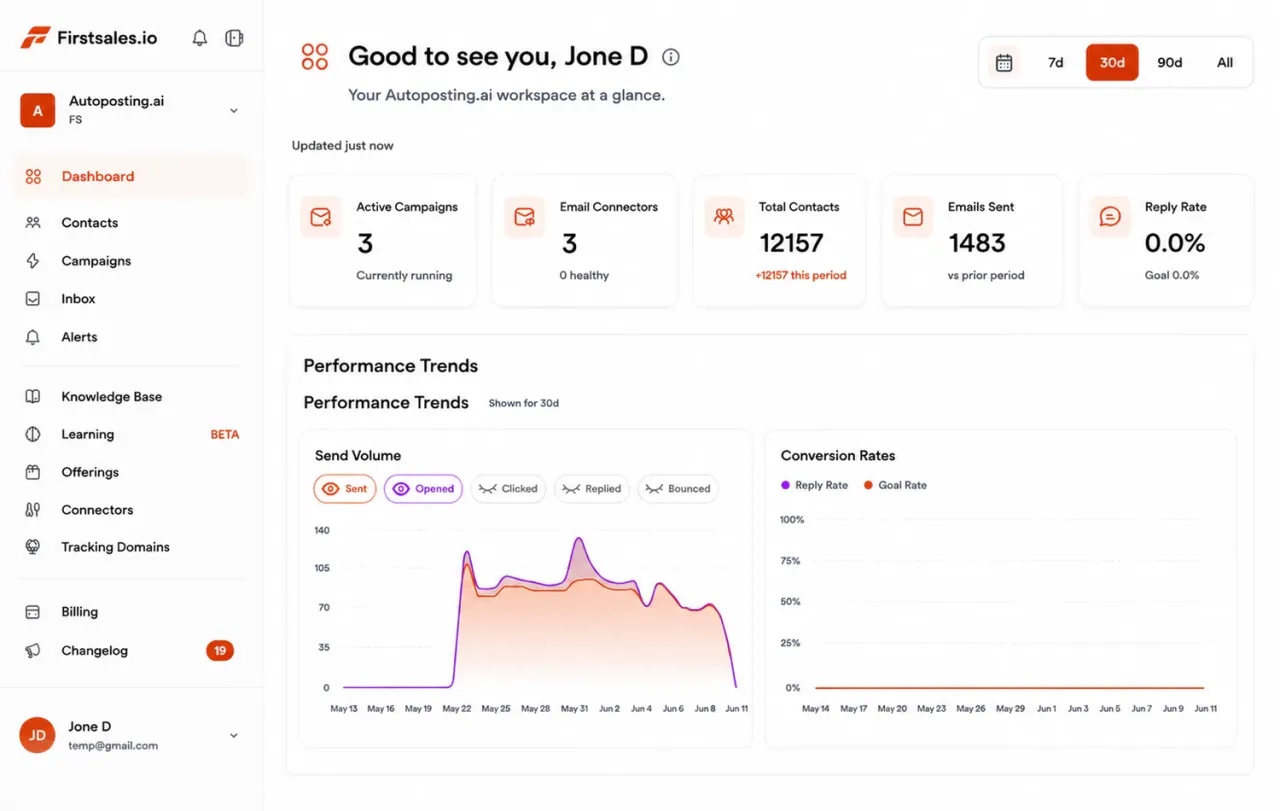
FirstSales dashboard for a law firm showing active campaigns, connected mailboxes, contacts, emails sent and a sending volume chart
  • 01

    Written only from the practice areas and wording you add to the knowledge base

  • 02

    Approval queue and manual mode so a lawyer reviews before anything sends

  • 03

    Unlimited mailboxes, with a 21-day warm-up

  • 04

    Start for $1 for 3 days, then from $29/mo

The problem

Most law firms grow by referral, and referrals do not arrive on a schedule.

Partners are busy with client work, so new business waits for word of mouth. When firms do reach out, the emails are stiff, generic and easy to ignore.

Referrals come and go

A good month of referrals is followed by a quiet one. There is no steady way to meet companies that need help now.

Generic emails look careless

"We are a full-service firm" tells a buyer nothing. A careless first email makes a firm look careless at the work.

No one has time to follow up

Billable work always wins. The company that was interested in March hears nothing until they have hired someone else.

How it works

From your practice areas to a booked consultation, in three steps.

Set it up once, review as much as you like, and let FirstSales research, write and follow up.

  1. 01

    Connect a separate domain

    Add mailboxes on a cold email domain, not your firm's main domain. SPF, DKIM and DMARC are checked and warm-up starts.

  2. 02

    Teach it your practice

    Add your practice areas, the matters you take, your fee approach and approved wording. Describe the companies you help and FirstSales builds the list.

  3. 03

    Send, follow up and book

    Each email names a real change at the company. Follow-ups stop on a reply, and interested buyers get your meeting link.

Who you write to

Legal work is bought by the business, and each buyer worries about something different.

Companies without in-house counsel hire firms through a founder, an operator or a finance lead. These are the people, what they care about, and the angle that earns a reply.

  • 01

    Founder or CEO

    What they care about
    Growing without a legal problem slowing the company down.
    The angle that earns a reply
    Name the growth step, like a raise, a new market or a big hire, and offer a short look at what it needs.
  • 02

    COO or operations lead

    What they care about
    Supplier, customer and lease contracts that do not cause surprises.
    The angle that earns a reply
    Talk about the contracts behind their day-to-day work and one clause worth checking.
  • 03

    CFO or finance lead

    What they care about
    Clear legal costs and fewer risks that turn into bills.
    The angle that earns a reply
    Explain your fee approach in plain words and offer a scoped first piece of work.
  • 04

    HR or people lead

    What they care about
    Hiring, contracts and policies that hold up as the team grows.
    The angle that earns a reply
    Point to a hiring change and offer to check offer letters or the staff handbook.
  • 05

    General counsel or legal lead

    What they care about
    Extra hands for overflow work or a specialist area.
    The angle that earns a reply
    Offer help with one practice area they do not cover in-house. Respect their judgment.
  • 06

    Office or practice manager

    What they care about
    Fewer dropped matters and simple ways to work with outside counsel.
    The angle that earns a reply
    Mention how you report on matters and how quickly you respond.
What you get

Outreach that sounds like a lawyer who has read the company's news.

Everything a firm needs for steady, careful outreach, in every plan.

  • Only your practice areas

    The AI writes only from your knowledge base, so it talks about the work you do and nothing else.

  • A real reason to write

    Each email opens with a real change, like a new market, a funding round, new contracts or a hiring push.

  • A lawyer reviews first

    Approve, edit or reject drafts in the approval queue, or use manual mode so every email is reviewed before it sends.

  • Clean lists

    Every contact is checked before each send, and Dirty contacts are left out to protect your domain.

  • Patient follow-ups

    Spaced follow-ups that stay polite, stopped on any reply or opt-out.

  • A workspace per practice group

    Run corporate, employment or property outreach in separate workspaces. Unlimited workspaces and team members.

A sequence that reads like counsel

Business buyers hire lawyers they trust, so each email should show judgment, not pressure.

A firm's first email is a sample of how it works. A calm sequence that gives something useful at every step reads like good counsel. FirstSales writes each step for each contact and stops the moment they reply.

  1. Email 1 · Day 1

    Name a real change at their company and ask one plain question. No fear, no legal jargon.

    Saw you opened a second warehouse this year. Did the lease and supplier terms get a legal look?

  2. Email 2 · Day 4

    Share one practical point a company like theirs often misses. Teach, do not sell.

    One thing we see often: auto-renewal clauses that lock in old prices for another year.

  3. Email 3 · Day 9

    Offer a small, clear next step, like a short call or a look at one template.

    Happy to look over one of your standard contracts and tell you what I would change.

  4. Email 4 · Day 16

    Close the loop politely and leave the door open. The sequence ends here.

    I will stop here. If contracts or hiring paperwork come up later, my door is open.

Set up law firm outreachthat buyers take seriously.

Four parts of the app do the work a business development lead would do by hand, with a lawyer's review where you need it.

  1. Connect

    Send from a separate, trusted domain

    Add Gmail, Outlook or SMTP mailboxes on a cold email domain. Mailboxes are unlimited, so spread volume across as many as you need with sending rotation.

    • SPF, DKIM and DMARC checks. Per domain, with the exact fix when a record is missing.
    • 21-day warm-up. Three phases before full volume.
    • Health grade. Each mailbox gets a grade and hourly monitoring.
  2. Teach

    Teach it the practice areas you offer

    Add your practice areas, the matters you take, your fee approach and the wording your firm has approved. The AI writes only from what you add.

    • Knowledge base. Practice areas, matter types and approved wording in one place.
    • Offerings. Each practice area with its own buyer and message.
    • Lead list from a description. Every contact checked before each send.
  3. Write

    Emails that name a real change

    Each email opens with something true about the company, like new supplier deals or a hiring push, and asks one plain question. No promises, no fear.

    • Writing profile. Keeps your tone careful, plain and professional.
    • Approval queue. Approve, edit or reject drafts before they send.
    • A/B tests. Test two openers and keep the one buyers answer.
  4. Reply

    Turn replies into consultations

    Replies land in Unibox. Interested buyers get your meeting link, and the sequence stops on any reply or opt-out.

    • Unibox. Every reply from every mailbox in one inbox.
    • Stop on reply or opt-out. No follow-up after a no.
    • Meeting link. Interested replies get your booking link.
“I've been using FirstSales.io for several months now, and I can confidently say it has revolutionized how I approach lead generation and customer acquisition.”
Paweł StelmachSmall business owner · Trustpilot
Plain guide

How to do cold email as a law firm.

What works when you offer legal help to companies that are busy running their business.

  1. 01

    Write to businesses about business work

    Contracts, hiring, leases, funding and disputes between companies are fair topics. Keep outreach to business buyers and business needs.

  2. 02

    Open with their change, not your firm

    A new market, a raise or a big hire is a real reason to talk. Your firm's history is not.

  3. 03

    One practice area per campaign

    An employment email and a commercial contracts email are different emails. Keep each campaign to one area and one kind of company.

  4. 04

    Teach one useful point

    A single practical point shows judgment better than a list of services. Buyers reply to firms that help first.

  5. 05

    Offer a small first step

    A short call or a look at one template is easy to say yes to. A full engagement is not.

  6. 06

    Have a lawyer review the wording

    Use the approval queue or manual mode so a lawyer checks each email, and keep claims to facts you can stand behind.

Real objections

What business buyers say to a law firm's cold email and how to answer.

Most companies already know a lawyer, or think they can manage without one. These are the objections you will hear most, with a calm answer for each.

  • “We already have a lawyer.”

    Respect that. Offer help in one area they may not cover, or a second opinion on one matter.

  • “Lawyers are too expensive.”

    Explain your fee approach in plain words and offer a small, scoped first piece of work.

  • “We use templates from the internet.”

    Agree templates are a fair start, and offer to look at one and point out what you would change.

  • “We do not have a legal problem right now.”

    Say that is the best time to check. Fixing a contract early costs less than a dispute later.

  • “How did you get my email?”

    Say plainly that you found their company through public sources, and offer to take them off your list.

  • “Send me something in writing.”

    Send one short note on the point you raised, with a clear next step. FirstSales stops the sequence on their reply.

Before and after

Law firm outreach, before and after FirstSales

What changes when each email reads like advice, not an ad.

The usual way

Wait for referrals.

  • Full-service firm pitchTells the buyer nothing about their needs.
  • Referrals onlyBusy months and quiet months.
  • One email, then silenceBillable work always comes first.
  • Every practice area at onceNothing feels written for them.
  • Bought lists uncheckedBounces hurt the domain.
  • Replies in scattered inboxesInterested buyers wait.
With FirstSales

Steady, careful outreach.

  • A real change at the companyA reason to reply.
  • A steady pipelineOutreach runs while you do client work.
  • Patient follow-upsStopped on any reply or opt-out.
  • One practice area per campaignEach email fits the reader.
  • Contacts checked firstDirty contacts left out before each send.
  • UniboxEvery reply in one inbox.
Care by default

Lawyers have their own rules for reaching out, so keep every email accurate and plain.

Law firm marketing is regulated by bar and professional bodies, and the rules differ by place. These general principles keep your outreach accurate and easy to stand behind.

  • Know your solicitation rulesRules on contacting people who have not asked for legal help differ by country, state and bar. Check what applies to you before you send.
  • Label it where you mustSome places ask for written outreach from lawyers to carry a label, such as "advertising material". Add it to your writing profile if it applies.
  • Never promise resultsDo not promise an outcome, a win or a saving. Describe what you review and how you work, not what you guarantee.
  • Keep claims true and checkableOnly mention experience, practice areas and credentials you can stand behind. Keep the knowledge base to facts you have checked.
  • Write to businesses, not people in troubleWrite to companies about business needs. Do not target people facing an accident, an arrest or another sensitive event.
  • Make opting out easyGive a simple way to opt out in every campaign. FirstSales stops follow-ups when someone replies or opts out.

This is general information, not legal advice about your marketing. FirstSales gives you tools to send with care; you decide who to contact and are responsible for following the professional rules that apply to your firm and your contacts.

Before you send

Law firm outreach checklist

Run through it before each new campaign. FirstSales handles most of it for you.

  • A cold email domain that is not your firm's main domain
  • SPF, DKIM and DMARC set up on every sending domain
  • Warm-up running for 21 days
  • Solicitation and labeling rules checked for where you practice
  • Only practice areas and credentials you can stand behind in the knowledge base
  • No promised outcomes in the writing profile
  • Every contact checked and Dirty contacts left out
  • One practice area per campaign
  • A lawyer reviewing drafts in the approval queue
  • Your meeting link ready for interested replies
Why firms switch

Law firm outreach: FirstSales vs a typical tool

Many tools send one template to a list. FirstSales writes each email from your practice areas and a real change at the company.

Outreach features for law firms in FirstSales and a typical cold email tool
What you getTypical toolFirstSales
Emails written only from your practice areasVariesAI writes only from your knowledge base
Opens with a real change at the companyVariesIncluded
Approval queue and manual modeVariesIncluded
SPF, DKIM and DMARC checksVariesIncluded, per domain
MailboxesVariesUnlimited on every plan
21-day warm-upVariesIncluded
Contact checks before each sendVariesOn every send, no add-on
Starting priceVaries$29/mo
Start your $1 trial

Questions,answered plainly.

Can’t find yours? Write to us.

01Does cold email work for law firms?

Yes, for business work, when each email names a real change at the company and offers a small, clear next step. FirstSales writes from your practice areas and approved wording, and never adds promises you did not write.

02Is cold email allowed for lawyers?

It depends on where you practice. Rules on solicitation and labeling differ by country, state and bar. Check what applies to your firm before you send. This is not legal advice.

03Who should a law firm write to?

Usually a founder, COO, CFO or HR lead at companies without in-house counsel, or a legal lead who needs extra help. Each role gets its own angle.

04Can a lawyer review emails before they send?

Yes. Use the approval queue to approve, edit or reject drafts, or manual mode so nothing sends until a person approves it.

05Can each practice group run its own outreach?

Yes. Give each practice group its own workspace with its own knowledge base, mailboxes and campaigns. Workspaces and team members are unlimited.

06How do we protect the firm's main domain?

Send from a separate cold email domain. FirstSales checks SPF, DKIM and DMARC, warms each mailbox for 21 days in three phases and gives it a health grade with hourly monitoring.

07How do I try it?

Start for $1 for 3 days. Connect a mailbox, add your practice areas and approved wording, and read the first drafts in manual mode. No contract: cancel anytime from your dashboard.

Outreach that keeps going after you log off.Leads, emails, follow-ups and replies, handled.

Connect unlimited mailboxes and let AI agents find leads, write each email and follow up. Or send your own templates in manual mode. From $29/mo.

$1 for 3 days · Cancel anytime · No contract

Install with AI

Your coding agent sets up the FirstSales CLI and skills for you.

Prompt for Claude Code

I'm setting up FirstSales (https://firstsales.io), an AI outbound sales platform: campaigns, contacts, a reply inbox, deliverability and lead signals. Help me get my workspace sending real, good emails end to end, from Claude Code.

Read these first so you know how FirstSales works:
- Developer docs and API: https://developer.firstsales.io
- CLI: https://www.npmjs.com/package/@firstsales.io/cli
- Skills for coding agents: https://github.com/firstsalesio/firstsales-skills (read README.md and GUIDE.md)

Setup
1. Install the CLI: npm install -g @firstsales.io/cli
2. Install the FirstSales skills:
   claude plugin marketplace add firstsalesio/firstsales-skills
   claude plugin install firstsales@firstsales
3. Ask me if I already have a FirstSales account. If not, send me to https://app.firstsales.io to sign up.
4. Ask me to create an API key under Settings → API → API Keys, with only the scopes we need.
   Never ask me to paste the key into this chat. Tell me to run this in my own terminal, so the key stays hidden:
   read -rs FS_KEY && firstsales auth login --api-key "$FS_KEY"; unset FS_KEY
5. Run `firstsales whoami` and tell me which workspace and organisation we are connected to.

Then ask me about my business: what I sell, who I sell to (roles, company size, countries), my best customers, and what I use today for outbound (tools, lists, mailboxes). Walk me through:
1. Teaching FirstSales my business: website, offer, proof points and case studies in the knowledge base, so the AI writes like someone who knows the product.
2. Connecting my sending mailboxes and checking my sending domain: SPF, DKIM, DMARC and warm-up. If anything is unhealthy, tell me the exact DNS record to add.
3. Bringing in contacts: import my CSV or CRM export into a clean list, remove duplicates and bad emails, and block domains I must never email (customers, competitors, my own).
4. Building my first campaign: the right list, senders, steps and timing. Write the sequence with me, show me the drafts, and do not launch until I say yes.
5. Setting up Signals if it fits: find people engaging with LinkedIn posts about topics my buyers care about, and turn them into leads.
6. Inviting my team and giving each person the right access.

Once campaigns run, show me how to work the reply inbox from here: which replies need an answer, draft responses in my voice, and move good conversations into deals. If I use Cal.com, connect it so follow-ups can offer my booking link (not the first email).

Throughout, as you learn about my business, proactively suggest and help create:
- Reply templates for the questions and objections my prospects are likely to raise, based on my product, site and codebase if you can see them.
- Campaign ideas and segments worth testing, with the reason for each.

Safety rules:
- Show every change as a dry run (--dry-run) first and wait for my yes. Never send emails, launch campaigns or delete anything without my yes.
- Tell me before anything that spends credits, and how many.

Be opinionated. If the docs give a sensible default, just use it. Don't make me choose between five options.