Skip to content
NewSee how

Industries · IT services

Cold email for MSPs and IT services: win new managed clients while your team keeps systems running.

FirstSales finds local businesses that need IT help, writes each one a personal email in plain words and follows up until they reply. Your engineers stay on tickets, and new conversations keep coming in every week.

$1 for 3 days · Cancel anytime · No contract
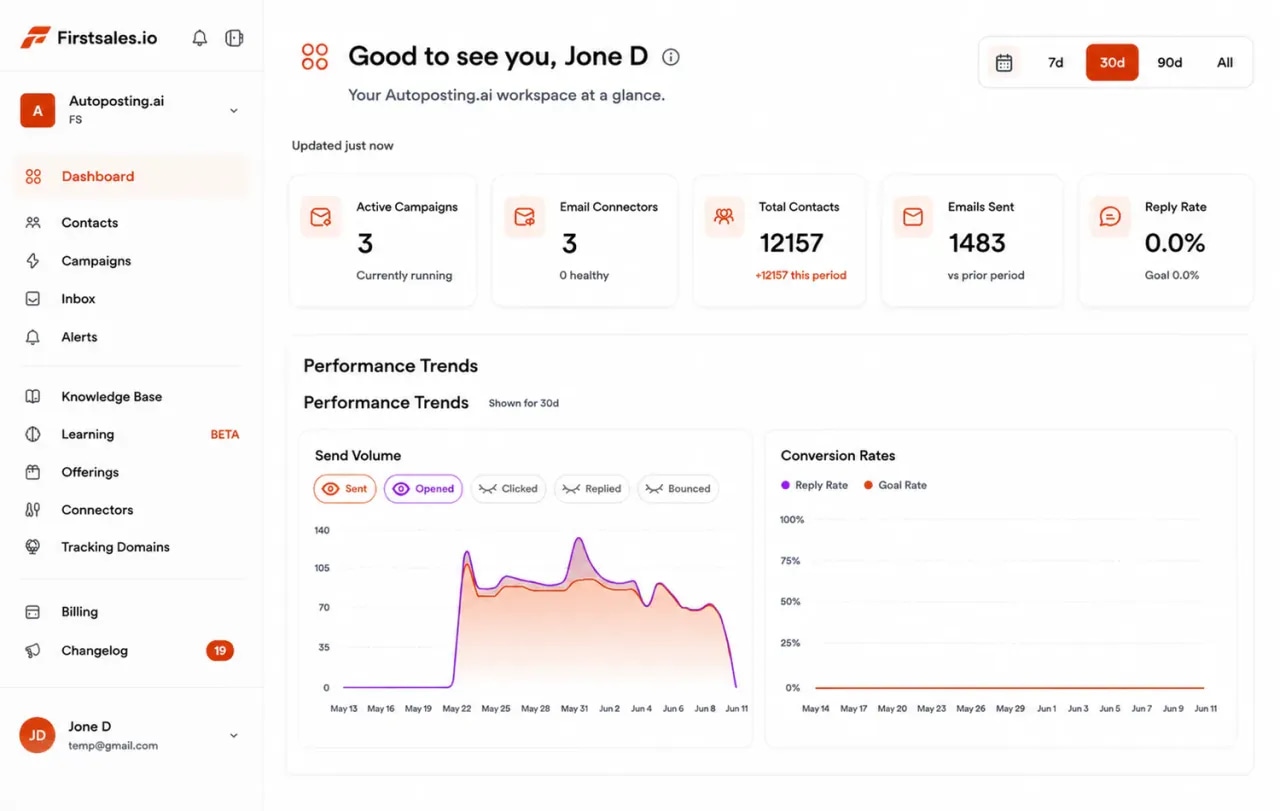
FirstSales dashboard for an IT services company: active campaigns, connected mailboxes, contacts, emails sent and a sending volume chart
  • 01

    Emails timed to new offices, hiring and other changes

  • 02

    Written from your service plans and onboarding steps

  • 03

    Unlimited mailboxes, warmed up for 21 days

  • 04

    Start for $1 for 3 days, then from $29/mo

The problem

Most IT firms grow by referral, and referrals do not scale.

Managed service providers are good at keeping clients. Finding new ones is harder, because the people who could sell are busy fixing things.

Sales stops when tickets pile up

The owner or a senior engineer does the selling. When a client has a bad week, outreach is the first thing to go.

Buyers do not speak IT

Emails about stacks, endpoints and patching lose a business owner in the first line. They want to know their staff can work.

Your domain is on the line

An IT firm that lands in spam looks careless. Sending cold email from your main domain puts client support emails at risk.

How it works

From your service plans to a discovery call, in three steps.

Set up once, then let FirstSales do the research, writing and follow-up every day.

  1. 01

    Connect your mailboxes

    Add mailboxes on a cold-email domain. SPF, DKIM and DMARC are checked and warm-up starts.

  2. 02

    Teach it your services

    Add your plans, onboarding steps and the types of business you serve. Describe the buyers you want and FirstSales builds and checks the list.

  3. 03

    Let it write, send and follow up

    Each business gets a personal email about a change they are making. Follow-ups stop on a reply, and interested buyers get your meeting link.

Timing beats volume

Businesses look for IT help at clear moments, so write when one happens.

Most small businesses do not think about their IT until something changes. These are the moments that make a cold email from an IT firm feel useful, with a sample first line for each.

  • A new office or location

    A move or a new site means networks, devices, printers and logins, all on a deadline. It is the most common reason a business calls an IT firm.

    Sample first line

    Saw you are opening a second office in the spring. Who is setting up the network before the move?

  • Fast hiring

    Every new hire needs a laptop, accounts and access on day one. When hiring speeds up, the person who does IT on the side runs out of time.

    Sample first line

    You have posted six roles this month. How long does it take to get a new hire set up today?

  • The in-house IT person leaves

    Many small firms rely on one person who knows every password. When that person leaves, the business suddenly needs outside help.

    Sample first line

    Noticed you are hiring an IT manager. Would it help to have cover while you find the right person?

  • A new client or contract asks for proof

    Larger customers often send security questionnaires. A business that cannot answer them needs help with basics like backups, access and device policies.

    Sample first line

    Many firms your size get security questionnaires from bigger clients. Is that something your team handles today?

  • Moving to the cloud

    Moving email, files or a line-of-business app is a one-time project that is easy to get wrong. A clear plan from an outside team helps.

    Sample first line

    Are you still running a server in the office, or has the move to the cloud started?

  • A contract with the current provider ends

    Many managed service contracts run for a year or more. When one comes up for renewal, the business is open to comparing options.

    Sample first line

    When does your current IT support agreement come up for renewal? Happy to share a simple comparison before then.

What you get

A steady flow of discovery calls without pulling engineers off tickets.

Everything an IT services firm needs to grow by outreach, on every plan.

  • Plain-English emails

    Each email talks about the buyer's business, not your tools. The writing profile keeps jargon out.

  • Timed to real changes

    Write when a business opens a site, hires fast or looks for an IT person, so your email arrives when it matters.

  • Follow-ups that stop on a reply

    Each follow-up adds something new and stops on any reply or opt-out, so nobody gets chased after a no.

  • Healthy mailboxes

    21-day warm-up, hourly inbox monitoring and a health grade for every mailbox, so your domain stays clean.

  • A workspace per region or vertical

    Run dental groups, law firms or each city in its own workspace. Workspaces and team members are unlimited.

  • Approve before it sends

    Read drafts in the approval queue, or switch to manual mode and send your own words.

Set up outreach for your IT firmbetween two tickets.

Four parts of the app do the work your owner or account manager would do by hand.

  1. Connect

    Connect a sending domain that proves you know email

    Add Gmail, Outlook or SMTP mailboxes on a cold-email domain. Mailboxes are unlimited, so add one for each salesperson or engineer who sells.

    • SPF, DKIM and DMARC checks. Per domain, with the exact fix if a record is missing.
    • Warm-up per mailbox. 21 days in three phases before full volume.
    • Sending rotation. Volume spread across your mailboxes.
  2. Teach

    Teach it your plans and onboarding

    Add your website, service plans, security add-ons and onboarding checklist. Describe the businesses you serve. The AI writes from these facts only.

    • Knowledge base. Your plans, steps and results in one place.
    • Offerings. Managed IT, projects and security, each with its own buyer and message.
    • Lead list from a description. Every contact checked before each send.
  3. Write

    Emails about their business, not your stack

    Each email starts with a change the buyer is going through and one question. Follow-ups share a simple checklist or a short example, never scare tactics.

    • Approval queue. Approve, edit or reject drafts before they send.
    • Manual mode. Send your own words when you prefer.
    • A/B tests. Test two subject lines and keep the winner.
  4. Reply

    Turn replies into discovery calls

    Replies land in Unibox. Interested buyers get your meeting link, and the sequence stops on any reply or opt-out.

    • Unibox. Every reply from every mailbox in one place.
    • Stops on reply or opt-out. No awkward follow-up after a no.
    • Meeting link. Interested replies get your booking link.
Who you write to

The people who buy IT services are rarely technical, so speak their language.

In a small or mid-size business, IT is usually bought by someone who runs the business, not by an engineer. These are the buyers, what they care about and the angle that gets a reply.

  • 01

    Owner or managing director

    What they care about
    Staff who can work without interruptions, and no surprise bills.
    The angle that gets a reply
    Talk about time lost to IT problems, not about tools. Offer a short call to review their setup.
  • 02

    Operations director

    What they care about
    New sites, new staff and new systems that work on day one.
    The angle that gets a reply
    Point to an operational change you can see, like a new site, and ask who is handling the IT for it.
  • 03

    Office manager

    What they care about
    Fewer calls from colleagues about printers, passwords and slow laptops.
    The angle that gets a reply
    Keep it practical. Describe how a help desk takes those calls off their plate.
  • 04

    Finance director

    What they care about
    A predictable monthly cost and a clear view of what they pay for.
    The angle that gets a reply
    Explain a flat monthly plan in plain words and offer to compare it with what they spend today.
  • 05

    Practice manager in a clinic or firm

    What they care about
    Systems that keep patients or clients moving, and records kept safe.
    The angle that gets a reply
    Mention the software they rely on every day and how you keep it running and backed up.
  • 06

    Head of IT in a growing company

    What they care about
    Extra hands for projects without hiring a full team.
    The angle that gets a reply
    Offer to support their team, not replace it. Name one project you can take off their list.
Plain-English guide

How to run cold email for an IT services firm.

What works when you sell managed IT to busy business owners, in plain words.

  1. 01

    Pick one vertical and one area at a time

    Dental groups in one city, or accounting firms in one region. A narrow list lets each email mention the software and problems that kind of business really has.

  2. 02

    Write about their week, not your tools

    Owners care about staff who can work, new hires set up on time and no surprise bills. Leave out product names and acronyms unless the buyer is technical.

  3. 03

    Use real moments as your reason to write

    A new office, a burst of hiring or a job post for an IT person gives you a natural first line. It shows you did your homework and makes a reply easy.

  4. 04

    Offer something small first

    A short IT review, a new-office checklist or a call to compare plans is easier to say yes to than a full contract. Put your offer in plain words in the knowledge base.

  5. 05

    Keep your own domain spotless

    Send from a cold-email domain with SPF, DKIM and DMARC set up, and let warm-up run for 21 days. Buyers notice when an IT firm's emails land in spam.

  6. 06

    Keep outreach running in busy weeks

    The weeks you are busiest with clients are the weeks you stop selling. Let FirstSales keep writing and following up, and check drafts in the approval queue when you have a minute.

Real pushback

What businesses tell IT firms and what to say back.

Switching IT providers feels risky to a small business. These are the doubts that come up most and a calm answer for each.

  • “We already have an IT company.”

    Good. Ask how quickly they respond today and when the agreement renews. Offer a short second opinion, with no change needed.

  • “My nephew handles our IT.”

    Respect it. Ask what happens when he is away. Offer cover for the gaps, not a full takeover.

  • “Managed IT is too expensive for us.”

    Ask what downtime costs them in a bad week. Offer a small plan that covers the basics first.

  • “Switching will be a headache.”

    Agree it can be. Describe your onboarding steps in plain words and how long each one takes.

  • “We are moving to the cloud, so we do not need IT support.”

    Explain that cloud tools still need setup, access control and backups. Offer to help plan the move.

  • “Send me a price list.”

    Send a simple range for a business their size and ask two questions so you can give a real number.

Before you send

An IT services outreach checklist

Run through it before each new campaign. FirstSales does most of it for you.

  • A cold-email domain that is not your support domain
  • SPF, DKIM and DMARC set up on that domain
  • Warm-up running for 21 days
  • Service plans, onboarding steps and add-ons in the knowledge base
  • One vertical and one area for this campaign
  • A writing profile that keeps jargon out
  • Every contact checked and Dirty contacts left out
  • A small first offer, like a short IT review
  • Your meeting link ready for interested replies
  • First drafts read and approved in the approval queue
“One of the biggest pains in cold email is making sure that you have your DNS setup correctly. Firstsales has created a system to make sure you have done this correctly.”
Mike OTrustpilot review · Trustpilot
Before and after

IT services outreach, before and after FirstSales

What changes when outreach runs every day, even in your busiest weeks.

By hand

The owner selling between tickets.

  • Outreach stops in busy weeksPipeline dries up after a hard month.
  • Emails full of jargonBusiness owners stop reading.
  • Bought lists sent as isBounces hurt your domain.
  • Follow-ups forgottenGood leads go cold.
  • Main domain at riskSupport emails start landing in spam.
  • Replies spread across inboxesInterested buyers wait.
With FirstSales

Timely outreach, every day.

  • Outreach every dayPipeline keeps building in busy weeks.
  • Plain-English emailsWritten about their business and its changes.
  • Contacts checked firstDirty contacts left out before each send.
  • Follow-ups that add valueStopped on any reply or opt-out.
  • Warm-up and monitoring21 days, then hourly checks per mailbox.
  • UniboxEvery reply in one place.
Why IT firms switch

IT services outreach: FirstSales vs a typical tool

Many tools are built to send more. FirstSales is built to send better emails at the right moment.

IT services outreach features in FirstSales and in a typical cold email tool
What you getTypical toolFirstSales
Email written for each businessVariesWritten by AI from your knowledge base
Writing profile to keep jargon outVariesIncluded
MailboxesVariesUnlimited on every plan
Workspaces per vertical or regionVariesUnlimited on every plan
21-day warm-upVariesIncluded
Contact checks before each sendVariesEvery send, no add-on
SPF, DKIM and DMARC checksVariesIncluded
Entry priceVaries$29/mo
Start your $1 trial
Good practice

An IT firm sells trust, so your outreach has to show it.

Buyers expect an IT company to get email right. These general truths keep your outreach clean and believable.

  • Your own email setup is your first proofA buyer may check your domain. Set up SPF, DKIM and DMARC on your sending domain, and FirstSales checks them for you.
  • Never scan or probe a prospect's systemsWrite about what is public, like a new office or job posts. Do not test their network or quote findings you were not asked for.
  • No scare tacticsFear-based emails about attacks hurt trust and get marked as spam. Offer something useful instead.
  • Send from a separate domainUse a cold-email domain, so the domain your clients use for support tickets stays clean.
  • Make opting out easyGive a simple way to opt out in every campaign. FirstSales stops follow-ups when someone replies or opts out.
  • Know the rules where your buyers areRules on business email differ by country and region. Check the ones that apply to you and the people you contact.

This is general information, not legal advice. FirstSales gives you tools to send with care; you decide who to contact and are responsible for following the rules where you and your contacts are.

Questions,answered plainly.

Can’t find yours? Write to us.

01Does cold email work for MSPs and IT firms?

Yes, when each email is about the buyer's business and arrives at the right moment. FirstSales writes every email from your knowledge base and the business's own situation, like a new office or fast hiring.

02Who should we write to in a small business?

Usually the owner, operations director or office manager, not a technical person. Describe them when you build your list, and FirstSales writes in plain words they understand.

03Will cold email hurt our main domain?

Send from a separate cold-email domain, not the one clients use for support. FirstSales checks SPF, DKIM and DMARC, warms up each mailbox for 21 days and monitors inbox health every hour.

04Can we run different verticals or cities separately?

Yes. Give each vertical or region its own workspace, or its own offering with its own buyer and message. Workspaces and team members are unlimited.

05Can our engineers send from their own mailboxes?

Yes. Mailboxes are unlimited on every plan. Add one for each person who sells, and replies from every mailbox land in Unibox.

06Do we have to approve every email?

You choose. Review drafts in the approval queue, switch to manual mode and send your own words, or let approved campaigns send on their own.

07How do I try it?

Start for $1 for 3 days. Connect a mailbox, add your service plans and read the first drafts. No contract: cancel any time from your dashboard.

Outreach that keeps going after you log off.Leads, emails, follow-ups and replies, handled.

Connect unlimited mailboxes and let AI agents find leads, write each email and follow up. Or send your own templates in manual mode. From $29/mo.

$1 for 3 days · Cancel anytime · No contract

Install with AI

Your coding agent sets up the FirstSales CLI and skills for you.

Prompt for Claude Code

I'm setting up FirstSales (https://firstsales.io), an AI outbound sales platform: campaigns, contacts, a reply inbox, deliverability and lead signals. Help me get my workspace sending real, good emails end to end, from Claude Code.

Read these first so you know how FirstSales works:
- Developer docs and API: https://developer.firstsales.io
- CLI: https://www.npmjs.com/package/@firstsales.io/cli
- Skills for coding agents: https://github.com/firstsalesio/firstsales-skills (read README.md and GUIDE.md)

Setup
1. Install the CLI: npm install -g @firstsales.io/cli
2. Install the FirstSales skills:
   claude plugin marketplace add firstsalesio/firstsales-skills
   claude plugin install firstsales@firstsales
3. Ask me if I already have a FirstSales account. If not, send me to https://app.firstsales.io to sign up.
4. Ask me to create an API key under Settings → API → API Keys, with only the scopes we need.
   Never ask me to paste the key into this chat. Tell me to run this in my own terminal, so the key stays hidden:
   read -rs FS_KEY && firstsales auth login --api-key "$FS_KEY"; unset FS_KEY
5. Run `firstsales whoami` and tell me which workspace and organisation we are connected to.

Then ask me about my business: what I sell, who I sell to (roles, company size, countries), my best customers, and what I use today for outbound (tools, lists, mailboxes). Walk me through:
1. Teaching FirstSales my business: website, offer, proof points and case studies in the knowledge base, so the AI writes like someone who knows the product.
2. Connecting my sending mailboxes and checking my sending domain: SPF, DKIM, DMARC and warm-up. If anything is unhealthy, tell me the exact DNS record to add.
3. Bringing in contacts: import my CSV or CRM export into a clean list, remove duplicates and bad emails, and block domains I must never email (customers, competitors, my own).
4. Building my first campaign: the right list, senders, steps and timing. Write the sequence with me, show me the drafts, and do not launch until I say yes.
5. Setting up Signals if it fits: find people engaging with LinkedIn posts about topics my buyers care about, and turn them into leads.
6. Inviting my team and giving each person the right access.

Once campaigns run, show me how to work the reply inbox from here: which replies need an answer, draft responses in my voice, and move good conversations into deals. If I use Cal.com, connect it so follow-ups can offer my booking link (not the first email).

Throughout, as you learn about my business, proactively suggest and help create:
- Reply templates for the questions and objections my prospects are likely to raise, based on my product, site and codebase if you can see them.
- Campaign ideas and segments worth testing, with the reason for each.

Safety rules:
- Show every change as a dry run (--dry-run) first and wait for my yes. Never send emails, launch campaigns or delete anything without my yes.
- Tell me before anything that spends credits, and how many.

Be opinionated. If the docs give a sensible default, just use it. Don't make me choose between five options.