Skip to content
NewSee how

Industries · Cybersecurity

Cold email for cybersecurity companies: reach security leaders with emails that earn trust, not fear.

FirstSales finds the security leaders who fit your product, writes each one a calm, specific email from your own facts and follows up until they reply. Every email leaves from an authenticated domain, because security buyers check.

$1 for 3 days · Cancel anytime · No contract
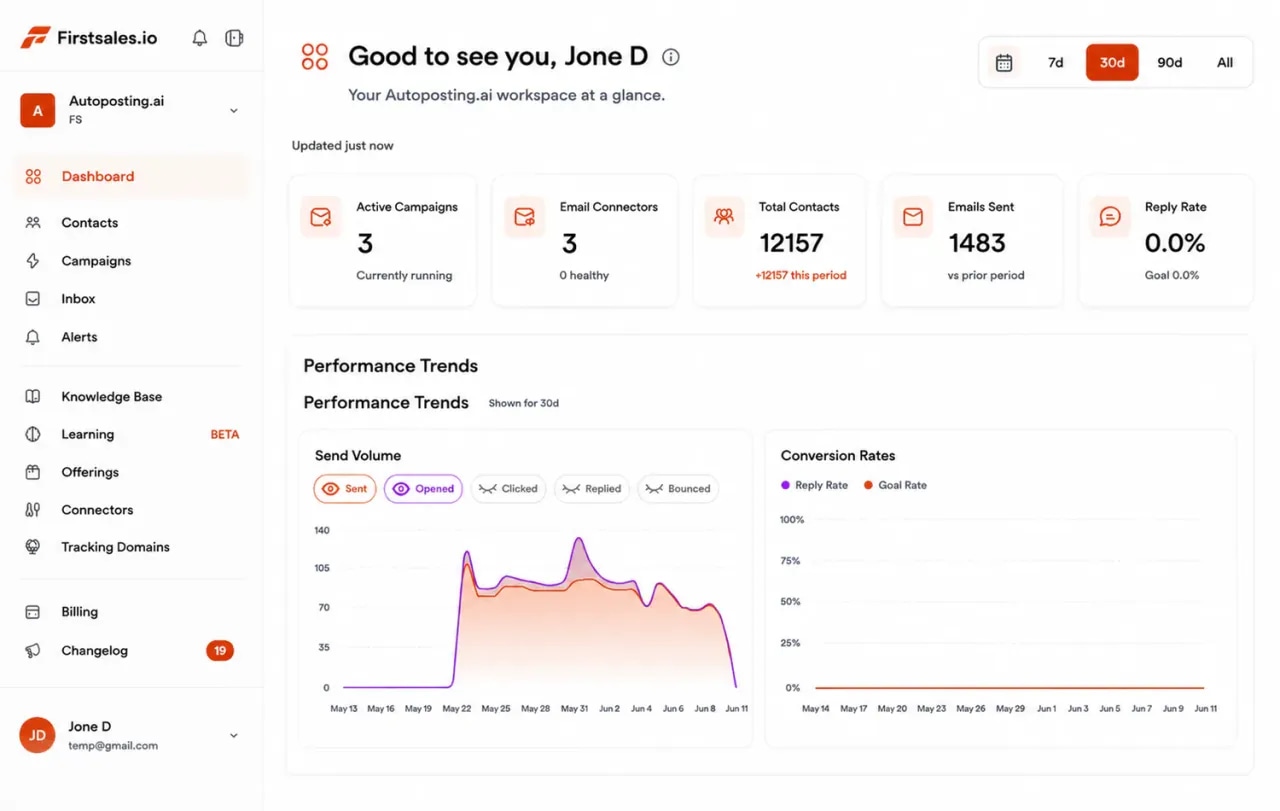
FirstSales dashboard for a cybersecurity company: active campaigns, connected mailboxes, contacts, emails sent and a sending volume chart
  • 01

    Written from your product facts, never from breach headlines

  • 02

    SPF, DKIM and DMARC checked on every sending domain

  • 03

    Unlimited mailboxes, with a 21-day warm-up

  • 04

    Start for $1 for 3 days, then from $29/mo

The problem

Security leaders get more vendor email than anyone, and most of it sounds the same.

A security buyer's inbox is full of the same warnings and big promises. To get a reply, your email has to be calm, specific and from a sender they can trust.

Fear stopped working long ago

Breach headlines and scary numbers are what every vendor sends. Security leaders delete them on sight, and spam filters learn to catch them.

Buyers check the sender first

A security vendor with a broken SPF, DKIM or DMARC record looks careless. Many buyers will not read past that.

Long cycles, forgotten follow-ups

Security deals take time and many people. Reps forget to follow up, and good conversations go cold between steps.

How it works

From your product facts to a first technical call, in three steps.

Set it up once, then let FirstSales research, write and follow up every day.

  1. 01

    Connect authenticated mailboxes

    Add mailboxes on a cold email domain. SPF, DKIM and DMARC are checked and warm-up starts.

  2. 02

    Teach it your product

    Add your product overview, integrations and real customer results. Describe the security teams you want and FirstSales builds and checks the list.

  3. 03

    Let it write, send and follow up

    Each leader gets a calm email about a change at their company. Follow-ups stop on a reply, and interested buyers get your meeting link.

What you get

Outreach that security leaders actually read and answer.

Everything a security company needs to run careful outreach, on every plan.

  • Grounded in your facts

    The AI writes only from your knowledge base, so every claim is one you made. No invented results.

  • A clean sender record

    SPF, DKIM and DMARC checks on every domain, so the sender a buyer checks looks right.

  • Calm, specific emails

    The writing profile keeps out scare tactics and buzzwords. Each email names one real change and asks one question.

  • Follow-ups for long cycles

    Each follow-up adds something new, and the sequence stops on any reply or opt-out.

  • A workspace per product or market

    Run each product line or region in its own workspace. Unlimited workspaces and team members.

  • Review before you send

    Read drafts in the approval queue, or switch to manual mode for your most important accounts.

A sequence without fear

Security buyers ignore scare tactics, so each email should earn the next one.

Security leaders get more vendor email than almost anyone. A calm sequence that gives something useful at every step stands out. FirstSales writes each step for each contact and stops the moment they reply.

  1. Email 1 · Day 1

    Name a change at their company and ask one honest question. No breach headlines.

    Saw you added three depots this year. Did the alert volume grow with them, or the team?

  2. Email 2 · Day 3

    Share one plain result from similar work. No client name unless you have permission.

    A freight team of a similar size cut the alerts they triage by hand. The first fix was tuning, not tools.

  3. Email 3 · Day 8

    Give something they can use today, even if they never buy.

    Here is the one-page triage checklist we share with new customers. Free to use.

  4. Email 4 · Day 15

    Close the loop politely and make it easy to say not now.

    I will stop here. If alert load becomes a priority, reply and I will send times.

Set up outreach for a security companythe careful way.

Four parts of the app do the work your SDR team would do by hand.

  1. Connect

    Send from domains that pass a buyer's check

    Add Gmail, Outlook or SMTP mailboxes on a cold email domain. Mailboxes are unlimited, so spread volume across as many as you need.

    • SPF, DKIM and DMARC check. Per domain, with the exact fix if a record is missing.
    • Warm-up per mailbox. 21 days in three phases before full volume.
    • Health grade. Each mailbox gets a grade, and hourly inbox monitoring.
  2. Teach

    Teach it what your product really does

    Add your product overview, integrations, whitepapers and real results. Describe the teams you sell to. The AI writes only from these facts.

    • Knowledge base. Your product, integrations and results in one place.
    • Offerings. Each product or service with its own buyer and message.
    • Lead list from a description. Every contact checked before each send.
  3. Write

    Emails that sound like an expert, not an alarm

    Each email opens with a real change at the buyer's company and one question. Follow-ups share a checklist or a short result, never a breach headline.

    • Writing profile. Keeps your tone calm and your words plain.
    • Approval queue. Approve, edit or reject drafts before they send.
    • A/B tests. Test two subject lines and keep the winner.
  4. Reply

    Turn replies into technical calls

    Replies land in Unibox. Interested buyers get your meeting link, and the sequence stops on any reply or opt-out.

    • Unibox. Every reply from every mailbox in one inbox.
    • Stops on reply or opt-out. No awkward follow-up after a no.
    • Meeting link. Interested replies get your booking link.
Who you write to

Security is bought by a committee, and each member needs a different reason to reply.

A security deal often involves a technical leader, a business owner and someone who signs. These are the people you write to, what they care about and the angle that earns a reply.

  • 01

    CISO or head of security

    What they care about
    Less risk with the team they have, and fewer tools to look after.
    The angle that gets a reply
    Be specific and calm. Name one problem teams like theirs face, and ask if it matches.
  • 02

    Security operations lead

    What they care about
    Fewer noisy alerts and less manual triage for a small team.
    The angle that gets a reply
    Talk about the work: alert volume, on-call load and time to triage. Offer a short look at how you help.
  • 03

    CTO or VP of engineering

    What they care about
    Security that does not slow down releases or add friction for developers.
    The angle that gets a reply
    Show how your product fits into the tools they already use, in plain words.
  • 04

    IT director

    What they care about
    Clear setup, simple upkeep and good support when something breaks.
    The angle that gets a reply
    Describe your setup steps and how long they take. Practical beats clever.
  • 05

    Compliance or risk manager

    What they care about
    Evidence for audits and customer security questions, without a scramble.
    The angle that gets a reply
    Explain how your product helps them answer audit and customer questions. Never promise certification.
  • 06

    CFO or finance lead

    What they care about
    A clear price, a clear scope and no surprise renewals.
    The angle that gets a reply
    Keep it short. Give a price range and the outcome they pay for, in plain words.
Plain guide

How to cold email security leaders.

What works when you sell security to people who are paid to be careful.

  1. 01

    Lead with a real change, not a threat

    Growth, a new office, a cloud move or a new compliance need are good reasons to write. They show you looked at the company, and they do not try to scare anyone.

  2. 02

    Write to one problem per email

    Pick one problem your product solves well, like noisy alerts or slow access reviews. A narrow email is easier to answer than a list of features.

  3. 03

    Use proof you can back up

    Share a short result from real work, without a client name unless you have permission. Put only true facts in the knowledge base, because the AI writes from them.

  4. 04

    Keep your own house in order

    Send from a cold email domain with SPF, DKIM and DMARC, and let warm-up run for 21 days. Security buyers notice a careless sender.

  5. 05

    Plan for a long cycle

    Security deals involve several people and take time. Write to each role with its own angle, and keep follow-ups useful instead of pushy.

  6. 06

    Offer a small first step

    A short technical call, a trial or a review of one area is easier to say yes to than a full demo. Put that first step in plain words in your offering.

Before you send

Cybersecurity outreach checklist

Run through this before each new campaign. FirstSales handles most of it for you.

  • A cold email domain that is not your main domain
  • SPF, DKIM and DMARC set up on every sending domain
  • Warm-up running for 21 days
  • Product facts, integrations and real results in the knowledge base
  • No breach headlines or scare tactics in the writing profile
  • One problem and one buyer role per campaign
  • Every contact checked and Dirty contacts left out
  • A small first step, like a short technical call
  • Your meeting link ready for interested replies
  • First drafts read and approved in the approval queue
Real objections

What security buyers say to vendors and how to answer.

Security leaders are careful by trade. These are the doubts you will hear most, and a calm answer for each one.

  • “We already have a tool for that.”

    Ask what still takes the team the most time. Offer to show how you fit beside what they have, not replace it.

  • “Every vendor says they stop everything.”

    Agree, and do not say it. Share one narrow, real result and offer a trial or a technical call.

  • “We have no budget this year.”

    Ask when planning starts for next year. Offer something useful now so you are remembered then.

  • “How did you get my email?”

    Answer plainly: from public company information, for a work-related reason. Offer to remove them at once.

  • “Send me your security documents first.”

    Good sign. Share what you can, and offer a call with someone who can answer technical questions.

  • “Our team is too busy for a new project.”

    Respect it. Ask what a smaller first step would look like, like a short review of one area.

“His honest and insightful feedback helped us transform @synchrowork when we started on LTD to what we are building now.”
Sushant Kumar@sushantkr49 · X
Before and after

Cybersecurity outreach, before and after FirstSales

What changes when your outreach is calm, specific and sent from a clean domain.

The usual way

Scary emails at volume.

  • Breach headlines in every emailBuyers delete them on sight.
  • Broken sender recordsThe vendor looks careless.
  • Feature lists, no focusNothing to reply to.
  • Follow-ups forgottenLong deals go cold.
  • Bought lists sent uncheckedBounces hurt the domain.
  • Replies spread across inboxesInterested buyers wait.
With FirstSales

Careful outreach, every day.

  • One real change, one questionEasy for a buyer to answer.
  • SPF, DKIM and DMARC checkedThe sender passes a buyer's check.
  • Written from your factsNo invented claims.
  • Useful follow-upsStopped on any reply or opt-out.
  • Contacts checked firstDirty contacts left out before each send.
  • UniboxEvery reply in one inbox.
Good practice

A security vendor is judged on its own hygiene, so your outreach has to be clean.

Security buyers often check the sender before they read the email. These general principles keep your outreach credible.

  • Authenticate every sending domainSet up SPF, DKIM and DMARC on each sending domain. FirstSales checks them and shows the exact fix when a record is missing.
  • Never scan or test a prospectDo not probe a prospect's systems or quote findings no one asked for. Write about public facts, like growth or a new office.
  • No fear, no fake urgencyBreach headlines and scare tactics hurt trust and often land in spam. Lead with a useful idea instead.
  • No claims you cannot back upKeep the knowledge base to real facts about your product. The AI writes only from what you add, so keep it accurate.
  • Make opting out easyGive a simple way to opt out in every campaign. FirstSales stops follow-ups when someone replies or opts out.
  • Know the rules where your buyers areRules for business email differ by country and region. Check the rules that apply to you and the people you contact.

This is general information, not legal advice. FirstSales gives you tools to send with care; you decide who to contact and are responsible for following the rules where you and your contacts are.

Why security teams switch

Cybersecurity outreach: FirstSales vs a typical tool

Many tools are built to send more. FirstSales is built to send fewer, better emails from a sender buyers trust.

Outreach features for cybersecurity companies in FirstSales and a typical cold email tool
What you getTypical toolFirstSales
Emails written from your own factsVariesAI writes only from your knowledge base
Writing profile that keeps out scare tacticsVariesIncluded
SPF, DKIM and DMARC checkVariesIncluded, per domain
MailboxesVariesUnlimited on every plan
21-day warm-upVariesIncluded
Contact check before each sendVariesEvery send, no add-on
Approval queue and manual modeVariesIncluded
Entry priceVaries$29/mo
Start your $1 trial

Questions,answered plainly.

Can’t find yours? Write to us.

01Does cold email work for cybersecurity companies?

Yes, when emails are calm, specific and sent from a clean domain. FirstSales writes each email from your product facts and a real change at the buyer's company, and never uses scare tactics.

02Who should we email at a target company?

Usually the CISO or head of security, plus the security operations lead, the CTO or the IT director. Each role gets its own angle. Describe them when you build your list.

03Will security buyers check our sending domain?

Many do. FirstSales checks SPF, DKIM and DMARC on every sending domain, warms each mailbox for 21 days and gives it a health grade with hourly inbox monitoring.

04Can the AI make up claims about our product?

The AI writes only from what you put in the knowledge base. Add real facts and real results, and read drafts in the approval queue before they send.

05How many follow-ups should we send?

Three or four over two to three weeks works for most teams. Each one should add something new. FirstSales stops the sequence on any reply or opt-out.

06Can we run different products separately?

Yes. Give each product line or region its own workspace, or its own offering with its own buyer and message. Unlimited workspaces and team members.

07How do I try it?

Start for $1 for 3 days. Connect a mailbox, add your product facts and read the first drafts. No contract: cancel any time from your dashboard.

Outreach that keeps going after you log off.Leads, emails, follow-ups and replies, handled.

Connect unlimited mailboxes and let AI agents find leads, write each email and follow up. Or send your own templates in manual mode. From $29/mo.

$1 for 3 days · Cancel anytime · No contract

Install with AI

Your coding agent sets up the FirstSales CLI and skills for you.

Prompt for Claude Code

I'm setting up FirstSales (https://firstsales.io), an AI outbound sales platform: campaigns, contacts, a reply inbox, deliverability and lead signals. Help me get my workspace sending real, good emails end to end, from Claude Code.

Read these first so you know how FirstSales works:
- Developer docs and API: https://developer.firstsales.io
- CLI: https://www.npmjs.com/package/@firstsales.io/cli
- Skills for coding agents: https://github.com/firstsalesio/firstsales-skills (read README.md and GUIDE.md)

Setup
1. Install the CLI: npm install -g @firstsales.io/cli
2. Install the FirstSales skills:
   claude plugin marketplace add firstsalesio/firstsales-skills
   claude plugin install firstsales@firstsales
3. Ask me if I already have a FirstSales account. If not, send me to https://app.firstsales.io to sign up.
4. Ask me to create an API key under Settings → API → API Keys, with only the scopes we need.
   Never ask me to paste the key into this chat. Tell me to run this in my own terminal, so the key stays hidden:
   read -rs FS_KEY && firstsales auth login --api-key "$FS_KEY"; unset FS_KEY
5. Run `firstsales whoami` and tell me which workspace and organisation we are connected to.

Then ask me about my business: what I sell, who I sell to (roles, company size, countries), my best customers, and what I use today for outbound (tools, lists, mailboxes). Walk me through:
1. Teaching FirstSales my business: website, offer, proof points and case studies in the knowledge base, so the AI writes like someone who knows the product.
2. Connecting my sending mailboxes and checking my sending domain: SPF, DKIM, DMARC and warm-up. If anything is unhealthy, tell me the exact DNS record to add.
3. Bringing in contacts: import my CSV or CRM export into a clean list, remove duplicates and bad emails, and block domains I must never email (customers, competitors, my own).
4. Building my first campaign: the right list, senders, steps and timing. Write the sequence with me, show me the drafts, and do not launch until I say yes.
5. Setting up Signals if it fits: find people engaging with LinkedIn posts about topics my buyers care about, and turn them into leads.
6. Inviting my team and giving each person the right access.

Once campaigns run, show me how to work the reply inbox from here: which replies need an answer, draft responses in my voice, and move good conversations into deals. If I use Cal.com, connect it so follow-ups can offer my booking link (not the first email).

Throughout, as you learn about my business, proactively suggest and help create:
- Reply templates for the questions and objections my prospects are likely to raise, based on my product, site and codebase if you can see them.
- Campaign ideas and segments worth testing, with the reason for each.

Safety rules:
- Show every change as a dry run (--dry-run) first and wait for my yes. Never send emails, launch campaigns or delete anything without my yes.
- Tell me before anything that spends credits, and how many.

Be opinionated. If the docs give a sensible default, just use it. Don't make me choose between five options.