Skip to content
NewSee how

Industries · Healthcare

Healthcare cold email software that reaches practice managers and health systems with emails about their organization, never their patients.

FirstSales finds clinics, practices and health systems that fit your offer, spots something real like a new location or a new service line, and writes each one a short email about it. It follows up until they reply, then stops, so the conversation reaches your team.

$1 for 3 days · Cancel anytime · No contract
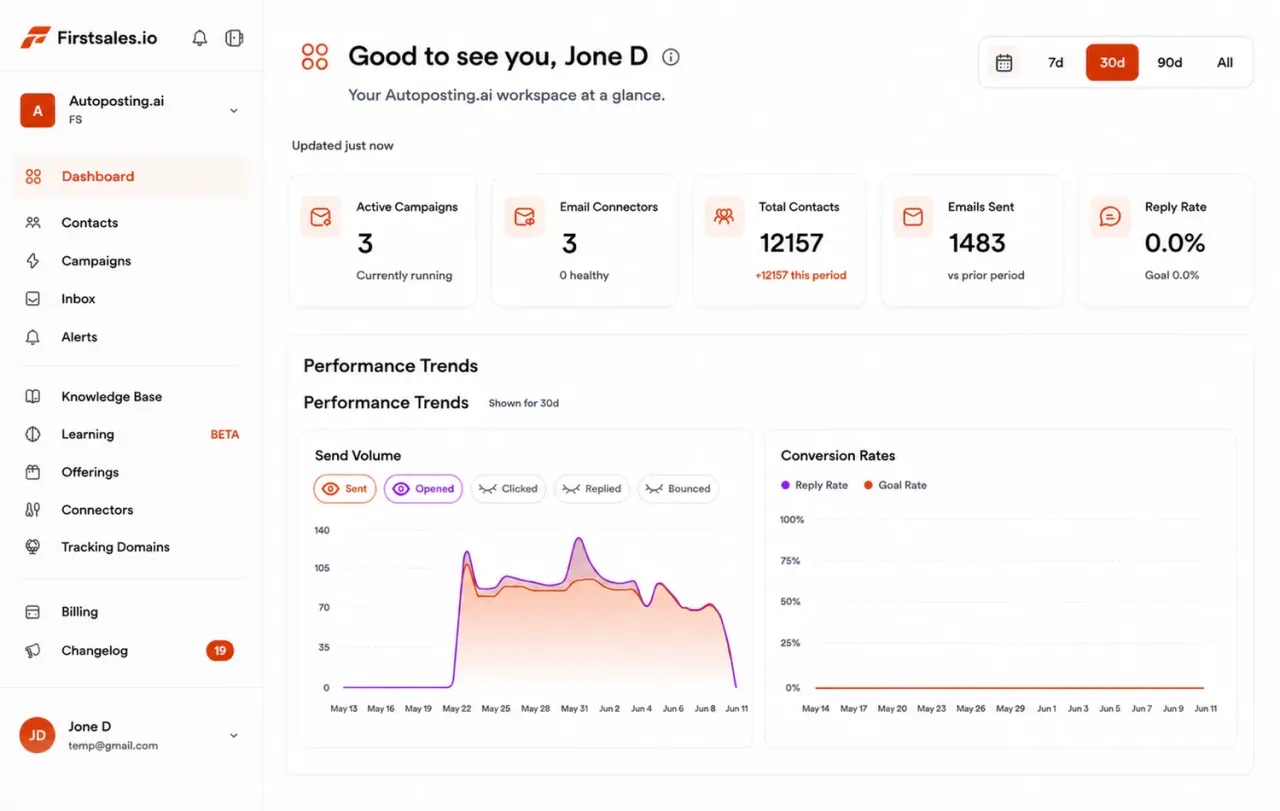
FirstSales dashboard for a healthcare vendor: active campaigns, connected mailboxes, contacts, emails sent and a sending volume chart
  • 01

    Written only from the solution, specialties and proof you add to the knowledge base

  • 02

    Separate campaigns for practices and health systems

  • 03

    Unlimited mailboxes, with a 21-day warm-up

  • 04

    Start for $1 for 3 days, then from $29/mo

The problem

Selling to healthcare is slow, and most vendor email never gets read.

Clinic staff are busy with patients, and health systems have long reviews. Vendors who win write to the right people at the right time, with a short reason to talk, and keep showing up until the timing is right.

Inboxes full of vendors

A practice manager hears from software, staffing and supply vendors every day. A generic note that could go to any clinic gets deleted.

Many people, one decision

A manager may love your offer, but IT, security and procurement still need to say yes. One email to one person rarely moves the deal.

Privacy makes people careful

Providers are wary of anyone who might touch patient data. A pitch that sounds careless about privacy ends the conversation.

How it works

From your offer to a booked demo, in three steps.

Set it up once, review as much as you like, and let FirstSales research, write and follow up.

  1. 01

    Connect a separate domain

    Add mailboxes on a cold email domain, not the one your customers use for support and billing. SPF, DKIM and DMARC are checked and the warm-up starts.

  2. 02

    Teach it your offer

    Add your solution, the specialties you serve, case studies and the certifications you hold. Describe the organizations you want and FirstSales builds the list.

  3. 03

    Send, follow up and book

    Each email names something real about the organization. Follow-ups stop on a reply, and interested contacts get your meeting link.

Two kinds of buyer

A small practice and a health system buy in different ways, so give each its own campaign.

An independent clinic can say yes in one meeting. A hospital or health system brings in IT, security and a buying committee. FirstSales runs each as its own campaign, with its own list, offer and voice.

Independent practices and clinics

Outreach to owners and managers who run the whole office and decide fast.

  • Write to practice managers, office managers and owner-physicians
  • Lead with a new location, a new provider or a busy front desk
  • Keep it short and practical: less admin, more time for patients
  • Offer a short walkthrough, not a long evaluation

Hospitals and health systems

Outreach that opens a door into a longer, multi-person buying process.

  • Write to department heads, operations leads and IT or security leads
  • Lead with a new facility, a new program or a public initiative
  • Have your security and privacy answers ready in the knowledge base
  • Offer a short intro call that maps who else needs to be involved
What you get

Outreach that sounds like someone who understands how a clinic runs.

Everything a healthcare vendor needs for steady outreach to practices and health systems, on every plan.

  • Only your real offer

    The AI writes only from your knowledge base, so it never claims a feature, a certification or a result you do not have.

  • A real reason to write

    Each email opens with something true about the organization, like a new location, a new provider or a new service line.

  • One campaign per buyer type

    Run practices, specialty groups and health systems as separate campaigns, each with its own list, offer and voice.

  • Clean lists

    Every contact is checked before each send, and Dirty contacts are left out to protect your domain.

  • Follow-ups that stop on reply

    Spaced follow-ups that end the moment someone replies or opts out, so no busy manager is chased after a no.

  • A workspace per product or region

    Run each product line, region or rep in its own workspace. Unlimited workspaces and team members.

Set up healthcare outreachthat keeps going while your team runs demos.

Four parts of the app do the work a rep and a research assistant would do by hand.

  1. Connect

    Send from a separate, trusted domain

    Add Gmail, Outlook or SMTP mailboxes on a cold email domain, so support and billing mail stays safe. Mailboxes are unlimited, so spread volume across as many as you need with sending rotation.

    • SPF, DKIM and DMARC checks. Per domain, with the exact fix when a record is missing.
    • 21-day warm-up. Three phases before full volume.
    • Health grade. Each mailbox gets a grade and hourly monitoring.
  2. Teach

    Teach it your solution and proof

    Add what you sell, the specialties and settings you serve, case studies you can share and the certifications you hold. The AI writes only from what you add, so every detail matches what your product really does.

    • Knowledge base. Solution, specialties and proof in one place.
    • Offerings. One offer per product or buyer type, each with its own message.
    • Lead list from a description. Every contact checked before each send.
  3. Write

    Emails about their organization, not your brochure

    Each email opens with something true about the practice or health system, like a new location or a new program, and asks one simple question. No blasts, no hype, no patient details.

    • Writing profile. Keeps your tone calm, short and plain.
    • Approval queue. Approve, edit or reject drafts before they send.
    • A/B tests. Test two openers and keep the one managers reply to.
  4. Reply

    Turn replies into booked demos

    Replies land in Unibox. Interested contacts get your meeting link, and the sequence stops on any reply or opt-out, so the conversation reaches your team.

    • Unibox. Every reply from every mailbox in one inbox.
    • Stop on reply or opt-out. No follow-up after a no.
    • Meeting link. Interested replies get your booking link.
Who you write to

In healthcare, the person who feels the problem is rarely the only one who signs.

Whether you sell software, services, staffing or supplies to providers, the yes usually needs more than one person. These are the people you will meet, what they care about and the angle that earns a reply.

  • 01

    Practice or office manager

    What they care about
    A front desk that keeps up, fewer missed calls and less paperwork for the team.
    The angle that earns a reply
    Name one admin task you take off their plate and ask how they handle it today.
  • 02

    Owner-physician or medical director

    What they care about
    More time with patients and a practice that runs well without them in every detail.
    The angle that earns a reply
    Keep it short and tie your offer to time saved for providers, not features.
  • 03

    Revenue cycle or billing lead

    What they care about
    Clean claims, fewer denials and cash that comes in on time.
    The angle that earns a reply
    Ask how they handle one step in the billing process you help with.
  • 04

    Operations or department head

    What they care about
    Smooth patient flow, staff who are not stretched thin and steady service across sites.
    The angle that earns a reply
    Lead with a new site, program or service line and ask what is hardest to scale.
  • 05

    IT or security lead

    What they care about
    Tools that fit their systems and protect patient data, with clear answers on both.
    The angle that earns a reply
    Offer your security and privacy details up front, before they have to ask.
  • 06

    Procurement or supply chain lead

    What they care about
    Fair pricing, clear terms and vendors who pass their review without delay.
    The angle that earns a reply
    Say plainly what you sell, how it is priced and what their review will need.
Plain guide

How to cold email practices, clinics and health systems.

What works when you write to busy people who care for patients and guard their data.

  1. 01

    Open with their organization

    Name a new location, a new provider or a new service line. One true detail beats a long list of features.

  2. 02

    Talk about time, not technology

    Staff want fewer clicks and less admin. Say what your offer takes off their plate in plain words.

  3. 03

    Keep patients out of it

    Write about the business only. Never mention patients, conditions or anything that looks like health data.

  4. 04

    Have privacy answers ready

    Expect questions on security and privacy. Keep true, current answers in your knowledge base and share them early.

  5. 05

    Ask for a small next step

    A short walkthrough is easier to say yes to than a full evaluation. Make the first step small.

  6. 06

    Use a separate domain

    Keep cold outreach off the domain your customers use for support and billing, so that mail stays safe.

Send with care

Healthcare has strict privacy rules, so keep outreach about the business, never about patients.

Cold email to a clinic or health system is business-to-business outreach. Patient privacy laws, such as HIPAA in the United States, cover patient health information. These general principles keep your outreach on the right side of that line.

  • Never use patient informationDo not put patient names, conditions or any health details in an email, a lead list or your knowledge base. Write about the organization, not the people it treats.
  • Write to business contactsWrite to staff in their work role at a practice, clinic or health system. Do not write to patients or use personal health data to build a list.
  • Only claim what you holdSay a product is HIPAA compliant, certified or secure only if that is true today. Keep these details current in your knowledge base so the AI never overstates them.
  • Keep clinical claims carefulDo not promise health outcomes. Describe what your product or service does, and name a past customer only with their permission.
  • Say who you are and make leaving easyUse your real company name and reply address, and give a clear way to opt out. In FirstSales, follow-ups stop when someone replies or opts out.

This is general information, not legal advice. FirstSales gives you tools to send with care; you choose who to contact and are responsible for following the privacy and email rules that apply to you and your contacts. Speak to a qualified advisor about your own situation.

“I've been using FirstSales.io for several months now, and I can confidently say it has revolutionized how I approach lead generation and customer acquisition.”
Paweł StelmachSmall business owner · Trustpilot
Real objections

What providers say to a healthcare cold email and what to say back.

Clinics and health systems get a steady stream of vendor email, and their teams are short on time. These are the objections you will hear most, with a calm reply for each.

  • “We are too busy with patients to look at this.”

    Agree, and ask for one small step, like a short walkthrough at a time that suits their schedule.

  • “We already have a system for that.”

    Ask what they like about it and what still takes too long. Offer to show only the part that covers that gap.

  • “Is this HIPAA compliant?”

    Answer only with what is true for your product today, and offer your security and privacy documents.

  • “Our IT team has to review any new vendor.”

    Thank them and ask who to send your security details to. Make the review as easy as you can.

  • “Send me some information.”

    Send one short page that fits their practice type, then ask a single question to keep the thread going.

  • “How did you get my email?”

    Say plainly that you found their organization through public sources, and offer to remove them from your list.

Before and after

Healthcare outreach, before and after FirstSales

What changes when every email reads like it came from someone who knows the practice.

The usual way

Trade shows, cold calls and the same vendor email to every clinic.

  • The same pitch to every clinicManagers can tell it went to everyone.
  • Feature lists up frontBusy staff stop reading.
  • One email, then silenceForgotten before the next budget cycle.
  • Practices and systems on one listNothing fits either buyer.
  • Bought lists left uncheckedBounces hurt the domain.
  • Replies scattered across inboxesInterested managers go unanswered.
With FirstSales

Outreach one organization at a time.

  • A real detail about their organizationA reason to reply.
  • Plain words about time savedEasy to read between patients.
  • Follow-ups until they replyStopped on any reply or opt-out.
  • One buyer type per campaignEach email fits its reader.
  • Contacts checked firstDirty contacts out before each send.
  • UniboxEvery reply in one inbox.
Why healthcare vendors switch

Healthcare outreach: FirstSales vs. a typical tool

Many tools send one template to a list. FirstSales writes each email from your offer and something real about the organization.

Outreach features for healthcare vendors in FirstSales and a typical cold email tool
What you getTypical toolFirstSales
Emails written only from your offerVariesAI writes only from your knowledge base
Opens with a real detail about the organizationVariesBuilt in
Separate campaigns for practices and systemsVariesUnlimited workspaces
SPF, DKIM and DMARC checksVariesBuilt in, per domain
MailboxesVariesUnlimited on every plan
21-day warm-upVariesBuilt in
Contact checks before each sendVariesEvery send, no add-on
Starting priceVaries$29/mo
Start your $1 trial
Before you send

Healthcare outreach checklist

Run through it before each new campaign. FirstSales handles most of it for you.

  • A cold email domain that is not your main company domain
  • SPF, DKIM and DMARC set up on every sending domain
  • Warm-up running for 21 days
  • Solution, specialties and case studies in the knowledge base
  • Only the certifications and security claims that are true today
  • No patient names, conditions or health data anywhere in the campaign
  • Every contact checked and Dirty contacts left out
  • One buyer type per campaign: practices or health systems
  • Drafts reviewed in the approval queue
  • One clear next step, like a short walkthrough

Questions,answered plainly.

Can’t find yours? Write to us.

01Does cold email work for selling to healthcare?

Yes, when each email is about the organization, names something real and asks for a small step, like a short walkthrough. FirstSales writes only from the offer and proof you add, and follows up until the contact replies.

02Is it okay to cold email clinics and hospitals?

Business-to-business email to staff in their work role is common, but the rules differ by country. Keep every email honest, make opting out easy and check the rules where you send. This is general information, not legal advice.

03Does FirstSales handle patient health information?

Your outreach should never include it. Write about the organization only, and keep patient names, conditions and health details out of your emails, lead lists and knowledge base.

04Will it claim we are HIPAA compliant?

Only if your knowledge base says so. The AI writes only from what you add, so list only the certifications and security details that are true today, and review drafts in the approval queue.

05Who should a healthcare vendor write to?

At practices, usually managers and owner-physicians. At health systems, department heads, operations leads, and IT or security leads. Run each buyer type as its own campaign.

06How do we protect the domain our customers use?

Send from a separate cold email domain. FirstSales checks SPF, DKIM and DMARC, warms each mailbox for 21 days in three phases and gives it a health grade with hourly monitoring.

07How do I try it?

Start for $1 for 3 days. Connect a mailbox, add your offer and proof, and read the first drafts in manual mode. No contract: cancel any time from your dashboard.

Outreach that keeps going after you log off.Leads, emails, follow-ups and replies, handled.

Connect unlimited mailboxes and let AI agents find leads, write each email and follow up. Or send your own templates in manual mode. From $29/mo.

$1 for 3 days · Cancel anytime · No contract

Install with AI

Your coding agent sets up the FirstSales CLI and skills for you.

Prompt for Claude Code

I'm setting up FirstSales (https://firstsales.io), an AI outbound sales platform: campaigns, contacts, a reply inbox, deliverability and lead signals. Help me get my workspace sending real, good emails end to end, from Claude Code.

Read these first so you know how FirstSales works:
- Developer docs and API: https://developer.firstsales.io
- CLI: https://www.npmjs.com/package/@firstsales.io/cli
- Skills for coding agents: https://github.com/firstsalesio/firstsales-skills (read README.md and GUIDE.md)

Setup
1. Install the CLI: npm install -g @firstsales.io/cli
2. Install the FirstSales skills:
   claude plugin marketplace add firstsalesio/firstsales-skills
   claude plugin install firstsales@firstsales
3. Ask me if I already have a FirstSales account. If not, send me to https://app.firstsales.io to sign up.
4. Ask me to create an API key under Settings → API → API Keys, with only the scopes we need.
   Never ask me to paste the key into this chat. Tell me to run this in my own terminal, so the key stays hidden:
   read -rs FS_KEY && firstsales auth login --api-key "$FS_KEY"; unset FS_KEY
5. Run `firstsales whoami` and tell me which workspace and organisation we are connected to.

Then ask me about my business: what I sell, who I sell to (roles, company size, countries), my best customers, and what I use today for outbound (tools, lists, mailboxes). Walk me through:
1. Teaching FirstSales my business: website, offer, proof points and case studies in the knowledge base, so the AI writes like someone who knows the product.
2. Connecting my sending mailboxes and checking my sending domain: SPF, DKIM, DMARC and warm-up. If anything is unhealthy, tell me the exact DNS record to add.
3. Bringing in contacts: import my CSV or CRM export into a clean list, remove duplicates and bad emails, and block domains I must never email (customers, competitors, my own).
4. Building my first campaign: the right list, senders, steps and timing. Write the sequence with me, show me the drafts, and do not launch until I say yes.
5. Setting up Signals if it fits: find people engaging with LinkedIn posts about topics my buyers care about, and turn them into leads.
6. Inviting my team and giving each person the right access.

Once campaigns run, show me how to work the reply inbox from here: which replies need an answer, draft responses in my voice, and move good conversations into deals. If I use Cal.com, connect it so follow-ups can offer my booking link (not the first email).

Throughout, as you learn about my business, proactively suggest and help create:
- Reply templates for the questions and objections my prospects are likely to raise, based on my product, site and codebase if you can see them.
- Campaign ideas and segments worth testing, with the reason for each.

Safety rules:
- Show every change as a dry run (--dry-run) first and wait for my yes. Never send emails, launch campaigns or delete anything without my yes.
- Tell me before anything that spends credits, and how many.

Be opinionated. If the docs give a sensible default, just use it. Don't make me choose between five options.