Integrations live on the Connectors page
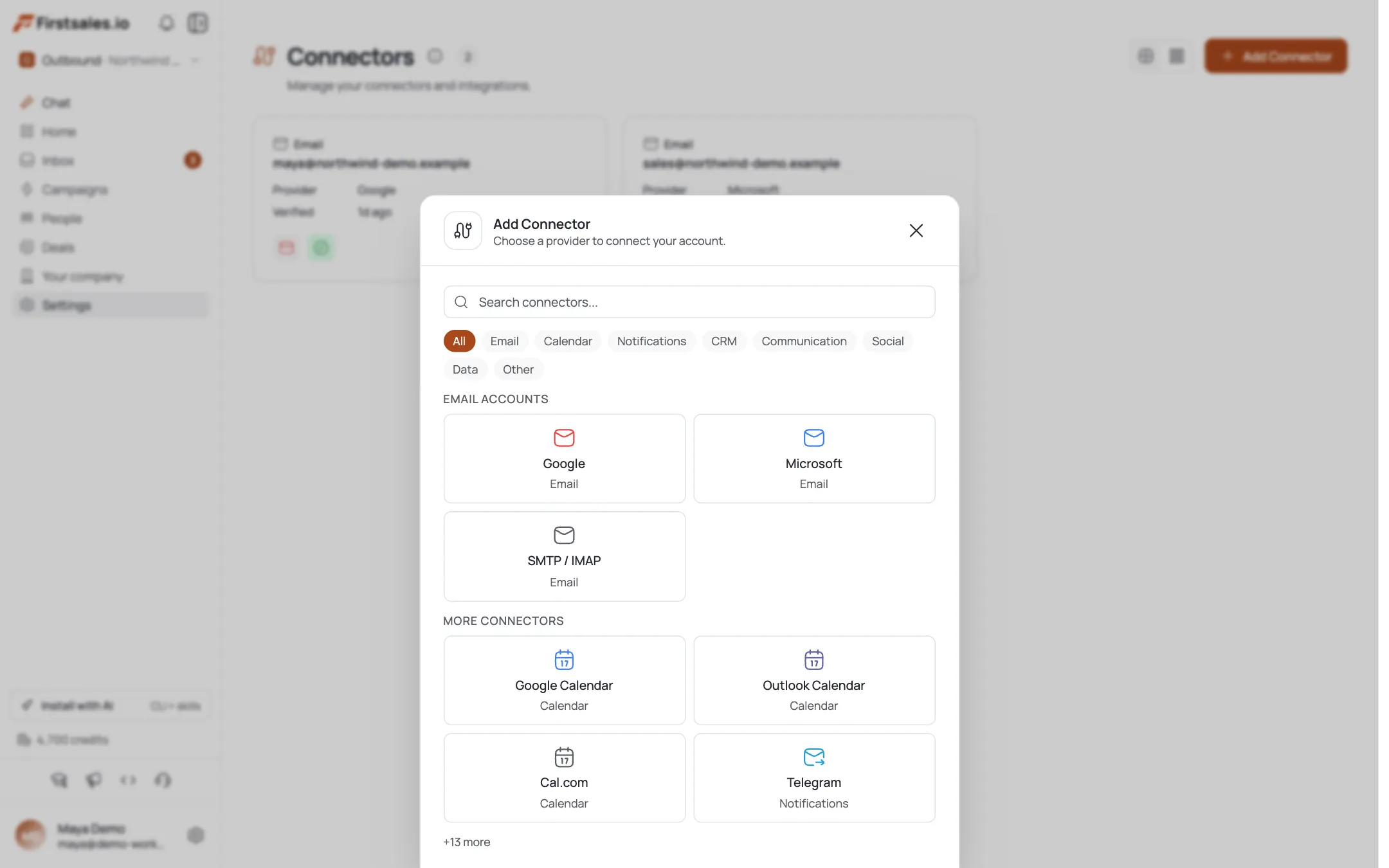
FirstSales groups mailboxes and third-party integrations together as connectors. Open the Connectors page and click Add Connector: the catalog is organized into categories: Email, Calendar, Notifications, CRM, Communication, Social, Data, and Other.
Available integrations connect right away; ones marked coming-soon are shown but not yet selectable.
Connect your email and calendar
The core integrations, all available now:
- Email: Google, Microsoft, or SMTP / IMAP to send campaigns.
- Calendar: Google Calendar or Outlook Calendar (via OAuth). Outlook can auto-create Teams meetings.
A connected calendar is what powers the Meeting campaign goal: the AI books calls straight onto it.
Add LinkedIn and Telegram
Two more are live:
- LinkedIn (Social): connects via a persistent browser login session for LinkedIn-based outreach and signals.
- Telegram (Notifications): get in-app alerts through a shared bot, so you hear about issues (bounce spikes, paused senders, auth problems) without living in the dashboard.
Each is added the same way: Add Connector, pick it, and follow the connect flow.
What's coming soon
Several integrations appear in the catalog but are not yet live (shown, not selectable):
- CRM: Salesforce, HubSpot, Zoho CRM, Pipedrive.
- Communication: Slack, Microsoft Teams, Discord, WhatsApp, Twilio.
- Other: Webhook, REST API; plus data sources (Google Sheets, Airtable, Notion, databases).
If you need one of these today, the public REST API (next section) is the way to push and pull data programmatically.
No Zapier: use the API instead
There's no Zapier connector in FirstSales. To automate against other tools right now, use the public REST API: generate an API key under Settings → API and call endpoints for contacts, campaigns, connectors, and the inbox. See the API quickstart tutorial to get started.
Pro tips
Connect a calendar to unlock Meeting campaigns
The Meeting goal needs a calendar. Add Google or Outlook Calendar before creating a Meeting campaign so the AI has somewhere to book the call.
Turn on Telegram alerts
Deliverability problems are cheapest to fix early. Telegram notifications surface bounce spikes, paused senders, and auth issues so you catch them before they compound.
CRM not live yet? Use the API
Salesforce/HubSpot/Pipedrive are catalog entries but not functional yet. Until they ship, sync via the public REST API's contacts and campaigns endpoints.
No Zapier: the REST API covers automation
Don't hunt for a Zapier connector; there isn't one. The public API with an fs-key does the same push/pull against contacts, campaigns, and the inbox.
Frequently asked questions
Where do I manage integrations?
On the Connectors page: mailboxes and third-party integrations share the same catalog, organized into Email, Calendar, Notifications, CRM, Communication, Social, Data, and Other. Click Add Connector to browse.
Which integrations are available today?
Email (Google, Microsoft, SMTP/IMAP), Calendar (Google Calendar, Outlook Calendar), LinkedIn (Social), and Telegram (Notifications). Others in the catalog are marked coming-soon.
Do you integrate with Salesforce or HubSpot?
They appear in the CRM category but are not yet live (shown, not selectable). Until they ship, use the public REST API to sync contacts and campaigns with your CRM.
Is there a Slack or WhatsApp integration?
Slack, Microsoft Teams, Discord, and WhatsApp are in the catalog as coming-soon. For alerts today, connect Telegram, which delivers in-app notifications now.
Do you support Zapier?
No: there's no Zapier connector. For automation and data sync, use the public REST API (generate a key under Settings → API).
Why would I connect a calendar?
A connected Google or Outlook calendar powers the Meeting campaign goal: the AI books calls directly onto it. Outlook can also auto-create Teams meetings.
What does the LinkedIn integration do?
It connects LinkedIn via a persistent browser login session, enabling LinkedIn-based outreach and signals alongside your email campaigns.