Generic emails
When the AI only knows your company name, every email sounds like every other cold email. Prospects can tell, and they delete it. The fix is not a cleverer prompt. It is giving the AI the facts that make your company different.
Knowledge base
Add your website, extra links and files. FirstSales crawls, reads and stores them in your workspace, then the AI email writer and Copilot use them for every email and reply.
$1 for 3 days · Cancel anytime · No contract
Crawls your website for you
Up to 100 extra links at once
Files up to 25 MB each
Private to your workspace
Most AI writing tools start from a blank prompt. Without real facts about what you sell, the email turns vague or, worse, makes something up.
When the AI only knows your company name, every email sounds like every other cold email. Prospects can tell, and they delete it. The fix is not a cleverer prompt. It is giving the AI the facts that make your company different.
An AI with no facts fills the gaps. It may name a feature you do not have or a price you never set. One wrong claim can cost you the deal, and a correction email rarely wins it back.
Teams paste the same product notes into prompt after prompt. The notes go stale, each rep keeps a different copy, and no one knows which one is right. New hires start from whatever copy they were sent.
Start with your website. Then add the pages it missed and the files that never made it onto the site, like a pricing sheet or an onboarding guide.
One URL
Give the knowledge base your website address and it crawls the site for you. Product pages, pricing, help articles and case studies all count. You do not copy or paste anything, and you do not need to list the pages yourself.
Up to 100 links at once
Paste more links in one go, separated by new lines, commas or spaces. Use it for pages the crawl did not reach, a docs site on another address, or a single article you want the AI to know well. Bad links are flagged before you add them.
Up to 25 MB per file
Upload the documents your team already uses. Each file is read and split into small pieces, so the AI can find the right fact later. You see every file with its size and the number of pieces.
Most knowledge bases need one URL to start. You can add more any time.
Give the knowledge base a name and your website address. Add a short description so your teammates know what is in it. Set it as the default if it is the main one. That takes about a minute.
FirstSales crawls the site, reads any files you upload, stores everything in your workspace and links the facts. You can watch each stage finish. You do not need to stay on the page while it runs.
Once it is Ready, the AI email writer drafts each email from these facts and Copilot answers questions from them. Your AI instructions still set the tone, and you still approve what goes out.
What you see as you set one up. Names and numbers in these views are sample data.
A new knowledge base needs a name and a website URL. Add a short description, such as pricing, product notes or customer stories, so teammates know what is inside. If you keep more than one, mark the main one as the default for the workspace.
The build runs in four stages. Each one shows when it is done, and the knowledge base moves from Processing to Ready. If a step fails, retry just that step. If your site's firewall blocks the crawler, follow the allow-list steps shown on the page.
Pricing sheets, onboarding guides, FAQs and sales decks often live in files, not web pages. Upload them, up to 25 MB each. Each file is read and split into pieces, and you see how many pieces came out of every file.
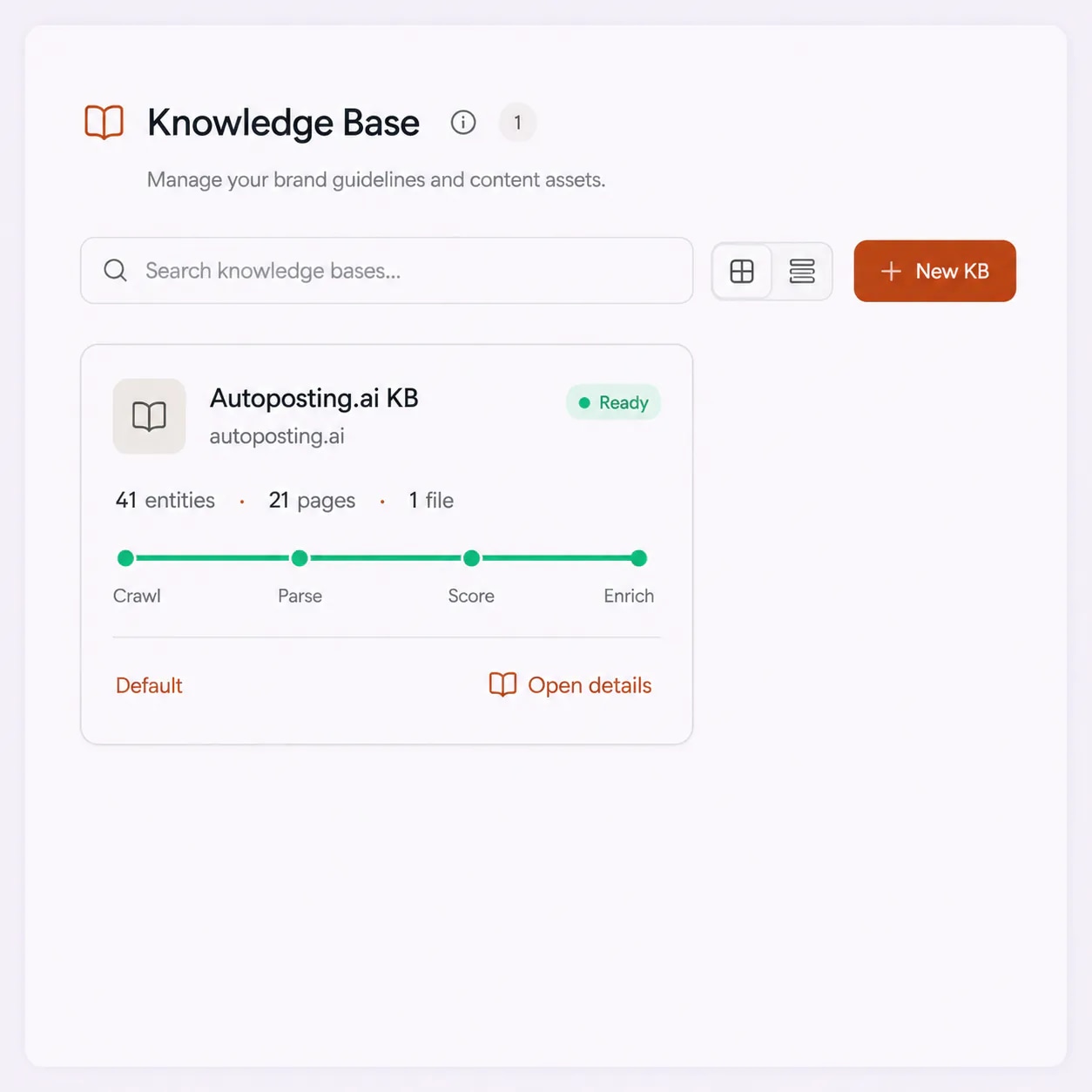
A ready knowledge base shows its counts: entities such as products, features and customers, the relations between them, the crawled pages and the files. Open the knowledge graph to see how the facts connect.
“One of the best email outreach tools I have ever seen in my 9 years of business experience. It has solved the problem of email outreach for my cold emails.”
 Santhosh K.Founder and CEO, small business · G2
Each knowledge base shows where it is in the build. When every stage is done, it is marked Ready and the AI starts writing from it.
FirstSales visits your website and the links you added, and collects the text from each page. It follows the links on your site, so you do not list every page.
You see the list of crawled pages and how many there are.
Your uploaded files are read and split into small pieces, so a long PDF becomes many short, findable facts instead of one block the AI has to skim.
You see each file with its size and its number of pieces.
The pages and pieces are saved to your workspace. Other workspaces cannot see them, even inside the same organization.
The status moves from Processing toward Ready.
FirstSales links the facts into a knowledge graph: your products, features, prices, customers and how they connect. This is what lets the AI match the right fact to the right prospect.
You see the number of entities and relations in the graph.
If a stage fails, you can retry that step without starting over. If your site's firewall blocks the crawl, the knowledge base shows you the steps to allow the FirstSales crawler for common providers, then you retry.
The knowledge base is the part of FirstSales that knows your company. Everything the AI writes starts here.
Point it at your website and it does the reading. You do not write a product document or keep a prompt up to date by hand.
Pages and files are split into small facts and linked in a knowledge graph, so the AI can find the one detail that fits a prospect, like the case study from their industry.
The AI email writer drafts from your real features, prices and proof, not from a guess. You still read and approve what goes out.
Copilot reads the same knowledge base, so an answer to a pricing question uses your real pricing, the same way every time.
Each knowledge base lives in one workspace. A client workspace never sees another client's facts, which matters for agencies running many brands.
Each knowledge base shows Draft, Processing, Ready or Error, with its stages. A failed step can be retried on its own.
The same AI writes very different emails depending on what it knows about you.
The AI knows your name and little else.
The AI knows your product.
Each source you add, what happens to it, and where the AI uses it in FirstSales.
| What you get | Source | What FirstSales does with it |
|---|---|---|
| Website | One URL | Crawled, page by page |
| Extra links | Up to 100 at once | Crawled with the site |
| Files | Up to 25 MB each | Read and split into pieces |
| Facts | From every source | Linked in a knowledge graph |
| Status | Per knowledge base | Draft, Processing, Ready or Error |
| Failed step | Crawl, parse, store or enrich | Retry that step alone |
| Cold emails | Every new draft | Written by the AI email writer |
| Replies | Questions from prospects | Answered by Copilot |
| Start your $1 trial | ||
Seven habits that make the emails more accurate and more specific.
Your site already explains what you sell. Use it first, then fill the gaps. You do not need a perfect document before you begin. A knowledge base that is good today beats a perfect one next month.
Pricing, case studies and feature pages carry the facts that move a reply. If the crawl missed one, paste its link.
Sales decks, one-pagers, onboarding guides and FAQs often hold the clearest answers. Upload them as files. A clear one-page FAQ often helps more than a long deck.
The AI writes from what you give it. Do not upload internal notes, old prices or claims you no longer stand behind.
If you have several knowledge bases, mark the main one as the default, so everyone in the workspace starts from the same facts.
Agencies and teams with several brands should keep each knowledge base in its own workspace. Facts never mix.
When you change pricing or ship a feature, add the new page or file. The next emails use the new facts. Remove the old file at the same time, so the AI does not see two prices.
A short list so the AI starts from good facts.
Real words from real users. No paid reviews.
“I've been using FirstSales.io for several months now, and I can confidently say it has revolutionized how I approach lead generation and customer acquisition.”

Paweł Stelmach
Small business owner
“I have always struggled in cold outreach. However, Firstsales has provided an excellent tool for cold outreach.”

Kaushal S.
Founder, small business
“His honest and insightful feedback helped us transform @synchrowork when we started on LTD to what we are building now.”

Sushant Kumar
@sushantkr49
Can’t find yours? Write to us.
It is where FirstSales keeps the facts about your company. You add your website, extra links and files, and FirstSales crawls, reads and stores them in your workspace. The AI email writer and Copilot use it for every email and reply.
Your website, up to 100 extra links pasted at once, and uploaded files up to 25 MB each. Files can be PDF, Word, Excel, PowerPoint, Markdown, plain text, CSV, HTML and other common formats.
No. Give it your website address and it does the reading. You can add files if some facts are not on your site. AI instructions are where you set tone and rules, not facts.
The AI email writer drafts from the facts in your knowledge base instead of a blank prompt, so it has your real features, prices and proof to work with. You still review and approve emails before they go out.
Yes. Each knowledge base belongs to one workspace. People and data in other workspaces cannot see it. Agencies can keep one workspace per client.
Yes. A workspace can hold several knowledge bases. Mark one as the default so the workspace starts from it.
Some firewalls block crawlers. If that happens, the knowledge base shows the steps to allow the FirstSales crawler for common providers. After that, retry the crawl.
Plans start at $29/mo for Starter with 4,000 credits a month. Growth is $79/mo, Pro $149/mo and Business $499/mo. You can try the whole product for $1 for 3 days.
Pages that say what you sell, who it is for, what it costs and what customers got from it. Product pages, pricing, case studies and help articles work well. Pages full of slogans give the writer little to use. If a fact matters in your emails, make sure a page in the knowledge base states it plainly.
Update the page on your site, then retry the crawl so the knowledge base picks up the new version. Drafts written after that use the new facts. Drafts already in the review queue were written from the old facts, so read them before you approve.
The knowledge base holds the facts: features, prices and proof. AI Instructions hold the rules: tone, words to avoid and claims never to make. Keep facts in the knowledge base and rules in AI Instructions, so each one is easy to find and change later.
Start with the pages a new customer would read first: home, pricing, your main product pages and two or three case studies. That is enough for good first drafts. Add more when you see drafts that cannot answer a question. More pages are not always better. Duplicate or out-of-date pages can confuse the writer, so remove them when they stop being true.
Yes. Remove pages that are no longer true, such as old pricing pages or retired features. New drafts then use only the pages that are left. Read the drafts in the review queue again afterwards, because they were written before the change.
Connect unlimited mailboxes and let AI agents find leads, write each email and follow up. Or send your own templates in manual mode. From $29/mo.
$1 for 3 days · Cancel anytime · No contract