TL;DR: A reliable pre-call research workflow pulls firmographic data, buying signals, stakeholder context, and recent news into one brief in under 10 minutes using a chained set of AI agents instead of 12 open browser tabs. This guide shows the exact stack, prompts, and QA checks that keep the output accurate enough to use on a live call, plus what to skip when the account is not worth the time.
#Why 10 minutes is the real budget
Reps do not get an hour to research an account.
They get whatever time is left after prospecting, sequencing, and the three meetings already on the calendar.
Ten minutes is generous by most team standards, and it is also enough time if the workflow is structured correctly.
The failure mode is not laziness.
It is 40 minutes lost tab-switching between LinkedIn, the company website, a funding database, and a CRM that has not been updated since March, only to walk into the call with three bullet points that could apply to any company in the category.
An agentic research workflow removes the tab-switching by chaining data pulls, letting one model synthesize them, and handing the rep a brief instead of a pile of tabs.
This matters more in 2026 than it did a few years ago.
Cold outbound volume has climbed across every channel, and AI slop in cold email has trained prospects to spot generic outreach in the first sentence.
A rep who opens a call with information that could apply to any company in the category is competing with dozens of other vendors who sound exactly the same.
The research workflow described here is not about doing more work.
It is about doing the same 10 minutes of work in a structure that consistently produces something a prospect notices, instead of a structure that produces something different every time depending on which tabs happened to be open.
#What a call-ready brief actually contains
A brief that changes how a call goes needs five things, not fifteen.
Company snapshot: headcount, funding stage, recent leadership changes, primary product line.
Buying signal: the specific trigger that made this account worth calling today, such as a new VP hire, a tool migration, or a job posting that reveals a gap.
Stakeholder map: who is likely in the room, their probable priorities, and any public statements they have made that hint at how they think about the problem.
Competitive footprint: what tools or vendors the account already uses, pulled from job postings, case studies, or their own site.
One sharp opening line: a single sentence a rep can say in the first 30 seconds that proves the call is not generic.
Everything beyond those five categories is nice to have, not need to have.
| Research input | Worth pulling every time | Skip unless high-value account |
|---|---|---|
| Company size and funding stage | ✓ | |
| Recent leadership change (last 90 days) | ✓ | |
| Job postings mentioning relevant tools | ✓ | |
| Full 10-K or annual report read-through | ✗ | |
| Every executive's full LinkedIn post history | ✗ | |
| Tech stack signals from job listings or BuiltWith | ✓ | |
| Competitor mentions in recent press | ✓ | |
| Personal hobbies or non-work social posts | ✗ | |
| G2 or Capterra reviews of current vendor | ✓ | |
| Deep org chart mapping for a sub-$5K deal | ✗ |
#The agentic workflow, step by step
The workflow below assumes you are using an AI research agent (a browsing-capable model, an enrichment API, or a tool like FirstSales) chained to a template, not a single unstructured prompt.
A single prompt to a chat model without live browsing will hallucinate funding numbers and job titles that sound plausible and are wrong.
graph TD
    A[Input: company name + domain] --> B[Firmographic pull: size, industry, funding]
    B --> C[Signal scan: hiring, news, leadership changes]
    C --> D[Stakeholder identification: likely buyer + influencers]
    D --> E[Tech stack inference: job posts, case studies, site]
    E --> F[Synthesis: AI drafts 5-point brief]
    F --> G{Human review: 60-second scan}
    G -->|Accurate| H[Brief attached to call/campaign]
    G -->|Off-target| C
#Step 1: firmographic pull
Start with a structured data source, not a search engine.
Clearbit, Crunchbase, or a CRM enrichment field gives you headcount, industry, and funding stage in one API call.
This step should take under 60 seconds and needs zero human judgment.
#Step 2: signal scan
This is the step that separates a generic call from a relevant one.
Scan for a hiring surge in a specific function, a new executive announcement, a product launch, or a funding round in the last 90 days.
Buying signals for cold email covers how to weight these signals so the AI does not treat a routine LinkedIn post the same as a Series B announcement.
Job postings are underrated here.
A company posting for a "Head of Revenue Operations" three weeks ago is telling you exactly what problem they are trying to solve, without you having to ask.
#Step 3: stakeholder identification
Map who is likely to be in the room based on title, function, and any public content they have produced.
If the target contact has published on LinkedIn about a specific pain point, that post is worth more than five paragraphs of generic firmographic data.
Do not try to build a full org chart for every deal.
Multithreading the buying committee is the right reference when a deal is large enough to justify mapping five or six stakeholders instead of one.
#Step 4: tech stack inference
Job postings again do most of the work here.
A listing that requires "Salesforce and Outreach experience" tells you their current stack without a paid tool.
Case studies on the vendor's own site, and G2 reviews written by employees at the target company, fill in gaps.
#Step 5: synthesis
This is where the AI agent earns its keep.
Feed everything pulled in steps 1 through 4 into a single prompt that asks for a five-section brief, capped at 200 words, written for a rep who has 90 seconds to read it before dialing.
A longer brief does not get read.
#Step 6: human review
Sixty seconds, no exceptions.
The rep scans the brief for anything that sounds wrong, outdated, or generic, and either approves it or sends it back for another signal pass.
Human in the loop cold email explains why this checkpoint matters even when the upstream research is automated end to end.
#The prompt structure that keeps hallucination low
Most bad AI research comes from asking a model to "research this company" with no grounding.
The model fills gaps with plausible-sounding fiction because that is what a language model does when it lacks real data.
The fix is a two-part prompt: a retrieval step that only pulls from live sources, and a separate synthesis step that is explicitly told to leave a field blank rather than guess.
"If you cannot confirm a fact from the sources provided, write 'not confirmed' rather than estimating. A wrong buying signal is worse than a missing one."
That single instruction, added to a synthesis prompt, cuts fabricated details dramatically in practice, because it removes the incentive for the model to fill silence with a guess.
#What breaks this workflow
Stale enrichment data is the most common failure.
A firmographic database that says a company has 200 employees when it laid off 60 people four months ago will produce a brief that reads as out of touch on the first line.
Cross-reference headcount against a recent job board scrape or a LinkedIn employee count, not just the enrichment vendor's cached number.
B2B data decay and list hygiene has the underlying math on how fast firmographic data rots, and it is faster than most teams assume.
The second failure is treating every account the same.
A $500,000 enterprise deal justifies 10 minutes of research per stakeholder.
A $2,000 self-serve deal does not, and running the full workflow on every account in a 500-company list burns the exact time this workflow was built to save.
TAM reality check for outbound is worth reading before deciding how deep to go account by account, because volume math changes the calculus entirely.
#Where this fits before the first email or call
 Where this fits before the first email or call
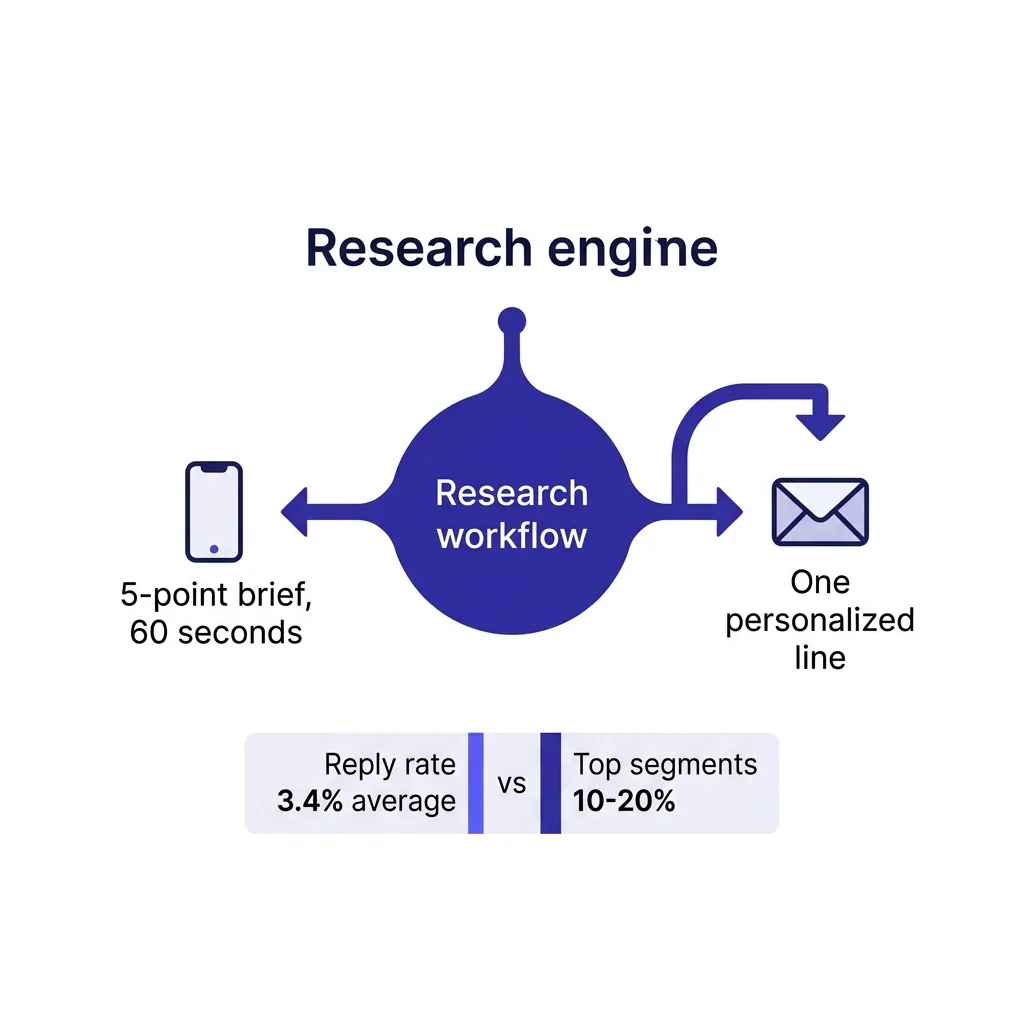
Pre-call research and pre-email research are the same workflow with a different output format.
For a call, the output is a five-point brief a rep reads in 60 seconds.
For an email, the same research feeds a single personalized line, which is a different compression problem covered in cold email personalization at scale.
Platforms built for signal-based prospecting, FirstSales among them, run this research loop automatically ahead of both channels so the personalization data exists before a rep opens the account, rather than being assembled from scratch every time.
That does not remove the need for the human review step.
It removes the 25 minutes of manual tab-switching that used to precede it.
#Measuring whether the research is actually working
Track two numbers, not one.
Reply or connect rate on researched touches versus generic touches, and time spent per account.
If reply rates go up but time per account also goes up past what the deal size justifies, the workflow needs tighter automation, not more manual digging.
Speed to lead outbound matters here too, because a perfect 20-minute brief on a hot inbound lead that goes cold while you research it is a net loss regardless of how good the brief looks.
A useful benchmark: cold email reply rates across segments average around 3.4%, with top-performing segments reaching 10 to 20 percent, largely driven by relevance rather than volume.
The gap between those numbers is mostly research quality, not send volume.
#A minimal version for high-volume outbound
Not every motion can afford five-step research per account.
For high-volume outbound, compress the workflow to two steps: an automated signal scan across the full list, and synthesis only for accounts that trip a signal threshold.
Everything else gets a lighter-touch, still-personalized-but-template-driven message, covered in cold email personalization mistakes.
This keeps the 10-minute brief reserved for accounts where it will actually move a reply rate, instead of spreading thin research evenly across a list where most accounts will not respond regardless of personalization depth.
#Building the stack without buying five tools
You do not need five separate subscriptions to run this workflow.
A firmographic enrichment source, a job-posting or signal feed, and a synthesis layer (which can be a well-prompted LLM with browsing) cover steps 1 through 5.
Most AI-assisted outbound platforms, including FirstSales, bundle enrichment and signal detection so the research step and the drafting step share the same data instead of running in two disconnected systems.
That matters more than it sounds, because disconnected systems mean the research brief and the actual email or call script often disagree with each other by the time the rep uses them.
#Common mistakes teams make with AI research workflows
#Treating the brief as the pitch
A five-point brief is fuel for the first 30 seconds of a call, not a script to read verbatim.
Reps who paste the AI brief into their opener sound like they are reading a report, not talking to a person.
The brief should inform one sharp line, then the rep runs the actual conversation.
#Skipping the review step because the AI seemed confident
Confidence is not accuracy.
A model can state a wrong headcount or an outdated executive name with the same tone it uses for a correct one.
The 60-second human scan exists specifically because AI output has no built-in signal for its own uncertainty unless you explicitly prompt for it.
#Researching every account to the same depth
This is the most expensive mistake because it is invisible.
A rep who spends 10 minutes on a $1,500 deal and 10 minutes on a $150,000 deal is misallocating almost all of their research time, and it rarely shows up as an obvious problem until pipeline velocity drops.
#Letting enrichment data go stale without a refresh cadence
Firmographic and stakeholder data decay fast.
A quarterly refresh cadence for active accounts, and a same-day refresh for anything about to be called, keeps the brief from citing information that is already wrong.
#Building the brief around the company instead of the person
Company-level research (funding, headcount, product) matters, but the line that actually lands on a call almost always comes from something specific to the person on the other end.
A stakeholder's own LinkedIn post, a quote in a trade publication, or a specific project they led beats a generic company fact every time.
#A repeatable template you can copy
Use this five-line structure for the synthesis prompt, and keep it identical across accounts so the output format stays predictable for reps scanning quickly.
- Company snapshot in one sentence: size, funding stage, primary product.
- Strongest signal found in the last 90 days, with a date.
- Likely stakeholder and one specific detail about them, not a title alone.
- Current tool or vendor footprint, if found, with the source.
- One suggested opening line built from the strongest signal.
Any field without a confirmed source gets marked "not confirmed" rather than filled with a guess, per the hallucination-reduction instruction covered earlier in this piece.
Reps who receive the same five-line format every time read it faster than reps who get a different structure per account, because pattern recognition speeds up scanning.
#Industry-specific research angles worth adding
 Industry-specific research angles worth adding
#SaaS and technology accounts
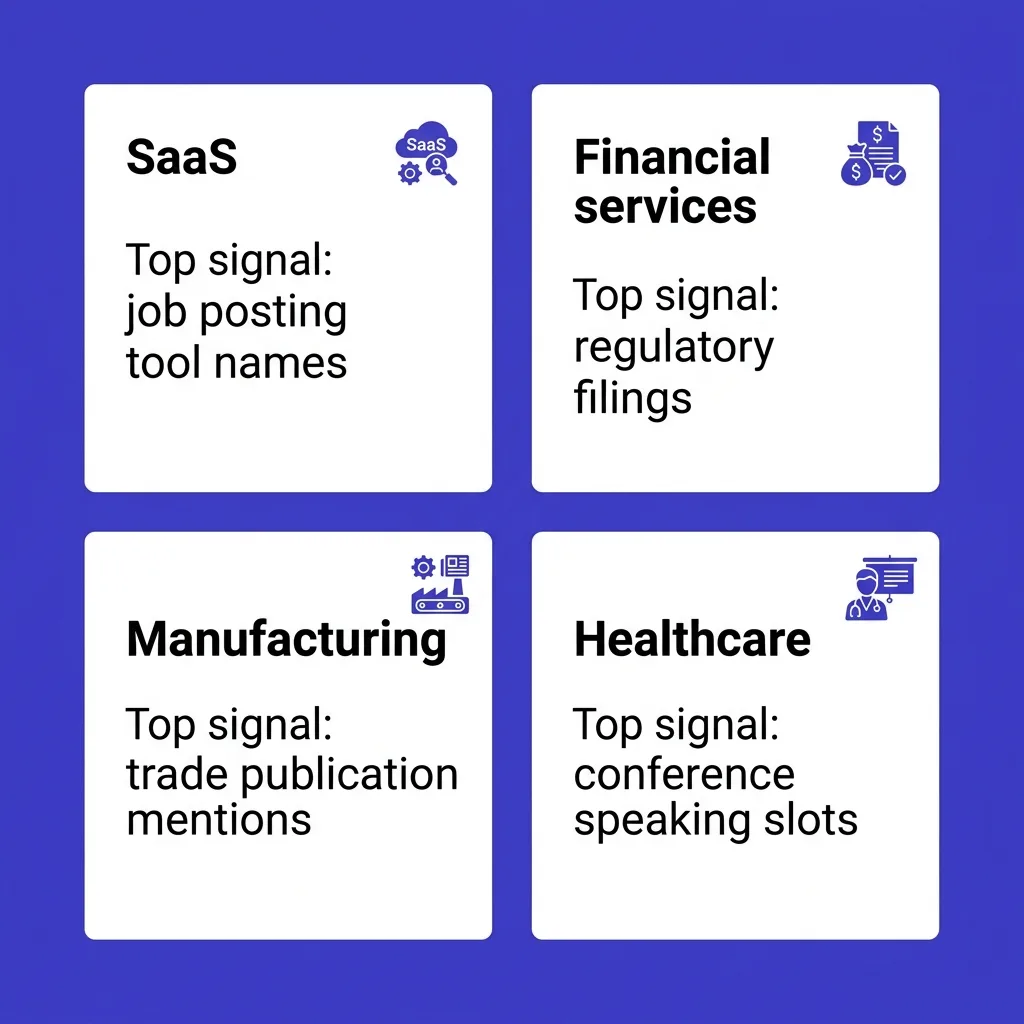
Job postings mentioning specific tool names are the highest-signal input available, since engineering and RevOps job listings routinely name the exact stack a company runs.
#Financial services and regulated industries
Compliance and procurement cycles run slower, so a signal that matters here is a recent regulatory filing, leadership change in risk or compliance, or a public statement about a specific initiative tied to your product category.
#Manufacturing and industrial accounts
Trade publication mentions and supply chain announcements carry more weight than social media activity, since decision-makers in this category are far less active on LinkedIn than in SaaS.
#Healthcare and life sciences
Conference speaking slots, published case studies, and grant announcements are strong signals, while generic firmographic data changes slowly and matters less week to week.
Adjust the signal-scan step in the workflow (step 2) by industry rather than running the identical scan logic across every vertical in a list.
#Splitting the workload across a team
On a team of five or more reps, centralizing the retrieval steps (1 through 4) into a shared operations function, while leaving synthesis review (steps 5 and 6) with the individual rep, tends to produce the most consistent output.
RevOps or a sales development lead can own the enrichment pipeline and signal feed configuration, so each rep is not independently deciding which data sources to trust.
This division of labor also makes it easier to audit brief quality across the team, since the retrieval layer is standardized and only the final review step varies by rep judgment.
#What this looks like on an actual account
Take a hypothetical mid-market logistics company with 300 employees.
The firmographic pull confirms headcount, a Series C raise 14 months ago, and a primary product in freight visibility software.
The signal scan turns up a job posting from 18 days ago for a "Director of Revenue Operations," plus a LinkedIn post from the VP of Sales about struggling to keep reps focused on high-intent accounts.
The stakeholder step identifies the VP of Sales as the likely first contact, with the specific post as supporting context.
The tech stack step finds a Salesforce and Outreach mention in the same job posting.
Synthesis produces a five-line brief, and the suggested opening line references the VP's own post about high-intent account focus rather than a generic "I saw you raised a Series C" line that every other vendor is also sending this quarter.
That is the difference a structured workflow produces over an unstructured one: the same raw facts, but the second the AI notices the VP's own words, the whole call opens differently.
#Cost and tooling reality check
A firmographic enrichment subscription runs from free tiers with limited lookups up to a few hundred dollars a month for team plans, depending on volume.
A signal or job-posting feed adds a similar range, and many outbound platforms now bundle this instead of requiring a separate line item.
The synthesis step costs almost nothing incrementally if you are already paying for an LLM subscription used elsewhere in the workflow.
The real cost is not the tooling.
It is the time spent building and maintaining the prompt template, the QA habit, and the discipline to actually run the review step instead of skipping it under deadline pressure.
Teams that treat the review step as optional tend to see brief quality degrade within a few weeks, even if the underlying data sources stay accurate.
#Data sourcing and compliance considerations
Every input in this workflow needs to come from a public or legitimately licensed source.
Firmographic vendors like Clearbit and Crunchbase aggregate public filings, company websites, and opt-in data, which keeps the retrieval step on solid legal footing in most jurisdictions.
Job postings and executive LinkedIn activity are public by design, since both are published specifically to be seen by outside parties.
Is cold email legal in 2026 covers the broader compliance picture for how this research eventually turns into an outbound message, and the two areas are connected: research inputs that come from public, legitimate sources make the downstream outreach easier to defend if a prospect asks where a detail came from.
Avoid scraping data that requires bypassing a login wall or terms of service, both because it creates legal exposure and because that data is usually stale or wrong anyway.
The safest, highest-signal sources in this workflow (job postings, funding announcements, executive public statements, and company press releases) are also the ones with the least compliance risk, which is a convenient overlap rather than a coincidence.
#When to stop researching and just make the call
Research has a point of diminishing returns.
Once a brief contains a confirmed signal, a likely stakeholder, and one specific opening line, additional research time rarely improves the outcome and mostly just delays the call.
Reps who chase a sixth or seventh data point are usually avoiding the call itself, not improving it.
Set a hard timer, treat the 10-minute mark as a stop signal rather than a suggestion, and trust that a good five-point brief beats a perfect twenty-point one that arrives an hour late.
Speed to lead outbound makes the same point from a different angle: a mediocre touch delivered fast usually outperforms a great touch delivered slow, because the buying window closes while research drags on.
#FAQs
#How long should pre-call research actually take?
Ten minutes is a reasonable ceiling for a mid-market or enterprise account, and two to three minutes is realistic for high-volume SMB outbound once the workflow is automated.
#Can AI research replace a rep reading the prospect's LinkedIn profile?
It can pull the same data faster, but a rep should still do the 60-second human review before the call, because context and tone judgment are not fully automatable yet.
#What is the biggest source of hallucinated research data?
Ungrounded synthesis prompts that ask a model to "research" without live retrieval, which causes the model to fill gaps with plausible but invented details.
#How do I stop AI research from using stale firmographic data?
Cross-reference headcount and funding stage against a recent source, such as a live job board scrape, rather than trusting a single cached enrichment field.
#Should every account in my pipeline get the full five-step research workflow?
No, reserve the full workflow for accounts above your deal-size threshold and use a lighter, signal-triggered version for high-volume SMB lists.
#What is the single most useful signal for pre-call research?
A specific, recent job posting in a relevant function, because it reveals a real internal priority instead of an inferred one.
#How do I know if my pre-call brief is too long?
If it takes more than 90 seconds to read, it is too long for a rep to use before a live call.
#Does pre-call research improve email reply rates too?
Yes, the same research inputs feed personalization for cold email, and relevance is the main driver of the gap between average reply rates and top-quartile reply rates.
#What tools handle the firmographic pull step?
Clearbit, Crunchbase, ZoomInfo, and most CRM-native enrichment fields cover the basic company data layer.
#How do I map stakeholders without buying an org chart tool?
Search the target company's LinkedIn employee list filtered by function and title, cross-referenced against any public content those individuals have published.
#What is the risk of over-researching a small deal?
Time spent per account that exceeds the deal's expected value, which is a common way research workflows quietly kill outbound velocity.
#How often should firmographic data be refreshed?
Quarterly at minimum for active accounts, and immediately before a call or campaign for high-priority accounts, since headcount and leadership can shift in weeks.
#Can I use ChatGPT alone for pre-call research?
Only if it has live browsing enabled and you explicitly instruct it to flag unconfirmed facts, otherwise it will produce confident-sounding fiction.
#What is a buying signal versus a vanity signal?
A buying signal indicates an active internal priority, like a relevant hire or tool migration, while a vanity signal, like a generic company update post, does not predict readiness to buy.
#How does pre-call research differ for enterprise versus SMB accounts?
Enterprise accounts justify multi-stakeholder mapping and deeper signal analysis, while SMB accounts need fast, signal-triggered research to stay profitable at volume.
#Should the AI-generated brief include a suggested opening line?
Yes, one sharp, specific opening line based on the strongest signal found is more useful to a rep than five paragraphs of background.
#What happens if no strong signal exists for an account?
Skip the account or move it to a lower-priority, template-driven cadence rather than forcing a signal that is not there.
#How do I QA an AI research brief before a call?
Do a 60-second scan for anything that contradicts public knowledge, sounds generic, or references outdated details like an executive who has since left.
#Does this workflow work for outbound calling as well as email?
Yes, the same five-category brief format works for both, with the call version optimized for a spoken opening line rather than a written subject line.
#What is the ROI case for investing in this workflow versus manual research?
Reps typically spend 20 to 40 minutes on manual multi-tab research per account; compressing that to 10 minutes or less, while improving relevance, directly increases the number of well-researched touches a rep can complete per day.
Ten minutes of structured research beats forty minutes of unstructured tab-switching, and it beats zero minutes of research even more.
Build the five-category brief, automate the retrieval steps, and keep the human review checkpoint.
The accounts that get a real signal-based opening line will notice the difference before you finish your first sentence on the call.