Open Tracking Domains
In workspace settings, open Tracking Domains and start a new domain.
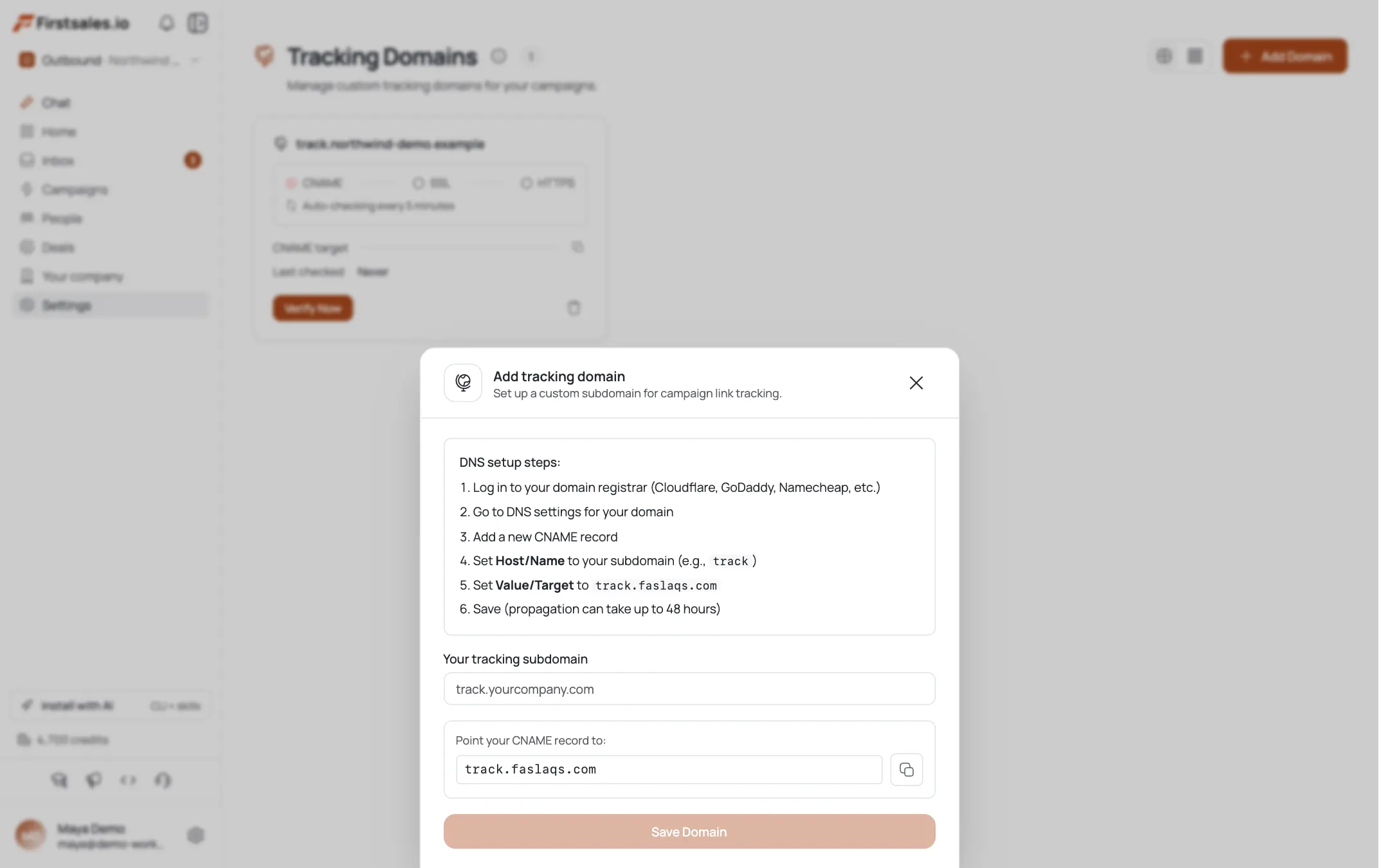
Pick a subdomain
Enter a tracking subdomain like
track.yourcompany.comin Your tracking subdomain. Use a dedicated subdomain, not your root domain.Copy the CNAME target
FirstSales shows a CNAME target: click Copy. This is the single record you'll add at your registrar.
Add the CNAME at your registrar
In your DNS settings add a CNAME record: Host/Name = your subdomain (e.g.
track), Value/Target = the target you copied. Save. Propagation can take up to 48 hours, though it's usually minutes.Verify before saving
FirstSales tests the CNAME in-page; Save Domain unlocks only once the CNAME verifies (“CNAME must be verified before saving”). Save it once it passes.
Watch the status ladder
The card walks through CNAME → SSL → HTTPS: Pending → CNAME OK → SSL OK → Verified. It auto-rechecks every 5 minutes, and SSL is provisioned for you: there's no certificate to install.
Handle Failed
If the status shows Failed (after 24 hours), re-check the CNAME host and target for typos and click Retry Verification.
You're done
Once Verified, tracking for Delivered, Opened, Clicked, Unsubscribed, and Re-subscribed runs on your own domain: better trust and deliverability than a shared tracking link.
Pro tips
Use a dedicated subdomain
track. or email. keeps tracking isolated from your website's DNS and is easy to reason about later.
CNAME only: SSL is automatic
You add exactly one record. FirstSales provisions the HTTPS certificate itself; don't try to add or upload a cert.
This is not email authentication
A tracking domain doesn't set SPF, DKIM, or DMARC: do those on your sending domain. Both matter; they're separate setups.
Give DNS a few minutes
Propagation is usually fast but can take up to 48 hours. The card auto-rechecks every 5 minutes, so you can leave it and come back.
Frequently asked questions
What is a tracking domain?
A subdomain you point at FirstSales with one CNAME record, so open/click/unsubscribe tracking runs on your own domain instead of a shared one.
How many DNS records do I add?
Just one CNAME. SSL is provisioned automatically.
What do I set Host and Value to?
Host/Name = your subdomain (e.g. track); Value/Target = the CNAME target FirstSales shows (use Copy).
Why won't Save Domain enable?
Save unlocks only after the CNAME verifies. If it's disabled, the record hasn't propagated yet or has a typo.
What do the statuses mean?
Pending (waiting for CNAME) → CNAME OK → SSL OK → Verified. Failed means it didn't verify within 24 hours.
How long does it take?
Often minutes; DNS propagation can take up to 48 hours. The card auto-rechecks every 5 minutes.
Does this set up SPF/DKIM/DMARC?
No: that's email authentication on your sending domain, a separate setup.
What does the tracking domain track?
Delivered, Opened, Clicked, Unsubscribed, and Re-subscribed events.