Frame the automatable surface (and what isn't yet)
What's live today: the REST API, the CLI, and CSV/JSON contact import/export. What isn't: webhooks, CRM connectors (Salesforce, HubSpot, Zoho, Pipedrive), and Slack/Teams/Sheets/Airtable/Notion connectors are all coming-soon and return
unsupported_operationif you try to call them. Build automation on the live surface: poll and export via REST/CSV instead of waiting on a connector.Mint a least-privilege API key
Go to Settings → API and create one named key per consumer: e.g.
ci-contact-sync: with only the scopes it needs (contacts:read/write,campaigns:read, etc.). The key is shown once; copy it straight into a secret manager. Revoke instantly if it ever leaks: revocation is immediate. See Create & Manage Developer API Keys.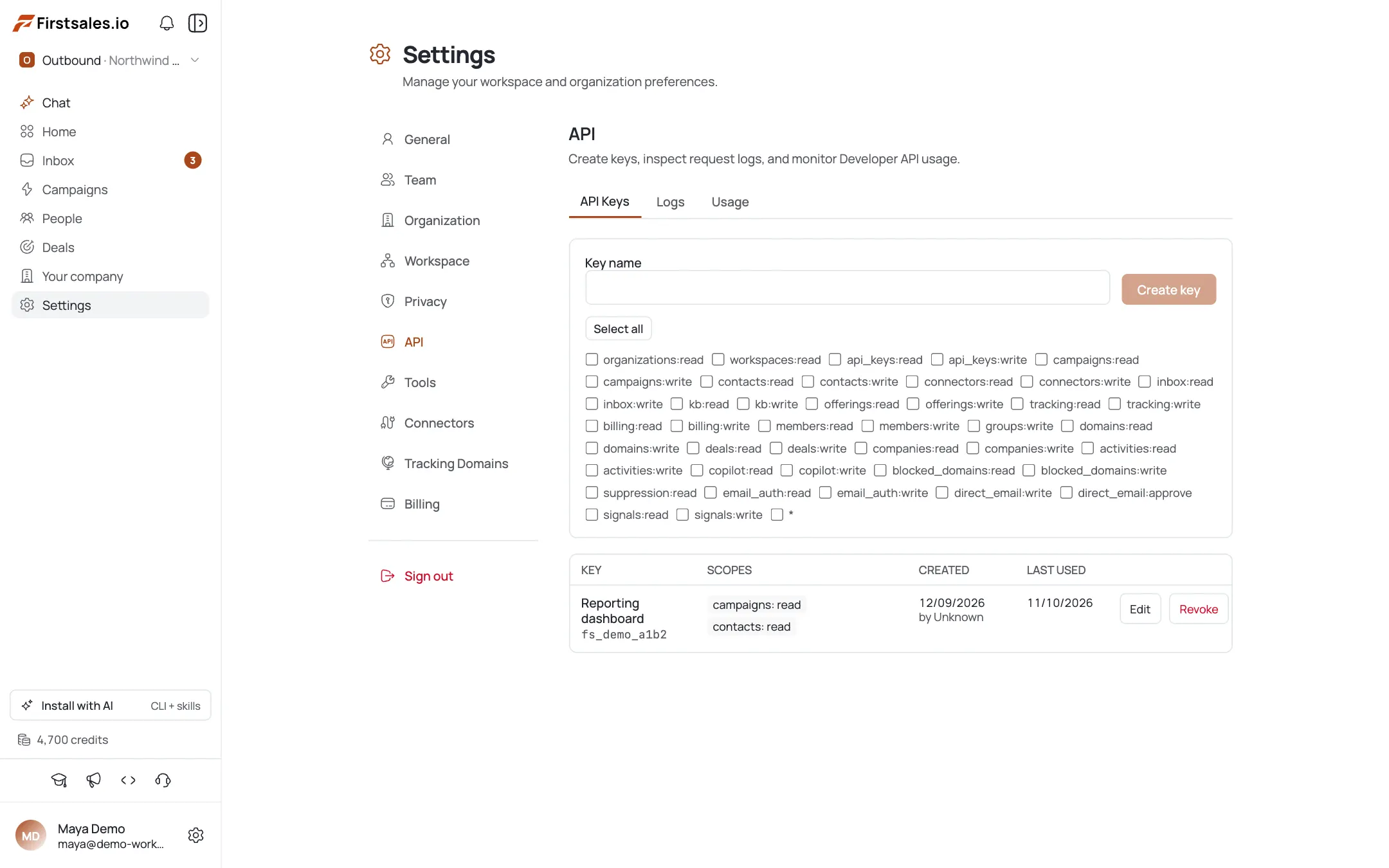
Install and verify the CLI
Install the CLI and confirm the key resolves before doing anything else:
npm install -g @firstsales.io/cli export FIRSTSALES_API_KEY="fs_live_..." # from your secret manager firstsales whoami --json firstsales doctorImport contacts programmatically from CSV
Push a batch through an import job with an idempotency key: the platform de-duplicates by email server-side, so a re-run of the same file won't duplicate anyone:
firstsales contact-imports create --org "$ORG_ID" --workspace "$WS_ID" \ --data-file ./leads.csv \ --idempotency-key "leads-import-2026-07"Keep contacts in sync: the golden loop
Automation follows the same loop as a human operator: inspect, then mutate deliberately, then verify. Preview with
--dry-runbefore any write, mutate with an idempotency key, then re-read to confirm:firstsales contacts list --org "$ORG_ID" --workspace "$WS_ID" --json firstsales contacts update --org "$ORG_ID" --workspace "$WS_ID" \ --contact "$CONTACT_ID" --data '{"job_title":"VP Sales"}' --dry-run firstsales contacts update --org "$ORG_ID" --workspace "$WS_ID" \ --contact "$CONTACT_ID" --data '{"job_title":"VP Sales"}' firstsales contacts get --org "$ORG_ID" --workspace "$WS_ID" --contact "$CONTACT_ID"Drive campaigns from the CLI or API
List and read campaigns through the CLI, or hit
/api/v1directly with a Bearer token when you'd rather not shell out to the CLI:firstsales campaigns list --org "$ORG_ID" --workspace "$WS_ID" --json curl https://api.app.firstsales.io/api/v1/organizations/$ORG_ID/workspaces/$WS_ID/campaigns/$CAMPAIGN_ID/analytics \ -H "Authorization: Bearer $FIRSTSALES_API_KEY"Wire it into CI/CD
Inject the key from your CI provider's secret store, never hardcode it. Start every job with
whoamiso a bad key fails fast, and gate real writes behind--dry-runon PRs vs. real mutation on main, with idempotency keys derived from a stable CI variable so a replayed pipeline step is a no-op:# GitHub Actions - name: FirstSales sync env: FIRSTSALES_API_KEY: ${{ secrets.FIRSTSALES_API_KEY }} run: | firstsales whoami --json > /dev/null || { echo "auth failed"; exit 1; } firstsales contact-imports create --org "$ORG_ID" --workspace "$WS_ID" \ --data-file ./leads.csv --idempotency-key "import-${GITHUB_SHA}"Monitor usage and credit runway
Watch API-key usage/logs under Settings → API and the org's credit balance under Billing so an automated pipeline never silently runs the org dry. See Credits, Plans & Billing and Read Campaign Analytics.
Pro tips
One scoped key per consumer
CI, your laptop, and each integration each get their own named key: leak or retire one and you revoke just that key, not everything.
Idempotency keys are free insurance
Every automated create carries --idempotency-key so a retried pipeline step is a no-op, not a duplicate record.
Don't build against coming-soon connectors
Webhooks, CRM, Slack, and Sheets connectors return unsupported_operation today: poll or export via REST + CSV instead of waiting on them.
Inspect, dry-run, mutate, verify: in scripts too
The same loop that protects a human operator protects an agent. Always --dry-run before any write in automation, not just interactively.
Frequently asked questions
What can I actually automate today?
The REST API, the CLI, and CSV/JSON contact import/export, all authenticated with scoped Developer API keys.
Are there webhooks, CRM, or Slack integrations?
Not yet: webhooks, CRM connectors (Salesforce, HubSpot, Zoho, Pipedrive), and Slack/Teams/Sheets/Airtable/Notion connectors are coming-soon and return unsupported_operation. Don't build automation that depends on them.
How do I import contacts programmatically?
contact-imports create --data-file with a CSV or JSON file. Contacts are de-duplicated by email server-side, so re-running the same import is safe.
How does auth work for CI?
Store the Developer API key in your CI provider's secret store and expose it as FIRSTSALES_API_KEY. For raw HTTP, send it as a Bearer token.
How do I avoid duplicate writes in a pipeline?
Pass --idempotency-key (or the Idempotency-Key header on raw HTTP) derived from a stable value like a commit SHA: a retried step becomes a no-op instead of a duplicate.
How do I keep a delete from wiping data in CI?
Destructive CLI commands require --confirm: keep it out of any step that shouldn't delete, so a cleanup job can only remove data when the flag is explicitly present.
How do I watch usage and credit runway?
Check API-key usage/logs under Settings → API and the org's credit balance under Billing so an automated pipeline doesn't silently run you out of credits.
CLI or raw API?
The CLI is a thin wrapper over the same public /api/v1 surface. Either works: the CLI adds convenient auth handling, idempotency, and JSON output for scripts and agents.