
TL;DR: This is a working library of 25 AI prompts split across account research, cold email drafting, and objection handling, each with a note on when to use it and what good output looks like. Feed the AI real context (past won deals, your actual ICP, recent account signals), and always keep a human reviewing the output before it reaches a prospect.
#What you will learn
- Why a prompt library beats one-off prompting
- Prompt hygiene: what to feed the AI before anything else
- Research prompts (1-8)
- Drafting prompts (9-17)
- Objection and reply prompts (18-25)
- Keeping a human in the loop
- Iterating prompts against reply-rate data
- FAQ
#Why a prompt library beats one-off prompting
Most SDRs write a new prompt from scratch every time they need something from an AI tool.
That wastes time and produces inconsistent output, because a slightly different phrasing changes what the model returns.
A prompt library fixes that.
Once a prompt reliably produces useful output, save it, reuse it, and only edit it when the results start slipping.
The prompts below are organized into three groups that map to an actual SDR workflow: research before you write, drafting the first touch and follow-ups, and handling replies once a prospect responds.
Every prompt assumes you are pasting the output of a previous step (account research) into the next step (drafting) as context, not starting from a blank page each time.
That chaining is what makes AI actually save time instead of just producing generic first drafts that need a full rewrite.
Most SDR teams that adopt AI tools go through the same three phases.
Phase one is excitement: draft volume goes up, and everything feels faster.
Phase two is a quality dip: prospects start recognizing the pattern, reply rates drop, and someone on the team says the AI drafts sound "off."
Phase three, if the team gets there, is a disciplined system: real context feeding every prompt, a human reviewing every output, and a feedback loop that catches drift before it tanks a whole quarter's pipeline.
This library is built to get a team straight to phase three, skipping the mid-stage dip most teams hit when they first turn a generic AI tool loose on outbound without any structure around it.
The difference between a team stuck in phase two and one in phase three is rarely the underlying model.
It is almost always the quality of what gets fed into the prompt, and whether anyone reviews what comes out.
#Prompt hygiene
Three habits separate a prompt library that produces usable output from one that produces filler.
Give the AI real company context, not just the prospect's.
Paste in two or three of your own past won-deal emails, a short description of your actual ICP, and the specific problem your product solves in plain language.
Without that, the model defaults to generic SaaS phrasing that reads like every other AI-drafted email in the recipient's inbox.
Always review before sending.
Every prompt below is written to produce a draft, not a final email.
A human should read every output for accuracy, tone, and whether the specific facts it references are actually true, before anything goes to a prospect.
Update the context block as your business changes.
A prompt fed six-month-old positioning produces six-month-old emails.
Refresh the ICP description and recent case study details at least quarterly.
Write the constraint into the prompt, not just into your head.
If you always want emails under 130 words, say so explicitly in the prompt text every time, rather than mentally filtering afterward.
Models drift toward longer, more hedged output by default, and an explicit constraint in the prompt itself is far more reliable than editing it out after the fact.
Separate research prompts from drafting prompts.
Asking one prompt to both research an account and write the email in a single pass tends to produce weaker output on both fronts, because the model is splitting effort between two different tasks.
Run research first, review it, then feed the verified research into a separate drafting prompt.
graph TD
    A[Research prompt: pull account signals] --> B[Human verifies facts are current]
    B --> C[Drafting prompt: write email using verified research]
    C --> D[Human reviews for tone and accuracy]
    D --> E{Approved?}
    E -->|Yes| F[Send]
    E -->|No| G[Edit or re-prompt with feedback]
    G --> D
    F --> H[Reply received]
    H --> I[Objection/reply prompt: draft response]
    I --> D
#Research prompts
Use these before drafting anything. Paste the output into your CRM notes or directly into the drafting prompts below.
#1. Company summary in plain language
Summarize [Company]'s business in 3 sentences: what they sell, who their
customers are, and one thing that's changed for them in the last 6 months
(funding, leadership, product launch, expansion). Use only information you
can attribute to a specific, real source. If you're not confident about a
detail, say so instead of guessing.
Use this as your first step on any new account. A good output names the source for each claim, not just the claim itself.
#2. Hiring signal extraction
Based on [Company]'s recent job postings for [department/role], what does
their hiring pattern suggest about a gap or priority right now? Keep it to
2 sentences and avoid speculation beyond what the postings themselves show.
Pair this with our guide on hiring signal outbound for how to turn a hiring pattern into an actual email hook.
#3. Tech stack gap analysis
Given that [Company] uses [known tool 1] and [known tool 2] (from job
postings or public sources), what's a common workflow gap teams using that
combination run into? Answer in 2 sentences, grounded in the specific tools
named, not generic pain points.
#4. Competitor displacement angle
[Company] is a current customer of [Competitor]. Based on public complaints
or reviews about [Competitor] (G2, Reddit, Capterra), what's one specific,
verifiable frustration users cite? Cite the source. If nothing verifiable
comes up, say so.
Use only what you can verify, and see competitor-switch campaigns for the ethical line on this kind of outreach.
#5. Funding round summary
Summarize [Company]'s most recent funding round: amount, date, lead
investor, and stated use of funds if publicly disclosed. Flag if any detail
can't be confirmed from a named source.
Cross-reference with funding round cold email for timing guidance once you have the facts.
#6. Buying committee mapping
Based on [Company]'s org chart or LinkedIn, who are the 2-3 roles most
likely involved in a decision about [your category]? For each, note their
likely priority (cost, speed, risk, adoption) in one line.
This maps directly to the multithreading outbound buying committee approach: research the full committee before you write to just one person.
#7. Recent news digest
List any news about [Company] from the last 90 days: product launches,
executive changes, partnerships, expansions. One line each, with date and
source. Skip anything you can't attribute.
#8. Trigger-event prioritization
Given these 5 signals about [Company] [paste bullet list: funding, hiring,
news, tech stack, exec change], rank them by which is most likely to
produce a relevant, timely cold email hook and explain why in one sentence
per item.
#Drafting prompts
 Drafting prompts
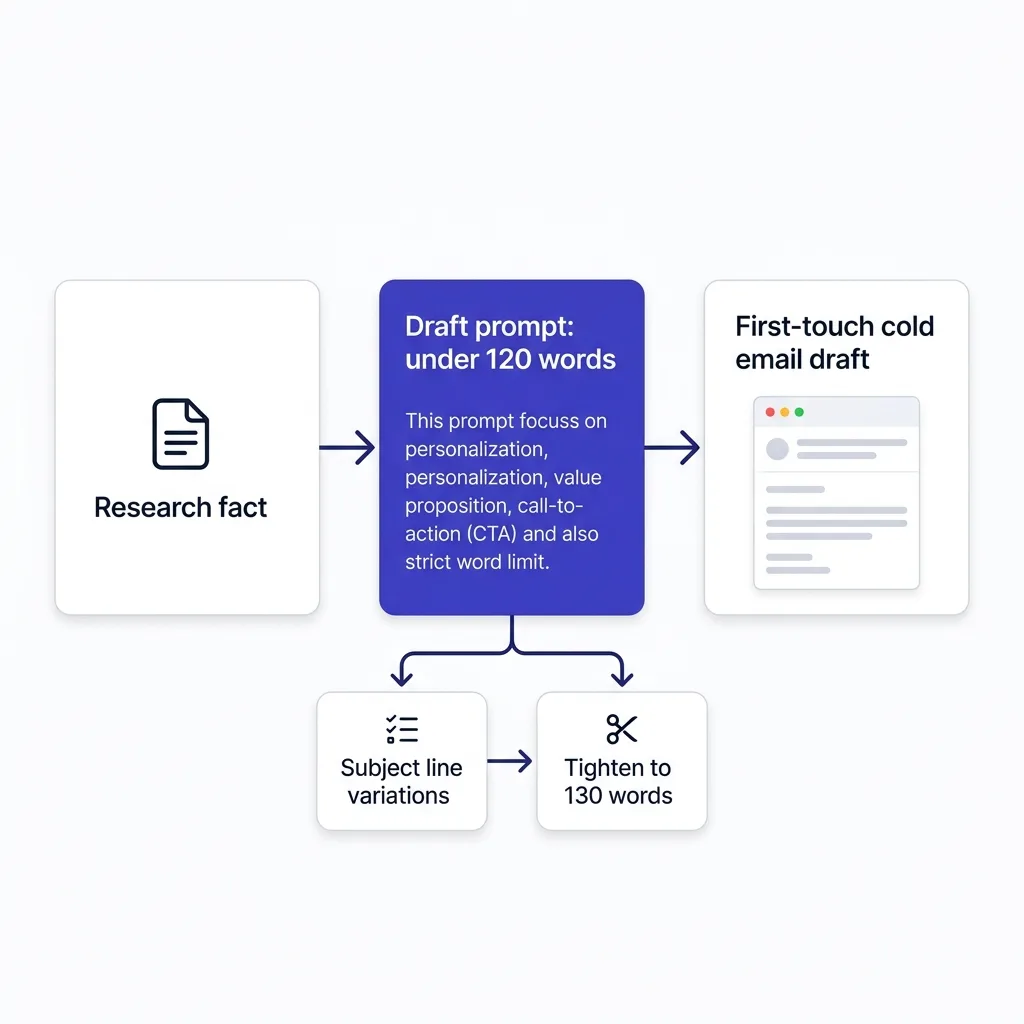
Feed the research output from above into these. Always include 2-3 of your own past high-performing emails as style reference.
#9. First-touch cold email draft
Using this research on [Company] [paste research summary] and these 3
examples of emails that got replies from similar accounts [paste examples],
draft a cold email under 120 words. One specific hook from the research,
one line connecting it to a problem, one proof point, one clear ask. No
generic filler, no "I hope this finds you well," no company mission
statement.
#10. Subject line variations
Write 5 subject line options for this email [paste draft]. Each under 6
words. At least 2 should reference a specific fact from the email body, not
a generic hook. Avoid punctuation gimmicks or all-caps.
See cold email subject line formulas for the underlying patterns these variations should follow.
#11. Tightening a bloated draft
This email is 220 words and needs to be under 130. Cut anything that
doesn't add a fact, a number, or move toward the ask. Keep the specific
hook and the proof point intact. Here's the draft: [paste]
#12. Opener personalization from research
Using this specific fact about [Company] [paste one research fact], write
3 different opening lines under 20 words each that reference it without
sounding templated. Avoid phrases like "I noticed" or "I saw that you."
#13. Follow-up email 2 (value add)
Write a follow-up to this original email [paste original] that adds one
new piece of information or proof point, not just a reminder. Under 80
words. No "just following up" or "bumping this to the top of your inbox."
#14. Follow-up email 3 (different angle)
Write a third-touch follow-up that approaches the same problem from a
different angle than the first two emails [paste both]. Different proof
point or different stakeholder concern. Under 90 words.
#15. Breakup email
Write a final "closing the loop" email for this sequence [paste prior
emails]. Acknowledge the lack of response without guilt-tripping, leave the
door open, and keep it under 60 words.
Full framework in our breakup email guide, including when this outperforms every prior touch in a sequence.
#16. P.S. line generator
Suggest 3 P.S. lines for this email [paste email] that add a small, real
detail (a specific resource, a relevant stat, a low-pressure alternative
ask), not a repeat of the main CTA.
See the P.S. line for why this small addition measurably lifts replies.
#17. Voice and tone match
Rewrite this draft [paste draft] to match the tone of these 3 examples of
my past emails [paste examples]: sentence length, level of formality, and
how I phrase requests. Keep the facts and structure the same.
#Objection and reply prompts
Use these once a prospect actually responds. Paste their exact reply as context every time.
#18. Price objection response
A prospect replied: "[paste their exact reply about price/budget]." Draft
a response that acknowledges the concern directly, reframes around value
or cost of inaction if there's a real data point to use, and proposes one
concrete next step. Under 100 words. No pressure tactics.
Compare against our cold email objection handling templates for the underlying structure.
#19. "Not interested" reply
A prospect replied: "[paste their exact reply]." They said no. Draft a
short, respectful response that doesn't argue the no, asks one clarifying
question only if genuinely useful, and leaves the door open for a future
touch. Under 50 words.
#20. "Send me more info" reply
A prospect replied asking for more information: "[paste reply]." Draft a
response with one specific, relevant detail (not an attachment dump) and a
follow-up question that moves toward a call rather than an endless email
thread.
#21. Timing objection ("not right now")
A prospect said: "[paste reply], not the right time." Draft a response
that respects the timing, asks when would be better if appropriate, and
sets a specific, dated follow-up rather than a vague "I'll check back."
#22. Referral request
A prospect replied: "[paste reply], I'm not the right person for this."
Draft a short response thanking them and asking directly for the name of
the right contact, making it easy to answer in one line.
#23. Positive reply, moving to booking
A prospect replied positively: "[paste reply]." Draft a response that
proposes 2-3 specific time windows (not "whenever works for you") and
confirms what will be covered on the call in one sentence.
#24. Reply classification and routing
Classify this reply as one of: interested, not interested, timing
objection, price objection, wrong person, out of office, or unclear.
Reply: "[paste reply]." Explain your classification in one sentence.
This is the same logic behind automated reply handling playbooks; use it to speed up triage before a human writes the actual response.
#25. Case study reply for social proof requests
A prospect asked for proof this works: "[paste reply]." Using this real
case study data [paste specific numbers and account name if you have
permission to share], draft a response with one concrete result, not a
generic list of features.
See case-study cold emails for how to phrase proof numbers so they don't read as fabricated.
#A short worked example: research prompt into draft prompt
Here is what the chain looks like end to end on a real account.
Run prompt 2 (hiring signal extraction) on a target account, and the output might read: "Company X posted 4 openings for outbound SDRs in the last 6 weeks, suggesting they are scaling a team that likely lacks mature tooling for research and personalization at that new headcount."
Paste that sentence into prompt 9 (first-touch cold email draft) along with your own past examples, and the model now has a concrete, specific hook to build from instead of guessing at a generic pain point.
The resulting draft opens with something close to: "Saw Company X posted 4 SDR roles in the last 6 weeks. Teams scaling that fast usually outgrow manual research tooling within the first quarter."
That sentence did not come from the model inventing a plausible-sounding detail.
It came from a verified research step feeding a drafting step, which is the entire point of chaining these prompts instead of asking one prompt to do both jobs at once.
#Keeping a human in the loop
Every prompt above produces a draft, and drafts need a human before they become sent emails.
That review step catches three things AI consistently gets wrong: facts that sound plausible but are not verified, tone that reads slightly off for your specific brand voice, and details that were true in the training data but changed since.
This is the same principle behind human-in-the-loop cold email more broadly: AI speeds up the first draft, a person owns what actually gets sent.
FirstSales builds this directly into its workflow: the platform's AI drafts messages using account signals and your ICP, but nothing sends without a human approving it first, which matters most exactly in the objection and reply prompts above, where getting the tone wrong costs you a live conversation, not just an unopened email.
Skipping the review step is how teams end up with AI slop cold email at scale: technically correct, structurally fine, and completely generic, because nobody checked whether the specific claim was actually true for that specific account.
#Iterating against data
 Iterating against data
A prompt library is not a static document.
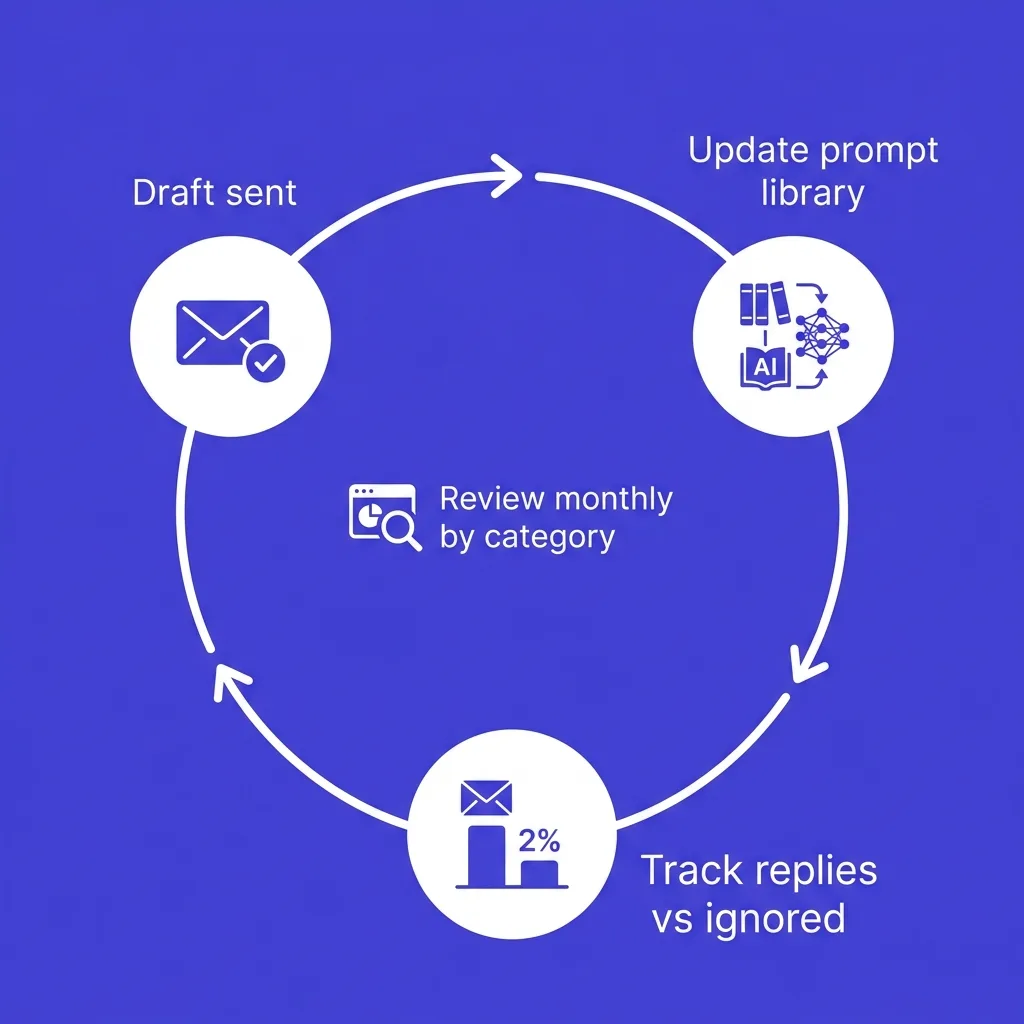
Track which drafted emails actually got replies, and which got ignored, then feed that back into the prompt.
If a subject-line prompt consistently produces lines that never get opened, add a note to the prompt itself: "avoid X pattern, it underperforms."
If an objection-handling prompt for price keeps producing responses that end the conversation instead of continuing it, add a real example of a response that worked and reference it directly in the prompt.
This turns the library into something that improves with use instead of staying frozen at whatever quality it started at.
Review reply-rate data by prompt category at least monthly, not just by campaign, since a drafting prompt might work fine while a specific objection-handling prompt quietly stops converting.
#Prompt habits: what separates a useful library from a generic one
The table below summarizes the difference between prompt habits that consistently produce usable, specific output and habits that produce something a human has to rewrite anyway.
| Habit | Produces usable output | Produces generic filler |
|---|---|---|
| Includes 2-3 real past emails as style reference | ✓ | ✗ |
| Asks for "a cold email" with no context | ✗ | ✓ |
| Pastes the prospect's exact reply text for objection handling | ✓ | ✗ |
| Paraphrases the prospect's reply instead of quoting it | ✗ | ✓ |
| Sets an explicit word count cap | ✓ | ✗ |
| Leaves length open-ended | ✗ | ✓ |
| Requires the model to name a source for research claims | ✓ | ✗ |
| Accepts unsourced claims as fact | ✗ | ✓ |
| Reviews and edits every draft before sending | ✓ | ✗ |
| Sends AI output directly without review | ✗ | ✓ |
| Updates prompts based on reply-rate data | ✓ | ✗ |
| Uses the same prompt unchanged for a year | ✗ | ✓ |
Most of the difference comes down to one thing: specificity in, specificity out.
A prompt that only describes the task in the abstract will always produce an abstract draft, regardless of how good the underlying model is.
#Building your own prompts beyond this list
The 25 prompts above cover the core SDR workflow, but your product, market, and process will need variations.
Use this pattern to build new ones: state the exact task in one sentence, specify a hard constraint (word count, tone, what to exclude), and require the model to ground any claim in something you provided rather than something it assumes.
A prompt missing any of those three elements tends to drift toward generic output within a few uses, even if the first result looked fine.
Test a new prompt on five real accounts before adding it to the shared library, and note in the prompt itself what it is for and what it explicitly should not do, since that context helps every teammate who reuses it later.
#Why some prompts stop working
A prompt that produced great emails in January can quietly degrade by April, and the reason is rarely the model.
Usually one of three things happened: the example emails feeding the prompt got stale as messaging shifted, the ICP description no longer matches who you are actually targeting, or the team stopped reviewing output closely enough to notice quality had slipped.
Treat a prompt library the way you would treat a sequence in your sending tool.
It needs an owner, a review cadence, and a clear process for retiring or rewriting a prompt once its output stops converting, rather than letting it run unattended indefinitely.
Teams that skip this step tend to notice the problem only when reply rates have already dropped for a full quarter, at which point the fix takes longer than it would have if the prompt library had been reviewed monthly from the start.
#FAQ
#What is an SDR prompt library?
An SDR prompt library is a saved, reusable set of AI prompts covering account research, email drafting, and reply handling, built so a rep does not have to write a new prompt from scratch for every task.
#Do these prompts work with any AI tool?
Yes, they are written to work with any general-purpose LLM (ChatGPT, Claude, Gemini) as well as AI features built into cold email platforms, since the structure (context plus specific instruction) is what matters, not the underlying model.
#How much context should I paste into a research prompt?
Enough to ground the answer in something real: a LinkedIn URL, a job posting excerpt, or a news snippet. Vague prompts with no source material produce vague, sometimes fabricated answers.
#Should AI-drafted emails ever send without human review?
No. Every prompt in this library is designed to produce a draft. A person should verify facts, check tone, and approve before anything reaches a prospect, especially reply-handling prompts where a wrong tone can end a live conversation.
#How do I stop AI drafts from sounding generic?
Feed the model 2-3 of your own past emails that actually got replies as style reference in the prompt itself. Without that reference, the model defaults to generic SaaS phrasing.
#Can I use these prompts for LinkedIn outreach too?
Yes, with light editing for length and platform tone. The research and objection-handling prompts transfer directly; drafting prompts need shorter target word counts for LinkedIn messages.
#How often should I update the context I feed these prompts?
At least quarterly. Refresh your ICP description, recent case study numbers, and example emails as your business and positioning change.
#What's the biggest mistake reps make with AI prompts?
Skipping the context step and just asking for "a cold email to a SaaS company," which produces generic output no different from what every competitor's AI tool is also generating.
#Should objection-handling prompts use the prospect's exact words?
Yes, always paste their exact reply rather than paraphrasing it. The AI needs the actual tone and wording to draft a response that reads as a genuine reply, not a generic template.
#How do I verify facts an AI research prompt returns?
Ask the prompt to cite a source for each claim, then spot-check anything you plan to use in an email against the original source (company website, LinkedIn, news article) before sending.
#Can these prompts help with cold calling scripts too?
The research prompts (1-8) transfer directly to call prep. The drafting prompts are written specifically for email structure and would need rework for spoken scripts.
#What if my product has multiple use cases across different buyer roles?
Run the drafting prompts separately for each role, feeding role-specific context each time, rather than trying to write one draft that covers every possible buyer.
#How long should a good cold email prompt output be?
Most first-touch drafts should land under 120-150 words. If the AI consistently returns longer drafts, add an explicit word cap to the prompt instructions.
#Should I share this prompt library across my whole sales team?
Yes, a shared library with a feedback loop (see the iteration section above) improves faster than everyone maintaining separate, informal prompts.
#Do I need to disclose AI involvement to prospects?
No standard practice requires disclosure for internally-used drafting tools, and doing so typically adds nothing useful to the message itself.
#How is this different from just using canned templates?
Templates are static and get recognized as templates over time. AI prompts fed live account research produce a differently-worded, differently-specific draft for every account, closer to what a human writing from scratch would produce, just faster.
#What's the best way to test if a prompt is actually working?
Track reply rate specifically for emails drafted with that prompt versus your baseline, over at least 20-30 sends, before deciding to keep or revise it.
#Should reply-classification prompts replace a human reading every response?
No, use classification prompts to speed up triage and routing, but a human should still read the actual reply before a response goes out, especially for anything flagged as a positive or ambiguous reply.
#Can I use these prompts for cold email in a language other than English?
Yes, the structure translates, but feed the AI native-language examples of emails that performed well in that market, since tone and directness norms vary significantly by region.
#What should I do if a drafting prompt starts producing repetitive-sounding emails across different accounts?
Refresh the example emails you're feeding as style reference, and check whether the research step is actually pulling distinct account-specific facts, since repetitive output usually traces back to repetitive or thin input.
#Where to go from here
Start with the three prompts you will use most: one research prompt, the first-touch drafting prompt, and one objection-handling prompt for your most common reply type.
Get those working well with your own context before expanding to the full 25.
A library that is actually used and refined beats a longer one that sits untouched after the first week.