#How many contacts per company should you target in cold email
Copy page
TL;DR: Targeting 2 to 3 well-chosen contacts per company consistently outperforms emailing every available contact at a domain. Carpet-bombing an org chart raises spam-complaint risk and dilutes reply quality, while a focused, role-based approach protects deliverability and speeds up the path to a real buying decision.
#The temptation to email everyone at a company
More contacts feels like more chances to land a reply.
That logic breaks down fast once deliverability enters the picture.
Sending near-identical outreach to ten or fifteen contacts at the same domain looks less like individualized selling and more like a mail blast, both to the recipients and to the inbox providers scoring your mail before it even opens.
Average cold email reply rates sit around 3.4% industry-wide, with top segments reaching 10% to 20%, according to 2026 outbound benchmark data.
Teams that carpet-bomb an org chart rarely land in that top tier, since low relevance per contact drags down engagement rates across the whole domain, which then hurts deliverability for every other email sent to that same company later.
You can check current reply-rate ranges by industry and list size on firstsales.io's cold email benchmarks page before assuming a wider net is the safer bet.
#What multithreading actually means
Multithreading is the practice of engaging multiple relevant stakeholders at one account with tailored, coordinated outreach, rather than relying on a single contact to champion the deal internally.
It is not the same as contacting every person who works there.
Multithreading targets specific roles tied to the buying decision: the person who feels the pain, the person who approves the budget, and often the person who evaluates the tool technically.
Research on B2B buying groups has repeatedly found that complex purchases typically involve multiple stakeholders across departments, which is the entire justification for multithreading in the first place, detailed further in buying committee multithreading.
Carpet-bombing confuses volume with multithreading.
Sending to fifteen people is not more thorough multithreading than sending to three; it is usually a sign that no one did the work of identifying who actually matters in the decision.
#Why 2 to 3 contacts is the sweet spot for most deals
| Approach | 2-3 targeted contacts | 10+ carpet-bomb contacts |
|---|---|---|
| Deliverability risk at domain | ✓ Low | ✗ High spam-complaint exposure |
| Personalization depth per contact | ✓ Deep, role-specific | ✗ Shallow or copy-pasted |
| Internal forward risk | ✓ Lower, less likely to look templated | ✗ High, generic copy gets noticed |
| Sending capacity used per account | ✓ Efficient | ✗ Wasteful |
| Coverage of key buying roles | ✓ Champion, buyer, evaluator | ✗ Diluted across irrelevant roles |
| Reply quality | ✓ Higher intent replies | ✗ More noise, fewer qualified replies |
Three roles cover most of the decision-making surface area for a typical B2B purchase: someone who experiences the problem day to day, someone with budget authority, and someone who will evaluate the tool technically or operationally.
Adding a fourth or fifth contact can make sense for larger enterprise accounts with more formal procurement processes, but going past five or six contacts rarely adds proportional value, and it multiplies the deliverability and internal-forward risks described above.
#The domain-level reputation problem
Every email sent to a domain contributes to how that domain's mail servers score your sender reputation, at least in aggregate across major providers' spam-filtering signals.
Sending fifteen near-identical emails to one company in a single week produces a pattern that looks statistically different from normal human correspondence, and modern filters are tuned to catch exactly that kind of pattern.
Under 2026 bulk sender rules from Google, Yahoo, and Microsoft, complaint rates above 0.3% and bounce rates above 2% can trigger throttling or blocking, and a carpet-bombed domain full of irritated recipients is a fast way to cross those thresholds.
This risk compounds because domain-level sending limits are not per-contact, they are aggregated, so ten wasted sends to unqualified contacts at one company eat into capacity that could go toward higher-value accounts elsewhere on your list.
#How to pick the right 2 to 3 contacts
Start with the role most likely to feel the problem your product solves directly.
This is usually the day-to-day user or the person whose team owns the workflow you are improving, and they tend to be the most responsive to a specific, pain-point-driven email.
Add the role with budget authority next, typically a director or VP who needs to approve spend but may not use the product hands-on.
Round out the list with a technical or operational evaluator when the purchase involves integration, security review, or a formal evaluation process, since that person often blocks a deal quietly if they are never looped in.
An ideal customer profile built around specific job titles, not just company firmographics, makes this selection process faster and more consistent across your whole list.
#Mapping the org chart
The diagram below shows a simplified account map, with the three targeted roles highlighted against the broader org chart most teams are tempted to blast.
Only the highlighted roles receive tailored outreach.
Everyone else at the company, shown as the "other employees" node, stays out of the campaign entirely, which keeps total send volume proportional to actual decision-making relevance rather than headcount.
#Sequencing and personalization by role
Each targeted contact should receive messaging built around their specific relationship to the problem, not a copy-pasted version of the same email with the name swapped.
The day-to-day user gets copy focused on the friction they experience directly, often with a concrete before-and-after framing.
The budget holder gets copy focused on cost, risk, and outcomes, since that role rarely cares about workflow details the way a hands-on user does.
The technical evaluator gets copy focused on integration, security, and implementation specifics, which a champion or budget holder would likely find irrelevant or overly detailed.
This kind of role-based personalization at scale is what separates real multithreading from carpet-bombing dressed up with mail-merge fields.
#Timing matters as much as targeting
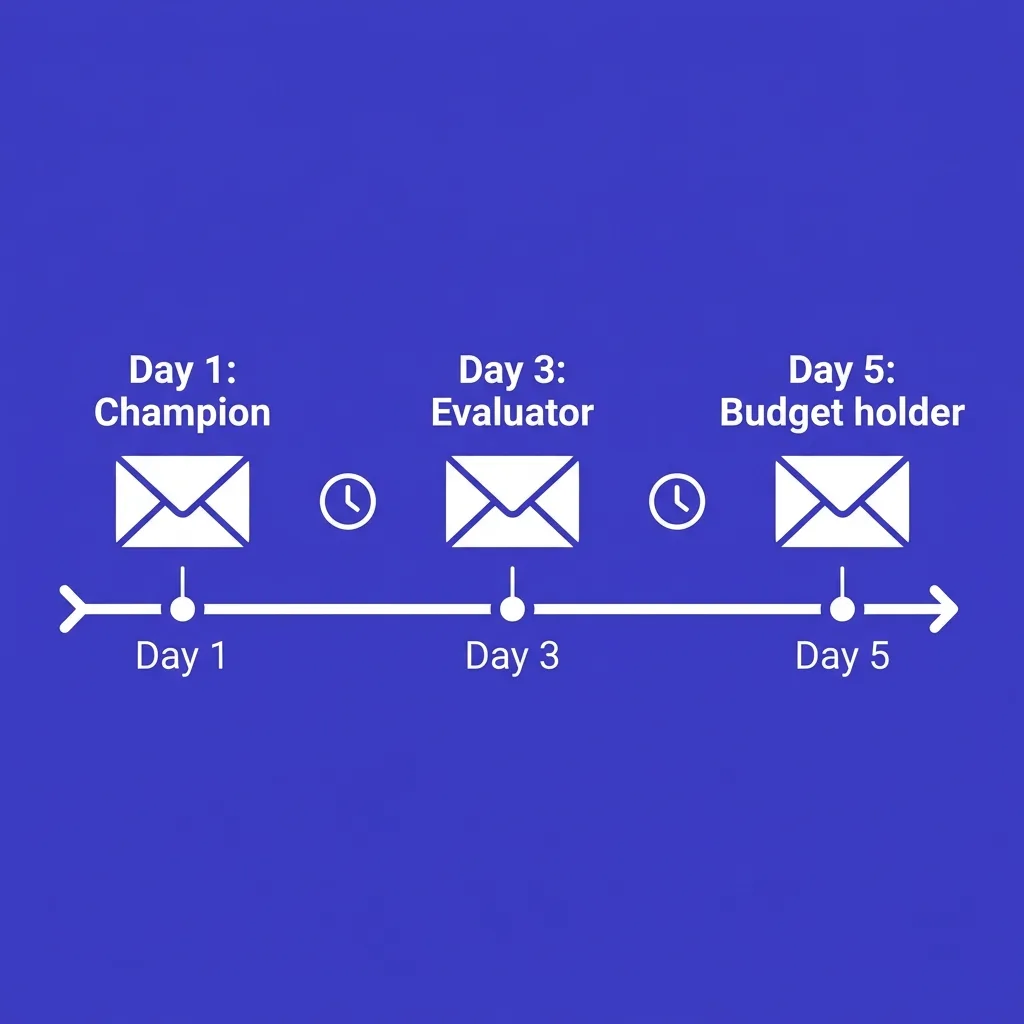 Timing matters as much as targeting
Hitting all three contacts on the same day increases the odds that one forwards your email to another with a note like "did you get this too," which exposes generic or templated copy immediately.
Staggering outreach across contacts by two to five days keeps the campaign looking like individualized outreach rather than a coordinated blast, even though it is coordinated on your end.
This staggered approach also mirrors how enterprise cadences handle multiple stakeholders differently from single-contact sequences, covered in more depth in outbound cadence by deal size.
#Common mistakes when targeting contacts per company
Sending identical copy to every contact. The fastest way to expose a mail-merge campaign is sending the same message to a CFO and a hands-on user with only the name field changed.
Ignoring seniority when sequencing. Reaching out to the most senior stakeholder first with a cold, generic pitch often burns the best contact before a champion has a chance to warm them up internally.
Adding contacts without a clear reason. Every additional contact should map to a specific role in the decision, not just be "another person at the company who might reply."
Skipping domain-level volume tracking. Teams that do not track total sends per domain often discover the carpet-bombing problem only after deliverability has already degraded, which is harder to reverse than to prevent.
Treating multithreading as a numbers game. More contacts is not more thorough multithreading. Better-chosen contacts with tailored messaging outperform a wider net nearly every time.
#How AI-assisted targeting keeps contact selection precise
Identifying the right 2 to 3 contacts at a company requires research most reps do not have time to do consistently across a full pipeline: mapping the org chart, confirming current roles, and matching titles to the buying-committee pattern that fits the deal.
Platforms like FirstSales can research account structure and surface the most relevant contacts per role automatically, drafting role-specific outreach for each one while a human reviews before anything sends.
That combination keeps campaigns from drifting toward carpet-bombing simply because adding more contacts is easier than researching the right three, which is the trap most teams fall into once list-building tools make bulk contact export effortless.
#Measuring whether your contact-per-company approach is working
Track reply rate and spam-complaint rate segmented by number of contacts targeted per account, not just overall campaign performance.
If accounts with 2 to 3 targeted contacts show meaningfully higher reply rates and lower complaint rates than accounts with 8 or more, that is a clear signal to tighten targeting across the board.
Also track how often a second or third contact at an account replies after the first contact went cold, since that pattern shows whether multithreading is adding real coverage or just adding volume without adding conversions.
#How contact count interacts with sending frequency
Contact count per company does not exist in isolation from how often you send to each of those contacts.
A campaign that targets three contacts well but then hits each of them eight times in three weeks recreates the same fatigue problem carpet-bombing causes, just spread across fewer inboxes instead of more.
Balance contact count against sending frequency per contact, since the two variables together determine total domain-level volume more than either one does alone.
A useful mental model: total domain touches equals contacts targeted multiplied by touches per contact, and that total is what inbox providers effectively see when scoring your sender reputation against that company, even though each individual touch looks like a separate one-to-one email.
Keeping that total number reasonable, rather than optimizing contact count and cadence length independently, is what actually protects deliverability at the account level.
#Contact selection differs by company size
The right number of contacts is not fixed across every account size, even within the 2 to 3 baseline described earlier.
A 20-person startup often has one clear decision-maker, so targeting three contacts there can mean reaching people with limited relevance to the purchase.
A 500-person mid-market company usually supports the full 2 to 3 contact model cleanly, with a clear day-to-day user and a clear budget holder.
A multi-thousand-employee enterprise account may genuinely need 4 to 6 contacts to cover procurement, security, and multiple department stakeholders, which is the scenario where expanding beyond the general 2 to 3 guideline is justified rather than a sign of carpet-bombing creep.
Use company size and organizational complexity, not a fixed number, as the real input into how many contacts an account should receive.
#Contact selection and data quality
None of this targeting discipline matters if the underlying contact data is wrong.
Reaching out to someone who left the company eight months ago, or targeting a title that no longer matches their actual role, wastes a send regardless of how well-chosen the role was in theory.
B2B contact data decays quickly, and stale records are one of the most common reasons a well-designed 2 to 3 contact strategy still underperforms, a problem covered in depth in B2B data decay and list hygiene.
Verifying role and employment status close to send time, rather than relying on a list built months earlier, protects both the precision of your targeting and your domain's bounce rate, which directly affects deliverability under 2026 bulk sender rules.
#Coordinating multithreaded contacts across reps and channels
 Coordinating multithreaded contacts across reps and channels
Multithreading gets harder to manage cleanly once more than one rep or channel touches the same account.
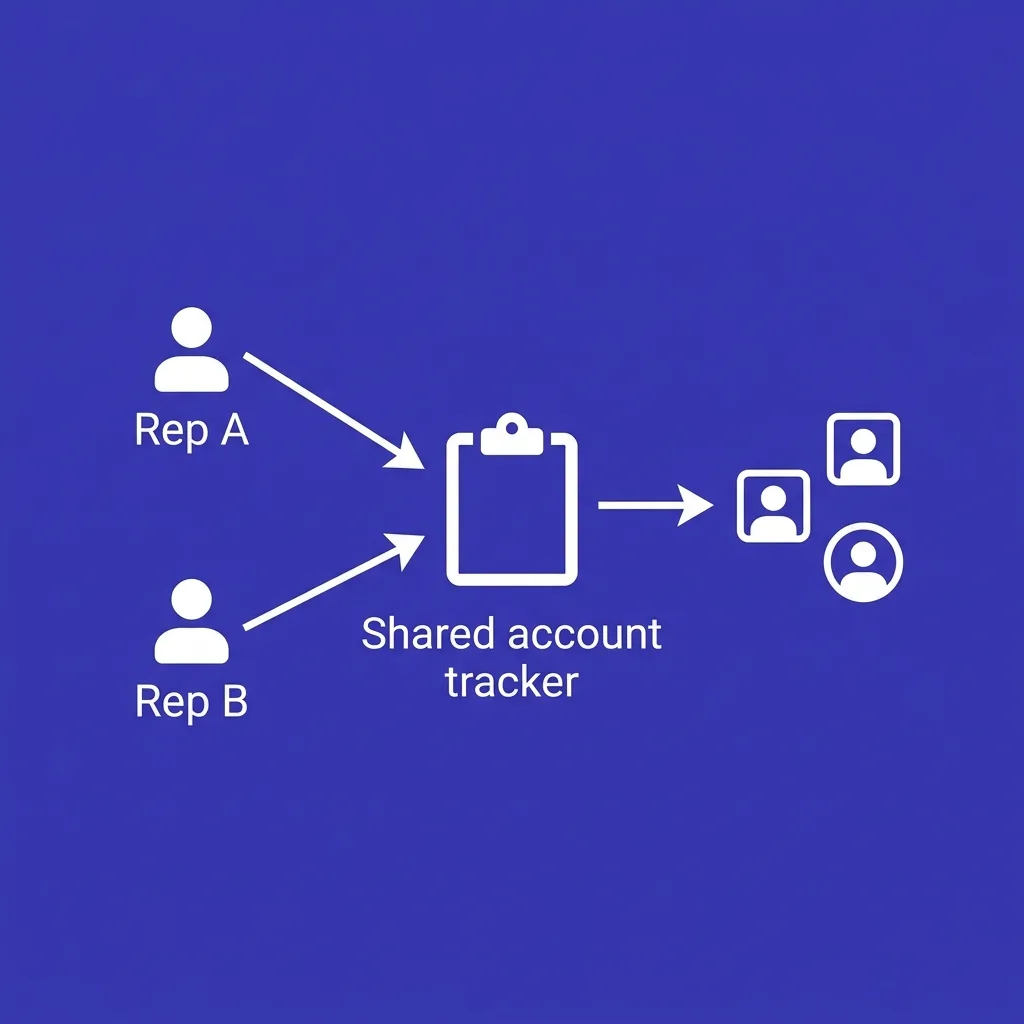
Without coordination, two reps can end up emailing the same three contacts independently, or a sales rep can start a cadence to a contact who already received a LinkedIn message from a different part of the team days earlier.
A shared account view, even a simple shared tracker, prevents this kind of duplicate or conflicting outreach, which otherwise creates exactly the carpet-bombed feeling this piece has been arguing against, just spread across people instead of concentrated in one campaign.
Combining email with LinkedIn multichannel outreach adds another coordination layer, since a contact who received a connection request and a cold email in the same 48-hour window from two different channels can experience that as more aggressive than either touch would feel alone, even though neither individual touch violated the 2 to 3 contact guideline.
Treat account-level coordination as part of the contact-selection discipline, not a separate concern, since the benefit of choosing 2 to 3 contacts carefully disappears if those same contacts get hit from multiple uncoordinated directions at once.
#Contact selection for smaller sales teams without dedicated tooling
Not every team has an account-based platform to manage multithreading formally.
For a small team running outbound manually or with basic tools, the same 2 to 3 contact discipline still applies, just enforced through simpler process: a shared spreadsheet noting who has been contacted at each account, updated before any new campaign launches against that domain.
The goal is the same regardless of tooling sophistication: know, before sending, exactly how many contacts at an account have already been touched and by whom, so that a well-intentioned second campaign does not accidentally recreate the carpet-bombing pattern through simple lack of visibility rather than a genuine belief that ten contacts was ever the plan.
This discipline scales naturally as a team grows, since the habit of checking before sending matters more than the specific tool used to track it.
#A simple audit to run this week
Teams unsure whether they are already carpet-bombing accounts can run a quick audit without new tooling.
Pull the last 90 days of outbound sends and group them by company domain.
Calculate average contacts targeted per domain and flag any account above six or seven contacts for a closer look.
For each flagged account, check whether the additional contacts map to a clear role rationale, budget authority, technical evaluation, or a distinct department affected by the problem, or whether they were added simply because the list-building tool surfaced more names at that company.
Cross-reference flagged accounts against reply rate and any recorded complaints, since this is usually where the pattern becomes obvious: accounts with unclear contact rationale typically show measurably lower engagement than accounts where every targeted contact has a specific, defensible reason for being on the list.
Use this audit as a recurring quarterly check rather than a one-time fix, since the drift back toward wider contact lists tends to creep in gradually as new reps join a team or as list-building tools make it easier to export more names than the deal actually needs.
#What good multithreading looks like at scale
The principles in this piece hold whether a team is running outbound against fifty accounts a month or five thousand.
What changes at scale is the need for systematic enforcement rather than individual rep judgment on every account.
A team running high-volume outbound needs the 2 to 3 contact guideline built into how lists get built in the first place, not applied as a manual check after a list of fifteen names per account has already been exported and loaded into a sequencer.
That means setting role-matching rules at the list-building stage: pull the day-to-day user, the budget holder, and, where relevant, the technical evaluator, and stop there by default, with a documented exception process for accounts that genuinely warrant more contacts.
Teams that build this constraint into their tooling and process, rather than relying on reps to self-police contact count, consistently maintain better domain-level deliverability and see more consistent reply quality across their pipeline than teams that only address carpet-bombing after it shows up as a reputation problem.
#Contact count as a leading indicator, not a vanity metric
Teams tracking outbound performance often measure list size, total sends, and reply rate, but skip average contacts per account entirely.
That is a gap worth closing, since contacts-per-account often predicts deliverability trouble before it shows up in aggregate complaint or bounce data.
A rising average contacts-per-account number, even a gradual one over a few months, is an early warning sign worth investigating before it turns into a domain-level reputation problem that is much harder to reverse than to prevent.
Add this single number to a regular outbound health check, alongside more commonly tracked metrics like reply rate and bounce rate, and treat any sustained upward drift as a prompt to revisit list-building practices before the deliverability data confirms the problem the hard way.
#Bringing new reps up to speed on the 2 to 3 contact standard
New sales hires often arrive with habits formed at a previous company, and those habits do not always match a disciplined multithreading approach.
Include the reasoning behind the 2 to 3 contact guideline in onboarding, not just the rule itself, since reps who understand the deliverability and reply-quality logic behind the constraint are far more likely to hold to it under pipeline pressure than reps who were simply told a number without context.
Pair the guideline with real examples from your own closed-won deals, showing which roles were targeted and how the sequence was staggered, since concrete examples from your own market tend to stick better than an abstract rule borrowed from outside content.
#The underlying principle to remember
Every guideline in this piece traces back to one idea: relevance per send matters more than total sends per account.
Two well-chosen contacts who each receive a message built around their specific role will consistently outperform ten contacts who all receive a version of the same generic pitch, both in reply quality and in the domain reputation that determines whether your next campaign even reaches the inbox.
Keep that principle as the filter for every contact-count decision going forward, and the specific numbers in this piece become far easier to apply correctly across accounts that do not fit neatly into any single example.
#Key takeaways
- Target 2 to 3 well-chosen contacts per company for most B2B deals, expanding to 4 to 5 only for larger enterprise accounts.
- Multithreading means matching roles to the buying decision, not maximizing contact count.
- Carpet-bombing a domain raises spam-complaint risk and hurts deliverability for every future email to that company.
- Stagger outreach across contacts by a few days to avoid looking like a coordinated blast.
- Personalize by role. Identical copy across contacts is the clearest sign of a mail-merge campaign, not real multithreading.
Precision beats volume more clearly in 2026 than it did a few years ago, since every provider now scores engagement before a message even opens, and a domain full of low-relevance sends earns a worse starting score regardless of how well any single email is written.
Ready to audit your current lists? Pull average contacts-per-account across your last quarter of campaigns and compare reply and complaint rates between accounts with 2 to 3 contacts versus accounts with 8 or more before your next send.
#Frequently asked questions
#How many contacts should I target per company in cold email?
Most B2B deals convert best with 2 to 3 well-chosen contacts per company, expanding to 4 or 5 only for larger enterprise accounts with more complex buying committees.
#What is carpet-bombing in cold email?
Carpet-bombing means sending near-identical outreach to every available contact at a company, regardless of role relevance, which raises spam-complaint risk and dilutes reply quality.
#Why does emailing too many contacts at one company hurt deliverability?
Sending many similar emails to one domain in a short window produces a pattern that inbox providers flag differently from normal correspondence, which can raise spam-complaint and bounce rates above safe thresholds.
#What roles should I prioritize when multithreading an account?
Prioritize the day-to-day user who feels the problem, the budget holder who approves spend, and, for more complex purchases, a technical or operational evaluator.
#Is multithreading the same as contacting more people?
No. Multithreading means matching outreach to specific roles tied to the buying decision. Contacting more people without a clear role rationale is carpet-bombing, not multithreading.
#Should I send the same email to every contact at a company?
No. Each contact should receive messaging tailored to their relationship to the problem. Identical copy across roles is the clearest sign of a mail-merge campaign rather than genuine personalization.
#How far apart should I space outreach to different contacts at the same company?
Stagger outreach by two to five days per contact to avoid the pattern looking like a coordinated blast, even though the campaign is coordinated internally.
#Does company size affect how many contacts I should target?
Yes. Smaller companies often need only one or two contacts to cover the decision, while larger enterprise accounts with formal procurement can justify four or five targeted roles.
#What happens if I target too few contacts at a large enterprise account?
You risk missing a key stakeholder, such as a technical evaluator or procurement contact, who can quietly block a deal even if the champion is enthusiastic.
#How do I identify the right contacts at a company?
Build an ideal customer profile around specific job titles and buying-committee roles, then confirm current titles before reaching out, since roles and headcounts change frequently.
#Does multithreading increase spam-complaint risk?
Not when done well. Targeted, role-specific outreach to a small number of contacts carries far less complaint risk than broad, undifferentiated outreach to many contacts at once.
#Should I hit the most senior contact first?
Not necessarily. Reaching a senior stakeholder cold before a champion has built internal context can burn that contact before they have a reason to care.
#How does contact count affect sending capacity?
Every wasted send to an unqualified or low-relevance contact eats into domain-level sending capacity that could go toward higher-value accounts elsewhere on your list.
#Can AI tools help identify the right contacts per company?
Yes. Modern prospecting tools can map account structure and surface likely decision-makers by role, though a human should still confirm relevance and review outreach before it sends.
#What metric shows if my contact targeting is too broad?
Compare reply rate and spam-complaint rate between accounts with 2 to 3 targeted contacts and accounts with 8 or more. A meaningful gap signals the wider net is underperforming.
#Does adding more contacts always increase reply rate?
No. Reply rate quality often drops as contact count rises past the roles that actually matter to the decision, since irrelevant contacts rarely respond and can flag the campaign as spam.
#How does timing coordination differ for enterprise versus mid-market accounts?
Enterprise accounts with more stakeholders typically need longer staggering windows between contacts, while mid-market accounts with one or two contacts need less coordination overall.
#Should procurement or legal contacts be included in the first wave of outreach?
Usually not. Procurement and legal typically enter the process after a champion and budget holder have already shown interest, so early outreach should focus on those two roles first.
#What is the risk of a contact forwarding my email to another contact at the same company?
If the copy is generic or clearly templated, an internal forward can expose the mail-merge nature of the campaign immediately, which is one reason staggered, role-specific outreach matters.
#How often should I review my average contacts-per-account across campaigns?
Review it quarterly alongside reply and complaint rate data, since drift toward carpet-bombing often happens gradually as list-building tools make bulk contact export easier over time.