---
title: "Out of office replies: the data goldmine SDRs waste"
description: "Out of office replies make up 45% of cold email responses. Here is how to harvest contacts, org intel, and timing data from them."
date: "2026-07-16"
tags: "cold-email, sales-prospecting, outbound-data"
readTime: "17 min read"
slug: "out-of-office-replies-data"
canonical: "https://firstsales.io/blog/out-of-office-replies-data/"
---
# Out of office replies: the data goldmine SDRs waste
**TL;DR:** Auto-replies and out-of-office messages account for 45.1% of all cold email replies, based on an analysis of more than two million cold emails. Most SDRs archive them without reading past the first line, missing referral contacts, return dates, and org-chart signals sitting in plain text.
---
## What you will learn
1. [Why OOO replies are undervalued](#why-undervalued)
2. [What an OOO reply actually contains](#what-it-contains)
3. [A hypothetical walkthrough](#walkthrough)
4. [The manual versus automated harvesting workflow](#workflow)
5. [Timing patterns worth tracking](#timing-patterns)
6. [Building this into your sequence logic](#sequence-logic)
7. [Delegate follow-up templates](#templates)
8. [CRM fields worth capturing](#crm-fields)
9. [What to automate versus what to read manually](#automation-table)
10. [The harvesting flow, visualized](#flow-diagram)
11. [Compliance boundaries](#compliance)
12. [Common mistakes](#mistakes)
13. [FAQs](#faqs)
Every SDR has archived a bounce-back auto-reply without reading it. That habit throws away one of the highest-signal, zero-cost data sources in cold outbound.
Auto-replies and out-of-office messages make up 45.1% of all cold email replies, according to an analysis of more than two million cold emails by Instantly's 2026 benchmark research.
That is not noise to filter out before counting "real" replies. It is close to half of every reply your sequences generate, sitting mostly unread.
## Why OOO replies are undervalued
Most reporting dashboards treat auto-replies as a category to exclude, not a category to mine. That framing makes sense for measuring genuine interest, since only about 14.1% of cold email replies express real interest in the same dataset.
It makes no sense for prospecting research, where an auto-reply is often the single most information-dense message a target account will ever send you unprompted.
A genuine interest reply tells you one person is interested. A well-written auto-reply can tell you who covers that territory while the primary contact is out, when they return, and sometimes their direct line or a secondary contact's full name and title.
## What an OOO reply actually contains
Not every auto-reply is useful. Generic ones just confirm absence with no other detail.
The valuable ones follow a predictable pattern worth training your team to recognize at a glance.
**Return date.** Tells you exactly when to schedule a follow-up, removing the guesswork most [follow-up email strategy](/blog/follow-up-email-strategy) playbooks otherwise rely on.
**Delegate or backup contact.** Many auto-replies name a colleague to contact "for urgent matters," which is a warm, semi-permissioned introduction to a second contact at the account you would otherwise have to find cold.
**Title and department confirmation.** Signature blocks in auto-replies confirm exact job title and sometimes direct phone numbers, useful for [multithreading a buying committee](/blog/multithreading-outbound-buying-committee) once you know who else sits nearby.
**Reason for absence.** Parental leave, sabbatical, or a role change ("I have moved to a new position, please contact X") signals an organizational shift worth tracking separately, since a role change often means a [job change trigger](/blog/job-change-trigger-email) opportunity on both the departing and arriving contact.
**Company-wide holiday notices.** A cluster of auto-replies mentioning the same company-wide closure date is a scheduling signal for the whole account, not just one contact, useful for planning your next touch across the entire buying committee at once.
## A hypothetical walkthrough
This example is hypothetical, built to illustrate the mechanics rather than describe a real campaign.
An SDR sends a cold email to a VP of operations at a mid-size logistics company. The reply lands within an hour, auto-generated.
It reads: "I am out of office until August 18th. For anything related to fleet operations, please reach out to my colleague, James, at james@company.com. For all other matters, I will respond upon my return."
A rep skimming quickly might archive this as a non-response. A rep trained to read it sees three usable facts.
First, the VP returns August 18th, which sets the exact follow-up date. Second, James is a named delegate with a working email address and an implied scope, fleet operations, which suggests his title and function. Third, the phrasing "colleague" rather than "manager" or "direct report" hints at a peer relationship, useful context before that second outreach.
The rep logs the return date against the original contact's record, schedules a follow-up for August 19th, and sends a separate, lightly warmer message to James the same day: "Reaching out because [VP name]'s auto-reply mentioned you're the right person for fleet operations questions while she's out. Wanted to introduce myself in the meantime."
Two touches now exist where there was one, both correctly timed, neither requiring new prospecting research.
## The manual versus automated harvesting workflow
Manual harvesting works at low volume. A rep sending 50 emails a day can skim the handful of auto-replies that come back and jot down return dates and delegate names in a spreadsheet.
That breaks down past a few hundred sends a day, which is where most serious outbound programs operate.
Automated parsing extracts the same fields (return date, delegate name and email, reason category) using pattern matching or a lightweight AI classification pass, then routes that data directly into the CRM record instead of a rep's personal notes.
FirstSales classifies inbound replies automatically, separating genuine interest from auto-replies and extracting delegate contacts and return dates where present, so a rep never has to manually parse an OOO message to capture the useful part.
The distinction matters because unclassified inboxes are exactly where this data dies. [Reply handling playbooks](/blog/reply-handling-playbook) that do not explicitly address auto-reply parsing default to archiving everything that is not a "yes, let's talk," which throws away the delegate contact along with the noise.
There is a middle path worth mentioning for teams not ready to build or buy a classifier. A simple inbox rule that tags any reply containing common auto-reply phrases ("out of office," "currently unavailable," "returning on") routes those messages into a dedicated folder a rep can batch-review once a day rather than reacting to each one individually. It is not as precise as proper classification, but it is a five-minute setup that stops the data from disappearing into a general archive folder alongside everything else.
Whichever approach a team chooses, the volume math still favors doing something over doing nothing. At even a modest sending volume, a program generating a few hundred replies a month will see over a hundred of those land as auto-replies, and even a conservative estimate of one in five containing a usable delegate contact or precise return date still adds up to real pipeline data sitting unused every single month.
## Timing patterns worth tracking
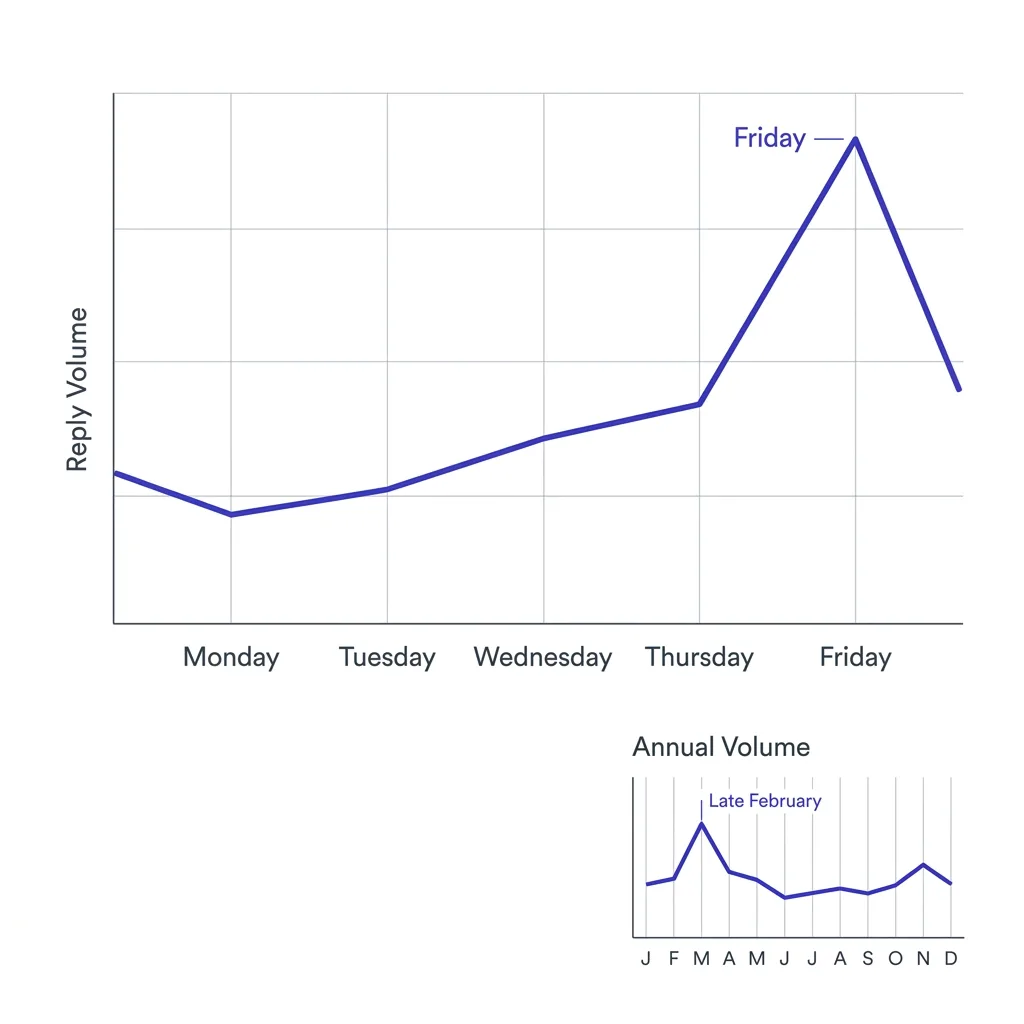
Auto-reply volume is not evenly distributed across the week or the year, and the pattern itself is useful scheduling data.
Friday sees the highest volume of auto-replies as prospects set out-of-office messages heading into the weekend, according to the same Instantly analysis, which is a weak but real signal that Friday afternoon sends land in a lower-attention window generally.
OOO reply rates climb again in late February, likely reflecting a wave of return-from-holiday and early-year travel auto-replies clearing out of a broader seasonal lull.
Track this at the account level, not just in aggregate. A cluster of auto-replies from the same domain within a short window often means an all-hands event, an offsite, or a company holiday, information worth holding onto before you schedule the next touch to that account.
Seasonal patterns compound with day-of-week patterns. A Friday send during the last week of December is likely to generate both a weekend auto-reply and a holiday-closure auto-reply layered on top of each other, which is a strong signal to push the entire account's next touch into the second week of January rather than the first.
Tracking these patterns over a full year gives a rough seasonal calendar specific to your own prospect base, which tends to be more reliable than generic industry benchmarks since it reflects the actual working patterns of the roles and regions you sell into.
## Building this into your sequence logic
An auto-reply should trigger a different next step than silence or a genuine reply, and most sequence tools do not separate these three outcomes by default.
Configure your sequence logic so a detected auto-reply pauses the current cadence and schedules a follow-up for the stated return date plus one or two buffer days, rather than continuing to send on the original schedule into an inbox the recipient is not checking.
If a delegate contact is named, route a separate, lightly warmer touch to that person referencing the original contact by name, since "reaching out because Sarah mentioned you'd be the right person while she's out" reads as considerate, not cold.
Log the reason category (leave, role change, holiday) against the account record. A role-change auto-reply is a trigger worth surfacing to the rep immediately, not filing away for the next quarterly list refresh.
## Delegate follow-up templates
The wording of a delegate touch matters more than most reps assume. Get it wrong and it reads like a stranger cold-emailing off a scraped list. Get it right and it reads like a considerate, referred introduction.
A weak version ignores the auto-reply entirely and sends the same generic opener used on every other prospect. That wastes the one piece of context that made this touch different from a cold one.
A stronger version references the specific colleague by name and the specific reason given in the auto-reply, without implying permission that was never granted.
For a named delegate with a stated scope: "Reaching out because [name]'s auto-reply mentioned you cover [scope] while she's away. Wanted to introduce myself and see if [problem area] is something on your radar."
For a delegate with no stated scope, just a name: "[Name]'s out-of-office note pointed me your way. I'll keep this brief: [one-line value proposition]. Worth a short conversation while she's out, or should I wait until she's back?"
For a company-wide holiday notice with no individual delegate, skip the follow-up entirely until the stated return window closes. There is no one to route the message to, and sending anyway just adds noise to an inbox that will already be full on return.
## CRM fields worth capturing
Most CRMs are not configured to capture auto-reply data by default, which is exactly why it gets lost. A few structured fields fix that without adding real overhead to a rep's workflow.
**Stated return date**, as a date field on the contact record, not a free-text note buried in an activity log. This is the field that drives the automated follow-up scheduling described above.
**Delegate contact**, either linked to an existing contact record or created as a new one with a note on how it was sourced, so the next rep who touches the account understands the relationship.
**Absence reason category**, a short picklist (leave, holiday, role change, travel, unspecified) rather than open text, so the field is filterable and reportable across the whole pipeline.
**Auto-reply raw text**, stored verbatim in an activity note for the rare case where a nuance in phrasing matters later and the original message is needed for reference.
Firms running this at scale build a simple dashboard filtering for "role change" as the absence reason, since that category deserves a faster human review than a routine holiday notice.
## What to automate versus what to read manually
| Task | Worth automating | Still needs a human read |
|---|---|---|
| Detecting an auto-reply vs. a genuine reply | ✓ | ✗ |
| Extracting stated return date | ✓ | ✗ |
| Extracting delegate contact name and email | ✓ | ✗ |
| Judging whether a role-change auto-reply signals a buying trigger | ✗ | ✓ |
| Drafting the delegate follow-up message | ✓ (draft), ✗ (send without review) | ✓ review |
| Deciding whether to pause the whole account cadence | ✗ | ✓ |
## The harvesting flow, visualized
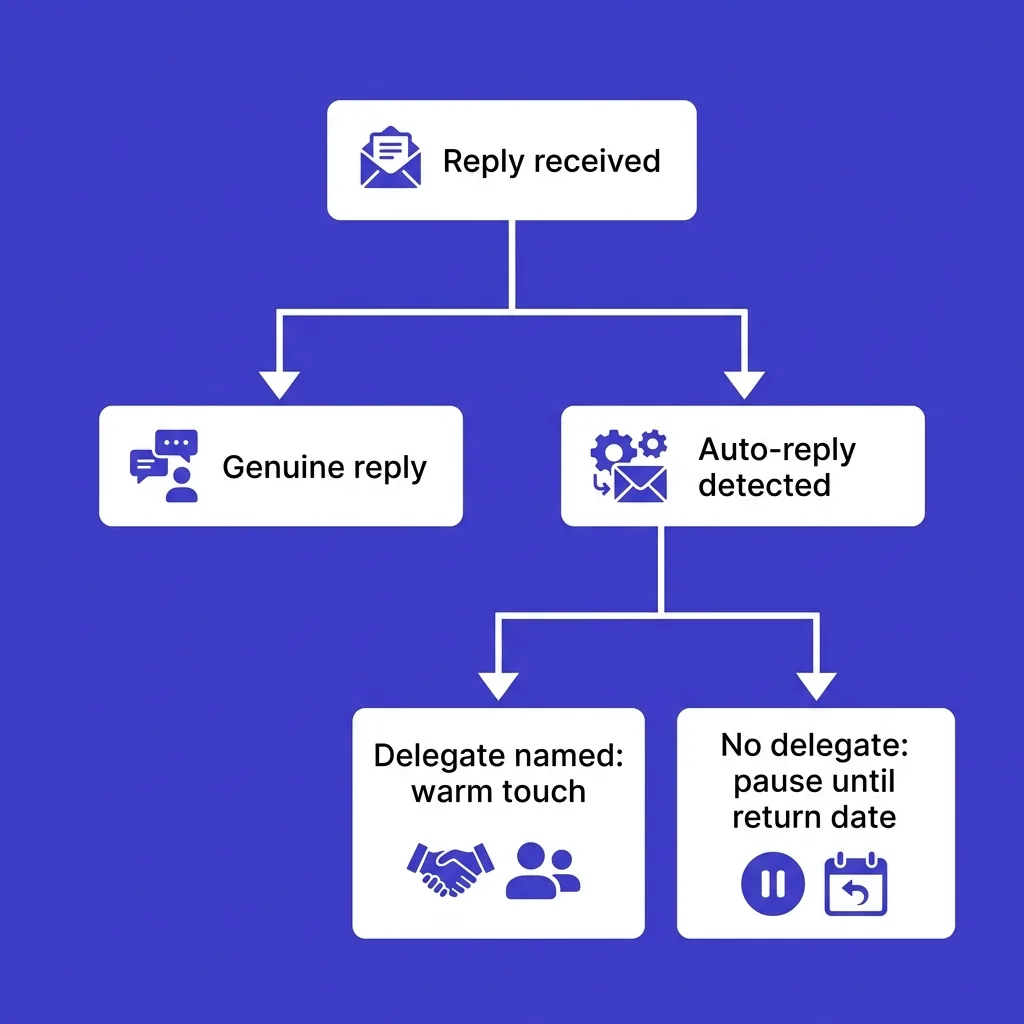
```mermaid
graph TD
A[Reply received] --> B{Auto-reply classifier}
B -->|Genuine reply| C[Route to rep for immediate response]
B -->|Auto-reply detected| D[Extract return date, delegate contact, reason]
D --> E{Delegate contact named?}
E -->|Yes| F[Queue warm delegate touch referencing original contact]
E -->|No| G[Pause cadence until return date plus buffer]
D --> H{Reason indicates role change?}
H -->|Yes| I[Flag account for rep review as a trigger event]
H -->|No| G
```
## Measuring the impact of a harvesting program
Most teams that start tracking auto-reply data skip measurement entirely, which makes it hard to justify the small amount of process change required to sustain it.
A simple way to measure impact: track the delegate-touch reply rate separately from your baseline cold reply rate. A referenced, warm-context message to a named delegate should outperform a cold first touch, since it carries a specific reason for reaching out rather than a generic opener.
Track a second metric: percentage of accounts where a stated return date led to a booked meeting within the following two weeks, compared to accounts where the follow-up cadence continued blindly on the original schedule regardless of the auto-reply.
Neither metric requires new tooling beyond a couple of CRM fields and a saved filter. The goal is not a sophisticated attribution model, it is confirming that the extra few seconds spent reading an auto-reply produces measurably better follow-up timing and warmer secondary contacts than ignoring it.
Teams running this consistently for a full quarter typically find the delegate-touch reply rate sits meaningfully above their cold baseline, simply because the message references something the recipient's own colleague actually said, rather than opening cold.
## Compliance boundaries
Harvesting data from an auto-reply is not the same as scraping a private database, but it is not a blank check either.
The information in a professional auto-reply (name, title, delegate contact, return date) is information the sender chose to disclose in a business context, generally treated the same as a signature block or an out-of-office notice posted on a company website.
Stay inside the same [cold email compliance](/blog/cold-email-compliance-penalties) rules you already follow for any other contact: honor unsubscribe requests immediately, do not misrepresent how you obtained the delegate's contact information, and check [is cold email legal](/blog/is-cold-email-legal-2026) requirements for the delegate's specific jurisdiction before reaching out, since consent and disclosure rules vary by region.
Never imply the original contact "gave permission" for outreach to the delegate beyond what the auto-reply text itself states. Reference the auto-reply plainly ("your colleague's auto-reply mentioned you cover this while she's out") rather than overstating the introduction.
Regional variation matters here too. GDPR-covered contacts in the EU and UK generally require a clearer legitimate-interest basis for a new, unsolicited contact than a delegate reference alone provides, so pair any EU delegate outreach with the same legitimate-interest documentation your compliance team already requires for standard cold outreach. In jurisdictions with stricter opt-in requirements, treat a delegate contact exactly like any other new prospect record, subject to the same consent rules, not as an exception carved out because the contact information arrived via auto-reply rather than a prospecting tool.
Keep a record of how each delegate contact entered your CRM, sourced from an out-of-office auto-reply to [original contact], dated. That provenance note matters if a data subject access request or an unsubscribe dispute ever comes up, since it shows exactly how and why the contact was added rather than leaving the sourcing ambiguous.
## Common mistakes
**Treating every auto-reply the same.** A one-line generic notice and a detailed message naming a delegate and a return date carry very different amounts of usable signal. Skimming for the detailed ones is worth the extra few seconds; archiving both categories identically throws away the valuable half.
**Sending the exact same follow-up message on the return date regardless of what the auto-reply said.** If a role change was mentioned, that follow-up should acknowledge it, not repeat the original pitch verbatim as if nothing happened.
**Overreaching on the delegate introduction.** Implying the original contact personally recommended you, when the auto-reply only named a colleague for general coverage, misrepresents the referral and can damage trust with both contacts.
**Letting the return-date follow-up slip past the buffer window.** A contact who returns to find your message sitting three weeks stale in their inbox gets a worse impression than one who never heard from you during the absence at all.
**Not distinguishing a leave-related absence from a departure.** An auto-reply stating "I am no longer with the company" is not an out-of-office notice, it is a signal to immediately research a replacement contact rather than scheduling any follow-up to the original address.
## Where this fits in a broader prospecting stack
OOO harvesting is a small, specific tactic inside a much larger data strategy, not a replacement for one.
Pair it with [buying signals](/blog/buying-signals-for-cold-email) you already track, like [hiring signal](/blog/hiring-signal-outbound) or [funding round](/blog/funding-round-cold-email) triggers, so a role-change auto-reply gets weighed alongside other account-level activity rather than treated in isolation.
Treat it as one input into [zero-party data](/blog/zero-party-data-outbound) style research: information the prospect disclosed directly, in their own words, rather than something inferred or scraped from a third-party source.
None of this replaces core deliverability discipline. An auto-reply is only useful if your message reached the inbox in the first place, which means the fundamentals covered in [cold email deliverability checklist](/blog/cold-email-deliverability-checklist) still come first. A perfectly parsed auto-reply from a message that landed in spam is not a signal worth building a workflow around.
The same logic applies to volume. Sending more emails to generate more auto-replies is the wrong optimization. A smaller, better-targeted list generates fewer auto-replies overall but a higher proportion of the detailed, delegate-naming kind, since those replies tend to come from more senior or more process-driven contacts who already have a structured absence workflow in place.
## Handling blank or unparseable auto-replies
Not every automated reply gives you a return date or a delegate name.
Some are a single line, "I am out of office," with nothing else, and others are so heavily templated by the company's IT department that any name or date sits inside an image or an odd character encoding your parser cannot read.
Treat a blank auto-reply as a weaker signal, not a useless one. It still confirms the address is live, the message was delivered, and a human is behind it, which is worth more than silence.
Log it as a soft touch and set a follow-up for two to three weeks out rather than treating it as a dead end.
If the same contact sends a blank auto-reply twice in a short window, that pattern itself is useful, since it usually means the person travels often.
Avoid over-investing in parsing logic for rare edge cases. A workflow that handles common structured formats well and logs the rest as a soft touch beats one that tries to extract meaning from every malformed reply.
## Frequently asked questions
### What percentage of cold email replies are auto-replies?
45.1% of all replies across a dataset of more than two million cold emails, according to Instantly's 2026 cold email benchmark research.
### Is it ethical to email a delegate contact named in an auto-reply?
Generally yes, when the auto-reply explicitly names that person as the point of contact during the original recipient's absence, since the sender disclosed that information for exactly this purpose.
### Should auto-replies count in my reply rate metric?
Only if you are measuring raw engagement. For a genuine interest metric, exclude auto-replies and track them as a separate category, since blending the two inflates apparent reply rate without reflecting real pipeline signal.
### Can I automate return-date extraction reliably?
Yes, with either pattern matching for common phrasings ("returning on," "back in office") or a lightweight AI classification step, though edge cases (vague dates like "early next month") still benefit from a human spot-check.
### Does a role-change auto-reply always mean a buying trigger?
Not always, but it is worth flagging for a human review rather than filing automatically, since a departure or promotion at a target account is exactly the kind of organizational shift that opens or closes a deal.
### How long should I wait after the stated return date to follow up?
One to two business days past the stated return date is standard, giving the contact time to clear a backlog before your message competes for attention in an already-full inbox.
### Do out-of-office replies hurt my sender reputation?
No. Auto-replies are legitimate mail server responses, not spam complaints or bounces, and do not affect your domain or IP reputation in any documented way.
### What is the difference between a hard bounce and an auto-reply?
A hard bounce means the message could not be delivered at all, usually an invalid address. An auto-reply means the message delivered successfully and the recipient's mail system generated an automated response.
### Should I stop my sequence entirely when I get an auto-reply?
Pause the current step and reschedule around the stated return date rather than stopping entirely, unless the auto-reply also indicates the contact has left the company, in which case the sequence should stop and route to research the replacement contact.
### Do all auto-replies include useful information?
No. Many are generic, one-line notices with no return date, delegate, or reason. Worth a quick scan, not worth building an entire workflow around extracting nonexistent data from a generic message.
### Is there a risk of annoying prospects by following up on an auto-reply?
Minimal, if the follow-up references the stated return date specifically rather than resending the exact same message blindly. A timed, specific follow-up reads as attentive rather than repetitive.
### How does this differ from scraping LinkedIn for org chart data?
Auto-reply data is volunteered directly by the recipient's own mail system in response to your message, not gathered from a third-party platform, which is a meaningfully different consent context.
### Should sales and marketing both have access to this data?
Yes, ideally through a shared CRM field rather than a personal spreadsheet, since a delegate contact or role-change signal is useful for account-based marketing timing as much as it is for the individual rep's next touch.
### What tools can classify replies automatically?
Most modern sales engagement and AI SDR platforms include reply classification as a baseline feature; the differentiator is whether the classifier extracts structured fields like return date and delegate contact, not just a binary interested versus not-interested label.
### Does out-of-office volume vary by industry?
It correlates more with role seniority and travel frequency than industry specifically, though sales, executive, and field roles tend to generate more detailed auto-replies than desk-based operational roles.
### Can I use OOO data to time a whole sequence around someone's return?
Yes, and it is one of the more reliable timing signals available, since it comes directly from the contact's own calendar system rather than an inferred best-time-to-send model.
### What happens if the delegate contact is also out of office?
Log it and move to the next name if one is provided, or fall back to researching a title-based contact through your usual prospecting workflow rather than looping indefinitely through a chain of absent contacts.
### Do B2C cold email campaigns see the same auto-reply patterns?
Rarely. Auto-reply culture is largely a B2B, corporate email norm; personal email accounts used for B2C outreach almost never generate structured out-of-office responses.
### Is manually reading every auto-reply worth it at low volume?
Yes, below a few hundred sends a week, manual review costs little time and catches nuance an automated classifier might miss, like a subtly implied buying signal in the phrasing of the absence reason.
### Should this data feed into account scoring models?
It can, particularly the role-change and holiday-cluster signals, though it should be weighted as a supplementary input rather than a primary scoring factor, since coverage of this data depends entirely on reply volume and not every account will generate one.
---
Most outbound teams already have this data sitting in their inbox, unread and uncategorized. Building even a simple parsing step into your reply workflow turns a metric you currently subtract out of your reporting into a steady source of warm delegate contacts and correctly timed follow-ups.
Start small if the full CRM field setup feels like too much at once. Even a rule that a rep manually scans every auto-reply for a delegate name and a return date, logged in a shared spreadsheet for a single week, is enough to show whether the effort is worth formalizing for your specific list and industry.